Mailcheck Alternatives: 8 Email Verifiers Compared for 2026
Mailcheck's $10/month plan works fine until you hit catch-all domains, bigger lists, or the need to find contacts as well as verify them. Here are 8 Mailcheck alternatives, with an honest look at what each one does better.
TL;DR
- Mailcheck (mailcheck.co) is a cheap, simple email verifier. Plans start at about $10/month for 1,000 checks, and there's a small free tier. It works well for solo users and small agencies.
- People usually look for Mailcheck alternatives for one of four reasons: more volume, better catch-all handling, deeper integrations, or one tool that both finds and verifies emails.
- For pure bulk verification at the lowest cost per email, look at MillionVerifier and Bouncer. For enterprise compliance and reporting, look at ZeroBounce and Kickbox.
- If you prospect and verify in the same workflow, an all-in-one tool like Tomba saves you exporting CSVs between two products.
- Watch for name confusion. Mailcheck, MailerCheck (from MailerLite) and the open-source mailcheck.js library are three different things.
What is Mailcheck, and why do people look for alternatives?#
Mailcheck is an email verification service. You upload a list or call the API, and it tells you which addresses are valid, invalid or risky before you send. Under the hood it runs the standard steps: syntax checks, domain and MX lookups, disposable-domain detection, and an SMTP handshake to see whether the mailbox exists.
At the time of writing, third-party pricing trackers list these plans:
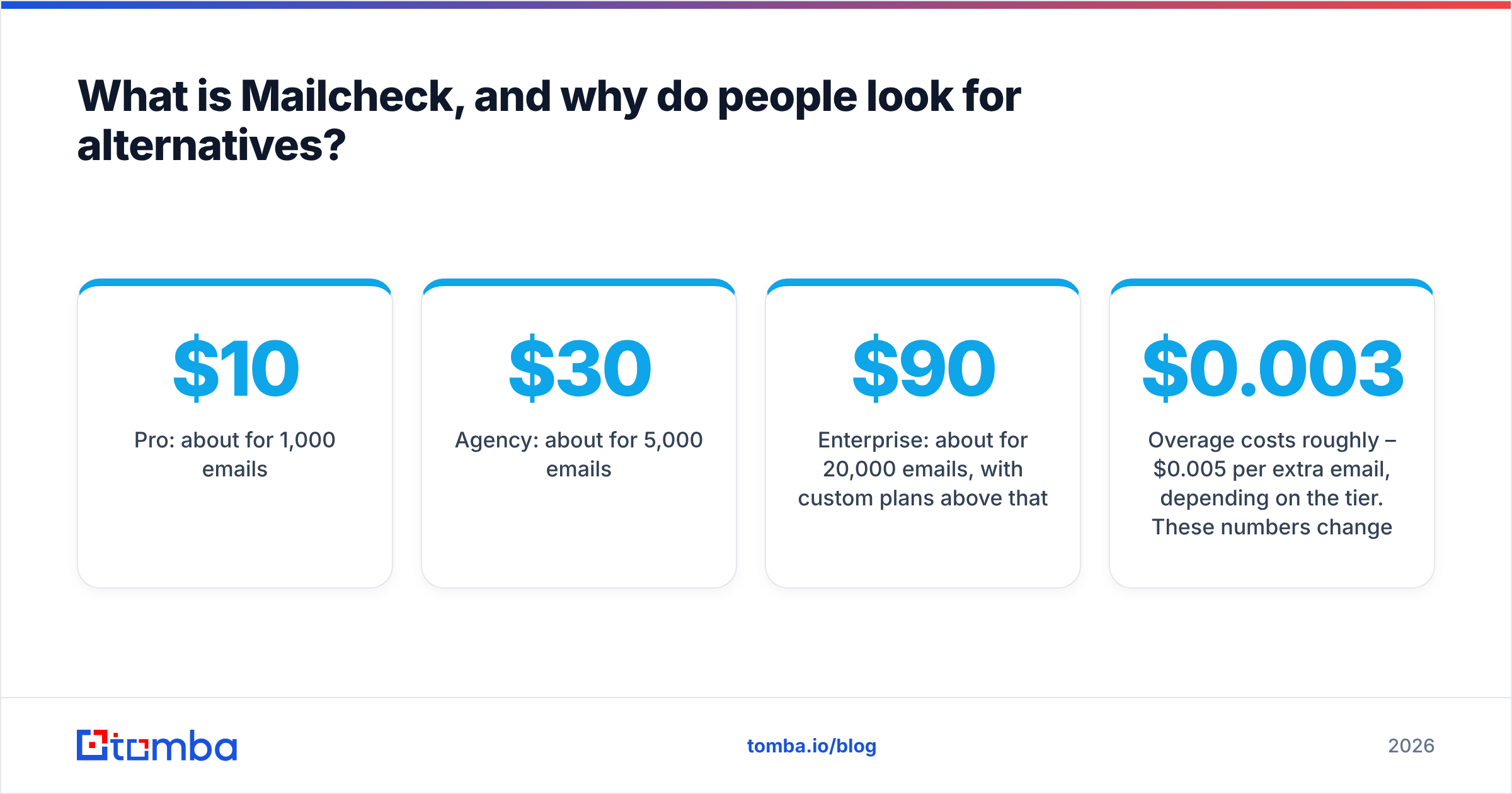
- Free: around 10 validations/month
- Pro: about $10/month for 1,000 emails
- Agency: about $30/month for 5,000 emails
- Enterprise: about $90/month for 20,000 emails, with custom plans above that
Overage costs roughly $0.003–$0.005 per extra email, depending on the tier. These numbers change, so check Mailcheck's own pricing page before you commit.
For a freelancer cleaning a 500-row list once a month, that's a perfectly reasonable deal. Here's where users start looking elsewhere:
- Volume. At 50,000+ verifications a month, subscription tiers usually cost more than pay-as-you-go bulk verifiers.
- Catch-all domains. Many B2B companies set their mail servers to accept every address. A basic SMTP check returns "accept-all" or "unknown" for these, and that's often where a large share of your B2B list ends up.
- Workflow. Verification is usually one step in a longer process. If you're already finding contacts in another tool, it's annoying to export, upload to Mailcheck, re-export and re-import into your sequencer.
- Integrations and compliance. Larger teams want native CRM connectors, SOC 2 documentation, team seats and audit trails.
Quick disambiguation: Mailcheck vs. MailerCheck vs. mailcheck.js#
These three names get mixed up all the time, including in review sites:
- Mailcheck (mailcheck.co) is the verification SaaS this article covers.
- MailerCheck is a separate verification and deliverability product from MailerLite. It uses pay-as-you-go credits.
- mailcheck.js is an old open-source JavaScript library. It suggests corrections for typos like "gmial.com" in signup forms and doesn't verify mailboxes at all.
If you landed here looking for a replacement for the JS library, you want a real-time verification API in your signup form, which several tools below offer.
How should you evaluate a Mailcheck alternative?#
Before you look at logos, decide what you're actually optimizing for. Verifiers vary less than their marketing suggests on easy addresses. They differ a lot on the hard ones.
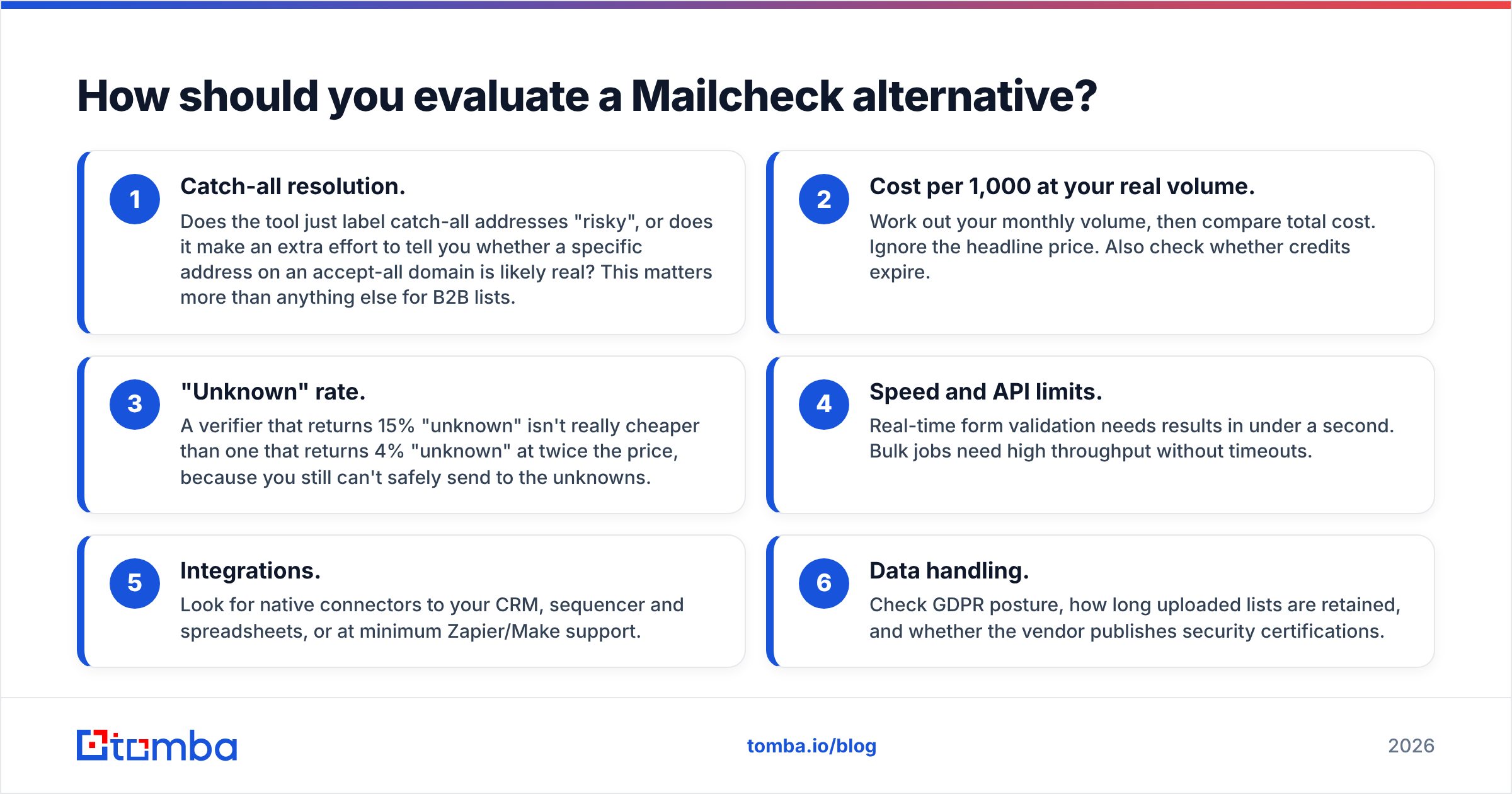
- Catch-all resolution. Does the tool just label catch-all addresses "risky", or does it make an extra effort to tell you whether a specific address on an accept-all domain is likely real? This matters more than anything else for B2B lists.
- Cost per 1,000 at your real volume. Work out your monthly volume, then compare total cost. Ignore the headline price. Also check whether credits expire.
- "Unknown" rate. A verifier that returns 15% "unknown" isn't really cheaper than one that returns 4% "unknown" at twice the price, because you still can't safely send to the unknowns.
- Speed and API limits. Real-time form validation needs results in under a second. Bulk jobs need high throughput without timeouts.
- Integrations. Look for native connectors to your CRM, sequencer and spreadsheets, or at minimum Zapier/Make support.
- Data handling. Check GDPR posture, how long uploaded lists are retained, and whether the vendor publishes security certifications.
What are the best Mailcheck alternatives in 2026?#
Here's the shortlist. Prices are approximate public list prices at the time of writing and are meant for rough comparison only. Every vendor runs promotions and changes tiers, so confirm on their site.
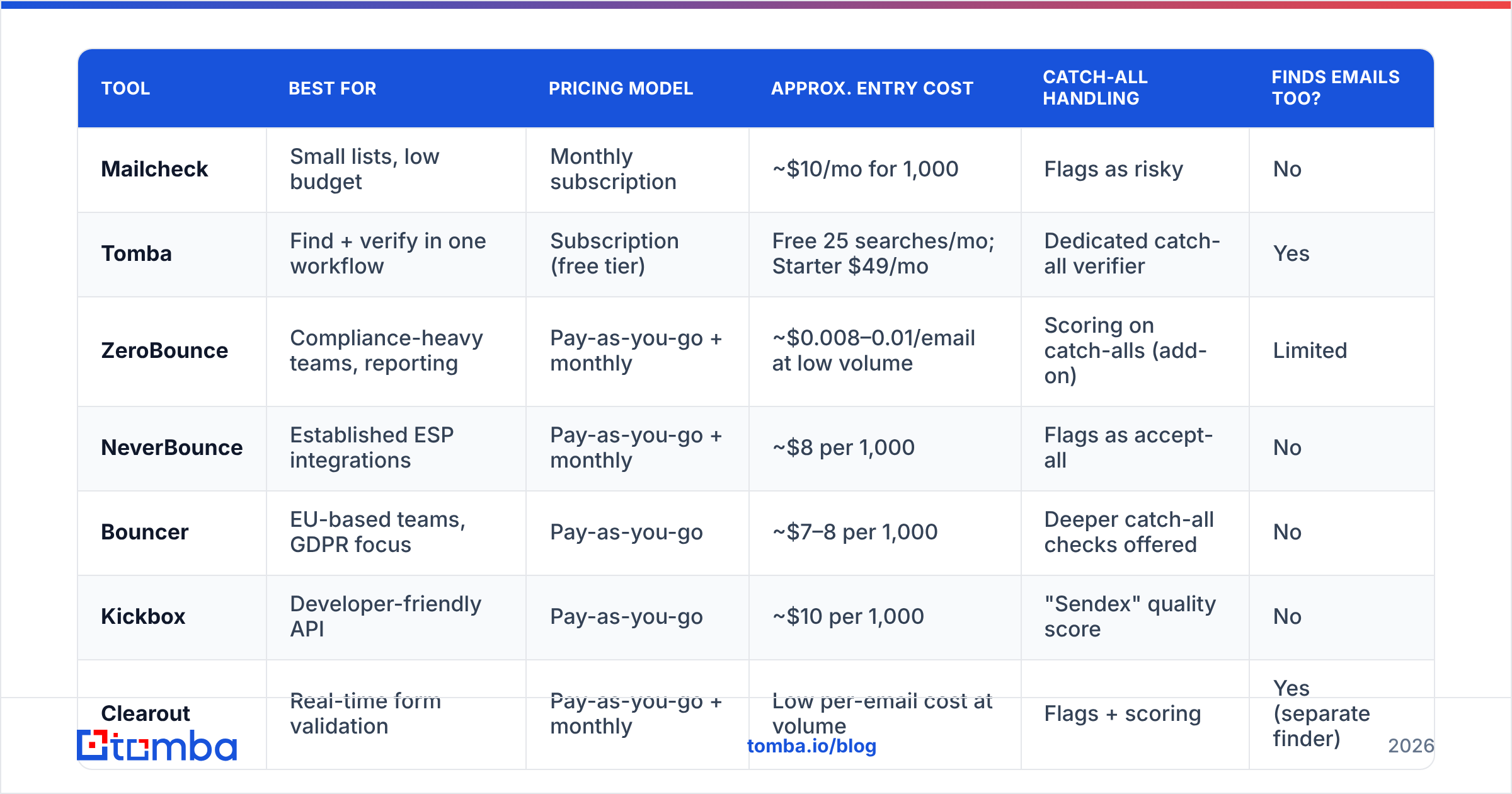
| Tool | Best for | Pricing model | Approx. entry cost | Catch-all handling | Finds emails too? |
|---|---|---|---|---|---|
| Mailcheck | Small lists, low budget | Monthly subscription | ~$10/mo for 1,000 | Flags as risky | No |
| Tomba | Find + verify in one workflow | Subscription (free tier) | Free 25 searches/mo; Starter $49/mo | Dedicated catch-all verifier | Yes |
| ZeroBounce | Compliance-heavy teams, reporting | Pay-as-you-go + monthly | ~$0.008–0.01/email at low volume | Scoring on catch-alls (add-on) | Limited |
| NeverBounce | Established ESP integrations | Pay-as-you-go + monthly | ~$8 per 1,000 | Flags as accept-all | No |
| Bouncer | EU-based teams, GDPR focus | Pay-as-you-go | ~$7–8 per 1,000 | Deeper catch-all checks offered | No |
| Kickbox | Developer-friendly API | Pay-as-you-go | ~$10 per 1,000 | "Sendex" quality score | No |
| Clearout | Real-time form validation | Pay-as-you-go + monthly | Low per-email cost at volume | Flags + scoring | Yes (separate finder) |
| MillionVerifier | Very large lists, lowest cost | Pay-as-you-go | ~$37 per 10,000 | Flags as catch-all | No |
| MailerCheck | MailerLite users | Pay-as-you-go credits | ~$0.01/email | Flags as risky | No |
The rest of this section explains what each one does well and where it falls short.
1. Tomba: best if you find and verify contacts#
Tomba is mainly an email finder, but its email verifier runs the same syntax, MX, SMTP and disposable checks you'd expect from a dedicated verifier. The difference is that it sits next to domain search, the finder, enrichment and phone lookup in one account. So if you're building a prospect list, you don't need a second tool to clean it.
What sets it apart from Mailcheck is the catch-all layer. Tomba has a dedicated catch-all verifier for accept-all domains, which is exactly where cheap verifiers return "risky" and leave you guessing.
- Strengths: find + verify + enrich in one place; bulk uploads; API, Chrome extension, Google Sheets and CRM integrations; free tier to test.
- Trade-offs: if all you need is to scrub a 2-million-row newsletter list once a year, a bulk-only verifier will cost less per email.
- Pricing: Free (25 searches/mo), Starter $49/mo, Growth $99/mo, Pro $249/mo, Enterprise custom. See Tomba pricing for credit allocations.
2. ZeroBounce: best for compliance and reporting#
ZeroBounce is one of the best-known verifiers. It adds extras like activity data (whether an address has shown recent engagement), an inbox placement tester and blacklist monitoring. Its security documentation and data-handling policies are among the most thorough in the category.
- Strengths: mature product, strong documentation, many ESP integrations, extra deliverability tooling.
- Trade-offs: costs more per email than budget verifiers, and some features are paid add-ons.
- If you're comparing it against other options, our ZeroBounce alternative breakdown covers the trade-offs in detail.
3. NeverBounce: best for plug-and-play ESP integrations#
NeverBounce (now part of ZoomInfo) has been around a long time and connects to most major email platforms and CRMs. You can sync a Mailchimp or HubSpot list, clean it and push results back without touching a CSV.
- Strengths: reliable, fast bulk jobs, very broad integration library.
- Trade-offs: catch-all addresses mostly come back as "accept-all" with little extra detail. Pricing is middle of the pack.
4. Bouncer: best for EU teams with GDPR requirements#
Bouncer is a Poland-based verifier that puts a lot of weight on GDPR compliance and data security. It's a popular choice for European agencies that need to show where their data is processed. It also offers deeper catch-all verification and a toxicity check for known spam-trap and complainer addresses.
- Strengths: competitive pricing, strong privacy posture, clean interface.
- Trade-offs: verification only, so you'll still need a separate prospecting tool.
5. Kickbox: best developer experience#
Kickbox is a favorite among engineers adding verification to signup flows. Its API is well documented, response times are fast, and its "Sendex" score gives you a single quality number per address. That's handy if you want to set thresholds instead of interpreting status codes.
- Strengths: API design, real-time speed, clear documentation.
- Trade-offs: costs more per email than budget bulk tools, and the dashboard has fewer features.
6. Clearout: best for real-time form validation#

Clearout covers bulk verification, real-time form widgets and a separate email finder. If your main problem is fake or mistyped signups, which is the job the old mailcheck.js library handled, Clearout's JavaScript widget is a direct, more capable replacement.
- Strengths: form widget, decent pricing at volume, finder available.
- Trade-offs: the finder is a separate product with a separate credit pool, and the interface can feel busy.
7. MillionVerifier: best cost per email on huge lists#
If you regularly verify six- or seven-figure lists, MillionVerifier is hard to beat on price. It also offers a refund-style guarantee on bounces above a stated threshold. Credits don't expire, which suits irregular bulk jobs.
- Strengths: very low cost per 1,000, non-expiring credits, simple.
- Trade-offs: basic catch-all handling, fewer integrations, minimal extras.
8. MailerCheck: best if you already use MailerLite#
MailerCheck verifies lists and also offers inbox placement and content analysis. It makes the most sense if you already send through MailerLite, because the account and billing live in the same place.
- Strengths: pay-as-you-go, deliverability add-ons, tight MailerLite fit.
- Trade-offs: fewer B2B prospecting features, and the per-email cost is higher than budget bulk tools.
You can browse more user reviews by category on G2's email verification category. Treat star ratings carefully, though, because review volume drives a lot of the ranking.
Is Mailcheck cheaper than the alternatives?#
At low volume, yes, usually. Here's a rough way to estimate your real monthly cost:
- Count real monthly volume. Include re-verification. B2B data decays fast, so lists older than about 90 days should be re-checked before a campaign.
- Add expected "unknown" and catch-all rows. If 20% of a B2B list comes back as catch-all, you either drop those leads or pay to resolve them somewhere else. Count that cost.
- Count the tool switching. If you find emails in one tool and verify in another, both subscriptions belong in the comparison.
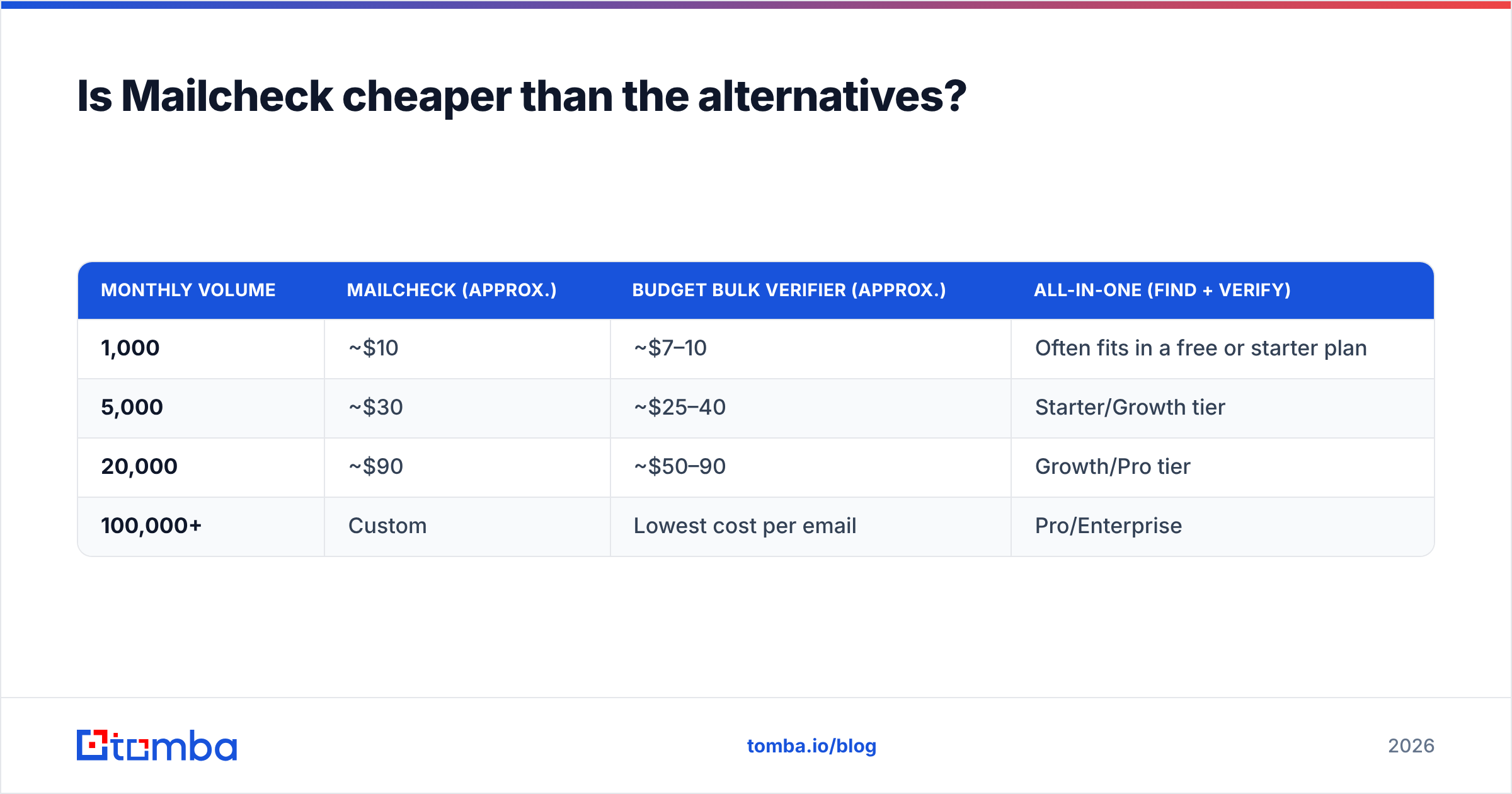
| Monthly volume | Mailcheck (approx.) | Budget bulk verifier (approx.) | All-in-one (find + verify) |
|---|---|---|---|
| 1,000 | ~$10 | ~$7–10 | Often fits in a free or starter plan |
| 5,000 | ~$30 | ~$25–40 | Starter/Growth tier |
| 20,000 | ~$90 | ~$50–90 | Growth/Pro tier |
| 100,000+ | Custom | Lowest cost per email | Pro/Enterprise |
The pattern is simple. Mailcheck wins on simplicity at small volume. Bulk verifiers win on raw price at high volume. All-in-one tools win when finding contacts is part of the job. If you only verify lists you already own, a pure verifier makes sense. If you're constantly building new prospect lists, paying for two tools rarely works out cheaper.
Why do catch-all domains matter so much in B2B?#
Think of a catch-all domain as a company mailroom that signs for every package, even ones addressed to people who don't work there. The courier (your verifier) gets a "delivered" signature, but that doesn't prove the recipient exists.
In technical terms, the mail server returns a positive response to the SMTP RCPT TO command for any address on the domain. So a standard verifier can't tell jane.doe@company.com apart from nobody123@company.com. Larger companies and many Microsoft 365 or Google Workspace setups with certain gateway configurations behave this way.
The practical consequence:
- Sending to every catch-all address risks hard bounces that get reported back later and hurt your sender reputation.
- Dropping every catch-all address throws away a large share of your best enterprise leads.
- Resolving them with a tool that does extra catch-all verification is the middle path, and it's where tools differ the most.

When you trial any Mailcheck alternative, put a known set of catch-all addresses in your test list. You should already know which of them are real. That one test tells you more than any vendor's accuracy claim.
How do you run a fair test before switching?#
Don't trust marketing accuracy figures, including ours. Run your own benchmark in an afternoon:
- Build a 300–500 row seed list from your actual data: recent bounces, confirmed-good replies, catch-all domains, role addresses (info@, sales@) and a few deliberately fake addresses.
- Run the same list through 2–3 tools, including Mailcheck as the baseline.
- Compare four numbers: valid, invalid, catch-all/risky and unknown. Then check how each tool scored the addresses where you already know the true answer.
- Calculate the cost per usable email. That means price divided by the addresses you'd actually send to. This is the only fair cost comparison.
- Test the workflow. How many clicks or API calls does it take to get from raw list to cleaned list inside your CRM or sequencer?
HubSpot's guidance on email bounce rates is a useful reference for what "healthy" looks like after cleaning. Aim to keep hard bounces well under 2% per campaign.
Which Mailcheck alternative should you pick?#
Match the tool to how you actually work:
- Freelancer, small occasional lists: Stay on Mailcheck, or use any pay-as-you-go verifier. Switching doesn't gain you much.
- Agency verifying big client lists: MillionVerifier or Bouncer, mainly on price, with Bouncer if GDPR documentation matters.
- Enterprise marketing team: ZeroBounce or NeverBounce for integrations, reporting and procurement-friendly paperwork.
- Developers adding signup validation: Kickbox or Clearout for real-time API speed.
- SDR or outbound team building prospect lists: An all-in-one tool like Tomba, so finding, verifying and bulk processing happen in one place instead of three.
Whichever you choose, verify before every campaign, not just once when you buy a list. Data decays steadily as people change jobs, and one bad send can undo months of careful warmup.
Ready to find and verify contacts in one place?#
If you've outgrown Mailcheck because verification is now just one step in your prospecting workflow, try the Tomba Email Finder. You can find professional email addresses by domain, name or company, verify them right away, resolve catch-all results, and push clean contacts straight into your CRM or Google Sheets. Start on the free tier with 25 searches a month, run your own seed-list test against Mailcheck, and upgrade to Starter at $49/month only if the numbers justify it.
Related guides#
// start free
See who Tomba finds at any company
Type a company's domain to see its people, their roles and verified work emails, each with the pages it was found on. Free account, no card.
Free plan · No credit card required · GDPR & CCPA
// about the author