Mailcheck Pricing, Reviews, Pros and Cons: 2026 Verdict
Mailcheck starts at $10/mo, but your real cost depends on volume, overage and whether you also need a finder. Here are the plans, the cost math, what reviewers say, and who should buy it.
TL;DR
- Mailcheck (mailcheck.co) is an email verification tool, not an email finder. It checks addresses you already have; it doesn't find new ones.
- Paid plans run $10/mo (1,000 checks), $30/mo (5,000) and $90/mo (20,000), with overage billed at $0.005, $0.004 and $0.003 per email. There is a small free allowance: 10 checks without a card, 100 once billing is verified.
- It's cheap at low volume, and per-email overage keeps a busy month from turning into a hard stop. The trade-offs: few public reviews, a narrow feature set, and monthly subscriptions instead of credits that never expire.
- If you need to find contacts as well as verify them, you'll end up paying for a second tool. An all-in-one platform with finder and verifier together is usually the better value in that case.
Mailcheck shows up on a lot of "cheap email verifier" lists, and the headline price is low. What matters for budgeting is the price you actually pay once overage, unused allowance and the tools you still need are counted. This review goes through the plans, works out what a typical month costs, sums up what reviewers say, and shows where Mailcheck fits next to all-in-one tools.
What is Mailcheck and what does it actually do?#
Mailcheck is a web-based email validation service. You upload a list or call the API, and it checks each address for syntax, domain and MX records, and mailbox status. It then labels each address valid, invalid or risky, so you can delete the bad rows before they bounce.
That's the entire job. Mailcheck doesn't search a company domain for contacts, guess email patterns, or add titles, phone numbers or firmographics. It works like a spellchecker for a list you've already written: it catches mistakes, but it can't write the list for you.
That matters for everything below. Comparing Mailcheck to Apollo or Tomba on price alone is misleading, because those tools both find and verify. The honest comparison is with standalone verifiers, plus the combined cost of a finder and a verifier you'd have to buy anyway.
Four checks run on every address you submit:
- Syntax validation: rejects malformed addresses such as missing "@" signs, illegal characters and double dots.
- Domain and MX lookup: confirms the domain exists and accepts mail.
- Mailbox-level check: asks the receiving server whether the specific inbox exists, without sending an email.
- Risk flagging: marks disposable domains, role accounts (info@, sales@) and catch-all domains that accept any address.
The fourth check is where verifiers differ most. A catch-all domain answers "yes" to every address, so a basic verifier can't tell a real inbox from a made-up one. If a large share of your list is catch-all, a cheap verifier will return a lot of "unknown" results that you either have to accept or test some other way, for example with a dedicated catch-all verifier.
How much does Mailcheck cost in 2026?#
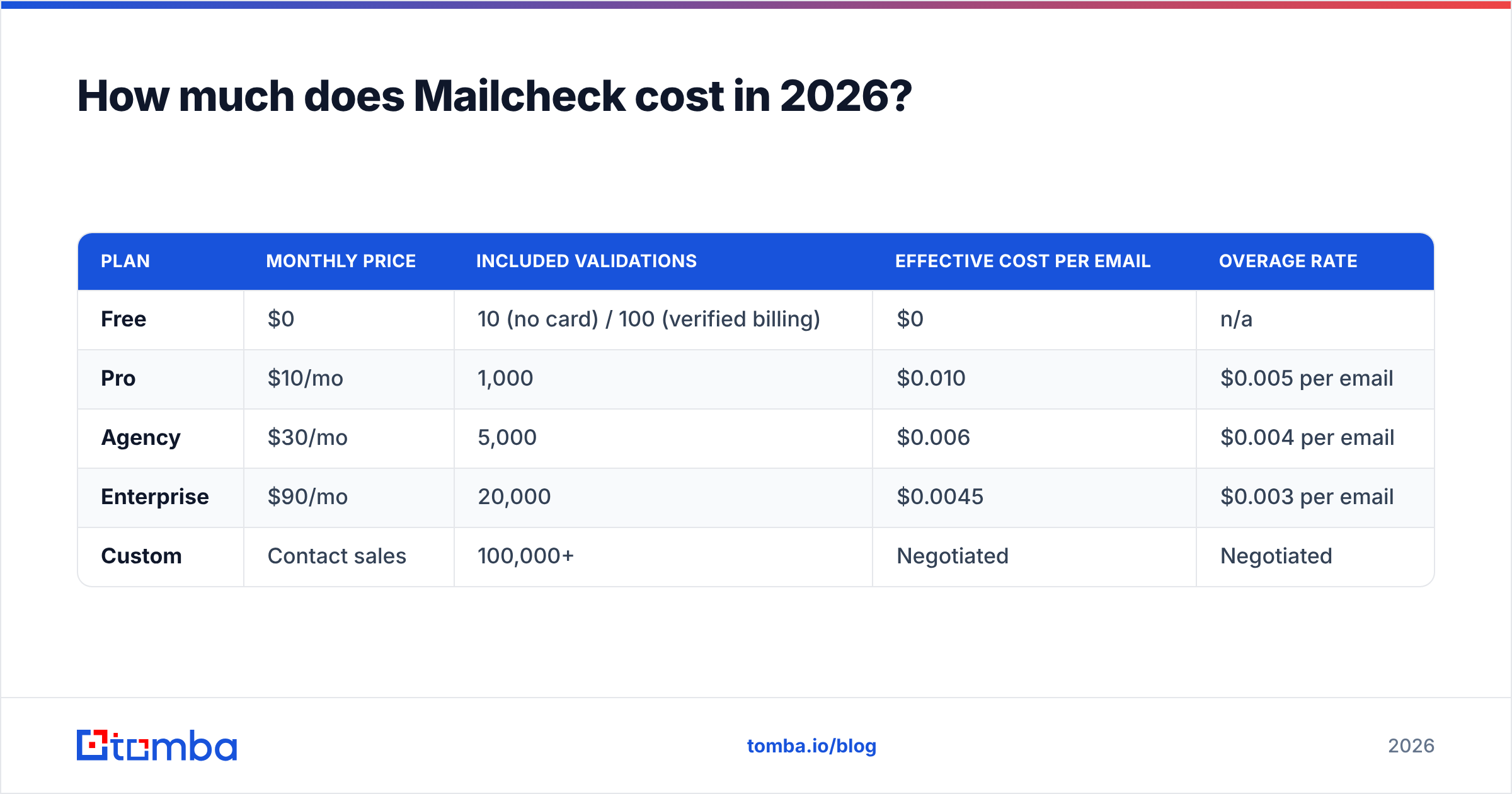
Mailcheck has three monthly subscription tiers plus a custom plan for high volume. These figures come from the pricing section of mailcheck.co as of 2026. Check the live page before you commit, because small vendors change prices often.
| Plan | Monthly price | Included validations | Effective cost per email | Overage rate |
|---|---|---|---|---|
| Free | $0 | 10 (no card) / 100 (verified billing) | $0 | n/a |
| Pro | $10/mo | 1,000 | $0.010 | $0.005 per email |
| Agency | $30/mo | 5,000 | $0.006 | $0.004 per email |
| Enterprise | $90/mo | 20,000 | $0.0045 | $0.003 per email |
| Custom | Contact sales | 100,000+ | Negotiated | Negotiated |
Two details are easy to miss on the pricing page:
- Overage is cheaper than the base rate. On Pro, the 1,000 included checks work out to $0.01 each, but every check after that costs $0.005. The model rewards going over the allowance, not choosing a bigger plan "just in case."
- It's a subscription, not a credit pack. Most write-ups say unused validations don't roll over. If you clean one big list per quarter, you pay for two months of allowance you don't use.

What does Mailcheck really cost at your volume?#
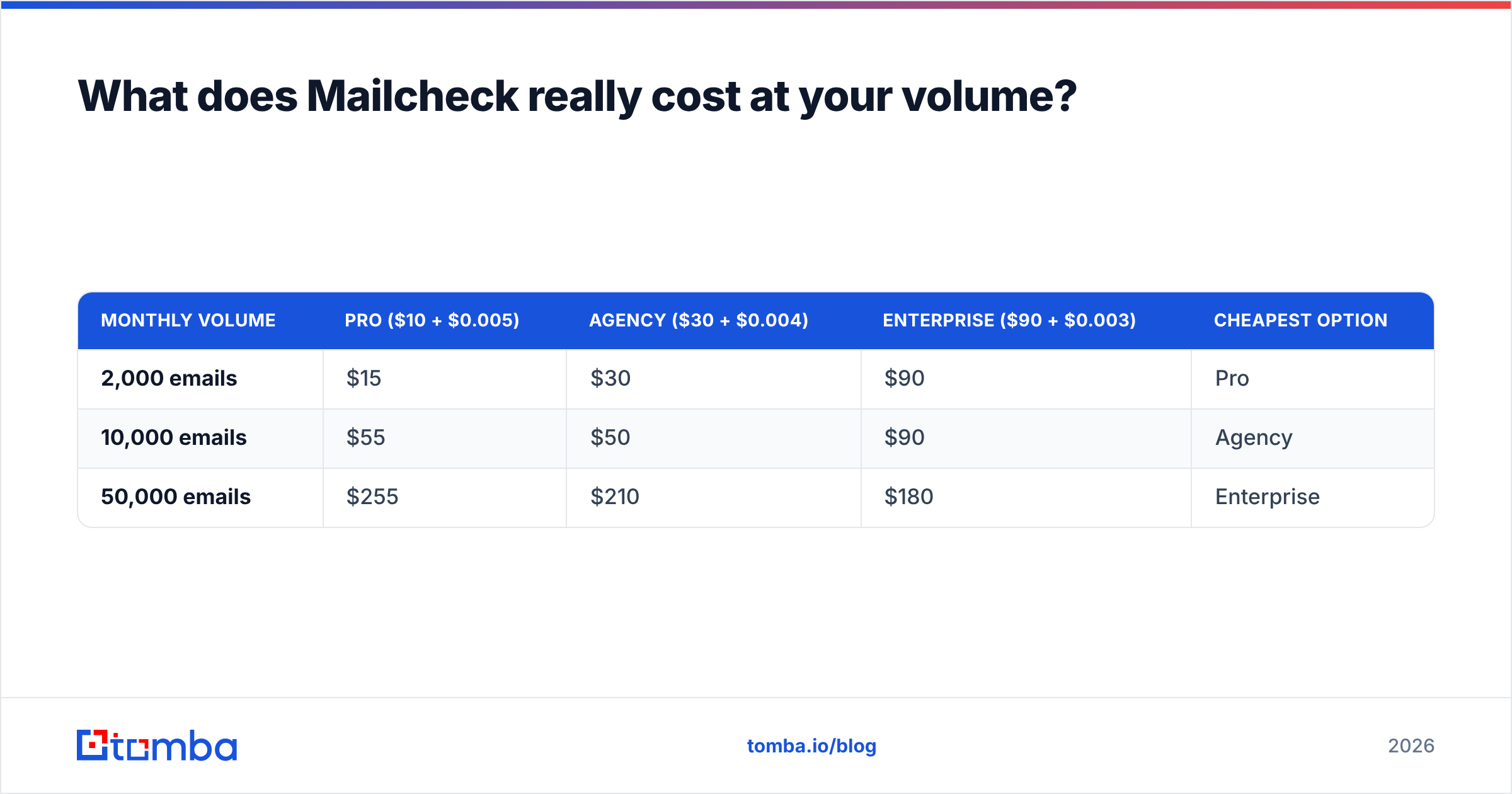
Prices per tier are only half of it. Because overage is cheap, the best plan depends on your monthly volume, and sometimes the lowest tier wins at mid-range volumes. Here's what the math gives at three common volumes:
| Monthly volume | Pro ($10 + $0.005) | Agency ($30 + $0.004) | Enterprise ($90 + $0.003) | Cheapest option |
|---|---|---|---|---|
| 2,000 emails | $15 | $30 | $90 | Pro |
| 10,000 emails | $55 | $50 | $90 | Agency |
| 50,000 emails | $255 | $210 | $180 | Enterprise |
Some takeaways:
- Under ~5,000 checks a month, stay on Pro and pay overage. Moving up only makes sense once overage on Pro is more than the price difference between plans.
- The 10,000 mark is close. Agency saves $5 a month compared with Pro plus overage, which isn't much.
- At 50,000+, Enterprise pays off. Past roughly 100,000 checks a month, ask for custom pricing.
For comparison, the Capterra email verification category shows most pay-as-you-go verifiers charging $0.003–$0.008 per email at mid volume. Mailcheck sits in the competitive middle of that range, not clearly below it.
What do Mailcheck reviews say?#
There isn't much public review data. The Mailcheck profile on G2 has only a handful of reviews. They're positive overall, but G2 marks the listing as inactive for more than a year. Directory listings (SourceForge, GoodFirms, ColdIQ, Salesforge) mostly repeat the vendor's feature list and don't add independent testing.
Read that as "not enough data," not "bad." Here's what comes through consistently in the reviews and listings that exist:
What users like
- Simple interface: upload a CSV, get a cleaned CSV back.
- A low entry price for freelancers and small teams.
- An API that developers can plug into signup forms or CRMs.
- Fast processing for small and mid-size lists.
What users and reviewers flag
- Little public data on accuracy, especially on catch-all-heavy B2B lists.
- No contact discovery, so a second tool is required for prospecting.
- A thinner set of native integrations than larger verifiers.
- No free trial beyond the small free allowance, so you test on 10–100 addresses before paying.
Be careful with brand names here. MailerCheck (by MailerLite) and mailcheck.fr / mailcheck.dev are different companies with different pricing. Many "Mailcheck review" results are actually about MailerCheck. Before you trust a review, check which product it covers.
What are the pros and cons of Mailcheck?#
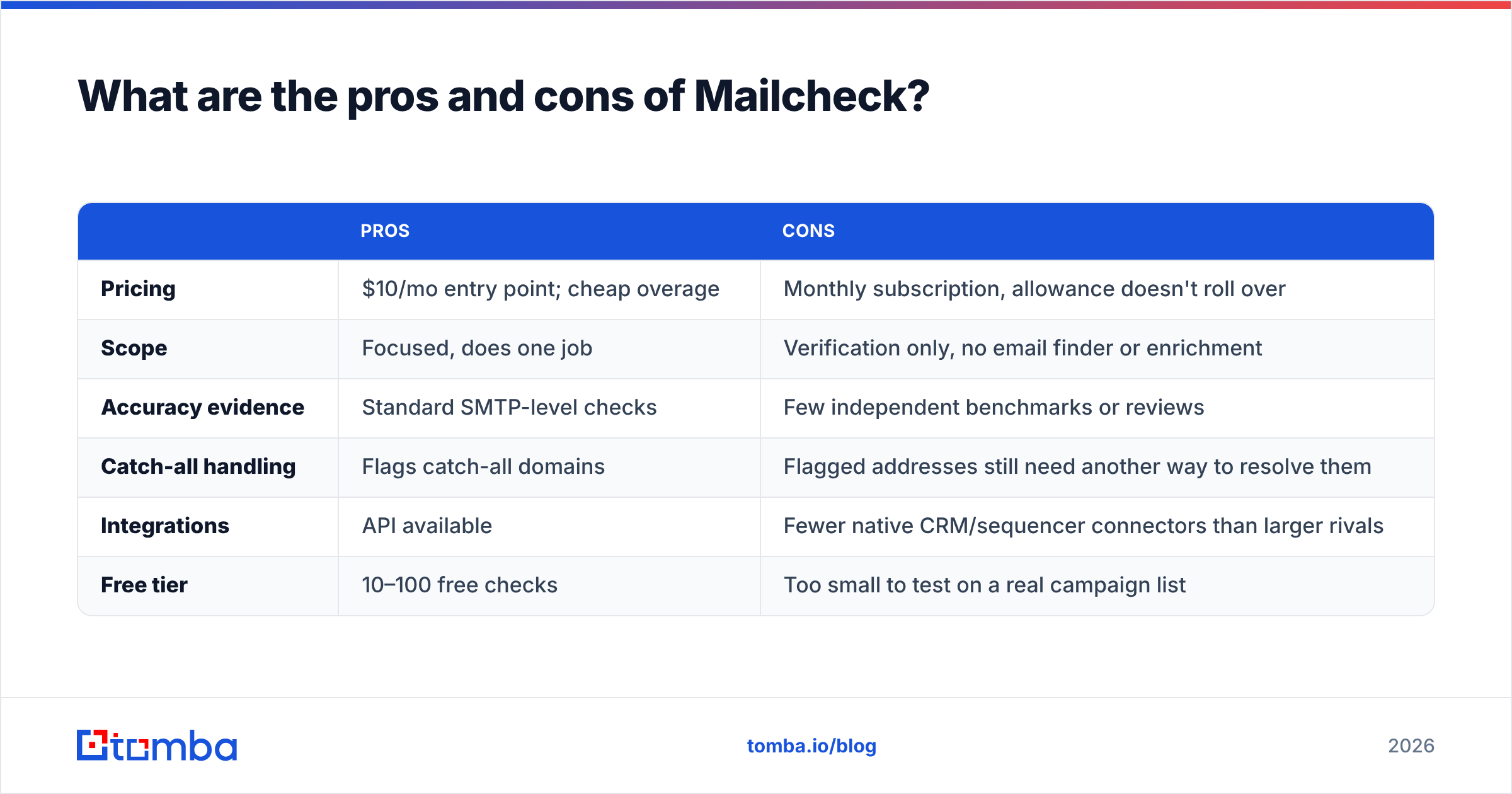
| Pros | Cons | |
|---|---|---|
| Pricing | $10/mo entry point; cheap overage | Monthly subscription, allowance doesn't roll over |
| Scope | Focused, does one job | Verification only, no email finder or enrichment |
| Accuracy evidence | Standard SMTP-level checks | Few independent benchmarks or reviews |
| Catch-all handling | Flags catch-all domains | Flagged addresses still need another way to resolve them |
| Integrations | API available | Fewer native CRM/sequencer connectors than larger rivals |
| Free tier | 10–100 free checks | Too small to test on a real campaign list |
The pattern: Mailcheck is a cheap, narrow tool. It's good if verification is the only gap in your stack. It's a weaker fit if you're also paying for data somewhere else.
Is Mailcheck worth it compared to alternatives?#
It depends on where your emails come from. There are four common setups, and the right choice differs for each:
- You already have a clean data source and only need hygiene. Mailcheck works. At $10–$30 a month it's an inexpensive way to keep bounce rates low on lists you already own, such as newsletter signups or event registrations.
- You buy or scrape lists and need to clean them before sending. Mailcheck works, but compare per-email cost with other pay-as-you-go verifiers, since you're cleaning in large irregular batches and the subscription model penalizes idle months.
- You prospect B2B contacts and verify them before outreach. This is where Mailcheck gets more expensive. You pay for a finder (often $49–$99/mo) and then pay again to verify what the finder returned. An all-in-one tool that verifies at the moment it finds an address removes the second bill.
- You run high-volume outbound across several domains. At this point catch-all resolution and integrations matter more than price per check. A broader platform with CRM sync and API access usually fits better.
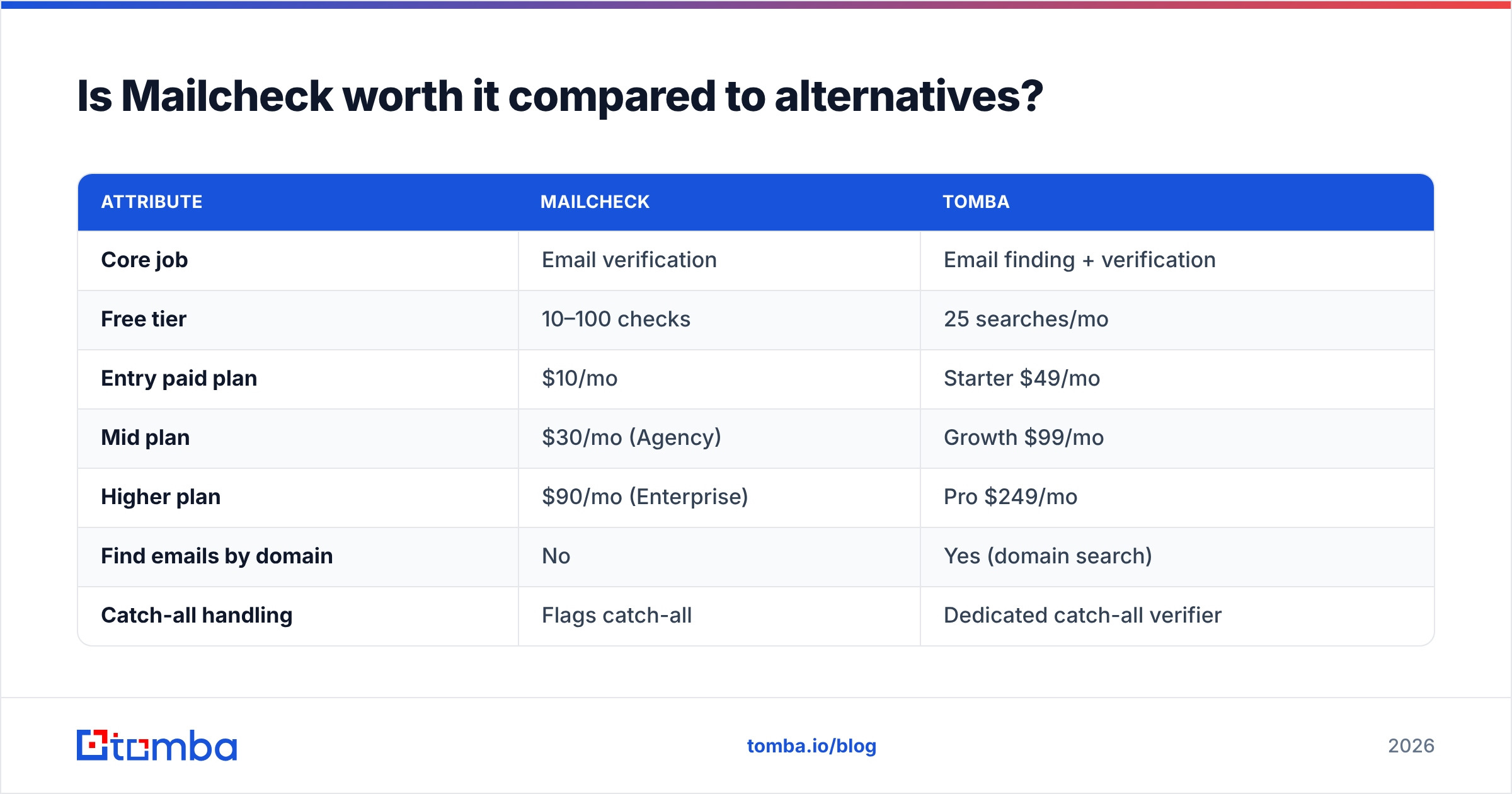
Here's how Mailcheck compares with an all-in-one finder-plus-verifier on the attributes that drive total cost:
| Attribute | Mailcheck | Tomba |
|---|---|---|
| Core job | Email verification | Email finding + verification |
| Free tier | 10–100 checks | 25 searches/mo |
| Entry paid plan | $10/mo | Starter $49/mo |
| Mid plan | $30/mo (Agency) | Growth $99/mo |
| Higher plan | $90/mo (Enterprise) | Pro $249/mo |
| Find emails by domain | No | Yes (domain search) |
| Catch-all handling | Flags catch-all | Dedicated catch-all verifier |
| Enrichment / phone | No | Yes |
| Best for | Cleaning existing lists | Prospecting + verifying in one place |
Mailcheck is cheaper if all you need is verification. Tomba makes more sense once you count a separate finder subscription, because the $49/mo Starter covers both jobs. Full plan limits are on the Tomba pricing page.
How do you decide whether to buy Mailcheck?#
Run this quick check before you subscribe:
- Count your real monthly volume. Use the table above. If you're under 2,000 checks, Pro plus overage is the cheapest option.
- Look at your catch-all share. Run 100 addresses through the free tier. If more than 20–30% come back "catch-all" or "unknown," a basic verifier leaves too much to guesswork for B2B outreach.
- List what you already pay for. If you already have a finder that verifies, Mailcheck is a duplicate cost. If your data comes from forms or events, it fills a real gap.
- Check bounce tolerance. Mailbox providers watch hard-bounce rates closely (bounce messages feed straight into sender reputation). If your campaigns depend on staying under 2%, accuracy matters more than saving $10.
- Test before you commit. Put the same 100-address sample through Mailcheck and one other tool, then send a small batch and compare real bounces with each tool's prediction.
Are there hidden costs with Mailcheck?#
No surprise fees, but there are a few structural costs to plan for:
- Idle months. You pay the subscription whether or not you upload a list.
- Second-tool tax. Verification-only means a separate finder or data vendor for prospecting.
- Unknown results. Catch-all and unknown addresses count against your allowance but don't give you a send/don't-send answer.
- Integration work. Fewer native connectors means more CSV export and import or custom API work, and engineering time costs money too.
None of these is a dealbreaker. They're simply what a cheap, focused tool costs you, and they belong in your total cost alongside the $10.
Final verdict: who should use Mailcheck?#
Use Mailcheck if you have a steady, moderate flow of addresses from forms, events or an existing CRM, you need to keep bounces down, and you don't prospect for new contacts. For that use, $10–$30 a month is fair and the cheap overage is a real plus.
Look elsewhere if you prospect B2B buyers, deal with many catch-all domains, or want finding, verifying and enrichment in one workflow. Paying for a separate verifier on top of a finder rarely beats a single platform that does both.
If your bigger problem is getting accurate business emails in the first place, start with the Tomba Email Finder. It finds professional addresses by name, company or domain and verifies them in the same step, so you don't pay twice. You can test it on 25 free searches a month before deciding whether you need a separate verifier.
Related guides#
// start free
See who Tomba finds at any company
Type a company's domain to see its people, their roles and verified work emails, each with the pages it was found on. Free account, no card.
Free plan · No credit card required · GDPR & CCPA
// about the author