MailCleanup vs SalesQL: Email Verifier or LinkedIn Finder in 2026?
MailCleanup cleans the email list you already have. SalesQL finds contacts you don't have yet. Here is how their pricing, credits and workflows compare, and which one your team actually needs.
TL;DR
- MailCleanup is a pay-as-you-go email verification tool. You upload a list you already have, and it tells you which addresses are safe to send to. Credits start at about $5 per 1,000 emails, and there's no subscription.
- SalesQL is a LinkedIn-based contact finder. It pulls work emails and phone numbers from LinkedIn profiles and its own database. The free tier is small, and paid plans start at $39/mo.
- They aren't really competitors. One cleans data and the other creates it. Picking between them depends on whether your problem is bad lists or no lists.
- If you need both finding and verifying in one place, and you prospect outside LinkedIn too, an all-in-one tool like Tomba is worth comparing against the two-tool setup.
What is the real difference between MailCleanup and SalesQL?#
Most "MailCleanup vs SalesQL" searches start from the wrong idea that the two tools do the same job. They don't.
Think of a kitchen. SalesQL is the grocery run: it brings new ingredients (contacts) into the house. MailCleanup is the fridge clean-out: it throws away what has gone off (dead, risky, or disposable addresses) before you cook with it. Both matter, but at different points in the workflow.
Technically:
- MailCleanup takes a CSV or list of email addresses and runs checks on syntax, the domain and MX record, mailbox existence over SMTP, disposable and role-based address detection, and catch-all status. You get a cleaned file back. Its sole job is to protect your bounce rate and sender reputation.
- SalesQL starts with a person, usually a LinkedIn profile, search result, or Sales Navigator list. It returns that person's business email, sometimes a personal email, and a phone number where available. Its job is to fill your pipeline.
So the honest answer to "which is better?" is: better for what? The rest of this post breaks down where each one earns its money.
How do MailCleanup and SalesQL compare side by side?#
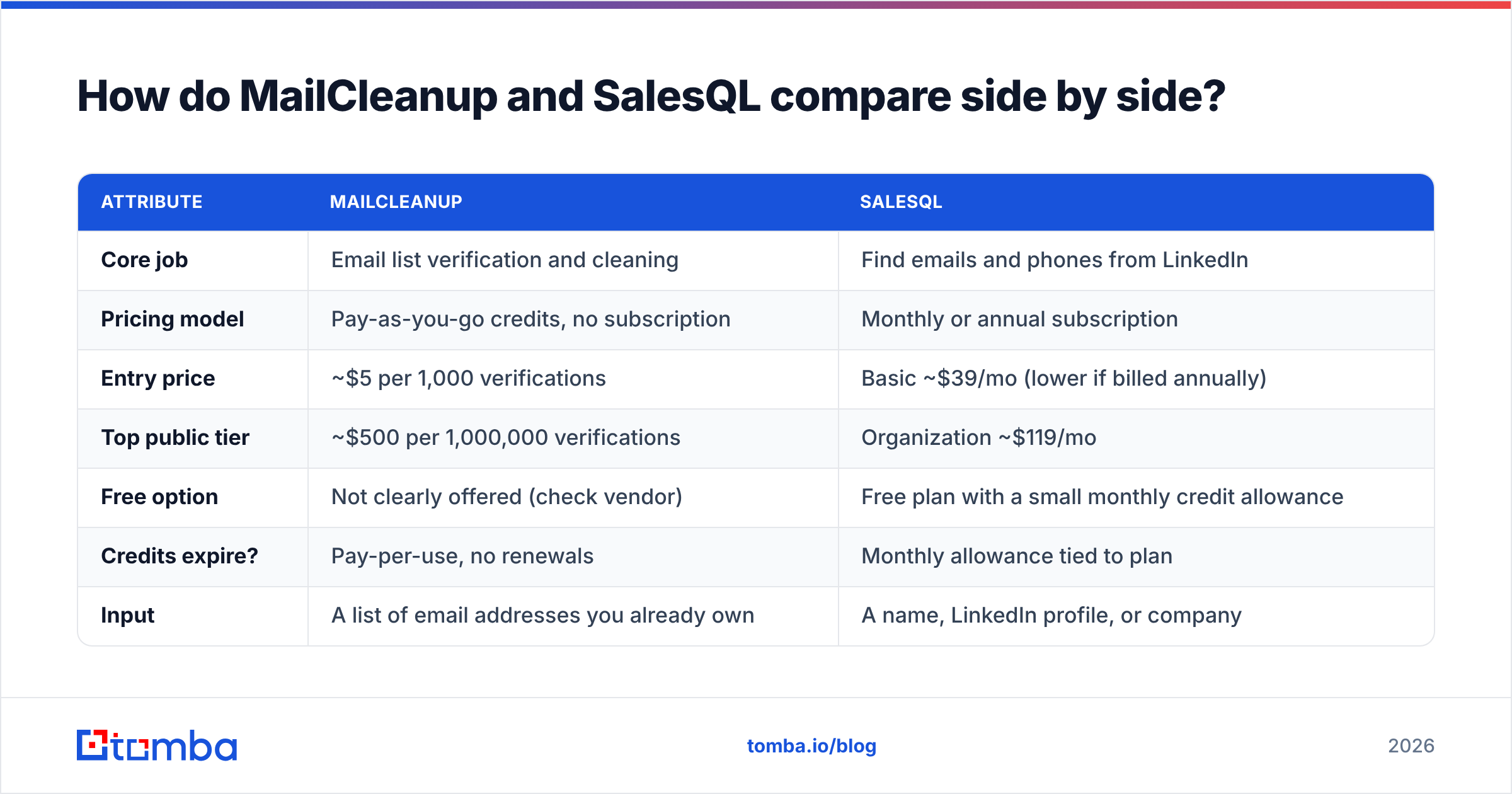
This table covers the attributes that actually affect a buying decision. Pricing reflects publicly listed rates at the time of writing. Both vendors adjust tiers, so confirm on their sites before you commit.
| Attribute | MailCleanup | SalesQL |
|---|---|---|
| Core job | Email list verification and cleaning | Find emails and phones from LinkedIn |
| Pricing model | Pay-as-you-go credits, no subscription | Monthly or annual subscription |
| Entry price | ~$5 per 1,000 verifications | Basic ~$39/mo (lower if billed annually) |
| Top public tier | ~$500 per 1,000,000 verifications | Organization ~$119/mo |
| Free option | Not clearly offered (check vendor) | Free plan with a small monthly credit allowance |
| Credits expire? | Pay-per-use, no renewals | Monthly allowance tied to plan |
| Input | A list of email addresses you already own | A name, LinkedIn profile, or company |
| Output | Valid / invalid / risky / catch-all flags | Email, phone, title, company data |
| Phone numbers | No | Yes, on paid plans |
| Chrome extension | Not the core workflow | Yes, the core workflow |
| Best for | Cleaning old, purchased, or event lists | SDRs prospecting on LinkedIn |
The biggest structural difference is billing. MailCleanup charges per email checked, so a one-off 50,000-row cleanup costs a small fixed amount and nothing after that. SalesQL charges a monthly fee for a recurring allowance. That suits steady daily prospecting, but you pay for unused credits in quiet months.
What does MailCleanup do well?#
MailCleanup is narrow by design, and that narrowness is its strength.
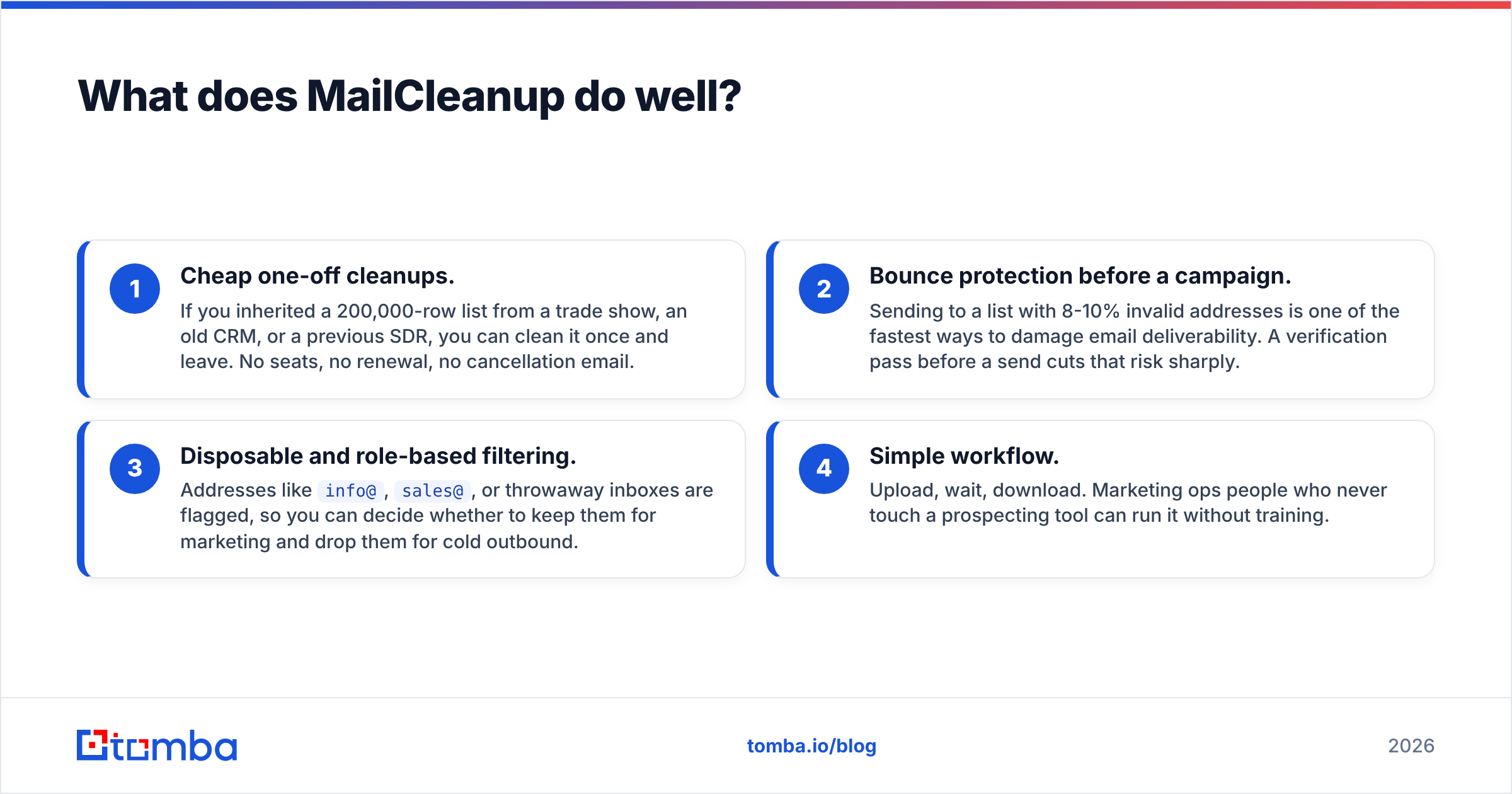
- Cheap one-off cleanups. If you inherited a 200,000-row list from a trade show, an old CRM, or a previous SDR, you can clean it once and leave. No seats, no renewal, no cancellation email.
- Bounce protection before a campaign. Sending to a list with 8-10% invalid addresses is one of the fastest ways to damage email deliverability. A verification pass before a send cuts that risk sharply.
- Disposable and role-based filtering. Addresses like
info@,sales@, or throwaway inboxes are flagged, so you can decide whether to keep them for marketing and drop them for cold outbound. - Simple workflow. Upload, wait, download. Marketing ops people who never touch a prospecting tool can run it without training.
Where it falls short:
- It can't find anyone. If an address is invalid, MailCleanup tells you to drop it. It doesn't suggest the correct replacement.
- Catch-all domains stay uncertain. Like most verifiers, it can flag a catch-all domain, but it can't always confirm the specific mailbox behind it. Many B2B companies, especially larger ones, run catch-all servers, so a chunk of your list may come back "risky" rather than clean.
- Third-party review volume is light. Compared with bigger verifiers, there's less independent feedback to go on. Check the current reviews on G2 and Capterra before you push a large list through it. The vendor-stated accuracy figure (up to 99%) hasn't been independently benchmarked.
What does SalesQL do well?#
SalesQL lives where many B2B sellers already spend their day: LinkedIn.
- One-click contact reveal. With the SalesQL Chrome extension, you open a LinkedIn profile or a Sales Navigator search and pull emails and phone numbers into a list without leaving the page.
- Bulk extraction from searches. You can grab contacts from an entire search results page, not just one profile at a time, which is where most of the time savings come from.
- Phone numbers. MailCleanup will never give you a direct dial. SalesQL can, on paid plans, which matters if your outbound mixes email and calls.
- One credit covers a full record. A single credit generally covers the email, phone, and enrichment data for one prospect, which keeps the credit maths simple.
- Built-in verification credits. Paid plans include a separate allowance of email-verifier credits, so light users may not need a standalone verifier at all.
Where it falls short:
- LinkedIn-centric. If your prospects aren't well represented on LinkedIn (some trades, local businesses, many non-English markets), coverage drops.
- Subscription friction. Monthly plans suit consistent use. If your prospecting is seasonal or project-based, you pay for idle months.
- Free tier is a trial, not a workflow. The free allowance is good for testing, not for running a real sequence. Third-party sources report it without phone numbers, CSV enrichment, or API access.
- Seat-based scaling. Larger teams pay more as they add users, and the jump from Professional to Organization is meaningful.
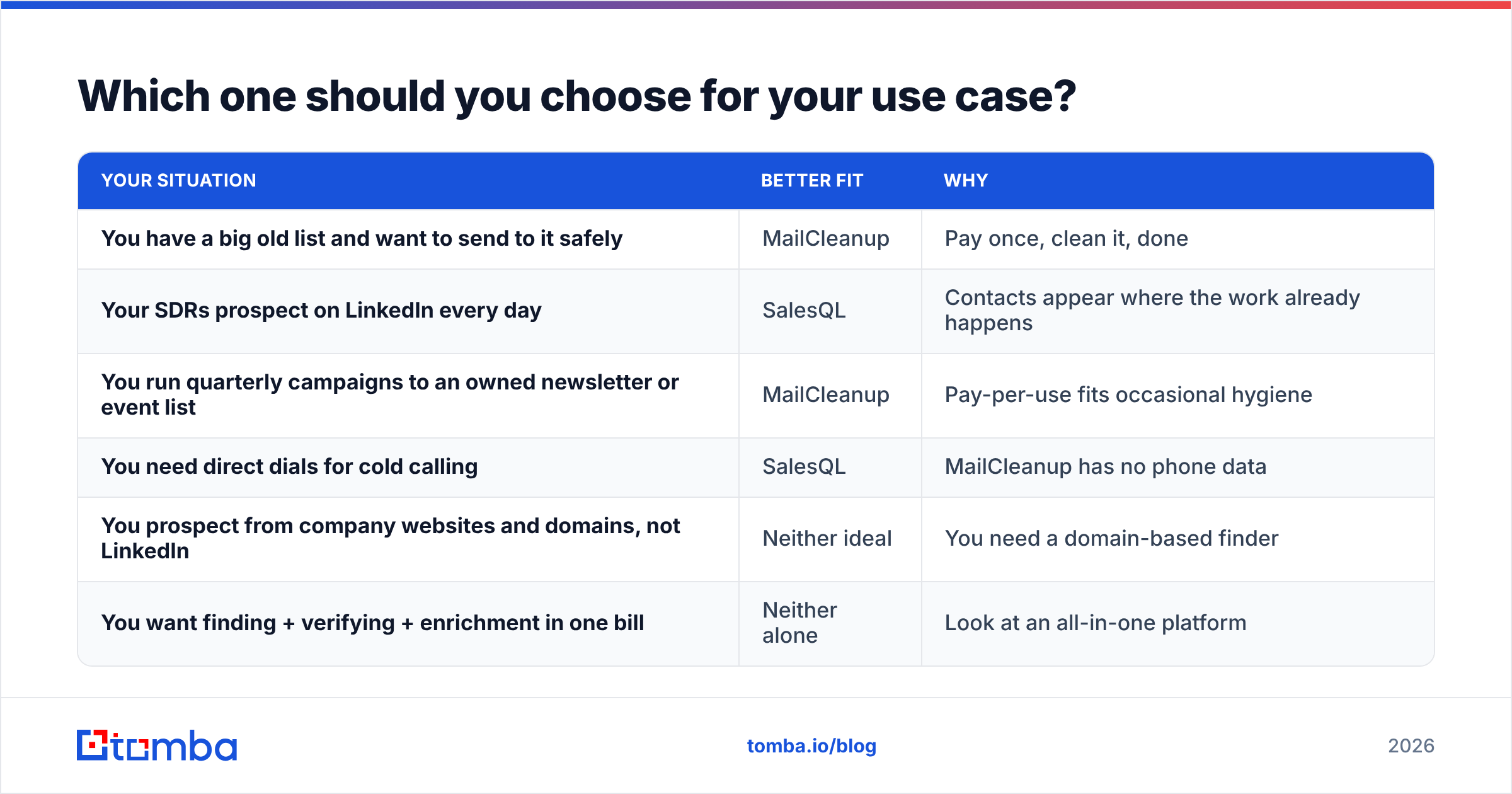
Which one should you choose for your use case?#
Match the tool to the problem you actually have. This section is the short version of the decision.
| Your situation | Better fit | Why |
|---|---|---|
| You have a big old list and want to send to it safely | MailCleanup | Pay once, clean it, done |
| Your SDRs prospect on LinkedIn every day | SalesQL | Contacts appear where the work already happens |
| You run quarterly campaigns to an owned newsletter or event list | MailCleanup | Pay-per-use fits occasional hygiene |
| You need direct dials for cold calling | SalesQL | MailCleanup has no phone data |
| You prospect from company websites and domains, not LinkedIn | Neither ideal | You need a domain-based finder |
| You want finding + verifying + enrichment in one bill | Neither alone | Look at an all-in-one platform |
A few patterns worth spelling out:
- Marketing ops teams often only ever need MailCleanup. Their lists come from forms, webinars, and events. The data exists already; it just decays at roughly 20-30% a year as people change jobs, which is broadly in line with B2B data decay figures HubSpot and others have cited for years.
- Outbound SDR teams often only ever need SalesQL plus whatever verification is bundled into it. They're building lists from scratch every week.
- Agencies and RevOps teams usually end up needing both kinds of capability. That's where the two-tool stack gets expensive and clunky, because you export from one, upload to the other, then re-import into the CRM.
Is it cheaper to run MailCleanup and SalesQL together?#
Sometimes, but do the maths before assuming so.
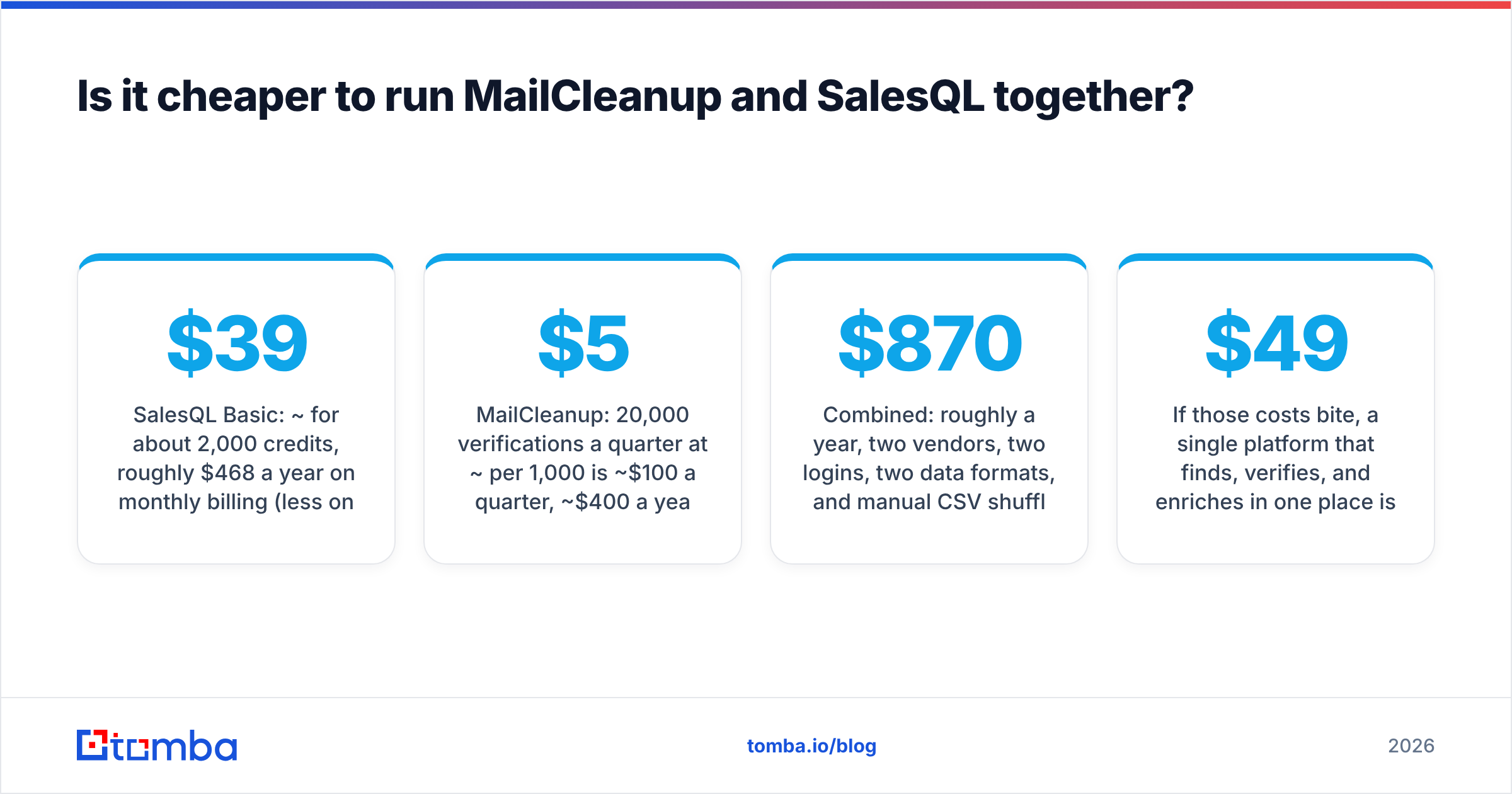
Take a small outbound team that needs about 2,000 new contacts a month and also wants to re-verify a 20,000-contact CRM once a quarter:
- SalesQL Basic: ~$39/mo for about 2,000 credits, roughly $468 a year on monthly billing (less on annual).
- MailCleanup: 20,000 verifications a quarter at ~$5 per 1,000 is ~$100 a quarter, ~$400 a year.
- Combined: roughly $870 a year, two vendors, two logins, two data formats, and manual CSV shuffling between them.
That's not outrageous, but the hidden costs are operational:
- Data hand-offs. Every export, upload, and re-import is a chance to lose fields, duplicate rows, or overwrite good CRM data.
- Two sources of truth. SalesQL may mark an email as verified, and MailCleanup may later flag it as risky. Someone has to decide which one wins.
- Coverage gaps. Neither tool finds emails from a company domain or website when there's no LinkedIn profile to start from.
If those costs bite, a single platform that finds, verifies, and enriches in one place is usually simpler. For example, Tomba's email verifier and LinkedIn finder run on the same credit pool, and you can see the trade-offs on the Tomba pricing page: a free tier with 25 searches a month, then Starter at $49/mo, Growth at $99/mo, and Pro at $249/mo.
How accurate are verification results from each tool?#
Accuracy claims in this category are slippery, so treat every vendor number, including any you read on this blog, as a starting point and not a guarantee.
Here's what drives real-world accuracy for both tools:
- Catch-all domains. No SMTP check can fully confirm a mailbox on a server that accepts everything. Expect a "risky" or "accept-all" bucket from MailCleanup and lower-confidence emails from SalesQL on these domains.
- Data freshness. SalesQL's emails are only as current as its last crawl or verification of that contact. Someone who changed jobs last month may still show the old address.
- Greylisting and rate limits. Some mail servers temporarily reject verification pings. Good verifiers retry; weaker ones mark the address invalid.
- Your own sending setup. Even a perfectly verified list will underperform if your domain authentication is weak. Verification is one layer of deliverability, not the whole thing.
The practical test: take 500 contacts you already know the status of (recent bounces plus confirmed replies), run them through whichever tool you're evaluating, and compare. That one afternoon tells you more than any landing-page percentage.
What alternatives should you consider?#
If neither tool fits cleanly, these categories are worth a look:
- Standalone verifiers in the same class as MailCleanup, such as ZeroBounce, NeverBounce, or Bouncer, if verification is your only need and you want deeper reporting or larger review bases.
- LinkedIn-first finders in the same class as SalesQL, such as Lusha, ContactOut, or Wiza, if your team lives in Sales Navigator.
- Domain-based finders and all-in-one platforms, such as Tomba, Hunter, or Apollo, if you prospect from company websites and lists as well as LinkedIn and want verification built in.
When you shortlist, compare four things: cost per usable contact (not per credit), catch-all handling, CRM integrations, and whether unused credits roll over.
So, MailCleanup vs SalesQL: which wins?#
There's no single winner, because they solve different problems:
- Choose MailCleanup if you already own your contacts and need cheap, no-commitment list hygiene before campaigns.
- Choose SalesQL if your reps build lists from LinkedIn every day and need emails and phone numbers fast.
- Choose an all-in-one if you're about to pay for both, or if a meaningful share of your prospects can't be reached through LinkedIn.
The mistake to avoid is buying the wrong category: subscribing to a finder when your real problem is a bouncing list, or paying for a verifier when you have nobody to verify yet.
If you want to find and verify contacts in one workflow, by domain, by name, or straight from LinkedIn, try the Tomba Email Finder. Start on the free plan's 25 monthly searches, run your own 500-contact accuracy test against your current setup, and only upgrade to Starter at $49/mo once the numbers hold up on your own data.
Related guides#
// start free
See who Tomba finds at any company
Type a company's domain to see its people, their roles and verified work emails, each with the pages it was found on. Free account, no card.
Free plan · No credit card required · GDPR & CCPA
// about the author