Mailcleanup vs Wiza: Email Verifier or LinkedIn Email Finder?
MailCleanup cleans email lists you already have. Wiza finds emails for LinkedIn prospects you don't have yet. This comparison covers pricing, accuracy, and workflow so you can tell which one your outbound stack is missing.
TL;DR
- MailCleanup and Wiza do different jobs. MailCleanup is a pay-as-you-go email verifier for lists you already have. Wiza is a LinkedIn and Sales Navigator email finder that builds new contact lists.
- The pricing models are opposites. MailCleanup sells one-time credits from about $5 per 1,000 verifications with no subscription. Wiza uses monthly plans starting around $49/mo for 100 emails, and its annual "unlimited" plans are capped at 2,500 exports per month.
- Choose MailCleanup if your problem is bounces on an old CRM export or a purchased list. Choose Wiza if your problem is turning LinkedIn searches into emails you can send to.
- Many teams end up needing both a finder and a verifier. If you'd rather pay for one tool, look for a platform that does finding and verification together.
What is the real difference between MailCleanup and Wiza?#
Searches for "Mailcleanup vs Wiza" usually come from people who assume the two tools compete head to head. They mostly don't. Think of a water filter and a well. The filter cleans water you already have. The well gets you water you didn't have before. MailCleanup is the filter and Wiza is the well.
MailCleanup is a bulk email verification service. You upload a CSV and it runs a series of checks on each address: syntax, MX records, SMTP handshake, catch-all detection, disposable-domain detection, and spam-trap risk. Each address comes back labelled as deliverable, risky, or invalid. MailCleanup doesn't find new contacts.
Wiza is a prospecting tool built around LinkedIn. You run a search in LinkedIn or Sales Navigator, export it with Wiza, and get back a list of names, titles, companies, and (when Wiza finds them) work emails and phone numbers. Wiza verifies the emails it finds before handing them over, but it isn't designed as a general-purpose list cleaner for data you bring from elsewhere.
So the question is less "which tool is better" and more "is your bottleneck finding contacts or keeping your data clean?"
How do MailCleanup and Wiza compare side by side?#
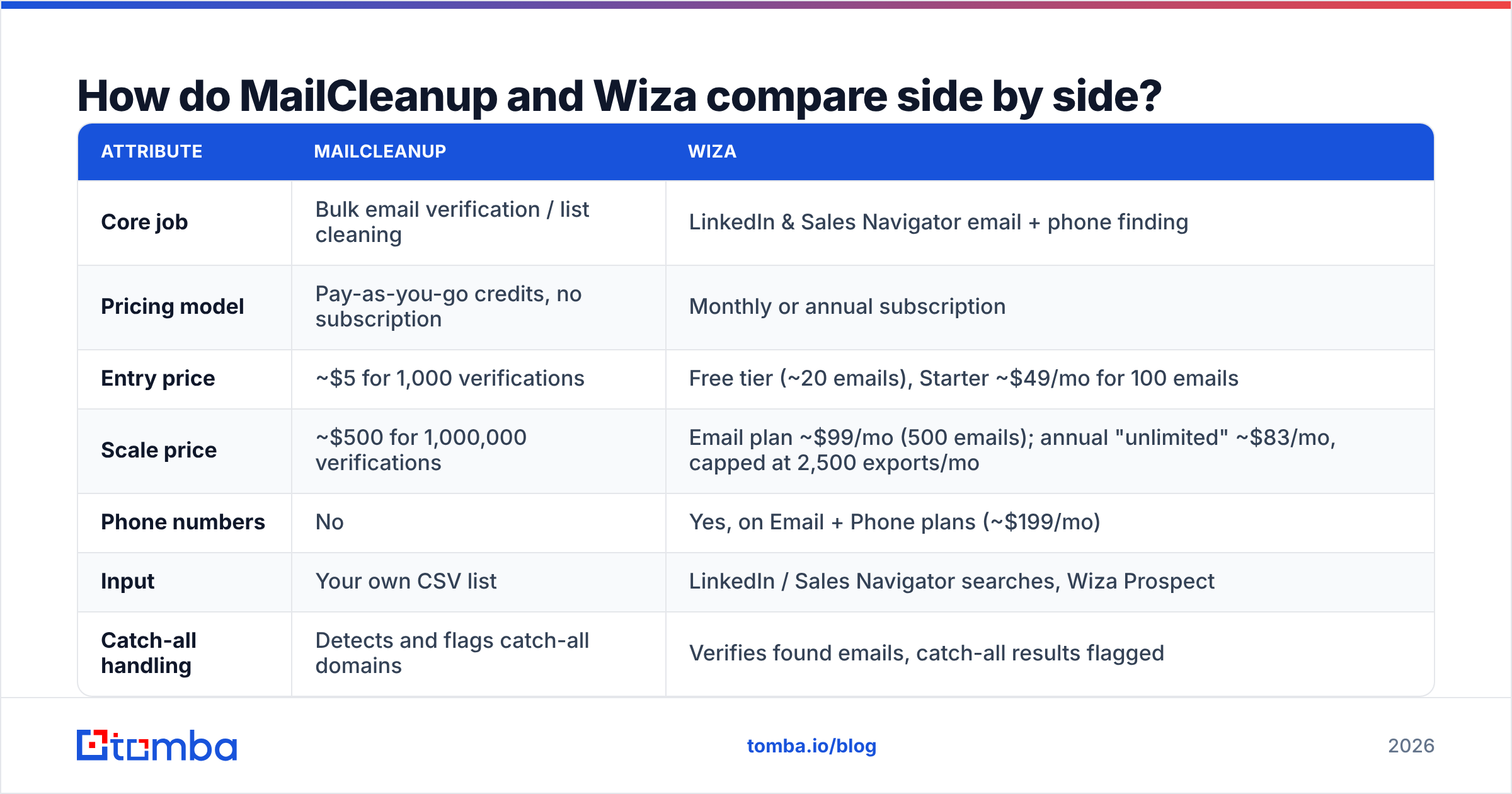
Here are the two tools on the attributes buyers usually ask about. Wiza pricing below comes from third-party breakdowns published in 2026, so confirm current numbers on Wiza's official site before you budget.
| Attribute | MailCleanup | Wiza |
|---|---|---|
| Core job | Bulk email verification / list cleaning | LinkedIn & Sales Navigator email + phone finding |
| Pricing model | Pay-as-you-go credits, no subscription | Monthly or annual subscription |
| Entry price | ~$5 for 1,000 verifications | Free tier (~20 emails), Starter ~$49/mo for 100 emails |
| Scale price | ~$500 for 1,000,000 verifications | Email plan ~$99/mo (500 emails); annual "unlimited" ~$83/mo, capped at 2,500 exports/mo |
| Phone numbers | No | Yes, on Email + Phone plans (~$199/mo) |
| Input | Your own CSV list | LinkedIn / Sales Navigator searches, Wiza Prospect |
| Catch-all handling | Detects and flags catch-all domains | Verifies found emails, catch-all results flagged |
| Recurring cost | None unless you buy more credits | Yes, monthly or annual |
| Best for | Cleaning old CRM data, purchased lists, event lists | SDRs building fresh lists from LinkedIn |
Notice the units. MailCleanup charges per verification. Wiza charges per found contact. A $5 MailCleanup purchase and a $49 Wiza plan aren't buying the same thing, so the price gap isn't a straight comparison.
How does each tool work in a real workflow?#
Here's where each tool fits in a typical outbound process:
- Define your ICP and build a target account list. Neither tool does this well. You'll use LinkedIn Sales Navigator, a B2B database, or your CRM.
- Find contacts and emails. This is Wiza's step. You pick leads in Sales Navigator, Wiza exports them, and you get emails it has already checked.
- Merge with existing data. You combine fresh exports with old CRM records, webinar sign-ups, and anything else you have. This is usually where bad addresses get in.
- Verify everything before sending. This is MailCleanup's step. You run the merged list through verification and drop invalid and high-risk addresses before they reach your sending domain.
- Sequence and monitor. You load the clean list into your sequencer and watch bounce rate, keeping it well below the 2% that most deliverability guides treat as the danger line.
Wiza covers step 2 and part of step 4, but only for the emails it finds itself. MailCleanup covers step 4 for any data you have, wherever it came from. That's the core of the comparison.

Is MailCleanup accurate enough to trust?#
MailCleanup says its verification is up to 99% accurate. That's the company's own figure, and every verifier in this category claims something similar. What you can check is how many checks it runs and how it handles "unknown" results.
From its public listings on G2 and Capterra, MailCleanup runs 12 or more checks per address, including:
- SMTP verification, which asks the receiving mail server whether the mailbox exists without sending a message
- Catch-all detection, which flags domains that accept mail for any address so a server "yes" means nothing
- Anti-greylisting handling, which retries servers that temporarily reject first contact, so fewer results come back as "unknown"
- Disposable and spam-trap risk flags, which remove addresses that hurt sender reputation even when they don't bounce
- Deduplication, which removes repeated addresses before you pay to verify them twice
That covers the standard checks. The weak spot for MailCleanup, and for most pure verifiers, is catch-all domains. Many mid-market and enterprise companies set their mail servers to accept everything, so a verifier can only say "this domain accepts mail" and not "this person exists." If a large share of your list is catch-all, check how the tool labels those results and whether it has a separate pass for them. A dedicated catch-all verifier is designed for exactly this case.
MailCleanup's review volume is also small. Capterra lists only a handful of reviews. Small doesn't mean bad, but you have less independent evidence to go on, so run a test batch on a list where you already know the outcomes before you trust it with a large file.
Is Wiza's data accurate enough for cold outreach?#
Wiza's accuracy depends on LinkedIn coverage. When a prospect has a current LinkedIn profile with an up-to-date employer, Wiza does well, because it's matching a live profile to a company domain and checking the resulting address. When profiles are stale (people change jobs and don't update LinkedIn for months), match rates fall and some found emails point to old employers.
Wiza's practical strengths:
- Built-in verification. Wiza checks emails before delivering them, so a fresh Wiza export bounces less than raw data from a pattern guesser.
- It works inside Sales Navigator. If your SDRs already spend their day in Sales Navigator, Wiza adds almost nothing to the workflow.
- Phone numbers. On the Email + Phone tiers you get mobile and direct dials, which MailCleanup doesn't offer.
Its practical limits:
- Export caps on "unlimited." The annual plans are reported to cap exports at 2,500 per month. That's a lot for one rep but tight for a team running high-volume outbound.
- Credits don't roll over, according to several third-party pricing reviews. If you have a slow month, you lose the unused credits.
- Coverage depends on LinkedIn. Prospects who aren't active on LinkedIn, such as many field roles, government contacts, and some regions, are harder to find.
If Wiza's caps or its LinkedIn-only scope are a problem, we cover options in our Wiza alternative breakdown.
Which is cheaper: MailCleanup or Wiza?#
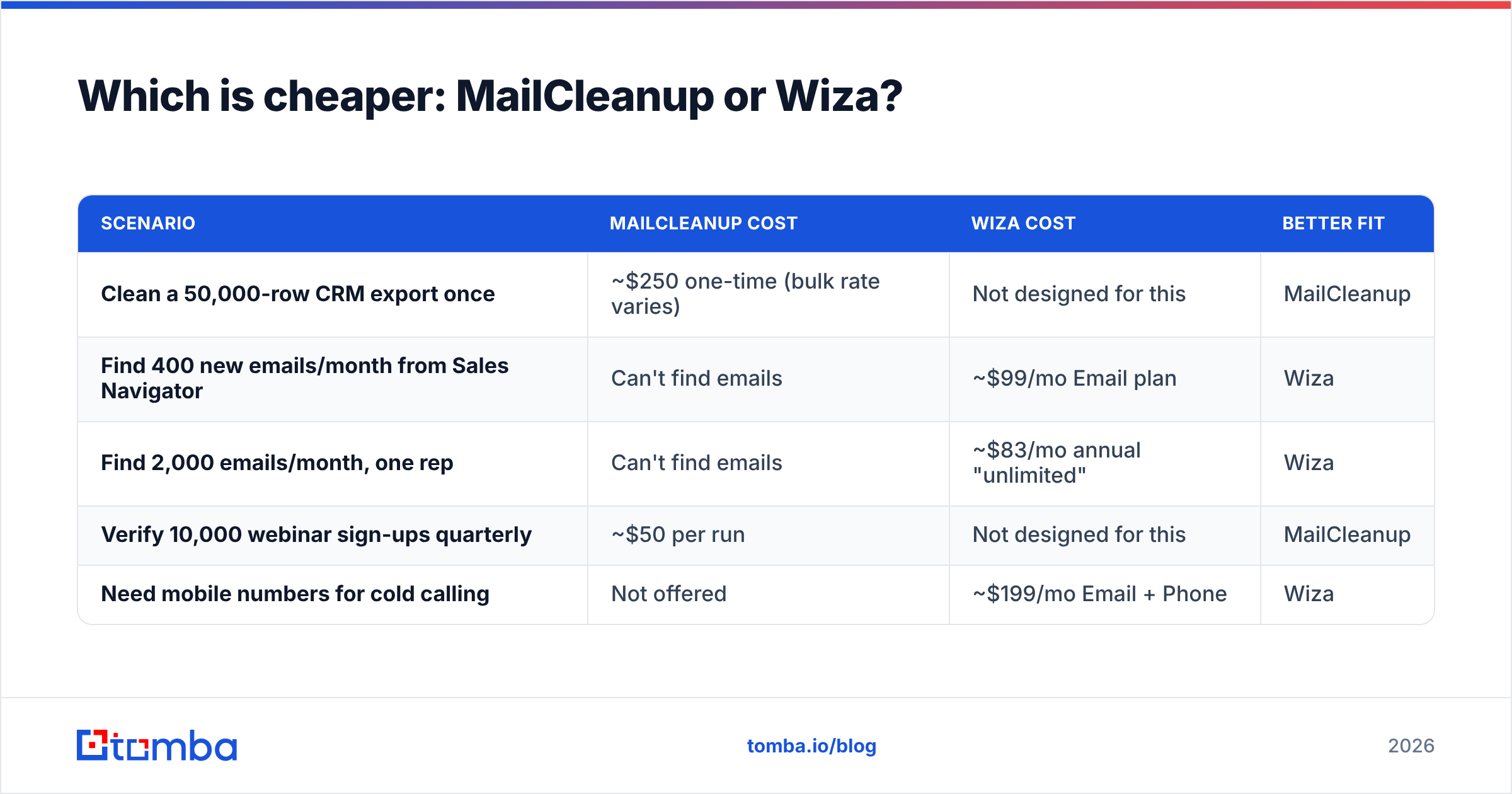
MailCleanup is far cheaper per action, but the actions are different, so the useful question is cost per usable contact in your situation.
| Scenario | MailCleanup cost | Wiza cost | Better fit |
|---|---|---|---|
| Clean a 50,000-row CRM export once | ~$250 one-time (bulk rate varies) | Not designed for this | MailCleanup |
| Find 400 new emails/month from Sales Navigator | Can't find emails | ~$99/mo Email plan | Wiza |
| Find 2,000 emails/month, one rep | Can't find emails | ~$83/mo annual "unlimited" | Wiza |
| Verify 10,000 webinar sign-ups quarterly | ~$50 per run | Not designed for this | MailCleanup |
| Need mobile numbers for cold calling | Not offered | ~$199/mo Email + Phone | Wiza |
MailCleanup's model suits irregular, list-based work. You pay once when you have a list and nothing in quiet months. Wiza's model suits steady daily prospecting, where a subscription cost spread across many found contacts gets cheaper per contact.
Once you add the two together, the stack cost matters too. A team paying ~$99/mo for Wiza plus occasional MailCleanup purchases is paying for two vendors, two logins, and a CSV handoff between them. That's fine at small volume and gets annoying as you grow.
Who should choose MailCleanup?#
MailCleanup fits if:
- You already have data and it's going stale. B2B email lists decay quickly as people change jobs, so a CRM nobody has cleaned in a year usually has a meaningful share of dead addresses.
- You hate subscriptions. You pay only when you upload a list.
- You send newsletters or marketing email, not only cold outbound, and need list hygiene for email deliverability on your existing audience.
- Your volume is spiky, such as a big clean before a launch and then little for months.
MailCleanup isn't a good fit if you need new contacts, phone numbers, or deep CRM integration. Check its documentation for API and native integration support before you plan an automated workflow around it. Its public listings focus on CSV upload.
Who should choose Wiza?#
Wiza fits if:
- Your team prospects in LinkedIn Sales Navigator every day and wants emails without leaving it.
- You need phone numbers as well as emails for multichannel outreach.
- Your volume is steady and predictable, so a monthly plan's credits actually get used.
- You want found emails already verified, so you don't need a separate verification step for fresh exports.
Wiza isn't a good fit if you mainly need to clean data from outside LinkedIn, if your prospects aren't active on LinkedIn, or if you'd hit the monthly export cap.

Do you actually need both tools?#
Probably, in some form. The reason is a simple point about data quality: any email you found more than a few weeks ago is unverified now. A Wiza export from March isn't a verified list in September. People leave, companies change domains, and mailboxes get shut down.
So most outbound teams that take deliverability seriously end up with two layers:
- A finder to create new contacts, from LinkedIn, by domain, or by name and company.
- A verifier to re-check everything before each send, including the finder's own older output.
You can do this with two separate tools (Wiza plus MailCleanup), or with one platform that handles both. One platform means one bill, one credit pool, and no CSV handoff between apps.
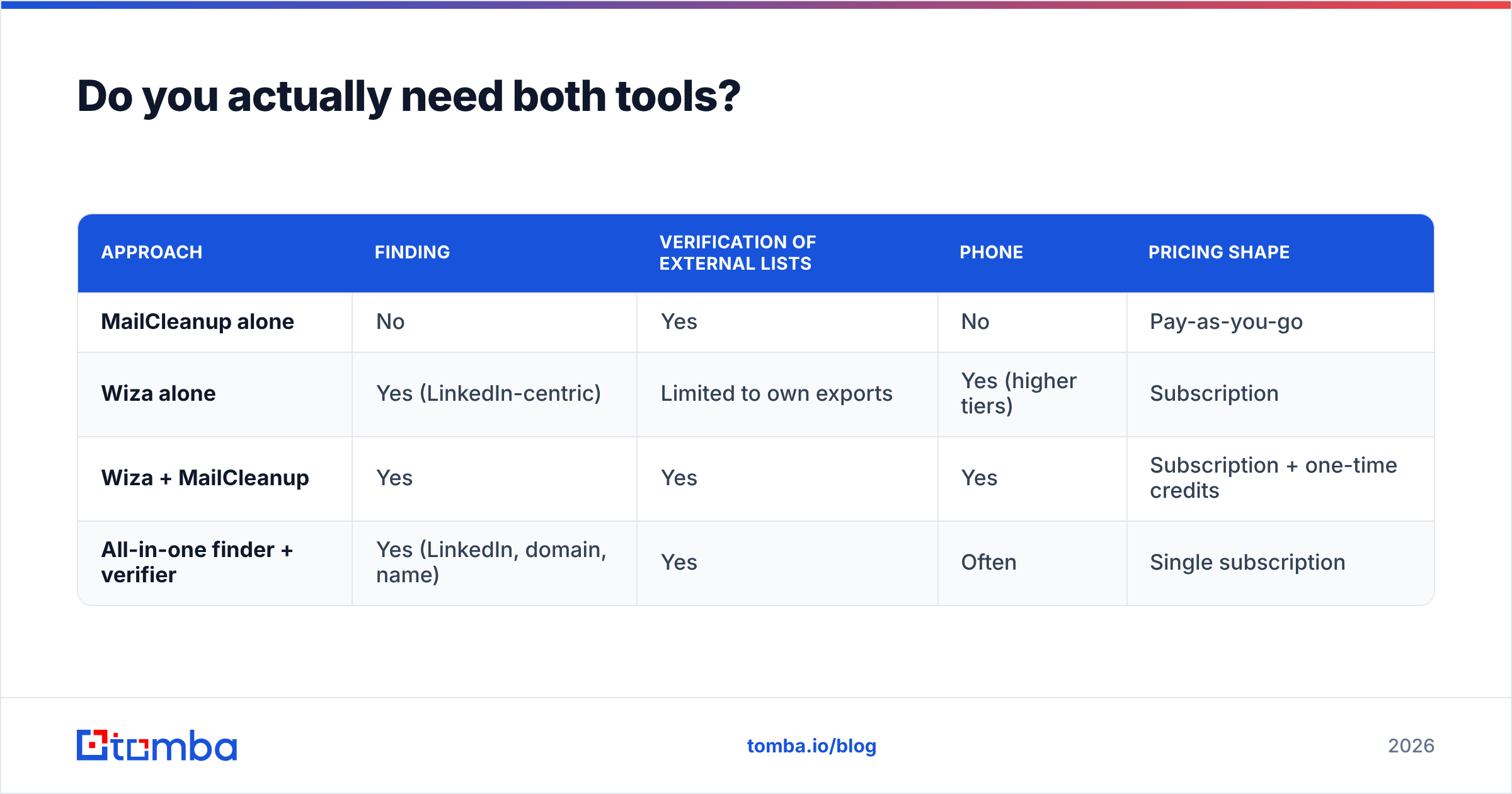
Here's how the three main options compare:
| Approach | Finding | Verification of external lists | Phone | Pricing shape |
|---|---|---|---|---|
| MailCleanup alone | No | Yes | No | Pay-as-you-go |
| Wiza alone | Yes (LinkedIn-centric) | Limited to own exports | Yes (higher tiers) | Subscription |
| Wiza + MailCleanup | Yes | Yes | Yes | Subscription + one-time credits |
| All-in-one finder + verifier | Yes (LinkedIn, domain, name) | Yes | Often | Single subscription |
How does Tomba fit into this comparison?#
Tomba is an all-in-one option: an email finder with verification, domain search, catch-all handling, and phone finding on the same account. It's not the only tool of this type, and if you already like Wiza for Sales Navigator, keeping it is reasonable. But if what you really want is "find and verify without two vendors," here's how Tomba lines up:
- Finding. Tomba finds emails by domain, by name and company, or from LinkedIn profiles through its LinkedIn finder and browser extension, so you aren't limited to Sales Navigator workflows.
- Verification. The email verifier works on any list you upload, not just Tomba's own results, so it does MailCleanup's job too. A separate catch-all verifier handles the accept-all domains that standard SMTP checks can't resolve.
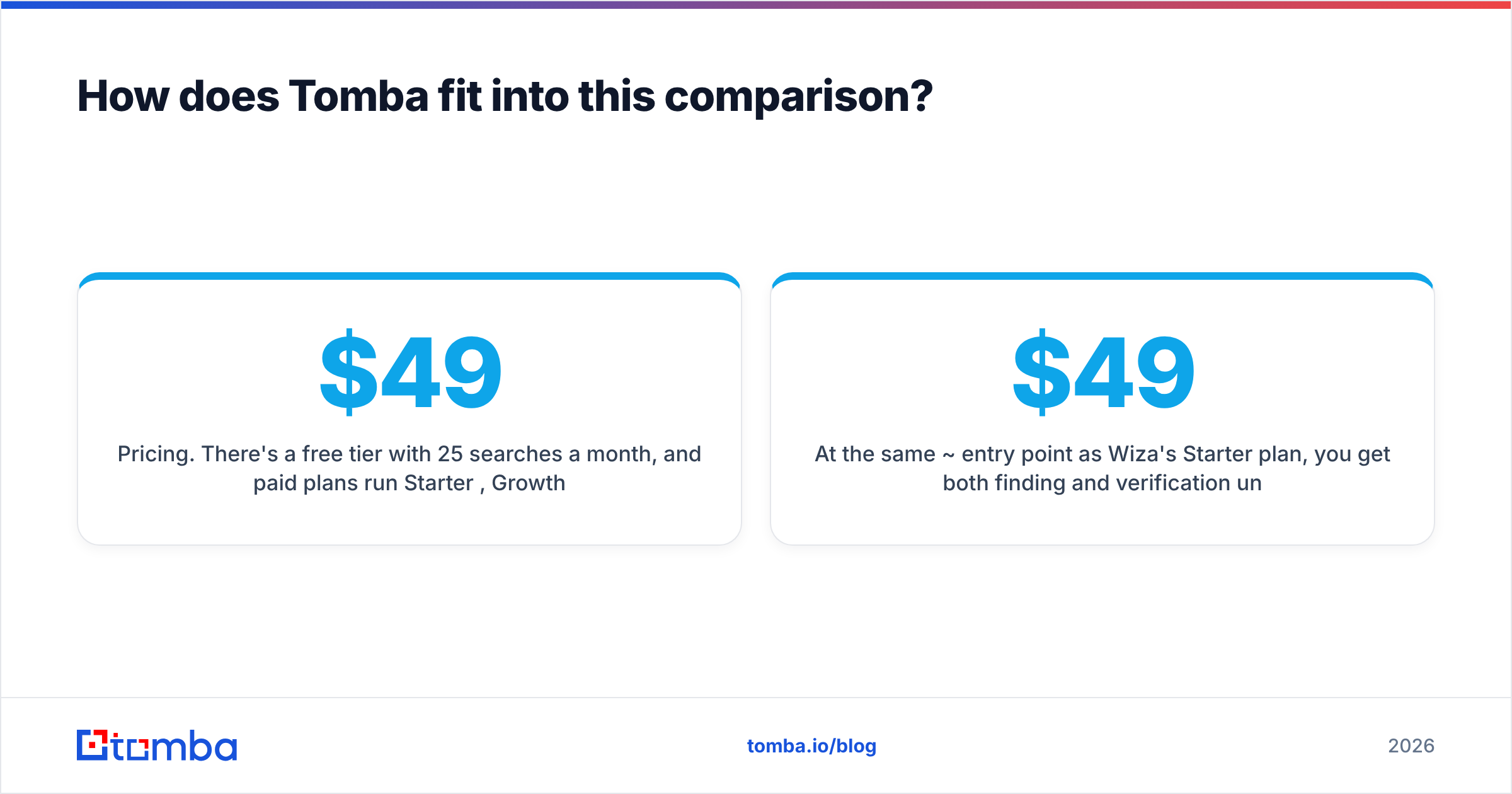
- Pricing. There's a free tier with 25 searches a month, and paid plans run Starter $49/mo, Growth $99/mo, and Pro $249/mo, with Enterprise on custom terms. Full Tomba pricing has the credit breakdown.
At the same ~$49 entry point as Wiza's Starter plan, you get both finding and verification under one account. Whether that beats Wiza + MailCleanup depends on how much of your prospecting has to happen inside Sales Navigator, and Wiza remains the stronger choice when it does.
What's the final verdict on Mailcleanup vs Wiza?#
- Pick MailCleanup if you have plenty of data and need to keep it from damaging your sender reputation. It's cheap, has no subscription, and does one job.
- Pick Wiza if your team lives in LinkedIn Sales Navigator and needs fresh, verified emails and phone numbers every day.
- Pick both if you prospect on LinkedIn and keep a large CRM. Re-verify Wiza exports with MailCleanup before every major send.
- Pick an all-in-one finder + verifier if you'd rather not manage two tools, two bills, and the CSV handoff between them.
One rule applies whichever you choose: verify close to the time you send. Data that was verified when you found it can be out of date a few months later.
If you want finding and verification on one account, try Tomba Email Finder. You can find emails by domain, by name, or from LinkedIn, verify any list you already have, and start on the free tier with 25 searches a month before deciding whether you need Wiza, MailCleanup, or neither.
Related guides#
// start free
See who Tomba finds at any company
Type a company's domain to see its people, their roles and verified work emails, each with the pages it was found on. Free account, no card.
Free plan · No credit card required · GDPR & CCPA
// about the author