Mailead Pricing, Reviews, Pros and Cons: An Honest 2026 Breakdown
Mailead looks cheap at $19/mo, with unlimited mailboxes and built-in warmup. Here are its reported plans, what AppSumo buyers say, the real pros and cons, and who should still buy it in 2026.

TL;DR
- Mailead is a budget cold email platform. Third-party listings put its reported plans at about $19/mo (Starter), $52/mo (Pro), and $112/mo (Growth), with custom pricing above that. All plans include unlimited mailboxes and email warmup.
- Your bill depends on monthly email volume, not on how many inboxes you connect. That makes it cheap for agencies that rotate many sending domains.
- Public reviews are thin and mixed. On AppSumo the tool sits around 3.5 stars from roughly 70 reviews. Buyers like the warmup and the price, and they complain about bugs, slow warmup, and support that has gone quiet.
- It suits small teams and lifetime-deal buyers who are comfortable with risk. If you need dependable support, deep analytics, or a vendor with a long track record, look elsewhere.
- No sending tool saves a bad list. Check the cost of finding and verifying contacts before you compare per-email prices.
What is Mailead?#
Mailead is a cold email outreach platform. It covers the usual sending stack in one place: you connect your mailboxes, warm them up, build sequences with follow-ups, rotate sending across inboxes, and track replies. It grew its user base largely through an AppSumo lifetime deal, which explains both the price-sensitive customers and the large share of reviews that sit on AppSumo rather than G2 or Capterra.
Its pitch is the same one Instantly and Smartlead made popular: unlimited email accounts and unlimited warmup, with pricing tied to how many emails you send. Older outreach tools charge per seat or per mailbox. Mailead's model is built for cold email in 2026, where you spread sending across many inboxes and domains to protect sender reputation.
You can check the current offer on the official site at mailead.io. The figures below come from third-party listings and reviews, so confirm them before you buy. Vendors in this category change plans often.
How much does Mailead cost in 2026?#
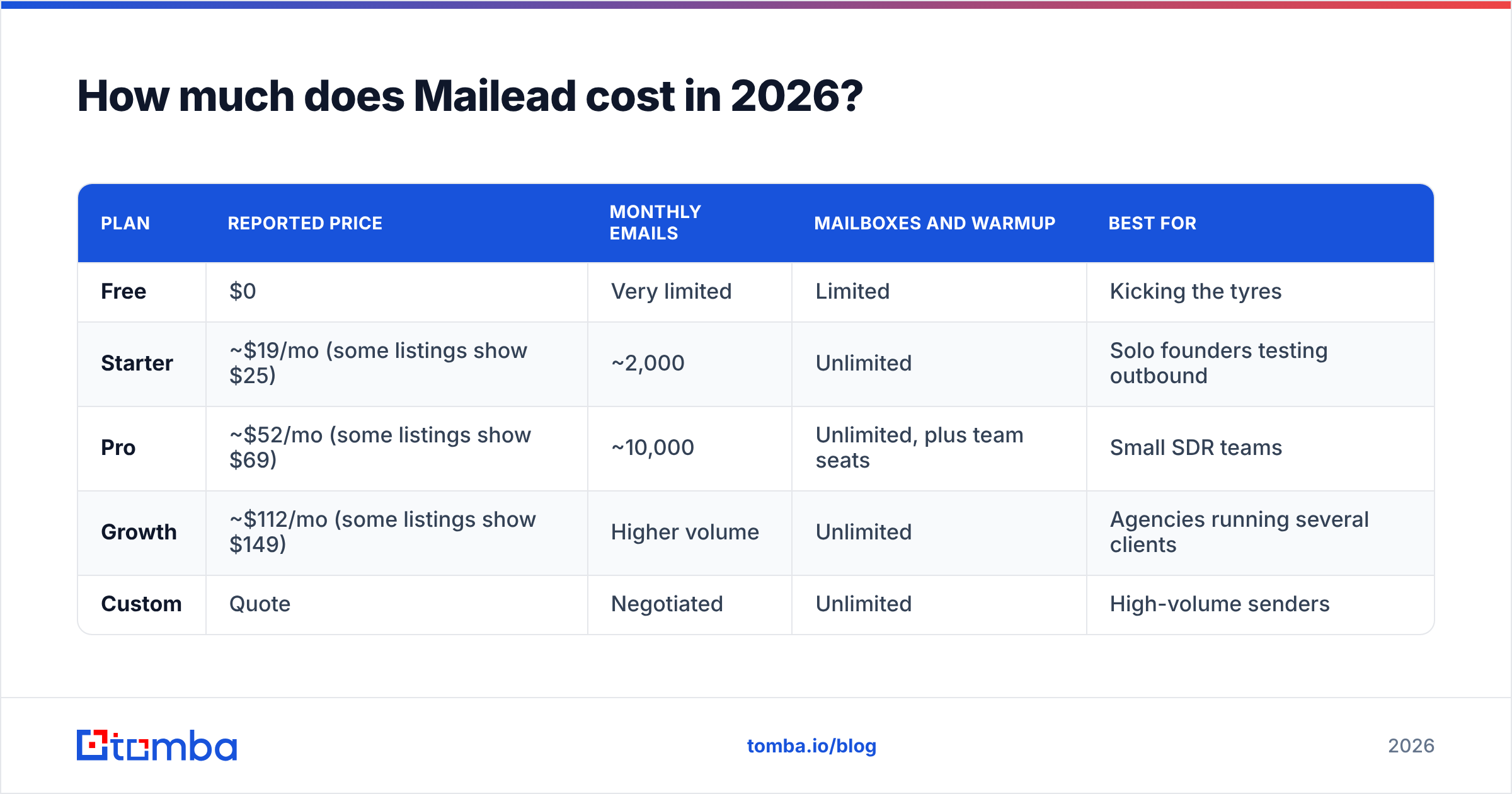
Mailead uses volume-based tiers. Here is what independent listings and competitor reviews have reported most recently:
| Plan | Reported price | Monthly emails | Mailboxes and warmup | Best for |
|---|---|---|---|---|
| Free | $0 | Very limited | Limited | Kicking the tyres |
| Starter | ~$19/mo (some listings show $25) | ~2,000 | Unlimited | Solo founders testing outbound |
| Pro | ~$52/mo (some listings show $69) | ~10,000 | Unlimited, plus team seats | Small SDR teams |
| Growth | ~$112/mo (some listings show $149) | Higher volume | Unlimited | Agencies running several clients |
| Custom | Quote | Negotiated | Unlimited | High-volume senders |
Two caveats:
- The paired prices are probably annual versus monthly billing. One listing shows $19/$25, $52/$69 and $112/$149 for the three tiers. The lower figure is most likely the annual-billing rate and the higher one the month-to-month rate, but neither listing says so.
- Some aggregator sites list much higher plans, in the $199 to $999 range. Those figures look outdated or belong to a different product package. If the number you see at checkout doesn't match the table above, trust the checkout.
What does Mailead really cost per email?#
The sticker price hides the useful number. Take the reported Starter plan: about $19 for about 2,000 emails, or roughly $0.0095 per send. The reported Pro plan works out to about $0.005 per send. That is cheap. But a cold email program costs more than the sending tool. Every month you also pay for:
- Domains and mailboxes. Each Google Workspace or Microsoft 365 inbox costs money, and serious senders run 5 to 20 of them.
- Contact data. You still have to find the right person's address.
- Verification. Sending to invalid addresses is the fastest way to burn a new domain.
- Your time. A cheaper tool with more bugs costs you hours.
Do the maths for your own setup. A $19 sending plan on top of $60/mo in inboxes and an unverified scraped list is not a cheap program. It is a fast way to get a domain blacklisted.

What do Mailead reviews actually say?#
There isn't much review data for Mailead. One competitor review (Woodpecker's, so not neutral) noted that independent reviews of the tool are hard to find outside AppSumo. Most of what's public is on AppSumo, where Mailead averages about 3.5 stars across roughly 70 reviews.
The feedback falls into a few clear groups.
What reviewers like
- Warmup that works. Several buyers say the built-in warmup moved new inboxes toward the primary tab reliably.
- Unlimited accounts. Agencies like that adding a new client's inboxes doesn't raise the bill.
- Automation hooks. Some reviewers mention easy integration with automation tools such as TaskMagic.
- Price. For lifetime-deal buyers, a one-time payment for ongoing sending capacity felt like very good value.
What reviewers complain about
- Bugs. Several reviewers mention small UI and sequencing glitches.
- Slow warmup. Some found that ramping new inboxes took longer than with competing tools.
- Support and roadmap worries. At least one 1-star review says the product appears abandoned, with little support and few updates. That is one user's experience, not proof. Still, on a lifetime-deal product, buyers worry about this more than anything else.
How to read this: a 3.5-star average on AppSumo is middling. LTD audiences are generous early and harsh later. The direction of the reviews matters more than the average. If recent reviews mention support going quiet, take it seriously, because a cold email tool sits right on top of your domain reputation.
What are the pros and cons of Mailead?#
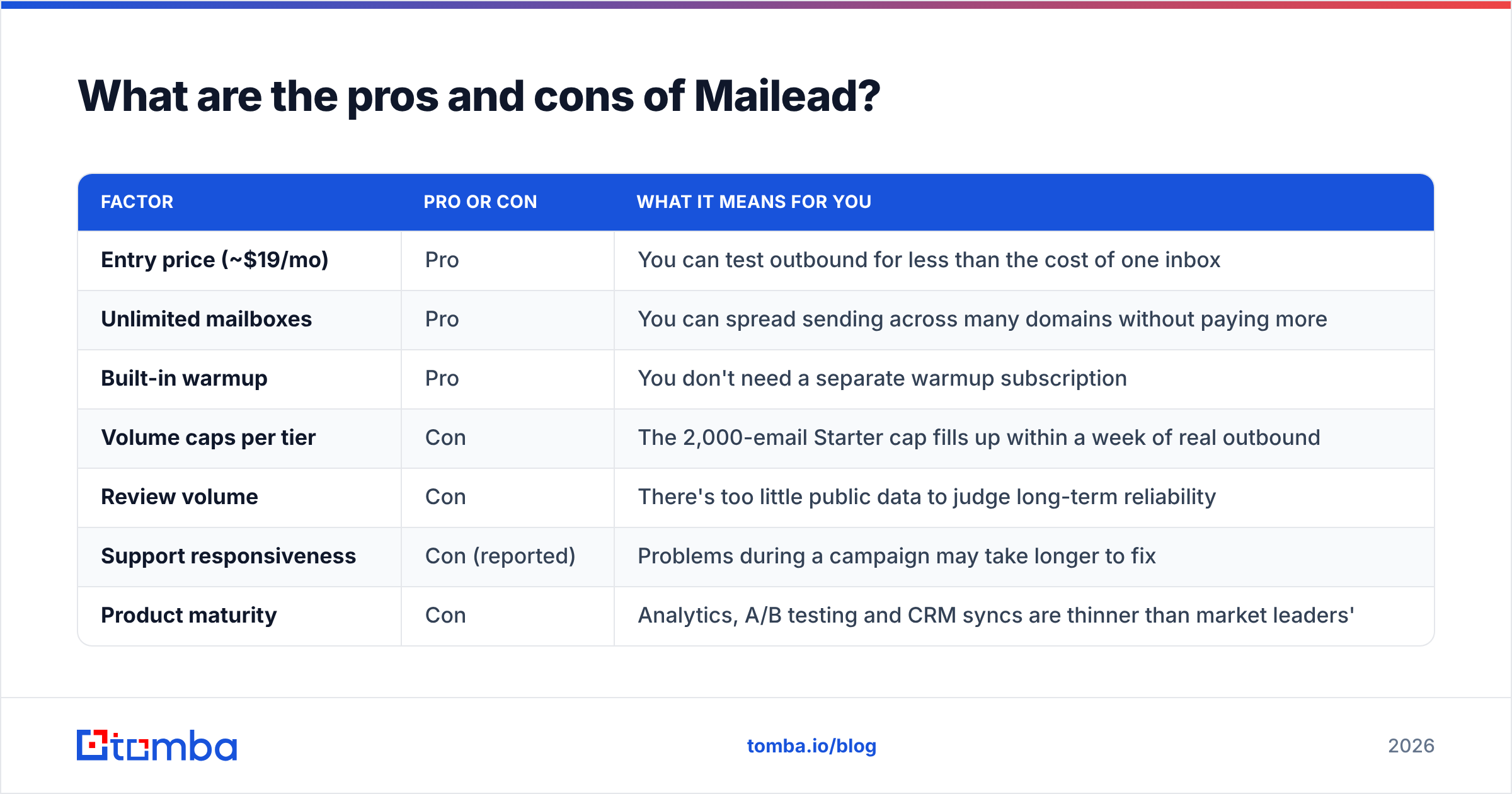
Here is the short version, with what each point means in practice:
| Factor | Pro or con | What it means for you |
|---|---|---|
| Entry price (~$19/mo) | Pro | You can test outbound for less than the cost of one inbox |
| Unlimited mailboxes | Pro | You can spread sending across many domains without paying more |
| Built-in warmup | Pro | You don't need a separate warmup subscription |
| Volume caps per tier | Con | The 2,000-email Starter cap fills up within a week of real outbound |
| Review volume | Con | There's too little public data to judge long-term reliability |
| Support responsiveness | Con (reported) | Problems during a campaign may take longer to fix |
| Product maturity | Con | Analytics, A/B testing and CRM syncs are thinner than market leaders' |
| Lifetime deal history | Mixed | Cheap to get started, but the vendor has less recurring revenue to fund development |
Which pros matter most?#
Pricing by email volume rather than by inbox is the real advantage. A modern cold email setup spreads sending across many mailboxes to keep each one well under provider limits. Google's email sender guidelines push bulk senders toward authentication, low spam complaint rates, and easy unsubscribes. Spreading volume across inboxes is part of how teams stay inside those limits. If a tool charges per mailbox, every inbox you add for safety raises the bill. Mailead doesn't charge that way.
The other thing that matters is warmup bundled into every plan. You still need to plan your ramp properly (a warmup calculator helps you set daily limits per inbox), but you don't pay for a separate warmup tool.
Which cons should worry you?#
Vendor risk is the main one. Your sending tool holds your sequences, your reply data, and your mailbox connections. If it breaks in the middle of a campaign and nobody answers support tickets, you lose pipeline and possibly domain health. With a newer, smaller vendor that has sparse reviews, you take on that risk yourself.
The second concern is the volume ceiling on the cheaper plans. Two thousand emails a month is fine for a founder testing one offer. A single SDR running a three-step sequence to 700 new prospects a month will hit it. Plan around the Pro tier if outbound is a real channel for you, not an experiment.
Is Mailead worth it for your team?#
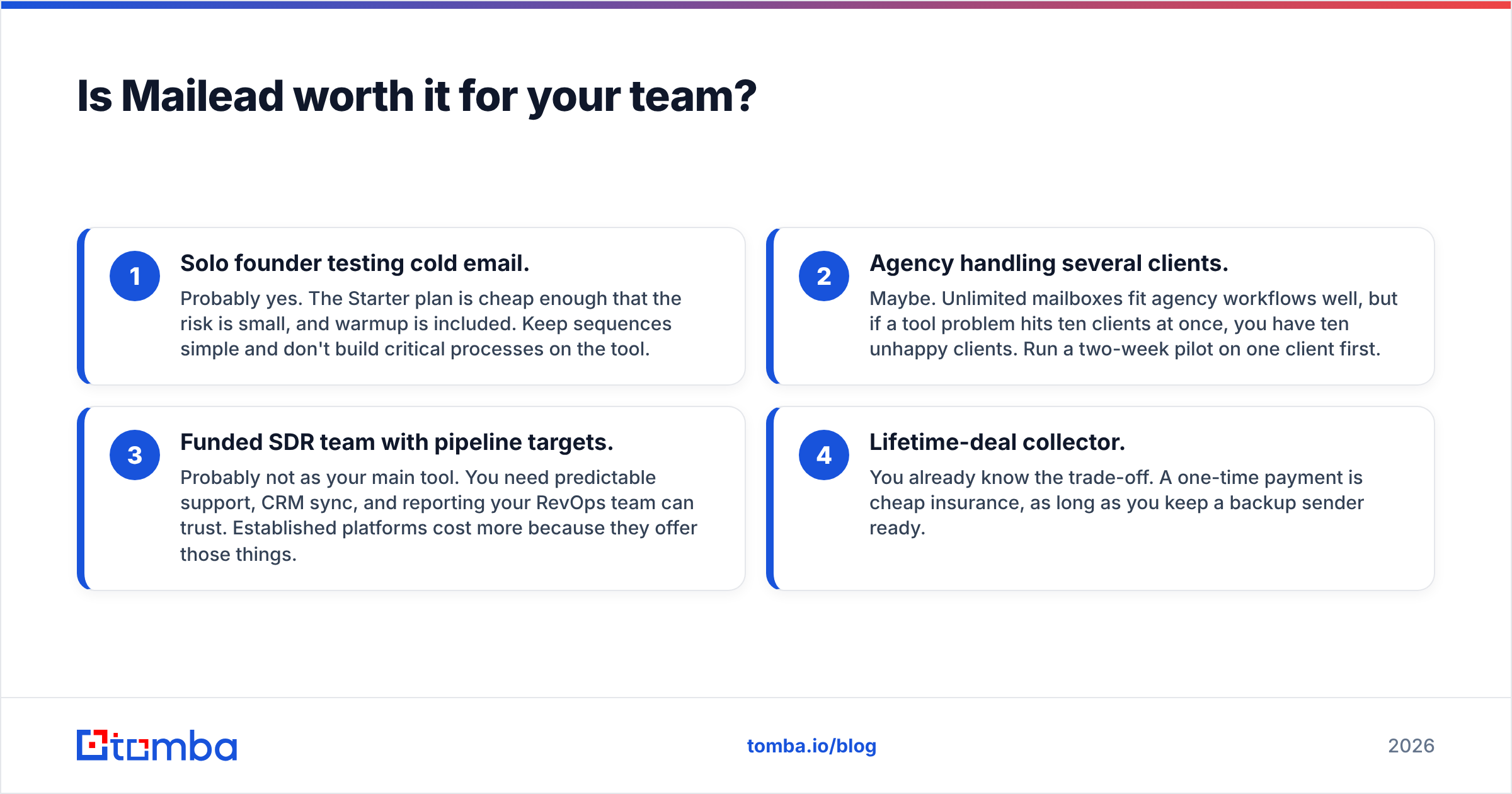
It depends on who you are. Here is a short decision guide:
- Solo founder testing cold email. Probably yes. The Starter plan is cheap enough that the risk is small, and warmup is included. Keep sequences simple and don't build critical processes on the tool.
- Agency handling several clients. Maybe. Unlimited mailboxes fit agency workflows well, but if a tool problem hits ten clients at once, you have ten unhappy clients. Run a two-week pilot on one client first.
- Funded SDR team with pipeline targets. Probably not as your main tool. You need predictable support, CRM sync, and reporting your RevOps team can trust. Established platforms cost more because they offer those things.
- Lifetime-deal collector. You already know the trade-off. A one-time payment is cheap insurance, as long as you keep a backup sender ready.
What should you compare Mailead against?#
If Mailead's risk profile doesn't suit you, these are the obvious tools to compare it with:
- Instantly. The best-known "unlimited inboxes plus warmup" platform. It costs more than Mailead but has a much larger user base and more public reviews. If Instantly is on your shortlist, our Instantly alternative breakdown covers where it falls short.
- Smartlead. Similar unlimited-mailbox model, popular with agencies for its white-label options.
- Woodpecker. An older tool with a strong focus on deliverability and solid support. It charges per contacted prospect rather than per email.
- Lemlist. Better for multichannel (email plus LinkedIn) and personalised images. It costs more per seat.
- Reply.io. Closer to a full sales engagement platform, with calling and LinkedIn steps.
Whichever tool you choose, compare them on the same things: cost at your monthly volume, warmup quality, inbox rotation, reply detection, CRM sync, and how quickly support responds to a ticket. Run a real support test during the trial. Open a ticket and time the reply.

Why does the sending tool matter less than your list?#
Teams switch from one sending tool to another looking for better reply rates, and the problem is usually the list. When reply rates drop, it's rarely because one sequencer's follow-up logic is better than another's. It's usually because:
- A large share of addresses bounce, which hurts sender reputation across every inbox in the rotation.
- Catch-all domains accept everything, so you can't tell real recipients from dead ends.
- Contacts are outdated, and the people you're emailing changed jobs months ago.
- The emails reach the wrong people: right company, wrong role.
Mailead's unlimited inboxes don't fix any of this. Spreading a bad list across 15 inboxes just spreads the damage across 15 inboxes. Before you start a campaign on any sending platform, run your list through an email verifier. Check catch-all domains separately, and remove anything risky.
This matters most on cheap plans. If your volume is capped at 2,000 sends a month, every email to an invalid address wastes part of a small budget and hurts your domain's reputation.
How do you get the most out of Mailead if you buy it?#
If you go with Mailead, set it up to limit the risks above:
- Start on monthly billing. Pay the higher monthly rate for the first one or two months before committing to annual. That protects you if the product doesn't hold up.
- Keep your list somewhere else. Store prospects in your CRM or a spreadsheet, not only inside Mailead, so you can switch tools within a day.
- Warm up for at least two to three weeks before running real campaigns, and keep each inbox at a modest daily limit.
- Authenticate every sending domain with SPF, DKIM and DMARC before you connect it.
- Verify every list before upload, and re-verify anything older than 60 days.
- Test support during the trial. If a simple ticket takes more than two business days, that tells you what to expect when something breaks mid-campaign.
Where does Tomba fit in a Mailead setup?#
Mailead sends the emails. It doesn't tell you who to email or whether the address exists. That's the gap Tomba fills. You find decision-makers by domain or by name, verify the addresses, then export a clean CSV straight into whichever sequencer you use, whether that's Mailead, Instantly or something else.
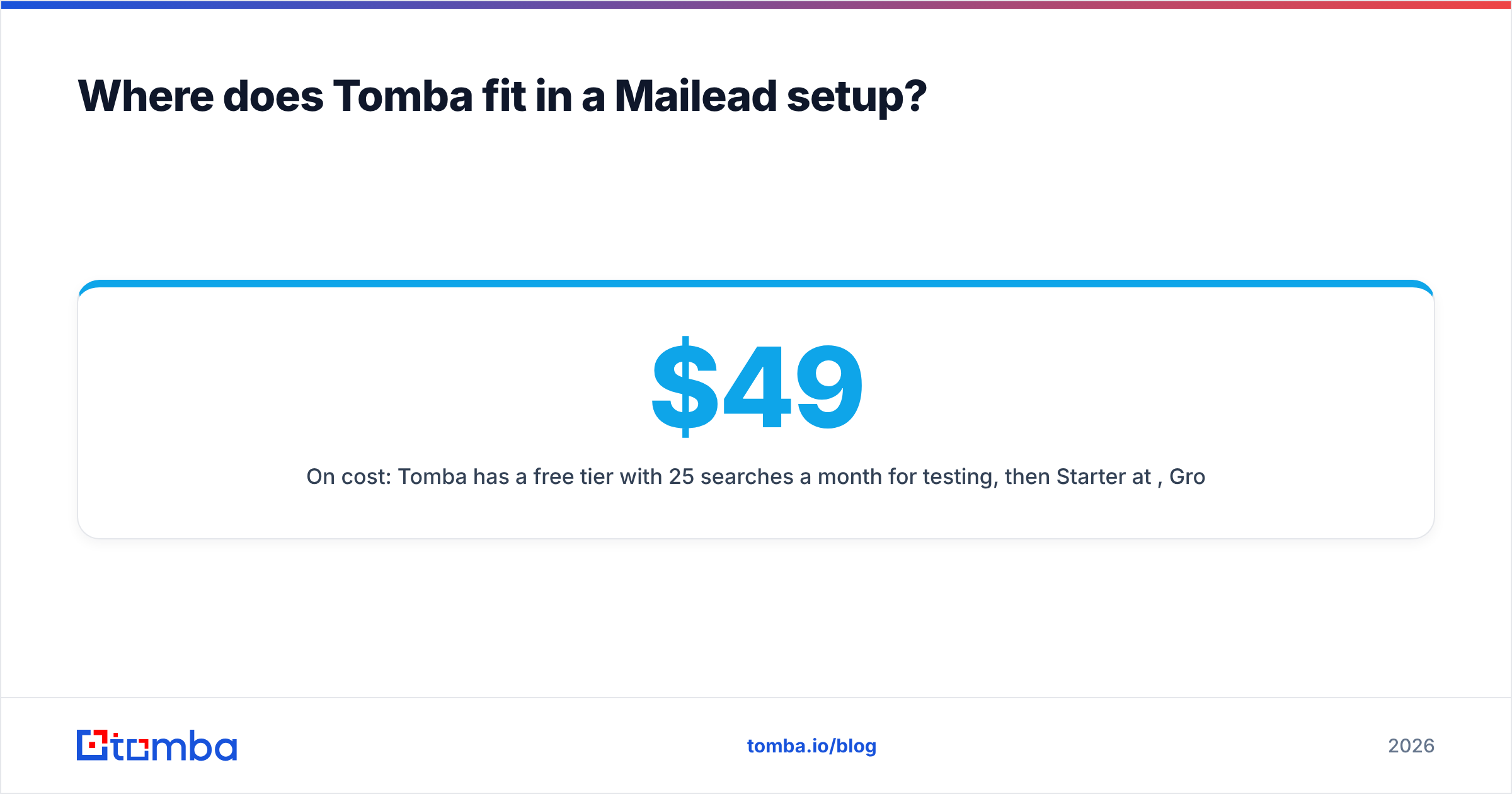
On cost: Tomba has a free tier with 25 searches a month for testing, then Starter at $49/mo, Growth at $99/mo and Pro at $249/mo (full breakdown in Tomba pricing). Paired with a budget sender like Mailead, a lean outbound setup can come in under $100 a month, with list quality as the part you don't compromise on.
Final verdict: is Mailead pricing worth it?#
Mailead is cheap, its reported plans are easy to understand, and unlimited mailboxes with warmup make it a reasonable choice for founders and small agencies trying cold email on a tight budget. The weak points are the ones you'd expect from a younger, lifetime-deal-funded product: few public reviews, reported bugs, and questions about support. Treat it as a low-cost experiment, not the base of a revenue team. Keep your data portable, and measure the real cost at your volume rather than the headline $19.
Whatever you send with, results depend on the list. Use the Tomba Email Finder to find verified professional addresses by domain, name or company before you load anything into Mailead. Clean data keeps your bounce rates low and your domains healthy, and makes a cheap sending plan worth what you pay for it.
Related guides#
// start free
See who Tomba finds at any company
Type a company's domain to see its people, their roles and verified work emails, each with the pages it was found on. Free account, no card.
Free plan · No credit card required · GDPR & CCPA
// about the author