MailerCheck Pricing, Reviews, Pros and Cons: 2026 Breakdown
MailerCheck charges about a cent per verified email, and its credits never expire. Here is what that costs at real list sizes, what reviewers praise and complain about, and when a find-and-verify tool is the better buy.
TL;DR
- MailerCheck runs on pay-as-you-go credits. MailerCheck's own pricing page puts verification at about $0.01 per email, with a 1,000-credit minimum ($10). Credits don't expire and there's no required subscription.
- Reviews are strong but there aren't many of them: 4.9/5 on Capterra and 4.6/5 on G2, each from around 10 reviews. People praise how simple it is and how well it works with MailerLite.
- The main drawbacks: catch-all addresses come back as "unknown," large lists can be slow, and the bulk discount is small.
- It fits best if you're a marketer cleaning a newsletter list now and then. It fits poorly if you need to find and verify B2B contacts together.
- If you're doing outbound prospecting, a tool that finds and verifies in one step usually costs less per usable contact than buying verification on its own.
What is MailerCheck?#
MailerCheck is an email list verification and deliverability tool built by the team behind MailerLite and MailerSend. You upload a list or connect an email service provider (ESP). MailerCheck checks each address's syntax, domain, MX records and mailbox, then sorts every address into a bucket: valid, invalid, catch-all, disposable, role-based, or unknown.
Over time it has picked up more than bulk verification:
- Email list verification: upload a CSV or sync a list from a connected ESP, then download the cleaned results.
- Real-time verification API: check addresses as people submit them on signup forms.
- Inbox placement tests: send a seed test to see whether your campaign lands in the inbox, the promotions tab, or spam at the major providers.
- Email insights: a pre-send review of content, links and authentication before a campaign goes out.
- DMARC and blocklist monitoring: ongoing checks on your sending domains.
Think of it as list hygiene for people who already have a list. It doesn't give you new contacts. It tells you which ones you already hold are safe to send to.
How much does MailerCheck cost in 2026?#
The short answer: about one cent per verified email, bought in advance in packs of at least 1,000.
Here's what MailerCheck's official pricing page says:
- Pay-as-you-go credits. There's a 1,000-credit minimum, and no monthly commitment is required.
- No discount codes. MailerCheck says outright that it doesn't run discounts. You only save by buying bigger credit packs.
- 10 free credits on a new account to test list verification.
- Credits don't expire, so buying a large block for quarterly cleanups wastes nothing.
- Inbox placement tests and email insights use extra credits. One recent third-party review lists each inbox test at 200 credits.
The details get murky past that. A September 2026 review that checked the official page lists a flat $0.01 per credit at every volume. Older listings on aggregator sites such as TrustRadius show tiers that fall to around $0.006 per credit at 50K–100K. Treat the tiered numbers as possibly outdated, and check the live calculator on MailerCheck's pricing page before you budget.
What does that look like at real list sizes?#
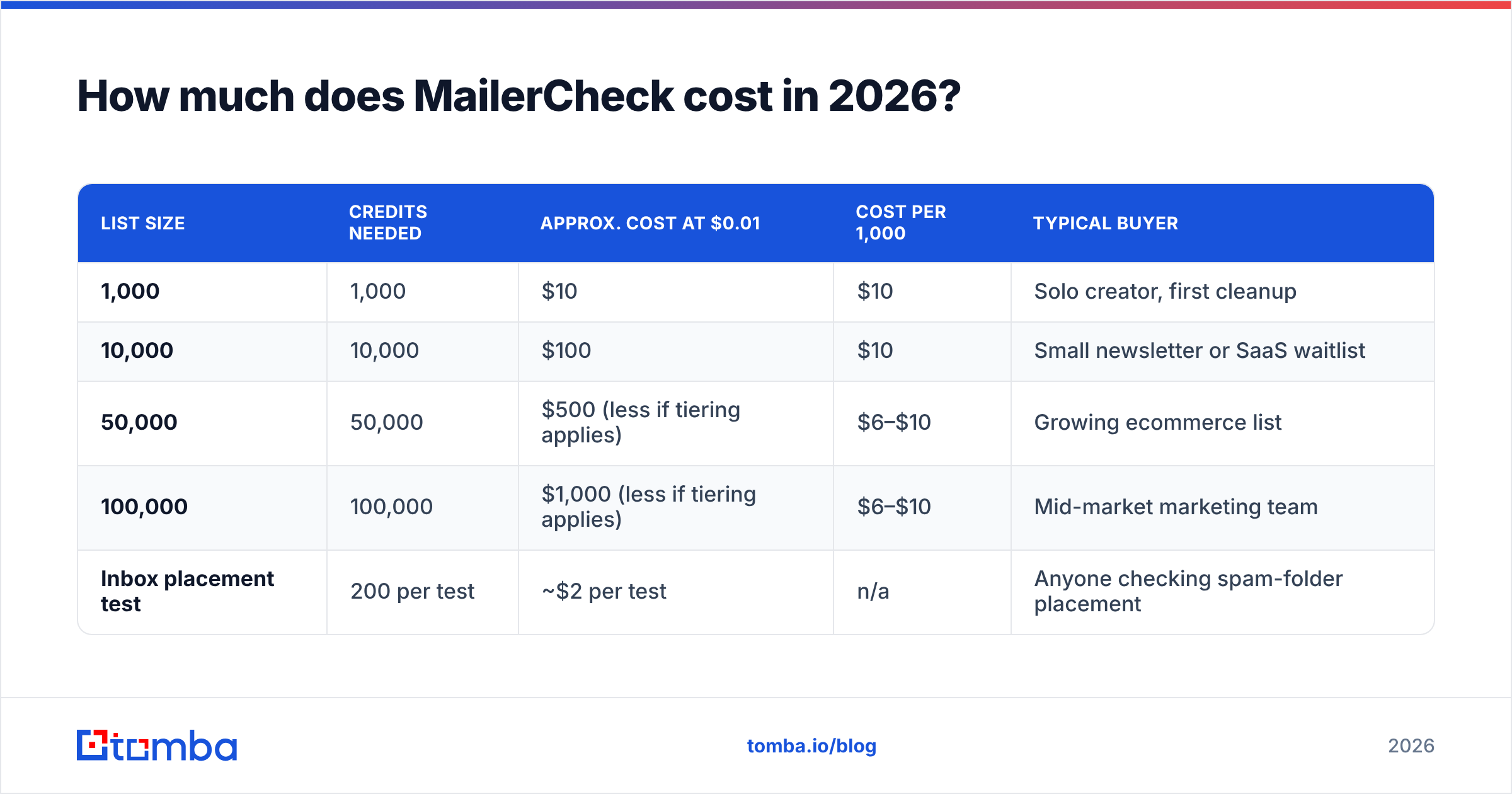
Using the flat $0.01 rate as the worst case:
| List size | Credits needed | Approx. cost at $0.01 | Cost per 1,000 | Typical buyer |
|---|---|---|---|---|
| 1,000 | 1,000 | $10 | $10 | Solo creator, first cleanup |
| 10,000 | 10,000 | $100 | $10 | Small newsletter or SaaS waitlist |
| 50,000 | 50,000 | $500 (less if tiering applies) | $6–$10 | Growing ecommerce list |
| 100,000 | 100,000 | $1,000 (less if tiering applies) | $6–$10 | Mid-market marketing team |
| Inbox placement test | 200 per test | ~$2 per test | n/a | Anyone checking spam-folder placement |
Two things matter more than the headline rate:
- You pay for every address, including the ones that turn out bad. If 20% of a 50,000-row list is invalid, you've spent about $100 confirming that 10,000 addresses are dead. That's still cheaper than the sender reputation hit you'd take from mailing them, but it's a real cost.
- Catch-all results don't settle anything. You pay for the check, and the answer is still "might be fine." More on that below.

What do MailerCheck reviews actually say?#
MailerCheck is well rated, but not many people have reviewed it. On Capterra it has 4.9 out of 5 from about nine verified reviews, with 5.0 for customer service and 4.8 for ease of use. On G2 it scores 4.6 from around ten reviews, which is too few for G2 to build its usual pros-and-cons summary.
With samples that small, a single reviewer can move the average. Here are the themes that come up more than once.
What reviewers like#
- It's very easy to use. Upload a file, wait, download. There's no setup and you don't need a sales call.
- It connects smoothly to MailerLite. If MailerLite is your ESP, verification feels like part of the product.
- There's no subscription. Several reviewers mention buying credits only when they need them.
- The reports are clean. Results are well organized and easy to export, with syntax errors, disposable domains and catch-alls flagged separately.
- Support responds quickly. At least one reviewer whose large list timed out says support fixed it fast.
What reviewers complain about#
- Catch-all addresses stay gray. MailerCheck flags them but can't tell you whether to send.
- Big lists take time. Some runs take several minutes or longer, and very large uploads have stalled.
- Some say it over-flags. A few third-party write-ups say real addresses get marked risky. These come mostly from competing vendors, so read them skeptically. We couldn't confirm the claim in verified reviews.
- It only has a few native integrations. It has about six ESP connectors, and HubSpot and Mailchimp are among them. Most other workflows mean exporting a CSV or using the API.
What are MailerCheck's pros and cons?#
Here's a compact summary for your evaluation doc:
| Pros | Cons |
|---|---|
| Simple pay-as-you-go credits with no subscription | About $0.01/email is mid-pack, not cheap |
| Credits never expire | 1,000-credit minimum purchase |
| Very easy to use, with a strong support reputation | Catch-all addresses remain unresolved |
| Inbox placement, insights and DMARC in one account | Extras use credits on top of verification |
| Built by the MailerLite/MailerSend team, so ESP sync works well | Small review sample, and few native integrations |
| Real-time API for signup forms | Doesn't find new contacts; verification only |
Is MailerCheck worth it for your use case?#
Whether it's worth the money depends on where your emails come from. Here's how it plays out for four common buyer types.
- Newsletter and ecommerce marketers. Yes, mostly. Your list comes from opt-ins and grows slowly. You clean it once or twice a year and want MailerLite or Mailchimp sync. MailerCheck's credit model fits that pattern.
- Agencies cleaning client lists. It depends. Credits that never expire help, but the flat rate on six-figure lists adds up, and you'll want more integrations and white-label reports than MailerCheck offers.
- SDR and outbound teams. Usually not on its own. Your problem starts before verification: you need the address in the first place. Paying one tool to find an email and a second to verify it doubles your cost per contact and adds a CSV handoff.
- Product teams protecting signup forms. Yes, if the API volume fits. Real-time checks at a cent each are cheap compared with the email deliverability cost of fake signups.
How does MailerCheck compare with other verifiers?#
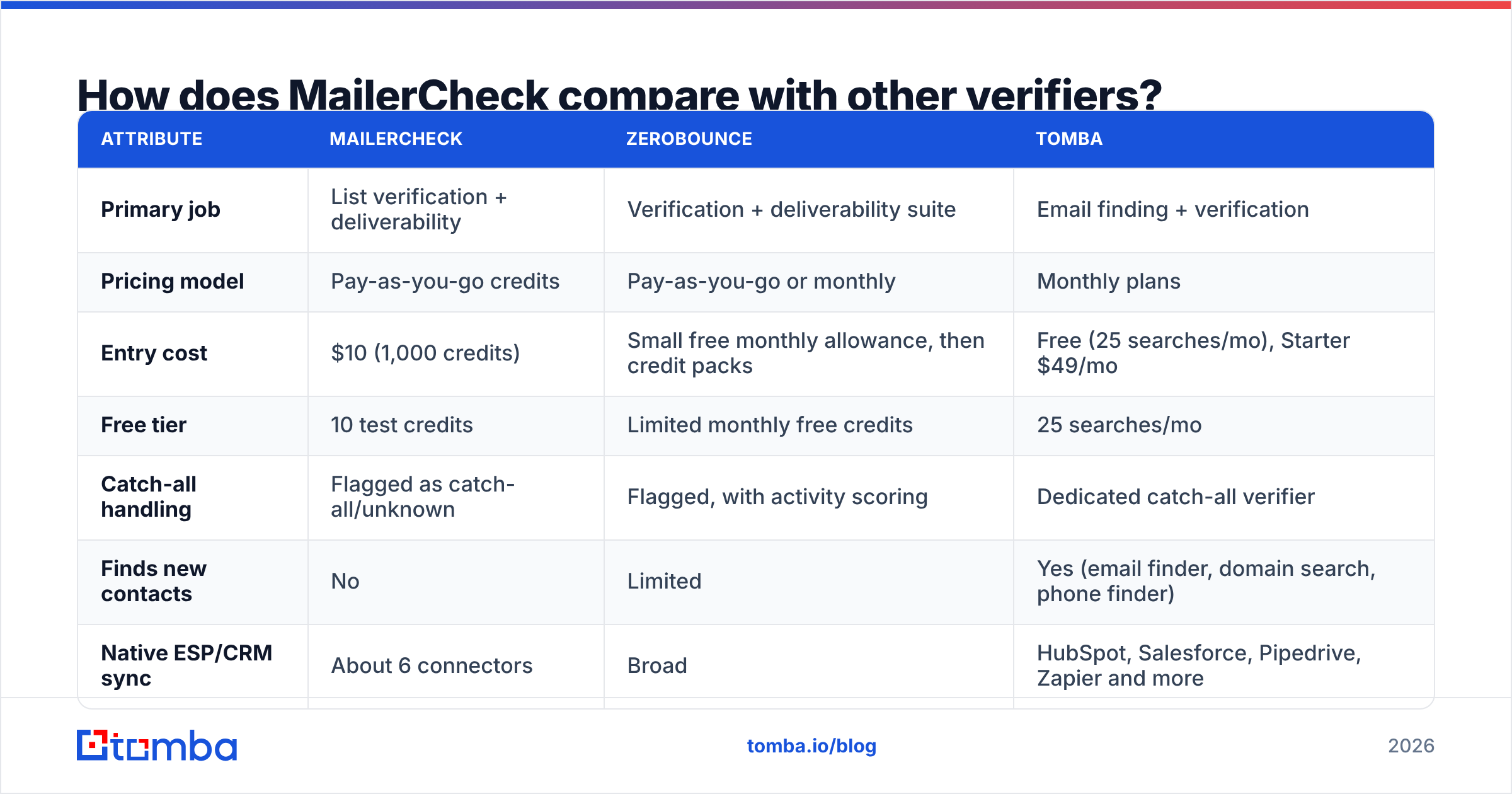
MailerCheck sits in a crowded middle tier. The real differences are in the pricing model (credits or subscription), how catch-alls are handled, and whether you can also find contacts in the same tool.
| Attribute | MailerCheck | ZeroBounce | Tomba |
|---|---|---|---|
| Primary job | List verification + deliverability | Verification + deliverability suite | Email finding + verification |
| Pricing model | Pay-as-you-go credits | Pay-as-you-go or monthly | Monthly plans |
| Entry cost | $10 (1,000 credits) | Small free monthly allowance, then credit packs | Free (25 searches/mo), Starter $49/mo |
| Free tier | 10 test credits | Limited monthly free credits | 25 searches/mo |
| Catch-all handling | Flagged as catch-all/unknown | Flagged, with activity scoring | Dedicated catch-all verifier |
| Finds new contacts | No | Limited | Yes (email finder, domain search, phone finder) |
| Native ESP/CRM sync | About 6 connectors | Broad | HubSpot, Salesforce, Pipedrive, Zapier and more |
| Best for | MailerLite users, occasional cleanups | High-volume marketing lists | Outbound and B2B prospecting |
ZeroBounce's free allowance and pack sizes change often. Check its live pricing before you compare. If you're looking at that side of the market, a dedicated ZeroBounce alternatives breakdown goes into more detail.
The key line in that table is "finds new contacts." MailerCheck, ZeroBounce and most standalone verifiers assume the list already exists. B2B outbound teams rarely start with a clean list. They start with a target account, and that changes which tool is cheapest.
What hidden costs should you watch for?#
The credit price is only part of what you'll spend. Here's what to budget for:
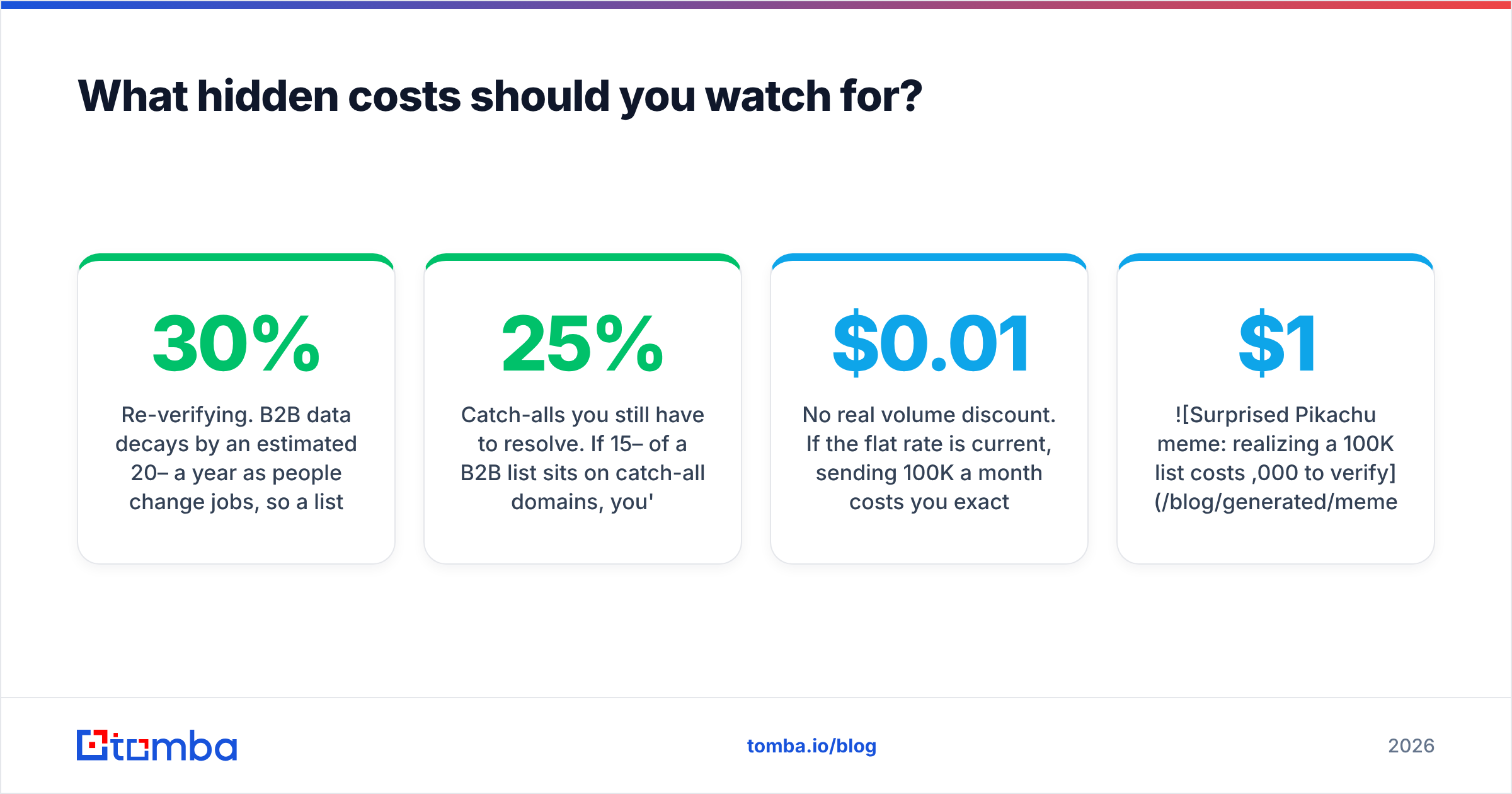
- Re-verifying. B2B data decays by an estimated 20–30% a year as people change jobs, so a list you cleaned in January needs checking again by summer. Every pass costs full credits again.
- Catch-alls you still have to resolve. If 15–25% of a B2B list sits on catch-all domains, you'll either send blind or pay for a second opinion. A dedicated catch-all verifier covers that gap. Standalone list cleaners usually don't.
- Credits spent on add-ons. Inbox placement tests and insights come out of the same balance as verification, so a team that runs weekly seed tests will burn through credits faster than planned.
- Moving data between tools. If you find emails in one tool and verify them in MailerCheck, someone has to export, upload, download and re-import. That labor rarely makes it into the budget.
- No real volume discount. If the flat $0.01 rate is current, sending 100K a month costs you exactly ten times what 10K does. Subscription verifiers usually pass along more of a scale discount.

When should you choose something other than MailerCheck?#
Look at other options if any of these apply to you:
- Your list comes from prospecting, not opt-ins. You need to find the address and confirm it in the same step, so paying separately for verification is wasted spend.
- Catch-all domains are a large share of your sends. Enterprise and mid-market targets often run catch-all mail servers. You need an answer for those addresses, not just a flag.
- You live in a CRM, not an ESP. If HubSpot, Salesforce or Pipedrive is where you work, native enrichment and verification beat CSV round-trips.
- You verify on a schedule. A monthly plan that includes verification often costs less than repeated credit top-ups.
For outbound teams, the better move is to verify as part of finding the contact. With Tomba, the email finder returns an address with a confidence score, the email verifier checks it, and catch-all domains go to a separate check. That's one tool, one export and one bill. You can line up the volumes against Tomba pricing: a free tier with 25 searches a month, then Starter at $49, Growth at $99 and Pro at $249 a month, with Enterprise on custom terms.
Tomba isn't a replacement for MailerCheck's inbox placement tests or DMARC monitoring. If deliverability monitoring is your main need, MailerCheck's add-ons are useful, and that's an honest point in its favor.
What's the final verdict on MailerCheck pricing?#
MailerCheck is a fairly priced, low-friction list cleaner. It's best for marketers who already own a list, use MailerLite or a similar ESP, and verify a few times a year. The credits don't expire, the interface stays out of your way, and support has a good reputation. The weak spots are predictable: no real bulk discount, catch-alls left unresolved, and no way to find new contacts.
Choose MailerCheck if you're cleaning an opt-in list, want pay-as-you-go pricing with no subscription, and value inbox placement testing.
Look elsewhere if your contacts come from outbound prospecting, catch-alls make up a large share of your targets, or you need finding and verifying in one CRM-connected workflow.
Ready to find and verify in one step?#
If your list starts with target accounts rather than signup forms, verifying it in a separate tool means paying twice for every contact. Tomba Email Finder finds professional email addresses by name, domain or company and verifies them before they reach your sequence. Start on the free plan with 25 searches a month, run your own target accounts through it, and compare the cost per usable contact against a find-then-MailerCheck workflow. You can decide from your own numbers.
Related guides#
// start free
See who Tomba finds at any company
Type a company's domain to see its people, their roles and verified work emails, each with the pages it was found on. Free account, no card.
Free plan · No credit card required · GDPR & CCPA
// about the author