MailerCheck vs SignalHire: Email Verifier vs Contact Finder in 2026
MailerCheck cleans the email list you already have. SignalHire finds contacts you don't have yet. Here's how they compare on pricing, credits, accuracy and fit, so you can tell which one your outbound stack is missing.
TL;DR
- MailerCheck and SignalHire do different jobs. MailerCheck checks emails you already have and tests deliverability. SignalHire finds emails and phone numbers for people you haven't contacted yet.
- MailerCheck is pay-as-you-go, at about $0.01 per verification credit with a 1,000-credit minimum, and credits don't expire. SignalHire is a subscription, starting around $69/mo for emails or for phones, and about $139/mo for both.
- Choose MailerCheck if you have a list and your bounce rate or inbox placement is the problem. Choose SignalHire if you have names but no contact details, especially for recruiting or phone-heavy outreach.
- Most outbound teams end up needing both a finder and a verifier. If you'd rather pay for one tool, look at a platform that combines the two.
Most "MailerCheck vs SignalHire" searches come from someone with a specific problem: emails are bouncing, or there's a list of names with no contact details. These two tools fix different ones. MailerCheck sits after you have data. SignalHire sits before you have it. Comparing them only makes sense once you know which side of that line your problem is on.
This breakdown covers what each tool does, current pricing, where each is strong and weak, and when one tool is better than two.
What is MailerCheck?#
MailerCheck is an email verification and deliverability tool from the team behind MailerLite. You upload a list or connect an email service provider, and it labels each address as valid, invalid, catch-all, disposable, role-based, or risky. Its job is to keep you from sending to addresses that will bounce and hurt your sender reputation.
MailerCheck also offers deliverability features beyond list cleaning:
- List verification: bulk CSV upload, a single-address check, and an API for real-time checks at signup.
- Inbox placement tests: send a test campaign to seed addresses and see whether it lands in the inbox, the promotions tab, or spam.
- Email content checks: catch spam triggers, broken links, and rendering problems before you send.
- DMARC and blocklist monitoring: keep track of your domain's authentication and listing status over time.
- ESP integrations: pull lists straight from MailerLite, Mailchimp, HubSpot, and similar platforms, then push cleaned results back.
The point to remember for this comparison: MailerCheck does not find new contacts. If you give it a name and a company, it has nothing to look up. It only checks addresses you already have.
What is SignalHire?#
SignalHire is a contact-finding platform. You give it a person, usually from a LinkedIn profile, a GitHub page, or its own search engine, and it returns that person's work email, personal email, and phone number when it has them.
It started out aimed at recruiters, and that still shows in the product:
- Chrome extension: shows contact details on LinkedIn, GitHub, Twitter/X and other profile pages.
- People search: filter its database by title, company, location, and skills.
- Bulk enrichment: upload a list of names or profile URLs and get contact data back.
- Phone numbers: direct dials and mobile numbers, sold as a separate credit type.
- API and ATS/CRM exports: for teams that want enrichment built into their own workflows.
SignalHire runs some checks on the emails it returns, but it is not a standalone deliverability tool. It doesn't offer inbox placement testing, DMARC monitoring, or content analysis.

How do MailerCheck and SignalHire compare side by side?#
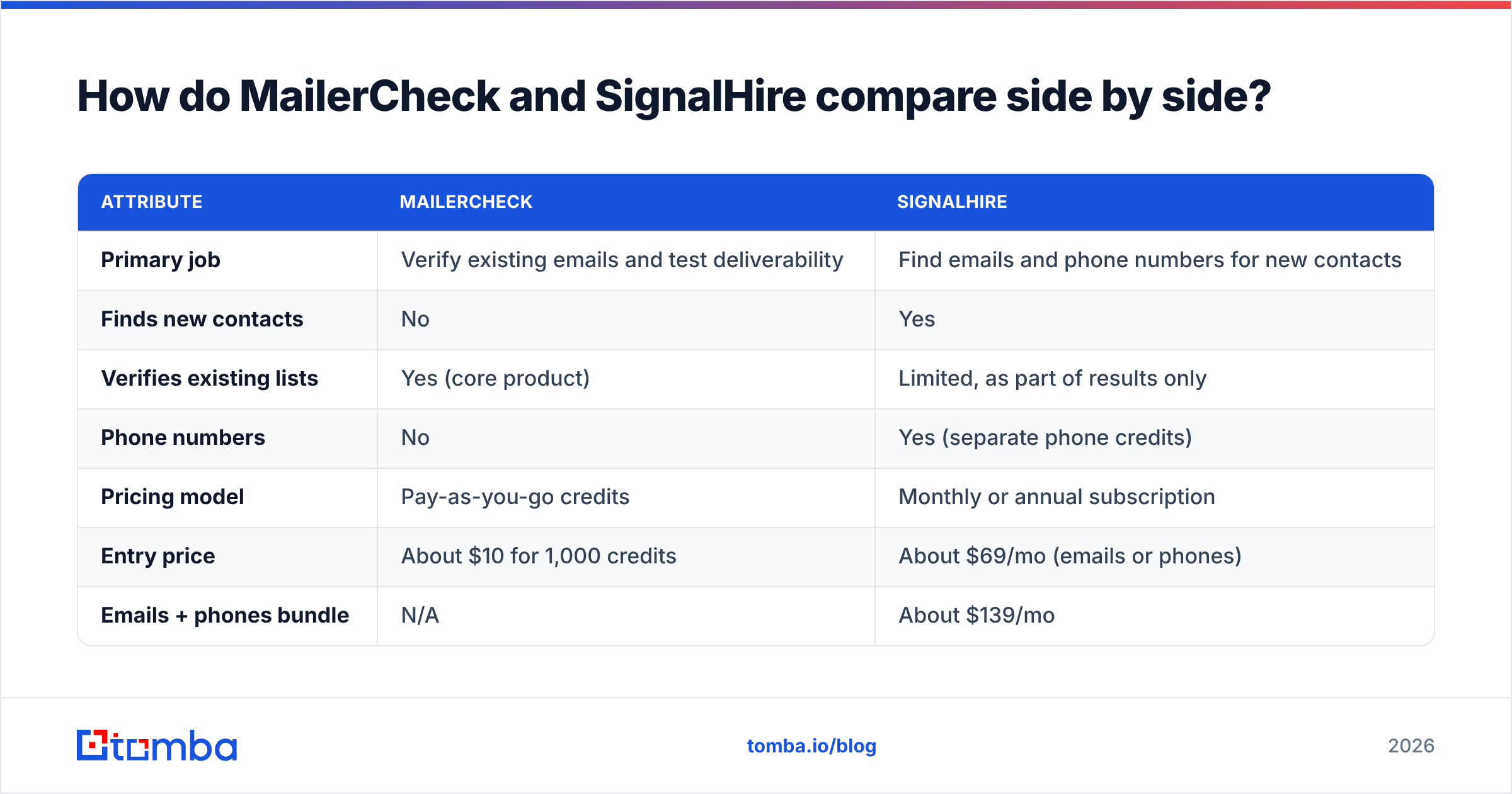
The table below lines them up on the attributes that usually decide the purchase. Prices are list prices at the time of writing. Both vendors change their pricing pages often (SignalHire changed its plans more than once in 2026), so check before you buy.
| Attribute | MailerCheck | SignalHire |
|---|---|---|
| Primary job | Verify existing emails and test deliverability | Find emails and phone numbers for new contacts |
| Finds new contacts | No | Yes |
| Verifies existing lists | Yes (core product) | Limited, as part of results only |
| Phone numbers | No | Yes (separate phone credits) |
| Pricing model | Pay-as-you-go credits | Monthly or annual subscription |
| Entry price | About $10 for 1,000 credits | About $69/mo (emails or phones) |
| Emails + phones bundle | N/A | About $139/mo |
| Free tier | Small trial credit allowance | About 5 credits/mo (more with extension) |
| Credit expiry | Credits never expire | Monthly allowance resets |
| Deliverability tools | Inbox placement, content check, DMARC, blocklist | None |
| Browser extension | No | Yes (LinkedIn, GitHub, etc.) |
| API | Yes | Yes (higher tiers / custom) |
| Best for | Marketers, ESP users, ops teams cleaning lists | Recruiters, SDRs building lists from profiles |
Independent reviews on G2 say much the same thing. MailerCheck gets praise for being simple and cheap for occasional cleanups. SignalHire gets praise for phone coverage and the extension, while some reviewers complain about credit limits and inconsistent coverage outside tech and recruiting-heavy roles.
Is MailerCheck better than SignalHire for email deliverability?#
Yes. This is MailerCheck's home ground. If your problem shows up as a high bounce rate, a domain warming up slowly, or campaigns landing in spam, a contact finder won't fix it. You need to know which addresses are bad and why your mail is being filtered.
Here's what MailerCheck does for deliverability that SignalHire doesn't:
- It removes hard bounces before they happen. Invalid and disposable addresses get flagged, so you don't burn reputation on them.
- It flags catch-all domains as their own category. That lets you decide whether to send to them carefully or drop them.
- It tests real inbox placement. A verified list can still land in spam if your content or authentication is off, and seed tests show you where your mail actually ends up.
- It monitors DMARC and blocklists over time. You find out about an authentication failure or a listing before it costs you a quarter's pipeline.
One limitation: catch-all domains are still hard for every verifier, because the server accepts every address during the SMTP check. MailerCheck labels these honestly as "catch-all" or "unknown" and doesn't guess. If many of your targets sit on catch-all domains (common at mid-market and enterprise companies), a dedicated catch-all verifier that goes further than a standard SMTP check can recover addresses you'd otherwise have to throw away.
Is SignalHire better than MailerCheck for prospecting?#
Yes, because MailerCheck doesn't prospect at all. If your pipeline starts with "I need to reach the VP of Engineering at these 300 companies," SignalHire can return contact details and MailerCheck can't.
SignalHire is strongest in these situations:
- Recruiting outreach. Profile-based lookup on LinkedIn and GitHub fits how recruiters already work.
- Phone-first sales motions. Mobile numbers are an add-on credit type, which many email-only finders don't offer.
- Individual SDR research. The extension is quick for one-off lookups while you're browsing profiles.
The tradeoffs:
- Credits are tight at entry level. Around 1,000 email credits a month disappears quickly if you're building lists at volume, and phone credits are a separate pool.
- "Unlimited" plans have caps. Third-party reviews describe fair-use limits on SignalHire's unlimited packages, and the numbers they quote don't agree. Read the terms before you count on unlimited volume.
- Coverage varies by segment. Like most contact databases, it's strongest where people keep public profiles up to date, which means tech, recruiting, and SaaS. Coverage is weaker in local SMBs, manufacturing, and some non-English markets.
- You should still verify. A found email isn't automatically a deliverable one. Teams sending at volume usually run found contacts through a separate verifier before they go into a sequence.
That last point is why the comparison is often framed wrong.
Do you actually need both tools?#
For most outbound teams, you need both jobs done. Whether that takes two tools is up to you. A typical data flow has four steps:
- Find: turn names, domains, or profiles into contact details.
- Verify: confirm each address is deliverable and flag catch-alls.
- Enrich: add title, company size, phone, and social profiles for segmentation.
- Send and monitor: run the sequence and watch bounces, replies, and inbox placement.
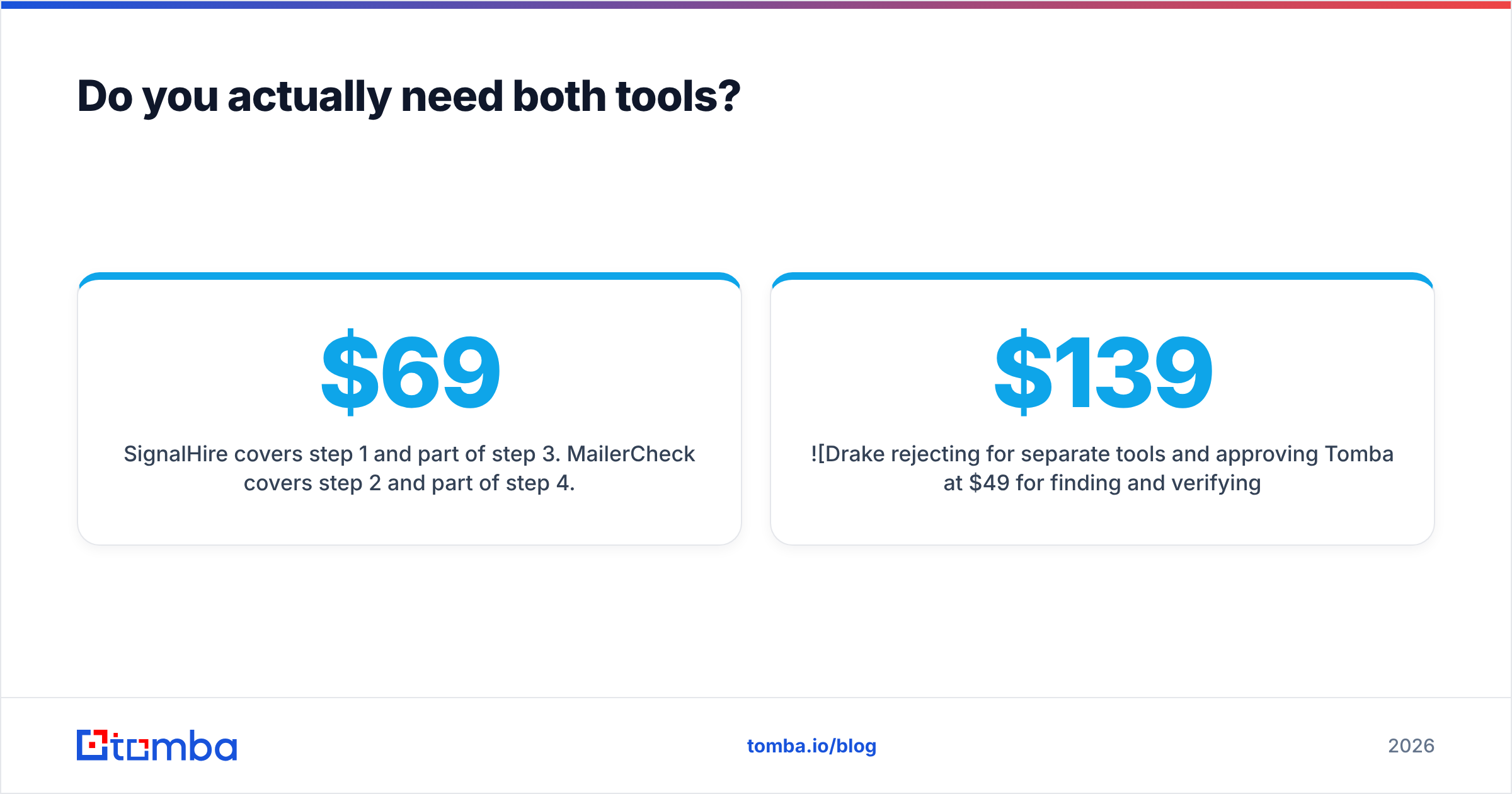
SignalHire covers step 1 and part of step 3. MailerCheck covers step 2 and part of step 4. If you buy both, you'll pay about $69–$139/mo for SignalHire plus MailerCheck credits, export and re-import CSVs between them, and reconcile two sets of statuses.
Some teams are fine with that. The tools are good at what they do, and a recruiting team that already loves SignalHire's extension may just add MailerCheck for a monthly cleanup. If you're starting from scratch, though, look at platforms that find and verify in one pass. The email verifier and email finder inside Tomba share one credit pool and one export, which removes the CSV round trip.

How does pricing compare in real-world scenarios?#
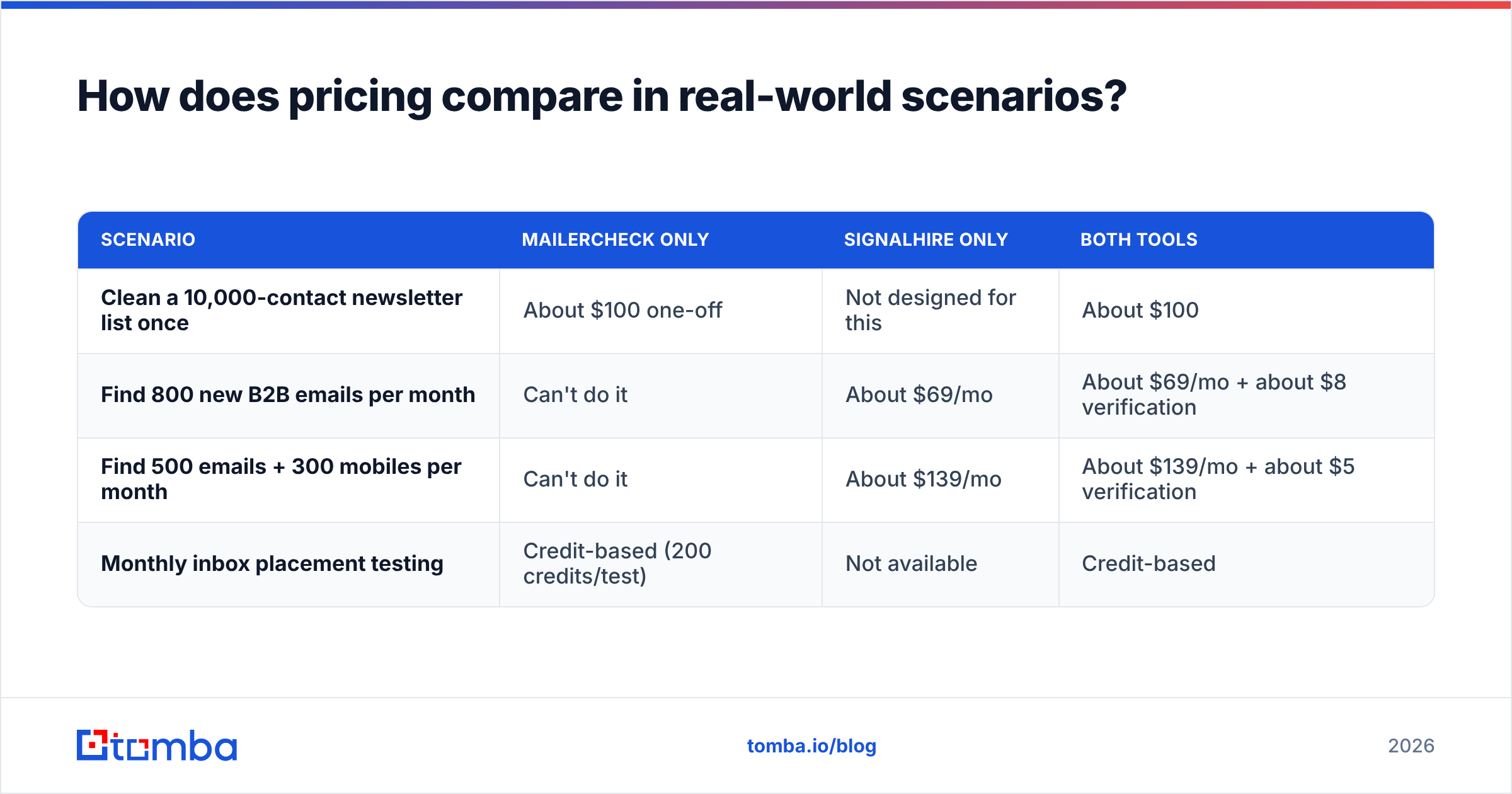
List prices don't tell you much until you apply them to a workload. Here are three common cases, using the public figures above. Treat them as estimates.
| Scenario | MailerCheck only | SignalHire only | Both tools |
|---|---|---|---|
| Clean a 10,000-contact newsletter list once | About $100 one-off | Not designed for this | About $100 |
| Find 800 new B2B emails per month | Can't do it | About $69/mo | About $69/mo + about $8 verification |
| Find 500 emails + 300 mobiles per month | Can't do it | About $139/mo | About $139/mo + about $5 verification |
| Monthly inbox placement testing | Credit-based (200 credits/test) | Not available | Credit-based |
Two patterns stand out. MailerCheck is very cheap for occasional verification because credits never expire, so a quarterly cleanup doesn't commit you to anything. SignalHire's cost rises mainly with phone numbers. If you only need emails, you're paying a premium for a phone database you won't use.
For comparison, Tomba's plans start with a free tier of 25 searches a month, then Starter at $49/mo, Growth at $99/mo, and Pro at $249/mo, with finding and verification included under the same plan. Full limits per tier are on Tomba pricing.
Which should you choose: MailerCheck or SignalHire?#
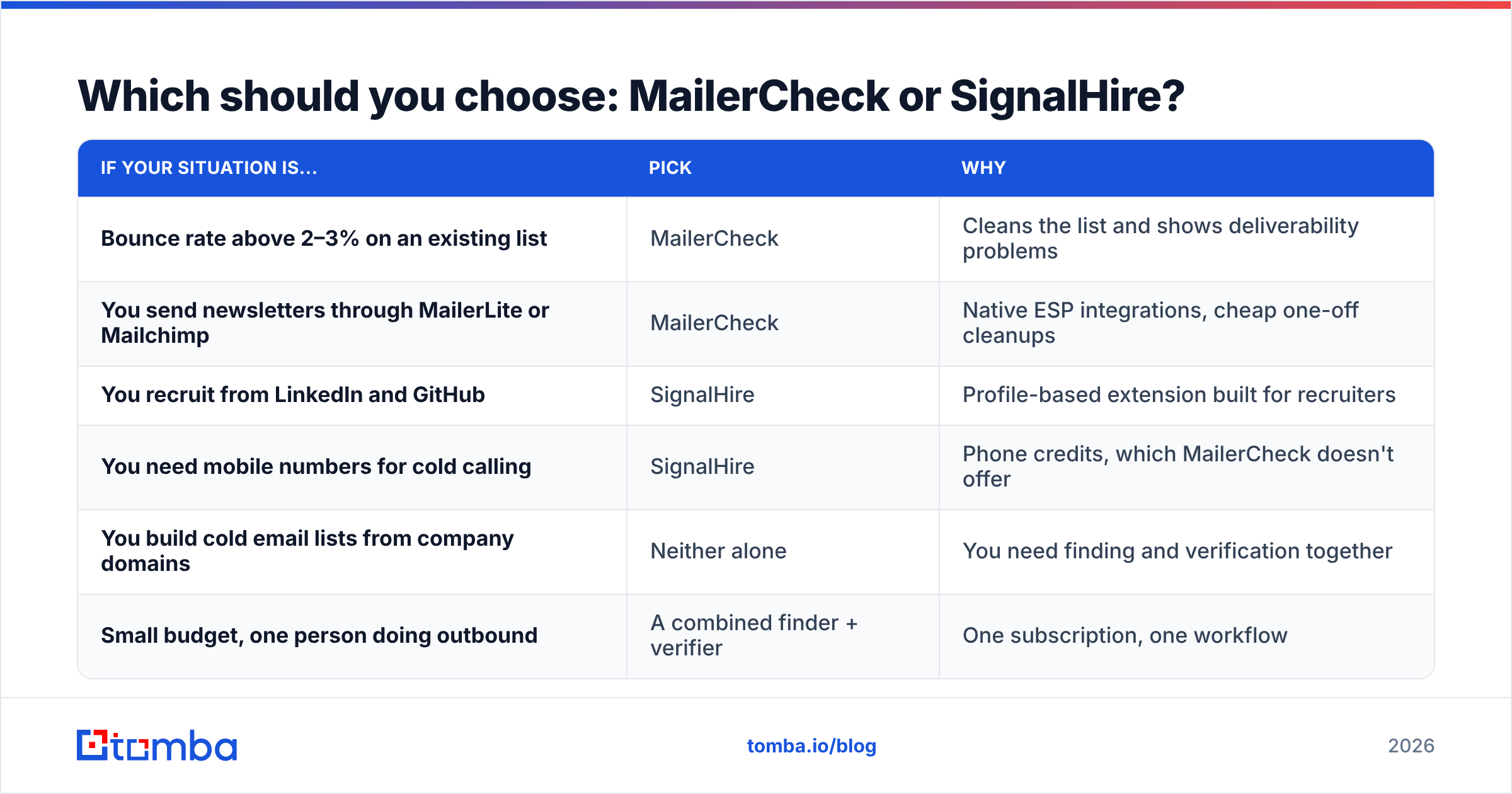
Start from the problem you have, not from the tool.
| If your situation is... | Pick | Why |
|---|---|---|
| Bounce rate above 2–3% on an existing list | MailerCheck | Cleans the list and shows deliverability problems |
| You send newsletters through MailerLite or Mailchimp | MailerCheck | Native ESP integrations, cheap one-off cleanups |
| You recruit from LinkedIn and GitHub | SignalHire | Profile-based extension built for recruiters |
| You need mobile numbers for cold calling | SignalHire | Phone credits, which MailerCheck doesn't offer |
| You build cold email lists from company domains | Neither alone | You need finding and verification together |
| Small budget, one person doing outbound | A combined finder + verifier | One subscription, one workflow |
A useful test: list the last three data problems that slowed your outbound down. If they were all about bad addresses and spam placement, buy MailerCheck. If they were all about missing contacts, buy SignalHire. If it was a mix, which is the usual answer, one combined tool will probably save you money and time.
What do people commonly ask about MailerCheck vs SignalHire?#
Can MailerCheck find email addresses? No. MailerCheck only verifies addresses you already have and tests deliverability. It has no contact database.
Does SignalHire verify the emails it finds? SignalHire runs checks on the contacts it returns, but it doesn't offer standalone list verification, catch-all handling at the depth of a dedicated verifier, or inbox placement testing. Teams sending at volume usually add a separate verification step.
Is MailerCheck free? New accounts get a small allowance of trial credits. After that it's pay-as-you-go, around $10 per 1,000 verifications, and the credits don't expire.
Does SignalHire have a free plan? Yes, a small monthly credit allowance that grows a bit if you install the browser extension. It's enough to test match quality, not to run a campaign.
Which is better for recruiters? SignalHire. Its extension, profile search, and phone coverage are built around recruiting workflows. MailerCheck has no sourcing features.
What's a good alternative if I want finding and verification in one tool? Look for a platform that offers domain search, single-person lookup, bulk verification, and catch-all handling under one plan. Tomba, for example, combines the email finder, verifier, and catch-all tools, and plans start at $49/mo.
Final verdict#
MailerCheck and SignalHire are both good at their own jobs, but the jobs are different. MailerCheck is a cheap, no-commitment way to clean lists and diagnose deliverability, and it's the obvious pick for marketers and anyone already using MailerLite or Mailchimp. SignalHire is a capable contact finder with real phone coverage, and it's the obvious pick for recruiters and phone-led sales teams. Neither one covers the whole outbound data workflow by itself.
If you're building cold outreach lists from company names or domains and want to find and verify contacts in one step, try Tomba Email Finder. Search by domain, name, or company, get addresses checked against Tomba's verifier in the same pass, and export them ready to use, with no CSV juggling between two tools. The free plan includes 25 searches a month, so you can compare match rates against your current setup before paying for anything.
Related guides#
// start free
See who Tomba finds at any company
Type a company's domain to see its people, their roles and verified work emails, each with the pages it was found on. Free account, no card.
Free plan · No credit card required · GDPR & CCPA
// about the author