Mailercheck vs Wiza (2026): Verifier or Finder, Which Do You Need?
MailerCheck cleans the list you already have. Wiza builds a list from LinkedIn. They solve different problems, so here's how to tell which one your outbound stack is missing, and when you need both.
TL;DR
- MailerCheck and Wiza don't really compete. MailerCheck is an email verification and deliverability tool built by the MailerLite team. Wiza is a LinkedIn email finder that turns Sales Navigator searches into contact lists.
- Pick MailerCheck if you already have a list (newsletter signups, CRM exports, purchased data) and need to clean it, test inbox placement, or watch DMARC and blacklists.
- Pick Wiza if your problem is getting emails in the first place and your prospecting lives inside LinkedIn and Sales Navigator.
- Pricing models differ. MailerCheck is mostly pay-as-you-go at roughly $0.01 per credit. Wiza runs per-seat plans from $49/user/month, and many workflows also need a Sales Navigator subscription.
- Many outbound teams end up needing both jobs done. An all-in-one finder plus verifier like Tomba covers both from one account at $49/mo.
What is the real difference between MailerCheck and Wiza?#
Most "Mailercheck vs Wiza" searches come from people who think they're comparing two versions of the same thing. They aren't. Here's the simplest way to put it:
- Wiza answers "who do I email, and at what address?" You give it a LinkedIn profile or a Sales Navigator search, and it returns work emails (and phone numbers on higher plans).
- MailerCheck answers "is this address safe to send to?" You give it an email list, and it tells you which addresses are valid, risky, catch-all, disposable, or dead. It also checks whether your campaigns actually land in the inbox.
One builds the list and the other cleans it. They sit at opposite ends of the same pipeline, so the useful question is which half of your pipeline is broken.
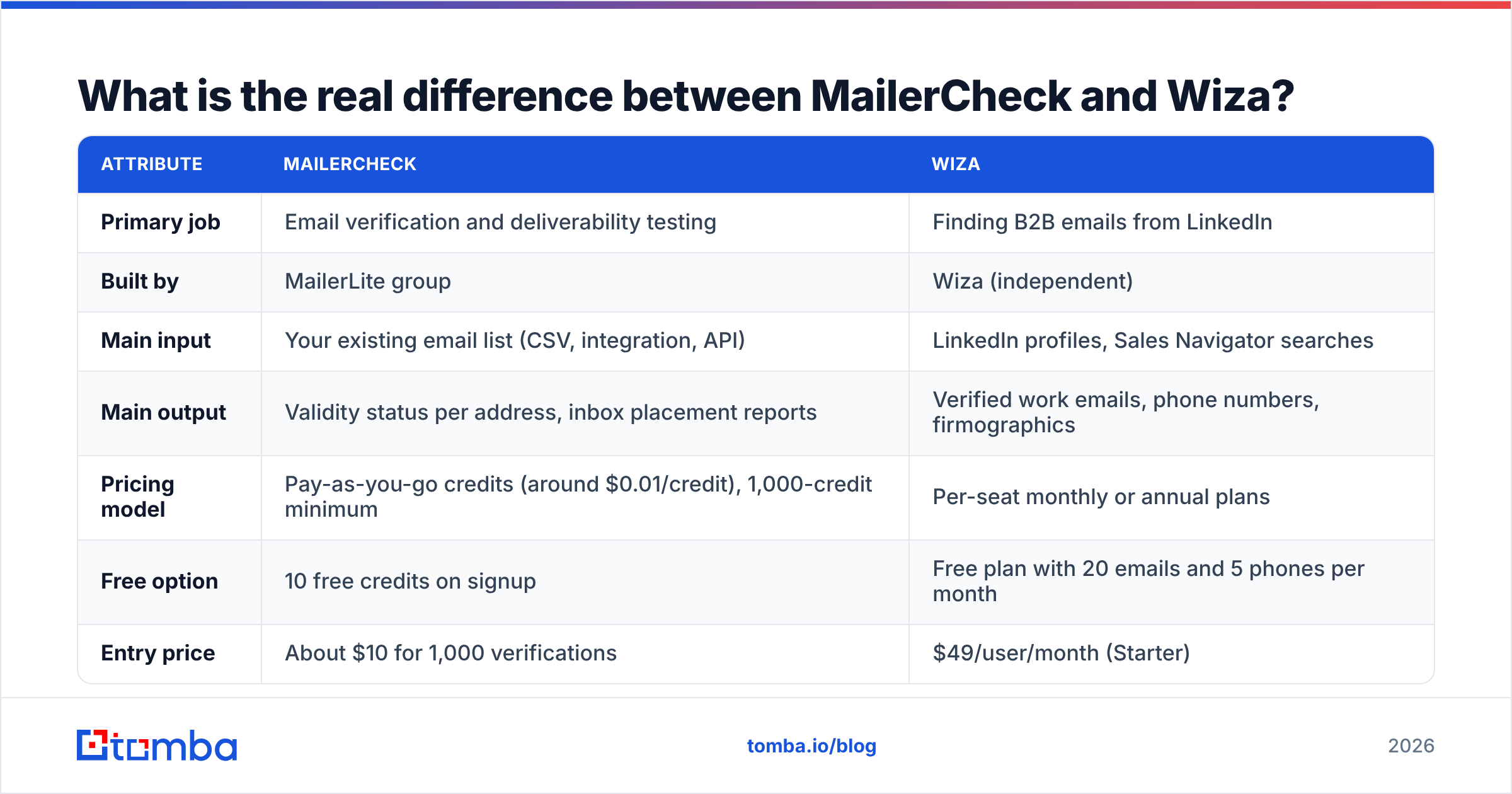
| Attribute | MailerCheck | Wiza |
|---|---|---|
| Primary job | Email verification and deliverability testing | Finding B2B emails from LinkedIn |
| Built by | MailerLite group | Wiza (independent) |
| Main input | Your existing email list (CSV, integration, API) | LinkedIn profiles, Sales Navigator searches |
| Main output | Validity status per address, inbox placement reports | Verified work emails, phone numbers, firmographics |
| Pricing model | Pay-as-you-go credits (around $0.01/credit), 1,000-credit minimum | Per-seat monthly or annual plans |
| Free option | 10 free credits on signup | Free plan with 20 emails and 5 phones per month |
| Entry price | About $10 for 1,000 verifications | $49/user/month (Starter) |
| Extra cost to watch | Inbox placement tests use extra credits | Sales Navigator for list exports ($79-149/mo) |
| Best for | Email marketers, ESP users, list hygiene | SDRs and recruiters prospecting on LinkedIn |
What does MailerCheck actually do?#
MailerCheck started as MailerLite's in-house list cleaner and grew into a standalone deliverability suite. If you send newsletters or nurture sequences through an ESP, it's built for you.
Core features:
- Email list verification. Upload a CSV or connect an integration, and every address gets a status: valid, invalid, catch-all, disposable, mailbox full, role-based, and so on. Single-address checks and an API are available too.
- Inbox placement testing. Send a campaign to MailerCheck's seed addresses and see whether it lands in the inbox, the Gmail promotions tab, or spam across major providers.
- Email insights. A content analysis that flags spammy wording, broken links, and image-to-text problems before you hit send.
- DMARC monitoring. Reports on who's sending mail on behalf of your domain, and whether SPF and DKIM pass.
- Blacklist monitoring. Alerts if your sending IP or domain shows up on a major blocklist.
- ESP integrations. It connects directly to MailerLite, Mailchimp, HubSpot, Klaviyo, and other platforms, so you can clean an audience without exporting CSVs.
Where it's strong: the pricing is simple, credits don't expire according to multiple third-party reviews, and the deliverability extras (inbox placement plus DMARC) are features that standalone verifiers usually charge extra for or don't offer.
Where it falls short: it can't find a single new contact. If your list is thin, MailerCheck will tell you very precisely how thin it is.
What does Wiza actually do?#
Wiza is a LinkedIn-native prospecting tool. You run a search in LinkedIn Sales Navigator, Wiza exports the results, and it enriches each person with a verified work email, and with a phone number on the right plan.
Core features:
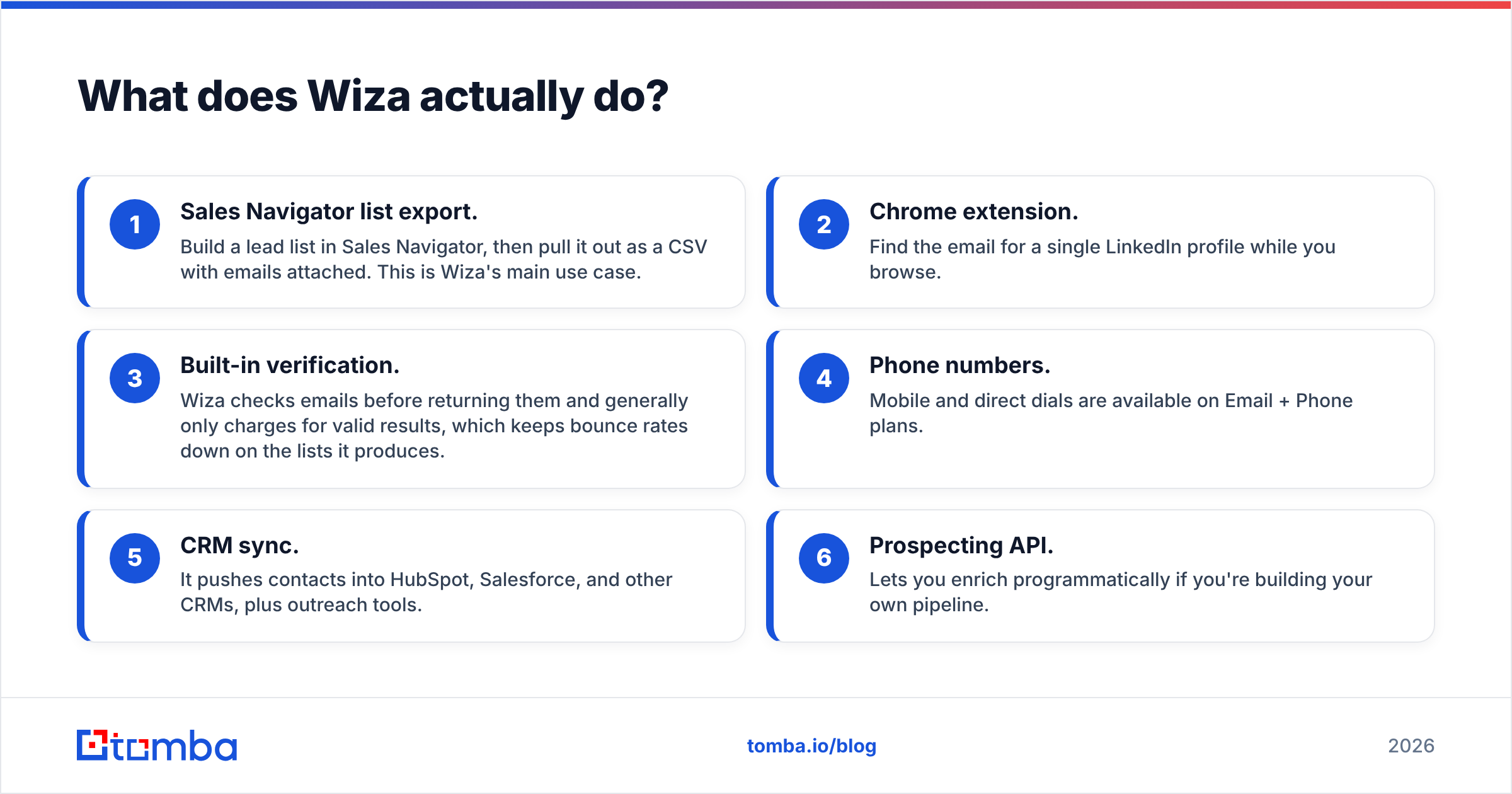
- Sales Navigator list export. Build a lead list in Sales Navigator, then pull it out as a CSV with emails attached. This is Wiza's main use case.
- Chrome extension. Find the email for a single LinkedIn profile while you browse.
- Built-in verification. Wiza checks emails before returning them and generally only charges for valid results, which keeps bounce rates down on the lists it produces.
- Phone numbers. Mobile and direct dials are available on Email + Phone plans.
- CRM sync. It pushes contacts into HubSpot, Salesforce, and other CRMs, plus outreach tools.
- Prospecting API. Lets you enrich programmatically if you're building your own pipeline.
Where it's strong: if you live in Sales Navigator, the workflow from search to CSV is about as short as it gets. Recruiters and SDRs like it because they don't have to change how they search.
Where it falls short: it's built around LinkedIn. If your best prospects come from a company domain, a conference attendee list, or a website, Wiza is the wrong shape. It also won't help you clean a list you got somewhere else, and it does nothing for inbox placement.
How does pricing compare between MailerCheck and Wiza?#
Comparing prices here is awkward because the units are different. MailerCheck charges per address checked. Wiza charges per contact found, through a seat subscription.
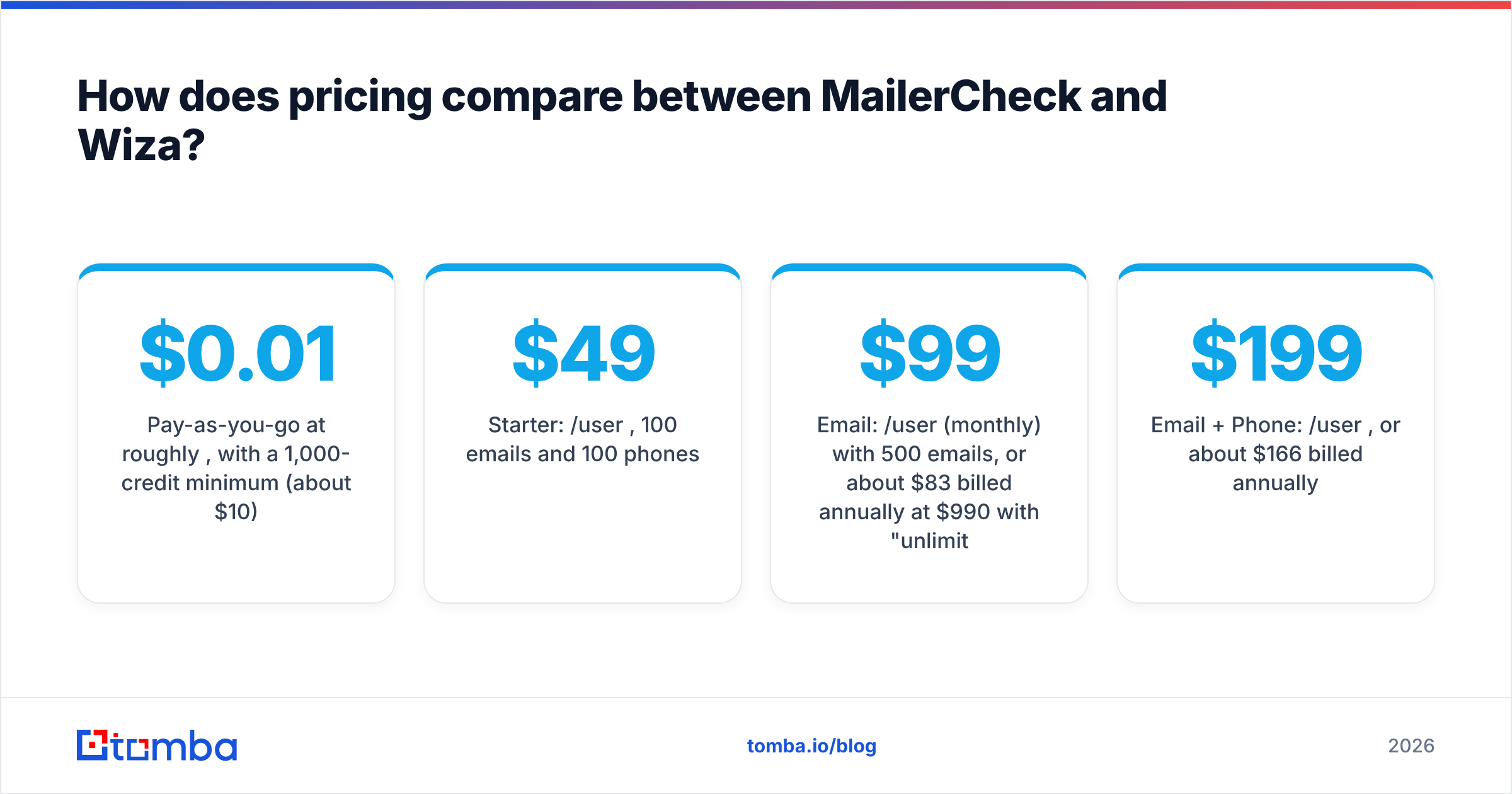
MailerCheck pricing (as of 2026):
- Pay-as-you-go at roughly $0.01 per credit, with a 1,000-credit minimum (about $10).
- 10 free credits to test verification.
- Inbox placement and email insights tests use extra credits on top of verification. One third-party review puts an inbox placement test at 200 credits.
- The help center also describes autopay and subscription options. Sources disagree on volume discounts, so check the MailerCheck pricing on G2 and the official page before you budget.
Wiza pricing (as of 2026, per public breakdowns):
- Free: 20 emails and 5 phone numbers per month.
- Starter: $49/user/month, 100 emails and 100 phones.
- Email: $99/user/month (monthly) with 500 emails, or about $83/month billed annually at $990/year with "unlimited" emails. Exports are capped at around 2,500 contacts per month.
- Email + Phone: $199/user/month, or about $166/month billed annually.
- Team: custom pricing for 3+ seats.
- Hidden cost: list exports are built around Sales Navigator, which costs another $79-149 per seat per month.
What it means in practice: cleaning a 10,000-address newsletter list costs about $100 with MailerCheck, one time. Building a 500-contact prospect list with Wiza costs $99 for the month, plus Sales Navigator if you don't already have it. Neither number tells you whether the other job is done.
Is MailerCheck more accurate than Wiza?#
This is a common question, but it compares two different things.
- MailerCheck accuracy means how well it classifies an address you already have. Verifiers in this tier generally do well on clear valid and invalid results. The hard part for every verifier is catch-all domains, where the mail server accepts everything and SMTP checks can't confirm that a specific mailbox exists. MailerCheck labels these as catch-all instead of guessing, which is honest, but it means a chunk of your B2B list will come back as "risky."
- Wiza accuracy means how often the email it finds is correct for that person. Because Wiza verifies before returning results and generally doesn't charge for invalids, the emails it delivers tend to bounce rarely. Its weak spot is coverage: people with thin LinkedIn profiles, small companies, and non-English markets return fewer matches.
If accuracy is your worry, the real risk sits between the two tools. Data goes stale at roughly 2-3% a month as people change jobs. A Wiza list from six months ago should be re-verified before you send to it, and MailerCheck can't fix a list that never had the right people on it.
When should you choose MailerCheck?#
Pick MailerCheck if most of these describe you:
- You already own your list. Newsletter subscribers, webinar signups, customers, or an old CRM export.
- You send through an ESP. MailerLite, Mailchimp, Klaviyo, or HubSpot, and you want verification connected to it directly.
- Deliverability is the issue, not lead volume. Your open rates dropped, you suspect spam-folder placement, or a provider warned you about bounce rates.
- You want DMARC and blacklist monitoring without buying a separate tool.
- You send irregularly. Credits that don't expire suit quarterly list cleans better than a monthly seat.
When should you choose Wiza?#
Pick Wiza if most of these describe you:
- Your prospecting starts in LinkedIn Sales Navigator and you already pay for it.
- You need new contacts every week, not a one-time clean.
- You want phone numbers too and you're fine paying for the Email + Phone tier.
- You're a recruiter or SDR whose workflow is search, shortlist, export.
- You don't want to manage verification separately for the contacts you source.
If you like Wiza's workflow but want something that isn't tied to LinkedIn, look at a Wiza alternative that can also find emails from a company domain or a name.
Do you need both MailerCheck and Wiza?#
For a real outbound motion, often yes. Here's how the jobs split:
- Source contacts (Wiza's job, or any email finder).
- Verify them right before sending, especially if the list is more than a few weeks old (MailerCheck's job, or any verifier).
- Check placement on a test send before a big campaign (MailerCheck's inbox placement).
- Monitor domain health over time (MailerCheck's DMARC and blacklist alerts).
Running both tools means two logins, two billing models, and a CSV handoff between them, which is a common place for mistakes. Someone exports from Wiza, forgets to re-verify three months later, and the bounce rate jumps.
If you want both jobs in one account, a combined finder and verifier removes the handoff. Tomba, for example, has an email finder that works from a domain, a full name, or a LinkedIn URL through its LinkedIn finder, plus a standalone email verifier with catch-all handling, all on the same credits. What it doesn't do is MailerCheck's inbox placement testing or DMARC reporting. If those matter to you, a dedicated deliverability tool still has a place in your stack.

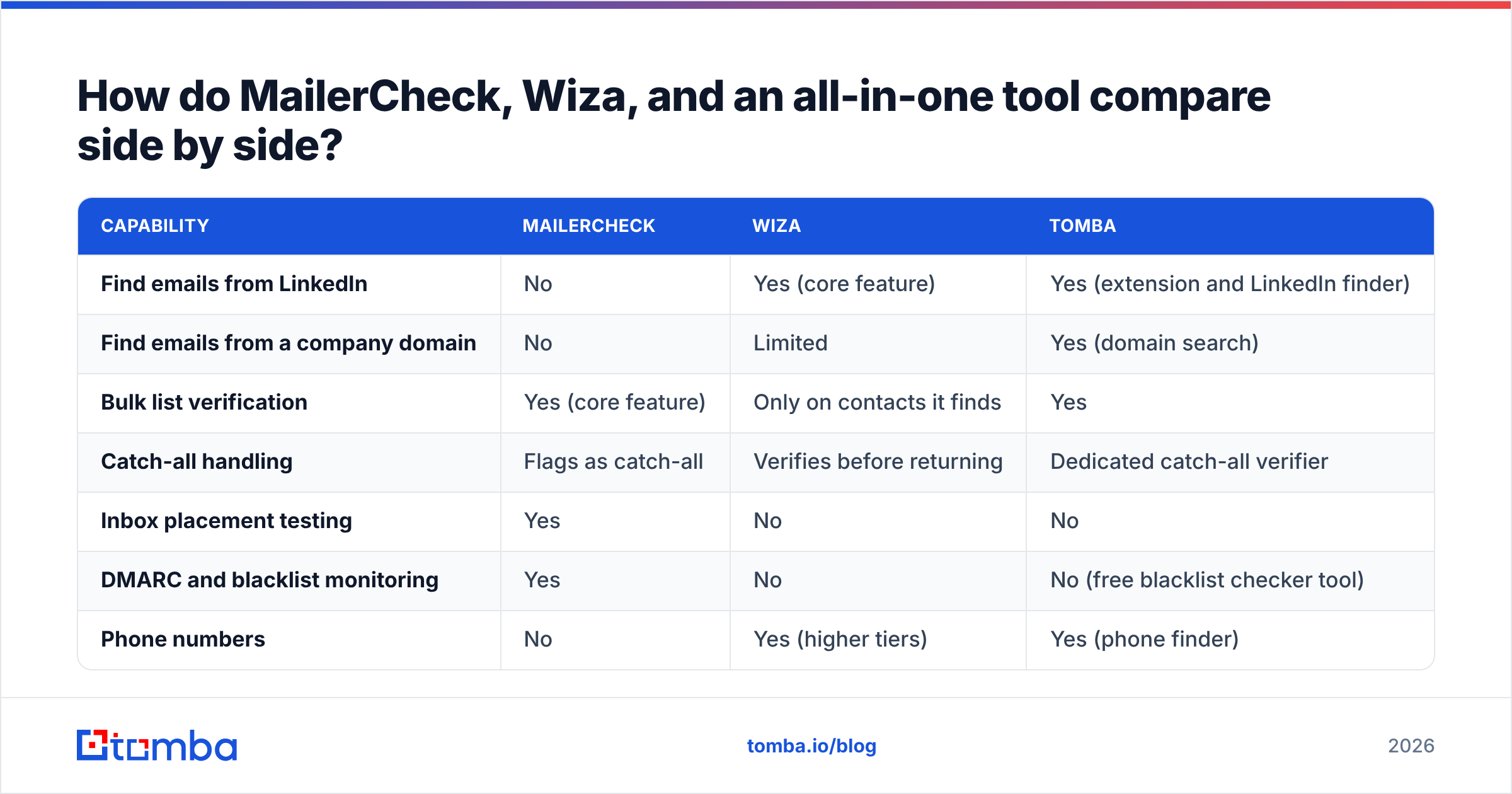
How do MailerCheck, Wiza, and an all-in-one tool compare side by side?#
| Capability | MailerCheck | Wiza | Tomba |
|---|---|---|---|
| Find emails from LinkedIn | No | Yes (core feature) | Yes (extension and LinkedIn finder) |
| Find emails from a company domain | No | Limited | Yes (domain search) |
| Bulk list verification | Yes (core feature) | Only on contacts it finds | Yes |
| Catch-all handling | Flags as catch-all | Verifies before returning | Dedicated catch-all verifier |
| Inbox placement testing | Yes | No | No |
| DMARC and blacklist monitoring | Yes | No | No (free blacklist checker tool) |
| Phone numbers | No | Yes (higher tiers) | Yes (phone finder) |
| Free tier | 10 credits | 20 emails + 5 phones/mo | 25 searches/mo |
| Paid entry point | ~$10 for 1,000 credits | $49/user/mo | $49/mo |
| Needs Sales Navigator | No | For list exports | No |
There's no overall winner in that table. MailerCheck has the deepest deliverability features, Wiza has the smoothest Sales Navigator workflow, and an all-in-one finder covers sourcing and verification without the handoff. Check full Tomba pricing if you want to compare per-credit costs at your volume.
What do reviewers say about MailerCheck and Wiza?#
Both tools get good ratings on review sites like G2 and Capterra, and the praise matches what each is built for:
- MailerCheck reviewers mention the clean interface, pay-as-you-go pricing, and how easily it connects to MailerLite. Common complaints are the number of catch-all results on B2B lists and the extra credits needed for placement tests.
- Wiza reviewers mention how fast the Sales Navigator export is and how low the bounce rates are on emails it returns. Common complaints are the LinkedIn dependency, export caps on "unlimited" plans, and the total cost once you add Sales Navigator seats.
Read the most recent reviews before buying, since both companies have changed their pricing and plan names more than once.
So, Mailercheck vs Wiza: which should you buy?#
Use this decision rule:
- Your list is fine but bouncing or landing in spam: buy MailerCheck.
- You don't have enough people to contact and you prospect on LinkedIn: buy Wiza.
- You need both sourcing and verification and don't want to manage a CSV handoff: use one tool that does both, and add a deliverability monitor only if inbox placement is a known problem.
The worst option is buying one tool and expecting it to do the other's job. A verifier can't create leads, and a LinkedIn finder won't fix your sender reputation.
If your bottleneck is finding the right contacts in the first place, and you want those addresses verified before they reach your sequencer, try Tomba Email Finder. Search by domain, name, or LinkedIn profile, verify the results in the same account, and start with 25 free searches a month before you commit to a $49/mo plan.
Related guides#
// start free
See who Tomba finds at any company
Type a company's domain to see its people, their roles and verified work emails, each with the pages it was found on. Free account, no card.
Free plan · No credit card required · GDPR & CCPA
// about the author