Mailfloss vs SalesQL: Email Verifier or Finder, Which Do You Need?
Mailfloss cleans the email list you already have. SalesQL finds emails you don't have yet, starting from LinkedIn. Here's how they compare on pricing, workflow and fit, and when you need both.
TL;DR
- These tools don't really compete. Mailfloss is an email verification and list-cleaning tool. SalesQL is a LinkedIn-based email finder. Picking between them comes down to which problem you have.
- Choose Mailfloss if you already have a list sitting in Mailchimp, HubSpot, Klaviyo or another ESP, and bounces are hurting your sender reputation. Its best feature is automated daily cleaning inside your ESP.
- Choose SalesQL if your prospects are on LinkedIn and you need their work emails and phone numbers. Use it for building lists, not maintaining them.
- Pricing differs in kind: Mailfloss charges by verifications per month (about $29/mo for 10,000 at the time of writing). SalesQL charges by credits for found contacts (a free tier with 50 credits, paid plans from about $39/mo).
- Most outbound teams need both jobs done. Running two subscriptions is fine. So is one platform that finds and verifies in the same step.
What is the real difference between Mailfloss and SalesQL?#
Searching "Mailfloss vs SalesQL" usually means one thing: you have an email problem and you've heard both names. But they sit at opposite ends of the email data lifecycle.
Think of it like a restaurant. SalesQL is the supplier that brings ingredients through the back door: new contacts pulled from LinkedIn profiles. Mailfloss is the health inspector who checks what's already in the fridge and throws out anything spoiled before it reaches a customer. A restaurant needs both, but you wouldn't hire an inspector to source tomatoes.
In practical terms:
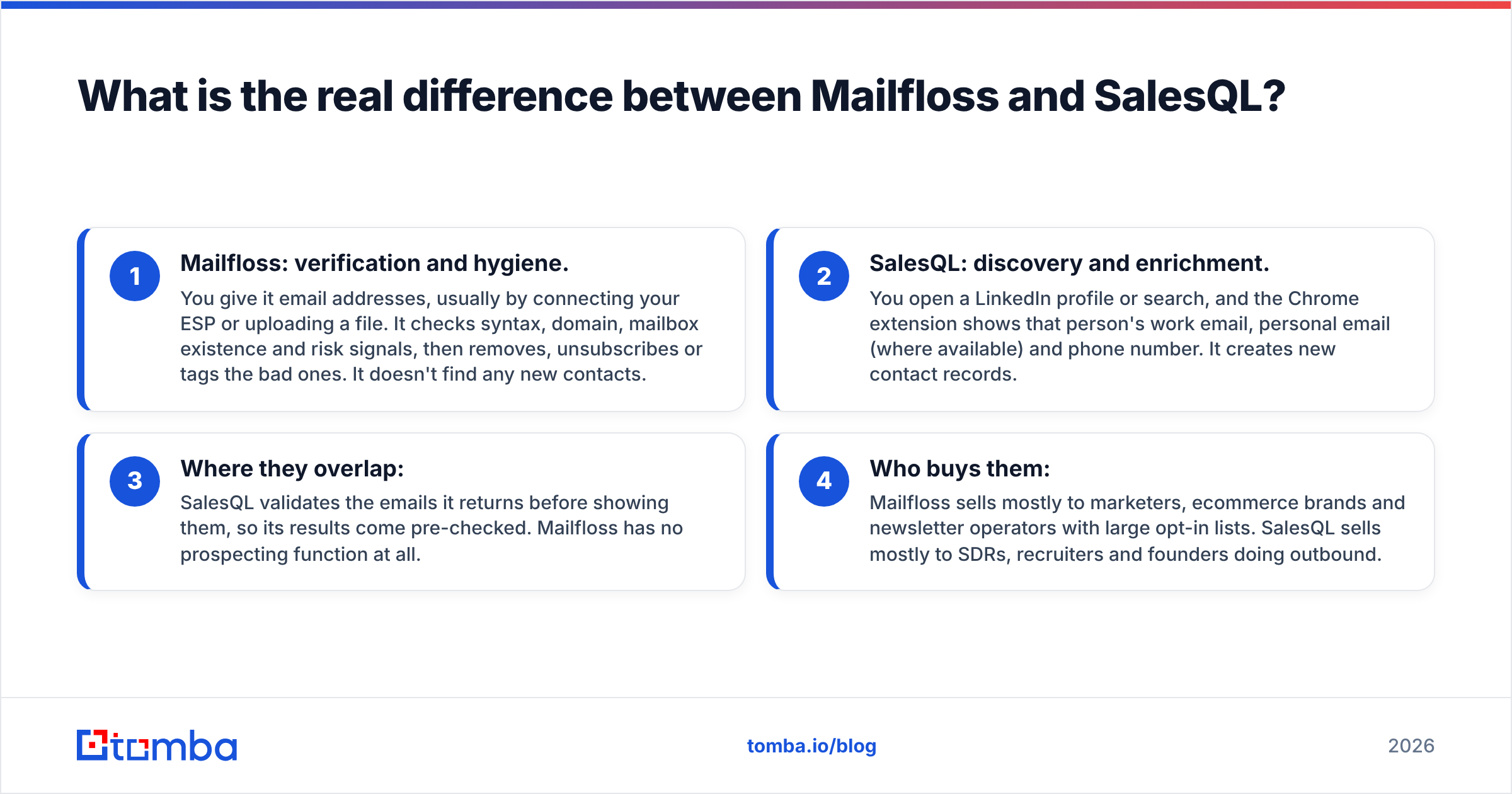
- Mailfloss: verification and hygiene. You give it email addresses, usually by connecting your ESP or uploading a file. It checks syntax, domain, mailbox existence and risk signals, then removes, unsubscribes or tags the bad ones. It doesn't find any new contacts.
- SalesQL: discovery and enrichment. You open a LinkedIn profile or search, and the Chrome extension shows that person's work email, personal email (where available) and phone number. It creates new contact records.
- Where they overlap: SalesQL validates the emails it returns before showing them, so its results come pre-checked. Mailfloss has no prospecting function at all.
- Who buys them: Mailfloss sells mostly to marketers, ecommerce brands and newsletter operators with large opt-in lists. SalesQL sells mostly to SDRs, recruiters and founders doing outbound.
If you remember one thing from this post: SalesQL fills the top of the funnel, and Mailfloss protects the list once you have one.
How does Mailfloss work?#
Mailfloss is built around a "set it and forget it" idea. Most verifiers expect you to export a CSV, upload it, download the results and re-import them. Mailfloss connects directly to your email platform and cleans the list on a schedule, daily by default.
Here's how it fits into a workflow:
- Native ESP integrations. Mailfloss connects to the major email marketing platforms, including Mailchimp, HubSpot, Klaviyo, ActiveCampaign, AWeber, ConvertKit (now Kit), Constant Contact and others. New subscribers get checked automatically.
- Typo correction. It catches common domain typos like
gmial.comoryaho.comand can fix them instead of deleting the subscriber. For consumer-facing signup forms, this alone can save a meaningful slice of your list. - Configurable actions. For each category (invalid, disposable, role-based, risky) you decide whether Mailfloss unsubscribes, deletes or just tags the contact.
- Bulk uploads and API. If you don't use a supported ESP, you can still upload files or call the API.
The strength here is automation. If your list grows by a few thousand signups a month, Mailfloss runs in the background and keeps bounce rates from creeping up, which matters a lot for email deliverability as Gmail and Yahoo keep tightening sender requirements.
The weakness follows from the same design. Mailfloss is a hygiene tool for lists you already have. If you're a two-person sales team with no list yet, it has nothing to clean.
Placeholder: screenshot of the Mailfloss dashboard with the connected-ESP view and the daily "cleaned" counter. Replace before publishing.
You can check the current feature list and plans on the official Mailfloss site.
How does SalesQL work?#
SalesQL is mainly a Chrome extension that sits on top of LinkedIn and Sales Navigator. You browse profiles as usual, and SalesQL adds a panel with contact details it has found for that person.
The core workflow:
- Single-profile lookups. Open a LinkedIn profile, click the extension, and see the person's work email, sometimes a personal email, and a direct or mobile number where available.
- Bulk extraction from searches. Run a LinkedIn or Sales Navigator search and pull contacts for a whole results page into a SalesQL list. This is where most SDR time goes.
- Company data. Paid plans add firmographics like company size, industry and website, which helps with segmentation.
- CRM export. Lists export to CSV or sync to CRMs like HubSpot, Salesforce and Pipedrive, depending on plan.
- Credit model. A credit is used when SalesQL successfully returns at least one email for a profile. Profiles with no result don't cost you, which is a fair model for a finder.
SalesQL is good when LinkedIn is your source of truth. Recruiters use it heavily, and so do outbound teams whose ICP is easy to define with Sales Navigator filters.
It's weaker outside LinkedIn. If you're starting from a company domain, a list of conference attendees, or a spreadsheet of names and companies, a profile-first extension adds friction. In those cases a domain-first email finder or a dedicated LinkedIn finder that also handles domain and name lookups may fit better.
See the SalesQL website for current plan limits.
How do Mailfloss and SalesQL compare side by side?#
Here is the head-to-head on the attributes that actually affect a buying decision. Prices reflect public list pricing at the time of writing and change often, so confirm on each vendor's pricing page before you buy.
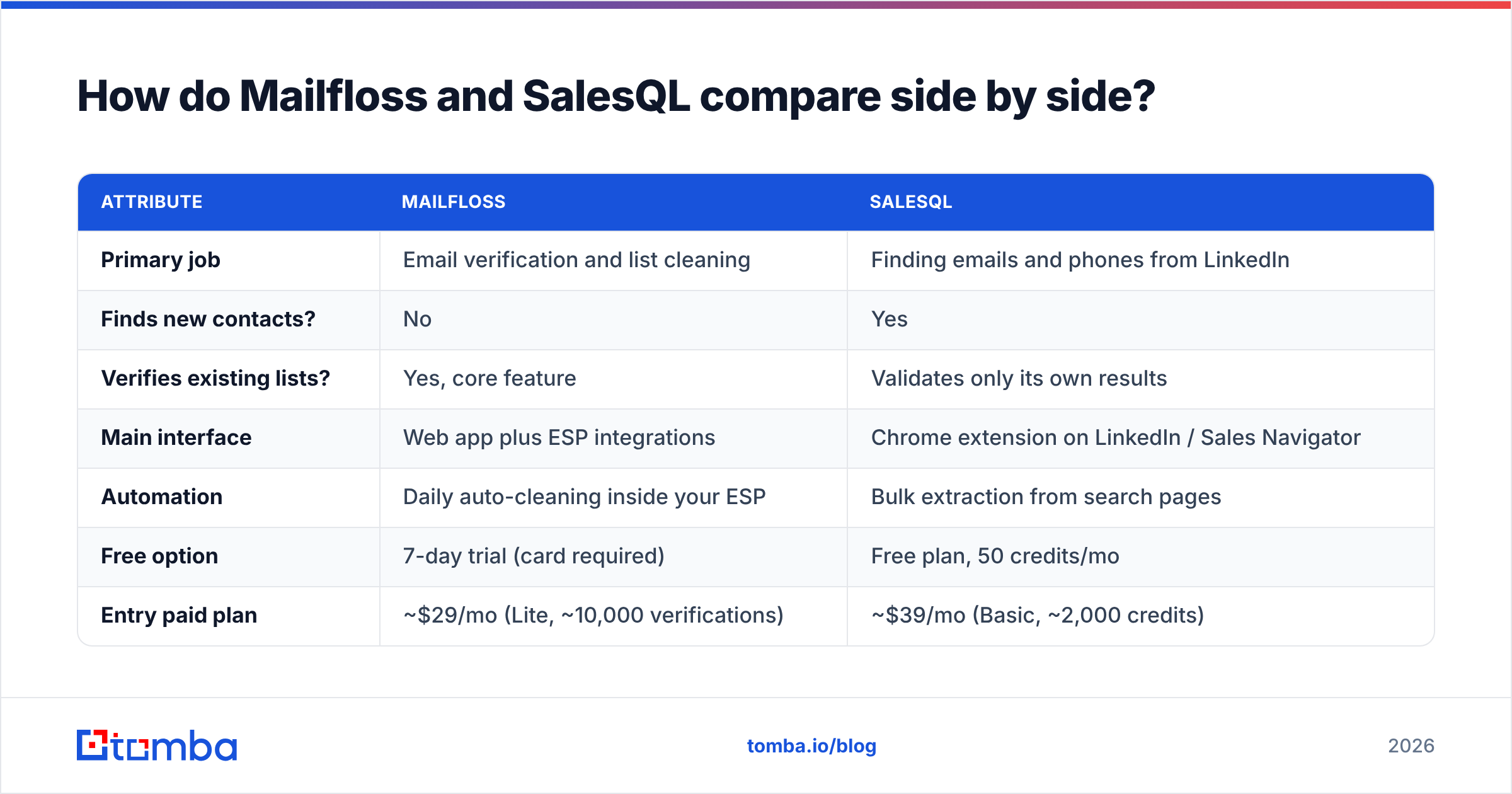
| Attribute | Mailfloss | SalesQL |
|---|---|---|
| Primary job | Email verification and list cleaning | Finding emails and phones from LinkedIn |
| Finds new contacts? | No | Yes |
| Verifies existing lists? | Yes, core feature | Validates only its own results |
| Main interface | Web app plus ESP integrations | Chrome extension on LinkedIn / Sales Navigator |
| Automation | Daily auto-cleaning inside your ESP | Bulk extraction from search pages |
| Free option | 7-day trial (card required) | Free plan, 50 credits/mo |
| Entry paid plan | ~$29/mo (Lite, ~10,000 verifications) | ~$39/mo (Basic, ~2,000 credits) |
| Mid tier | ~$59/mo (Business, ~25,000 verifications) | ~$79/mo (Professional, ~5,000 credits) |
| Top self-serve tier | ~$209/mo (Pro, ~125,000 verifications) | Organization plan (~12,000 credits/mo) |
| Phone numbers | No | Yes, on paid plans |
| Typo correction | Yes | Not applicable |
| Best for | Marketers with large opt-in lists | SDRs, recruiters, LinkedIn-led outbound |
Two things stand out.
First, the unit economics don't compare directly. A Mailfloss verification costs a fraction of a cent because it only checks an address. A SalesQL credit costs roughly 1.5 to 2 cents because it produces a new contact. Saying one is "cheaper" is like comparing the price of a car wash with the price of a car.
Second, the interfaces point to different users. Mailfloss mostly runs out of sight in your ESP. SalesQL runs while you're actively browsing LinkedIn. The person who logs into one is rarely the person who logs into the other.
For broader context, user reviews for both products are on G2, where you can filter by company size and role. That's useful because a marketer's review of a verifier rarely tells an SDR anything.
Which is more accurate, Mailfloss or SalesQL?#
They measure accuracy differently, so you need to know what you're asking.
For Mailfloss, accuracy means classification: does it label a valid address as valid and an invalid one as invalid? Verifiers in this category generally do well on clear-cut cases like dead domains, syntax errors and mailboxes that reject outright. The hard cases are the same for every vendor:
- Catch-all domains accept every address at the SMTP level, so no verifier can be fully sure a specific mailbox exists. Mailfloss and its peers mark these as "risky" or "unknown." How you handle that bucket matters more than which vendor you pick. A dedicated catch-all verifier can narrow it further.
- Greylisting and rate limiting from large providers can give temporary "unknown" results.
- Role-based addresses (info@, sales@) are usually valid but bad for outreach, so treat them as a policy decision, not an accuracy one.
For SalesQL, accuracy means data correctness: is the email it returns really this person's current work address? That depends on how fresh its database is and how well it matches profiles. Common failure points:
- Job changers. LinkedIn updates the day someone moves jobs, and email databases lag. Expect some stale addresses on recently updated profiles.
- Small companies and non-standard patterns. Pattern-based guesses work at scale for large companies and less well at 10-person firms.
- Personal vs work email. Make sure your sequences use the work address for B2B outreach, both for compliance and for reply rates.
The honest takeaway: neither tool's marketing claims should replace your own test. Take 200 contacts you know well, run them through, and track hard bounces over two weeks. That number is what you'll actually get.
When should you choose Mailfloss?#
Mailfloss is the right choice when your main problem is the quality of a list you already have, especially a marketing list.
Choose it if:
- You run an opt-in newsletter or ecommerce list with thousands of new signups each month, and typos and fake addresses are creeping in.
- Your bounce rate is above 2% and your ESP has warned you, or your sender reputation metrics are slipping.
- You don't want to manage CSV exports. The daily ESP sync is the main reason to pick Mailfloss over a generic bulk verifier.
- You already have a contact source (forms, events, purchased or partner lists) and need a gatekeeper, not a prospecting tool.
Skip it if you're doing cold outbound from scratch. You'd be paying to clean an empty fridge.
When should you choose SalesQL?#
SalesQL is the right choice when your main problem is not having contact details for people you can already identify on LinkedIn.
Choose it if:
- Your ICP maps cleanly to Sales Navigator filters, like "VP Engineering, 50–500 employees, fintech, DACH."
- You're a recruiter who needs personal emails and mobile numbers as well as work addresses.
- Your reps live in LinkedIn and won't adopt a separate web app. An extension that appears where they already work gets used.
- You want phone numbers alongside emails for multichannel sequences.
Skip it if your prospect lists come from domains, spreadsheets or account lists rather than LinkedIn profiles. Pay attention to LinkedIn's terms of service as well: extension-based extraction is common, but LinkedIn polices automated scraping, so keep bulk extraction volumes reasonable.
Do you need both Mailfloss and SalesQL?#
For many outbound teams, yes, or at least you need both functions. A typical cold email pipeline looks like this:
- Find the contact (SalesQL or another finder).
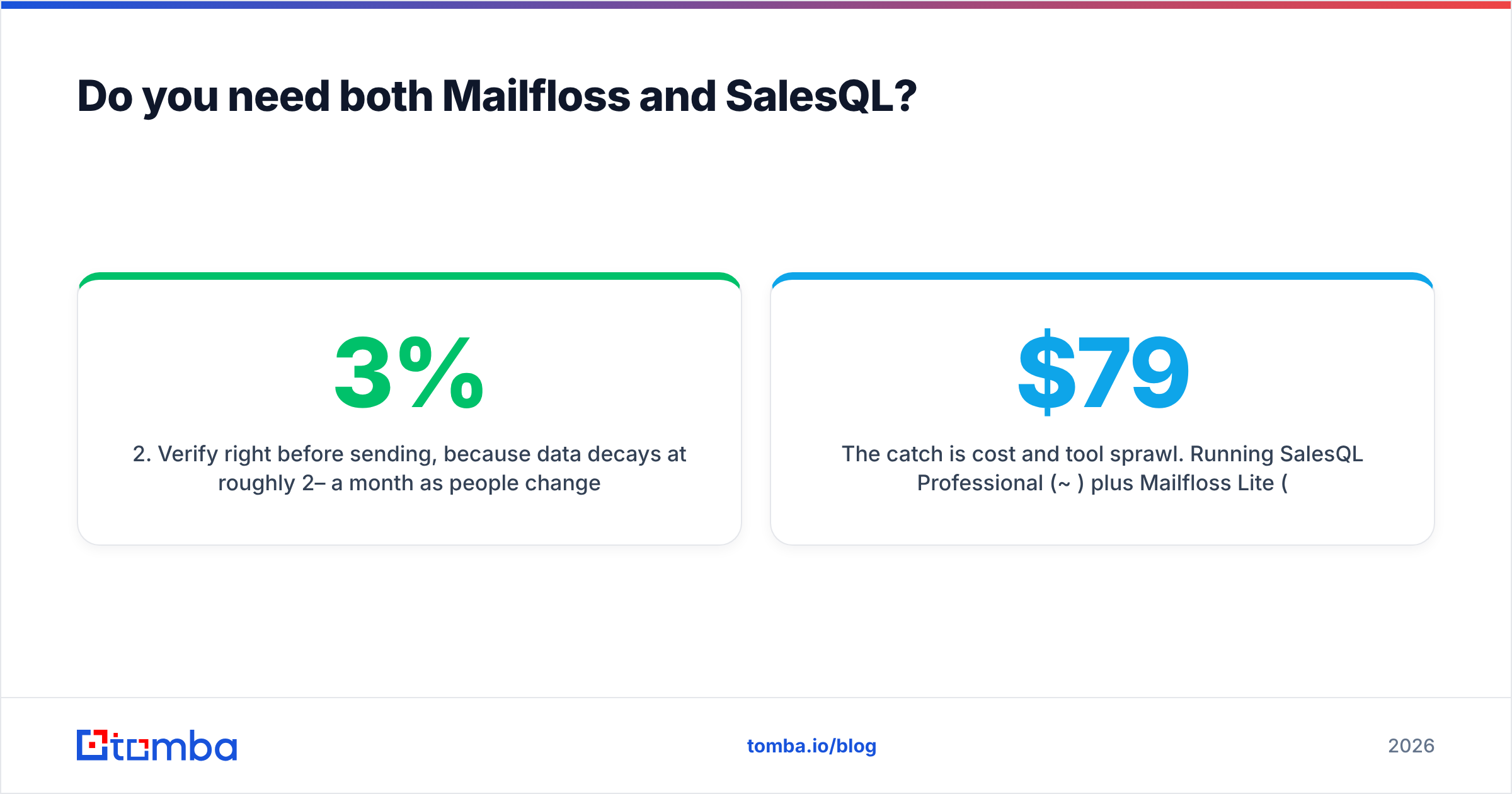
- Verify right before sending, because data decays at roughly 2–3% a month as people change jobs.
- Send through your sequencer.
- Re-verify older segments before re-engaging them.
SalesQL handles step 1 and checks results when it returns them. But if a contact sits in your CRM for three months before a rep sequences it, that check is stale. That's where a verifier like Mailfloss, or any bulk email verifier, earns its place.

The catch is cost and tool sprawl. Running SalesQL Professional ($79/mo) plus Mailfloss Lite ($29/mo) costs about $108/mo across two vendors, two logins and two sets of integrations. That's acceptable for some teams. Others prefer one platform that finds and verifies in the same request, so every address arrives already checked against the same rules.
How does a combined finder-plus-verifier compare?#
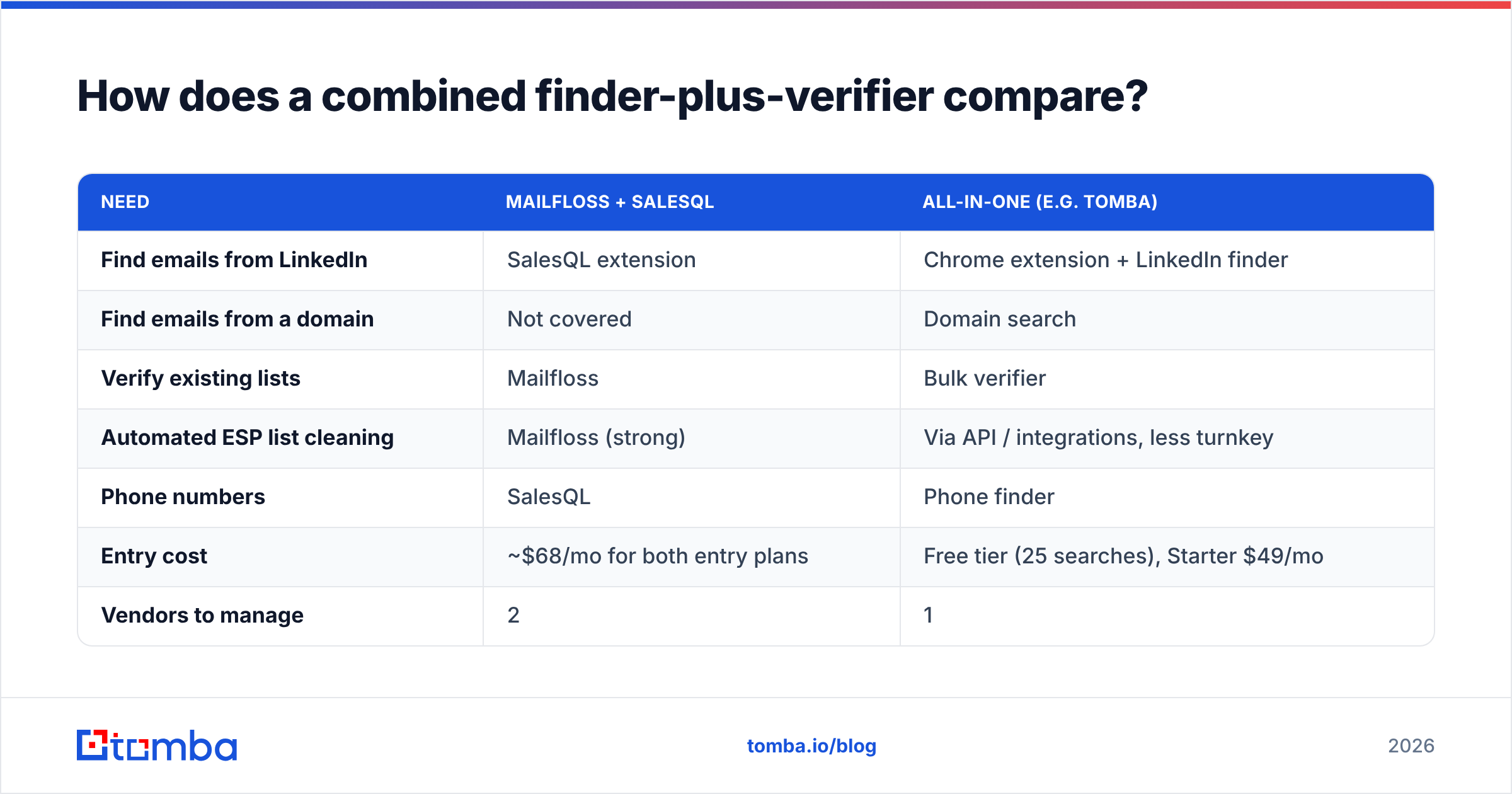
If you'd rather consolidate, this is how a single platform stacks up against the two-tool setup. Tomba is shown here as one example. Similar all-in-one options exist, and you should test whichever you shortlist.
| Need | Mailfloss + SalesQL | All-in-one (e.g. Tomba) |
|---|---|---|
| Find emails from LinkedIn | SalesQL extension | Chrome extension + LinkedIn finder |
| Find emails from a domain | Not covered | Domain search |
| Verify existing lists | Mailfloss | Bulk verifier |
| Automated ESP list cleaning | Mailfloss (strong) | Via API / integrations, less turnkey |
| Phone numbers | SalesQL | Phone finder |
| Entry cost | ~$68/mo for both entry plans | Free tier (25 searches), Starter $49/mo |
| Vendors to manage | 2 | 1 |
To be fair: if your only problem is automated daily cleaning of a big Mailchimp or Klaviyo list, Mailfloss's native ESP sync is more turnkey than most all-in-one tools. If you live entirely inside LinkedIn and want personal mobiles for recruiting, SalesQL is well tuned for that. Consolidation pays off most for B2B outbound teams whose sources go beyond LinkedIn. You can compare tiers on Tomba pricing.
What's the verdict on Mailfloss vs SalesQL?#
Pick based on the problem, not the brand:
- Bounces and list decay in a marketing ESP → Mailfloss. The automated daily cleaning is the reason to buy it.
- No contact data for LinkedIn prospects → SalesQL. A low-friction extension with a usable free tier to test it.
- B2B outbound that needs both, from mixed sources → an all-in-one finder with built-in verification, or both tools if you're happy managing two vendors.
Whichever way you go, run your own 200-contact bounce test before committing to an annual plan. Two weeks of real data beats any feature page.
If your bottleneck is finding the right people in the first place, and you want every address verified before it reaches your sequencer, try the Tomba Email Finder. Search by domain, by name and company, or straight from LinkedIn with the browser extension. Each result comes with a verification status, so you aren't paying for a second tool to check the first one's work. The free tier gives you 25 searches a month to test it on your own ICP before you spend anything.
Related guides#
// start free
See who Tomba finds at any company
Type a company's domain to see its people, their roles and verified work emails, each with the pages it was found on. Free account, no card.
Free plan · No credit card required · GDPR & CCPA
// about the author