Mailing Blacklist: How to Check, Delist, and Stay Off for Good
One spam trap hit or a burst of bounces can put your domain on a mailing blacklist overnight. Here's which lists matter, how to get delisted, and how to stop it happening again.
TL;DR
- A mailing blacklist (also called a DNSBL or blocklist) is a real-time database of IPs and domains that mailbox providers check to decide whether to accept, filter, or reject your email.
- Not every list matters the same amount. Spamhaus can block your mail at a huge share of corporate inboxes. Many smaller lists barely affect delivery.
- Delisting is usually free and fast once you fix the cause. If you request removal before fixing anything, you'll probably get relisted, and the second removal is harder.
- Most B2B listings trace back to the same few causes: bad contact data that leads to hard bounces and spam-trap hits, missing authentication, and sending volume that jumps faster than your reputation can handle.
- Prevention costs much less than recovery. Verify lists before you send, authenticate your domain, warm up gradually, and check blacklist status every week.
What is a mailing blacklist?#
A mailing blacklist is a list of IP addresses or domains that have been flagged for sending spam or showing spam-like behavior. Most of them are published as DNS-based blocklists (DNSBLs). When your email reaches a receiving server, that server runs a fast DNS query against one or more lists. If your sending IP or a domain in your message comes back as listed, the server can reject the message, send it to spam, or score it more harshly.
Wikipedia's entry on DNS blocklists covers the technical history. The practical version: a blacklist works like a credit bureau for email. You don't deal with it directly most days, but every lender, or in this case every mailbox provider, checks it before doing business with you.
Two distinctions matter more than anything else here:
- IP-based vs. domain-based lists. IP lists flag the server that sent the mail. Domain lists flag domains that appear in the message, including your From domain and any links in the body. If you send through a shared IP at Google Workspace or Microsoft 365, an IP listing is often the provider's problem. A domain listing is yours.
- Public lists vs. private reputation. Gmail and Outlook keep their own internal reputation systems and don't publish them. You can be clear on every public blacklist and still land in spam because your sender reputation with Google is poor. Public blacklists are one signal among several.
Which mailing blacklists actually matter?#
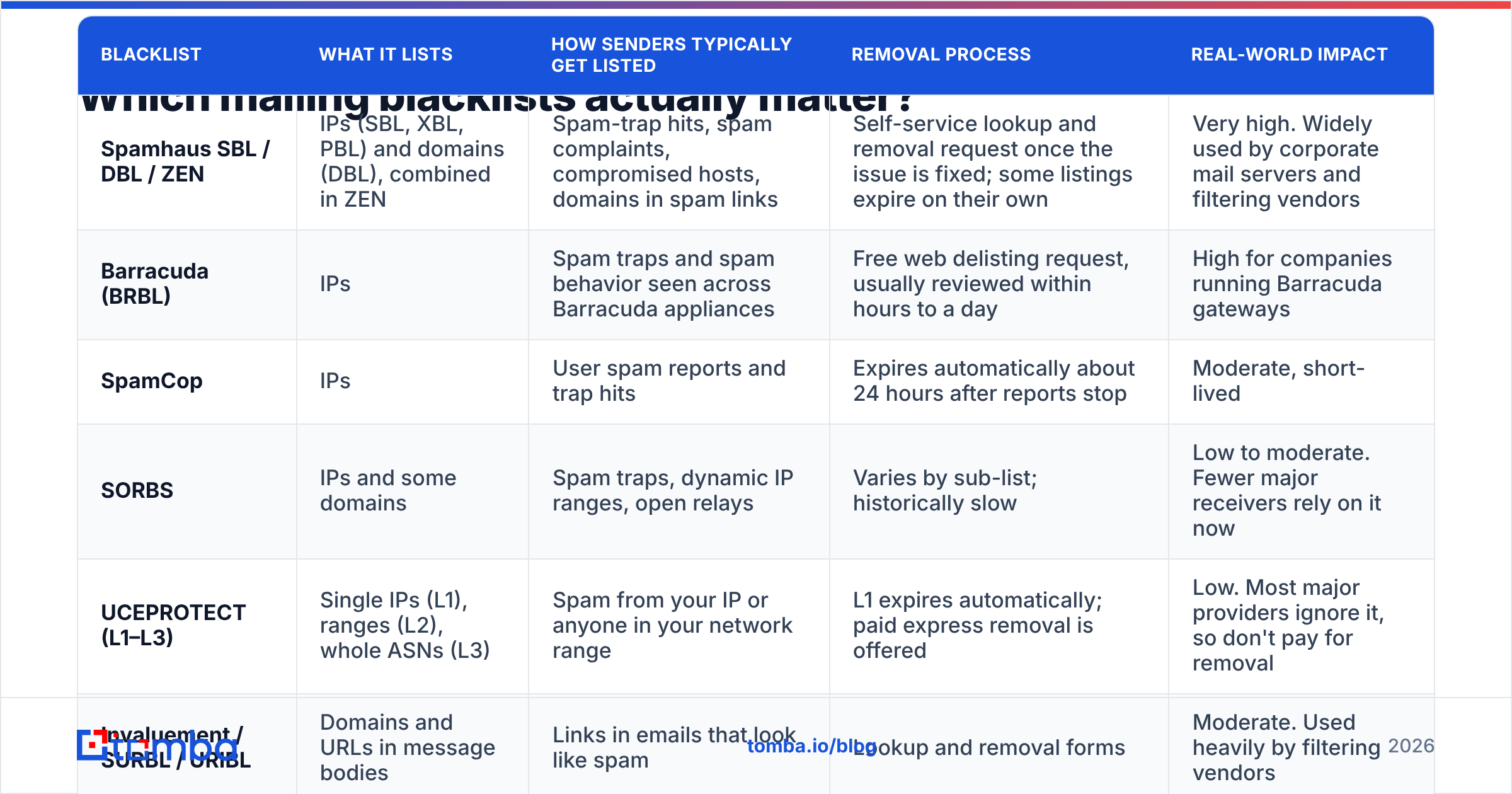
There are more than a hundred public blocklists. Most checkers query 50 to 100 of them, and seeing a red row on a list nobody uses can cause unnecessary panic. This table shows which ones deserve your attention.
| Blacklist | What it lists | How senders typically get listed | Removal process | Real-world impact |
|---|---|---|---|---|
| Spamhaus SBL / DBL / ZEN | IPs (SBL, XBL, PBL) and domains (DBL), combined in ZEN | Spam-trap hits, spam complaints, compromised hosts, domains in spam links | Self-service lookup and removal request once the issue is fixed; some listings expire on their own | Very high. Widely used by corporate mail servers and filtering vendors |
| Barracuda (BRBL) | IPs | Spam traps and spam behavior seen across Barracuda appliances | Free web delisting request, usually reviewed within hours to a day | High for companies running Barracuda gateways |
| SpamCop | IPs | User spam reports and trap hits | Expires automatically about 24 hours after reports stop | Moderate, short-lived |
| SORBS | IPs and some domains | Spam traps, dynamic IP ranges, open relays | Varies by sub-list; historically slow | Low to moderate. Fewer major receivers rely on it now |
| UCEPROTECT (L1–L3) | Single IPs (L1), ranges (L2), whole ASNs (L3) | Spam from your IP or anyone in your network range | L1 expires automatically; paid express removal is offered | Low. Most major providers ignore it, so don't pay for removal |
| Invaluement / SURBL / URIBL | Domains and URLs in message bodies | Links in emails that look like spam | Lookup and removal forms | Moderate. Used heavily by filtering vendors |
If you only watch one name, watch Spamhaus. A Spamhaus DBL listing on your sending domain is the closest thing to a deliverability emergency in B2B outbound. Your mail starts bouncing at mid-market and enterprise prospects, often with a rejection code that names Spamhaus directly.
How do you know if you're on a mailing blacklist?#
Usually a metric breaks before anyone thinks to check a blacklist. Look for these signs:
- Sudden bounce spikes with 5xx codes that mention a blocklist by name, e.g.
550 5.7.1 Service unavailable; client host blocked using zen.spamhaus.org. - Open and reply rates collapse on one sending domain while your other domains stay normal.
- Your sequencing tool flags a domain as unhealthy, or your warmup dashboard shows inbox placement falling over a few days.
- Prospects at particular companies stop receiving mail. That often points to one gateway (Barracuda, Mimecast, Proofpoint) using a list you're on.
To confirm, run your sending IP and domain through a blacklist checker. Check both:
- The domain in your From address, plus any tracking or link domains.
- The sending IP, which you can find in the
Received:headers of a message you sent to yourself.
If you're on Google Workspace or Microsoft 365, a listed IP often belongs to the provider's shared pool. That is normally temporary and handled by the provider. A listed domain is something you need to fix yourself.

Why do B2B senders end up on blacklists?#
In cold outbound, you rarely get listed for one dramatic mistake. It's usually several moderate problems that pile up until they cross a threshold.
Spam traps. Blocklist operators and mailbox providers run addresses that should never receive mail. Pristine traps were never used by a real person. Recycled traps are abandoned addresses that have been reactivated to catch senders mailing stale lists. When you hit a trap, the operator learns your data came from scraping, purchasing, or never cleaning. Spamhaus relies heavily on this signal.
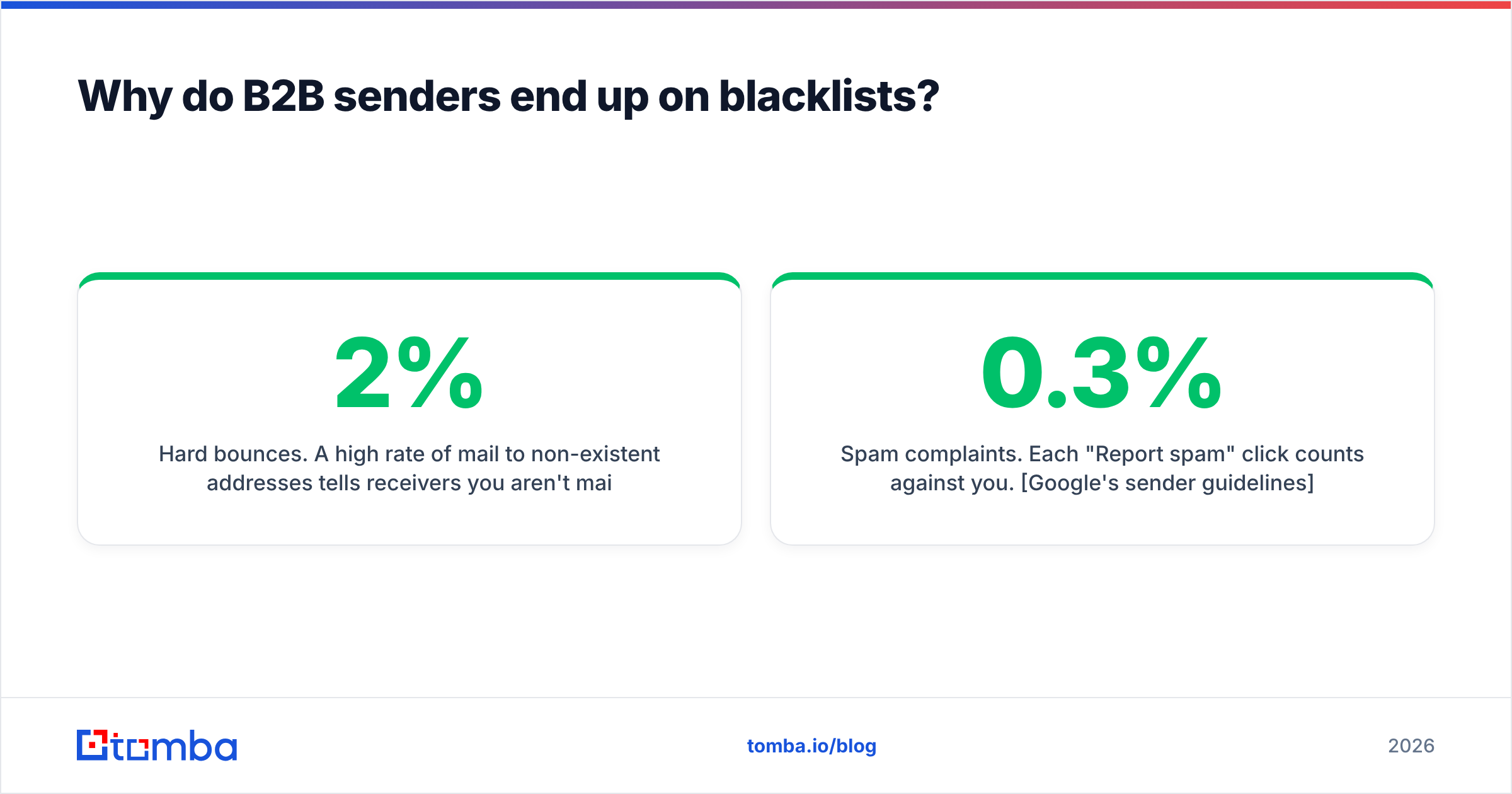
Hard bounces. A high rate of mail to non-existent addresses tells receivers you aren't maintaining your list. Gmail and Microsoft don't publish an exact bounce cutoff, but most deliverability teams treat anything above 2% as a warning. Old exports from lead databases, guessed email patterns, and contacts who have changed jobs push that number up quickly.
Spam complaints. Each "Report spam" click counts against you. Google's sender guidelines ask bulk senders to keep the spam rate reported in Postmaster Tools below 0.3%, and recommend staying under 0.1%. Cold email with weak targeting crosses that line fast.
Missing or broken authentication. Without SPF, DKIM, and DMARC, nothing proves your mail is really from you. Google and Yahoo require all three for bulk senders, and Microsoft has started enforcing similar rules for high-volume senders to Outlook.com. Missing authentication won't put you on Spamhaus by itself. It does make every other signal count more heavily against you. An SPF checker takes about 30 seconds to confirm your record resolves.
Volume spikes. If a new domain sends 50 emails on Monday and 2,000 on Tuesday, it looks like a compromised account or a spammer starting up. Reputation builds slowly and can be lost in a day.
Bad neighbors. On shared IPs, or on cheap hosting where the IP range has a bad history, you can be listed because of other senders. That's how UCEPROTECT L2/L3 listings happen, and it's one reason dedicated infrastructure costs more.
How do you get removed from a mailing blacklist?#
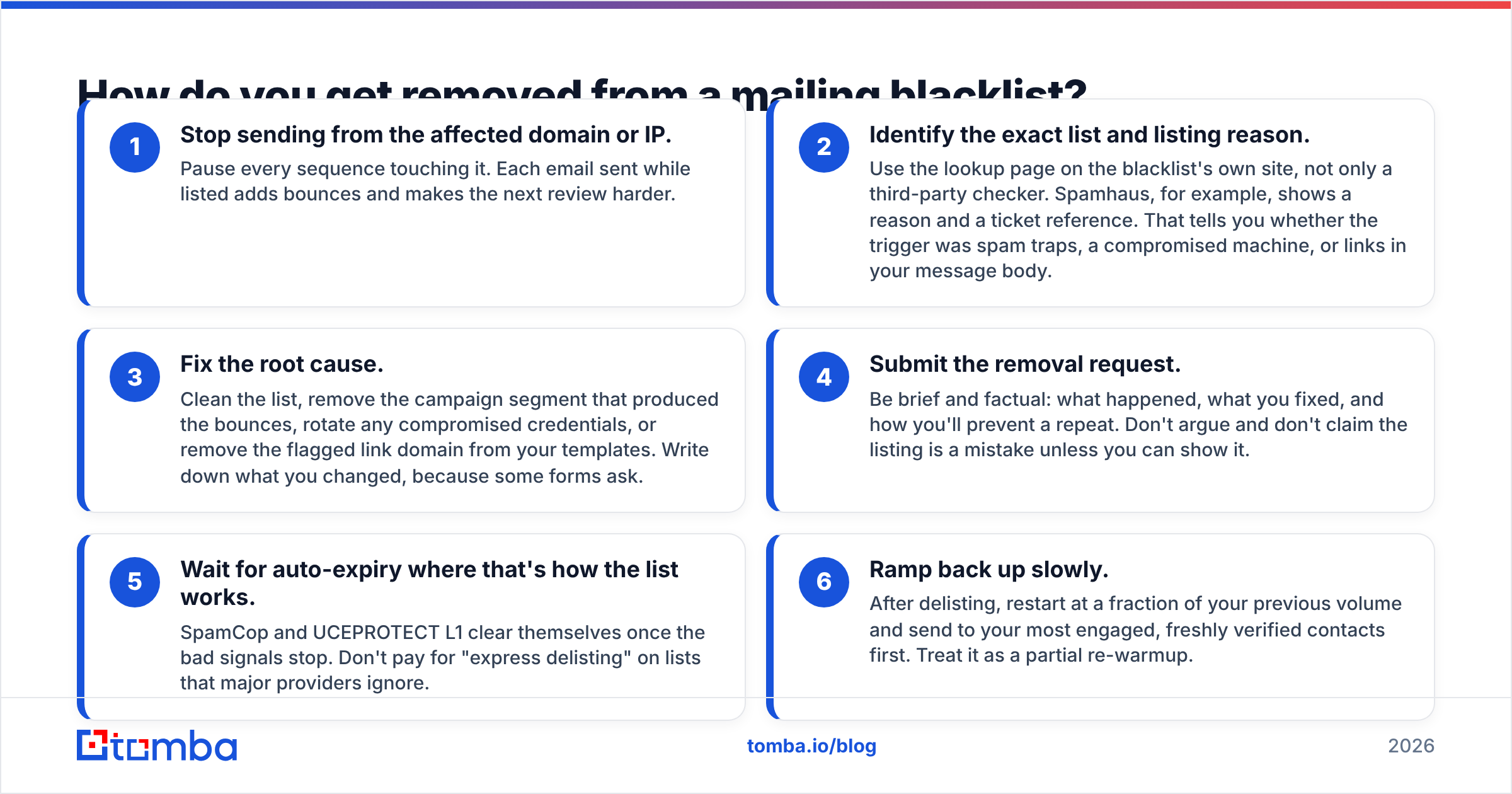
The delisting form itself takes about five minutes. The real work is fixing the cause first. Removal requests without a fix tend to get relisted, and most operators get stricter with repeat offenders.
- Stop sending from the affected domain or IP. Pause every sequence touching it. Each email sent while listed adds bounces and makes the next review harder.
- Identify the exact list and listing reason. Use the lookup page on the blacklist's own site, not only a third-party checker. Spamhaus, for example, shows a reason and a ticket reference. That tells you whether the trigger was spam traps, a compromised machine, or links in your message body.
- Fix the root cause. Clean the list, remove the campaign segment that produced the bounces, rotate any compromised credentials, or remove the flagged link domain from your templates. Write down what you changed, because some forms ask.
- Submit the removal request. Be brief and factual: what happened, what you fixed, and how you'll prevent a repeat. Don't argue and don't claim the listing is a mistake unless you can show it.
- Wait for auto-expiry where that's how the list works. SpamCop and UCEPROTECT L1 clear themselves once the bad signals stop. Don't pay for "express delisting" on lists that major providers ignore.
- Ramp back up slowly. After delisting, restart at a fraction of your previous volume and send to your most engaged, freshly verified contacts first. Treat it as a partial re-warmup.
Typical timelines: Barracuda and SpamCop often clear within 24 hours. Spamhaus can be same-day for a clear first-time listing and much slower for repeat or severe cases. Even after removal, your private reputation with Gmail and Outlook can take a few weeks to recover. Delisting fixes rejections, and inbox placement comes back more slowly.
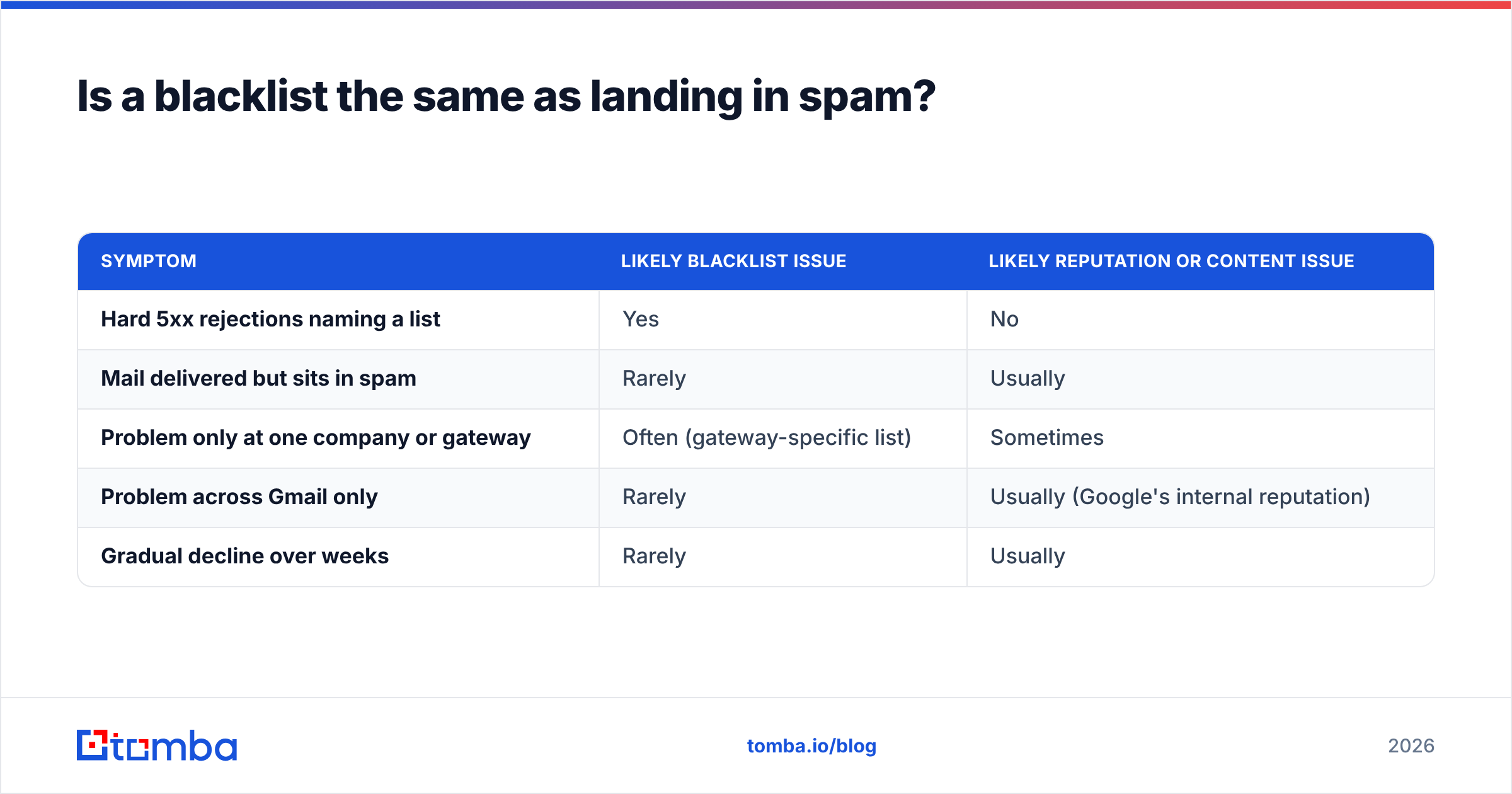
Is a blacklist the same as landing in spam?#
No, and treating them as the same leads to wrong fixes.
| Symptom | Likely blacklist issue | Likely reputation or content issue |
|---|---|---|
| Hard 5xx rejections naming a list | Yes | No |
| Mail delivered but sits in spam | Rarely | Usually |
| Problem only at one company or gateway | Often (gateway-specific list) | Sometimes |
| Problem across Gmail only | Rarely | Usually (Google's internal reputation) |
| Gradual decline over weeks | Rarely | Usually |
Blacklists cause rejections, so the message never arrives. Reputation and content problems usually cause spam-folder placement, where the message arrives and nobody sees it. If your mail is being delivered and landing in spam, delisting won't help. Look at Google Postmaster Tools, your complaint rate, and your copy instead. Our glossary page on email deliverability explains how these layers fit together.
How do you stay off mailing blacklists for good?#
Prevention comes down to five habits. Each one is cheap compared with a week of rejected outbound.
Verify every list before it goes into a sequence. Most B2B listings start here. Run every contact through an email verifier right before sending, not when you first sourced the list. B2B data decays quickly as people change jobs, and a contact that was valid last quarter can be a hard bounce now. Pay particular attention to catch-all domains, which accept everything at the SMTP stage and bounce later.
Source contacts from finders that verify, rather than guessing patterns. If someone builds firstname.lastname@company.com from a LinkedIn profile and sends without checking, that's a bounce generator. Use tools that return a confidence score and verification status, and drop anything that comes back unknown or risky.
Authenticate every sending domain. Set up SPF, DKIM with a 2048-bit key where your provider supports it, and DMARC starting at p=none with reporting before you move to quarantine. Do this for every secondary domain you use for cold outreach, not only your primary.
Separate cold outreach from your main domain. Send outbound from look-alike secondary domains (e.g. getacme.com for acme.com). Then a listing on an outbound domain doesn't take down invoices, password resets, and customer support email along with it.
Warm up and cap volume. New domains need several weeks of gradual ramping. Even after warmup, most teams keep each inbox at 30–50 cold emails per day and add inboxes to scale, rather than pushing one inbox harder.
Monitor weekly, not after something breaks. Schedule a blacklist check on every sending domain and IP. Watch Postmaster Tools for Gmail and Microsoft SNDS for Outlook. Set an alert if your bounce rate on any campaign goes above 2%.

How much does a blacklist listing actually cost you?#
Do the math once and it becomes easy to justify prevention.
Take an SDR team sending 1,500 cold emails a day across five domains. If one domain gets a Spamhaus DBL listing, roughly 20% of daily capacity disappears right away. In practice it's often more, because the team panics and pauses everything. Recovery usually means two to five days of no sending from that domain and a couple of weeks of reduced volume afterward. At a 1% positive-reply rate, that's dozens of lost conversations, and the pipeline loss is far larger than a year of list verification would have cost.
There's also a cost you can't see directly. Your reputation with Gmail and Microsoft doesn't reset when the public listing clears. Inbox placement can stay below baseline for weeks, and you won't get a clean signal telling you when it has recovered.
FAQ: mailing blacklist questions#
Can I get blacklisted using Gmail or Outlook to send cold email? Your domain can. The provider's IP usually won't be, because Google and Microsoft manage those pools. Domain-based lists like Spamhaus DBL apply no matter which provider sent the mail.
Should I pay to be removed from a blacklist? Almost never. The lists that matter most, including Spamhaus, Barracuda, and SpamCop, don't charge for delisting. Lists that sell express removal tend to be ones major mailbox providers ignore.
How long does a mailing blacklist listing last? Anywhere from 24 hours (SpamCop, after reports stop) to indefinitely (manual Spamhaus listings until you request removal). Repeat listings usually last longer and need more evidence of a fix.
Does one spam trap hit get me listed? It can, depending on the list and the type of trap. Usually it's a pattern of hits that triggers the listing. Even so, a single trap hit tells you something is wrong in your data source.
Is it worth buying a new domain instead of delisting? If the domain is a cheap secondary outbound domain with a short history, replacing it can be faster. But if you move the same dirty list to a fresh domain, that domain will get listed too. Fix the data before you change domains.
Where does Tomba fit in blacklist prevention?#
Most blacklist listings start with bad data. Hard bounces and spam-trap hits trace back to contacts that were guessed, scraped, or out of date before the first email went out. Fixing that upstream does more than any delisting form.
Tomba Email Finder finds professional email addresses by name, domain, or company, and returns verification status and source data with each result. That lets you drop risky contacts before they reach your sequencer. Combine it with bulk verification right before each send, and your bounce rate stays well below the levels that get senders listed. The free tier includes 25 searches a month so you can test it on your own target accounts. Paid plans start at $49/mo when you're ready to run it across your whole outbound list. Details are on the Tomba pricing page.
Related guides#
// get started
Find, verify and enrich your first contacts today
Start on the free plan with 25 searches a month, then scale when your team is ready.
Free plan · No credit card required · GDPR & CCPA
// about the author