Mailivery Alternatives: 8 Email Warmup Tools Compared for 2026
Mailivery's flat-rate warmup works well for a handful of inboxes. Once you scale past 10, need placement tests, or want warmup built into your sender, these 8 alternatives fit better.
TL;DR
- Mailivery is a flat-rate email warmup tool. Third-party listings put it at about $29, $79 and $199 a month, with daily warmup volume shared across all connected inboxes. That pricing is good value if you run 3 to 5 mailboxes.
- If warmup is the only reason you'd pay for a separate tool, Instantly and Smartlead are the strongest alternatives because unlimited warmup comes bundled with the sequencer.
- MailReach and Warmy are the picks when you need inbox-placement testing and diagnostics, not just reply-and-rescue activity.
- TrulyInbox, Warmup Inbox and Warmbox are the budget options, but compare per-inbox and flat pricing at your actual mailbox count before you commit.
- Warmup can't fix a bad list. A 6% bounce rate will undo weeks of warmup, so verify every contact before it goes into a sequence.
What is Mailivery, and why look for alternatives?#
Mailivery is a dedicated email warmup service. You connect Google Workspace, Microsoft 365 or SMTP inboxes. It then sends emails between your accounts and its network, opens them, replies to them and moves them out of spam. The goal is to build positive engagement signals so mailbox providers trust your domain before you start real outreach.
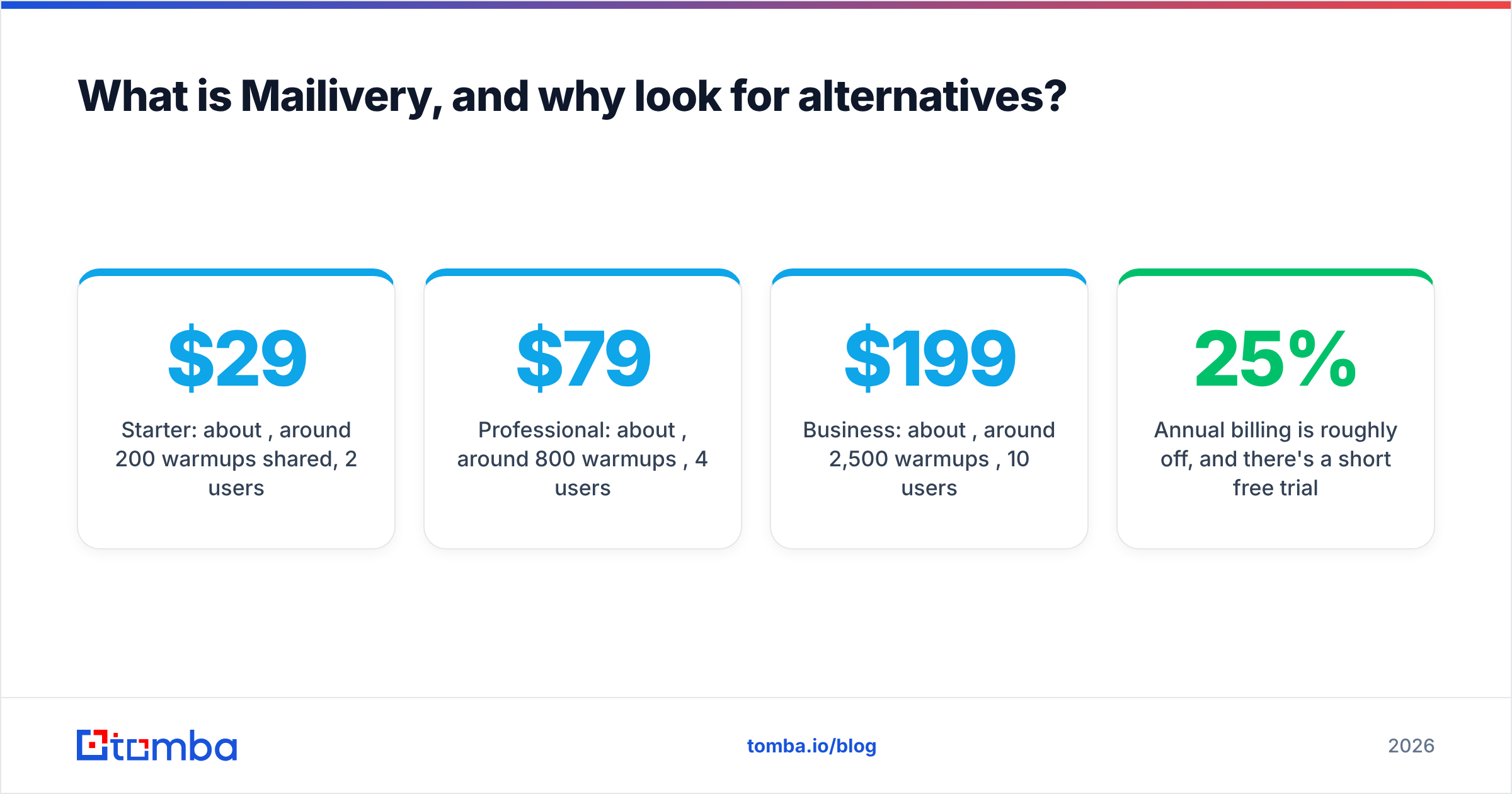
Its standout feature is the pricing model. Most warmup tools charge per mailbox. Mailivery charges one price for unlimited mailboxes, and each tier caps the total number of warmup emails per day across all of them. According to recent Mailivery reviews on Capterra and third-party pricing breakdowns, the tiers look roughly like this:
- Starter: about $29/mo, around 200 warmups per day shared, 2 users
- Professional: about $79/mo, around 800 warmups per day, 4 users
- Business: about $199/mo, around 2,500 warmups per day, 10 users
- Annual billing is roughly 25% off, and there's a short free trial
So why switch? Teams usually leave for one of four reasons:
- The shared daily cap gets thin at scale. If 200 warmups a day are split across 15 inboxes, each one only gets about 13. That's below what many deliverability practitioners recommend for an active cold-sending mailbox.
- You already pay for a sequencer with warmup included. Paying twice for the same engagement network rarely makes sense.
- You need diagnostics, not just activity. Seed-list placement tests, DNS audits and blacklist monitoring are where specialist tools pull ahead.
- You want everything in one place. Warmup, sending, the unified inbox and analytics in one product means fewer tools to manage.
If you're new to the underlying concept, read up on how sender reputation is scored. Warmup is just one input into it.
How should you evaluate an email warmup tool?#
Before you look at specific products, score each option on the criteria that actually change inbox placement. Feature lists are full of extras that don't. These five matter most:
- Network quality. Who are you warming up with? Real Google and Microsoft inboxes on aged domains beat a pool of freshly registered throwaway accounts. Ask vendors what their network is made of.
- Pricing model at your mailbox count. Per-inbox pricing wins at 1 to 3 mailboxes. Flat-rate or bundled pricing wins at 10 or more. Do the math at your real number, not the number on the pricing page.
- Placement testing. A dashboard that says "98% inbox" is measuring the vendor's own network. Seed tests against real Gmail, Outlook and Yahoo addresses tell you what prospects will actually see.
- Ramp control. You want adjustable daily volume, reply rates and ramp speed, plus a way to keep warmup running alongside live campaigns.
- Integration footprint. Does it plug into your sequencer, CRM and DNS checks, or is it another tab you'll forget to open?
Use the warmup calculator to estimate how long a new domain needs before it can safely send your target daily volume. Then judge each tool on whether it can support that ramp.

Which Mailivery alternatives are worth considering?#
Here are the eight tools that come up most often when teams outgrow Mailivery or want a different setup. Prices change often, so treat the numbers as approximate and check each vendor's pricing page before you buy.
1. Instantly: best if you also need a cold email sender#
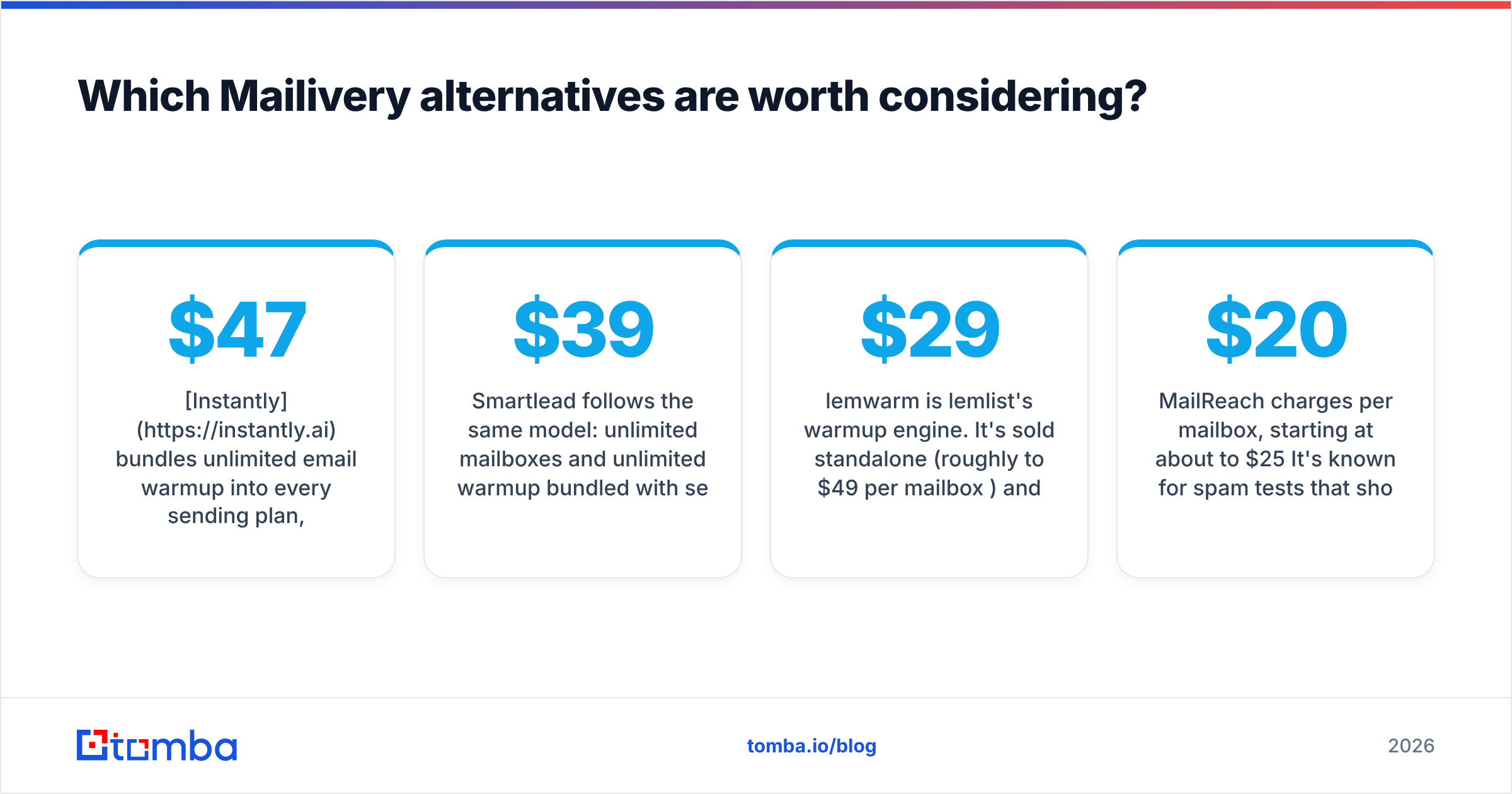
Instantly bundles unlimited email warmup into every sending plan, which start at about $47/mo. You can connect unlimited sending accounts. Its warmup network is one of the largest in cold email, and warmup keeps running automatically while your campaigns send. (Screenshot suggestion: the Instantly warmup dashboard showing per-account health scores.)
- Strengths: No per-inbox fee, warmup and sending share one dashboard, strong deliverability add-ons on higher tiers
- Trade-offs: You're buying a full sequencer, so it's overkill if you send from HubSpot or Outreach and only want warmup
- Best for: Agencies and SDR teams running 10 to 100+ inboxes
2. Smartlead: best for agencies managing many clients#
Smartlead follows the same model: unlimited mailboxes and unlimited warmup bundled with sending, starting at about $39/mo. Its main advantages are client workspaces, white-labelling and automatic mailbox rotation. Those features make it a common choice for lead-gen agencies.
- Strengths: Unlimited warmup, mailbox rotation, sub-accounts per client
- Trade-offs: The interface takes time to learn, and the warmup controls are less detailed than specialist tools
- Best for: Agencies with multiple client domains
3. lemwarm (by lemlist): best for lemlist users#
lemwarm is lemlist's warmup engine. It's sold standalone (roughly $29 to $49 per mailbox per month) and included in some lemlist plans. It groups your inbox with senders in a similar industry, which is meant to make the warmup conversations look more natural.
- Strengths: Industry-matched warmup, deliverability checks, tight lemlist integration
- Trade-offs: Per-mailbox pricing adds up fast past 5 inboxes
- Best for: Teams already sequencing in lemlist
4. MailReach: best for placement testing and diagnostics#
MailReach charges per mailbox, starting at about $20 to $25/mo. It's known for spam tests that show exactly where a message lands at major providers, plus blacklist and DNS monitoring. (Screenshot suggestion: a MailReach spam test result split by Gmail, Outlook and other providers.)
- Strengths: Real placement testing, a reputation score per inbox, responsive support
- Trade-offs: Per-inbox pricing makes it pricier than Mailivery at scale
- Best for: Teams that need to diagnose why emails hit spam, not just add activity
5. Warmy: best for hands-off, AI-driven warmup#
Warmy uses adaptive warmup that adjusts volume automatically, and it includes free tools such as a deliverability test and an SPF/DMARC generator. Its own blog says pricing has moved to custom, volume-based quotes. The historical entry point was about $49 per inbox.
- Strengths: Automatic ramping, template-based warmup content, strong diagnostic tooling
- Trade-offs: Opaque pricing, and it's often the most expensive option per inbox
- Best for: Teams with budget that want set-and-forget warmup
6. Warmup Inbox: best simple per-inbox option#
Warmup Inbox is a clean, focused tool with per-inbox pricing that starts around $15/mo. It has a large network and keeps its feature set small, which some teams prefer.
- Strengths: Simple setup, low price for 1 to 3 inboxes, clear reporting
- Trade-offs: Few diagnostics, and it gets expensive past 10 inboxes
- Best for: Founders and small teams with a handful of mailboxes
7. TrulyInbox: closest like-for-like flat-rate alternative#
TrulyInbox is the closest match to Mailivery's pricing approach. It offers unlimited inboxes on flat plans, with tiers that cap daily warmup volume. If you like Mailivery's model and want to compare a competitor's network, start here.
- Strengths: Flat pricing, unlimited mailboxes, low entry price
- Trade-offs: A smaller ecosystem and fewer integrations
- Best for: Budget-conscious teams that want to keep flat-rate pricing
8. Warmbox: best low-cost per-inbox warmup#
Warmbox starts at about $15 per inbox per month. It warms with a network of real inboxes and provides a deliverability score. It's a solid option if you only need to warm a couple of domains.
- Strengths: Low entry price, real-inbox network
- Trade-offs: Per-inbox pricing, limited advanced features
- Best for: Solo senders and very small teams
How do Mailivery alternatives compare side by side?#
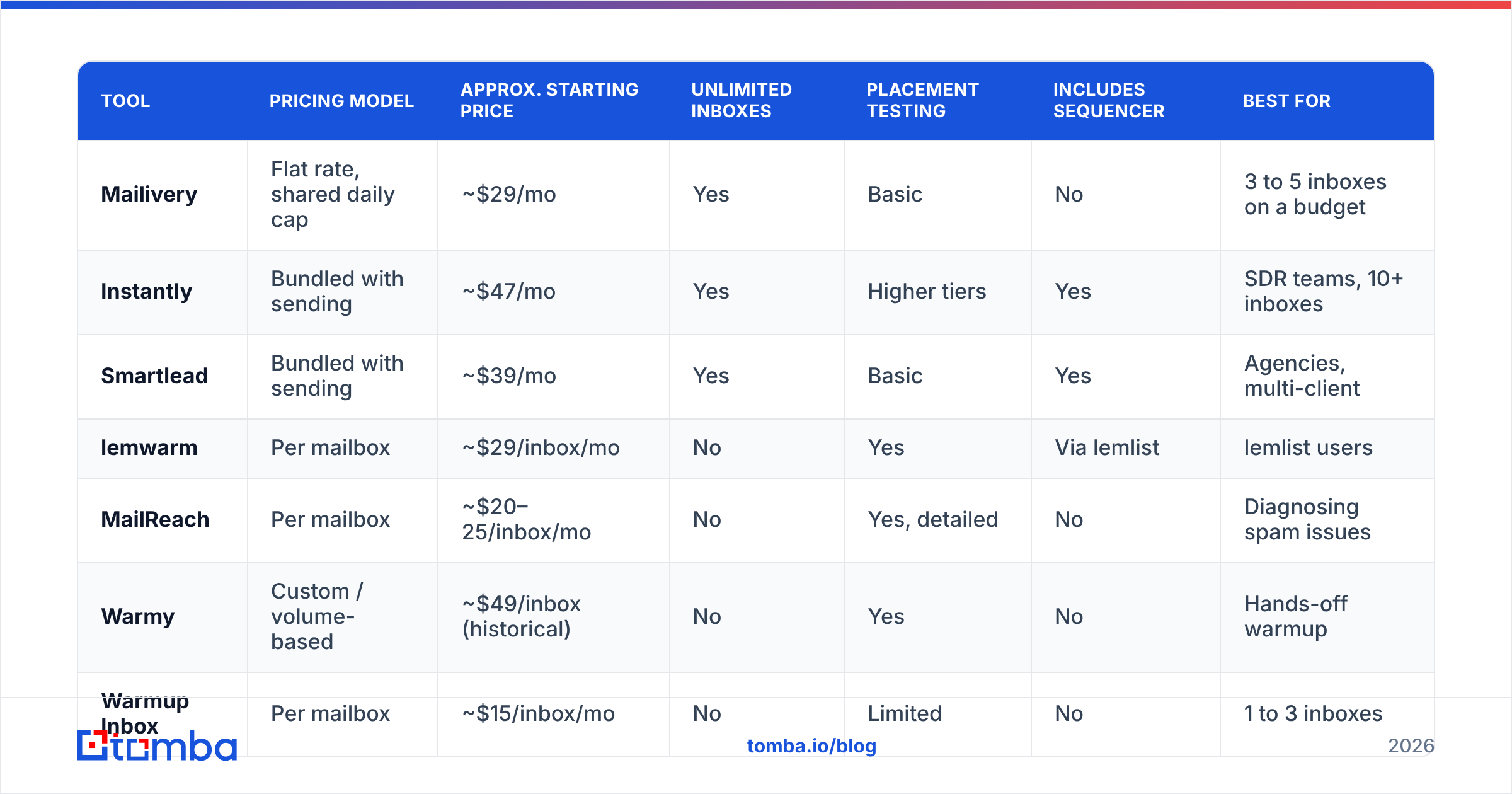
| Tool | Pricing model | Approx. starting price | Unlimited inboxes | Placement testing | Includes sequencer | Best for |
|---|---|---|---|---|---|---|
| Mailivery | Flat rate, shared daily cap | ~$29/mo | Yes | Basic | No | 3 to 5 inboxes on a budget |
| Instantly | Bundled with sending | ~$47/mo | Yes | Higher tiers | Yes | SDR teams, 10+ inboxes |
| Smartlead | Bundled with sending | ~$39/mo | Yes | Basic | Yes | Agencies, multi-client |
| lemwarm | Per mailbox | ~$29/inbox/mo | No | Yes | Via lemlist | lemlist users |
| MailReach | Per mailbox | ~$20–25/inbox/mo | No | Yes, detailed | No | Diagnosing spam issues |
| Warmy | Custom / volume-based | ~$49/inbox (historical) | No | Yes | No | Hands-off warmup |
| Warmup Inbox | Per mailbox | ~$15/inbox/mo | No | Limited | No | 1 to 3 inboxes |
| TrulyInbox | Flat rate | Low flat entry tier | Yes | Basic | No | Flat-rate buyers |
| Warmbox | Per mailbox | ~$15/inbox/mo | No | Score only | No | Solo senders |
For user-reported pros and cons on any of these, the Mailivery listing on G2 and the competitor pages it links to are a reasonable starting point. Weigh recent reviews more heavily, because warmup networks change quickly.
Is per-inbox or flat-rate warmup cheaper?#
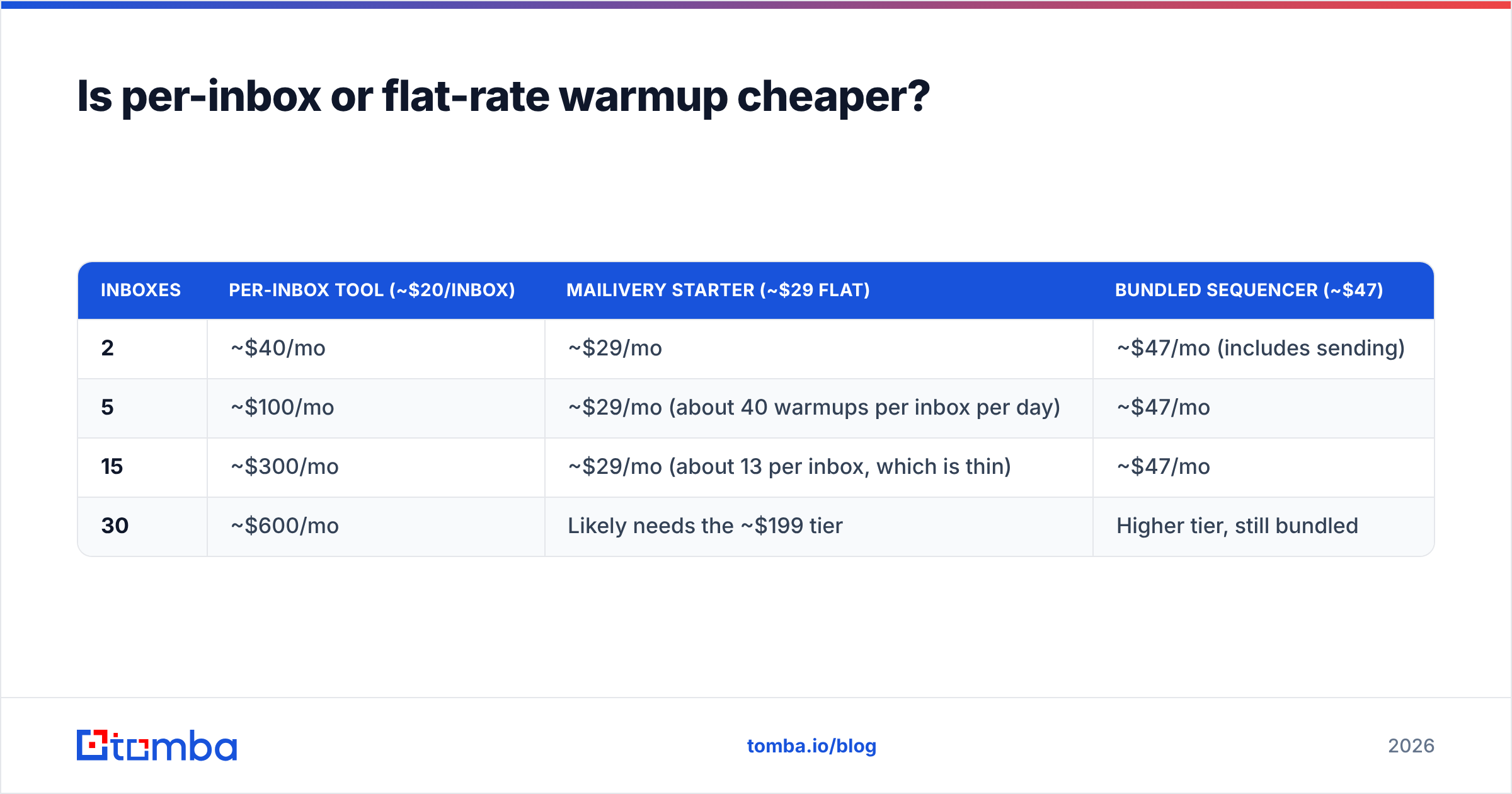
It depends on your mailbox count. The break-even point arrives sooner than most people expect.
| Inboxes | Per-inbox tool (~$20/inbox) | Mailivery Starter (~$29 flat) | Bundled sequencer (~$47) |
|---|---|---|---|
| 2 | ~$40/mo | ~$29/mo | ~$47/mo (includes sending) |
| 5 | ~$100/mo | ~$29/mo (about 40 warmups per inbox per day) | ~$47/mo |
| 15 | ~$300/mo | ~$29/mo (about 13 per inbox, which is thin) | ~$47/mo |
| 30 | ~$600/mo | Likely needs the ~$199 tier | Higher tier, still bundled |
Two conclusions follow from this:
- Flat rate only beats per-inbox if the shared cap still gives each inbox enough volume. With 15 inboxes on a 200-per-day cap, you're technically warming all of them but barely warming any of them.
- If you're paying for a sender anyway, bundled warmup usually wins. The marginal cost of warmup in Instantly or Smartlead is close to zero.
Does email warmup alone fix deliverability?#
No. This is the part most warmup comparisons leave out. Warmup builds positive signals, but mailbox providers weigh negative signals much more heavily. Every hard bounce, spam complaint and spam-trap hit undoes days of warmup activity.
The most common reason for a warmed domain landing in spam isn't a weak warmup network. It's the list. Scraped, guessed or outdated addresses push bounce rates well above the 2% threshold that most deliverability guides treat as the danger zone. Google's sender guidelines also expect bulk senders to keep spam complaint rates low and to have SPF, DKIM and DMARC configured correctly.

A deliverability stack that actually works has three layers:
- Clean data in. Find addresses from verified sources and run every list through an email verifier before upload. Handle catch-all domains separately, because they accept every address at the SMTP level, so a standard check can't confirm any single mailbox.
- Authentication and reputation. Configure SPF, DKIM and DMARC, warm new domains gradually, and monitor blacklists.
- Sending discipline. Keep daily volume per inbox moderate, use plain-text-leaning copy, and run messages through a spam checker before a big send.
Warmup tools only cover part of layer 2. Choosing between Mailivery and its alternatives matters much less than getting layer 1 right.
Which Mailivery alternative should you pick?#
Use this shortlist:
- Pick Instantly or Smartlead if you need a sequencer anyway or run more than 10 inboxes. Bundled unlimited warmup is the most cost-efficient setup at scale.
- Pick MailReach if your emails are already landing in spam and you need to find out why. Placement tests are worth paying per inbox.
- Pick Warmy if you have budget and want warmup that adjusts itself.
- Pick lemwarm if your team already works in lemlist.
- Pick TrulyInbox if you like Mailivery's flat-rate model and want to compare networks.
- Pick Warmup Inbox or Warmbox if you're warming just 1 to 3 inboxes.
- Stay on Mailivery if you run 3 to 5 mailboxes, only need warmup, and want a predictable flat bill. At that size it's still a strong deal.
Whichever tool you choose, run a seed placement test before you trust any vendor's "inbox rate" figure. That number is measured on the vendor's own network, and your prospects aren't on it.
Start with clean data before you warm anything#
A well-warmed domain can lose its reputation in one bad campaign, so the cheapest deliverability work happens before anything is sent. Tomba Email Finder finds professional email addresses by domain, name or company, and returns verification status so you know which contacts are safe to sequence. Pair it with your warmup tool and your bounce rate stays low enough that the warmup actually carries over to live campaigns. You can start on the free tier with 25 searches a month, then move to Starter at $49/mo when you're ready to scale outbound.
Related guides#
// get started
Find, verify and enrich your first contacts today
Start on the free plan with 25 searches a month, then scale when your team is ready.
Free plan · No credit card required · GDPR & CCPA
// about the author