Mailivery Pricing, Reviews, Pros and Cons: 2026 Honest Breakdown
Mailivery's flat $29–$199 pricing with unlimited mailboxes sounds simple, until you split shared warmup volume across your inboxes. Here's what it really costs per inbox, what reviewers say, and who should pay for it.

TL;DR
- Mailivery is an email warmup tool with three flat plans. Starter costs $29/mo, Professional $79/mo and Business $199/mo. Every plan lets you connect unlimited mailboxes, and annual billing cuts about 25%.
- The catch is that the daily warmup volume (200, 800 or 2,500 emails) is shared across all your inboxes. Divide that number by your inbox count before you decide a plan is cheap.
- Reviews are positive but there aren't many of them. G2 shows roughly 4.5/5 from a small pool. People like the simple UI and the bundled blocklist monitoring. The complaints are thin analytics, uneven support response and volume that gets spread too thin at scale.
- Mailivery is a good fit if you run about 5 to 60 inboxes and want one predictable bill. If you have only one or two inboxes, you're probably paying for capacity you won't use.
- Warmup can't fix a bad list. If you send to unverified addresses, bounces will undo whatever reputation warmup built.
What is Mailivery and what does it actually do?#
Mailivery is an email warmup service. You connect your sending mailboxes (Google Workspace, Microsoft 365 or SMTP/IMAP) and it sends emails to and from a network of real inboxes. Those messages get opened, replied to, marked important and pulled out of spam. Mailbox providers like Gmail and Outlook see that positive engagement, and over time your domain and IP build a better sender reputation.
You're paying for one thing: when your real cold emails go out, they should land in the primary inbox and not in spam or Promotions. Mailivery also bundles some extras, including blocklist monitoring across 70+ lists, inbox placement tests and a small allowance of email verification credits. That pushes it a little closer to a deliverability suite than a pure warmup bot.
You can check the current feature list on the official Mailivery site. Read on before you pick a tier.
How much does Mailivery cost in 2026?#
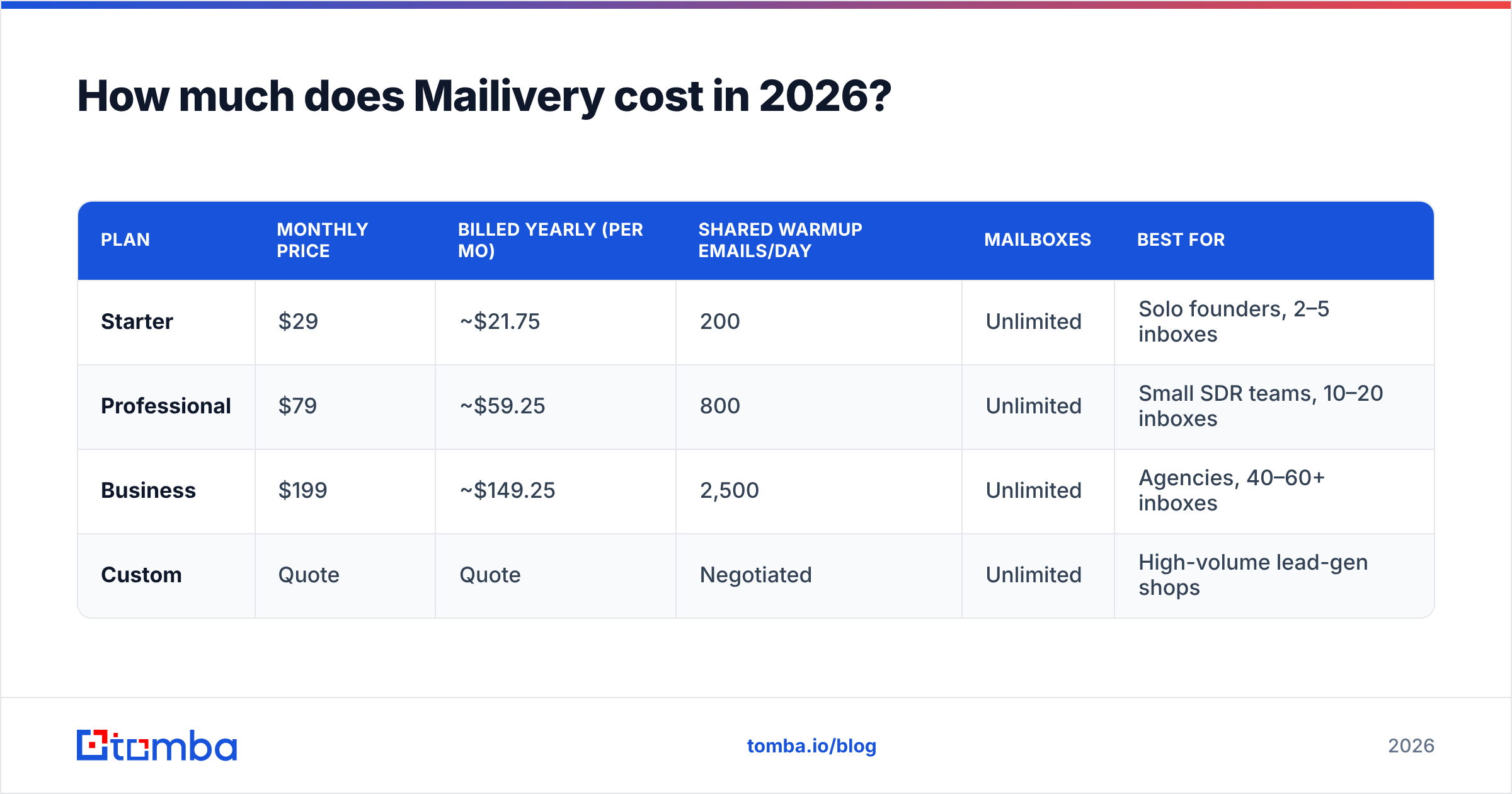
Mailivery has three self-serve tiers plus custom pricing for higher volume. These are the prices at the time of writing, from the vendor's pricing materials and its 2026 plan-upgrade announcement:
| Plan | Monthly price | Billed yearly (per mo) | Shared warmup emails/day | Mailboxes | Best for |
|---|---|---|---|---|---|
| Starter | $29 | ~$21.75 | 200 | Unlimited | Solo founders, 2–5 inboxes |
| Professional | $79 | ~$59.25 | 800 | Unlimited | Small SDR teams, 10–20 inboxes |
| Business | $199 | ~$149.25 | 2,500 | Unlimited | Agencies, 40–60+ inboxes |
| Custom | Quote | Quote | Negotiated | Unlimited | High-volume lead-gen shops |
A few points the pricing page won't make obvious:
- The trial is short. Mailivery advertises a 7-day trial, and at least one independent reviewer reports that you need a credit card to start it. Seven days isn't long enough to see the full reputation curve. Warmup usually takes 2–4 weeks to show real results.
- Placement-test allowances differ between sources. Some list 10/50/250 tests per tier and others list 10/30/100. Check the live page before you rely on them.
- No real free plan. A few coupon sites list a "free forever" tier. Mailivery's own materials don't mention one, so don't plan around it.
What does Mailivery really cost per inbox?#
This is the most important calculation. Mailivery says "unlimited mailboxes," and that's true. Your daily warmup volume, though, is one pool. If you connect more inboxes, each one gets less of it.
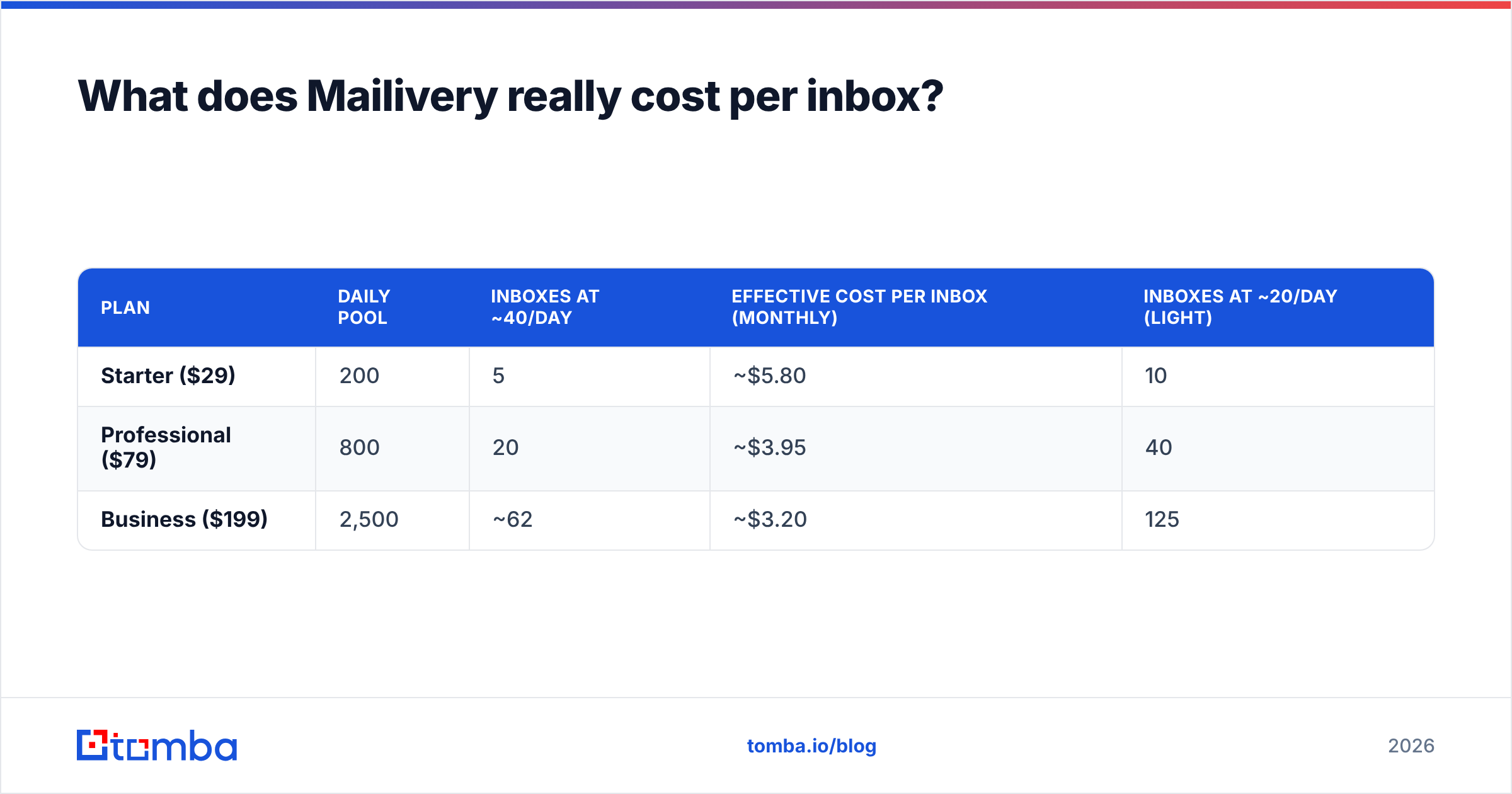
Most deliverability practitioners aim for about 20–40 warmup emails per inbox per day once a mailbox is past ramp-up. If you use 40/day as a healthy target, the numbers come out like this:
| Plan | Daily pool | Inboxes at ~40/day | Effective cost per inbox (monthly) | Inboxes at ~20/day (light) |
|---|---|---|---|---|
| Starter ($29) | 200 | 5 | ~$5.80 | 10 |
| Professional ($79) | 800 | 20 | ~$3.95 | 40 |
| Business ($199) | 2,500 | ~62 | ~$3.20 | 125 |
Compare that with per-inbox warmup tools such as MailReach, which have historically charged around $20–25 per inbox per month. From roughly five inboxes upward, Mailivery's flat model is much cheaper.
The opposite also holds. With one inbox you pay $29 for 200 emails/day and can use maybe 40 of them. Per-inbox tools or the warmup built into your sending platform are better value at that size.
To size your own setup, run your inbox count and target send volume through a warmup calculator first. Then pick the smallest Mailivery tier that gives each inbox at least 20–30 emails a day.

How should you evaluate Mailivery before paying?#
Don't just compare the price tags. Score Mailivery on these five points:
- Volume per inbox, not per plan. Divide the daily pool by your mailbox count. If the result is under ~20/day, you're under-warming and your reputation will build slowly.
- Provider coverage. Make sure your exact mix of Google Workspace, Microsoft 365 and custom SMTP is supported. One G2 reviewer said warming effectively worked only for Gmail on their setup, so test your Outlook inboxes during the trial.
- Monitoring depth. Blocklist checks and placement tests are useful, but reviewers keep asking for deeper analytics. If you need per-inbox trend reporting, see whether the dashboard gives you enough before you commit to annual billing.
- Support responsiveness. Most reviews are positive, but there are reports of slow replies. Send a pre-sales question and time the response.
- Exit cost. Annual billing saves ~25% but locks you in for 12 months. Pay monthly until the tool has proven itself over a full warmup cycle.
What do real users say in Mailivery reviews?#
Mailivery has a small but mostly positive review footprint. On G2's Mailivery reviews page it sits around 4.5 out of 5. That figure comes from a small number of reviews, so a few new ratings can move it a lot.
You'll hear the same themes from users:
- Ease of setup. Reviewers often say the interface is simpler than older warmup tools. In G2's side-by-side comparison, users rated Mailivery easier to set up than Warmup Inbox.
- Engagement realism. One reviewer singled out the automated reading and sorting behaviour, meaning emails get opened, moved and marked important rather than just delivered.
- Measurable inbox lift. Several users say inbox placement improved after a few weeks.
There are negatives too:
- Analytics are thin. This is the most common feature request.
- Support can lag. At least one reviewer reported waiting weeks for a resolution.
- Shared volume feels tight at scale. Some reviewers and comparison sites point out that the per-inbox share gets too small once you go well past the comfortable ratio for your tier.
Keep in mind where most "Mailivery review" content comes from. A lot of the top-ranking articles are written by competing warmup vendors or by Mailivery's own blog. Give the most weight to G2 and to your own trial data.
What are the pros and cons of Mailivery?#
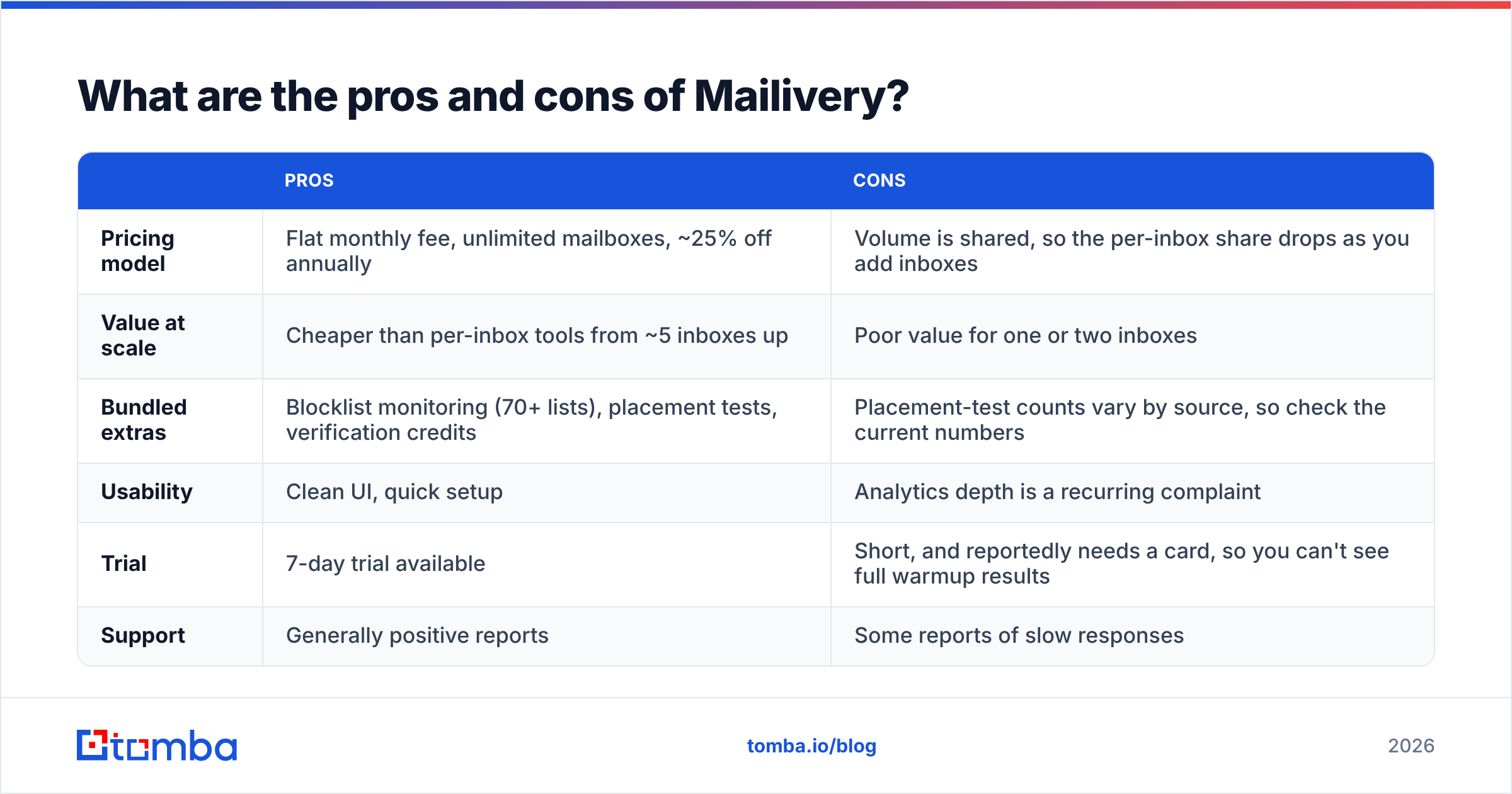
| Pros | Cons | |
|---|---|---|
| Pricing model | Flat monthly fee, unlimited mailboxes, ~25% off annually | Volume is shared, so the per-inbox share drops as you add inboxes |
| Value at scale | Cheaper than per-inbox tools from ~5 inboxes up | Poor value for one or two inboxes |
| Bundled extras | Blocklist monitoring (70+ lists), placement tests, verification credits | Placement-test counts vary by source, so check the current numbers |
| Usability | Clean UI, quick setup | Analytics depth is a recurring complaint |
| Trial | 7-day trial available | Short, and reportedly needs a card, so you can't see full warmup results |
| Support | Generally positive reports | Some reports of slow responses |
Is Mailivery better than per-inbox warmup tools?#
It depends on how many inboxes you have.
Mailivery wins when:
- You run 5+ inboxes across several secondary domains, which is standard for cold outbound in 2026.
- You're an agency adding and removing client mailboxes and you don't want the bill to change every time.
- You want blocklist monitoring and placement tests on the same invoice.
Per-inbox tools or built-in warmup win when:
- You have one to three inboxes.
- Your sequencer (Instantly, Smartlead, lemlist and others) already includes warmup in the plan, which makes a separate tool redundant.
- You need detailed per-inbox analytics more than raw volume.
A simple rule: if the Starter plan's 200/day would leave each inbox with more than 60 warmup emails, you're overpaying. If Business would leave each inbox with fewer than 20, you need custom pricing or a second account.
Why doesn't warmup alone fix deliverability?#
People often skip this part. Warmup builds reputation, and bad sending habits wear it down. Gmail and Yahoo's bulk-sender rules, set out in Google's email sender guidelines, expect authenticated domains (SPF, DKIM, DMARC), low spam-complaint rates and clean lists. A month of warmup won't survive one campaign that bounces 8% of the time.
Here's how it usually goes wrong. A team pays $79/mo for Professional, warms 20 inboxes for three weeks and sees great placement scores. Then they upload a scraped list nobody verified. Hard bounces spike, Microsoft starts junking everything, and the team blames the warmup tool.

The fix happens before you send:
- Verify every address with an email verifier before it reaches a sequence. Mailivery's bundled verification credits help, but they're sized for spot checks, not full prospect lists.
- Start with accurate data. Addresses you find through a reputable email finder bounce far less often than guessed patterns or scraped exports.
- Monitor blocklists independently. Mailivery covers this, but a quick blacklist checker run before a big campaign is cheap insurance.
- Keep per-inbox volume conservative. 30–50 cold sends per inbox per day, on top of warmup, is the range most teams stay in.
Who should buy Mailivery, and on which plan?#
Here's a short guide:
- Solo founder, 1–2 inboxes: Skip Mailivery for now. Use the warmup built into your sequencer, or a per-inbox tool.
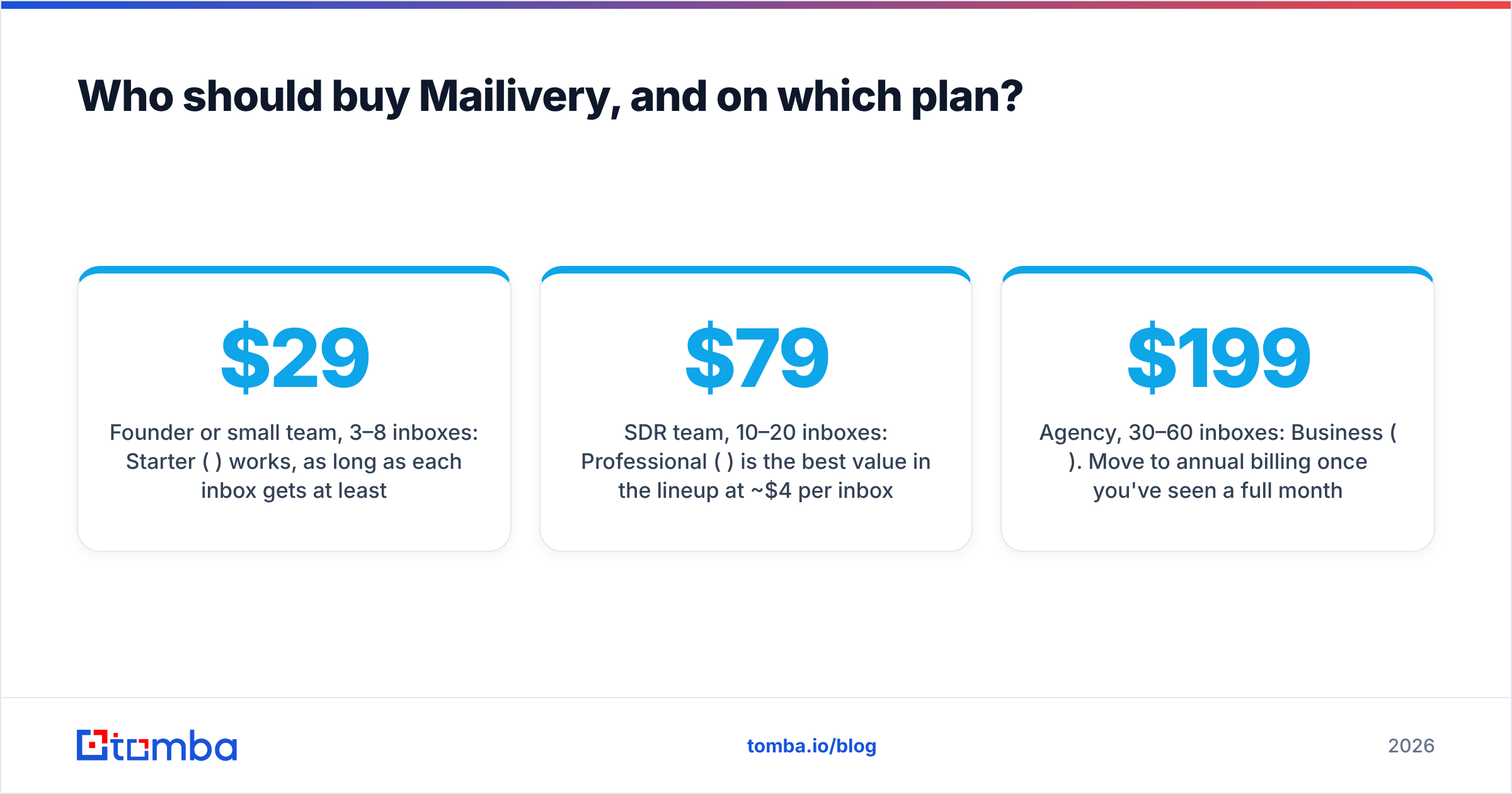
- Founder or small team, 3–8 inboxes: Starter ($29) works, as long as each inbox gets at least 25/day.
- SDR team, 10–20 inboxes: Professional ($79) is the best value in the lineup at ~$4 per inbox.
- Agency, 30–60 inboxes: Business ($199). Move to annual billing once you've seen a full month of results.
- Lead-gen shop, 100+ inboxes: Ask for custom pricing, or split inboxes across accounts so no mailbox falls below ~20/day.
In general, Mailivery is a solid, fairly priced warmup tool for multi-inbox outbound. The flat pricing is its main advantage, and the shared volume is the main thing to check before you buy. Do the per-inbox math, test your Microsoft inboxes during the trial, and keep the trial's limits in mind.
Ready to protect the reputation you're warming?#
Warmup only pays off if the addresses you send to are real. Before your newly warmed inboxes go out to prospects, build the list on verified data. Tomba Email Finder finds professional email addresses by name, domain or company and checks them so they don't bounce. Start with 25 free searches a month, or see Tomba pricing for plans from $49/mo. Clean data plus solid warmup is what keeps your outbound in the primary inbox.
Related guides#
// get started
Find, verify and enrich your first contacts today
Start on the free plan with 25 searches a month, then scale when your team is ready.
Free plan · No credit card required · GDPR & CCPA
// about the author