Clodura.ai vs SalesBlink (2026): Which Outbound Tool Wins?
Clodura.ai bundles a B2B database with sequences; SalesBlink is a leaner cold-email engine. Here's an honest, side-by-side breakdown of data, deliverability, pricing, and which one fits your outbound motion in 2026.
Choosing between Clodura.ai and SalesBlink usually comes down to one question: do you need a database bolted onto your outreach, or a lean sending engine you feed with your own leads? Both promise to run cold outbound end to end, but they solve different halves of the problem. This breakdown compares them on data, deliverability, sequencing, and price so you can pick without a two-week trial spiral.
TL;DR — Clodura.ai vs SalesBlink at a glance#
- Clodura.ai is a data-first platform: a built-in B2B contact database, intent signals, and email sequences in one login. Best when you have no lead source of your own.
- SalesBlink is an outreach-first platform: a cold-email engine with built-in warmup, multichannel sequences, and an AI assistant. Best when you already source leads elsewhere.
- Data quality is Clodura's pitch but its database is smaller and patchier than premium providers; SalesBlink barely has a database at all.
- Deliverability favors SalesBlink thanks to native warmup (via its "BlinkGPT" and rotation features); Clodura leans on third-party warmup.
- Neither is a pure email-finder. If accuracy of contact data is your real bottleneck, a dedicated finder like Tomba Email Finder pairs better with either tool than their built-in data does.
What is Clodura.ai?#
Clodura.ai is an all-in-one sales prospecting and engagement platform. Think of it as a lead database, an email-sequencing tool, and a light sales-intelligence layer stitched into a single dashboard. You search its database of companies and contacts, pull emails and direct dials, then drop those contacts into automated email sequences without leaving the app.
Its differentiators are the bundled data and the "signals" layer — technographics, org charts, and buying-intent triggers meant to tell you who to contact and when. For a small team with no CRM enrichment budget and no existing lead list, that consolidation is genuinely useful: one tool, one bill, prospect-to-send in a few clicks.
The trade-off is depth. Clodura's database is respectable for a bundled offering but thinner than dedicated data vendors, and its sequencing is functional rather than best-in-class. You're buying convenience, not category-leading performance in any single dimension.
What is SalesBlink?#
SalesBlink is a cold-email outreach platform built around deliverability. Its core loop is: connect your mailboxes, warm them up automatically, build multichannel sequences (email plus follow-up tasks), and let its AI ("BlinkGPT") draft and personalize copy. Rotation across multiple sending accounts and built-in warmup are the headline features.
SalesBlink does include a small prospecting/data component, but that's not why people buy it. You bring your leads — scraped, purchased, or found with a dedicated tool — and SalesBlink handles the sending mechanics that keep you out of spam. It competes more with Instantly and Saleshandy than with data platforms.
If you already know who to contact and just need those messages to land in the primary inbox at scale, SalesBlink is the more focused, more affordable pick. If you're staring at an empty list, it won't fill it for you.
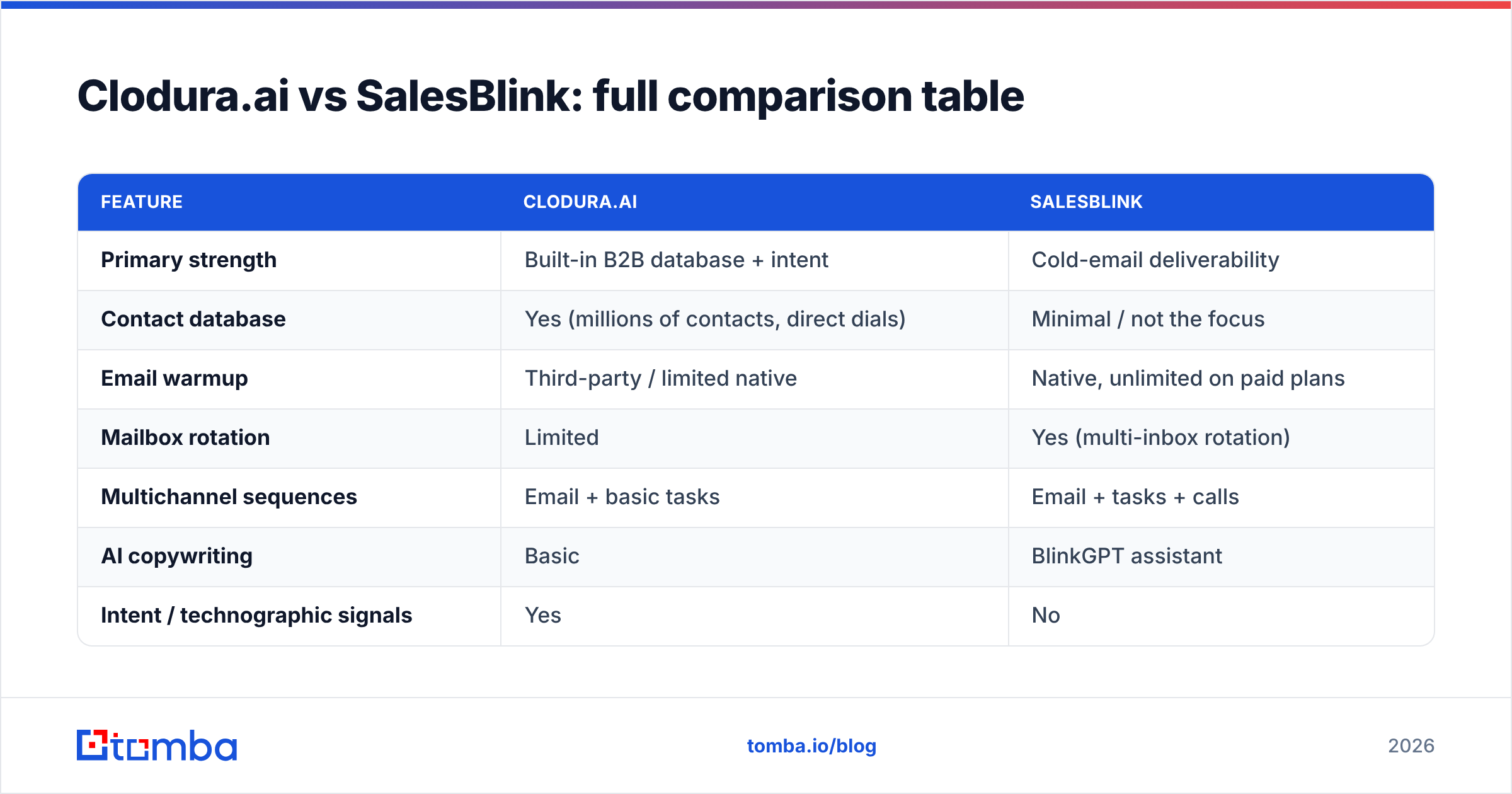
Clodura.ai vs SalesBlink: full comparison table#
| Feature | Clodura.ai | SalesBlink |
|---|---|---|
| Primary strength | Built-in B2B database + intent | Cold-email deliverability |
| Contact database | Yes (millions of contacts, direct dials) | Minimal / not the focus |
| Email warmup | Third-party / limited native | Native, unlimited on paid plans |
| Mailbox rotation | Limited | Yes (multi-inbox rotation) |
| Multichannel sequences | Email + basic tasks | Email + tasks + calls |
| AI copywriting | Basic | BlinkGPT assistant |
| Intent / technographic signals | Yes | No |
| Free tier | Limited free plan | 7-day trial (no permanent free) |
| Entry paid price | ~$33–$50/user/mo (billed annually) | ~$25/user/mo (billed annually) |
| Best for | Teams with no lead source | Teams with their own leads |
Prices shift with billing cycles and promotions, so confirm current numbers on each vendor's own pricing page before you commit.
Is Clodura.ai's data actually good enough?#
The honest answer: it's fine for top-of-funnel volume, but not for surgical outreach. Clodura's database gives you reach, and bundling it removes a purchase decision. But bundled databases share a common weakness — they're refreshed less aggressively than pure-play data vendors, so bounce rates and stale titles creep in, especially outside North America and outside tech.
That matters more than it sounds. A 12% bounce rate doesn't just waste sends; it damages your sender reputation and drags down the deliverability of every future campaign. The tool that finds the email and the tool that verifies it should be held to a higher accuracy bar than a convenience bundle usually clears.
This is where a dedicated layer earns its keep. Running Clodura contacts through a standalone email verifier before they hit a sequence routinely cuts bounces to low single digits. Or skip the bundled data entirely and source cleaner contacts with a purpose-built email finder that publishes its accuracy methodology.
Does SalesBlink win on deliverability?#
Yes — deliverability is SalesBlink's clearest advantage over Clodura. Native warmup, inbox rotation, and spam-aware sending are built in, not add-ons. For high-volume cold email, that architecture is the difference between the primary tab and the spam folder.
But deliverability tooling only protects valid sends. Warmup can't rescue a list full of invalid or catch-all addresses; those still bounce, and bounces are the fastest way to torch a warmed-up domain. So even SalesBlink's strength depends on the quality of the data you feed it.
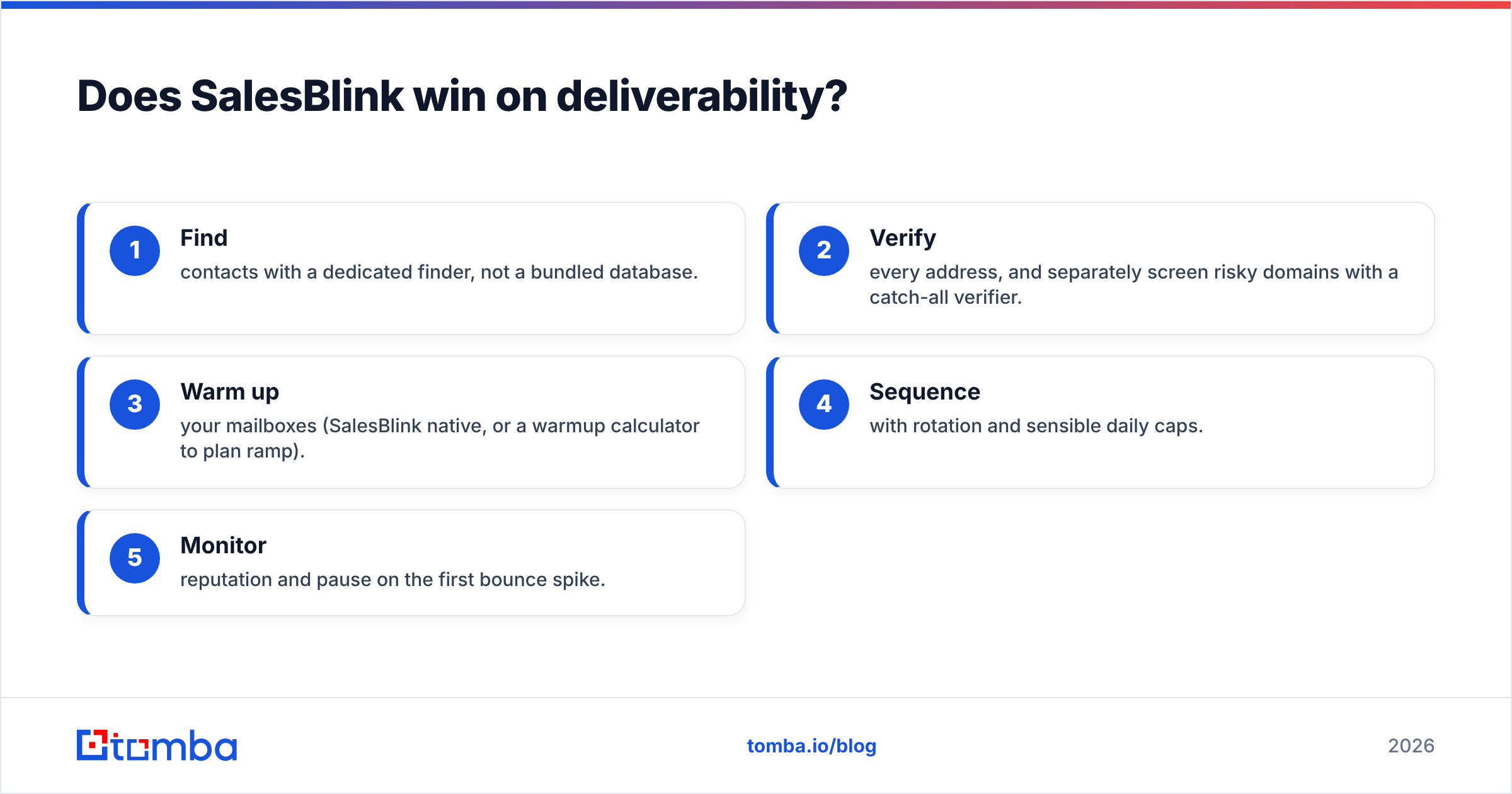
A practical stack looks like this:
- Find contacts with a dedicated finder, not a bundled database.
- Verify every address, and separately screen risky domains with a catch-all verifier.
- Warm up your mailboxes (SalesBlink native, or a warmup calculator to plan ramp).
- Sequence with rotation and sensible daily caps.
- Monitor reputation and pause on the first bounce spike.
Do those five and either platform performs. Skip step two and no amount of warmup saves you.
Clodura.ai vs SalesBlink: pricing breakdown#
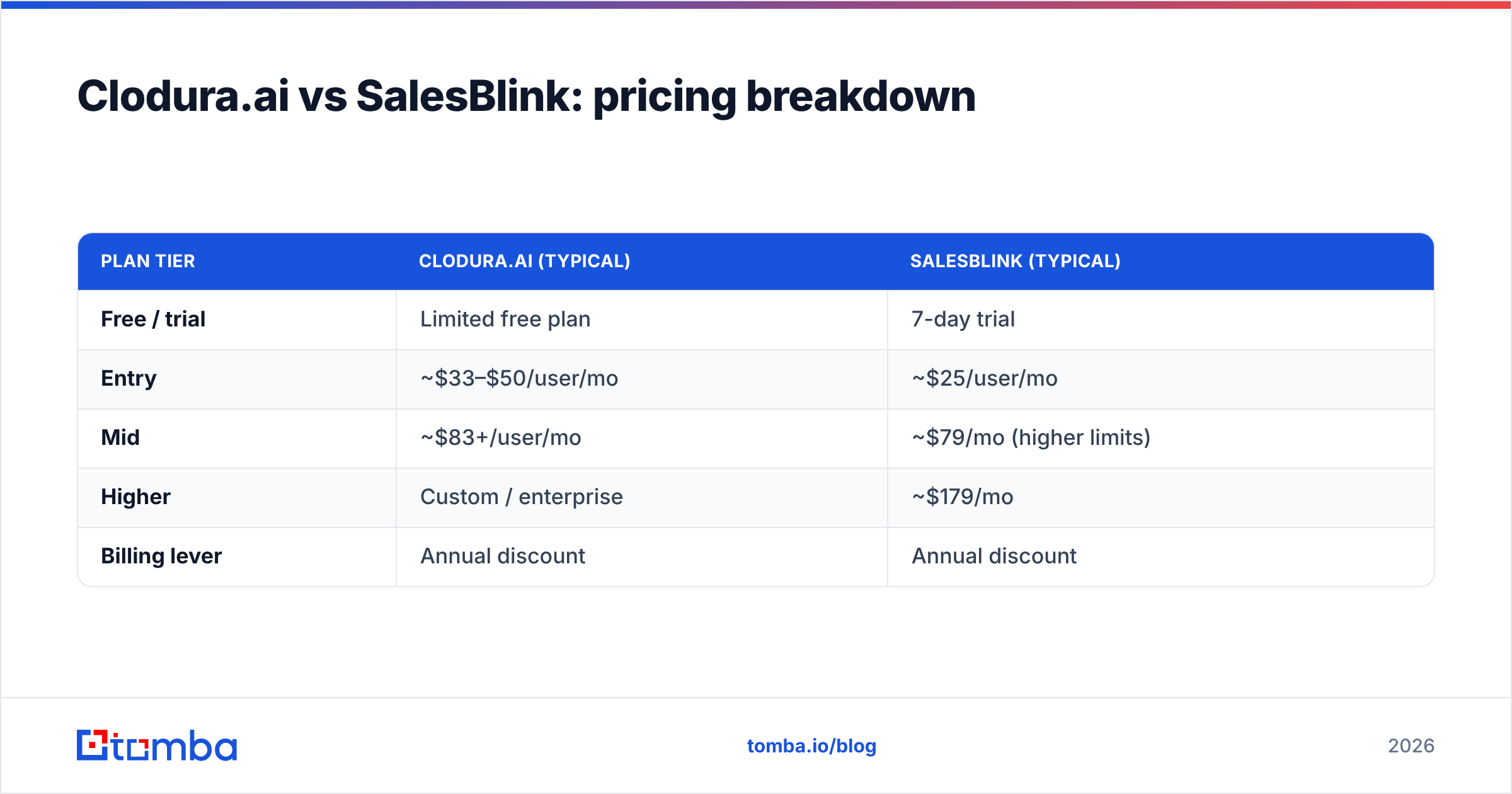
Pricing is where the two diverge in philosophy. Clodura charges for data plus platform, so you're paying for database credits and seats together. SalesBlink charges for sending capacity — mailboxes, contacts, and warmup — with data as an afterthought.
| Plan tier | Clodura.ai (typical) | SalesBlink (typical) |
|---|---|---|
| Free / trial | Limited free plan | 7-day trial |
| Entry | ~$33–$50/user/mo | ~$25/user/mo |
| Mid | ~$83+/user/mo | ~$79/mo (higher limits) |
| Higher | Custom / enterprise | ~$179/mo |
| Billing lever | Annual discount | Annual discount |
For a solo founder or a two-person SDR pod that already has leads, SalesBlink is cheaper to start. For a team that would otherwise buy a separate database and a sequencer, Clodura's bundle can be the lower total cost — provided the bundled data is good enough for your market. Check the fine print on credit limits; both platforms meter data access, and overages add up quietly.
For reference on how a standalone data provider prices credits versus a bundle, compare against transparent Tomba pricing — it makes the "bundle vs. best-of-breed" math obvious.
Which one should you pick?#
Pick based on your bottleneck, not the feature list.
Choose Clodura.ai if:
- You have no existing lead source and want data + sequencing in one bill.
- You sell into markets Clodura covers well (largely US/tech).
- Intent and technographic signals matter to your targeting.
Choose SalesBlink if:
- You already source leads and need them to land.
- Deliverability and mailbox rotation are your priority.
- You want a leaner, cheaper tool focused on sending.
Choose neither as your data layer if: contact accuracy is your real problem. Both bundle "good enough" data, and good-enough data is what produces 10%+ bounce rates. In that case, keep whichever platform fits your sequencing style and swap in a dedicated finder and verifier for the data itself.
How does a dedicated data layer change the math?#
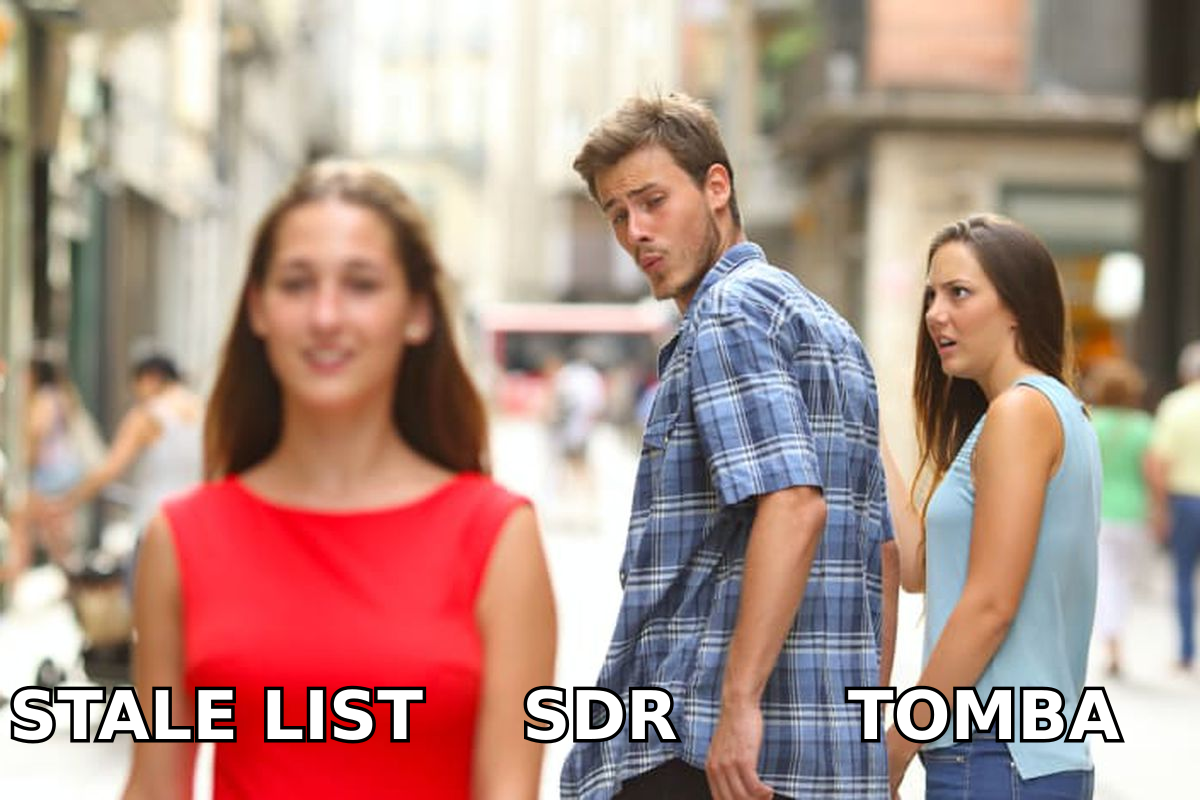
Consider two SDRs, same sequence, same warmup, different data.
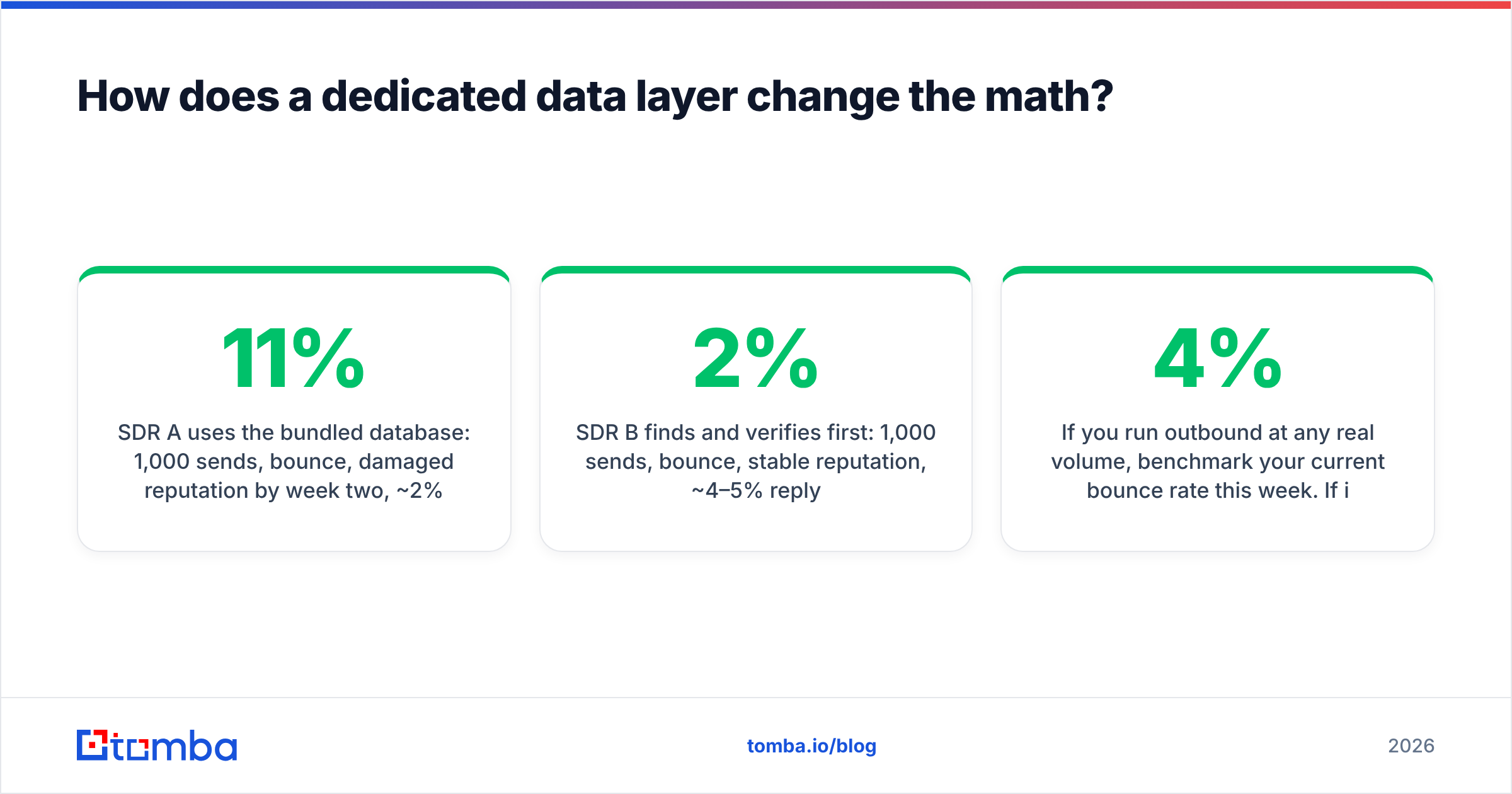
- SDR A uses the bundled database: 1,000 sends, 11% bounce, damaged reputation by week two, ~2% reply.
- SDR B finds and verifies first: 1,000 sends, 2% bounce, stable reputation, ~4–5% reply.
Same tool, double the pipeline — because the input was clean. That's the argument for decoupling data from delivery. A finder that specializes in one job (getting the right address) will out-accuracy a platform that treats data as feature #7. You can push those verified contacts into Clodura or SalesBlink via native integrations, a CSV, or an API, so decoupling costs you almost no workflow friction.
If you run outbound at any real volume, benchmark your current bounce rate this week. If it's above 3–4%, your data layer — not your sequencer — is the thing to fix first. Neither Clodura nor SalesBlink can out-sequence a dirty list.
For a broader view of how these platforms stack against dedicated point tools, third-party review sites like G2 and Capterra aggregate real deliverability and data-accuracy complaints worth reading before you buy — vendor pages won't surface those.
The bottom line#
Clodura.ai and SalesBlink aren't really rivals; they're two answers to different questions. Clodura answers "who do I contact and how" with a bundled database and sequences. SalesBlink answers "how do I make sure my emails land" with warmup and rotation. Pick Clodura if you lack a lead source, SalesBlink if you lack deliverability infrastructure.
But treat the shared weak spot honestly: both lean on convenience data, and convenience data is what quietly caps your reply rate. The highest-leverage upgrade for most outbound teams isn't switching sequencers — it's fixing the input.
Start there. Use Tomba Email Finder to pull accurate, verified professional emails by name, company, or domain, then feed that clean list into whichever platform matches your motion. The free tier covers 25 searches a month so you can benchmark accuracy against your bundled data before you change anything — and if the bounce rate drops, you'll know exactly which layer was holding your pipeline back.
Related guides#
Ready to find emails that actually work?
Join 150,000+ professionals who stopped guessing and started sending. Free credits on signup — no credit card required.
Get the Tomba newsletter
Practical outbound tactics and product updates — once every two weeks.
About the author