Cold Call Tracking Software: The 2026 Buyer's Guide
Most reps lose deals in the follow-up, not the pitch. Cold call tracking software logs every dial, outcome, and next step automatically—so nothing slips. Here's how to pick the right one in 2026.
Cold call tracking software is the system that records what happens on every outbound call—who you dialed, what was said, the outcome, and the next step—then feeds that data back into your CRM and dashboards. If your team still logs calls by memory or in a spreadsheet after lunch, you are guessing at what actually drives revenue.
This guide breaks down what these tools do, which features matter, what they cost in 2026, and how to choose one without overpaying for features you will never touch.
TL;DR#
- Cold call tracking software captures call activity, recordings, outcomes, and coaching signals automatically—no manual logging.
- The four buckets are: dialers (Kixie, Aircall), conversation intelligence (Gong, Chorus), all-in-one CRMs with tracking (HubSpot, Salesforce), and lightweight loggers.
- Price ranges from ~$25/user/mo for a basic dialer to $100+/user/mo for AI conversation analysis.
- Tracking is only as good as your contact data—bad numbers and stale contacts wreck connect rates before tracking even starts.
- Start with the outcome you want (coaching, forecasting, or compliance), then shortlist. Don't buy the biggest platform by default.
What is cold call tracking software?#
Think of it like a flight recorder for your sales calls. A plane's black box logs every input automatically so investigators never rely on the pilot's memory. Cold call tracking software does the same for reps: it captures the dial, connect, talk time, disposition, recording, and follow-up task without anyone typing a note.
Technically, it sits between your phone system and your CRM. When a rep clicks to call, the software logs the attempt, records the conversation (where legal), transcribes it, tags the outcome, and syncs everything to the contact record. Managers get dashboards; reps get their next task queued automatically.
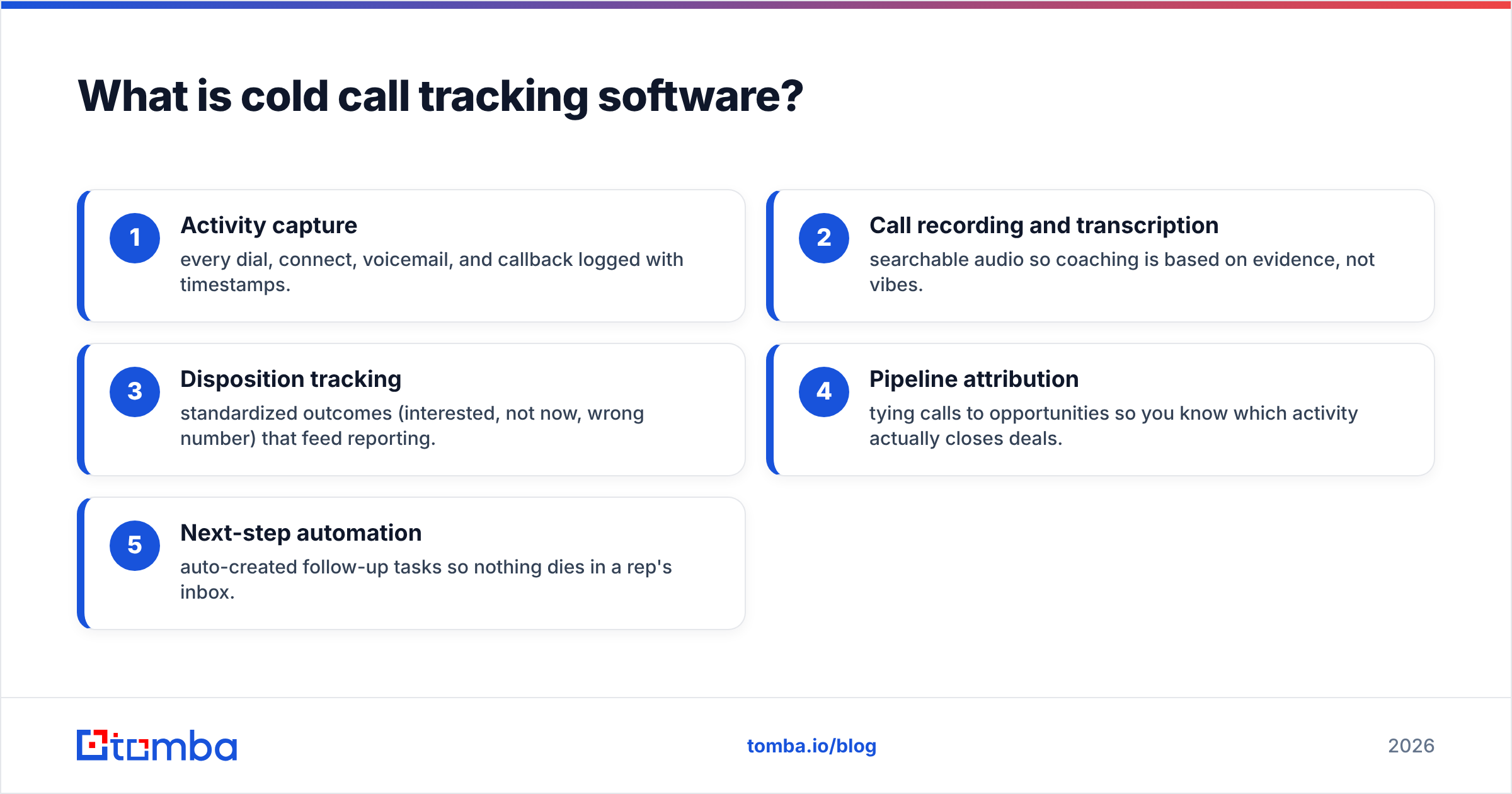
The core jobs it handles:
- Activity capture — every dial, connect, voicemail, and callback logged with timestamps.
- Call recording and transcription — searchable audio so coaching is based on evidence, not vibes.
- Disposition tracking — standardized outcomes (interested, not now, wrong number) that feed reporting.
- Pipeline attribution — tying calls to opportunities so you know which activity actually closes deals.
- Next-step automation — auto-created follow-up tasks so nothing dies in a rep's inbox.
Why do sales teams need call tracking at all?#
Because the follow-up is where deals are won and lost, and untracked calls have no follow-up. Studies routinely show most sales require several touches, yet the majority of reps stop after one or two attempts—often because they simply forget who to call back. When the next step is logged automatically, that leak closes.
Three concrete reasons teams adopt it:
- Coaching at scale. A manager cannot ride along on 300 calls a week. Recordings and transcripts let them review the moments that matter—objection handling, pricing pushback—and coach specifically instead of generically.
- Honest forecasting. If activity is self-reported, your pipeline is fiction. Automatic tracking ties real dials to real outcomes, so your win rate and forecast reflect reality.
- Ramping new reps faster. New hires learn by listening to the top performer's actual calls, not a role-play from onboarding week.
There is also a compliance angle. Recording laws vary by state and country, so any tool you pick must support consent prompts and regional rules. Check vendor documentation before you flip recording on.
What features matter most in cold call tracking software?#
Not all features earn their price. Here is how to weight them.
Must-haves:
- Automatic activity logging — if a rep has to click "log call," they won't. It has to be zero-effort.
- CRM sync — bidirectional, real-time, to whatever CRM you run. A broken sync makes the whole tool worthless.
- Local presence / caller ID management — connect rates drop hard when your number shows as spam.
- Dispositions and outcomes — customizable, standardized, and reportable.
High-value if you can afford them:
- AI transcription and keyword tracking — surfaces which talk tracks correlate with booked meetings.
- Coaching scorecards — structured review instead of ad-hoc feedback.
- Voicemail drop — reps skip re-recording the same message 40 times a day.
Nice-to-have:
- Sentiment analysis — useful directionally, rarely decisive.
- Battlecards mid-call — helpful for complex products, overkill for simple ones.
A quick sanity check before any demo: ask the vendor to show you the exact path from "rep dials" to "manager sees it on a dashboard." If that path has manual steps, the tracking will decay within a month.
How do the main cold call tracking tools compare in 2026?#
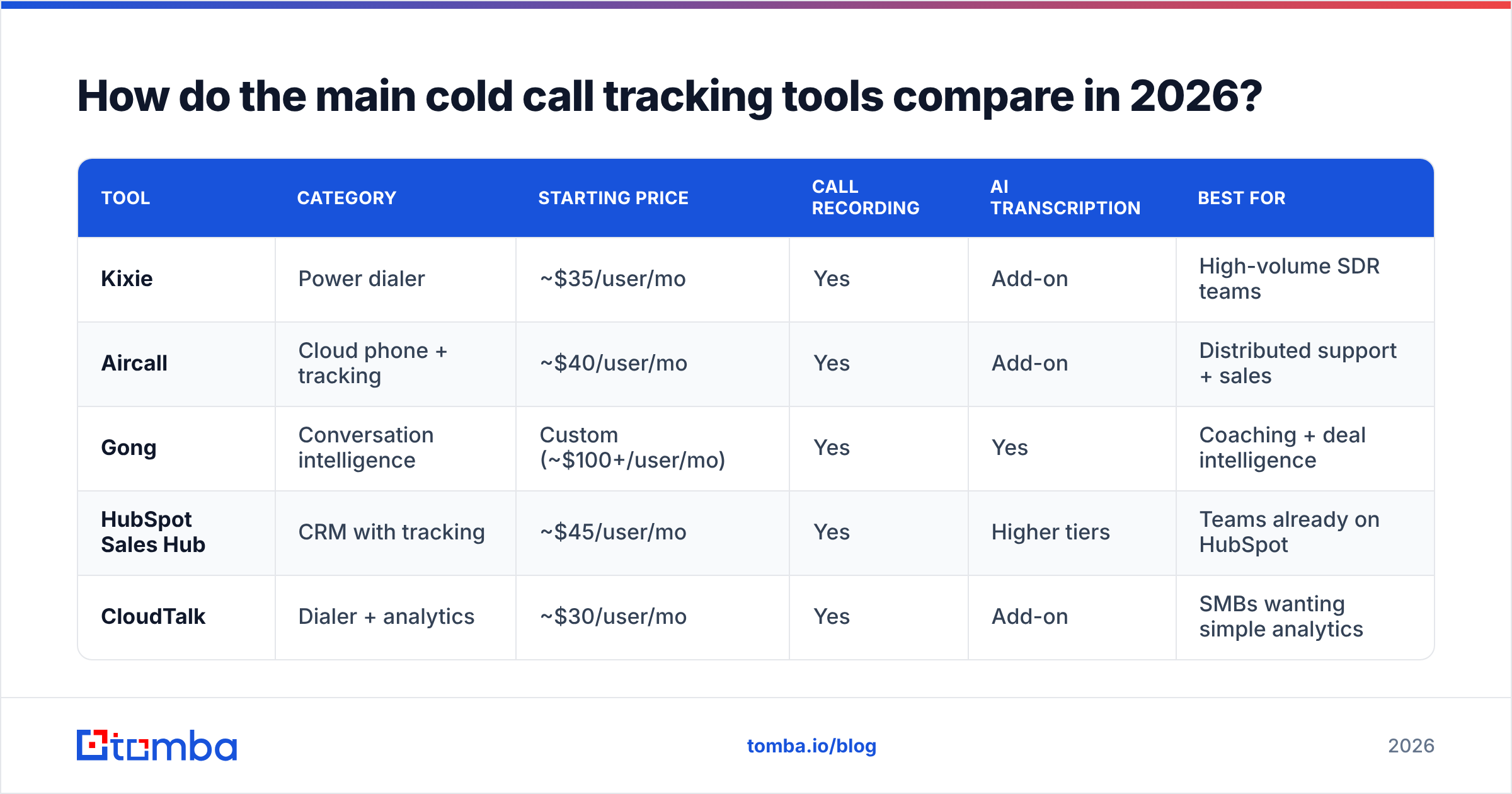
The market splits into dialers, conversation-intelligence platforms, and CRMs with tracking built in. Here is a representative comparison. Prices are approximate list prices per user per month and change often—confirm on each vendor's page.
| Tool | Category | Starting price | Call recording | AI transcription | Best for |
|---|---|---|---|---|---|
| Kixie | Power dialer | ~$35/user/mo | Yes | Add-on | High-volume SDR teams |
| Aircall | Cloud phone + tracking | ~$40/user/mo | Yes | Add-on | Distributed support + sales |
| Gong | Conversation intelligence | Custom (~$100+/user/mo) | Yes | Yes | Coaching + deal intelligence |
| HubSpot Sales Hub | CRM with tracking | ~$45/user/mo | Yes | Higher tiers | Teams already on HubSpot |
| CloudTalk | Dialer + analytics | ~$30/user/mo | Yes | Add-on | SMBs wanting simple analytics |
A few takeaways. If your only problem is "we don't log calls," a dialer like CloudTalk or Kixie solves it cheaply. If your problem is "we don't know why we lose deals," a conversation-intelligence tool like Gong earns its higher price through coaching and forecasting. If you already live in HubSpot or Salesforce, turning on native tracking beats bolting a second system on top—one less sync to break.
Standalone tool or CRM-native tracking?#
Lead with the CRM if you have one you're committed to. The single biggest failure mode in this category is a broken or one-way sync between a standalone dialer and your CRM. When that happens, reps stop trusting the data and go back to sticky notes.
Choose CRM-native tracking when:
- You already run HubSpot, Salesforce, or Pipedrive and use it daily.
- Your call volume is moderate (under ~50 dials/rep/day).
- You want one source of truth and hate integration maintenance.
Choose a standalone dialer or CI platform when:
- You run very high dial volume and need power/parallel dialing the CRM can't match.
- You specifically need best-in-class conversation intelligence for coaching.
- Your CRM's native calling is weak or costs extra add-ons anyway.
If you go standalone, verify the integration is native and bidirectional—check the vendor's Pipedrive integration, HubSpot integration, or Salesforce docs before signing, not after. A shiny dialer with a flaky sync is a downgrade.
Why tracking fails without clean contact data#
Here's the part vendors gloss over: you can track a dial perfectly and still learn nothing if the number was wrong or the contact left the company. Tracking measures what happens after you connect. It does nothing for the connect rate itself.
An everyday analogy: cold call tracking software is a great fuel gauge, but it doesn't put gas in the tank. If your list is full of disconnected numbers and outdated titles, your dashboards will faithfully report a terrible connect rate—and you'll blame the reps instead of the data.
Two data problems sink most cold calling programs:
- Stale phone numbers. People change roles and companies constantly. A number that connected last quarter may be dead now.
- Wrong or missing decision-maker contacts. You dial a gatekeeper's line because that's the only number you had.
This is where enrichment matters. Before a call block, run your list through a source that appends verified direct-dial numbers and confirms the contact still works there. Tomba's phone finder and data enrichment tools append B2B phone numbers and current contact details so your reps dial fewer dead ends. Cleaner input means your tracking finally measures selling, not list rot. Pairing enrichment with a strong response rate baseline tells you whether a slump is a script problem or a data problem.
How do you roll out cold call tracking without team pushback?#
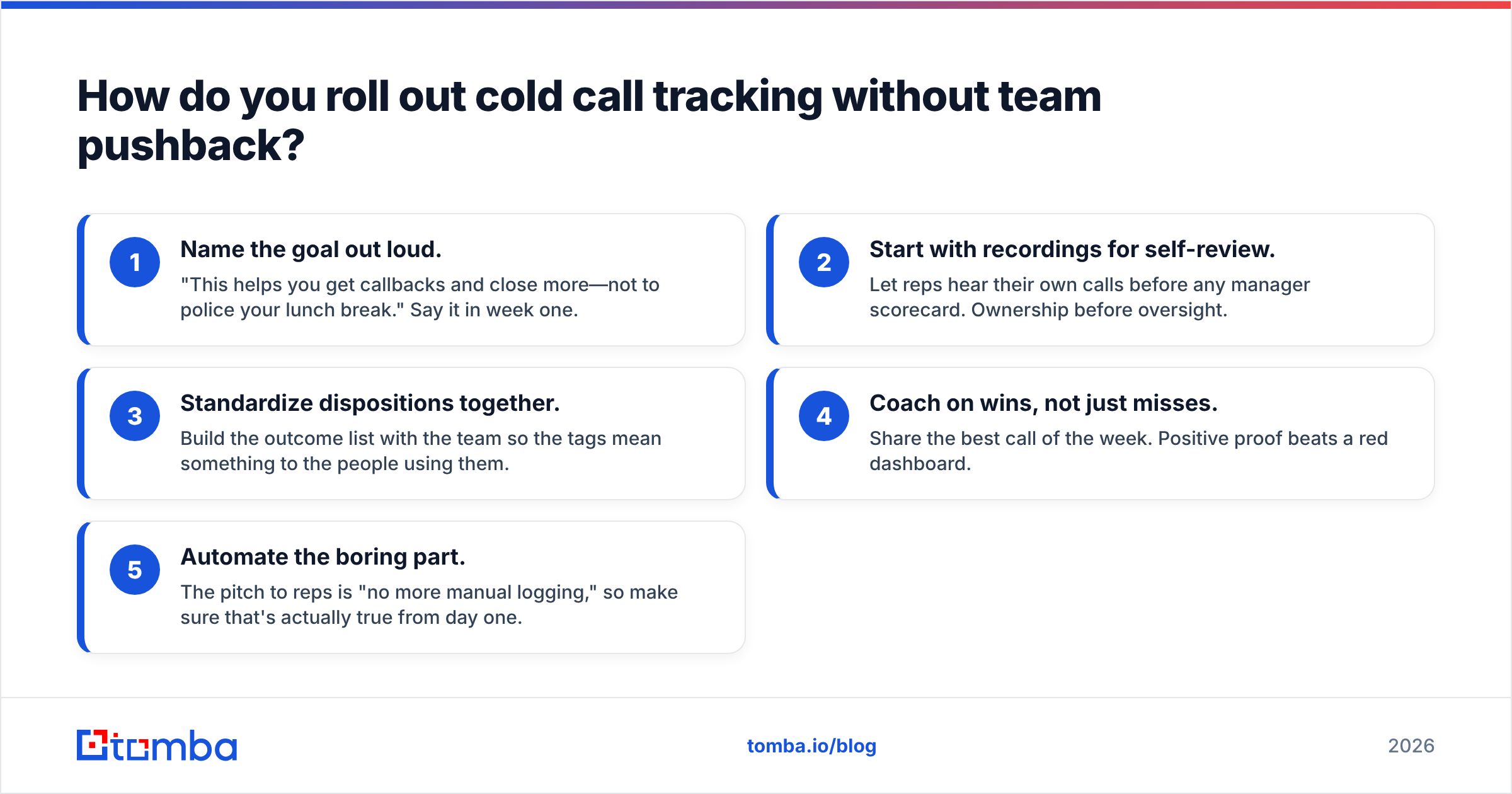
Reps hear "call tracking" and think "surveillance." Frame it as coaching and career growth, or adoption dies. The rollout that works looks like this:
- Name the goal out loud. "This helps you get callbacks and close more—not to police your lunch break." Say it in week one.
- Start with recordings for self-review. Let reps hear their own calls before any manager scorecard. Ownership before oversight.
- Standardize dispositions together. Build the outcome list with the team so the tags mean something to the people using them.
- Coach on wins, not just misses. Share the best call of the week. Positive proof beats a red dashboard.
- Automate the boring part. The pitch to reps is "no more manual logging," so make sure that's actually true from day one.
Measure adoption honestly. If logging rates dip below ~90% within a month, the tool is too manual or the sync is broken. Fix the friction; don't nag the humans.
What does cold call tracking software cost in 2026?#
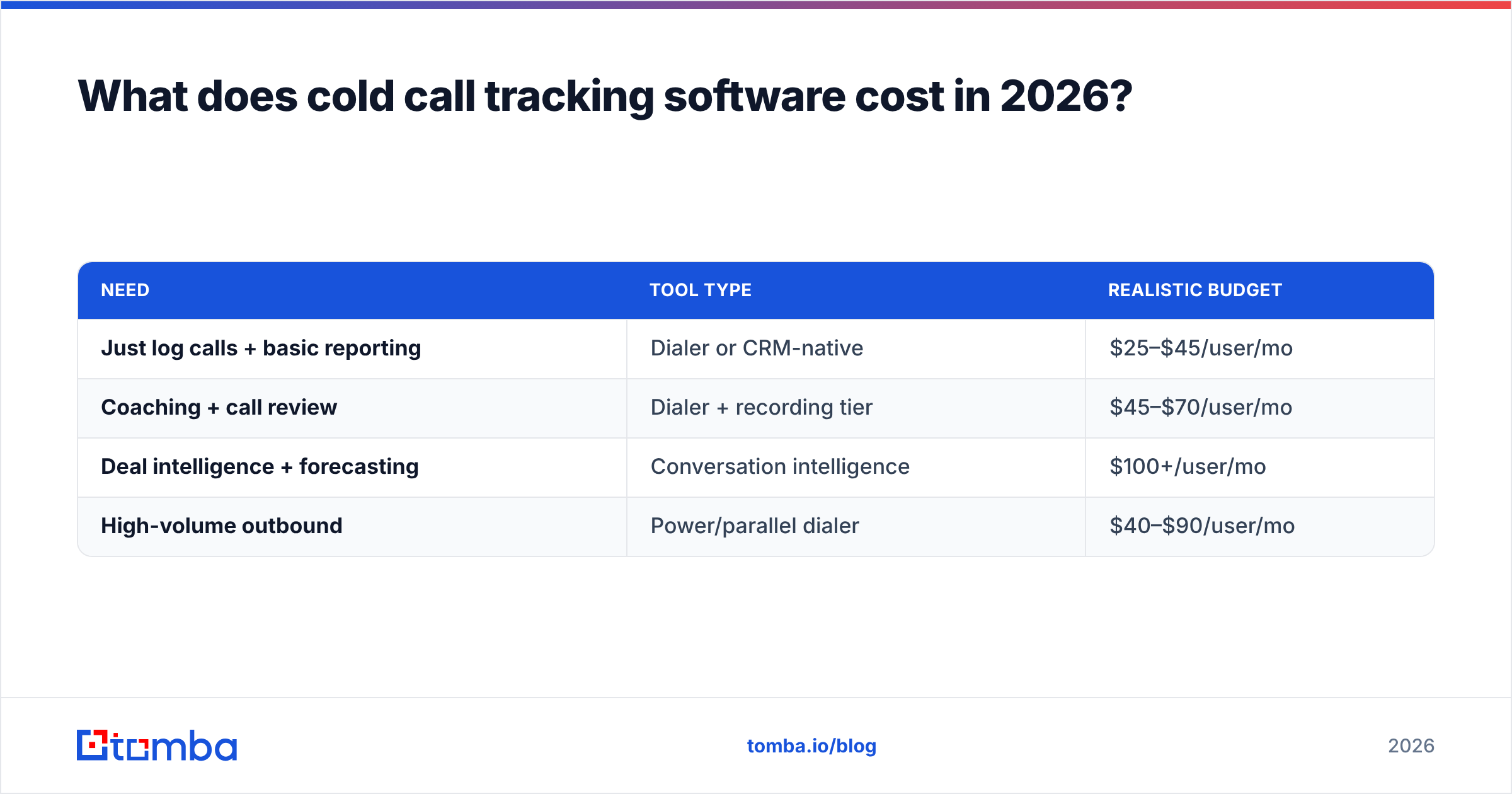
Budget by the outcome you're buying, not the feature list.
| Need | Tool type | Realistic budget |
|---|---|---|
| Just log calls + basic reporting | Dialer or CRM-native | $25–$45/user/mo |
| Coaching + call review | Dialer + recording tier | $45–$70/user/mo |
| Deal intelligence + forecasting | Conversation intelligence | $100+/user/mo |
| High-volume outbound | Power/parallel dialer | $40–$90/user/mo |
Watch the hidden costs. Transcription and AI features are frequently add-ons, not included. Local presence numbers, extra minutes, and recording storage can stack up. A "$35/user" dialer can land near $60 once you add the features you actually demoed. Always price the configuration you'll really run.
Compare a couple of shortlisted vendors side by side on a peer-review site like G2 to sanity-check the marketing claims against real user reports before you commit to an annual contract.
Which cold call tracking software should you choose?#
Match the tool to your primary bottleneck:
- "We don't log anything reliably." → CRM-native tracking (HubSpot, Salesforce, Pipedrive) or a simple dialer. Cheapest fix, biggest immediate gain.
- "We can't coach or figure out why we lose." → Conversation intelligence (Gong, Chorus). Worth the premium if you have a team big enough to coach.
- "Our reps can't physically dial fast enough." → Power/parallel dialer (Kixie, CloudTalk).
- "Our connect rate is the real problem." → Fix your data first with enrichment and verified numbers, then add tracking.
Resist the urge to buy the largest platform. A focused dialer your reps actually use beats an enterprise suite that half the team ignores.
The step tracking can't skip: reaching the right person#
No tracking dashboard helps if you're dialing the wrong number or a contact who left six months ago. The most reliable outbound programs fix their data before they measure their calls—verified direct dials, current titles, and real decision-maker contacts.
That's the layer Tomba's Email Finder and its companion phone finder handle: find and verify the right professional contact and direct-dial number by name, domain, or company, then push clean records into your CRM before the first call block. Start on the free tier (25 searches a month) to test coverage on your own accounts, and scale up through the Tomba pricing plans—Starter at $49/mo, Growth at $99/mo—as your list grows. Track all you want; just make sure every dial is aimed at a real, reachable human first.
Related guides#
// get started
Find, verify and enrich your first contacts today
Start on the free plan with 25 searches a month, then scale when your team is ready.
Free plan · No credit card required · GDPR & CCPA
// about the author