Cold Calling CRM: How to Build a Dialing System That Actually Books Meetings
A cold calling CRM turns scattered call notes into a repeatable pipeline. Here's how to pick one, wire it to your dialer, and keep every number clean and dial-ready.
Cold calling still works in 2026 — but not the way it did when a rep, a phone book, and a legal pad could hit quota. The teams booking meetings today run every call through a system that knows who to dial, when to dial, what was said last time, and whether the number is even connected. That system is a cold calling CRM.
This guide breaks down what a cold calling CRM actually is, how it differs from a generic CRM, which features move the needle, and how to keep the phone data feeding it accurate enough to trust.
TL;DR#
- A cold calling CRM is a customer database wired to a dialer, call logging, cadence automation, and reporting — so reps spend time talking, not typing.
- The three that matter most for outbound teams: HubSpot, Salesforce (with a dialer), and Pipedrive — each hits a different budget and complexity tier.
- The CRM is only as good as the numbers in it. Bad phone data kills connect rates faster than any script problem.
- Feed it clean, verified B2B phone numbers with a tool like a dedicated phone finder, and validate them before dialing.
- Measure connect rate, conversation rate, and meetings booked per hundred dials — not raw dial count.
What is a cold calling CRM?#
A cold calling CRM is a CRM built or configured around outbound phone activity. Think of a normal CRM as a filing cabinet: it stores contacts, deals, and notes. A cold calling CRM is that filing cabinet with a phone bolted to the side, a stopwatch, and a clerk who writes down everything you say automatically.
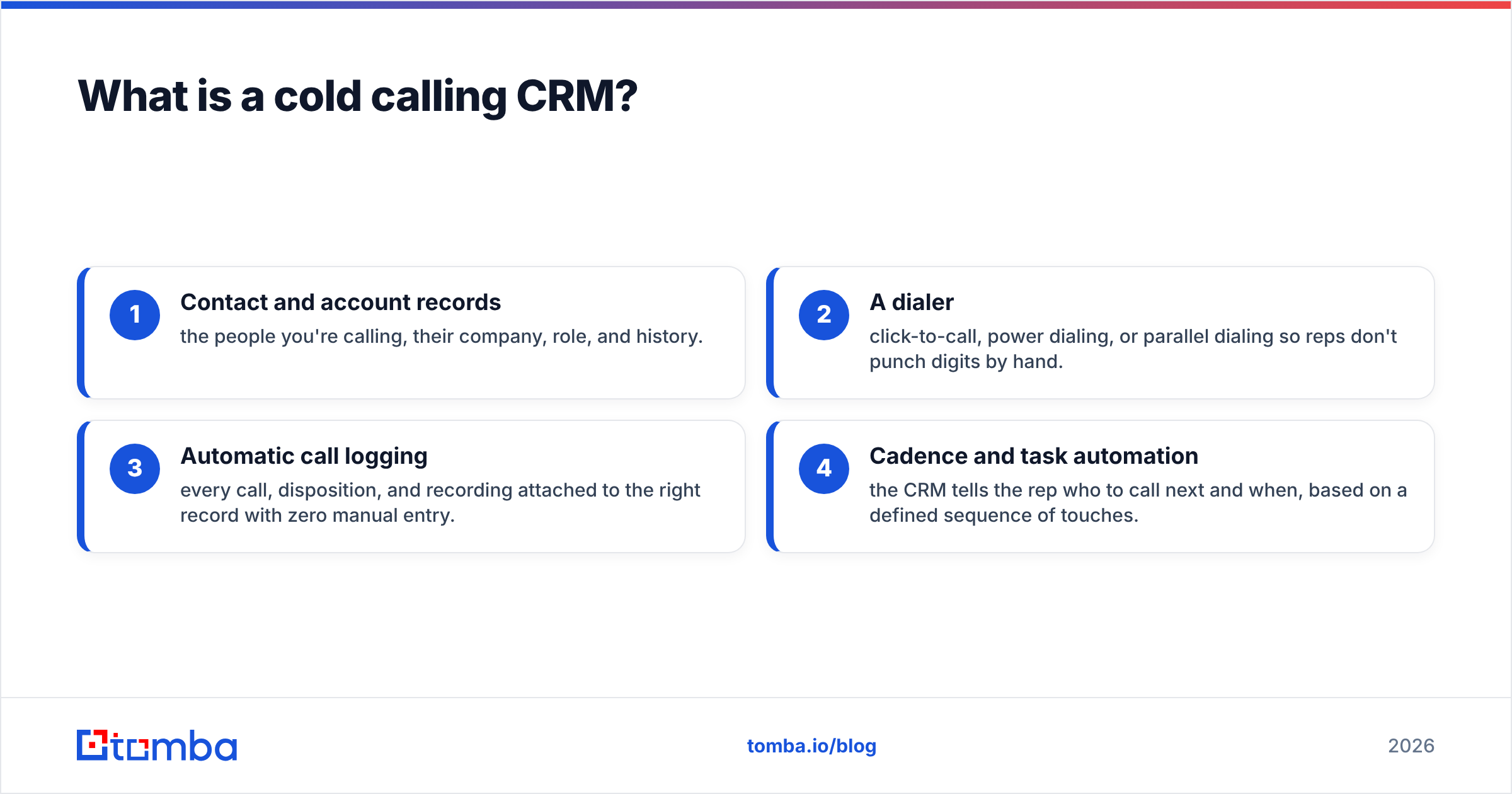
Concretely, it combines four things:
- Contact and account records — the people you're calling, their company, role, and history.
- A dialer — click-to-call, power dialing, or parallel dialing so reps don't punch digits by hand.
- Automatic call logging — every call, disposition, and recording attached to the right record with zero manual entry.
- Cadence and task automation — the CRM tells the rep who to call next and when, based on a defined sequence of touches.
The point is compounding: each of those features saves a few seconds or removes a decision, and across 80 dials a day that adds up to more conversations. A rep manually logging calls in a spreadsheet loses 15–20 minutes an hour to admin. A cold calling CRM gives most of that back.
How is a cold calling CRM different from a regular CRM?#
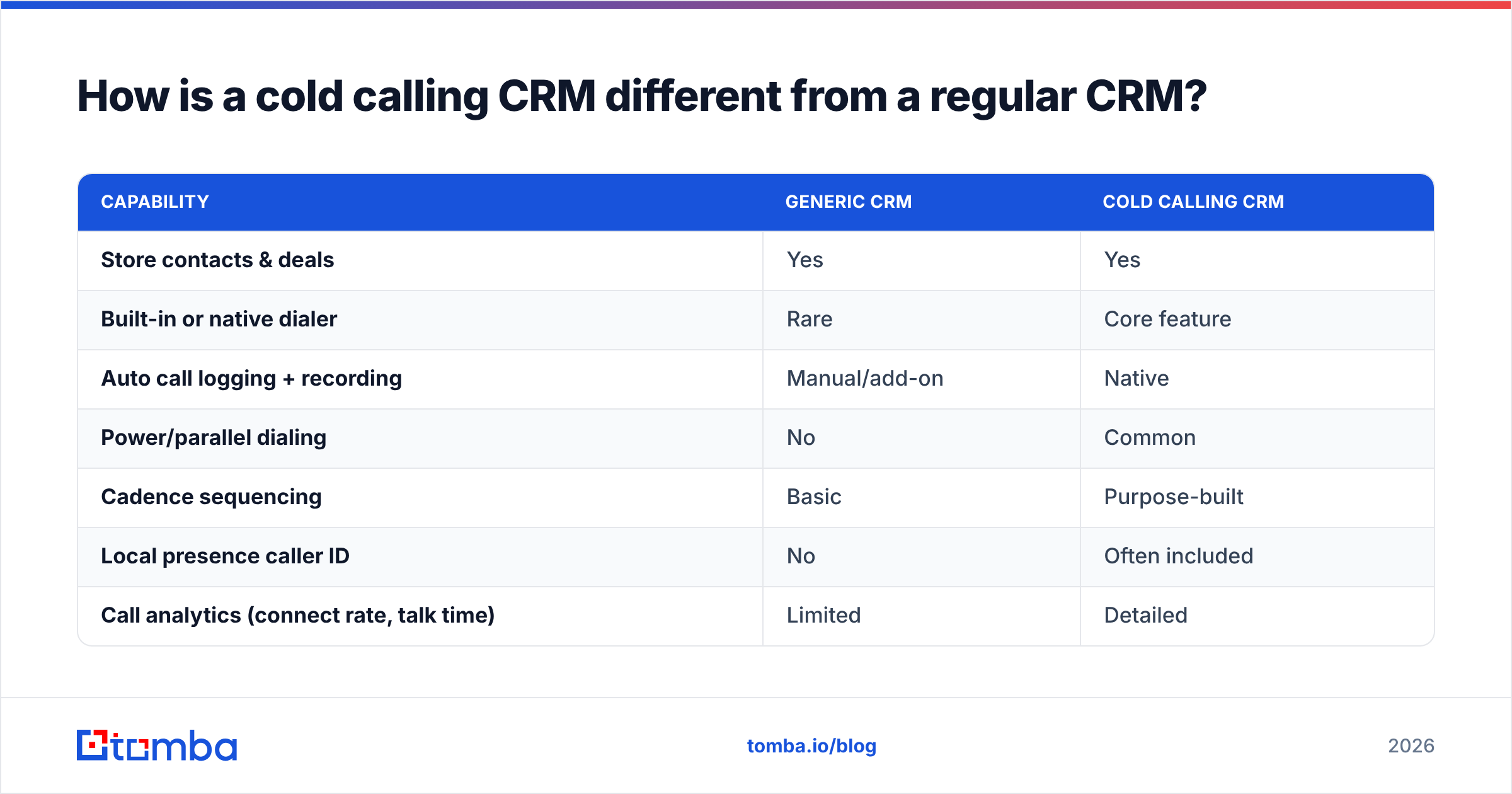
Every CRM can store a phone number. That doesn't make it a cold calling CRM. The difference is whether the system is designed for high-volume outbound activity or for managing relationships that already exist.
| Capability | Generic CRM | Cold calling CRM |
|---|---|---|
| Store contacts & deals | Yes | Yes |
| Built-in or native dialer | Rare | Core feature |
| Auto call logging + recording | Manual/add-on | Native |
| Power/parallel dialing | No | Common |
| Cadence sequencing | Basic | Purpose-built |
| Local presence caller ID | No | Often included |
| Call analytics (connect rate, talk time) | Limited | Detailed |
| Best for | Account management | Outbound prospecting |
A regular CRM answers "what's the status of this deal?" A cold calling CRM answers "who are the 60 people I should call before lunch, and what happened last time I reached them?" If your reps live on the phone, the second question is the one that pays rent.
What features actually matter in a cold calling CRM?#
Feature lists on vendor sites are long. Only a handful correlate with more booked meetings. Prioritize these:
- Native or tightly integrated dialer. Click-to-call is the floor. Power dialing (auto-advancing through a list) and parallel dialing (calling several numbers at once, connecting the rep to whoever picks up) multiply connects. A bolted-on dialer that drops calls costs you more than it saves.
- Automatic call logging and recording. If a rep has to remember to log a call, half of them won't. Auto-capture keeps data complete and makes coaching possible.
- Cadence automation. Cold calling rarely wins on the first dial. A CRM that sequences call → email → LinkedIn → call across days, and surfaces the right task at the right time, keeps prospects from slipping through cracks.
- Local presence and caller ID management. Prospects answer local numbers more often than toll-free strangers. Rotating compliant local caller IDs lifts connect rates meaningfully.
- Real-time reporting. You need connect rate, conversation rate, and meetings-booked per rep, visible without exporting to a spreadsheet.
- Clean data pipes. The CRM must accept enriched, verified contact data from your prospecting stack — ideally through native integrations rather than CSV gymnastics.
Notice what's not on that list: AI note summaries, gamification leaderboards, sentiment scoring. Nice to have, but they don't fix the two things that actually break outbound — reps not dialing enough, and reps dialing dead numbers.
Which cold calling CRM should you choose?#
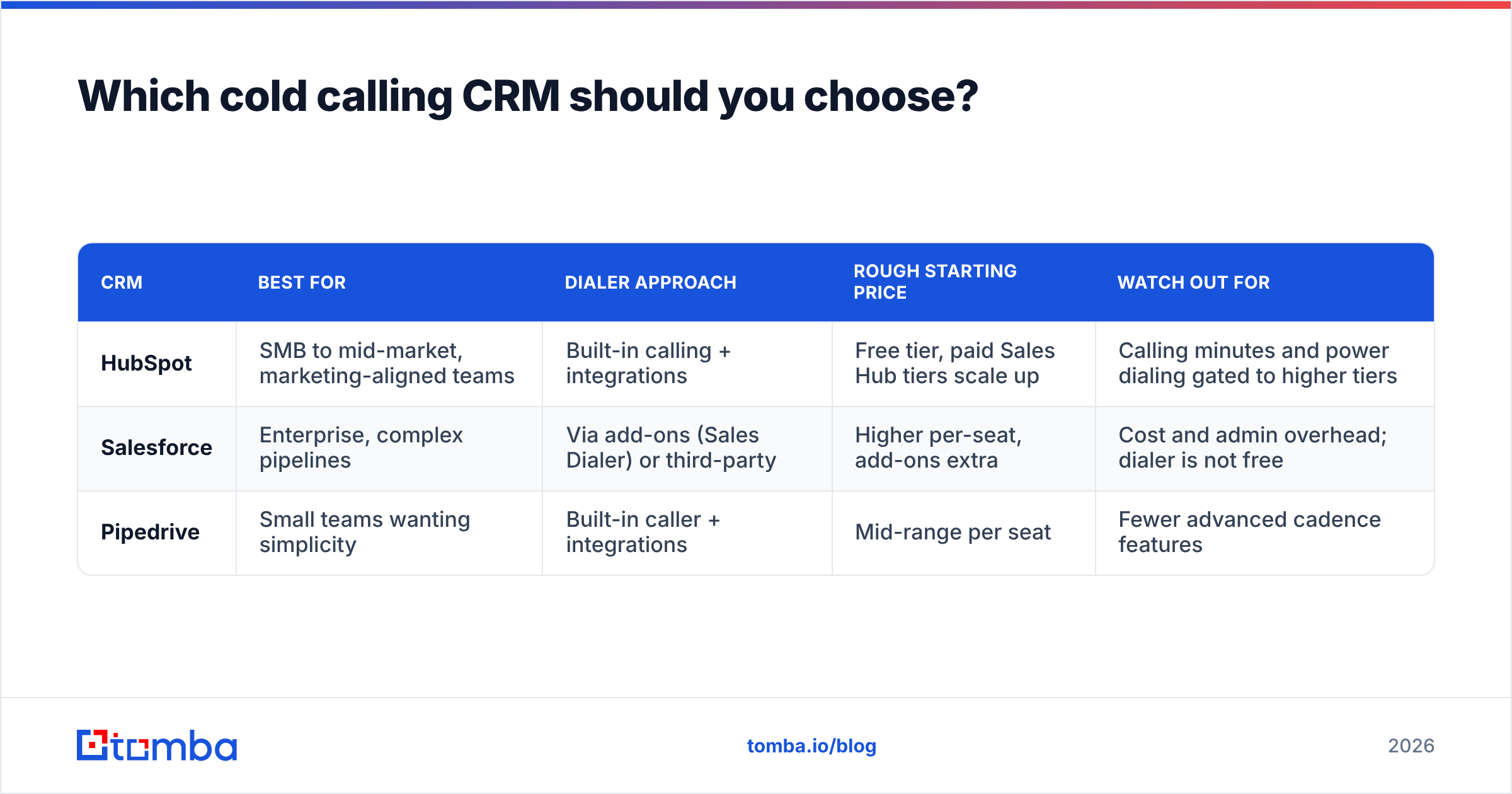
There's no universal winner; there's a best fit for your team size, budget, and process maturity. Here's an honest breakdown of the three most common choices for outbound teams, plus where each falls short.
| CRM | Best for | Dialer approach | Rough starting price | Watch out for |
|---|---|---|---|---|
| HubSpot | SMB to mid-market, marketing-aligned teams | Built-in calling + integrations | Free tier, paid Sales Hub tiers scale up | Calling minutes and power dialing gated to higher tiers |
| Salesforce | Enterprise, complex pipelines | Via add-ons (Sales Dialer) or third-party | Higher per-seat, add-ons extra | Cost and admin overhead; dialer is not free |
| Pipedrive | Small teams wanting simplicity | Built-in caller + integrations | Mid-range per seat | Fewer advanced cadence features |
HubSpot is the pragmatic default for most growing teams. The calling tools are usable out of the box, and the HubSpot integration ecosystem means you can pipe enriched contacts straight into call queues. Just read the pricing page carefully — power dialing and higher call-minute limits live on the pricier Sales Hub tiers.
Salesforce is the right call when your pipeline is genuinely complex and you already run the platform. It's the most customizable and the most expensive; the dialer is an add-on, not a freebie. If you're a five-rep startup, this is overkill.
Pipedrive wins on simplicity and price for small teams. It has a native caller and a clean Pipedrive integration path for getting contacts in, but its cadence and analytics depth trail the other two.
If you want independent, filterable comparisons across dozens of options, G2's CRM category is a reasonable neutral starting point before you commit to a demo.
Does the CRM matter more than the data inside it?#
No. The data matters more. This is the mistake most teams make: they spend two months evaluating dialers and zero minutes auditing their phone list.
Here's the math. If half your numbers are wrong — disconnected, wrong person, generic switchboard — then every efficiency gain your fancy dialer gives you is applied to garbage. You dial faster into voicemail. A power dialer running through a bad list is a very efficient way to waste a rep's morning.
Connect rate is the hidden multiplier on every other number. Doubling your connect rate from 8% to 16% does more for your booked meetings than any script tweak or new CRM feature. And connect rate is mostly a function of two things:
- Number accuracy — is this the right, active direct line for this person?
- Caller ID trust — does the number you're dialing from look legitimate?
You control the first one with data hygiene. Before a number ever enters a call queue, it should be sourced from a reliable provider and validated. Feeding your CRM verified direct-dial and mobile numbers — instead of scraped switchboards — is the single highest-leverage change most outbound teams can make.
How do you keep a cold calling CRM's phone data clean?#
Treat phone data like fresh produce: it spoils. People change roles, companies switch providers, mobile numbers get reassigned. A number that connected last quarter may be dead today. Build a small, repeatable hygiene process around your CRM.
- Source direct dials, not switchboards. A generic company front desk wastes a dial and a gatekeeper conversation. Use a dedicated tool to find the person's actual line. A phone finder that returns direct-dial and mobile numbers by name and company gives your reps a real shot at a live conversation.
- Validate before you dial. Run numbers through a checker to confirm they're active and correctly formatted, and to identify line type (mobile vs. landline). A phone validator filters out disconnected lines so reps aren't burning attempts on dead numbers.
- Enrich records so reps have context. A bare number is worse than a number attached to a title, company size, and recent trigger event. Layer in data enrichment so the rep opens the call knowing who they're talking to and why now.
- Pair phone with email. Multichannel cadences convert better than phone-only. Having a verified email alongside the number — via an email finder — lets your CRM run the call-then-email touches that actually get callbacks.
- Re-verify on a schedule. Set a cadence (monthly or quarterly) to re-check high-priority segments. Numbers decay; your process should assume it.
Do this consistently and your CRM's reporting suddenly means something, because you're no longer averaging real conversations with dial-into-the-void noise.
What metrics prove your cold calling CRM is working?#
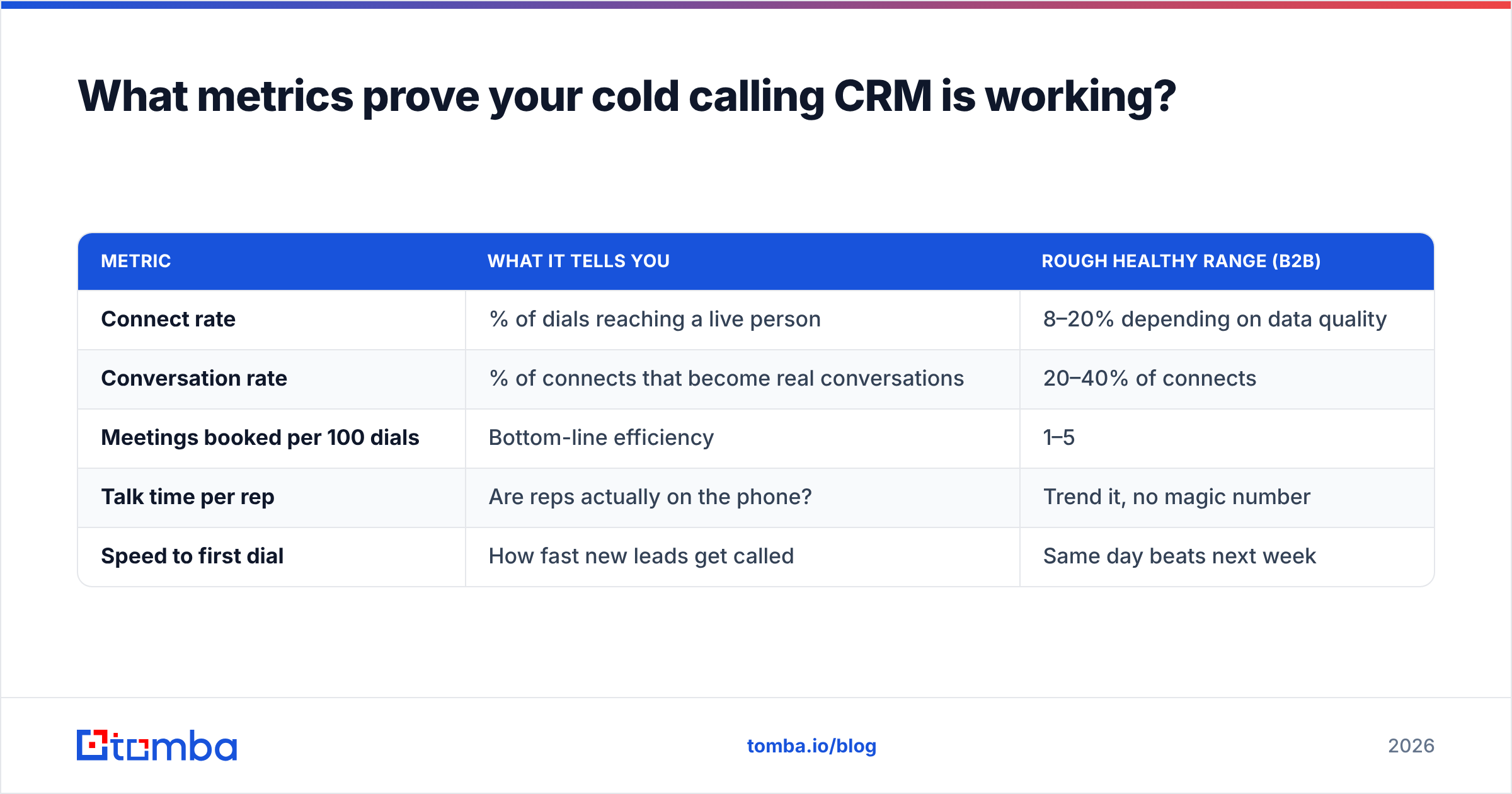
Dial count is a vanity metric. A rep can hit 120 dials and book nothing. Track the numbers that tie activity to outcomes:
| Metric | What it tells you | Rough healthy range (B2B) |
|---|---|---|
| Connect rate | % of dials reaching a live person | 8–20% depending on data quality |
| Conversation rate | % of connects that become real conversations | 20–40% of connects |
| Meetings booked per 100 dials | Bottom-line efficiency | 1–5 |
| Talk time per rep | Are reps actually on the phone? | Trend it, no magic number |
| Speed to first dial | How fast new leads get called | Same day beats next week |
The most useful of these is meetings booked per 100 dials, because it collapses the whole funnel into one number you can improve. If it's climbing, your combination of list quality, dialer efficiency, and rep skill is working. If it's flat while dial count rises, you have a data or targeting problem — not an effort problem.
Your CRM should surface all of these without a manual export. If it can't, that's a real strike against it.
How do you roll out a cold calling CRM without stalling the team?#
A phased rollout beats a big-bang switch. Reps hate tool changes that interrupt their pipeline, so minimize the disruption.
- Pick the CRM by fit, not hype. Match team size and budget to the comparison above. Check Tomba pricing style transparency in whatever you evaluate — hidden dialer add-ons are a common surprise.
- Clean the data before migration. Import verified, enriched contacts, not your old dead list. Garbage in stays garbage.
- Wire the dialer and test it. Confirm call logging, recording, and local presence work end to end before reps touch it.
- Build one cadence, not ten. Start with a single proven sequence. Add complexity after reps adopt.
- Train on the disposition workflow. Consistent call outcomes are what make reporting trustworthy. Everyone must log the same way.
- Review weekly, adjust monthly. Use the metrics table to spot the constraint — data, dials, or skill — and fix one thing at a time.
Teams that clean data first and add automation second get to productivity in weeks. Teams that migrate a messy list into a shiny new dialer just get faster at failing.
The bottom line#
A cold calling CRM is worth it — but only when the numbers flowing into it are real. The dialer, the cadences, and the analytics are multipliers, and multipliers applied to bad data produce bad results at scale. Choose a CRM that fits your team, then obsess over feeding it accurate, verified, enriched contact data.
That data layer is where most teams under-invest. If you want your reps dialing direct lines that actually connect — and reaching the same prospects by email when calls go to voicemail — start by fixing the source. Use Tomba's Email Finder alongside its phone finder and validator to build clean, dual-channel contact records, then pour them into whichever cold calling CRM you've chosen. Better data, more conversations, more meetings booked. That's the whole game.
Related guides#
Ready to find emails that actually work?
Join 150,000+ professionals who stopped guessing and started sending. Free credits on signup — no credit card required.
Get the Tomba newsletter
Practical outbound tactics and product updates — once every two weeks.
About the author