Cold Calling CRM Integration: The Complete 2026 Setup Guide
Connecting your dialer to your CRM turns every cold call into clean, trackable data. Here's how cold calling CRM integration actually works in 2026 — the setup, the tools, and the mistakes that quietly kill your pipeline.
Cold calling still closes deals in 2026 — but only when the calls actually get recorded, routed, and followed up. That last part is where most teams leak revenue. A rep dials 60 numbers, has three good conversations, and then loses two of them because the notes lived in a notebook that never made it into the CRM.
Cold calling CRM integration fixes that leak. It connects your phone system (or power dialer) directly to your customer relationship management platform so every call, outcome, and note is logged automatically against the right contact. This guide walks through what that integration is, why it matters, how to set it up, and which tools to use.
TL;DR#
- Cold calling CRM integration links your dialer to your CRM so calls, dispositions, recordings, and notes sync automatically — no manual data entry.
- The payoff is threefold: less admin time, cleaner pipeline data, and smarter follow-up timing based on real call history.
- The core building blocks are a CRM, a dialer or VoIP, an integration layer (native, Zapier, or API), and accurate contact data feeding the top of the funnel.
- Bad data breaks the whole system — wrong numbers and stale contacts waste dials, so verify phone numbers before they enter the CRM.
- Native integrations are fastest to launch; API-based setups give the most control. Match the approach to your team size and stack.
What is cold calling CRM integration?#
Cold calling CRM integration is the automated connection between the tool you use to make calls and the CRM where you store customer records. Instead of dialing from one screen and typing notes into another, the two systems talk to each other in real time.
Think of it like a fitness tracker syncing to your phone. You don't manually type in every step you took — the watch records it and the app updates. Cold calling CRM integration does the same for sales activity: the dialer captures what happened, and the CRM record updates itself.
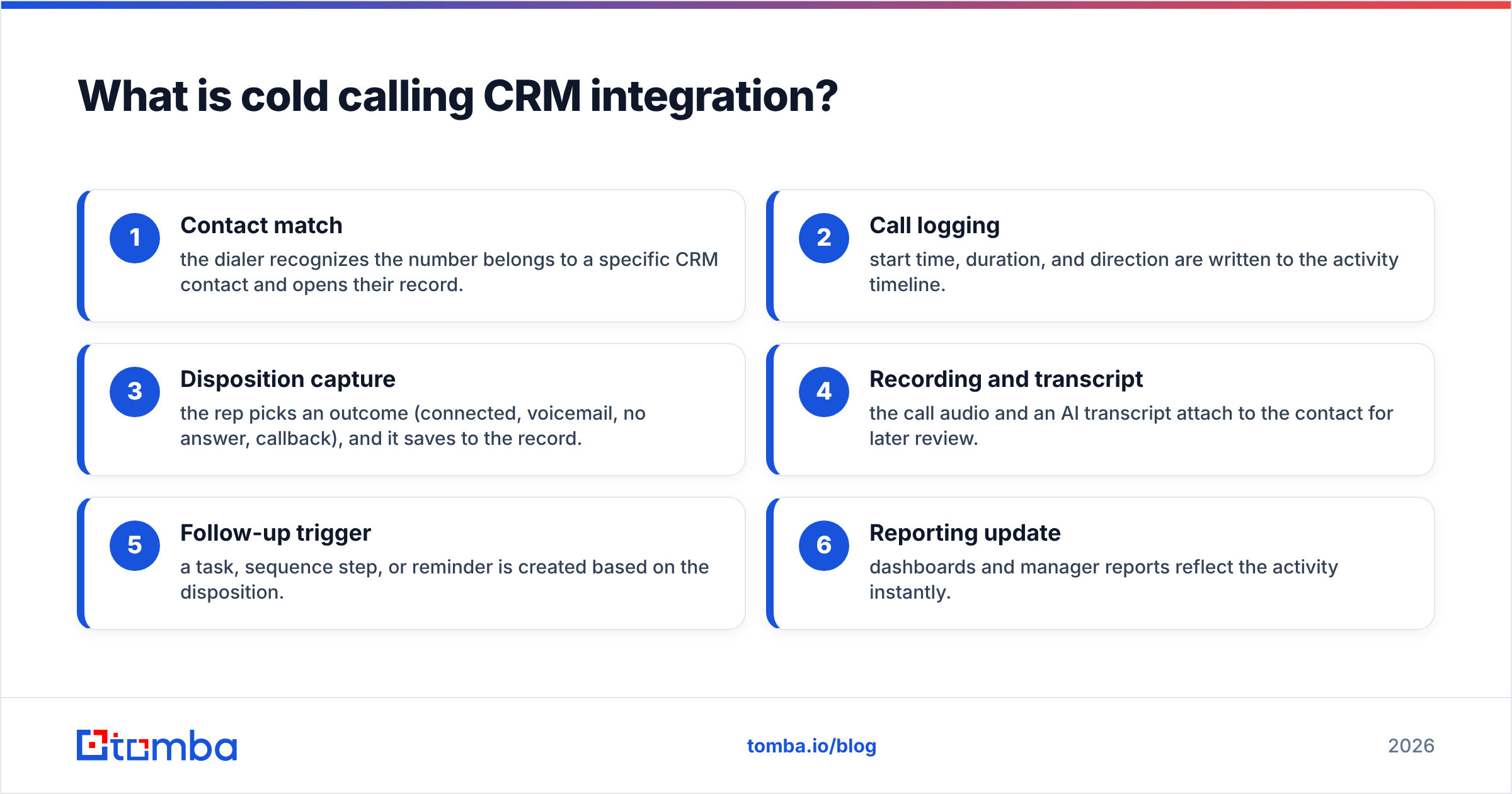
When it's working, a single cold call produces a chain of automatic events:
- Contact match — the dialer recognizes the number belongs to a specific CRM contact and opens their record.
- Call logging — start time, duration, and direction are written to the activity timeline.
- Disposition capture — the rep picks an outcome (connected, voicemail, no answer, callback), and it saves to the record.
- Recording and transcript — the call audio and an AI transcript attach to the contact for later review.
- Follow-up trigger — a task, sequence step, or reminder is created based on the disposition.
- Reporting update — dashboards and manager reports reflect the activity instantly.
That sequence is the heart of it. Without integration, a human has to do steps 2 through 6 by hand, dozens of times a day — which is exactly why they get skipped.
Why does cold calling CRM integration matter?#
The short answer: what doesn't get logged doesn't get managed. Here's what breaks when your calls and CRM are disconnected.
You lose the follow-up. Most cold-call deals need multiple touches. If the first call's context isn't recorded, the second call starts cold again. Integrated logging means every rep — even one covering for a colleague — sees the full history.
Your reporting lies. Managers make coaching and forecasting decisions from CRM data. If reps log calls inconsistently (or not at all), activity metrics are fiction. Automatic logging gives you a true picture of dials-to-connects and connects-to-meetings.
Reps drown in admin. Studies from vendors like HubSpot and analysts at Gartner have repeatedly pegged the share of a seller's week spent on non-selling admin at roughly a third or more. Auto-logging claws a chunk of that back and puts it into more dials.
Attribution disappears. When a deal closes, you want to know which touch mattered. Integrated call data lets you tie revenue back to specific outreach — the foundation of any serious revenue operations practice.
What are the core components you need?#
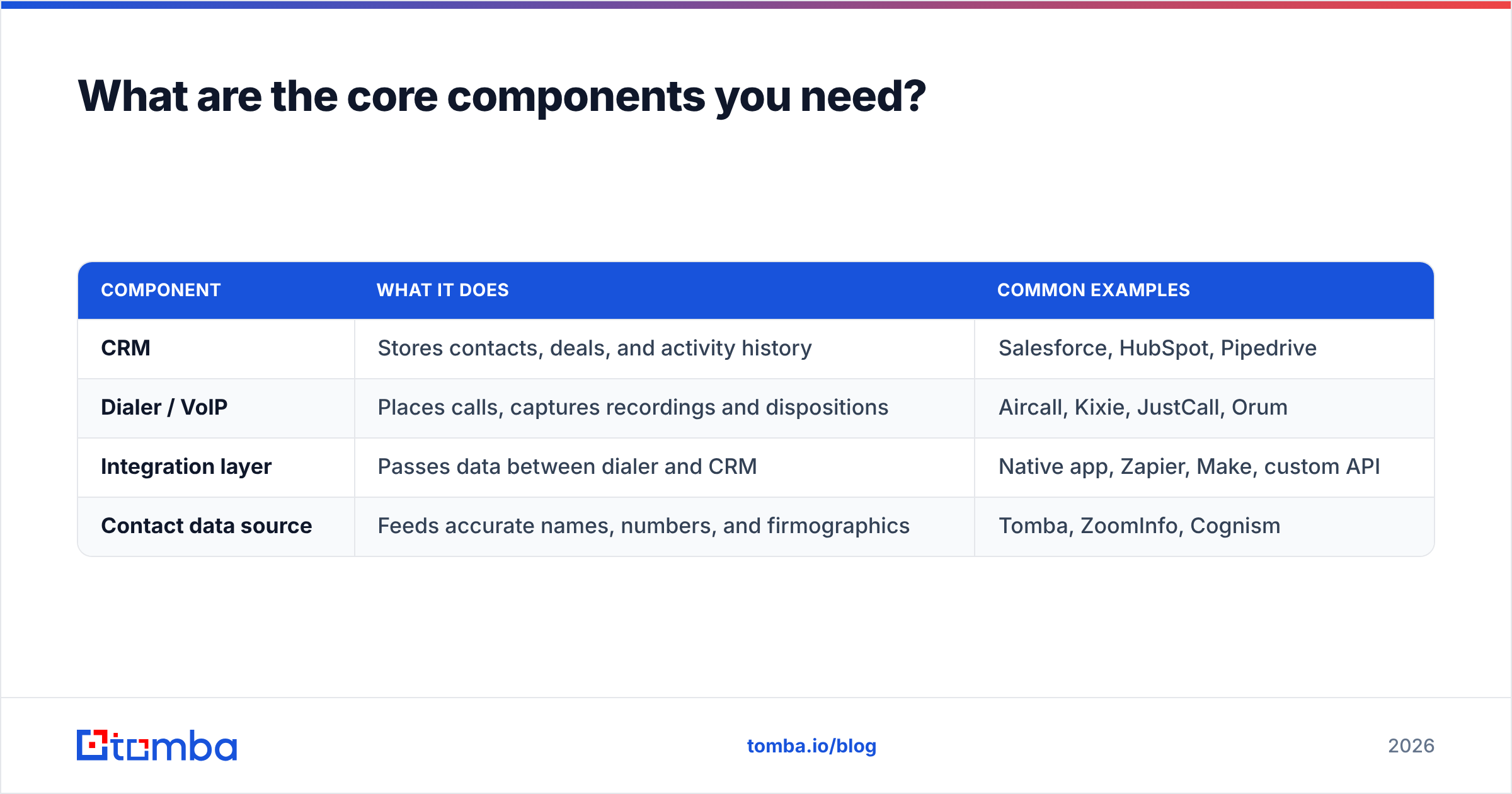
A working cold calling CRM integration has four moving parts. Get all four right and the system runs itself; neglect one and the rest suffer.
| Component | What it does | Common examples |
|---|---|---|
| CRM | Stores contacts, deals, and activity history | Salesforce, HubSpot, Pipedrive |
| Dialer / VoIP | Places calls, captures recordings and dispositions | Aircall, Kixie, JustCall, Orum |
| Integration layer | Passes data between dialer and CRM | Native app, Zapier, Make, custom API |
| Contact data source | Feeds accurate names, numbers, and firmographics | Tomba, ZoomInfo, Cognism |
The fourth row is the one teams forget. A flawless integration that's fed bad phone numbers just automates failure faster. If half your numbers are wrong, you've built an efficient machine for dialing dead ends. That's why the data layer — sourcing and verifying numbers before they enter the CRM — is not optional.
How do you set up cold calling CRM integration?#
There are three routes, ordered from simplest to most flexible. Pick based on your team size, technical resources, and how custom your workflow is.
1. Native integrations (fastest)#
Most modern dialers ship a pre-built connector for the major CRMs. You authenticate once, map a few fields, and calls start syncing. This is the right choice for 80% of teams — especially anyone on standard Salesforce, HubSpot, or Pipedrive setups.
Pros: Live in an afternoon, vendor-maintained, minimal breakage. Cons: You're limited to the fields and triggers the vendor exposes.
2. No-code automation (middle ground)#
Tools like Zapier or Make sit between apps and move data on triggers you define ("when a call is marked connected, create a follow-up task and enrich the contact"). Use this when the native connector almost does what you want but you need one or two custom steps. Tomba's Zapier integration fits here for pulling fresh contact data into the flow.
Pros: Flexible, no engineering, connects apps that lack native links. Cons: Per-task pricing adds up at high call volume; more points of failure.
3. API-based custom integration (most control)#
For high-volume or non-standard stacks, you wire the systems together directly through their APIs. Your dialer's API posts call events to your CRM's API, and a data provider's API enriches records on the fly. This is how large SDR orgs build exactly the workflow they want.
Pros: Total control over fields, timing, and logic; scales cleanly. Cons: Needs developer time to build and maintain.
Whichever route you choose, the setup checklist is the same:
- Map your dispositions to CRM activity types before go-live.
- Decide what auto-triggers on each outcome (task, sequence, nothing).
- Set field ownership so the dialer doesn't overwrite good CRM data.
- Test with a handful of real calls and confirm each lands correctly.
- Verify numbers upstream so reps aren't burning dials on dead lines.
How does contact data quality affect the whole system?#
It decides whether the whole thing is worth building. An integration is a pipe — it moves whatever you pour in. Pour in wrong numbers and you get a faster, better-documented way to fail.
Two data problems sink cold calling programs:
Wrong or disconnected numbers. B2B phone data decays fast as people change roles and companies. Dialing a dead number costs a rep 20–30 seconds and a hit to morale, multiplied across hundreds of dials a day. Sourcing numbers from a maintained provider and running them through a phone validator before they hit the CRM keeps your dial list live.
Missing context. A name and number alone make for a weak opener. When each record is enriched with title, company, and recent triggers, reps personalize instantly. Feeding data enrichment into the top of your integration turns a bare phone list into a briefed call list.
This is where a data platform earns its place beside the dialer and CRM. Tomba's phone finder surfaces B2B numbers, and the same platform verifies and enriches them — so the contact record that flows into your CRM is accurate before the first ring. Clean data in means trustworthy reporting out.
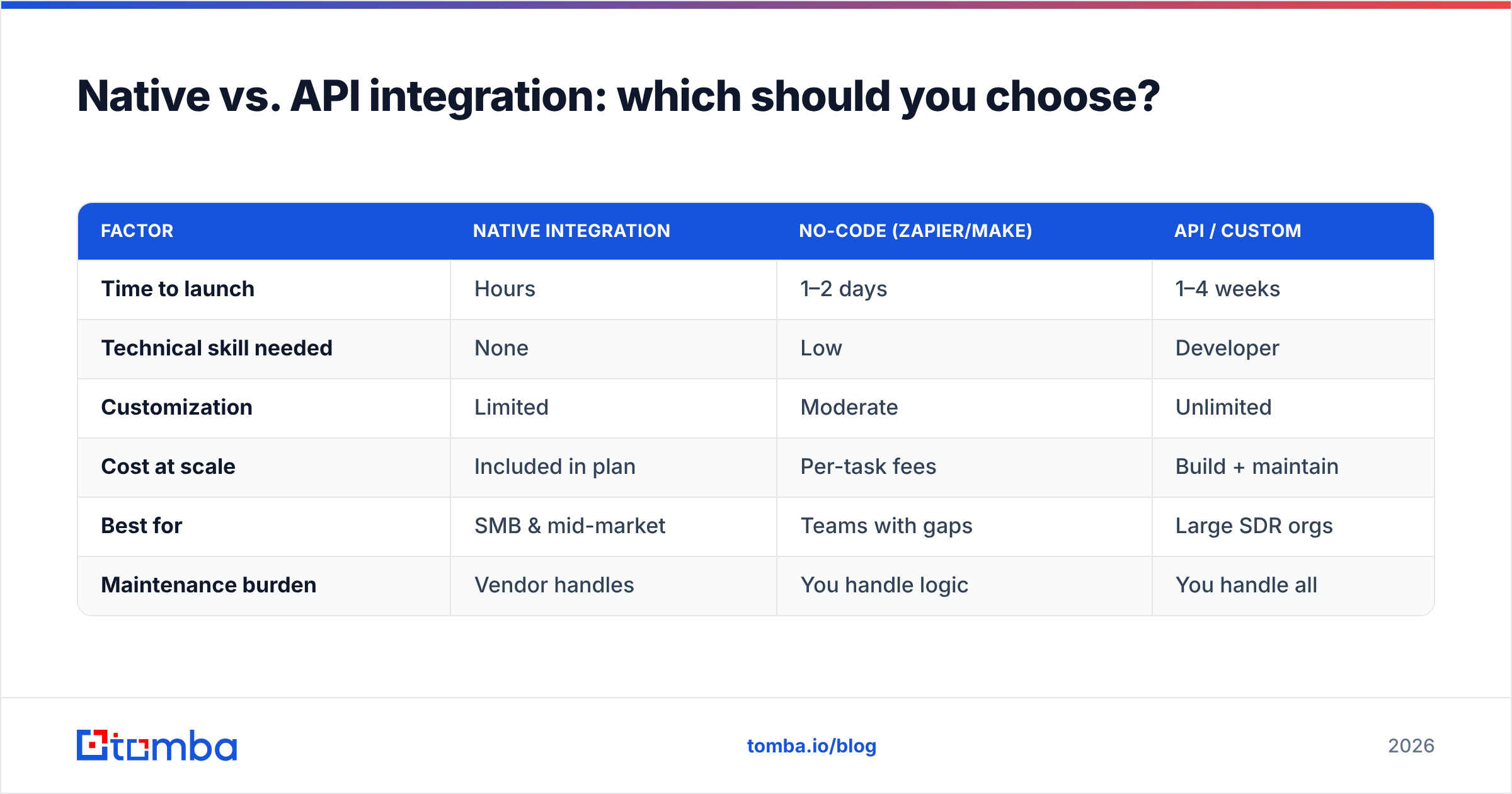
Native vs. API integration: which should you choose?#
Here's a direct comparison to match the approach to your situation.
| Factor | Native integration | No-code (Zapier/Make) | API / custom |
|---|---|---|---|
| Time to launch | Hours | 1–2 days | 1–4 weeks |
| Technical skill needed | None | Low | Developer |
| Customization | Limited | Moderate | Unlimited |
| Cost at scale | Included in plan | Per-task fees | Build + maintain |
| Best for | SMB & mid-market | Teams with gaps | Large SDR orgs |
| Maintenance burden | Vendor handles | You handle logic | You handle all |
If you're a team of 2–20 reps on a mainstream CRM, start native and only graduate to no-code or API when you hit a specific wall. Over-engineering the integration before you have volume is a common early mistake — you spend three weeks building what a native connector does in an afternoon.
What are the most common cold calling CRM integration mistakes?#
- Skipping the data layer. Teams obsess over the dialer-to-CRM link and pour unverified numbers in. Fix the source first.
- Over-mapping fields. Syncing every possible field creates conflicts and overwrites. Sync what you'll actually use.
- No disposition discipline. If reps don't consistently pick outcomes, your automation triggers on garbage. Train it, then enforce it.
- Ignoring recordings. Call recordings and transcripts are a coaching goldmine and, in many regions, a compliance requirement. Turn them on and store them on the record.
- Set-and-forget. Integrations drift as vendors update APIs. Audit the sync quarterly with a few test calls.
- Letting the dialer own the CRM. Configure field ownership so a quick call note can't wipe a carefully built contact profile.
Avoiding these six keeps the system trustworthy — and a trustworthy system is one reps actually use.
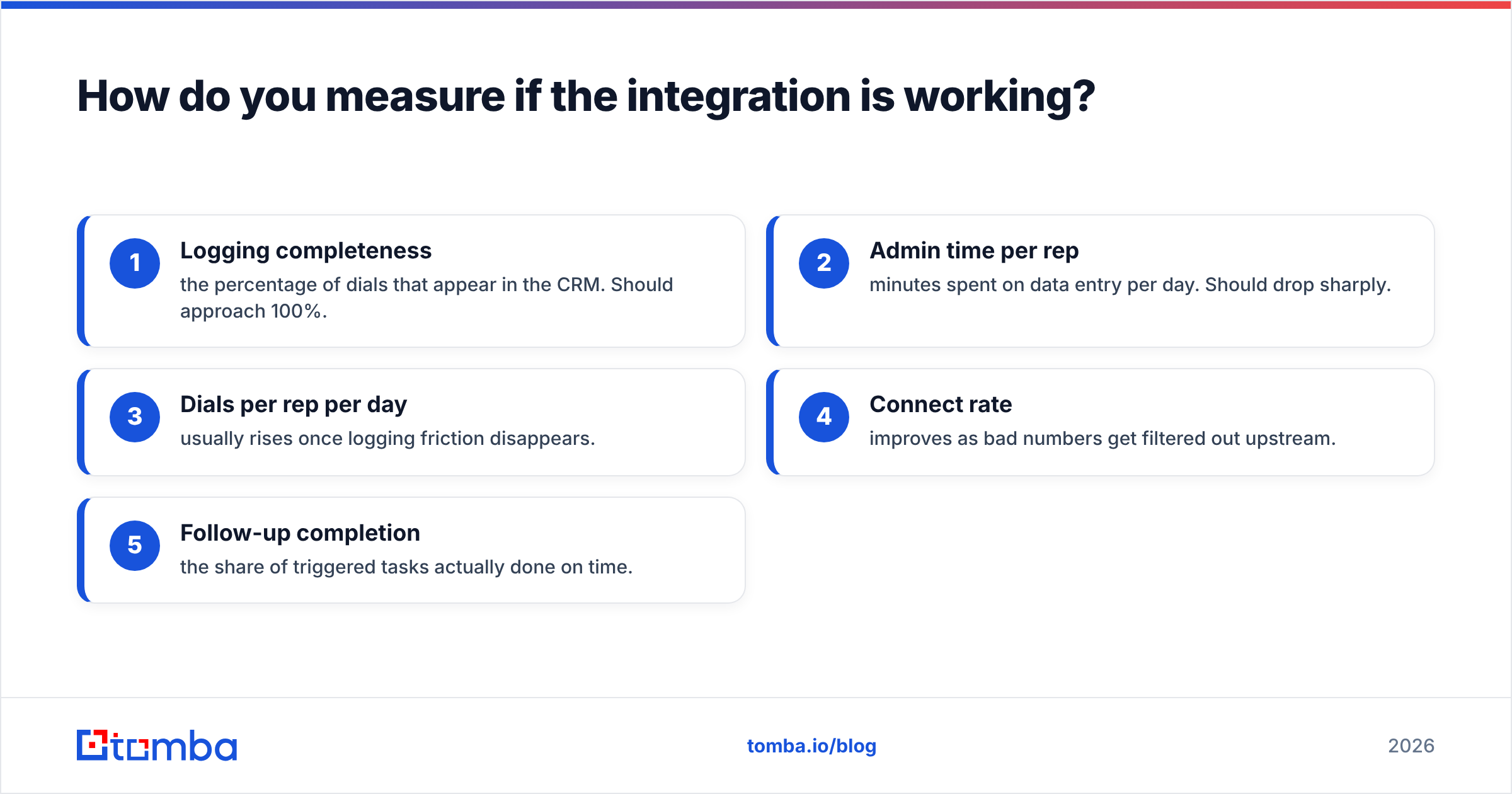
How do you measure if the integration is working?#
Track these before-and-after signals in the first 60 days:
- Logging completeness — the percentage of dials that appear in the CRM. Should approach 100%.
- Admin time per rep — minutes spent on data entry per day. Should drop sharply.
- Dials per rep per day — usually rises once logging friction disappears.
- Connect rate — improves as bad numbers get filtered out upstream.
- Follow-up completion — the share of triggered tasks actually done on time.
If logging completeness climbs but connect rate stays flat, your integration is fine and your data is the problem — loop back to sourcing and verification. If both improve, the machine is working. For benchmarks on what "good" looks like across CRMs, independent review sites like G2 aggregate real user data by tool and team size.
Where does this leave your cold calling stack?#
A cold call is only as valuable as the record it leaves behind. Cold calling CRM integration is what turns a fleaky, manual process into a compounding asset — every call sharpening the next, every rep seeing the full history, every manager forecasting from real numbers instead of guesses.
But the integration is only half the equation. The dialer-to-CRM pipe moves whatever you feed it, so the data going in decides the value coming out. Start there: source accurate B2B contacts, verify them, and enrich them before they ever hit your CRM.
That's exactly what Tomba's Email Finder and its companion tools are built for — finding, verifying, and enriching the contact data that powers your calls, emails, and CRM records from one place. Pair verified data with a clean integration, and your cold calling stops leaking pipeline. Check the Tomba pricing plans — the free tier gives you 25 searches a month to test it against your own list before you commit.
Build the pipe, but feed it clean water. That's the difference between a cold calling program that scales and one that just gets busier.
Related guides#
// get started
Find, verify and enrich your first contacts today
Start on the free plan with 25 searches a month, then scale when your team is ready.
Free plan · No credit card required · GDPR & CCPA
// about the author