Cold Email Cadence Template: A 2026 Sequence That Books Meetings
A copy-paste cold email cadence template for 2026 — exact send timing, touch counts, and message copy that lifts replies without torching your domain.
Most reps don't have a copywriting problem. They have a cadence problem. They send one email, hear nothing, and quietly move on — leaving 80% of their pipeline on the table. This guide gives you a full cold email cadence template you can copy into any sequencer today, plus the timing, touch counts, and channel mix that make it work in 2026.
TL;DR#
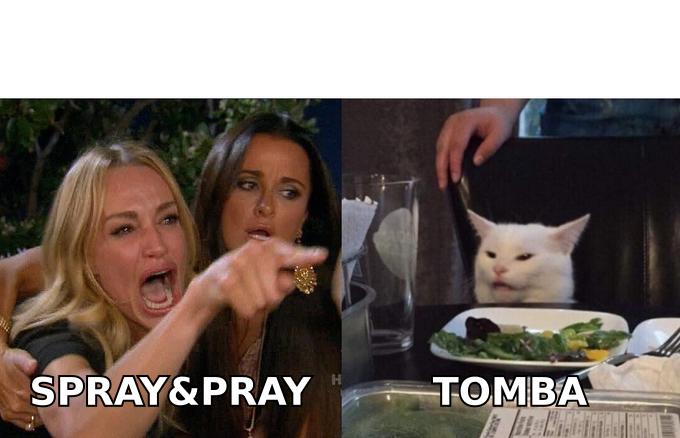
- A cold email cadence template is a scripted, multi-touch sequence — usually 5 to 8 emails over 2 to 4 weeks — not a single "spray and pray" blast.
- Most replies land on touches 2 through 5, so stopping after one email throws away the majority of your pipeline.
- The template below is a 7-touch, 21-day sequence blending value, social proof, a case study, and a clean break-up email.
- Deliverability beats cleverness: verify every address, warm the inbox, and cap volume before you scale.
- Pair the cadence with accurate contact data — a bad email address means even a perfect sequence never gets read.
What is a cold email cadence template?#
A cold email cadence template is a reusable, pre-written sequence of outreach messages sent to a prospect on a fixed schedule until they reply, book, or opt out. Think of it like a season of a TV show rather than a one-off movie: each episode (email) advances the story, and the value compounds because the viewer already knows the characters.
A single cold email is a coin flip. A cadence is a system. The template defines three things you'd otherwise improvise every time:
- Number of touches — how many messages you'll send before you stop.
- Timing and spacing — the gap between each send, in days.
- Message intent — what job each individual email does (open the loop, add value, prove results, ask for the break-up).
The point of writing it down once is consistency. When your cadence lives in a template instead of your head, you can measure it, A/B test it, and hand it to a new rep without them reinventing the wheel.
Why does a multi-touch cadence beat a single email?#
Because replies are back-loaded. Across most B2B outbound programs, only a minority of positive responses come from the first email — the rest arrive on follow-ups, often touch 3 or later. Buyers are busy, your first message gets buried, and timing is mostly luck. A cadence keeps you politely in view until the timing is right for them.
There's also a compounding trust effect. Each additional relevant touch signals that you're a real person with a real reason to reach out, not a bot firing a one-line pitch. The keyword is relevant: seven identical "just bumping this up" emails will get you blocked. Seven different angles — a stat, a case study, a question, a resource — feel like persistence, not pestering.
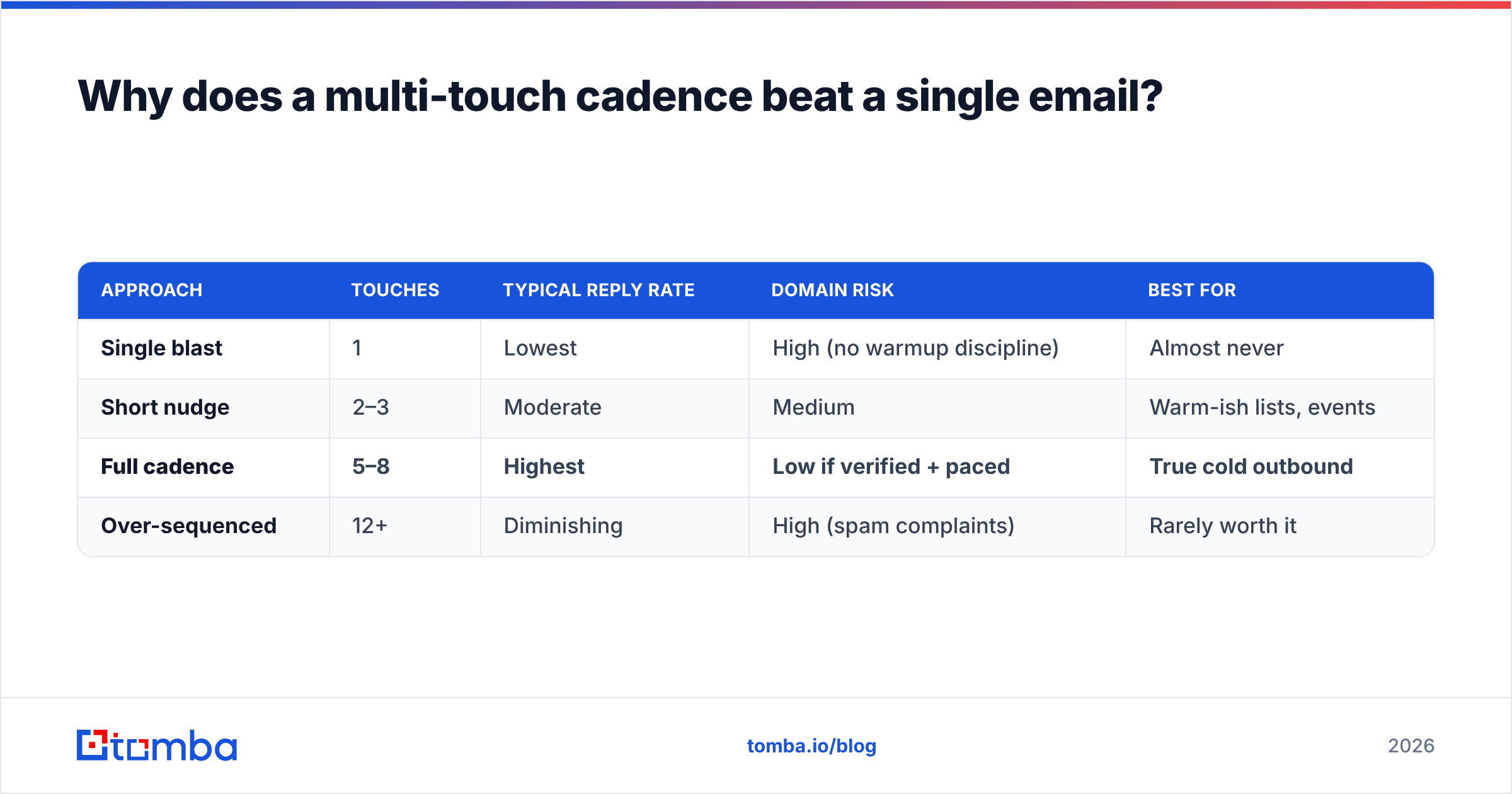
Here's the trade-off most teams get wrong, framed as a quick decision:
| Approach | Touches | Typical reply rate | Domain risk | Best for |
|---|---|---|---|---|
| Single blast | 1 | Lowest | High (no warmup discipline) | Almost never |
| Short nudge | 2–3 | Moderate | Medium | Warm-ish lists, events |
| Full cadence | 5–8 | Highest | Low if verified + paced | True cold outbound |
| Over-sequenced | 12+ | Diminishing | High (spam complaints) | Rarely worth it |
The sweet spot is 5 to 8 touches. Below that you leave replies on the table; above 8 you annoy people and invite spam complaints that hurt your sender reputation.
What does a 7-touch cold email cadence template look like?#
Here is the full template. It runs 21 days, mixes email with an optional LinkedIn touch, and gives each message a distinct job. Copy the structure; rewrite the copy in your own voice.
Day 1 — Email 1: The relevant opener. Lead with a specific trigger (a hire, a funding round, a product launch), tie it to one problem you solve, and ask a single low-friction question. No pitch, no calendar link yet.
Subject: quick question about {{company}}'s onboarding
Hi {{first_name}} — saw you just opened three CS roles. Usually that means onboarding volume is about to spike. When it did for {{similar_company}}, their time-to-value slipped 30%. Is that on your radar this quarter?
Day 3 — Email 2: The value add. No ask. Share a resource, benchmark, or one-line insight relevant to their world. You're depositing trust before you withdraw a meeting.
Day 6 — Email 3: The social proof. Introduce a peer company they'll recognize and the concrete result you drove. This is your strongest touch — make the number real.
Day 8 — LinkedIn: The soft touch (optional). A simple connection request or a comment on their recent post. Multichannel presence lifts reply rates without adding inbox pressure. If you run LinkedIn plays, our guide to LinkedIn outreach pairs well here.
Day 11 — Email 4: The objection pre-empt. Name the reason they're probably hesitating ("if you're already using X…") and reframe it. This shows you understand their reality.
Day 15 — Email 5: The case study. Link one short, skimmable proof point — a customer story with a before/after metric. Keep it to two sentences and one link.
Day 21 — Email 6: The break-up. Tell them you'll stop reaching out, restate the one problem you solve, and leave the door open. Break-up emails are famously one of the highest-reply touches because they trigger loss aversion.
Subject: closing the loop
Hi {{first_name}} — I'll stop here so I'm not cluttering your inbox. If cutting onboarding time ever climbs the priority list, my door's open. Either way, good luck with the CS build-out.
That's six emails plus one social touch across 21 days. Notice the spacing widens as the cadence goes on — tight early, patient later. That rhythm feels human; a rigid every-two-days drip feels robotic.
How do you set the timing and spacing between touches?#
The rule of thumb: start tight, then stretch. Early gaps of 2 to 3 days keep momentum while your name is fresh; later gaps of 4 to 6 days respect that a non-responder may just be busy, not uninterested. A common, defensible schedule is Day 1, 3, 6, 11, 15, 21.
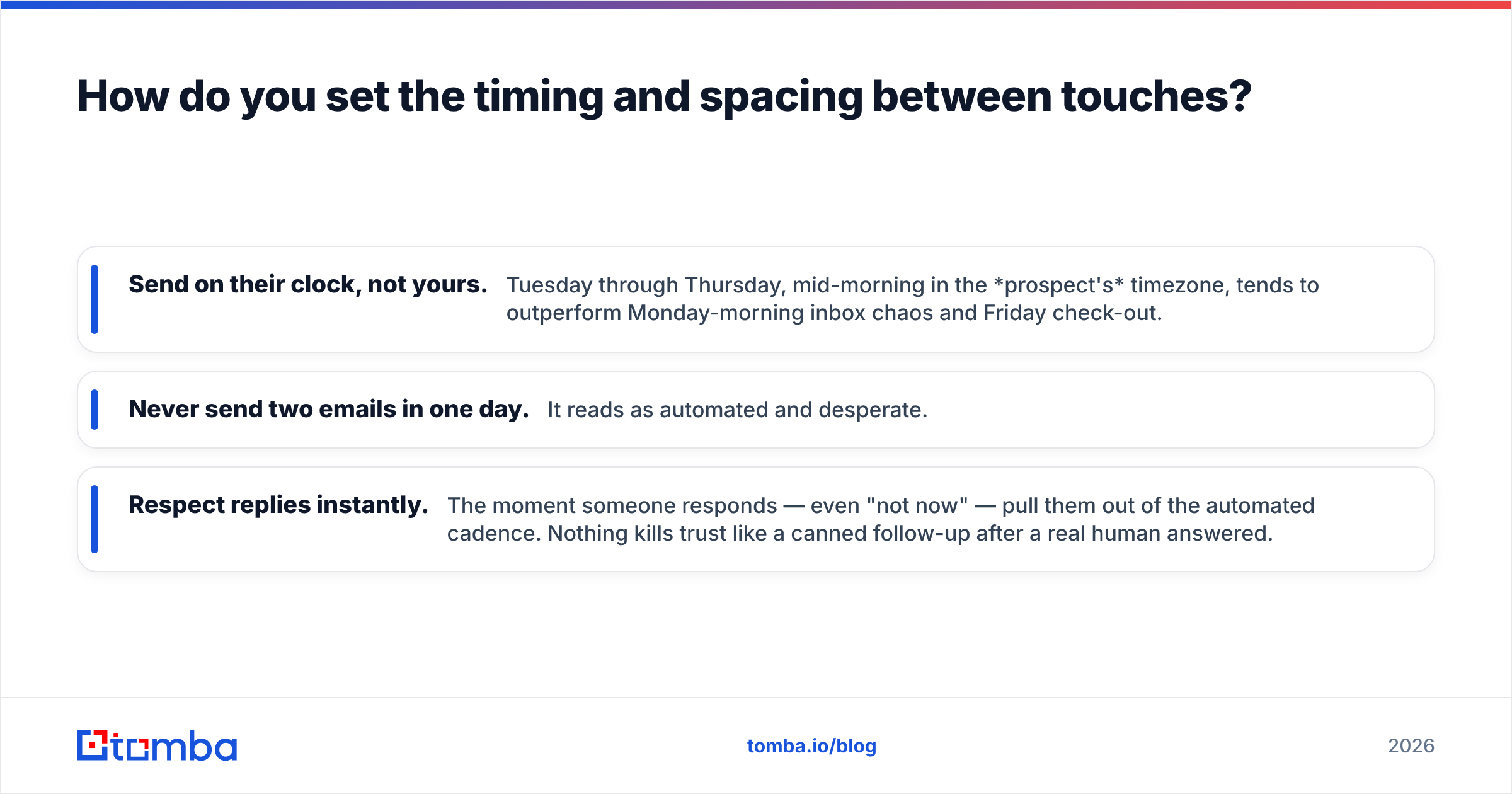
Three timing principles worth internalizing:
- Send on their clock, not yours. Tuesday through Thursday, mid-morning in the prospect's timezone, tends to outperform Monday-morning inbox chaos and Friday check-out.
- Never send two emails in one day. It reads as automated and desperate.
- Respect replies instantly. The moment someone responds — even "not now" — pull them out of the automated cadence. Nothing kills trust like a canned follow-up after a real human answered.
Most sequencers (Instantly, Smartlead, Saleshandy, Reply.io) let you encode this spacing once and reuse it. Set it, then leave it alone long enough to gather real data before you tweak.
Which channels should the cadence include?#
Email is the backbone, but a mono-channel cadence caps your reach. Blending in one or two other channels — without turning it into a full-time job — reliably lifts response rates:
- Email (primary). Carries the message, the proof, and the ask. 5–6 of your 7 touches.
- LinkedIn (secondary). One connection request or thoughtful comment. Presence, not pitch.
- Phone (optional, high-value accounts). A single well-timed call after touch 3 can break a stalemate. You'll need accurate numbers — a phone finder closes that gap.
Don't bolt on channels for the sake of it. For most SMB and mid-market outbound, disciplined email plus a light LinkedIn touch is plenty. Reserve phone for named accounts where the deal size justifies the effort.
How do you keep the cadence out of the spam folder?#
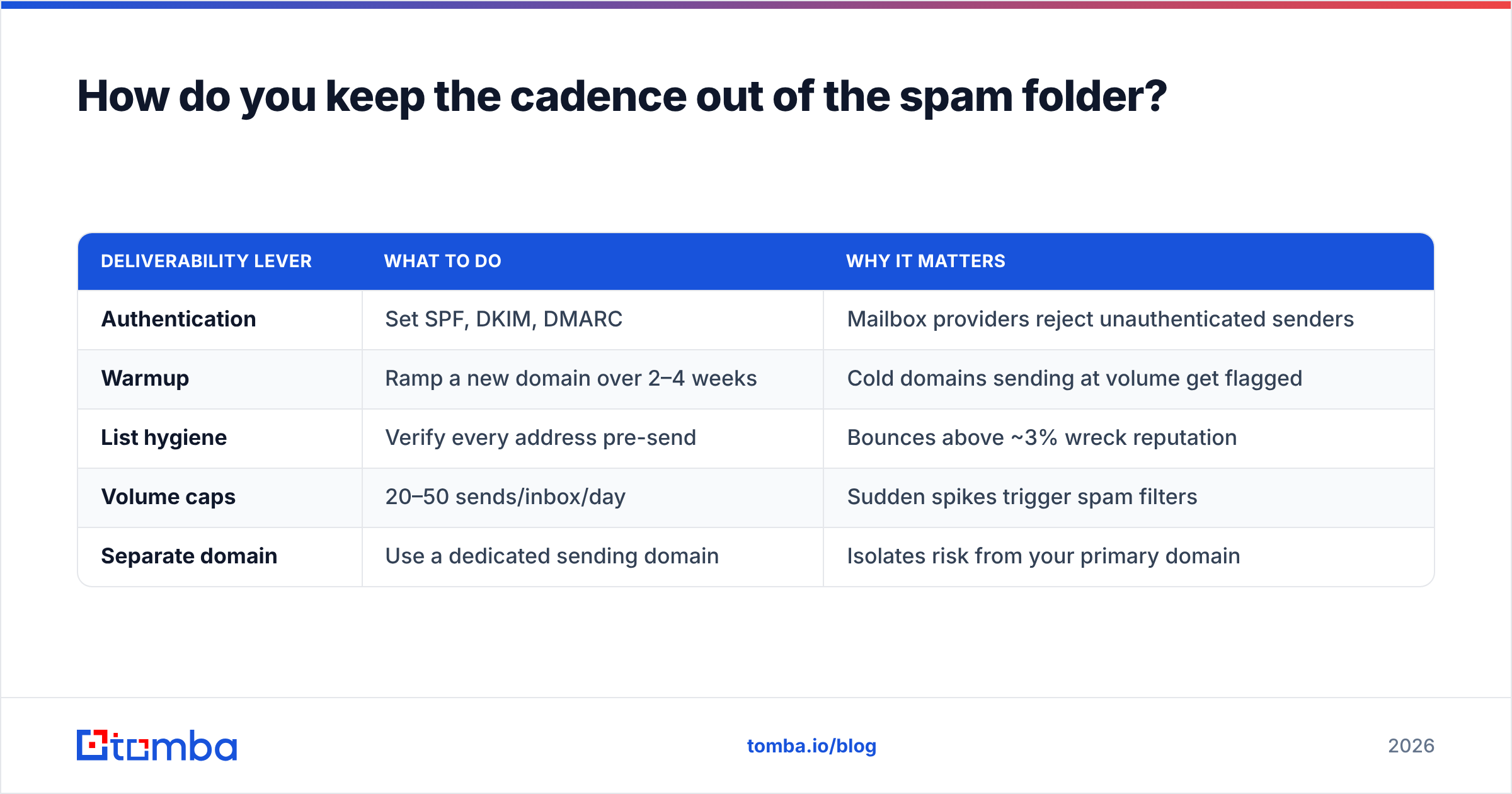
Deliverability is the silent killer of good cadences. You can write the perfect seven-touch sequence and still hit zero replies because none of it reached the inbox. Protect your delivery before you scale volume:
| Deliverability lever | What to do | Why it matters |
|---|---|---|
| Authentication | Set SPF, DKIM, DMARC | Mailbox providers reject unauthenticated senders |
| Warmup | Ramp a new domain over 2–4 weeks | Cold domains sending at volume get flagged |
| List hygiene | Verify every address pre-send | Bounces above ~3% wreck reputation |
| Volume caps | 20–50 sends/inbox/day | Sudden spikes trigger spam filters |
| Separate domain | Use a dedicated sending domain | Isolates risk from your primary domain |
The single highest-leverage step is list hygiene. A verified list keeps your bounce rate low, which protects the email deliverability of every future send. Run your list through an email verifier before the first email goes out, and re-verify anything older than a few months.
For the authentication basics, Google's own guidance is the canonical source — see the Gmail sender requirements and validate your records with a free SPF checker before you launch.
What metrics tell you the cadence is working?#
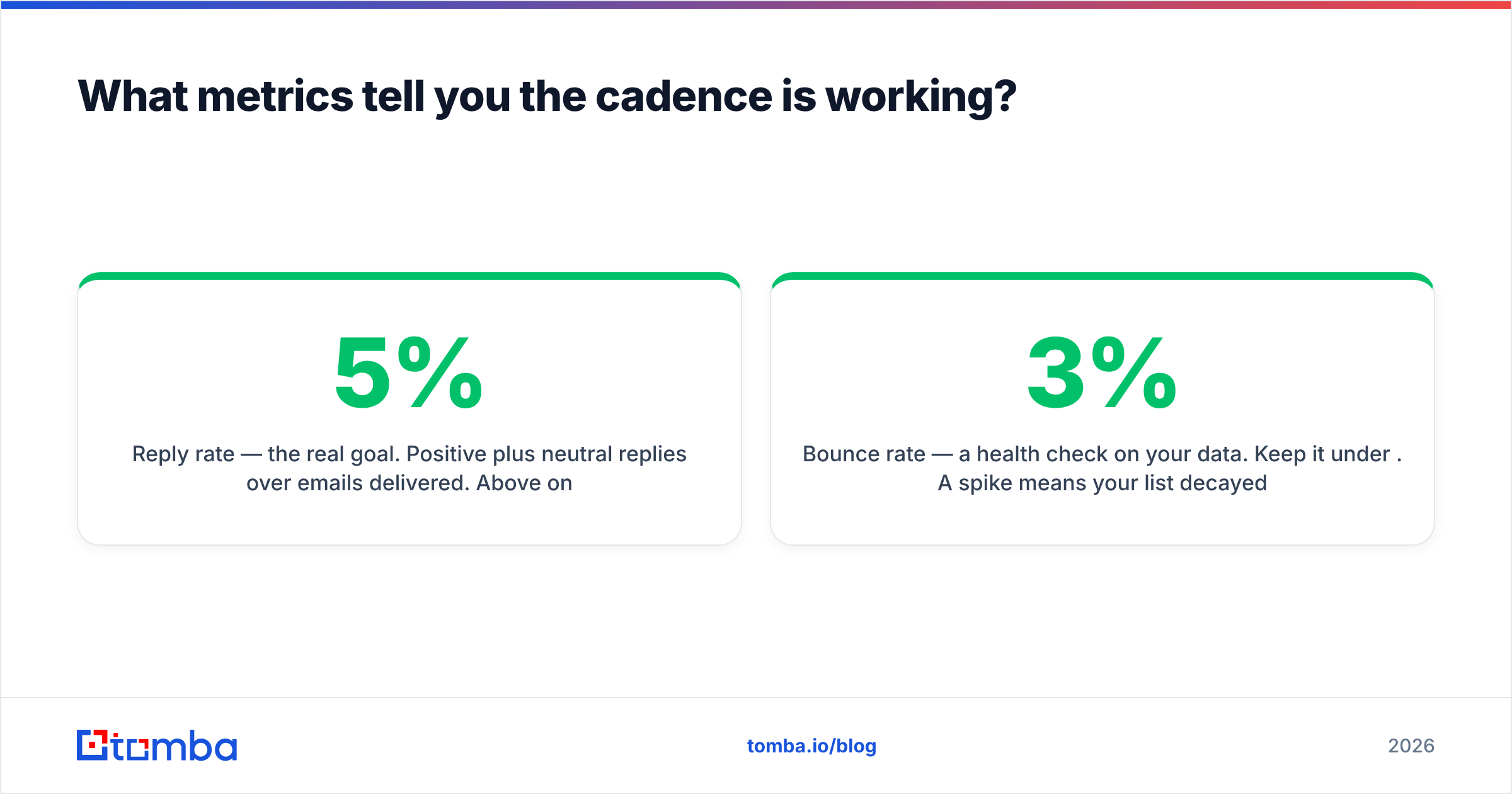
Track four numbers, in priority order, and resist the urge to over-optimize any one of them in isolation:
- Reply rate — the real goal. Positive plus neutral replies over emails delivered. Above 5% on true cold outbound is healthy; above 10% is excellent.
- Bounce rate — a health check on your data. Keep it under 3%. A spike means your list decayed or your verification slipped.
- Positive reply rate — replies that are actually interested, not "unsubscribe." This is the number that maps to pipeline.
- Meetings booked — the outcome your revenue team cares about. Everything else is a leading indicator of this.
Open rate deserves an asterisk in 2026: privacy features and prefetching inflate it, so treat it as directional at best. If you A/B test, change one variable at a time — subject line, or first line, or send day — and give each variant enough volume to reach significance before you declare a winner. G2's sales engagement category is a useful reference if you're comparing sequencer tooling.
How does contact data quality change your results?#
More than any subject line. A cadence is a delivery mechanism; the data is the fuel. Send seven beautifully written emails to a guessed, unverified address and you get seven bounces and a damaged domain — the foreseeable consequence of skipping verification.
This is where your cadence quietly succeeds or fails before touch one. To fuel it you need two things: the right email addresses, and confidence they're deliverable. A domain search surfaces the verified contacts at a target account, and a bulk find email addresses workflow turns a list of companies into a list of reachable people. Feed that into your sequencer, and the template above does its job.
The reps who win at outbound aren't the ones with the cleverest copy. They're the ones whose cadence reaches real inboxes, every time, because the data underneath it was verified first.
Put the cadence to work#
A cold email cadence template only performs when it's built on accurate, deliverable contact data. Before you load your seven-touch sequence into any sequencer, use the Tomba Email Finder to source and verify professional email addresses by name, company, or domain — so every touch lands in a real inbox instead of a bounce log. Start free with 25 searches a month, and scale on a Tomba plan that fits your outbound volume when the pipeline justifies it. Get the data right, and the cadence takes care of the rest.
Related guides#
// get started
Find, verify and enrich your first contacts today
Start on the free plan with 25 searches a month, then scale when your team is ready.
Free plan · No credit card required · GDPR & CCPA
// about the author