How to Build a Cold Email Campaign That Actually Gets Replies
A cold email campaign lives or dies on list quality, deliverability, and sequencing — not volume. Here's the 2026 playbook, with a step-by-step framework, benchmarks, and the tools that make it repeatable.
Most cold email campaigns fail before the first message ever sends. Not because the copy is weak, but because the list is dirty, the domain isn't warmed, and the sequence is built to sell instead of to start a conversation. If you fix those three things, average results start to look exceptional.
This guide walks through how to plan, build, and run a cold email campaign in 2026 — from list to sequence to measurement — without the fluff.
TL;DR#
- A cold email campaign is a structured, multi-step outreach sequence sent to a targeted list of prospects who haven't opted in — legally permitted for B2B in most regions when relevant and compliant.
- List quality beats volume. Sending 500 emails to verified, well-targeted contacts outperforms 5,000 to a scraped list every time.
- Deliverability is the hidden gate. Domain warmup, SPF/DKIM/DMARC, and low bounce rates decide whether anyone reads your copy at all.
- Sequences of 3–5 touches over 2–3 weeks convert far better than one-and-done sends.
- Measure replies and positive replies, not opens. Open tracking is unreliable in 2026; reply rate is the metric that maps to revenue.
What is a cold email campaign?#
A cold email campaign is a planned series of emails sent to prospects who have no prior relationship with you, with the goal of starting a business conversation — a demo, a call, a reply, a referral. Think of it like knocking on doors in a neighborhood you researched carefully: you're uninvited, so relevance and respect are everything.
Unlike spam, a legitimate cold email campaign is targeted, personalized, and compliant. Under the U.S. CAN-SPAM Act and similar B2B carve-outs, sending unsolicited business email is legal as long as you identify yourself, avoid deceptive subject lines, and honor opt-outs. (Consumer email under GDPR is stricter — always confirm your legal basis for your market.)
A campaign is different from a single cold email in three ways:
- It's sequenced. Multiple follow-ups spaced over days, not one shot.
- It's segmented. Different messaging per persona, industry, or trigger.
- It's measured. Every step is tracked so you can iterate.
Wait — that's the mindset most people bring to cold email, and it's exactly why their campaigns get flagged. Let's build the version that works instead.
What are the core components of a cold email campaign?#
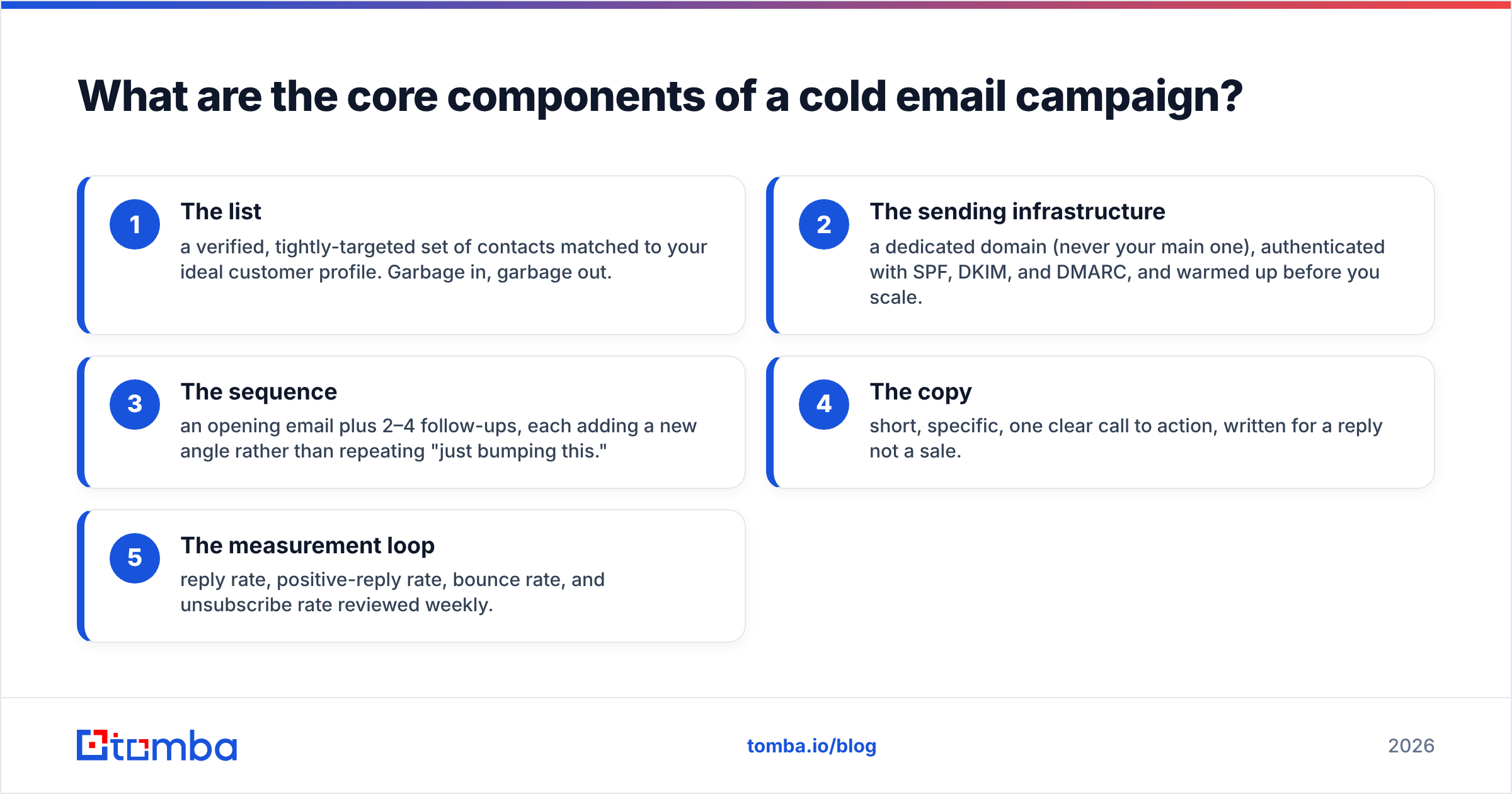
Every high-performing campaign is built from the same five parts. Weakness in any one caps the whole thing.
- The list — a verified, tightly-targeted set of contacts matched to your ideal customer profile. Garbage in, garbage out.
- The sending infrastructure — a dedicated domain (never your main one), authenticated with SPF, DKIM, and DMARC, and warmed up before you scale.
- The sequence — an opening email plus 2–4 follow-ups, each adding a new angle rather than repeating "just bumping this."
- The copy — short, specific, one clear call to action, written for a reply not a sale.
- The measurement loop — reply rate, positive-reply rate, bounce rate, and unsubscribe rate reviewed weekly.
Skip the list step and you'll burn your domain reputation on invalid addresses. Skip warmup and even perfect copy lands in spam. The components are a chain, not a menu.
How do you build a targeted list for cold email?#
Start with your ideal customer profile, then find real people inside those accounts — not a purchased list of stale contacts. The workflow looks like this:
- Define the ICP: company size, industry, region, and the specific job titles who feel the pain you solve.
- Source the accounts: build a list of target domains from your CRM, LinkedIn, or a B2B database.
- Find the people: use an email finder to get verified addresses for the right roles at each company, or run a domain search to pull every known contact at a target account.
- Verify before you send: run the full list through an email verifier to strip invalid, catch-all, and risky addresses. This single step is the difference between a 1% bounce rate and a 15% one that gets you blacklisted.
A clean list of 300 verified decision-makers will out-earn a scraped list of 10,000 every quarter. Accuracy compounds: fewer bounces protect your sender reputation, which keeps more of your future emails in the inbox.
Why does deliverability matter more than copy?#
Because copy nobody sees converts at zero percent. Deliverability is the gate that decides whether your message reaches the inbox, the spam folder, or a bounce.
Three technical requirements come first:
- Authentication: SPF, DKIM, and DMARC records on your sending domain. Google and Yahoo now effectively require them for bulk senders. Check yours with a free SPF checker before launching.
- Warmup: ramp a new domain slowly — start at 10–20 sends a day and build over 3–4 weeks so mailbox providers learn to trust you.
- List hygiene: keep bounce rates under 2–3%. Every hard bounce is a signal to spam filters that you don't know who you're emailing.
If you learn one habit from this guide, make it this: verify every address before it enters a campaign. It's the cheapest insurance in outbound. For a deeper walk-through, Google's own Postmaster guidelines spell out what large mailbox providers expect from senders.
How many emails should a cold email sequence have?#
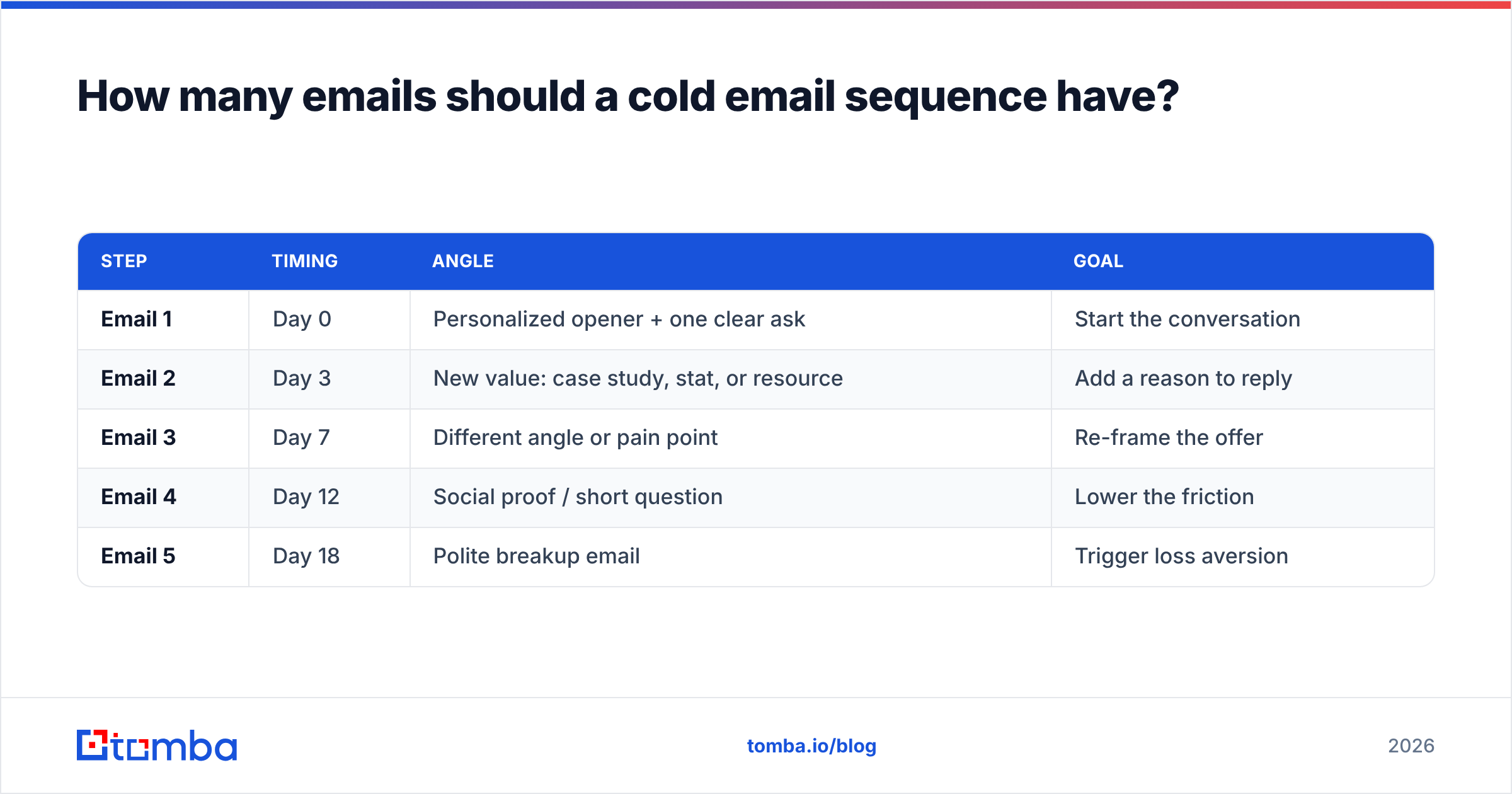
Three to five touches over two to three weeks is the sweet spot for most B2B campaigns. Single emails leave most of your reply volume on the table — a large share of positive replies come from follow-ups two and three, not the opener.
Here's a proven structure:
| Step | Timing | Angle | Goal |
|---|---|---|---|
| Email 1 | Day 0 | Personalized opener + one clear ask | Start the conversation |
| Email 2 | Day 3 | New value: case study, stat, or resource | Add a reason to reply |
| Email 3 | Day 7 | Different angle or pain point | Re-frame the offer |
| Email 4 | Day 12 | Social proof / short question | Lower the friction |
| Email 5 | Day 18 | Polite breakup email | Trigger loss aversion |
Each follow-up should add something — a new insight, a different benefit, a lighter ask — never just "checking in." The breakup email ("I'll close your file — should I?") consistently pulls one of the highest reply rates in the whole sequence because it creates urgency without pressure.
What does a good cold email look like?#
Short, specific, and about the prospect — not you. A strong cold email fits on a phone screen without scrolling and makes exactly one request.
The anatomy:
- Subject line: 2–5 words, curiosity or relevance, no clickbait. Test variants with a subject line tester.
- Opening line: a specific, personalized observation — not "I hope this finds you well." Reference a trigger: a hire, a launch, a post, a role.
- Body: two to three sentences connecting their situation to a concrete outcome you deliver.
- Call to action: one low-friction ask — "Worth a quick look?" beats "Do you have 30 minutes Tuesday at 2pm?"
- Signature: real name, real company, physical address (CAN-SPAM), easy opt-out.
Avoid attachments, avoid image-heavy HTML, and avoid more than one link in the first email — all three hurt deliverability. Write like a human sending one message to one person, because that's exactly what you're doing.
How do you compare cold email campaign tools?#
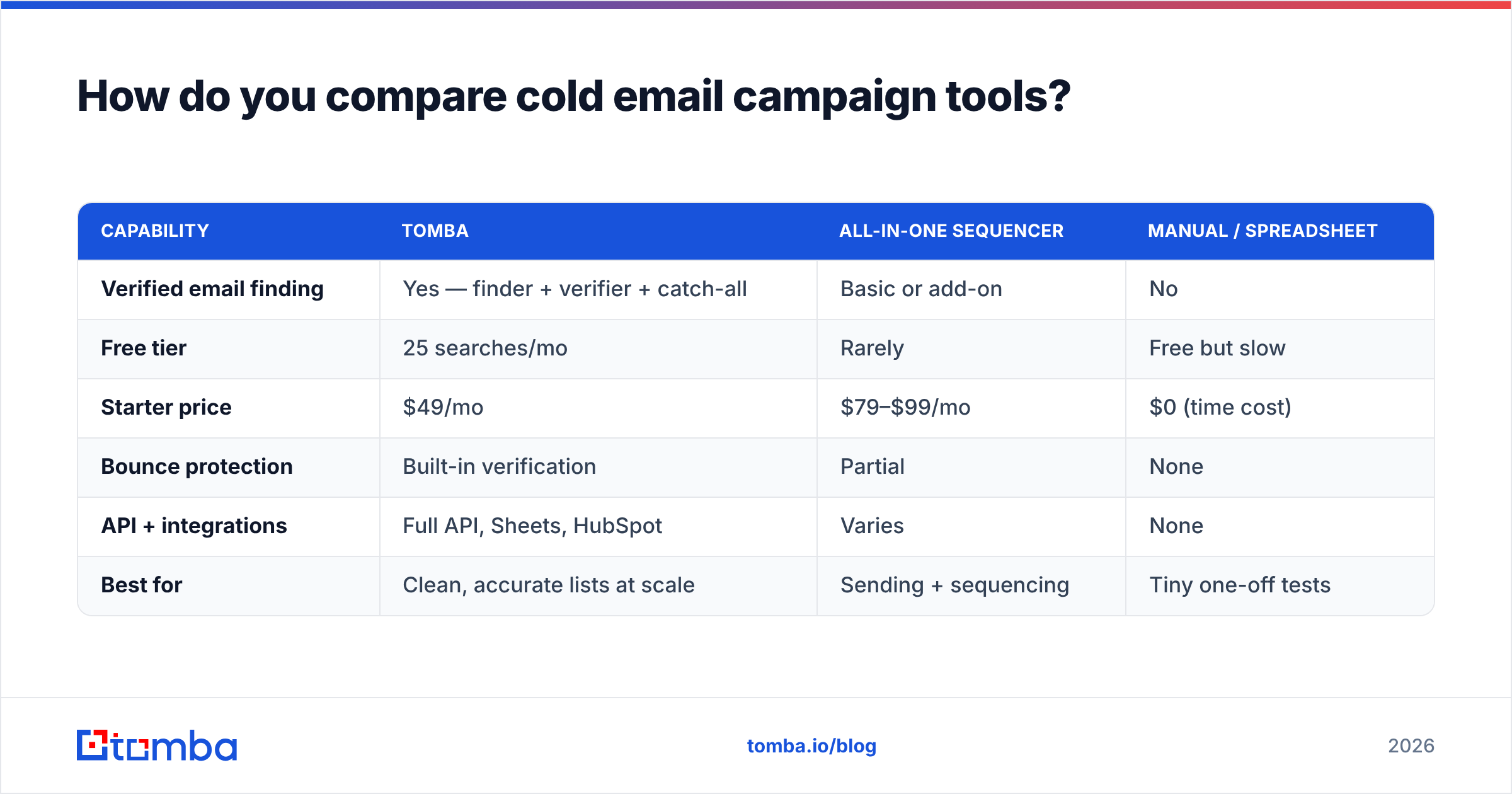
The tool stack for a cold email campaign usually spans three jobs: finding and verifying contacts, sending and sequencing, and measuring results. Some platforms bundle these; most teams combine a best-in-class data source with a dedicated sending tool. Here's how the common options stack up.
| Capability | Tomba | All-in-one sequencer | Manual / spreadsheet |
|---|---|---|---|
| Verified email finding | Yes — finder + verifier + catch-all | Basic or add-on | No |
| Free tier | 25 searches/mo | Rarely | Free but slow |
| Starter price | $49/mo | $79–$99/mo | $0 (time cost) |
| Bounce protection | Built-in verification | Partial | None |
| API + integrations | Full API, Sheets, HubSpot | Varies | None |
| Best for | Clean, accurate lists at scale | Sending + sequencing | Tiny one-off tests |
The pattern most efficient teams land on: use a dedicated data platform for accurate, verified contacts, then feed that clean list into a sequencing tool. When your data source is weak, no amount of clever sequencing saves the campaign. You can see current Tomba pricing to compare tiers, and cross-reference verified user reviews on G2 before committing to any sender.
For teams already living in a CRM, connecting your list source directly — via the HubSpot integration or a Google Sheets workflow — removes the copy-paste step that quietly corrupts lists.
What metrics prove a cold email campaign is working?#
Track reply rate and positive-reply rate above all else. Open rates became unreliable once Apple Mail Privacy Protection and similar features started pre-loading images, inflating "opens" that never happened.
The metrics that actually matter:
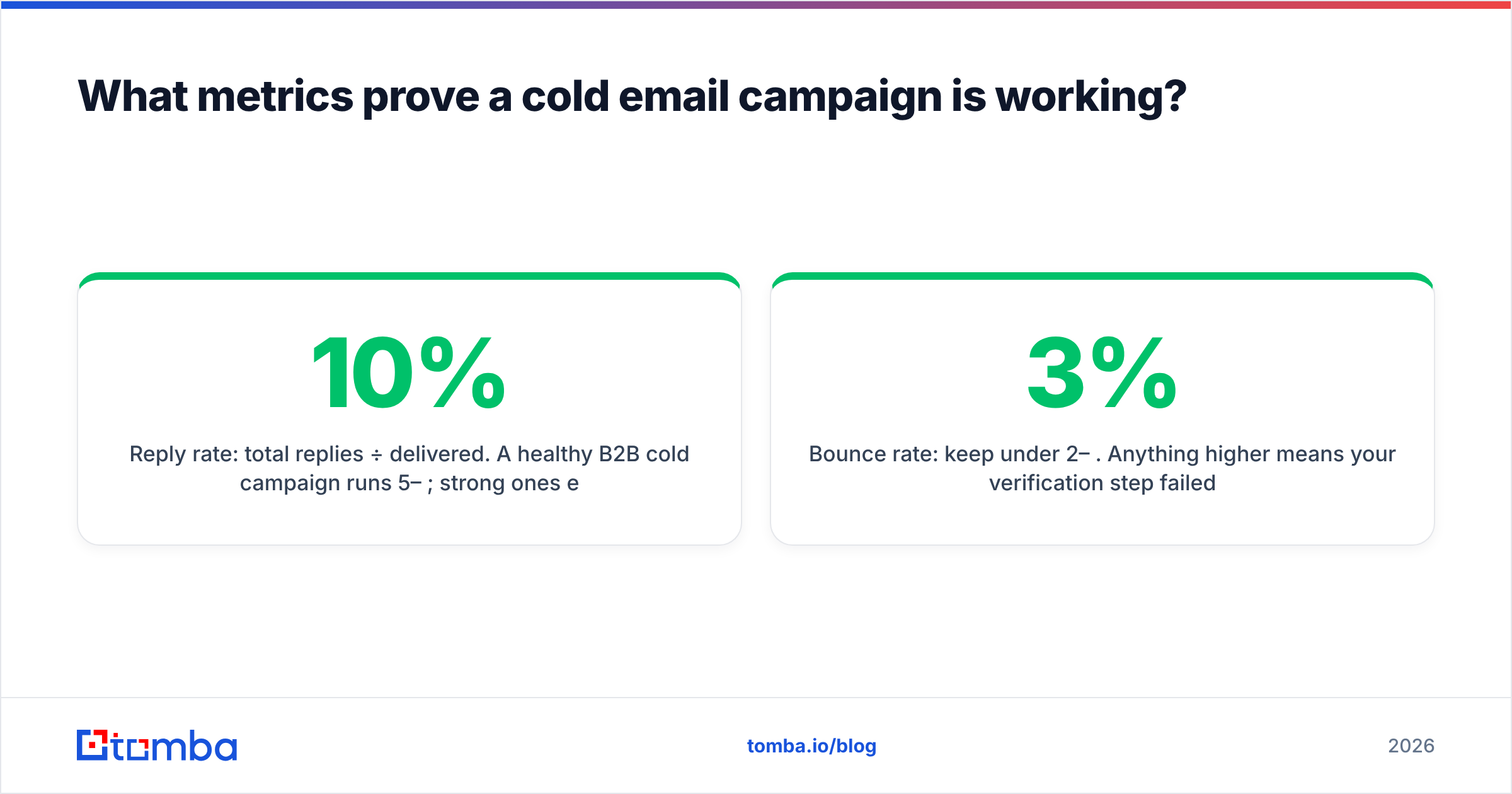
- Reply rate: total replies ÷ delivered. A healthy B2B cold campaign runs 5–10%; strong ones exceed 10%.
- Positive-reply rate: interested replies ÷ delivered. This is your true north — it maps directly to pipeline.
- Bounce rate: keep under 2–3%. Anything higher means your verification step failed.
- Unsubscribe / spam rate: rising numbers mean your targeting or relevance is off — pause and fix before scaling.
Review these weekly, change one variable at a time (subject, opener, or offer), and let the response rate tell you what's working. Chasing opens will send you optimizing a number that doesn't exist.
Common cold email campaign mistakes to avoid#
- Emailing from your main domain. One bad campaign can tank your primary domain's reputation. Always use a separate sending domain.
- Skipping verification. Unverified lists cause bounces, which cause blacklisting. Non-negotiable.
- Personalizing only the first name. {{FirstName}} isn't personalization. Reference something real about them or their company.
- Selling in email one. The goal of the first email is a reply, not a signed contract.
- Ignoring follow-ups. Most conversions happen after the first touch — give up too early and you leave money on the table.
- No clear opt-out. It's the law, and it protects your reputation.
Start your cold email campaign with clean data#
Every strong cold email campaign starts with a list you can trust. Before you write a single subject line, make sure every address is real, deliverable, and matched to the right person — because deliverability and reply rate both trace back to data quality.
That's exactly what Tomba's Email Finder is built for: find verified professional emails by name, domain, or company, confirm them with the built-in verifier, and export a campaign-ready list in minutes. Start free with 25 searches a month, then scale on the Starter plan at $49/mo when your outbound proves out. Build the list right, and the rest of the campaign has a real chance to work.
Related guides#
Ready to find emails that actually work?
Join 150,000+ professionals who stopped guessing and started sending. Free credits on signup — no credit card required.
Get the Tomba newsletter
Practical outbound tactics and product updates — once every two weeks.
About the author