Cold Email CRM: How to Track, Sync, and Close More Deals
Your cold email tool tracks opens. Your CRM tracks deals. When they don't talk, leads fall through the cracks. Here's how to connect cold email and CRM so every reply becomes a tracked opportunity.
Cold email sends the message. A CRM remembers what happened next. The gap between those two jobs is where most outbound revenue quietly leaks — a reply that never got logged, a "circle back in Q3" that no one circled back to, a hot lead worked twice by two reps who never saw each other's notes.
A cold email CRM is the setup that closes that gap: your outreach tool and your customer record talking to each other so every open, reply, bounce, and booked meeting lands on the contact it belongs to, automatically.
This guide covers what that actually means, how to build it without paying for features you won't use, and how the main tool categories stack up in 2026.
TL;DR#
- A "cold email CRM" isn't one product — it's the connection between your outreach tool and your contact database, so replies and status changes update the same record.
- You have three real options: an all-in-one sales engagement platform, a standalone CRM + a cold email tool wired together, or a lightweight tool with a native CRM view. Cost and control differ sharply.
- The non-negotiable features: two-way contact sync, reply detection, activity logging, deduplication, and clean data going in.
- Garbage in, garbage out — a CRM full of invalid emails and duplicate contacts is worse than no CRM. Verify and enrich before import.
- Start simpler than you think. Most teams under 10 reps do not need a $99-per-seat platform to run organized outbound.

What is a cold email CRM?#
A cold email CRM is a workflow, not a single app. It's the point where your outbound sending system and your CRM share one source of truth about each prospect.
Think of it like a delivery company. The sending tool is the courier — it gets the package (your email) to the door and reports "delivered" or "returned." The CRM is the warehouse ledger — it knows who ordered what, what they've bought before, and what to ship next. If the courier never tells the warehouse the package bounced, the warehouse keeps shipping to a dead address. Connecting them means every delivery event updates the ledger in real time.
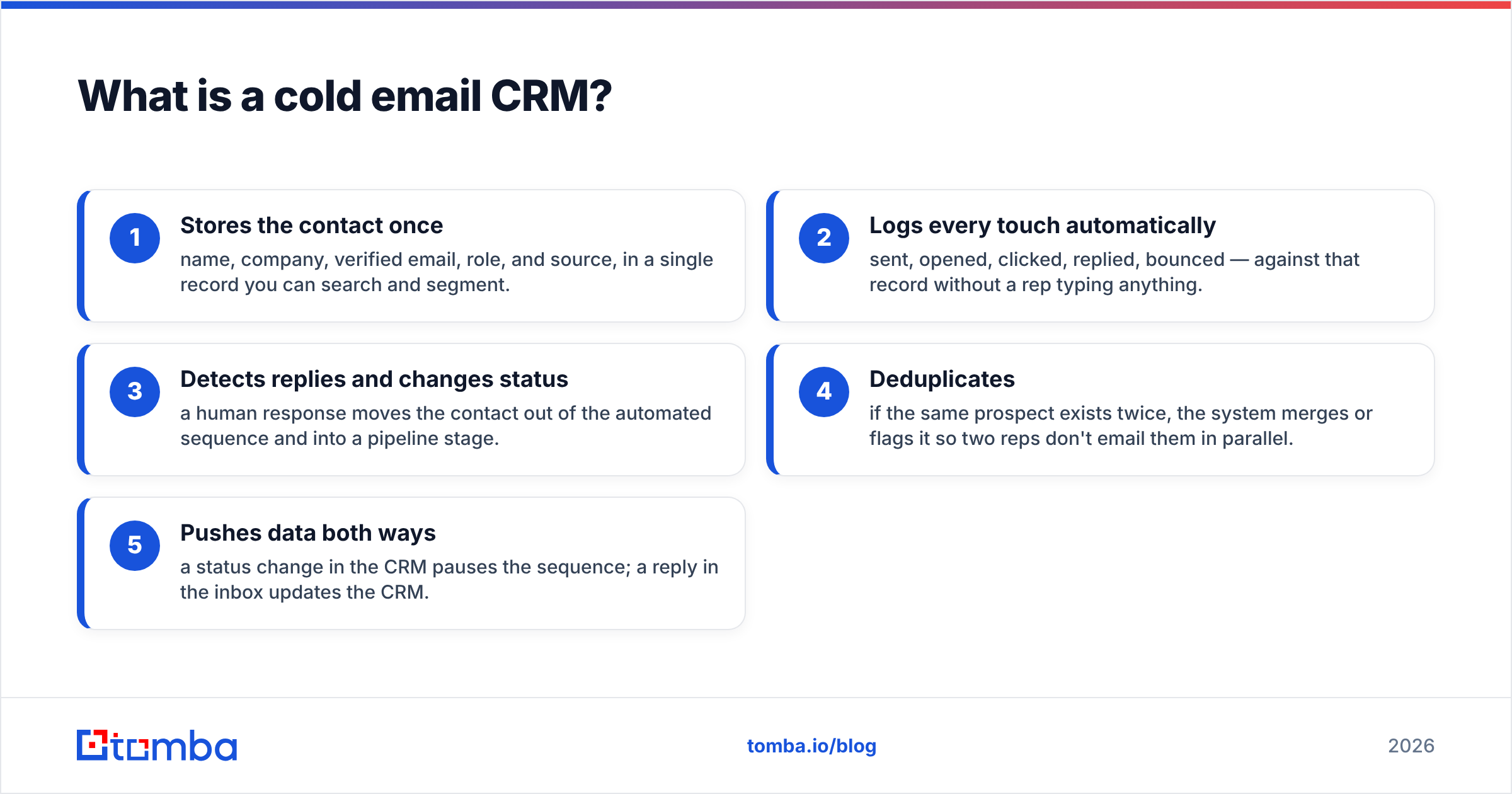
In practice, a working cold email CRM does five things:
- Stores the contact once — name, company, verified email, role, and source, in a single record you can search and segment.
- Logs every touch automatically — sent, opened, clicked, replied, bounced — against that record without a rep typing anything.
- Detects replies and changes status — a human response moves the contact out of the automated sequence and into a pipeline stage.
- Deduplicates — if the same prospect exists twice, the system merges or flags it so two reps don't email them in parallel.
- Pushes data both ways — a status change in the CRM pauses the sequence; a reply in the inbox updates the CRM.
Miss any one of those and you get the classic failure: a spreadsheet of "leads," a separate sending tool, and a rep manually copy-pasting between them until they stop bothering.
Why can't I just use a spreadsheet?#
You can, right up until you can't. A spreadsheet handles a first 200-contact campaign fine. It falls apart the moment outreach becomes continuous instead of a one-off blast.
Here's what breaks:
- No reply visibility. Opens and clicks live in your sending tool; the spreadsheet has no idea a prospect replied unless someone updates it by hand.
- Duplicate work. Two reps import overlapping lists. The prospect gets two cold emails in a week and both reps look amateur.
- No history. When a prospect who ghosted six months ago comes back, you have no record of what you already said.
- Stale data. People change jobs. A static list decays roughly 25–30% per year, and a spreadsheet never tells you which rows went bad.
- No accountability. You can't see which rep is working which account, or whether follow-ups are actually happening.
A CRM exists to solve exactly these problems. The cold email layer just makes sure the CRM stays current without manual data entry.
What features does a cold email CRM actually need?#
Ignore feature-list marketing. These are the components that determine whether the setup works day to day.
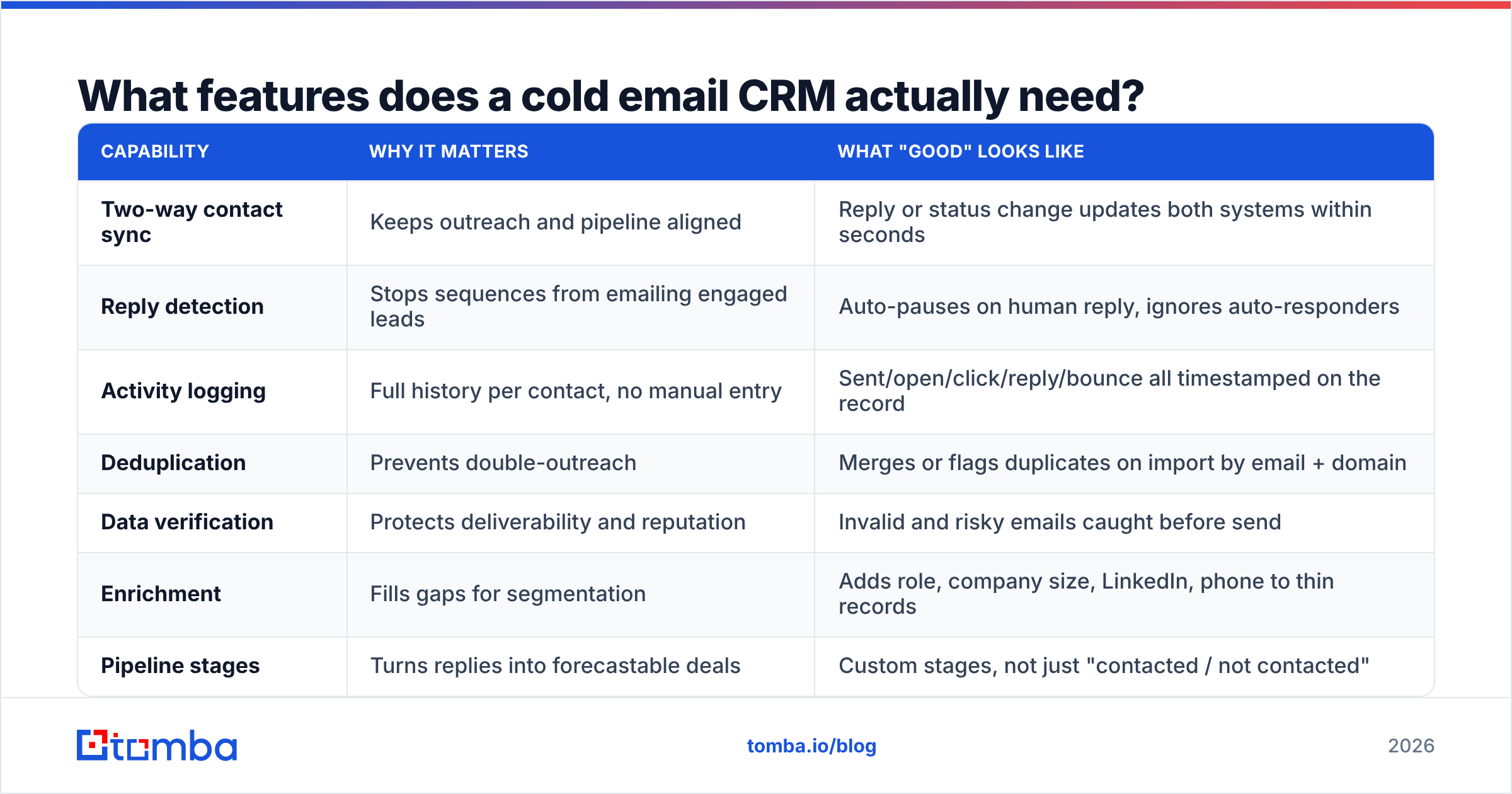
| Capability | Why it matters | What "good" looks like |
|---|---|---|
| Two-way contact sync | Keeps outreach and pipeline aligned | Reply or status change updates both systems within seconds |
| Reply detection | Stops sequences from emailing engaged leads | Auto-pauses on human reply, ignores auto-responders |
| Activity logging | Full history per contact, no manual entry | Sent/open/click/reply/bounce all timestamped on the record |
| Deduplication | Prevents double-outreach | Merges or flags duplicates on import by email + domain |
| Data verification | Protects deliverability and reputation | Invalid and risky emails caught before send |
| Enrichment | Fills gaps for segmentation | Adds role, company size, LinkedIn, phone to thin records |
| Pipeline stages | Turns replies into forecastable deals | Custom stages, not just "contacted / not contacted" |
The first five are the difference between a system and a mess. Pipeline and enrichment are what turn it from "organized outreach" into "a revenue engine."
One point that gets skipped: data quality is a feature, not an afterthought. If you import a list with a 20% invalid rate, your CRM inherits that 20%, your bounce rate spikes, and your sending domain's sender reputation takes the hit. Run every list through an email verifier before it touches the CRM, and use data enrichment to fill the fields your segmentation depends on.
What are the three ways to build a cold email CRM?#
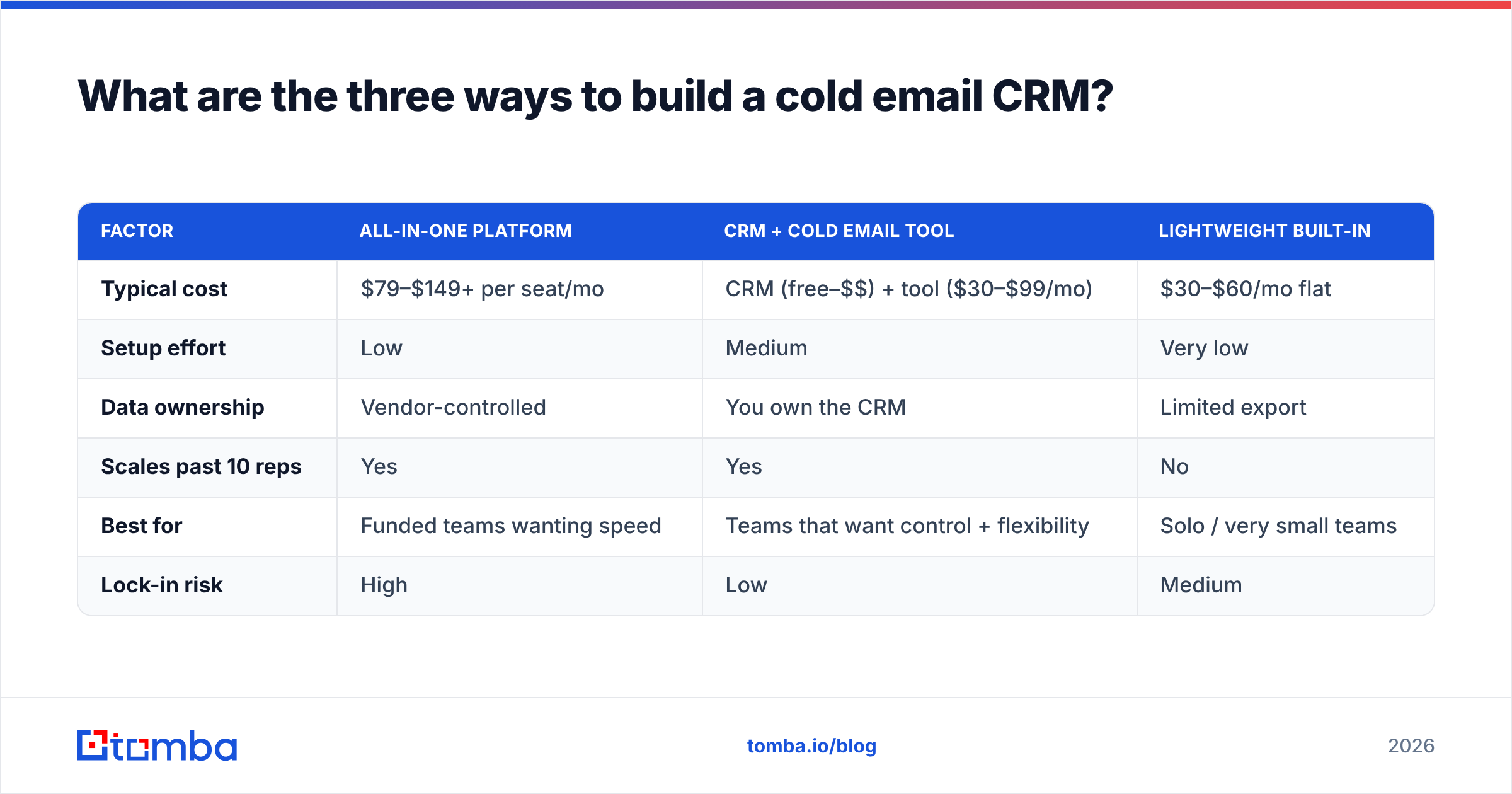
There is no single "cold email CRM" product that wins for everyone. There are three architectures, and the right one depends on team size and budget.
Option 1 — All-in-one sales engagement platform. One tool does sending, sequencing, and pipeline (Apollo, Outreach, Salesloft, Instantly's CRM view). Fastest to set up, everything in one screen, but you pay per seat and you're locked into their sending infrastructure and data.
Option 2 — Standalone CRM + dedicated cold email tool. You run a real CRM (HubSpot, Pipedrive, Salesforce) and connect a cold email tool to it via native integration or Zapier/Make. Most flexible, best long-term data ownership, but you assemble it yourself.
Option 3 — Lightweight tool with a built-in mini-CRM. Smaller sending tools now ship a basic pipeline/inbox view. Cheapest, fine for solo founders and tiny teams, but you'll outgrow the CRM side fast.
Here's how they compare on the decisions that matter:
| Factor | All-in-one platform | CRM + cold email tool | Lightweight built-in |
|---|---|---|---|
| Typical cost | $79–$149+ per seat/mo | CRM (free–$$) + tool ($30–$99/mo) | $30–$60/mo flat |
| Setup effort | Low | Medium | Very low |
| Data ownership | Vendor-controlled | You own the CRM | Limited export |
| Scales past 10 reps | Yes | Yes | No |
| Best for | Funded teams wanting speed | Teams that want control + flexibility | Solo / very small teams |
| Lock-in risk | High | Low | Medium |

Most teams overpay by defaulting to Option 1 because it's the loudest in the market. If you already use a CRM you like, Option 2 is usually cheaper and gives you data you actually keep. Platforms like HubSpot's CRM have a genuinely usable free tier, and a focused sending tool bolts onto it cleanly.
How do I connect a cold email tool to my CRM?#
The mechanics are simpler than they look. Whether you use HubSpot, Pipedrive, or Salesforce, the flow is the same:
- Build a clean list. Find the right contacts, verify the emails, and enrich the records before anything enters your CRM. This is where accuracy is won or lost.
- Import into the CRM as the source of truth. The CRM — not the sending tool — holds the master record. Tag by source and campaign.
- Connect the sending tool via native integration. Most cold email tools have a direct connector; if not, Zapier or Make bridges them.
- Map fields and status logic. Decide what a reply does (create a deal? move a stage?) and what a booked meeting does. Map custom fields so nothing lands in a black hole.
- Set the sync direction. Two-way is ideal: reply → CRM update, CRM stage change → sequence pause.
- Test with five contacts. Send, reply to yourself, confirm the CRM updated. Fix the mapping before you scale to 5,000.
The data-prep step is the one people rush and regret. Tomba's email finder pulls verified professional addresses by name or domain, the bulk email finder handles whole lists at once, and native connectors for HubSpot and Pipedrive push enriched, verified contacts straight into the CRM — so step 1 and step 2 become one motion instead of a copy-paste marathon.
How do cold email CRM tools compare on pricing?#
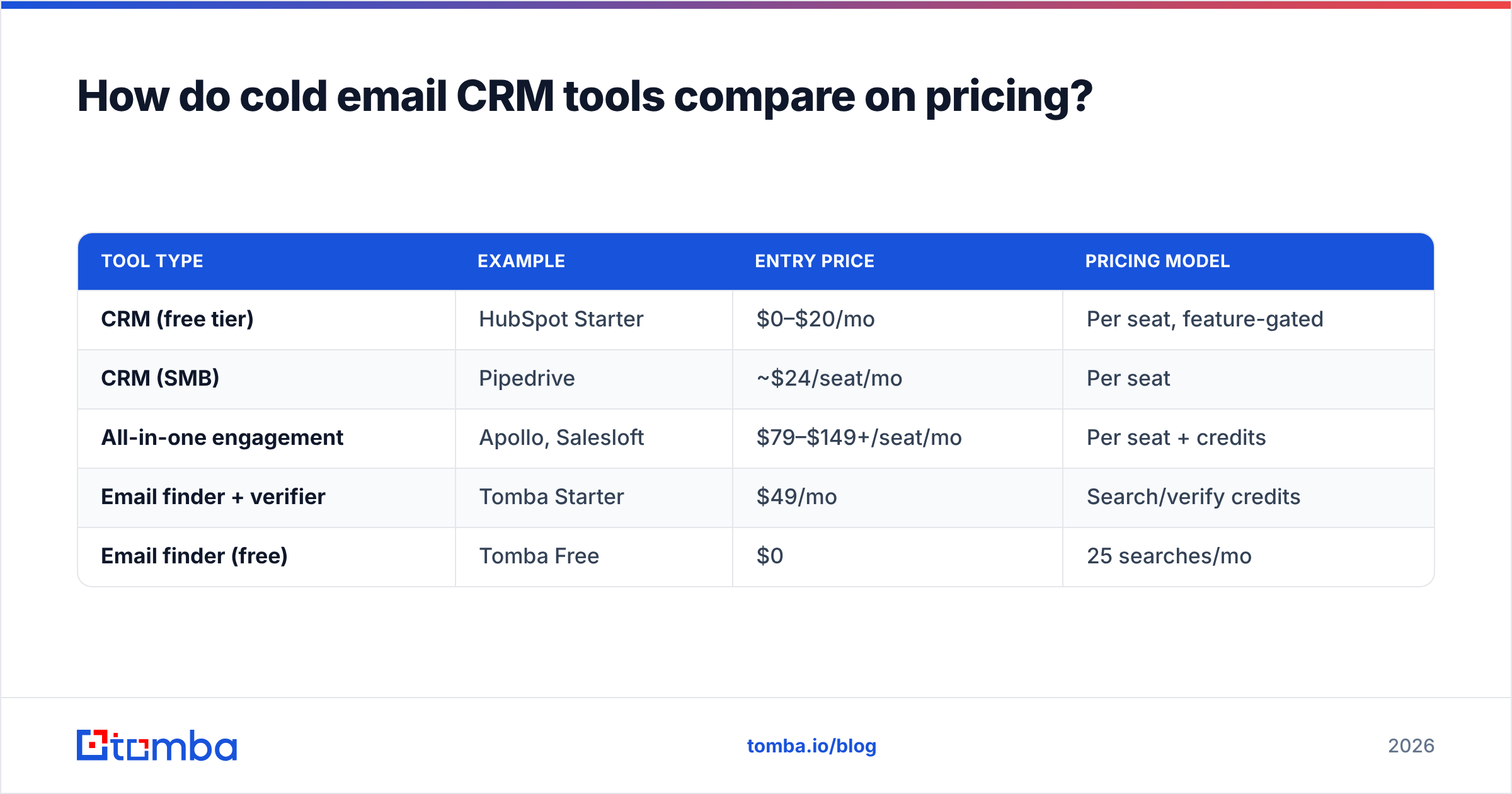
Cost is where the three architectures diverge hardest, because pricing models differ, not just numbers. Platforms charge per seat. Standalone CRMs often have a free tier and charge for advanced pipeline features. Data tools charge by lookup credits.
| Tool type | Example | Entry price | Pricing model |
|---|---|---|---|
| CRM (free tier) | HubSpot Starter | $0–$20/mo | Per seat, feature-gated |
| CRM (SMB) | Pipedrive | ~$24/seat/mo | Per seat |
| All-in-one engagement | Apollo, Salesloft | $79–$149+/seat/mo | Per seat + credits |
| Email finder + verifier | Tomba Starter | $49/mo | Search/verify credits |
| Email finder (free) | Tomba Free | $0 | 25 searches/mo |
The credits-based data layer is the piece teams forget to budget, and it's usually the cheapest line item with the biggest impact on results. You can see the full Tomba pricing tiers — Free (25 searches/mo), Starter at $49/mo, Growth at $99/mo, and Pro at $249/mo — which sit alongside whatever CRM you choose rather than replacing it.
A common, effective, low-cost 2026 stack: HubSpot free CRM + a dedicated sending tool + Tomba for finding and verifying contacts. Total cost well under a single seat of an all-in-one platform, with data you own outright.
What mistakes should I avoid?#
The failure modes are predictable. Avoid these and you're ahead of most teams:
- Importing unverified lists. Every invalid address is a bounce that hurts deliverability and pollutes your CRM. Verify first, always.
- Treating the sending tool as the CRM. If your only record of a prospect lives in the outreach tool, you lose it the day you switch tools.
- No dedupe rule. Without one, the same prospect gets worked twice and your data multiplies into noise.
- Over-buying seats. Paying per-seat platform pricing for a three-person team is the most common overspend in outbound.
- Skipping field mapping. Data that syncs into unmapped fields is data you can't segment or report on.
- Ignoring reply detection. Nothing kills trust faster than a prospect who replied "yes, let's talk" and got the next automated follow-up anyway.
For a deeper benchmark of the vendors you might slot into the data layer, independent review sites like G2's sales intelligence category and vendor docs such as Salesforce's CRM overview are worth reading before you commit budget.
Do small teams really need this?#
Yes — but not the expensive version. The value of a cold email CRM is proportional to how continuous your outreach is, not how big your team is. A solo founder sending 50 cold emails a week still benefits enormously from replies auto-logging and duplicates getting caught. They just don't need a $99-per-seat platform to get it.
The honest rule of thumb:
- 1–3 people, occasional campaigns: free CRM tier + a cheap sending tool + a data tool for verified contacts.
- 4–10 people, continuous outbound: real CRM (Pipedrive/HubSpot) + dedicated cold email tool + credits-based enrichment.
- 10+ reps, heavy volume: evaluate all-in-one platforms for the workflow consolidation, but keep your data portable.
The mistake isn't choosing the wrong tier. It's not connecting the layers at all — running outreach and pipeline as two disconnected systems and letting reps be the human glue. Reps are bad glue. They forget, they leave, and the history leaves with them.
The bottom line#
A cold email CRM isn't a product you buy — it's outreach and pipeline sharing one clean, verified, deduplicated source of truth, with replies and status changes flowing automatically between them. Get the data right at the front, wire the two systems together, and you turn scattered sending into a system you can actually forecast against.
Everything downstream depends on the quality of what you put in. If your CRM starts with verified, enriched, correctly-formatted contacts, the whole machine runs clean. Start there: use the Tomba Email Finder to build accurate, verified contact lists — and push them straight into HubSpot, Pipedrive, or Salesforce so your cold email CRM is fed good data from day one. The free tier gives you 25 searches a month to test the workflow before you scale it.
Related guides#
Ready to find emails that actually work?
Join 150,000+ professionals who stopped guessing and started sending. Free credits on signup — no credit card required.
Get the Tomba newsletter
Practical outbound tactics and product updates — once every two weeks.
About the author