Cold Email Lead List Building: A Practical 2026 Playbook
Your cold email results are decided before you write a single word. Here's how to source, verify, segment, and maintain a lead list that actually lands and replies in 2026.
TL;DR
- Cold email lead list building is the highest-leverage part of outbound. A great sequence sent to a bad list underperforms an average sequence sent to a great list, every single time.
- Bounce rate above 3% is a deliverability problem, not a data problem. Verify every address before it enters a sending tool — not after Google tells you.
- Buy lists only from vendors that verify at export time and let you filter narrowly. Scrape-and-guess lists are the fastest way to burn a sending domain.
- Segment by trigger (hiring, funding, tech stack, job change), not by industry alone. Trigger-based segments routinely 2–4x reply rates over static firmographic ones.
- Lists decay roughly 2–2.5% per month. Budget for maintenance, not just acquisition.
Why does cold email lead list building decide your results before you write a word?#
Because every downstream metric is capped by list quality. Deliverability, open rate, reply rate, meetings booked — each one multiplies against the number of real, relevant, reachable people you loaded into the sequence. If 30% of your addresses don't exist, no subject line saves you. If 60% exist but the person doesn't have the problem you solve, no personalization saves you either.
Here's the arithmetic most teams never do. Take a 1,000-contact list, a 40% open rate, a 5% reply rate, and a 25% meeting-booking rate on replies. You get roughly 12 meetings. Now degrade the list: 20% of addresses bounce, and half of the remaining contacts are outside your ICP. Same copy, same sender, same cadence — you now book about 5 meetings, and you've damaged your sender reputation on the way. The copy didn't change. The list did.
This is why the sequence of operations matters. Build the list, verify the list, segment the list, then write. Reversing that order is the single most common outbound mistake, and it's the reason so many teams conclude "cold email doesn't work anymore" when what actually happened is that their data was wrong.

What are the four sources of cold email leads, and which one should you use?#
There are exactly four ways to get a B2B email address. Everything else is a wrapper around one of them.
- Pattern inference + verification. You know the person's name and company domain. A tool guesses the pattern (
first.last@,flast@,first@) and confirms which one resolves. This is how most modern email finder products work, and it's the highest-coverage method for professional addresses. - Web sourcing and crawling. Emails published on company sites, press pages, author bylines, conference listings, and public filings. High intent-signal density, low volume, needs cleanup.
- Purchased or licensed databases. A vendor sells access to a pre-built contact set, filtered by firmographics. Fast, but quality varies enormously between vendors — and the good ones cost real money.
- First-party and enrichment. People who touched your properties: form fills, webinar attendees, website visitors, LinkedIn engagers. Smallest source, highest conversion, needs data enrichment to become outbound-ready.
The right answer for most teams under $50M ARR is a stack of 1, 2, and 4 — with 3 layered in for specific campaigns where you need volume in a market segment you have no organic presence in. Pure database buying is where teams get burned, because you inherit whatever verification standard the vendor applied at ingest, which may have been eighteen months ago.
How do the main list-building approaches actually compare?#
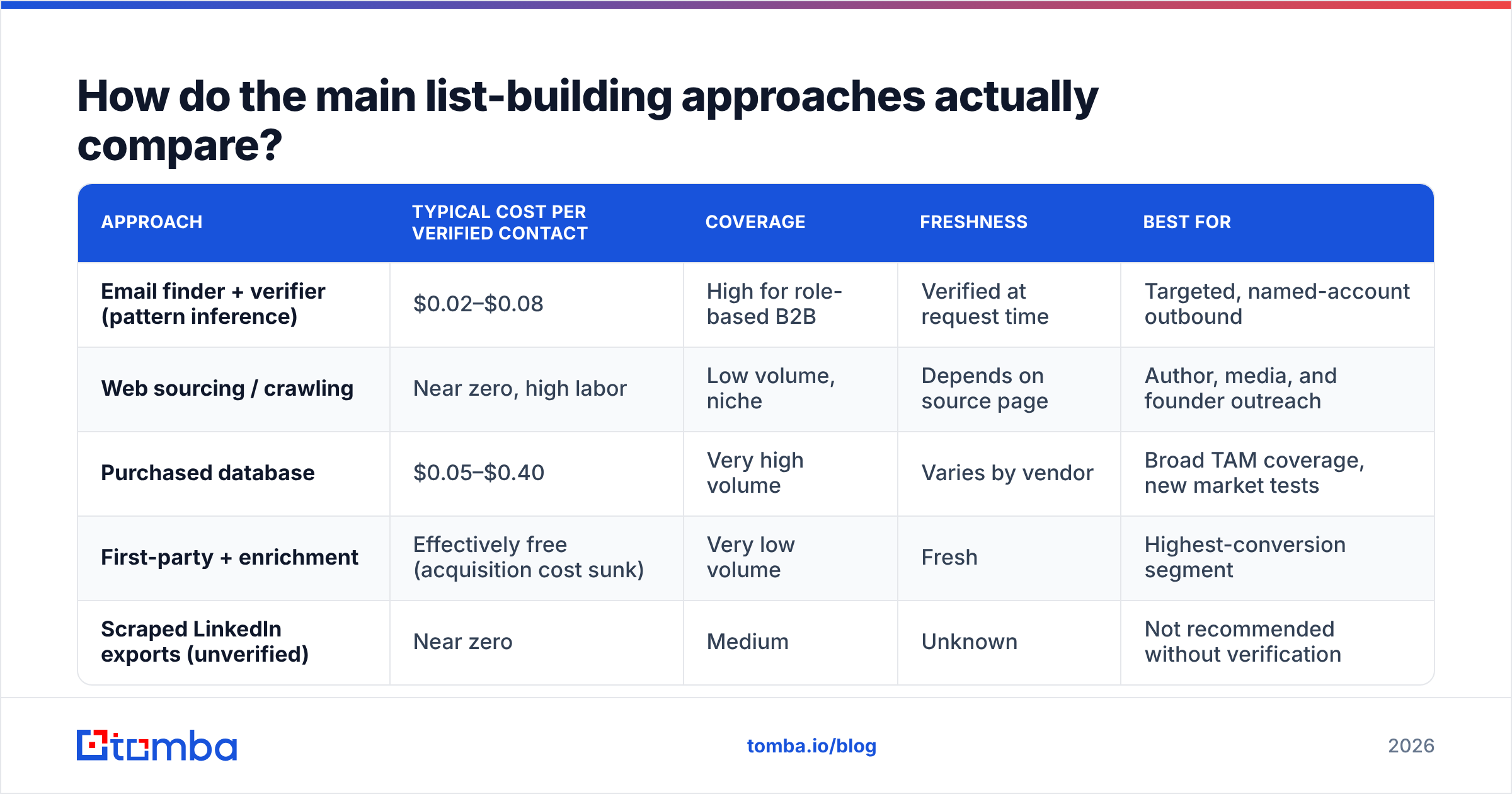
| Approach | Typical cost per verified contact | Coverage | Freshness | Best for |
|---|---|---|---|---|
| Email finder + verifier (pattern inference) | $0.02–$0.08 | High for role-based B2B | Verified at request time | Targeted, named-account outbound |
| Web sourcing / crawling | Near zero, high labor | Low volume, niche | Depends on source page | Author, media, and founder outreach |
| Purchased database | $0.05–$0.40 | Very high volume | Varies by vendor | Broad TAM coverage, new market tests |
| First-party + enrichment | Effectively free (acquisition cost sunk) | Very low volume | Fresh | Highest-conversion segment |
| Scraped LinkedIn exports (unverified) | Near zero | Medium | Unknown | Not recommended without verification |
Two notes on that table. First, "cost per verified contact" is the only number worth comparing — not cost per credit, not cost per row. A vendor at $0.05/row with a 70% valid rate is more expensive than one at $0.06/row with a 96% valid rate, and it also costs you sender reputation, which does not appear on any invoice.
Second, on purchased databases: vendors differ sharply in their guarantees. BookYourData, for example, sells on a pay-as-you-go model with a verification-at-checkout promise and a bounce guarantee, which is a meaningfully different product from a static list dump. If you're buying, buy from someone who stands behind the accuracy contractually.
What does a verified list actually look like?#
A verified list is not "a list where the emails looked plausible." It's a list where each address has been checked against a defined set of states, and you've made an explicit decision about which states you'll send to.
- Valid / deliverable. The mailbox exists and accepts mail. Send to these.
- Invalid. The mailbox does not exist. Remove permanently, and add to a suppression file so it never re-enters.
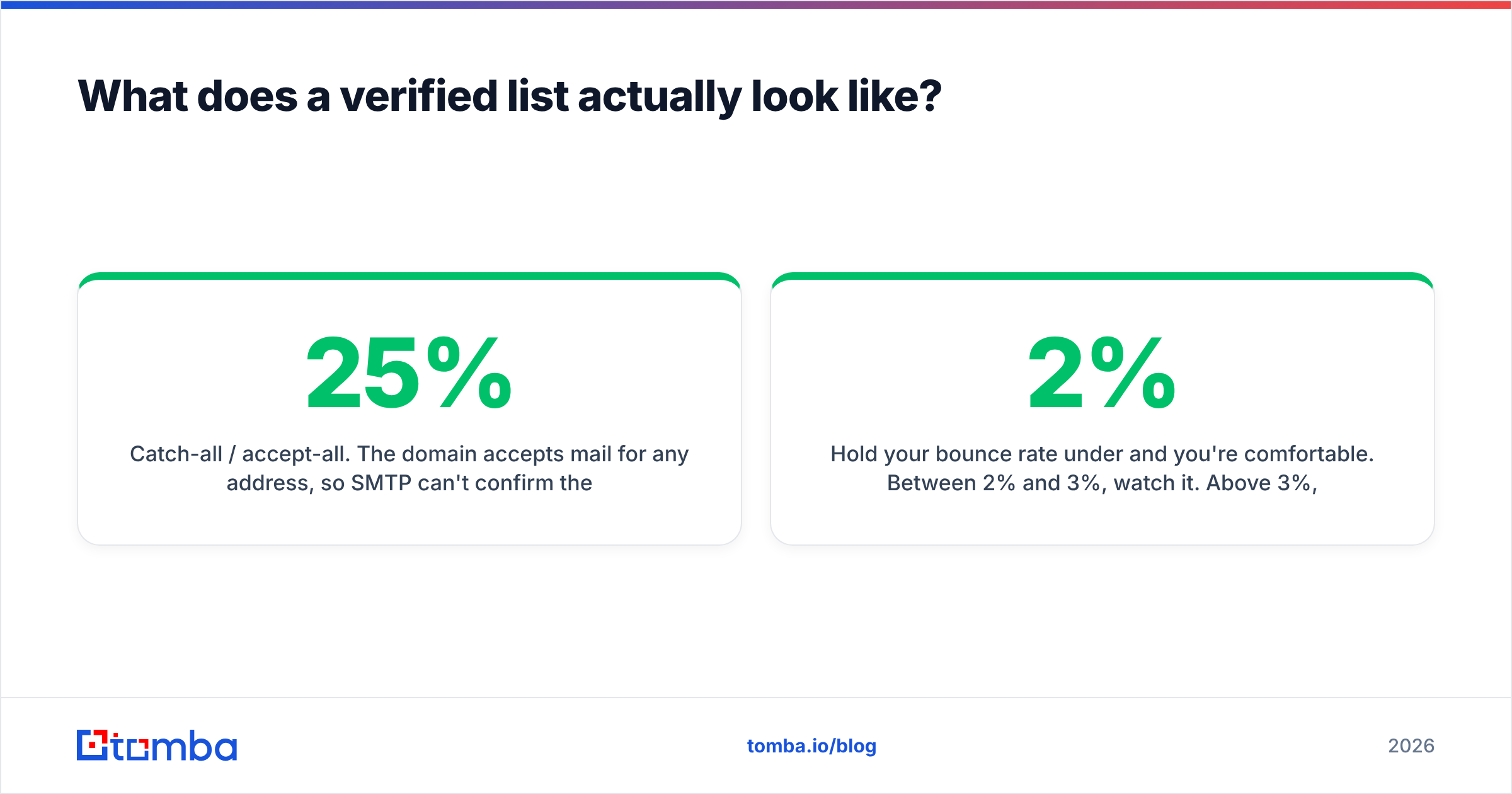
- Catch-all / accept-all. The domain accepts mail for any address, so SMTP can't confirm the specific mailbox. This is the interesting bucket — often 15–25% of a B2B list. Use a dedicated catch-all verifier to score these rather than blanket-including or blanket-excluding them.
- Role-based.
info@,sales@,support@. High spam-complaint risk in cold outbound. Segment out by default. - Disposable / temporary. Burner domains. Remove.
- Unknown. Verification timed out or the server was uncooperative. Retry once, then treat as catch-all.
The catch-all bucket is where most teams lose money in both directions. Excluding all catch-alls can cut a list by a quarter, and many of those mailboxes are perfectly real — Microsoft 365 tenants configured to accept everything. Including them blindly spikes your bounce rate. The correct move is to score them: pattern confidence, whether the company's other verified employees share that pattern, whether the address appears in web sources, and whether the domain has bounced for you before.
Hold your bounce rate under 2% and you're comfortable. Between 2% and 3%, watch it. Above 3%, you're in the zone where Google's bulk sender requirements and Microsoft's equivalents start throttling you, and recovery takes weeks. Sending 1,000 emails to a 90%-valid list means 100 bounces — a 10% rate. That's not a bad day; that's a domain in trouble. Run everything through an email verifier before it touches your sending tool.
How should you segment a cold email lead list in 2026?#
Stop segmenting by industry and headcount alone. Firmographics tell you who could buy. Triggers tell you who might buy this quarter. Both belong in the list, but the trigger is what earns the reply.
The five segmentation layers, in order of impact:
- Trigger event. New funding round, new executive hire in the buying role, a job posting that names your category, a competitor's tool detected on their site, an acquisition, an office opening. Anything with a date attached.
- Persona and seniority. VP Engineering and a staff engineer at the same company need different first lines. Segment by title cluster, not exact title string.
- Tech stack. Whether they run the thing you integrate with, or the thing you replace. Detectable from public site scans.
- Firmographics. Industry, headcount band, geography, revenue band. Necessary, insufficient.
- Relationship temperature. Cold, engaged-with-content, past-trial, churned. First-party data belongs in its own sequences entirely.
The practical rule: a segment should be small enough that one email — one, not one template with twelve merge fields — feels written for every person in it. If you can't write that email, your segment is too broad. Fifty contacts you can write a specific email to will beat five thousand you can only write a generic one to. HubSpot's research on outbound has been consistent on this point for years: relevance beats volume.

What does a repeatable list-building workflow look like end to end?#
Here's the workflow that survives contact with a real quarter. It has six stages, and skipping any of them shows up in your bounce rate within two weeks.
Stage 1 — Define the account list. Before any contact-level work, write down the account criteria and the trigger. "Series B SaaS companies, 50–300 employees, US, who posted a Head of RevOps role in the last 45 days." That's an account list, not a persona list. Build it from a B2B database, a job board scrape, or a funding announcement feed.
Stage 2 — Find contacts inside those accounts. For each domain, pull the relevant people. A domain search returns the addresses associated with a company along with the detected email pattern and confidence scores. For named individuals sourced from LinkedIn, a LinkedIn finder resolves profile to work email. For content-led outreach, an author finder resolves bylines.
Stage 3 — Verify everything. Run the full list through verification. Split into valid, catch-all-scored, and rejected. Do this even for addresses that came back "high confidence" from the finder — confidence is a prediction, verification is a check.
Stage 4 — Enrich and score. Add the fields your copy actually references. If your first line never mentions headcount, don't pay for headcount. Enrich for the trigger, the tech stack, and one specific detail you'll use in the opener.
Stage 5 — Suppress. Remove existing customers, open opportunities, active sequences, unsubscribes, competitors, and anyone who bounced before. This list should live in one place and be checked at import, not at send.
Stage 6 — Split and stage. Never load a full list into a new sending domain. Send to 50, wait 48 hours, check bounce and spam-complaint rates, then scale. If bounces exceed 2% on the seed batch, the list is wrong — stop and go back to stage 3.
How do you keep a lead list from rotting?#
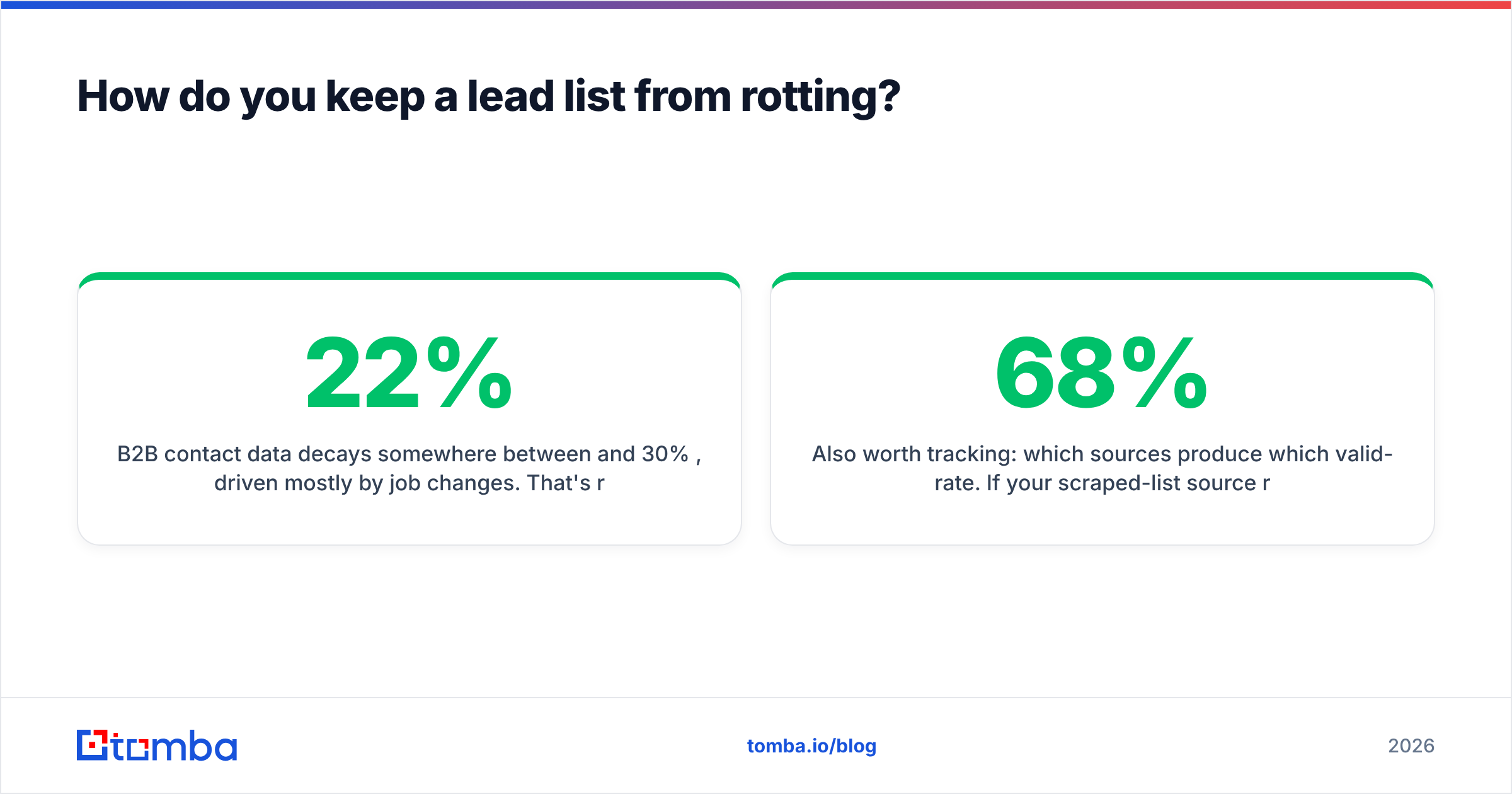
B2B contact data decays somewhere between 22% and 30% per year, driven mostly by job changes. That's roughly 2–2.5% per month, compounding. A list built in January is meaningfully worse in July, and substantially wrong by the following January.
Three maintenance habits keep this manageable:
- Re-verify on a schedule. Anything older than 90 days gets re-run before it's used again. Bulk verification is cheap relative to a damaged domain — use a bulk email finder run rather than one-off lookups.
- Treat bounces as permanent facts. Every hard bounce goes into a global suppression file. Not a campaign-level list. A global one.
- Watch for job changes, then re-target. A contact leaving a target account isn't a dead record — it's two records. The person at their new company is one of the warmest cold emails you'll ever send, and the vacant role at the old account is a trigger event.
Also worth tracking: which sources produce which valid-rate. If your scraped-list source runs 68% valid and your finder-plus-verifier flow runs 96%, that gap has a dollar value, and it's larger than the price difference between them. G2's category reviews are a reasonable starting point for evaluating vendors, but nothing substitutes for running 500 rows through two tools and comparing valid rates against the same accounts.
What should you budget for cold email lead list building?#
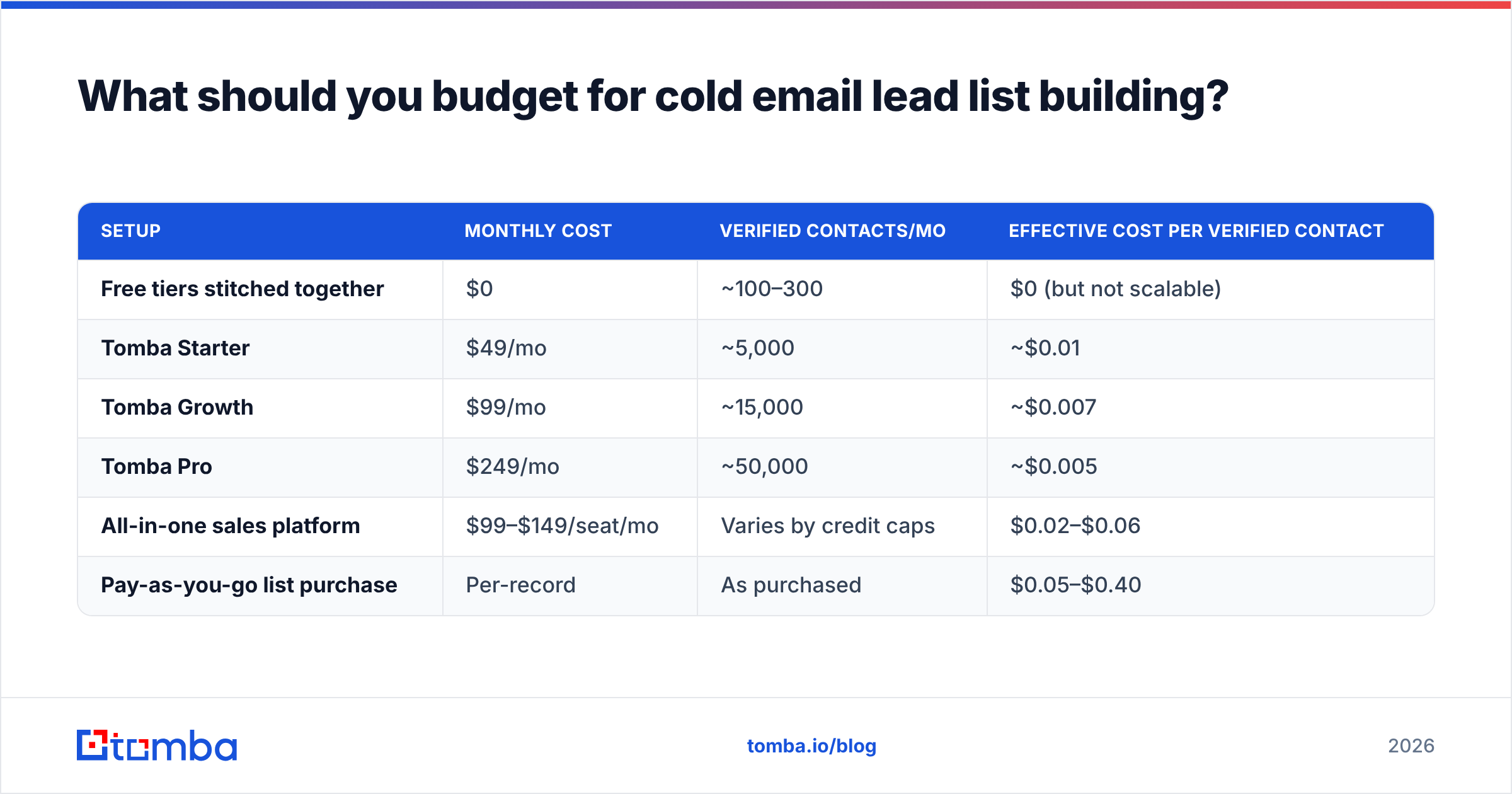
Cost per verified contact, not cost per credit. Here's a realistic comparison of what the same 5,000-contact monthly need costs across common setups.
| Setup | Monthly cost | Verified contacts/mo | Effective cost per verified contact |
|---|---|---|---|
| Free tiers stitched together | $0 | ~100–300 | $0 (but not scalable) |
| Tomba Starter | $49/mo | ~5,000 | ~$0.01 |
| Tomba Growth | $99/mo | ~15,000 | ~$0.007 |
| Tomba Pro | $249/mo | ~50,000 | ~$0.005 |
| All-in-one sales platform | $99–$149/seat/mo | Varies by credit caps | $0.02–$0.06 |
| Pay-as-you-go list purchase | Per-record | As purchased | $0.05–$0.40 |
A useful sanity check: at typical B2B conversion rates, a booked meeting costs you between 200 and 500 verified contacts. If your data cost per meeting is above $30, you're overpaying for data. If it's above $100, something in the pipeline is broken — usually the segment, not the vendor. See full Tomba pricing for how the tiers map to credits.
Where do most teams go wrong?#
Four failure patterns, in descending order of frequency.
They optimize copy before fixing the list. Six subject-line A/B tests on a list with a 12% bounce rate is rearranging furniture in a burning building. Fix deliverability inputs first.
They confuse "found" with "verified." A finder returning an address at 85% confidence means roughly one in seven will bounce. That's a 14% bounce rate. Verification is not optional post-processing; it's part of finding.
They buy volume they can't personalize. Fifty thousand contacts and one template is a spam operation, and every major inbox provider now has classifiers tuned to detect exactly that shape. Smaller, trigger-defined segments with genuinely specific openers are the only version of this that still works.
They never suppress. Emailing an existing customer as a cold prospect, or re-emailing someone who bounced, is entirely preventable and entirely self-inflicted. One suppression file, checked at import.
Start with the list, not the sequence#
The uncomfortable truth about outbound in 2026 is that the leverage moved. Copy frameworks are commoditized. Sending infrastructure is commoditized. What separates a 2% reply rate from an 8% one is whether the right person, at the right company, at the right moment, received a message that could only have been written for them — and that is a data problem before it's a writing problem.
Build the account list. Find the contacts. Verify every address. Segment by trigger. Suppress ruthlessly. Re-verify quarterly. Then write.
If you want a single place to run the finding and verification half of that workflow, start with the Tomba Email Finder. The free tier gives you 25 searches a month to test valid-rate against a competing source on the same accounts, and the $49/mo Starter plan covers most teams sending under 5,000 emails a month. Run 500 of your own contacts through it, compare bounce rates, and let the numbers decide.
Related guides#
Ready to find emails that actually work?
Join 150,000+ professionals who stopped guessing and started sending. Free credits on signup — no credit card required.
Get the Tomba newsletter
Practical outbound tactics and product updates — once every two weeks.
About the author