Cold Email Manifesto Tools: The 2026 Stack That Actually Works
The Cold Email Manifesto sells a system, not a software list. Here is the tool stack that actually executes it in 2026 — what each layer does, what it costs, and the two places every stack quietly breaks.
TL;DR
- The Cold Email Manifesto (Alex Berman and Robert Indries) describes a process — CTA-first offers, tight ICPs, three-email sequences — but it deliberately avoids naming a software stack. The tools are yours to pick.
- A working stack has exactly five layers: domains/inboxes, list building, verification, sending, and reply handling. Skip any one and the other four underperform.
- Verification is where most Manifesto implementations quietly die. A 12% bounce rate on a scraped list will kill a domain faster than bad copy ever will.
- Realistic 2026 cost for a solo operator sending 3,000 emails/month: $120–$260/month all-in. For a 5-SDR team: $600–$1,400/month.
- You do not need an AI SDR. You need a clean list, a warm domain, and three emails that ask for one thing.
What is the Cold Email Manifesto, and why does the tool stack matter?#
The Cold Email Manifesto is a short, aggressively practical book about outbound. Its core claim: cold email works when you narrow the ICP, lead with a single specific offer, and send a short three-touch sequence that asks for a reply rather than a meeting. Volume is a multiplier, not the strategy.
Here is the gap. The book teaches process. It does not — and cannot — tell you which software to buy, because the vendor landscape churns every 18 months. So thousands of people finish the book, open a spreadsheet, and stall at the first real question: where do the emails come from?
That is the question this guide answers. We are going to treat "cold email manifesto tools" as a stack architecture problem, not a shopping list. Because the failure mode is almost never "I picked the wrong sequencer." It is "I built four layers and skipped the fifth."
What tools does the Cold Email Manifesto actually require?#
Five layers. Every one of them is load-bearing.
- Sending infrastructure — secondary domains (never your primary), inboxes on Google Workspace or Microsoft 365, plus SPF, DKIM, and DMARC configured before a single send. This is plumbing, not strategy, and it is non-negotiable.
- List building — the mechanism that turns "VP of Ops at 40–200 person logistics companies in the Midwest" into 400 named humans with company domains. This is where the ICP work from the book becomes rows in a CSV.
- Contact discovery and verification — turning names + domains into deliverable email addresses, then proving those addresses accept mail before you send. Two distinct jobs, often sold together.
- Sequencing and sending — the tool that spaces out your three touches, rotates inboxes, throttles volume, and stops the sequence when someone replies.
- Reply handling — a unified inbox, a routing rule, and a human who answers within four hours. The Manifesto's entire thesis is get the reply. Most stacks invest 90% of budget upstream of the reply and then let it sit for three days.
Here is how the layers map to what they actually do and what breaks when you skip them:
| Layer | Job | What it looks like | Cost of skipping it |
|---|---|---|---|
| Infrastructure | Protect the primary domain | 2–3 secondary domains, 2 inboxes each, SPF/DKIM/DMARC | Primary domain blacklisted; company email stops working |
| List building | Convert ICP into named accounts | LinkedIn Sales Nav, company lists, firmographic filters | Sending to the wrong titles; 0.4% reply rate |
| Discovery + verification | Names → deliverable inboxes | Email finder + verifier, catch-all handling | 10–15% bounce; domain reputation collapse |
| Sequencing | Deliver 3 touches, stop on reply | Sending tool with inbox rotation | Manual sends, missed follow-ups, double-emailing |
| Reply handling | Convert reply → call | Unified inbox, SLA, CRM sync | Replies decay; interested prospects go cold in 48h |
Notice that layers 3 and 5 are the two nobody demos on a sales call. They are also the two that determine whether the system works.
Is list quality more important than copy?#
Yes, and it is not close.
Run the math. You send 1,000 emails. With a mediocre list — right industry, wrong titles, 12% invalid addresses — you land maybe 700 in a primary inbox and get 8 replies. Now take a tight list of 300 people who genuinely match the ICP, verified to a 98%+ deliverable rate. You land 290, and at a 4% reply rate you get 12 replies. Fewer emails, more conversations, and your domain reputation is intact for next month.
Copy matters at the margin. It is the difference between a 3% and a 5% reply rate on a good list. On a bad list it is the difference between 0.3% and 0.5%, which is to say: nothing.

This is the single most expensive lesson in outbound, and it is the reason your discovery-and-verification layer deserves more of your budget than your sequencer does. A bulk email finder that returns 400 verified contacts from a 500-row account list is doing more for your reply rate than any subject-line generator ever will.
Practical rule: before any campaign, your list should pass three checks.
- Title match — every contact holds a title on your approved list, not a fuzzy match.
- Deliverability — every address returns
validfrom an email verifier, and catch-all domains are flagged separately, not silently included. - Recency — the contact was confirmed in the last 90 days. B2B data decays around 2–2.5% per month as people change jobs.
Which cold email manifesto tools are worth paying for in 2026?#
The market has consolidated. Most tools now claim to do all five layers; almost none do more than two of them well. Here is an honest read of the categories, with representative options and what they genuinely cost.
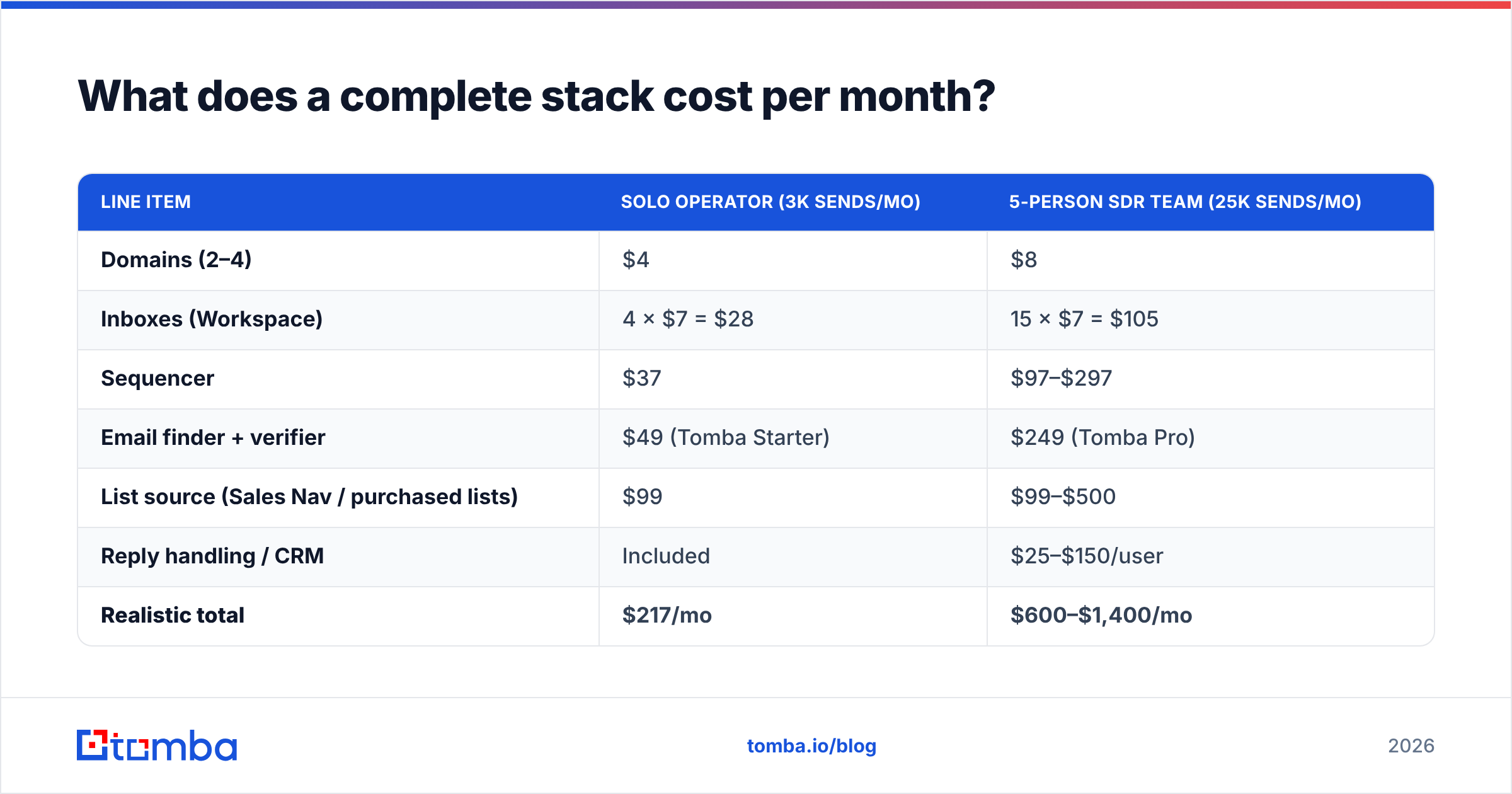
| Layer | Representative tools | Starting price | Genuinely good at | Watch out for |
|---|---|---|---|---|
| Infrastructure | Google Workspace, Microsoft 365 | $7–$8/inbox/mo | Actual inbox placement | Cheap SMTP resellers — reputation is shared |
| List building | LinkedIn Sales Navigator, BookYourData | $99/mo; pay-per-lead | Firmographic + title filtering | Exports that lack verified emails |
| Discovery + verification | Tomba, Hunter, Findymail | Free tier; $49/mo (Tomba Starter) | Domain search, verification, catch-all handling | Credit systems that charge for failed lookups |
| Sequencing | Instantly, Smartlead, Saleshandy | $30–$97/mo | Inbox rotation, warmup, throttling | Deliverability claims that assume a clean list |
| Reply handling | Unified inbox in the sequencer, or your CRM | Included / $25+/user | Speed to first response | Replies siloed away from the CRM |
A few notes on that table, because the nuance is where the money is.
BookYourData is a genuinely useful option when you want a verified list handed to you rather than built. Pay-per-lead pricing means no monthly floor, which suits campaign-based work. It is a different purchase from a lookup API — you are buying the list, not the mechanism.
Tomba sits in the discovery-and-verification layer. The email finder resolves name + domain into an address, domain search pulls every public address at a company, and the catch-all verifier handles the roughly 20% of B2B domains that accept everything at the SMTP layer and tell you nothing. Free tier is 25 searches/month; Starter is $49/mo, Growth $99/mo, Pro $249/mo. Full Tomba pricing is public.
Sequencers are commoditized. Instantly, Smartlead, and Saleshandy do broadly the same job at broadly the same price. Pick on unified-inbox UX and API quality, not on the deliverability claims — no sequencer can rescue a list with a 12% bounce rate. See the sales engagement category on G2 for current user-reported differences.
How do you keep the sending domain alive?#
The Manifesto assumes your email arrives. In 2026 that assumption requires active maintenance.
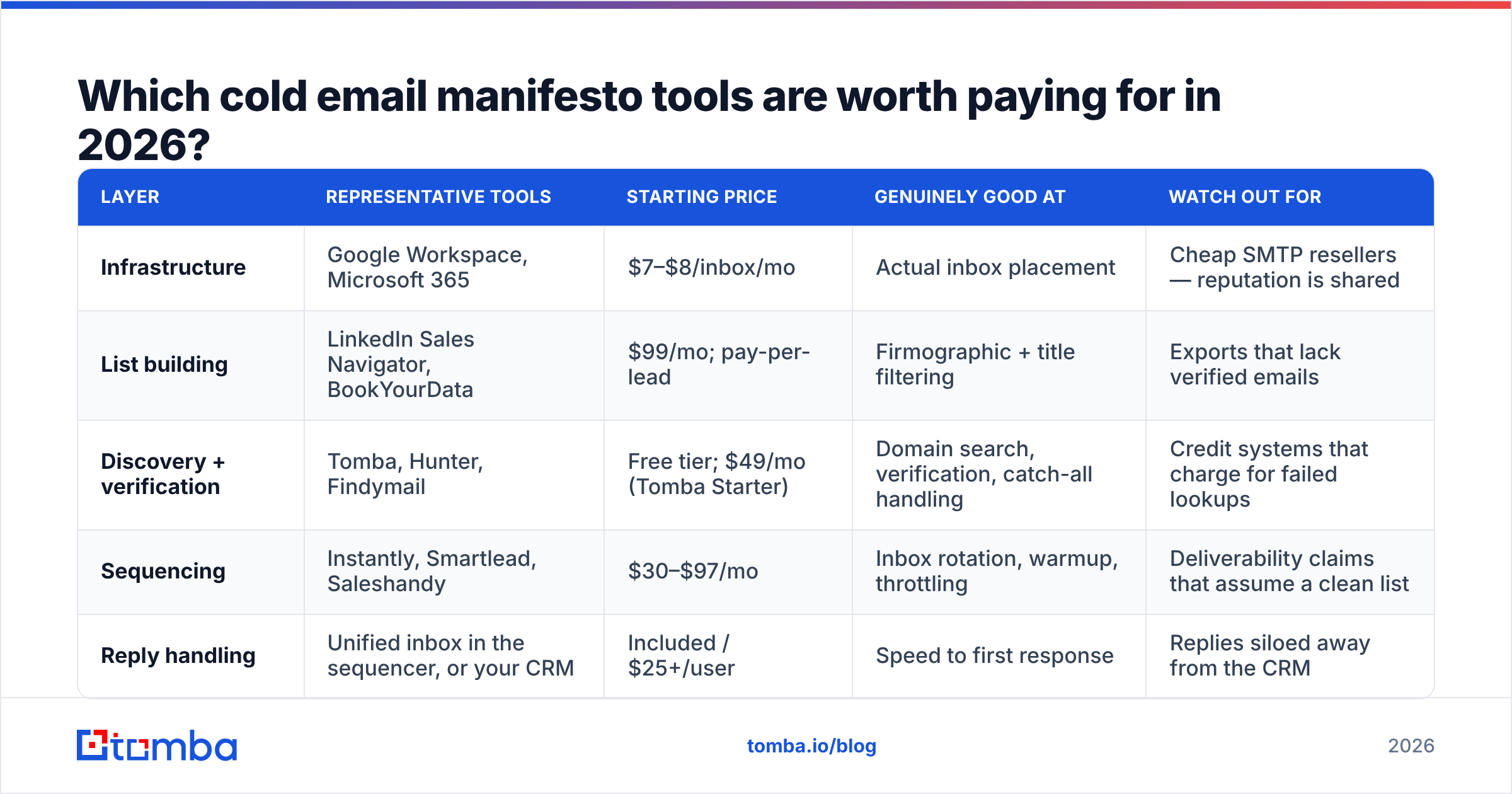
Google and Yahoo's bulk-sender rules — now baseline expectations rather than new requirements — mandate authenticated mail, one-click unsubscribe on commercial sends, and a spam complaint rate under 0.3%. Google publishes the current requirements for bulk senders and exposes your actual reputation through Postmaster Tools. If you are sending cold and have never opened Postmaster Tools, you are flying blind.
The operational rules that follow from this:
- Never send cold from your primary domain. Buy lookalikes (
getacme.com,acme-hq.com), point them at Workspace, and treat them as disposable. - Warm every inbox for 14–21 days before real volume. A warmup calculator will tell you how long your ramp needs to be for your target volume; the honest answer is usually longer than you want.
- Cap at 30–50 sends per inbox per day. Scale by adding inboxes, not by pushing one harder.
- Keep bounce rate under 2%. This is a verification problem, not a sending problem. Verify at build time and again immediately before send — a list verified six weeks ago is not a verified list.
- Watch complaint rate weekly. Above 0.1% is a warning; above 0.3% is a shutdown.
That fifth rule is where the Manifesto's advice to lead with a hard, specific CTA actually helps you. Vague, flattering emails get marked as spam. Direct, relevant, obviously-human emails get ignored or answered — both of which are fine.
What does a complete stack cost per month?#
Two honest budgets. No enterprise fantasies.
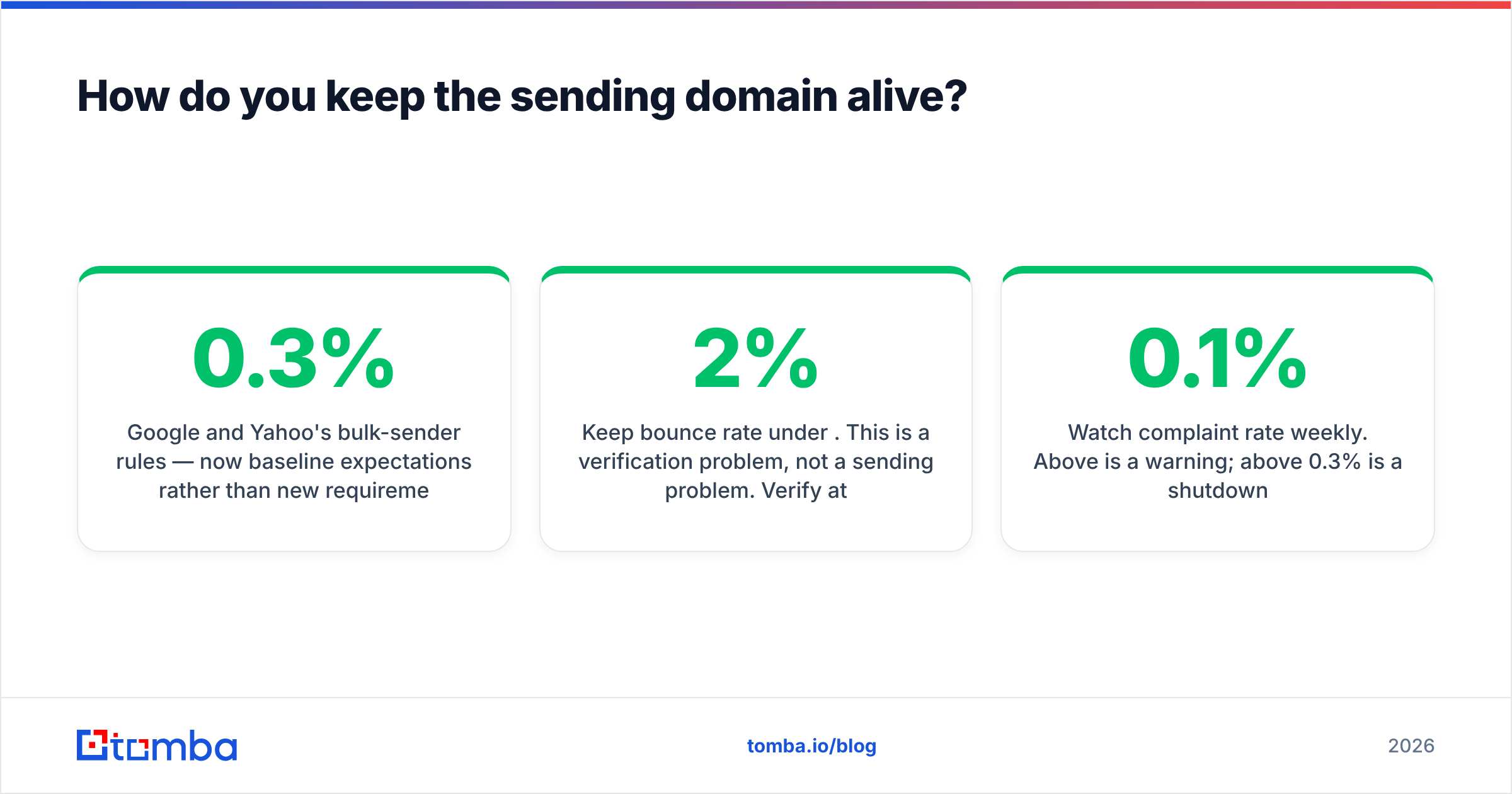
| Line item | Solo operator (3k sends/mo) | 5-person SDR team (25k sends/mo) |
|---|---|---|
| Domains (2–4) | $4 | $8 |
| Inboxes (Workspace) | 4 × $7 = $28 | 15 × $7 = $105 |
| Sequencer | $37 | $97–$297 |
| Email finder + verifier | $49 (Tomba Starter) | $249 (Tomba Pro) |
| List source (Sales Nav / purchased lists) | $99 | $99–$500 |
| Reply handling / CRM | Included | $25–$150/user |
| Realistic total | $217/mo | $600–$1,400/mo |
Two observations. First, sending infrastructure is cheap and data is expensive — which is exactly backwards from how most people allocate. Second, the number that scales fastest with headcount is the CRM seat, not the email tooling.

If you are running this at team scale, the integration layer matters more than any single tool. Pushing verified contacts straight into HubSpot or Salesforce via the Tomba API removes the CSV round-trip that causes most data hygiene problems. HubSpot's own sales tooling documentation covers the CRM side of that handoff.
Where do most Manifesto stacks break?#
Three places, in descending order of frequency.
1. Skipping verification to save $49. You build a 2,000-row list from scraping, send it, bounce 240 emails, and burn a domain that took three weeks to warm. You then spend $200 on new domains and another three weeks warming them. The $49 was the cheap option.
2. Confusing enrichment with discovery. Enrichment adds attributes to contacts you already have. Discovery finds contacts you do not have. Buying an enrichment platform when you need contact discovery leaves you with beautifully annotated rows and no email addresses.
3. Treating replies as an afterthought. The book's entire premise is that the reply is the conversion event. If your unified inbox is checked once a day, you have converted a 4% reply rate into a 1.2% meeting rate and blamed the copy.
There is also a quieter fourth failure: volume as a substitute for targeting. Sending 10,000 emails to a loose ICP produces the same number of meetings as 1,500 to a tight one, at four times the domain risk and ten times the complaint rate. The Manifesto says this explicitly. People do it anyway because volume is easier to buy than judgment.
What should you actually do this week?#
- Buy two secondary domains. Configure SPF, DKIM, DMARC. Start warming.
- Write your ICP as a filter, not a paragraph: industry, headcount band, geography, three approved titles.
- Build 200 accounts against that filter. Not 2,000.
- Find and verify the contacts. Flag catch-alls separately.
- Write three emails. The first asks for a reply, not a call. The third is two sentences.
- Send 30/day per inbox. Answer every reply the same day.
That is the whole system. The tools exist to make each step take minutes instead of hours — they do not replace any of the steps.
Start with the layer that determines everything downstream. Before you pay for a sequencer, make sure the addresses going into it are real. The Tomba Email Finder resolves name-and-domain pairs into verified, deliverable addresses, flags catch-all domains instead of hiding them, and runs from the web app, the API, Google Sheets, or a Chrome extension. The free tier gives you 25 searches a month — enough to verify whether your list-building assumptions hold before you spend a dollar on sending infrastructure.
Related guides#
Ready to find emails that actually work?
Join 150,000+ professionals who stopped guessing and started sending. Free credits on signup — no credit card required.
Get the Tomba newsletter
Practical outbound tactics and product updates — once every two weeks.
About the author