Cold Email Marketing Campaign: The Complete 2026 Playbook
A cold email marketing campaign lives or dies on three things: infrastructure, list quality, and sequence discipline. Here's how each one works in 2026, with real numbers and a build order you can copy.
TL;DR
- A cold email marketing campaign is a sequenced, permission-less outbound program aimed at a tightly defined list — not a newsletter, not a drip, and not a numbers game anymore.
- Since Google and Yahoo tightened bulk-sender enforcement, infrastructure (domains, authentication, warmup) decides more of your outcome than copy does. Get it wrong and nothing else matters.
- List quality beats list size. A 400-contact list at 97% deliverable outperforms a 4,000-contact list at 78% on every metric that matters, including cost per meeting.
- Sequences of 3–5 emails over 14–21 days capture roughly 80% of total replies. Emails six through twelve mostly generate spam complaints.
- Benchmark honestly: 40–60% open rate, 3–8% reply rate, 1–2% positive reply rate. Anyone quoting 30% reply rates is measuring something else.
What is a cold email marketing campaign?#
A cold email marketing campaign is a structured outbound sequence sent to people who have never interacted with you, built around a specific hypothesis about who has a problem you solve.
The word doing the work in that sentence is structured. Sending 500 one-off emails is not a campaign. A campaign has a defined segment, a controlled variable, a fixed sequence length, and a measurement window. Without those four things you have activity, not a campaign, and you cannot learn anything from the result.
Three terms get conflated constantly, so let's separate them:
- Cold email — unsolicited, one-to-one in appearance, sent from a mailbox, no unsubscribe footer required in the US under CAN-SPAM if it's a legitimate business communication (though including one is smart), and illegal to send to EU consumers without a lawful basis under GDPR.
- Email marketing — opt-in, broadcast, sent from an ESP like Mailchimp, unsubscribe mandatory, tracked as a channel.
- Drip/nurture — automated follow-up to people already in your funnel.
Blending them is how campaigns fail. If you send cold email through a bulk marketing ESP, you inherit shared-IP reputation you didn't earn. If you send opt-in newsletters from a cold-email tool, you burn a domain you're paying to protect.
Why does infrastructure decide the outcome before you write a word?#
Because in 2026 the inbox providers ask a reputation question before they ask a relevance question.
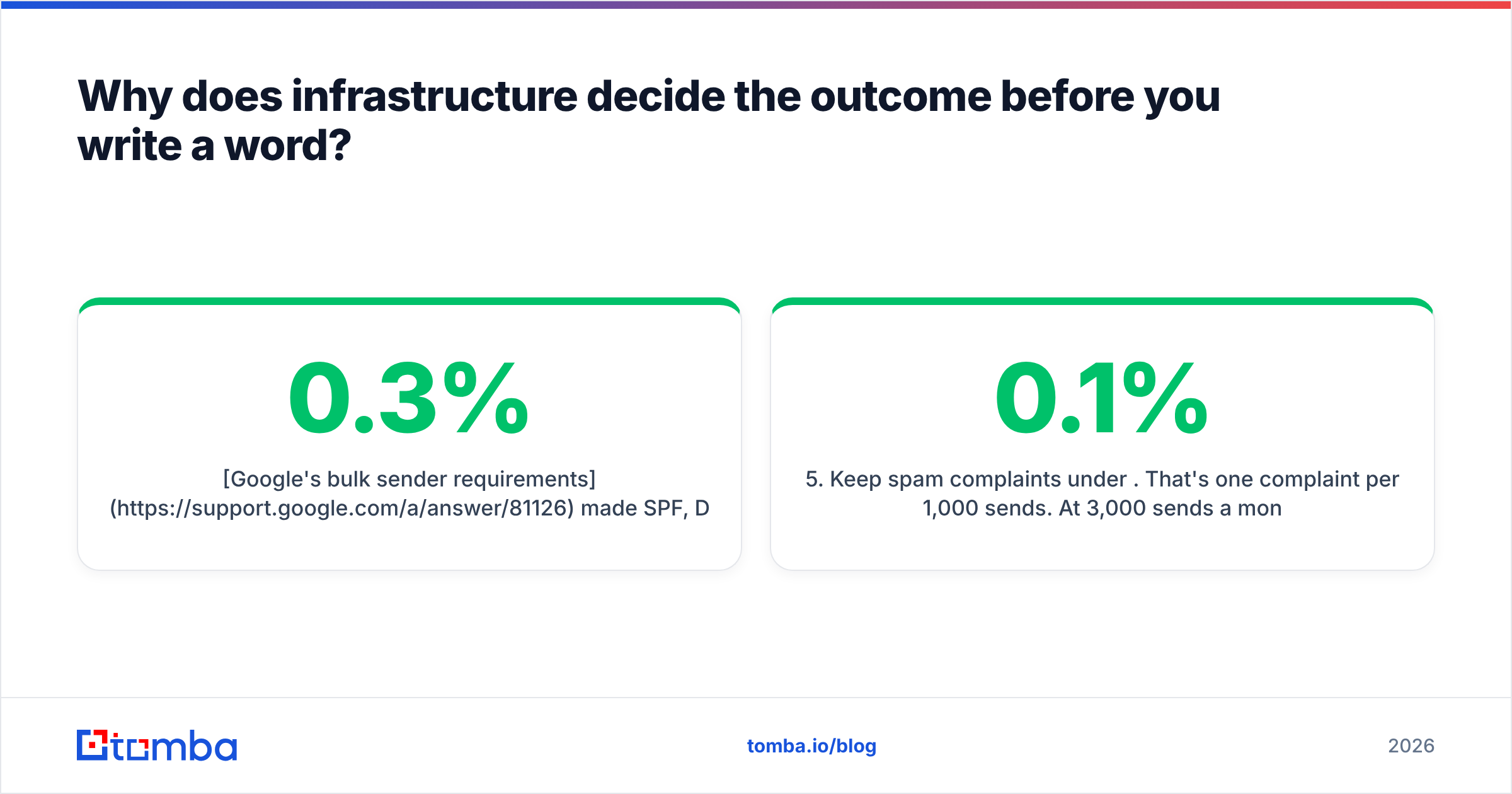
Google's bulk sender requirements made SPF, DKIM, and DMARC non-negotiable, put a hard spam-complaint ceiling at 0.3% (with 0.1% as the practical target), and required one-click unsubscribe for high-volume senders. Yahoo shipped equivalent rules. Microsoft followed for Outlook. Enforcement is no longer a warning email — it's silent spam-foldering that never shows up in your open rate.
Here's the build order that survives that:
- Buy secondary domains. Never send cold email from your primary domain. If
acme.comis your money domain, send fromacme-hq.com,getacme.com,tryacme.io. If one burns, your website and transactional email are untouched. - Authenticate everything. SPF record, DKIM signing keys, and a DMARC policy at
p=nonefor the first month, thenp=quarantine. Check the SPF record syntax before you trust it — one typo and every message is unsigned. - Warm up for 3–4 weeks. Two mailboxes per domain, maximum 30–40 cold sends per mailbox per day at steady state. A warmup calculator tells you how many mailboxes you need for your target volume; most teams underestimate by half.
- Monitor reputation, not just replies. Google Postmaster Tools shows your domain reputation and spam rate. If reputation drops from High to Medium, pause and diagnose. If it hits Low, that domain is done.
- Keep spam complaints under 0.1%. That's one complaint per 1,000 sends. At 3,000 sends a month you get three before you're in trouble.
The uncomfortable math: 40 sends/mailbox/day × 2 mailboxes × 2 domains × 22 working days = ~3,500 sends per month. That is your ceiling. Every strategy decision downstream has to fit inside it, which is exactly why list quality is not optional.
How much does list quality actually change the result?#
More than any other single variable, and it compounds.
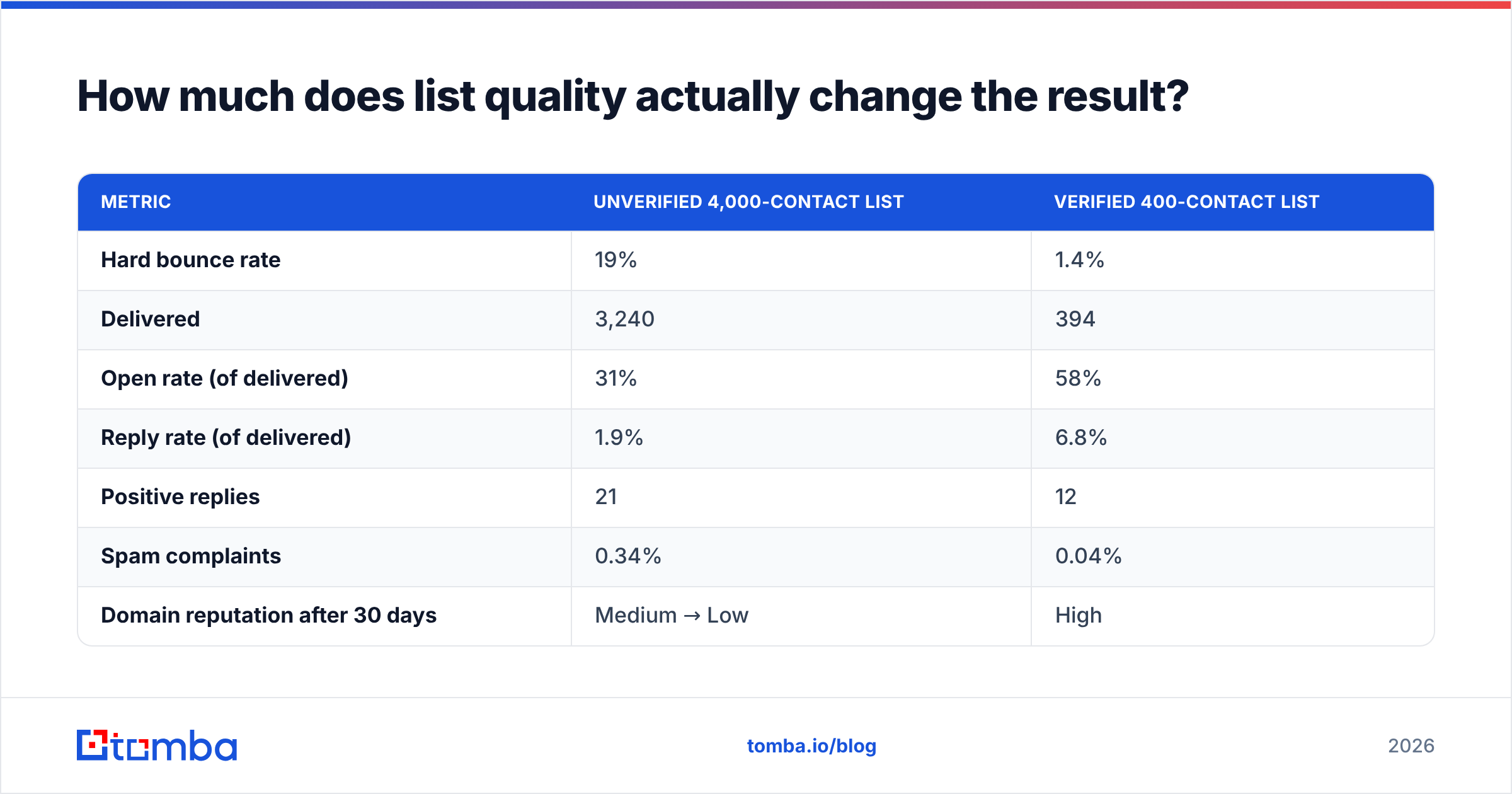
Run the numbers on two campaigns with identical copy, identical sequence, identical sender infrastructure. The only difference is list hygiene.
| Metric | Unverified 4,000-contact list | Verified 400-contact list |
|---|---|---|
| Hard bounce rate | 19% | 1.4% |
| Delivered | 3,240 | 394 |
| Open rate (of delivered) | 31% | 58% |
| Reply rate (of delivered) | 1.9% | 6.8% |
| Positive replies | 21 | 12 |
| Spam complaints | 0.34% | 0.04% |
| Domain reputation after 30 days | Medium → Low | High |
| Cost per positive reply | $61 | $18 |
The unverified list produced more raw positive replies — and destroyed the sending domain doing it. Month two, that team is buying new domains and warming up again from zero. The verified list is compounding. By month three the second team has sent to 1,200 contacts on a High-reputation domain and booked more meetings than the first team booked in its entire lifespan.
Bounces are the mechanism. A hard bounce is a direct signal to the receiving provider that you don't know who you're emailing. Above roughly 3% you're flagged; above 10% you're being filtered before content inspection even runs. So email verification isn't a nice-to-have layer on top of your list — it's the thing that keeps the rest of the campaign legible to Gmail.
Where the addresses come from matters too. Broadly there are three sourcing routes, and they trade off differently:
| Approach | Freshness | Cost model | Best for | Watch out for |
|---|---|---|---|---|
| Real-time email finder (Tomba, Hunter) | Verified at lookup | Per credit, $49/mo starter | Named-account outbound, ABM | Coverage gaps on tiny firms |
| Purchased B2B database (BookYourData, ZoomInfo) | Refreshed on a cycle | Per record or seat | Fast volume, new territories | Re-verify before every send |
| Scraped / manual | Whatever you built | Time | Very niche segments | Slow, error-prone at scale |
None of these is wrong. A common, effective stack is a licensed database for breadth — BookYourData does this well and prices it sanely — combined with a real-time email finder for the named accounts your reps actually care about, then a verification pass across everything before it enters the sequencer. Re-verify anything older than 60 days. B2B contact data decays at roughly 2–2.5% per month as people change jobs; a list you bought in January is meaningfully wrong by June.
What does the sequence look like?#
Short. Shorter than whatever your tool's default template suggests.
Reply data across cold outbound is consistently front-loaded. Email one and email two produce the majority of responses. Email three catches the genuinely busy. Emails four and five recover a thin tail. Anything past that is mostly generating complaints from people who have already decided.
A sequence that works:
- Day 0 — the ask. One observation about their business, one sentence on what you do, one specific question. Under 90 words. No links, no attachments, no calendar embed.
- Day 3 — the proof. Reply in-thread. One customer, one number, one sentence. "We did X for Y and it moved Z by N%."
- Day 8 — the angle change. New subject line, new thread. If the first two led with cost savings, lead with speed. You're testing whether you guessed the wrong pain, not whether they saw the email.
- Day 15 — the resource. Give something with no ask attached. A benchmark, a teardown, a template. This converts more often than any hard CTA.
- Day 21 — the close-out. "Assuming this isn't a priority — I'll stop here. If it changes, reply and I'll pick it back up." Ends the thread cleanly. Generates a surprising number of "actually, wait" responses.
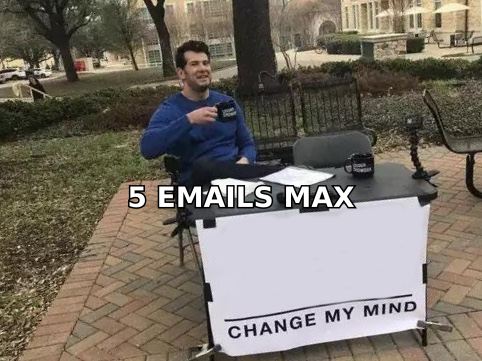
Five emails, twenty-one days, done. Then that contact goes into a quarterly re-touch, not into email six.
Personalization is where most teams spend effort badly. The tiers, in order of ROI:
- Segment-level (highest ROI). The email is written for one job title at one company stage with one problem. Nothing is variable. This is a template, and it beats bad personalization every time.
- Trigger-level. They raised a round, hired a VP of Sales, opened an office, shipped a feature. The trigger is the first line and the reason you're writing.
- Account-level. One researched sentence about their business — a pricing page change, a job posting, a podcast quote.
- Person-level (lowest ROI per minute). Their marathon, their alma mater, their LinkedIn post. Feels personal, converts poorly, takes the longest.
Most teams do tier four and skip tier one. Reverse it. Tighten the segment until the template is true for every person on the list, then add a trigger where you have one.
How do you measure a cold email marketing campaign honestly?#
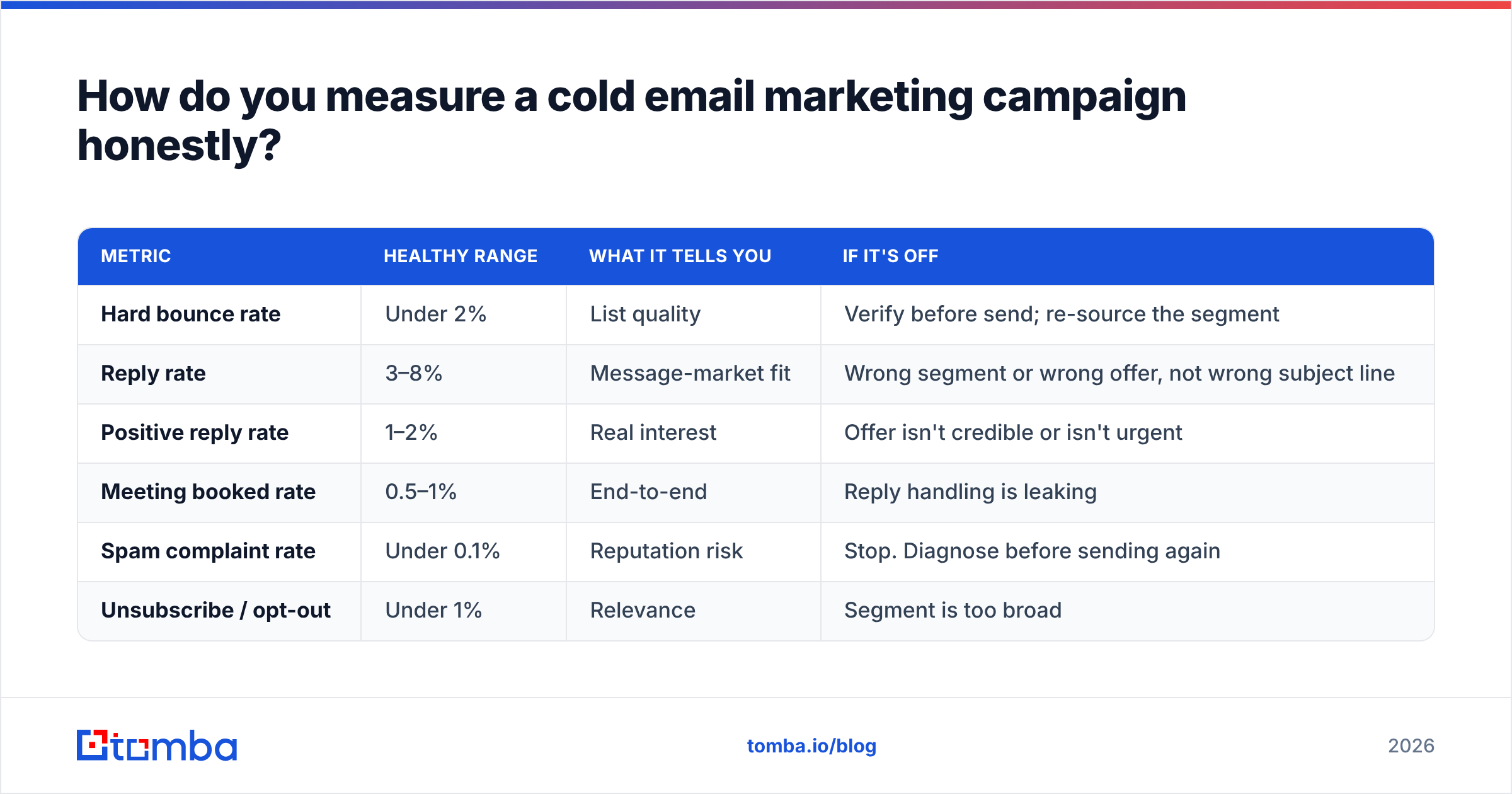
By counting the things that survive contact with the pipeline, not the things your tool puts on a dashboard.
Open rate is now decorative. Apple Mail Privacy Protection pre-fetches images, which fires your tracking pixel whether the message was read or not. Depending on your ICP's device mix, 25–50% of your "opens" are Apple's servers. Worse, open tracking requires an image and a redirect domain — both of which are spam signals. Many experienced senders disable open tracking entirely and accept the loss of a vanity metric in exchange for measurable deliverability gain.
Track these instead:
| Metric | Healthy range | What it tells you | If it's off |
|---|---|---|---|
| Hard bounce rate | Under 2% | List quality | Verify before send; re-source the segment |
| Reply rate | 3–8% | Message-market fit | Wrong segment or wrong offer, not wrong subject line |
| Positive reply rate | 1–2% | Real interest | Offer isn't credible or isn't urgent |
| Meeting booked rate | 0.5–1% | End-to-end | Reply handling is leaking |
| Spam complaint rate | Under 0.1% | Reputation risk | Stop. Diagnose before sending again |
| Unsubscribe / opt-out | Under 1% | Relevance | Segment is too broad |
If your reply rate is 1% and you spend a week rewriting subject lines, you will end the week at 1%. Subject lines move open rate. Segment and offer move reply rate. When a campaign underperforms, the fix is almost never in the copy — it's in who received it.
Test one variable at a time, with enough volume for the result to mean anything. At a 5% reply rate you need roughly 400 sends per variant to detect a two-point difference with any confidence. Most "A/B tests" in cold email run 60 emails per arm and produce noise that teams then treat as strategy. If you don't have the volume, don't run the test — run the better-reasoned version and move on.
What does a working campaign cost to run?#
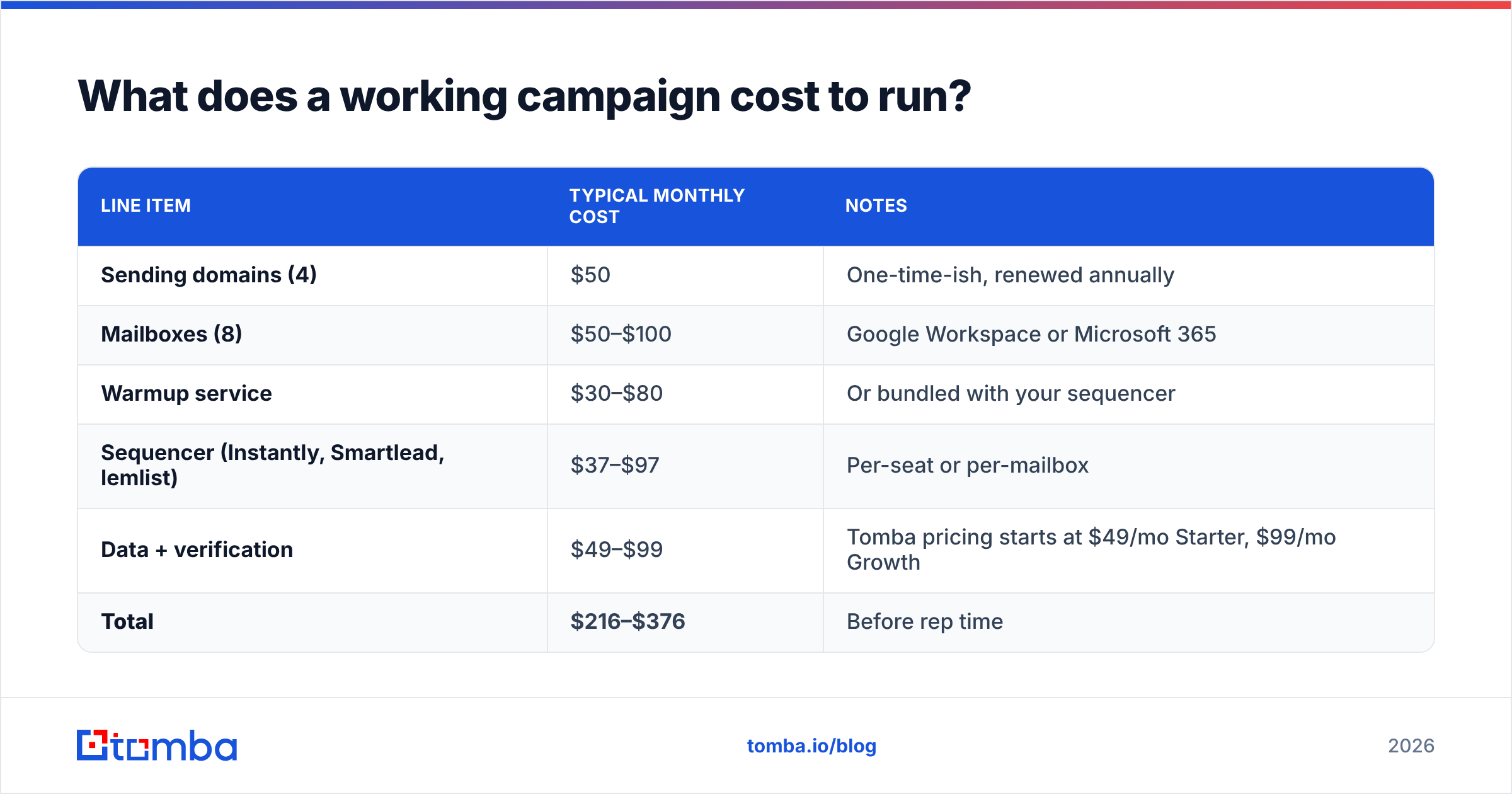
Less than most teams assume, and the money is in the wrong place on most spreadsheets.
For a two-rep team sending ~3,500 emails a month:
| Line item | Typical monthly cost | Notes |
|---|---|---|
| Sending domains (4) | $50 | One-time-ish, renewed annually |
| Mailboxes (8) | $50–$100 | Google Workspace or Microsoft 365 |
| Warmup service | $30–$80 | Or bundled with your sequencer |
| Sequencer (Instantly, Smartlead, lemlist) | $37–$97 | Per-seat or per-mailbox |
| Data + verification | $49–$99 | Tomba pricing starts at $49/mo Starter, $99/mo Growth |
| Total | $216–$376 | Before rep time |
The rep time — research, writing, reply handling — costs an order of magnitude more than the tooling. Which is why the tooling decision should optimize for rep time saved, not license price. A $30/mo data tool that returns 60% coverage and unverified addresses costs you more in bounced sends, burned domains, and rep hours than a $99/mo tool that returns verified addresses on the first lookup.
If you're building lists in batches rather than one lookup at a time, run them through a bulk email finder and verifier in one pass before anything touches the sequencer. Handling email deliverability as an input to the campaign rather than a post-mortem on it is the entire discipline in one sentence.
What's the fastest path from zero to a campaign that works?#
Compress it into four weeks:
Week 1 — Infrastructure. Register two secondary domains. Create two mailboxes each. Configure SPF, DKIM, DMARC. Start warmup. Write nothing yet.
Week 2 — Segment and list. Pick one job title, one company size band, one industry. Write down the problem you believe they have in a single sentence. Build a 300-contact list against exactly that definition. Verify all 300. Anything catch-all or risky goes in a separate bucket you don't send to yet.
Week 3 — Sequence. Write the five emails for that one segment. Have someone outside sales read email one and tell you what you sell. If they can't, rewrite it. Load the sequence. Cap sends at 20 per mailbox per day while warmup finishes.
Week 4 — Send and shut up. Send. Don't touch the copy for fourteen days. Handle replies within an hour — reply speed correlates with meeting-booked rate more strongly than any copy variable. At day 21, count positive replies against the benchmark table above and change exactly one thing.
Teams that follow this book meetings in month one. Teams that start by buying a 25,000-contact list and a sequencer license spend month one debugging why nothing lands, month two on new domains, and month three concluding cold email doesn't work.
It works. It just doesn't work the way it worked in 2019. The channel got narrower and deeper: fewer sends, better data, real infrastructure, honest measurement. Analyst coverage from firms like Gartner and practitioner data from HubSpot both point the same direction — outbound performance is consolidating among teams that treat contact data as an engineering problem rather than a procurement one.
Start with the list. Every failure mode described above traces back to sending mail to addresses you couldn't verify. The Tomba Email Finder returns verified professional addresses by name, domain, or company, with confidence scoring so you know what's safe to send before it costs you a domain. The free tier covers 25 searches a month if you want to test coverage on your actual ICP first — build one 50-contact segment, verify it, and compare the bounce rate to whatever you're sending today. That comparison usually ends the debate.
Related guides#
// get started
Find, verify and enrich your first contacts today
Start on the free plan with 25 searches a month, then scale when your team is ready.
Free plan · No credit card required · GDPR & CCPA
// about the author