Cold Email Marketing for Beginners: The 2026 Starter Guide
Most beginner cold email advice starts with copywriting. That's the third step. Here's the actual order — infrastructure, data, copy, sending — plus the numbers that tell you whether it's working.
TL;DR
- Cold email fails on infrastructure and data long before it fails on copy. Fix the sending domain and the list first.
- A verified list at 97%+ deliverable beats a clever subject line at 30% bounce every single time.
- Send 20–50 emails per inbox per day. Volume comes from more inboxes, not from pushing one harder.
- Track reply rate and positive reply rate. Open rate has been unreliable since Apple Mail Privacy Protection, and it got worse after Gmail's 2024 bulk-sender rules.
- Budget realistically: $50–$150/month covers a working stack for one sender. Anything cheaper usually means unverified data.
What is cold email marketing, exactly?#
Cold email marketing is sending a relevant, one-to-one business email to someone who has not asked to hear from you, with the goal of starting a conversation — not closing a sale in one shot.
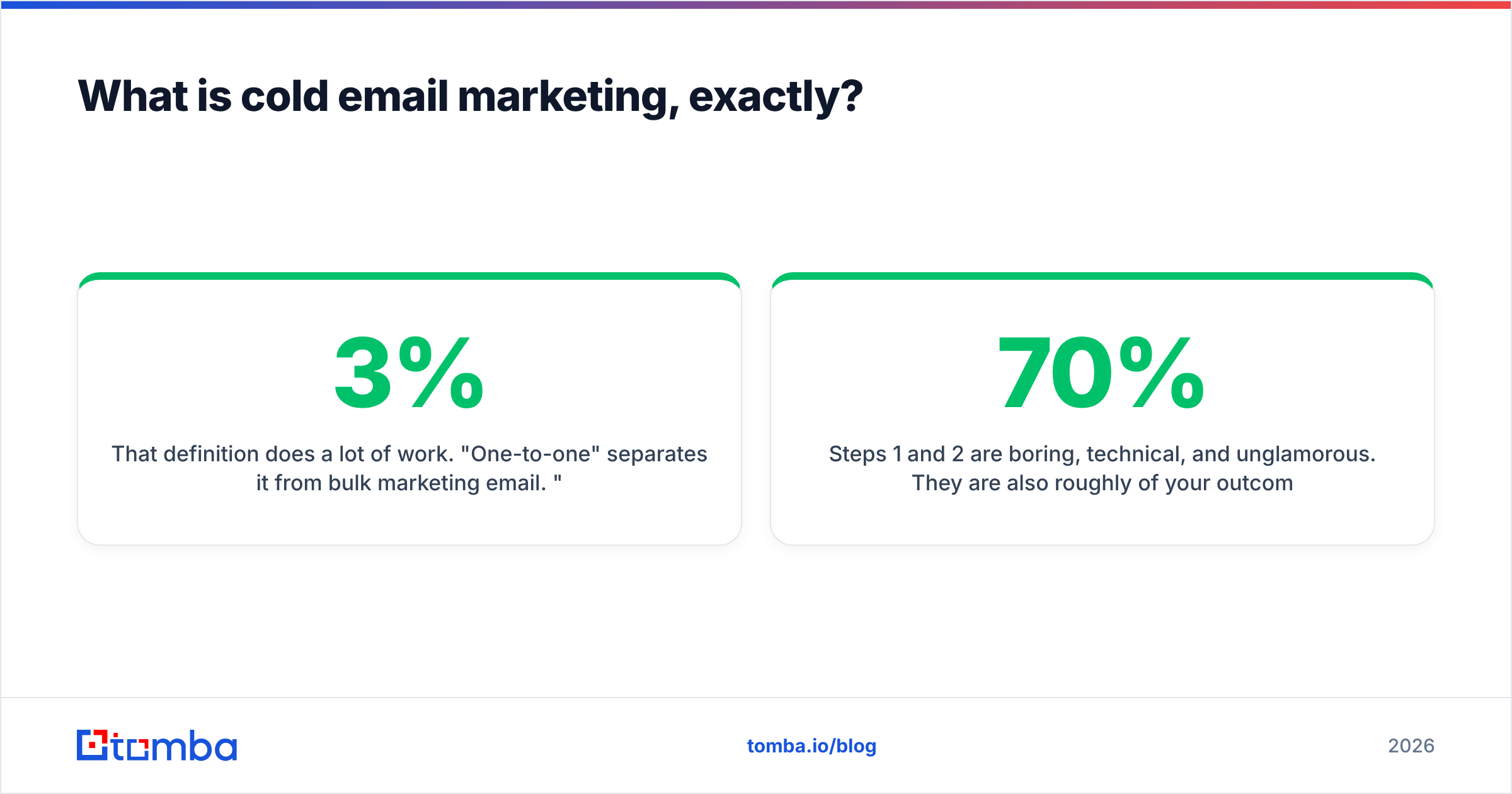
That definition does a lot of work. "One-to-one" separates it from bulk marketing email. "Relevant" is what keeps it legal under CAN-SPAM and GDPR's legitimate-interest basis. "Starting a conversation" is why a 3% reply rate can be a good campaign and a 40% open rate can be a worthless one.
Think of it like knocking on a door in a neighborhood where you've already read the mailboxes. You know the person's name, you know why you're there, and you leave after one polite question. Cold email that treats the inbox like a billboard gets treated like a billboard — ignored, then blocked.
Here's the order that actually matters, and the order almost every beginner guide gets wrong:
- Infrastructure — a separate sending domain, SPF, DKIM, DMARC, and 2–3 weeks of warmup. Skip this and nothing downstream matters, because your mail lands in spam regardless of quality.
- Data — a targeted list of real, verified, currently-employed people. This is where most campaigns quietly die.
- Offer — a specific reason this specific person should reply. Not a feature list.
- Copy — 60–120 words that make replying easier than deleting.
- Sending cadence — throttled volume, human-looking intervals, a real follow-up sequence.
- Measurement — reply rate, positive reply rate, meetings booked. Not opens.
Steps 1 and 2 are boring, technical, and unglamorous. They are also roughly 70% of your outcome. Steps 3–5 are where every course spends its time because copy is fun to teach.
Why does cold email land in spam before you write a word?#
Because mailbox providers judge the sender before they judge the message.
Since February 2024, Google's bulk sender requirements enforce three things for anyone sending meaningful volume: authenticated mail (SPF and DKIM), a published DMARC policy, and a spam complaint rate held under 0.3%. Microsoft followed with similar enforcement. These are not suggestions — they are filters that run before a human sees your subject line.
The practical setup for a beginner:
- Buy a separate domain for outbound. If your company is
acme.com, send fromgetacme.comoracme-hq.com. A blown-up sending domain should never take your main domain's sender reputation with it. - Publish an SPF record, enable DKIM signing at the provider, and set DMARC to
p=noneinitially so you get reports without rejecting your own mail. - Warm up for 14–21 days. Automated warmup tools send and reply to mail across a pool of real inboxes, building an engagement history. Start at 5 emails/day and climb.
- Cap each inbox at 20–50 sends/day. Ten inboxes at 30/day is 300 sends. One inbox at 300/day is a suspended account.
Run your domain through a blacklist checker and an SPF checker before your first send. Both take under a minute. Neither is optional.
What does a cold email tech stack cost for a beginner?#
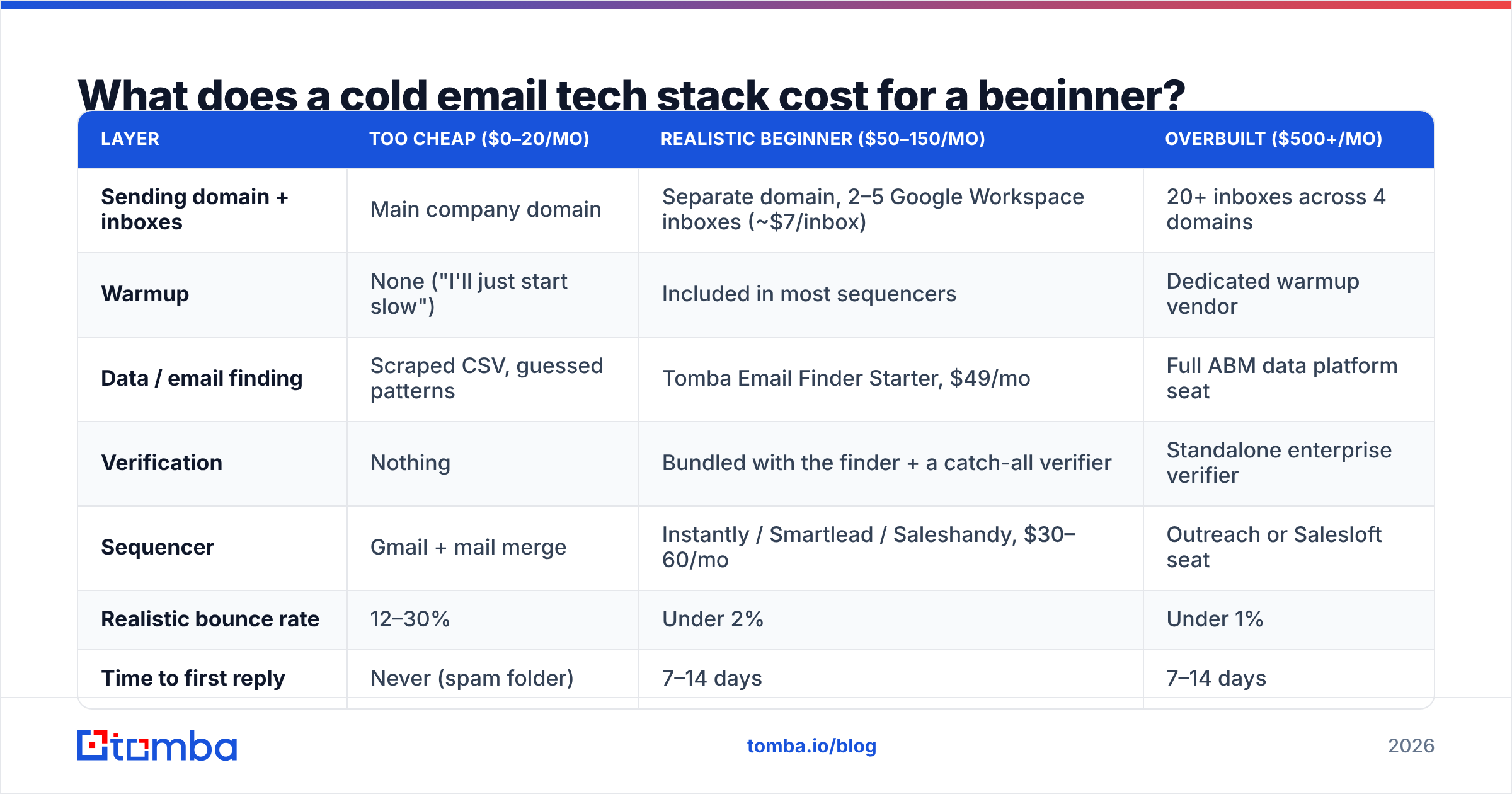
Four categories, and you need something in each. Here's what a realistic first stack looks like versus the two failure modes on either side.
| Layer | Too cheap ($0–20/mo) | Realistic beginner ($50–150/mo) | Overbuilt ($500+/mo) |
|---|---|---|---|
| Sending domain + inboxes | Main company domain | Separate domain, 2–5 Google Workspace inboxes (~$7/inbox) | 20+ inboxes across 4 domains |
| Warmup | None ("I'll just start slow") | Included in most sequencers | Dedicated warmup vendor |
| Data / email finding | Scraped CSV, guessed patterns | Tomba Email Finder Starter, $49/mo | Full ABM data platform seat |
| Verification | Nothing | Bundled with the finder + a catch-all verifier | Standalone enterprise verifier |
| Sequencer | Gmail + mail merge | Instantly / Smartlead / Saleshandy, $30–60/mo | Outreach or Salesloft seat |
| Realistic bounce rate | 12–30% | Under 2% | Under 1% |
| Time to first reply | Never (spam folder) | 7–14 days | 7–14 days |
The overbuilt column exists to make a point: it does not buy you a better reply rate as a beginner. It buys reporting, RevOps integrations, and seat-based governance you don't need yet. The gap between column one and column two, however, is the difference between a campaign and a wasted month.
Two line items are worth defending. First, real inboxes — free email aliases and shared IPs get filtered. Second, verification. A 20% bounce rate on 500 sends doesn't just waste 100 emails; it signals to Gmail that you're guessing, and it degrades delivery for the 400 that were correct.
How do you build a list that doesn't bounce?#
Start from a definition of who should reply, not from a tool. Write one sentence: "VP of Engineering at a Series A–B SaaS company, 50–300 employees, US or EU, currently hiring backend roles." Every filter in that sentence is a signal you can verify. "Anyone in tech" is not.
Then pick an acquisition method. There are three, and they have different failure modes.
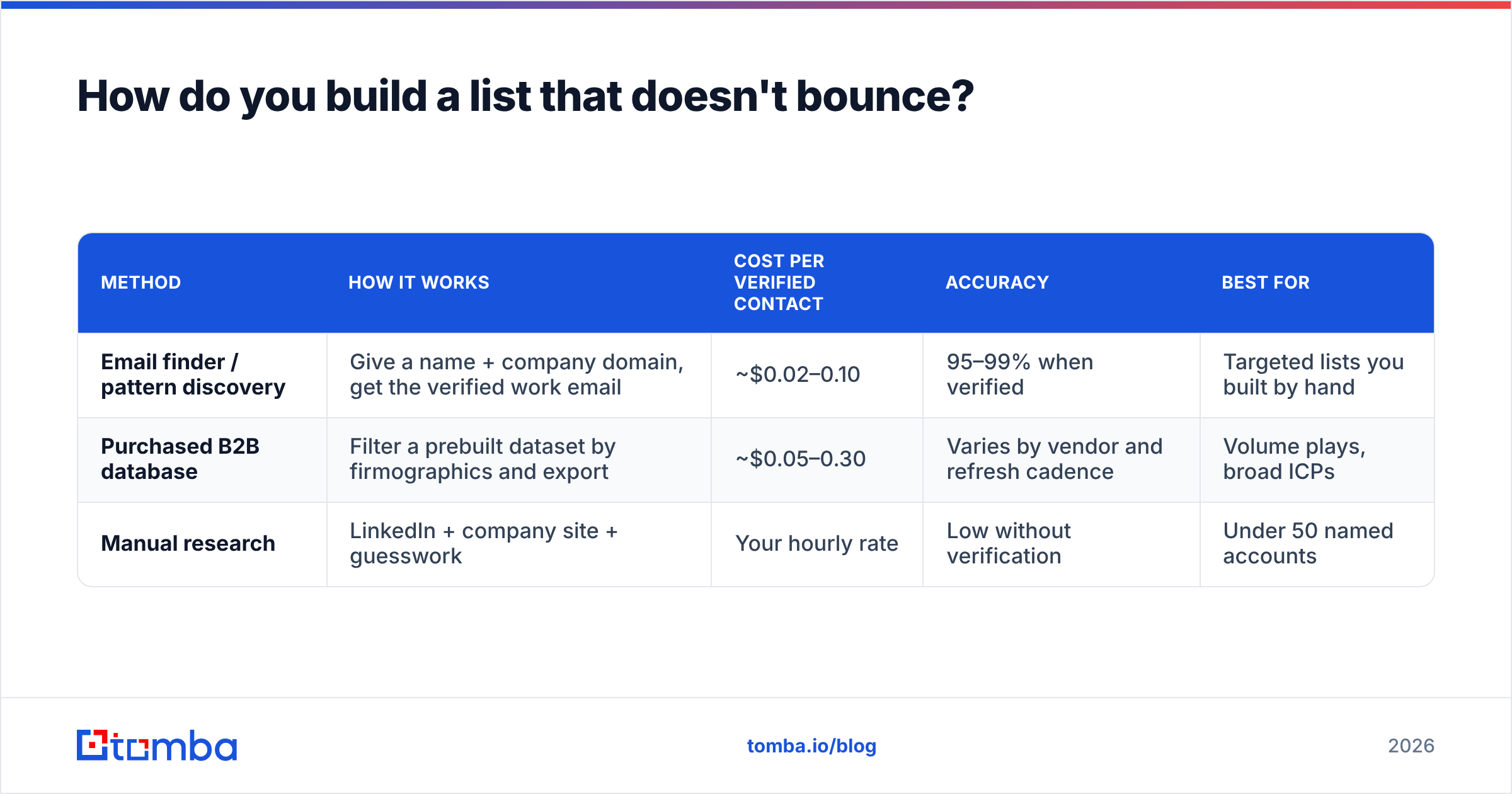
| Method | How it works | Cost per verified contact | Accuracy | Best for |
|---|---|---|---|---|
| Email finder / pattern discovery | Give a name + company domain, get the verified work email | ~$0.02–0.10 | 95–99% when verified | Targeted lists you built by hand |
| Purchased B2B database | Filter a prebuilt dataset by firmographics and export | ~$0.05–0.30 | Varies by vendor and refresh cadence | Volume plays, broad ICPs |
| Manual research | LinkedIn + company site + guesswork | Your hourly rate | Low without verification | Under 50 named accounts |
For the first method, a domain search gets you every published address at a company plus the dominant email pattern; the finder then constructs and verifies individuals. For the second, vendors like BookYourData sell pay-as-you-go verified B2B records with no subscription floor, which is a reasonable fit when you want a list today and don't want a seat. Both approaches work. Mixing them — database for volume, finder for the accounts you actually care about — works better than either alone.
Whatever the source, verify before sending. Not "the vendor says it's verified" — verify. Data decays at roughly 25–30% per year because people change jobs. A list exported in January is materially wrong by August. Run it through an email verifier the week you send, not the week you bought it.

Catch-all domains deserve a specific warning. Roughly 15–20% of B2B domains accept mail to any address, so SMTP verification returns "valid" for asdfghjkl@company.com. A generic verifier marks these as deliverable and your bounce rate looks great — until the recipient's server silently drops the message. A dedicated catch-all finder uses pattern confidence and secondary sourcing instead of relying on the SMTP handshake.
What should a beginner's first cold email actually say?#
Short. Specific. One ask.
The structure that works across most B2B contexts:
- Line 1 — the reason you're writing to them. A trigger event, a role change, a specific thing on their site. "Saw you're hiring three backend engineers in Berlin" beats "I hope this finds you well."
- Line 2 — the relevance bridge. What that trigger implies about a problem they might have. One sentence.
- Line 3 — proof, quantified and comparable. "We cut onboarding time for a 120-person fintech from 6 weeks to 9 days." Not "we're the leading platform."
- Line 4 — a low-friction ask. "Worth a look?" or "Are you the right person for this?" Not "Do you have 15 minutes Tuesday at 2pm?"
Total: 60–120 words. No images, no tracking pixels if you can avoid them, no more than one link. Every one of those elements is a spam signal, and the tracking pixel buys you an open rate that has been noise since Apple Mail Privacy Protection started pre-fetching images in 2021.
Test your draft against a spam checker before the first send. It'll catch the obvious triggers — "free," "guarantee," "act now," excessive punctuation, HTML-heavy formatting.
Follow-ups matter more than the first email. Most replies land on emails two through four. Send three to four follow-ups, spaced 3, 5, and 7 days apart, each one adding a new angle rather than repeating "just bumping this to the top of your inbox." A follow-up that says nothing new is a second chance to be marked as spam.
Which metrics tell you whether it's working?#
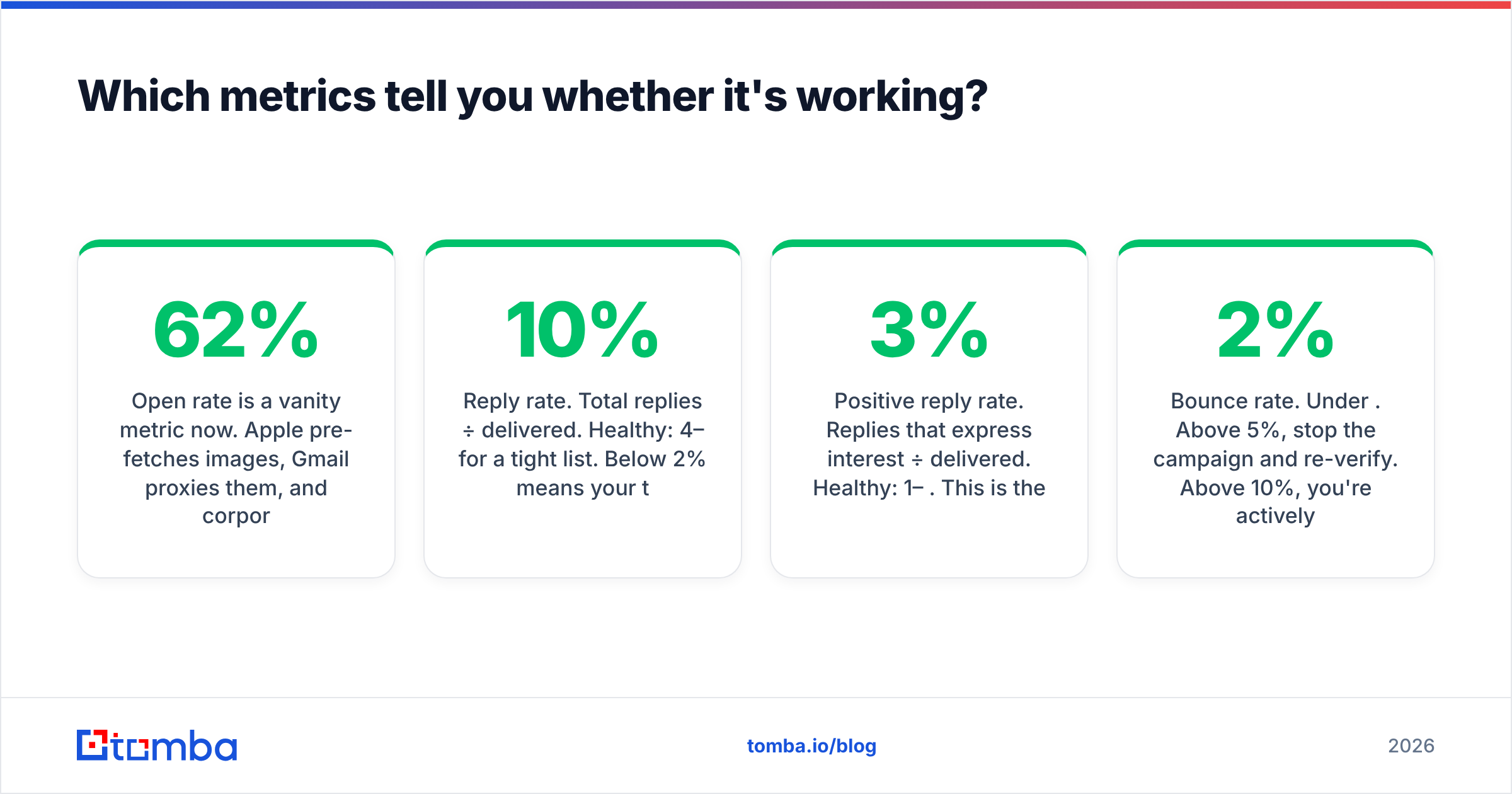
Open rate is a vanity metric now. Apple pre-fetches images, Gmail proxies them, and corporate security scanners click every link in every message. Your 62% open rate might be a bot.
Track three numbers instead:
- Reply rate. Total replies ÷ delivered. Healthy: 4–10% for a tight list. Below 2% means your targeting or offer is wrong, not your subject line.
- Positive reply rate. Replies that express interest ÷ delivered. Healthy: 1–3%. This is the number that predicts pipeline.
- Bounce rate. Under 2%. Above 5%, stop the campaign and re-verify. Above 10%, you're actively damaging your domain.
Also watch spam complaint rate, which you can see in Google Postmaster Tools. The 0.3% ceiling is not a soft target — cross it and delivery collapses across every inbox on the domain.
One correction to a common beginner instinct: a low reply rate on a verified, well-targeted list is a message problem. A low reply rate on an unverified list is a data problem masquerading as a message problem. You cannot A/B test your way out of a list where a third of the addresses don't exist. Fix the denominator first.
What are the seven traps that sink beginner campaigns?#
- Sending from the main company domain. One bad campaign poisons your invoices, your support replies, and your password resets.
- Skipping warmup. A brand-new domain sending 200 emails on day one is textbook spam behavior. Providers have seen it a million times.
- Buying an unverified list. Cheap per-contact pricing usually means the vendor never ran SMTP validation, or ran it two years ago.
- Trusting SMTP validation on catch-all domains. "Valid" is not the same as "delivers."
- Optimizing subject lines before fixing the list. See above. Denominator first.
- One email, no sequence. Roughly half of positive replies arrive after the first message. A single send is a coin flip you've weighted against yourself.
- Measuring opens. You will make confident decisions from data that is structurally unreliable, and you will make them for months.
If you fix one through four and do nothing clever at all in five through seven, you'll outperform most people who did the opposite.
Where should a beginner start this week?#
Buy the sending domain today. Set up SPF, DKIM, and DMARC tomorrow. Start warmup Wednesday and let it run for two full weeks while you do the interesting part: define your ICP in one sentence, build a list of 200 named people at 60 companies, and find their addresses.
That last step is where a good finder earns its cost. Tomba's Email Finder resolves a name and a company domain into a verified professional address, flags catch-all domains rather than pretending they're clean, and runs the same verification you'd otherwise pay a second vendor for. The free tier covers 25 searches a month — enough to sanity-check your ICP before spending anything — and the Starter plan is $49/month when you're ready for real volume. Full Tomba pricing is public, and there's a Chrome extension, Google Sheets add-on, and API if you'd rather build the list where you already work.
Start with 200 verified contacts and a four-email sequence. That's a real campaign. Everything else is a subject-line experiment on a list that was never going to reply.
Related guides#
// get started
Find, verify and enrich your first contacts today
Start on the free plan with 25 searches a month, then scale when your team is ready.
Free plan · No credit card required · GDPR & CCPA
// about the author