Cold Email Outreach in 2026: The Complete No-Fluff Guide
Cold email outreach still works in 2026 — but only if your list is clean, your domain is warm, and your first line earns the second. Here's the full playbook, with benchmarks, a channel comparison, and the mistakes that quietly kill reply rates.
TL;DR
- Cold email outreach in 2026 lives or dies on three things, in this order: list quality, domain reputation, and message relevance. Copy is fourth, not first.
- Google and Yahoo's bulk-sender rules made spam complaint rate (>0.3%) a hard fail. Bounce rate above ~3% now costs you inbox placement across an entire sending domain.
- Realistic benchmarks: 40–60% open rate on a verified list, 3–8% reply rate on a well-targeted one, 1–2% positive reply rate. Anything advertised above that is measuring something else.
- A 4-touch sequence over 12 days outperforms an 8-touch sequence over 30 days for most B2B offers — the tail adds complaints, not meetings.
- The cheapest performance win available to most teams is verifying the list before sending. It costs cents per contact and protects an asset (your domain) you cannot easily replace.
What is cold email outreach, exactly?#
Cold email outreach is sending a targeted, unsolicited business email to someone who has not previously engaged with you, with the goal of starting a conversation — not closing a deal in one message.
Think of it like knocking on a door in a professional building versus a residential street. Nobody expects you, but the context makes the interruption legitimate if you have an actual reason to be there. The moment you knock on 5,000 doors with the same script, you stop being a salesperson and start being noise — and in 2026 the building has security.
That security is the mailbox provider. Gmail, Outlook, and Yahoo don't evaluate your intent. They evaluate signals: how many of your recipients exist, how many mark you as spam, whether your domain authenticates, and whether real humans reply to you. Cold email outreach is therefore two problems welded together — a marketing problem (will anyone care?) and an infrastructure problem (will anyone see it?). Most teams solve the first and ignore the second, then blame the copy.
The distinction that matters legally: cold email is not spam by definition. Under CAN-SPAM in the US, unsolicited commercial email is legal if you identify yourself, include a physical address, honor opt-outs, and don't deceive. Under GDPR in the EU, B2B outreach can rest on legitimate interest, but the bar is higher and the recipient's rights are stronger. Neither framework protects you from the mailbox provider's algorithm, which is the authority that actually decides whether your message is read.
Why do most cold email campaigns fail before they're read?#
Because the list was never verified.
Here's the arithmetic. You buy or scrape 2,000 contacts. Fifteen percent are stale — people who left, roles that were eliminated, domains that got acquired. You send. Three hundred messages bounce. Your bounce rate is 15%, five times the tolerated threshold. Gmail's filters now treat your domain as a low-quality sender. The 1,700 valid contacts still receive your message, but 60% of them receive it in Promotions or Spam. Your open rate reads 22%. You conclude the subject line was weak.
It wasn't the subject line.
This is the single most expensive misdiagnosis in outbound, and it repeats every quarter because bounce rate feels like a vanity metric while open rate feels like a performance metric. In reality bounce rate is the leading indicator and open rate is the lagging one.
Run this sequence before any send:
- Verify every address. Use an email verifier to catch invalid, disposable, and role-based addresses. Target under 2% bounce, not under 5%.
- Handle catch-all domains separately. Roughly a fifth of B2B domains accept all mail, so a standard verifier returns "unknown." A catch-all verifier applies pattern confidence and secondary signals instead of guessing.
- Strip role accounts.
info@,sales@,support@,hello@— these route to shared inboxes with high complaint rates and near-zero reply rates. - Deduplicate across the whole database, not just the file. Emailing the same person from two sequences is the fastest route to a spam complaint.
- Confirm the person still works there. An address can be technically valid and commercially dead. Enrichment beats verification alone here.
- Warm the sending domain before volume. A fresh domain sending 300 emails on day one is indistinguishable from a spammer.
Step six is the one teams skip because it's boring. It takes three to five weeks. There is no shortcut, and the tools that promise one are selling you a slower version of the same wait.
How do the 2026 deliverability rules actually work?#
Google and Yahoo's bulk sender requirements — in force since early 2024 and progressively enforced since — turned deliverability from folklore into a spec sheet. If you send more than 5,000 messages a day to Gmail addresses, you must authenticate with SPF, DKIM, and DMARC, offer one-click unsubscribe, and keep spam complaints below 0.3%. Microsoft applied comparable requirements to Outlook and Hotmail domains in 2025.
The practical consequence for cold email outreach is that the domain is now the unit of reputation, not the individual campaign. One bad sequence poisons every sequence sent from that domain for weeks. This is why serious outbound teams send from secondary domains — getacme.com rather than acme.com — and treat those domains as disposable infrastructure.
Check your own setup before you diagnose anything else. An SPF checker tells you in ten seconds whether your record authorizes your sending platform. A blacklist checker tells you whether your IP is already listed. Google's own Postmaster Tools shows your complaint rate and domain reputation as Gmail sees it — the only opinion that counts. Google publishes the full sender requirements and they are worth reading once, in full, rather than absorbing secondhand.
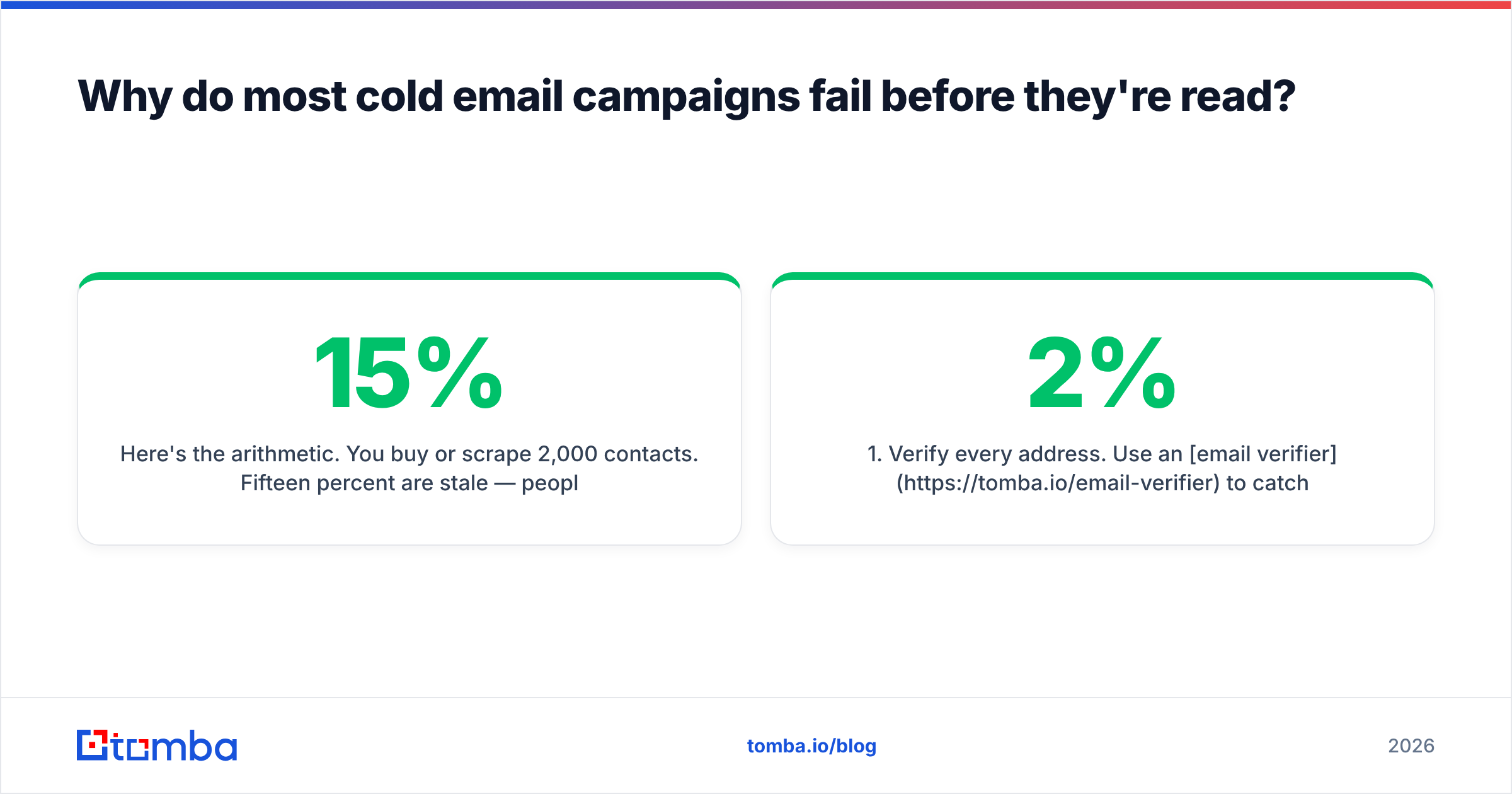
Three numbers to hold in your head:
| Signal | Safe | Risky | Failing |
|---|---|---|---|
| Bounce rate | Under 2% | 3–5% | Above 5% |
| Spam complaint rate | Under 0.1% | 0.1–0.3% | Above 0.3% |
| Daily volume per inbox | Under 50 | 50–100 | Above 100 |
| Reply rate | Above 4% | 1–3% | Under 1% |
The last row surprises people. Reply rate is a deliverability signal, not just a revenue signal. Mailbox providers read replies as proof that a human wanted the message. A sequence with a 0.4% reply rate degrades your placement even if nobody marks it as spam, because silence at scale looks like unwanted mail.
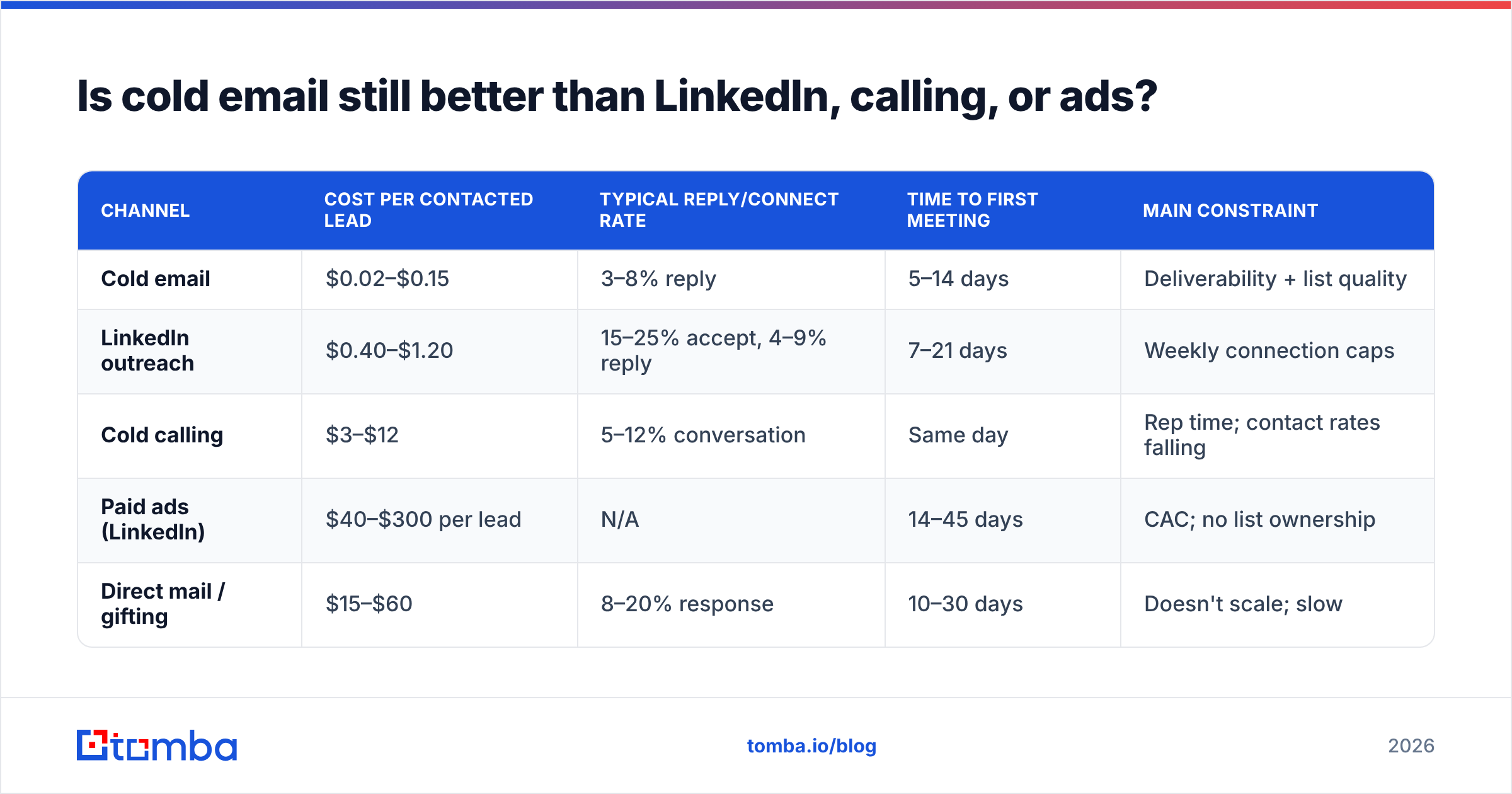
Is cold email still better than LinkedIn, calling, or ads?#
It depends on what you're optimizing for — but for most B2B teams under $50M ARR, email remains the highest-margin channel per qualified conversation. It is also the only channel where you own the list.
| Channel | Cost per contacted lead | Typical reply/connect rate | Time to first meeting | Main constraint |
|---|---|---|---|---|
| Cold email | $0.02–$0.15 | 3–8% reply | 5–14 days | Deliverability + list quality |
| LinkedIn outreach | $0.40–$1.20 | 15–25% accept, 4–9% reply | 7–21 days | Weekly connection caps |
| Cold calling | $3–$12 | 5–12% conversation | Same day | Rep time; contact rates falling |
| Paid ads (LinkedIn) | $40–$300 per lead | N/A | 14–45 days | CAC; no list ownership |
| Direct mail / gifting | $15–$60 | 8–20% response | 10–30 days | Doesn't scale; slow |
Read this table as a portfolio, not a ranking. Cold email is the cheapest way to reach a defined account list. Calling is the fastest way to convert a warm one. LinkedIn outreach sits between them and is capped by the platform, not by your budget. The teams that outperform run email as the volume layer and calls as the follow-up layer, sequenced against the same account list.
Third-party benchmark data from G2 and vendor-published aggregates consistently place cold email reply rates in the 3–8% band for targeted B2B campaigns, and HubSpot's sales research has tracked the same slow decline in cold-call contact rates for a decade. Neither number moves much year over year. What moves is deliverability — which is why 2026's outbound conversation is about infrastructure, not creativity.
What does a cold email sequence look like in 2026?#
Short. Four touches over twelve days, not eight over thirty.
Touch 1 — Day 0. The observation. Two to four sentences. One specific, verifiable thing about their company or role. One sentence on what that implies. One question. No pitch, no calendar link, no attachment. Under 90 words.
Touch 2 — Day 3. The proof. Reply in the same thread. One customer outcome with a number attached, chosen because it matches the observation in touch 1. Under 60 words.
Touch 3 — Day 7. The angle change. New thread, new subject line, different value proposition. If touch 1 led with cost, touch 3 leads with speed. This is where most sequences repeat themselves and lose people.
Touch 4 — Day 12. The close-out. Explicitly release them. "I'll assume the timing's wrong and stop here — happy to reconnect next quarter." This message reliably outperforms touches 5 through 8 combined, because it triggers reciprocity rather than fatigue.
Then stop. The marginal meeting from touch 7 costs you complaint-rate headroom you'll need for the next campaign. If you want more from an account, change the channel, not the frequency.
On subject lines: lowercase, three to five words, no punctuation, no personalization tokens in the subject itself. "quick question about hiring" outperforms "{{FirstName}}, a question about Acme's hiring process" in nearly every split test that controls for list quality — because the second one looks automated, and it is. If you want to pressure-test candidates before sending, a subject line tester will flag spam-trigger words and length problems faster than a spreadsheet will.
How do you build the list itself?#
Start from accounts, never from contacts. Define 200–500 companies that fit an actual pattern in your closed-won data — headcount band, tech stack, funding stage, hiring signal. Then find the two or three people at each who own the problem.
For contact discovery you have four broad options, and most teams end up combining them:
- Domain-first discovery. You know the company; you need the people. Domain search returns the addresses and patterns associated with a domain, which is the fastest path from an account list to a contact list.
- Name-first discovery. You know the person; you need the address. An email finder resolves name plus domain into a verified address, with a confidence score attached.
- Prebuilt B2B databases. Vendors like BookYourData sell curated, human-verified lists by industry and title — a strong fit when you need coverage in a segment you haven't researched, and a reasonable complement to on-demand lookup rather than a replacement for it.
- Enrichment on inbound. You already have the email; you need firmographics, phone, and LinkedIn. Data enrichment fills the gaps so routing and scoring work.
The mistake here is treating these as competing purchases. They solve different moments in the funnel. A database gives you breadth on day one; a finder-and-verifier stack gives you accuracy on the accounts you actually care about, at the moment you care about them. Buying only the first produces a large, decaying list. Buying only the second produces a small, pristine one. Most teams need both, weighted toward accuracy as deal size increases.
Whatever you use, budget for decay. B2B contact data degrades at roughly 22–30% per year — people change jobs, companies rebrand, domains consolidate. A list you built in January is meaningfully wrong by September. Re-verify before every major campaign, not once at import.
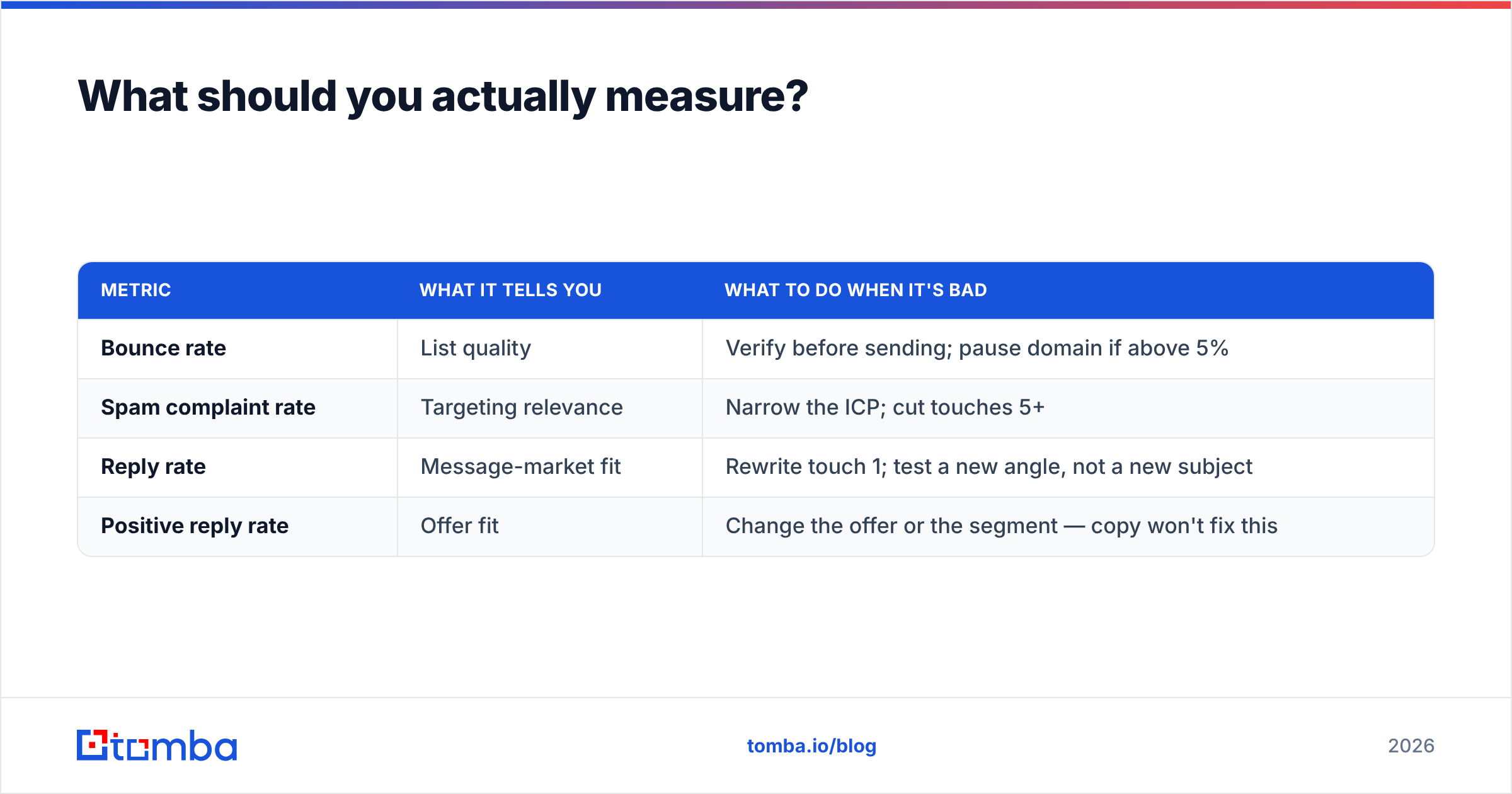
What should you actually measure?#
Four metrics, in this order of diagnostic value:
| Metric | What it tells you | What to do when it's bad |
|---|---|---|
| Bounce rate | List quality | Verify before sending; pause domain if above 5% |
| Spam complaint rate | Targeting relevance | Narrow the ICP; cut touches 5+ |
| Reply rate | Message-market fit | Rewrite touch 1; test a new angle, not a new subject |
| Positive reply rate | Offer fit | Change the offer or the segment — copy won't fix this |
Open rate is missing from that list deliberately. Apple's Mail Privacy Protection and equivalent proxies inflate opens by pre-fetching images, and in 2026 a meaningful share of reported opens are machines. Use it as a directional signal on deliverability collapse — a drop from 45% to 12% means something broke — but never optimize against it.
The metric that actually predicts pipeline is positive reply rate per 100 sent. Track it by segment, not by campaign. If one segment returns 1.8 positive replies per 100 and another returns 0.2, you don't have a copy problem. You have a targeting problem, and the fix is upstream in the account list.
What's the fastest way to fix a campaign that's already failing?#
Work backward through the stack, cheapest fix first:
- Check bounce rate. Above 3%? Stop sending immediately. Verify the remaining list. Resume in a week.
- Check authentication. SPF, DKIM, DMARC all passing? One misconfigured record explains months of poor results.
- Check volume per inbox. Above 50/day per mailbox? Add mailboxes, don't add volume.
- Check the segment. Are you emailing people who could plausibly buy this, at companies that could plausibly afford it? Be honest.
- Then, and only then, rewrite the copy.
Teams do this list in reverse. They rewrite the copy first because it's the only step that feels like work. It's also the step with the smallest effect size when the three below it are broken.
Where does this leave you?#
Cold email outreach in 2026 is a discipline with a narrow margin for sloppiness and a wide margin for people who respect the mechanics. The mechanics are unglamorous: verify the list, authenticate the domain, warm it slowly, send fewer messages to better-chosen people, and stop after four touches. Nothing in that sentence is a growth hack. All of it is the reason some teams book meetings from a 400-person list while others burn a domain on 40,000 sends.
If you're rebuilding your outbound motion this quarter, start where the leverage is highest and the cost is lowest: the list. The Tomba Email Finder turns an account list into verified, confidence-scored contacts, with catch-all handling and bulk verification built in — so the addresses you send to are addresses that exist. The free tier gives you 25 searches a month to test it against contacts you can independently confirm; paid plans start at $49/mo, with full Tomba pricing published rather than quoted. Verify first, send second. The order is the strategy.
Related guides#
Ready to find emails that actually work?
Join 150,000+ professionals who stopped guessing and started sending. Free credits on signup — no credit card required.
Get the Tomba newsletter
Practical outbound tactics and product updates — once every two weeks.
About the author