Cold Email Outreach CRM: How to Build a Stack That Scales
A CRM does not send cold email, and a sequencer does not manage deals. Here is how the two actually fit together, what to sync, what to leave out, and which stack fits your team size.
TL;DR
- A cold email outreach CRM is not one product. It is a CRM that stores the relationship plus a sending layer that runs the sequence — and the boundary between them is where most stacks break.
- Do not send cold email from your CRM-connected primary domain. Keep sending on separate domains and inboxes, and sync only replies and outcomes back to the CRM.
- The single highest-leverage step is upstream of both: verified contact data. Bad rows corrupt your bounce rate, your sender reputation, and every pipeline metric downstream.
- Small teams (1–5 reps) win with a sequencer plus a lightweight CRM. Teams over ~15 reps need the CRM as system of record and the sequencer as a spoke.
- Budget reality: a working stack costs roughly $150–$400/month for a 3-person team, and most of that is not the CRM.
What is a cold email outreach CRM?#
Short answer: it is a two-part system, not a single tool. One part remembers who you talked to. The other part talks to them.
Think of a restaurant. The CRM is the reservation book — who came in, what they ordered, whether they complained. The sequencer is the kitchen line — the thing that actually produces output on a schedule. You would not run the line out of the reservation book. Yet that is exactly what teams do when they try to blast cold sequences out of HubSpot Marketing or Salesforce Engagement and then wonder why their domain reputation tanked in week three.
The confusion is understandable, because vendors sell both. Most modern CRMs ship an "email sequences" feature. It works fine for warm follow-up — a demo no-show, a trial that stalled, a renewal reminder. It is generally the wrong tool for cold outreach at volume, for three structural reasons:
- Domain risk. Your CRM is wired to your primary sending domain. Cold email produces bounces, spam complaints, and unsubscribes at rates warm email never does. Google's own bulk sender guidelines put a hard spam-complaint ceiling on senders — cold volume from your money domain is how you find that ceiling.
- Throttling and warmup. Sequencers do inbox rotation, per-inbox daily caps, ramp schedules, and automatic warmup. CRMs mostly do not.
- Data hygiene. CRMs are built to accept records, not to reject them. A sequencer that refuses to send to an unverified address is doing you a favor. A CRM will happily store 40,000 guesses.
So a "cold email outreach CRM" in practice means: a CRM that plays well with a dedicated sending layer, and a data layer that keeps both clean.
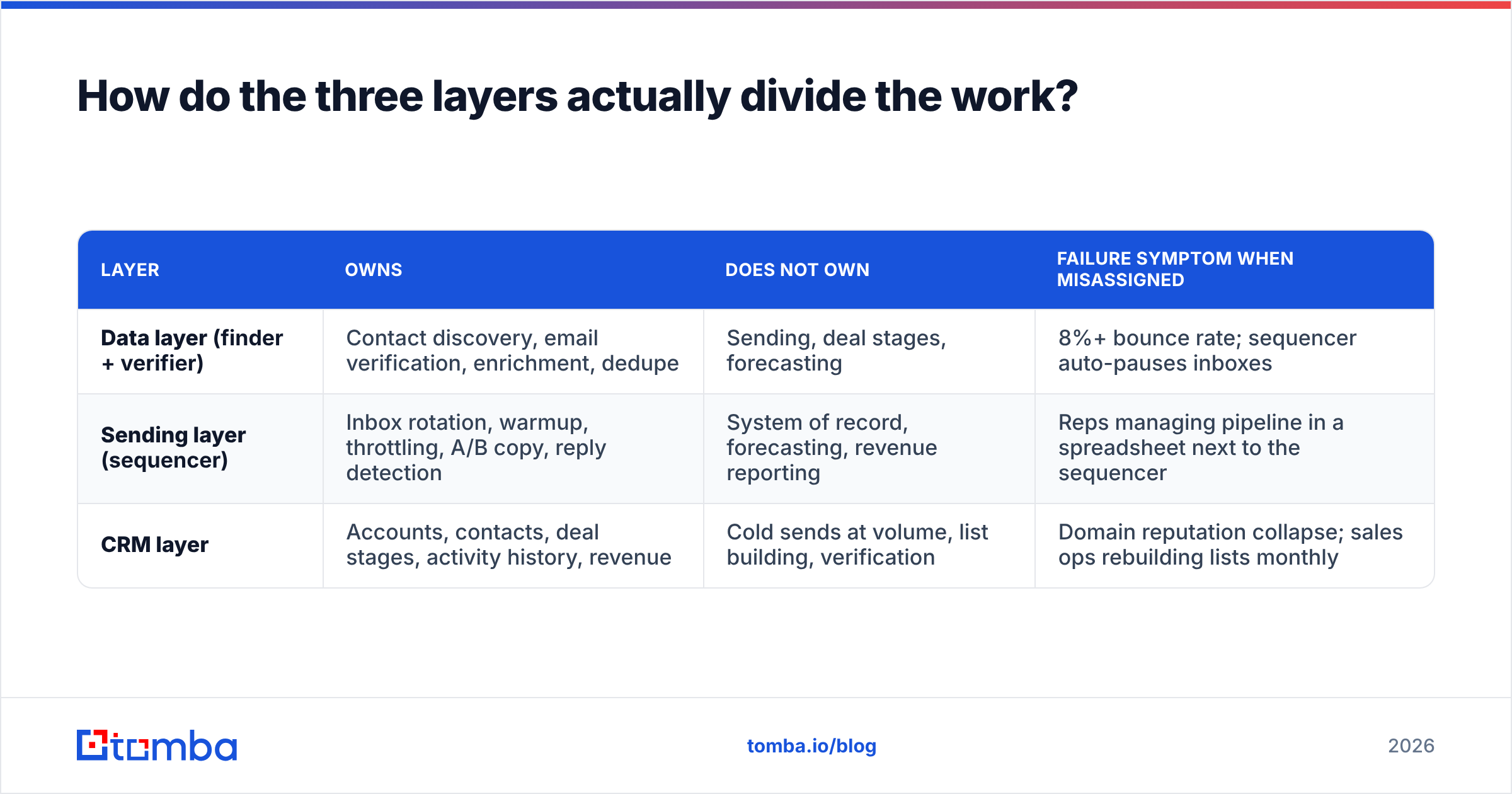
How do the three layers actually divide the work?#
| Layer | Owns | Does NOT own | Failure symptom when misassigned |
|---|---|---|---|
| Data layer (finder + verifier) | Contact discovery, email verification, enrichment, dedupe | Sending, deal stages, forecasting | 8%+ bounce rate; sequencer auto-pauses inboxes |
| Sending layer (sequencer) | Inbox rotation, warmup, throttling, A/B copy, reply detection | System of record, forecasting, revenue reporting | Reps managing pipeline in a spreadsheet next to the sequencer |
| CRM layer | Accounts, contacts, deal stages, activity history, revenue | Cold sends at volume, list building, verification | Domain reputation collapse; sales ops rebuilding lists monthly |
The rule that follows from that table: data flows forward, outcomes flow back. Verified contacts move from the data layer into the sequencer. Only engaged contacts — replied, booked, positive intent — move from the sequencer into the CRM. Everyone else stays out.
This is the part teams get backwards. They dump 40,000 scraped rows into the CRM first "so we have them," then push segments out to the sequencer. Now the CRM is 92% dead weight, every contact-count-based pricing tier costs more, and reporting is meaningless because your "contacted" number includes 6,000 addresses that never existed.

Wait — that image is a placeholder. Here is the real one:
Which CRM fits cold outreach best?#
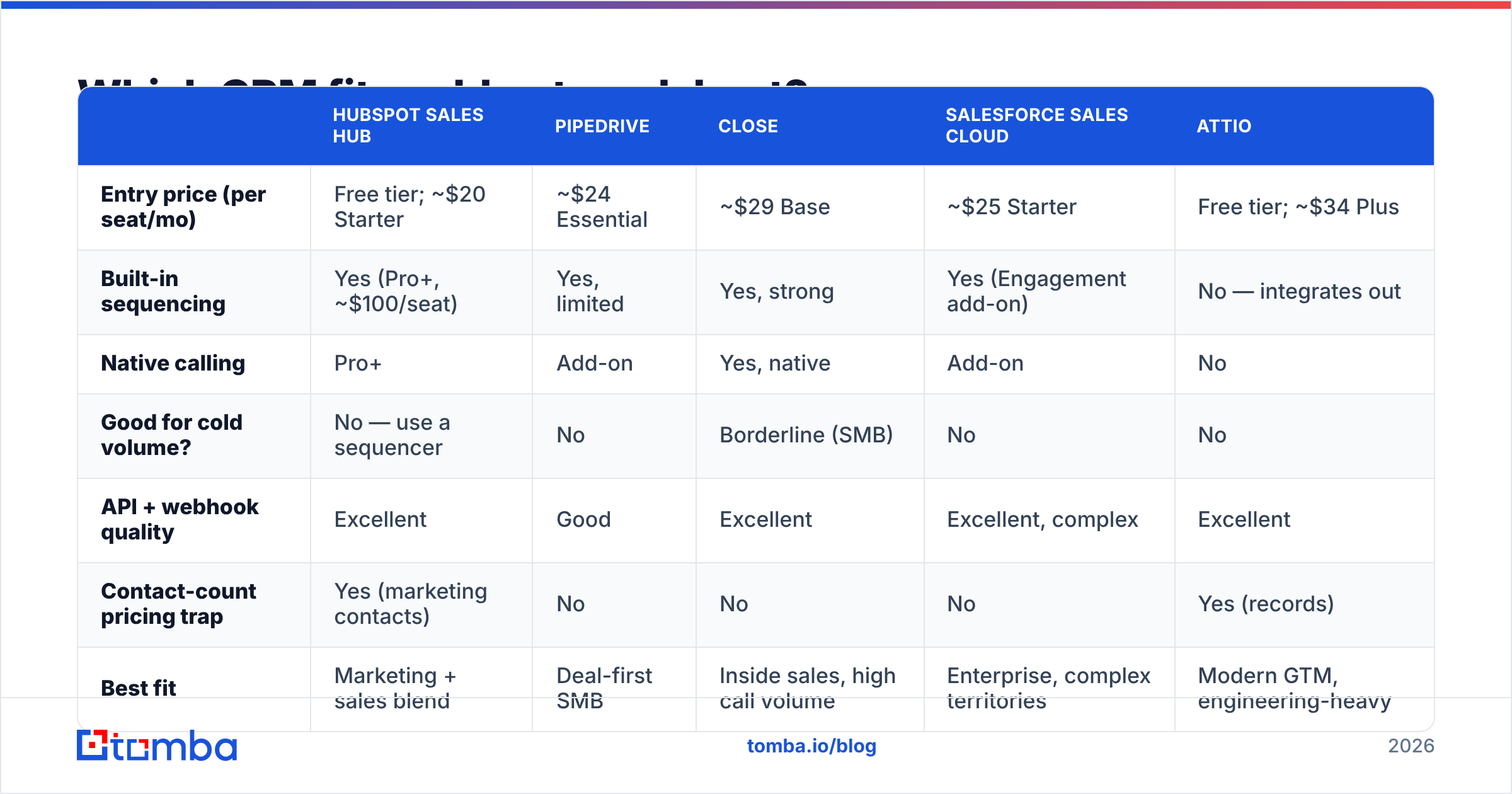
There is no universal winner. There is a winner per team size and per motion. Here is the honest breakdown, with pricing accurate to publicly listed rates as of early 2026 — always check the vendor page before you commit, since seat minimums move.
| HubSpot Sales Hub | Pipedrive | Close | Salesforce Sales Cloud | Attio | |
|---|---|---|---|---|---|
| Entry price (per seat/mo) | Free tier; ~$20 Starter | ~$24 Essential | ~$29 Base | ~$25 Starter | Free tier; ~$34 Plus |
| Built-in sequencing | Yes (Pro+, ~$100/seat) | Yes, limited | Yes, strong | Yes (Engagement add-on) | No — integrates out |
| Native calling | Pro+ | Add-on | Yes, native | Add-on | No |
| Good for cold volume? | No — use a sequencer | No | Borderline (SMB) | No | No |
| API + webhook quality | Excellent | Good | Excellent | Excellent, complex | Excellent |
| Contact-count pricing trap | Yes (marketing contacts) | No | No | No | Yes (records) |
| Best fit | Marketing + sales blend | Deal-first SMB | Inside sales, high call volume | Enterprise, complex territories | Modern GTM, engineering-heavy |
A few notes that the pricing pages will not tell you:
- HubSpot's contact-based pricing punishes list dumps. If you sync every prospected contact into HubSpot, you climb tiers on volume you never emailed profitably. Sync outcomes, not lists. HubSpot documents the marketing-contacts distinction clearly enough on its CRM product page — read it before you import.
- Close is the closest thing to a genuine "cold email outreach CRM" in a single box, because it was built around inside-sales workflows. For a 2–8 person team running email plus phone, it removes a tool. Above that, it starts to feel narrow.
- Salesforce is not a cold email tool and should never pretend to be. It is a system of record with an ecosystem. If you are already on it, wire the sequencer in via API and move on. The Salesforce integration path for outreach tooling is well trodden.
- Attio and the new-generation CRMs assume you bring your own sending layer. That is a feature, not a gap.
If you want a broader field to compare against, the G2 CRM category is a reasonable, if noisy, starting point — filter to reviews from companies your size and ignore the enterprise ones.
Where does the data layer fit — and why does it decide everything?#
Because a sequence sent to a bad address is not a neutral event. It is an actively negative one.
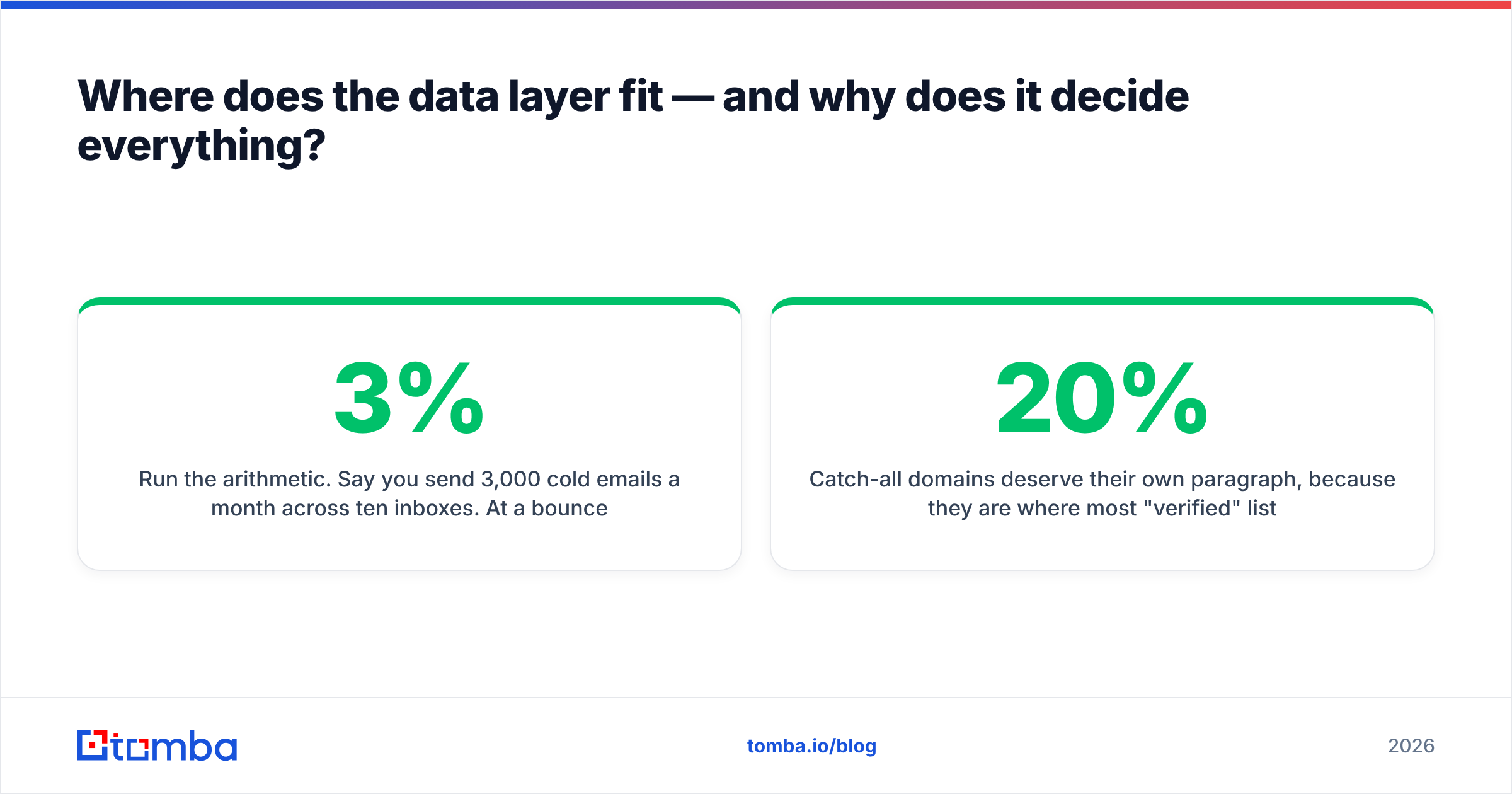
Run the arithmetic. Say you send 3,000 cold emails a month across ten inboxes. At a 3% bounce rate, that is 90 bounces — annoying, survivable. At a 12% bounce rate (typical for unverified scraped data), that is 360 bounces, several of your inboxes get auto-paused by the sequencer, and your sender reputation drops for the domains that are still sending. You do not lose 12% of your output. You lose the month.
So the data layer has to sit before the sequencer, and it has three jobs:
- Find — locate the address at all, via domain search across a company, or targeted lookup by name and company.
- Verify — SMTP-check, MX-check, catch-all detection, role-account flagging. An email verifier that returns a confidence score is worth more than one that returns a binary.
- Enrich — job title, seniority, company size, tech stack. This is what makes segmentation possible, which is what makes copy relevant, which is what makes the whole exercise work.
Catch-all domains deserve their own paragraph, because they are where most "verified" lists quietly lie to you. A catch-all server accepts mail for every address at the domain, so a naive verifier marks everything valid. Roughly a fifth of B2B domains are configured this way. If your list is 20% catch-all and your tool calls them all "valid," your real deliverability is worse than your dashboard says. A dedicated catch-all verifier that probes further, or at minimum segments those addresses into a separate lower-volume campaign, is the difference between a 2% bounce rate and a 9% one.
What should actually sync between the sequencer and the CRM?#
Keep the contract narrow. Every field you sync is a field you will eventually have to reconcile.
Push into the sequencer (from data layer):
- Email address + verification status + confidence score
- First name, company name, job title
- One or two personalization variables (recent funding, tech stack, hiring signal)
- A campaign tag
Push into the CRM (from sequencer) — only on qualifying events:
- Replied (positive or neutral) → create contact, log activity, assign owner
- Meeting booked → create deal at stage 1
- Explicit opt-out → create suppression record, never delete
- Bounced hard → write back to the data layer as a suppression, not to the CRM
Never sync:
- Opens. Apple Mail Privacy Protection and every corporate scanner have made open rate a vanity metric. Syncing opens into the CRM creates fake "engaged" contacts that pollute lead scoring.
- Unengaged contacts after the sequence completes. Archive them in the sequencer or a warehouse. They are not CRM records.
- Raw lists, ever.
That last one bears repeating because contact-count pricing is real money. A 30,000-row list synced into a contact-priced CRM can cost more per year than the sequencer, the data layer, and the CRM seats combined.
Wire the sync with native integrations where they exist — most sequencers ship HubSpot and Pipedrive connectors — and fall back to Zapier or Make for the edge cases. If you have engineering time, a direct API integration gives you retry logic and idempotency that no-code tools do not.
How much should this stack cost?#
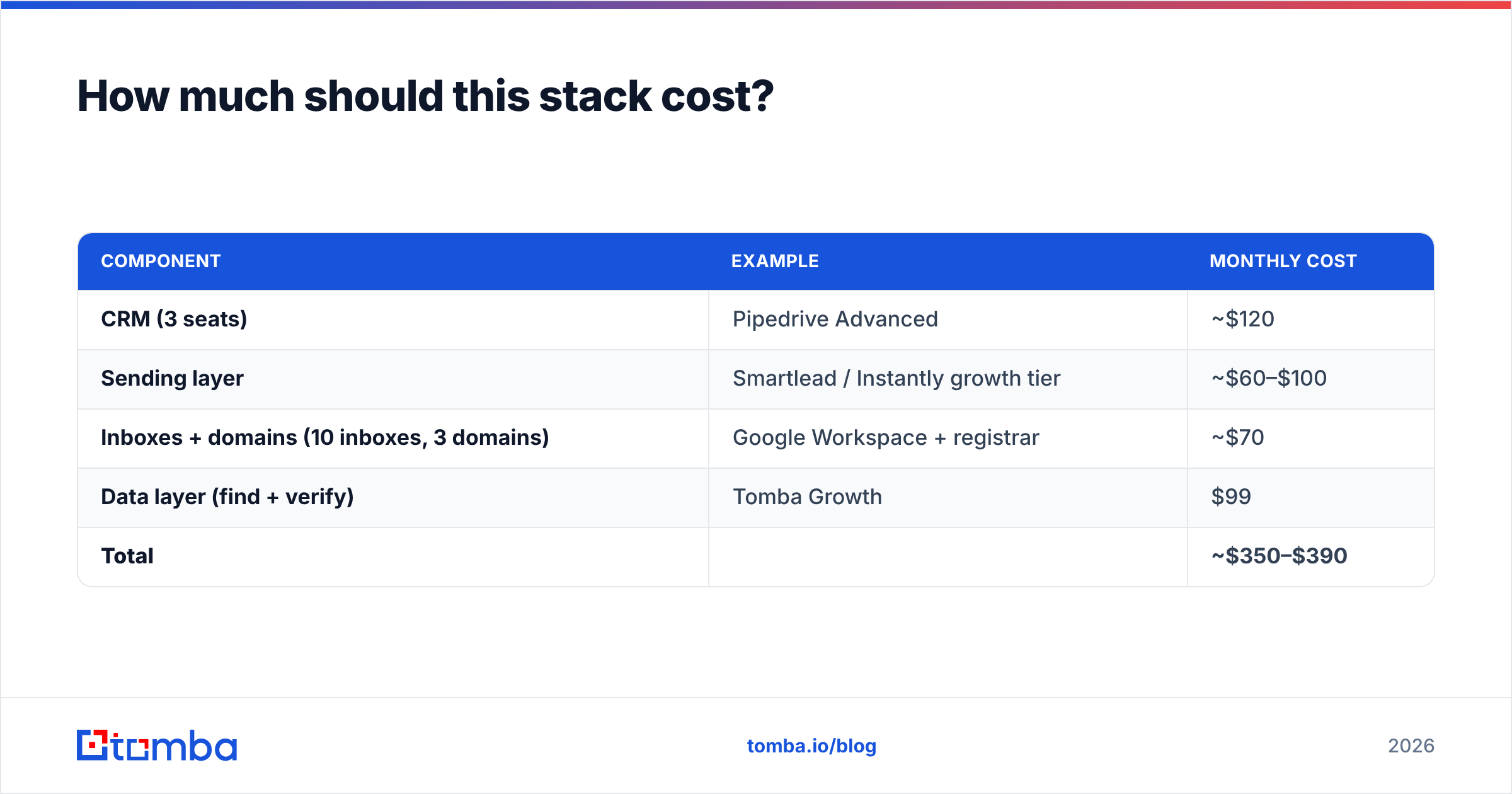
Here is a realistic monthly bill for a three-person outbound team sending ~6,000 emails/month, using publicly listed pricing:
| Component | Example | Monthly cost |
|---|---|---|
| CRM (3 seats) | Pipedrive Advanced | ~$120 |
| Sending layer | Smartlead / Instantly growth tier | ~$60–$100 |
| Inboxes + domains (10 inboxes, 3 domains) | Google Workspace + registrar | ~$70 |
| Data layer (find + verify) | Tomba Growth | $99 |
| Total | ~$350–$390 |
Two observations. First, the CRM is a third of the bill at most — which is why "which CRM?" is the least consequential question in this stack. Second, the data layer and the inboxes together cost more than the CRM, and they are the two components that determine whether anything lands.
If you are running solo or validating a motion, the numbers compress hard: a free CRM tier, one sending domain with three inboxes (~$20), a $30 sequencer, and Tomba's Starter plan at $49/mo gets you to roughly $100/month. Tomba's free tier (25 searches/month) is enough to sanity-check a niche before you spend anything at all.
Providers worth knowing at the data layer beyond the finders: purchased-list vendors like BookYourData serve a genuinely different use case — pre-built, filtered lists when you need volume immediately rather than precision targeting. They are a reasonable complement to a finder-plus-verifier workflow rather than a substitute for it, and the right choice depends on whether your ICP is broad enough that a pre-built list matches it.
What breaks first, and how do you catch it?#
In order of how often it happens:
- Bounce rate creeps above 5%. Cause is almost always stale data — B2B contacts decay at roughly 2–3% per month as people change jobs. Fix: re-verify any list older than 60 days before it enters a sequence. Bulk verification makes this a five-minute job.
- Replies stop reaching the CRM. Cause: the sequencer's reply detection missed an out-of-office or an auto-forward. Fix: audit weekly for the first month, and never rely on reply detection alone for meeting-booked events — trigger those from the calendar.
- Two reps email the same contact. Cause: no dedupe between the data layer and the CRM's existing contacts. Fix: check every new list against the CRM before it enters a sequence. This is a five-line API call and it prevents the single most embarrassing outbound failure.
- Domain reputation drops with no bounce spike. Cause: spam complaints, usually from bad targeting rather than bad data. Fix: tighten the ICP filter, cut send volume per inbox by 30%, and check whether your sending domains landed on a blocklist with a blacklist checker.
- Pipeline numbers do not reconcile. Cause: opens or unengaged contacts got synced into the CRM. Fix: see the sync contract above. Delete the fake engagement.
The pattern in all five: the failure shows up in the CRM, but it was caused two layers upstream. Instrument accordingly. Your weekly review should look at bounce rate and reply rate before it looks at deal stages, because the second number is meaningless if the first one is broken.
Do you need a CRM at all on day one?#
No — and pretending otherwise wastes a month.
If you have fewer than ~50 active conversations, your sequencer's inbox plus a spreadsheet is a perfectly functional CRM. Add a real CRM when one of three things becomes true: you have more than one person who needs to see the same conversation history, you need forecasting, or you need to route inbound based on outbound touchpoints. Before that, the CRM is a place where data goes to be admired.
What you do need on day one is the data layer. You cannot sequence contacts you do not have, and you cannot afford to sequence contacts that do not exist. The order of adoption is: finder + verifier → sequencer → CRM. Most teams do it exactly backwards, buy the CRM first because it feels like the serious purchase, and then spend six months feeding it garbage.
Start where the leverage is. Before you evaluate another CRM demo, fix the input. The Tomba Email Finder locates verified professional addresses by domain, name, or company, returns a confidence score on every result, and flags catch-all domains rather than quietly passing them through. It plugs into your sequencer and your CRM through native integrations and a straightforward API — so verified contacts flow forward, outcomes flow back, and your bounce rate stops being the number that decides your quarter. The free tier gives you 25 searches to test the hypothesis on your own ICP; paid plans start at $49/month when it works.
Related guides#
Ready to find emails that actually work?
Join 150,000+ professionals who stopped guessing and started sending. Free credits on signup — no credit card required.
Get the Tomba newsletter
Practical outbound tactics and product updates — once every two weeks.
About the author