Cold Email Prospecting in 2026: The Complete, No-Fluff Guide
Cold email prospecting didn't die in 2026 — the volume game did. Here's the list-building, sending, and measurement playbook that still books meetings after Google and Microsoft tightened the screws.
TL;DR
- Cold email prospecting still books meetings in 2026, but the "send 10,000 and pray" model is dead. Google and Microsoft's bulk-sender rules made bounce rate and spam-complaint rate hard gates, not soft metrics.
- Your list quality now determines your deliverability. A 4% bounce rate on a cold domain can throttle every campaign you run for the next 30 days.
- The winning shape is narrow: 30–80 verified contacts per sequence, 20–40 sends per inbox per day, 3–4 touches, one clear ask.
- Measure reply rate and positive-reply rate. Open rate has been noise since Apple Mail Privacy Protection, and it got worse when Gmail started prefetching images more aggressively.
- Tooling splits into three jobs — find, verify, send. Buying one vendor for all three usually means one of the three is mediocre.
What is cold email prospecting?#
Cold email prospecting is the practice of researching a specific person at a specific company, finding their business email address, and sending an unsolicited but relevant message that opens a sales conversation. The word doing the work in that sentence is specific.
Here's the everyday analogy. Cold email in 2018 was leafleting: print 5,000 flyers, jam them under 5,000 windshields, count the three people who call. Cold email in 2026 is knocking on the door of a house whose porch light is on, whose roof you noticed is missing shingles, and whose owner you know by name. Same channel. Completely different economics.
Technically, the change came from the receiving side. In February 2024 Google and Yahoo began enforcing bulk sender requirements — authenticated domains, one-click unsubscribe, and a spam-complaint rate held under 0.3%. Microsoft followed for Outlook.com in 2025. What used to be a reputation suggestion became a delivery condition. If you can't keep complaints below the threshold, your mail doesn't land in spam; it doesn't land at all.
That single change is why cold email prospecting in 2026 is a data-quality problem wearing a copywriting costume.
Does cold email prospecting still work in 2026?#
Yes, and the honest answer is "better than it did in 2022, for the people doing it properly."
The reason is counterintuitive: the volume ceiling pushed out the spammers. When you could send 50,000 emails a week from twenty burner domains for $300/month, every buyer's inbox was saturated and reply rates collapsed across the board. Now that each domain carries real reputational cost, the marginal cost of noise went up. Fewer bad senders, more room for good ones.
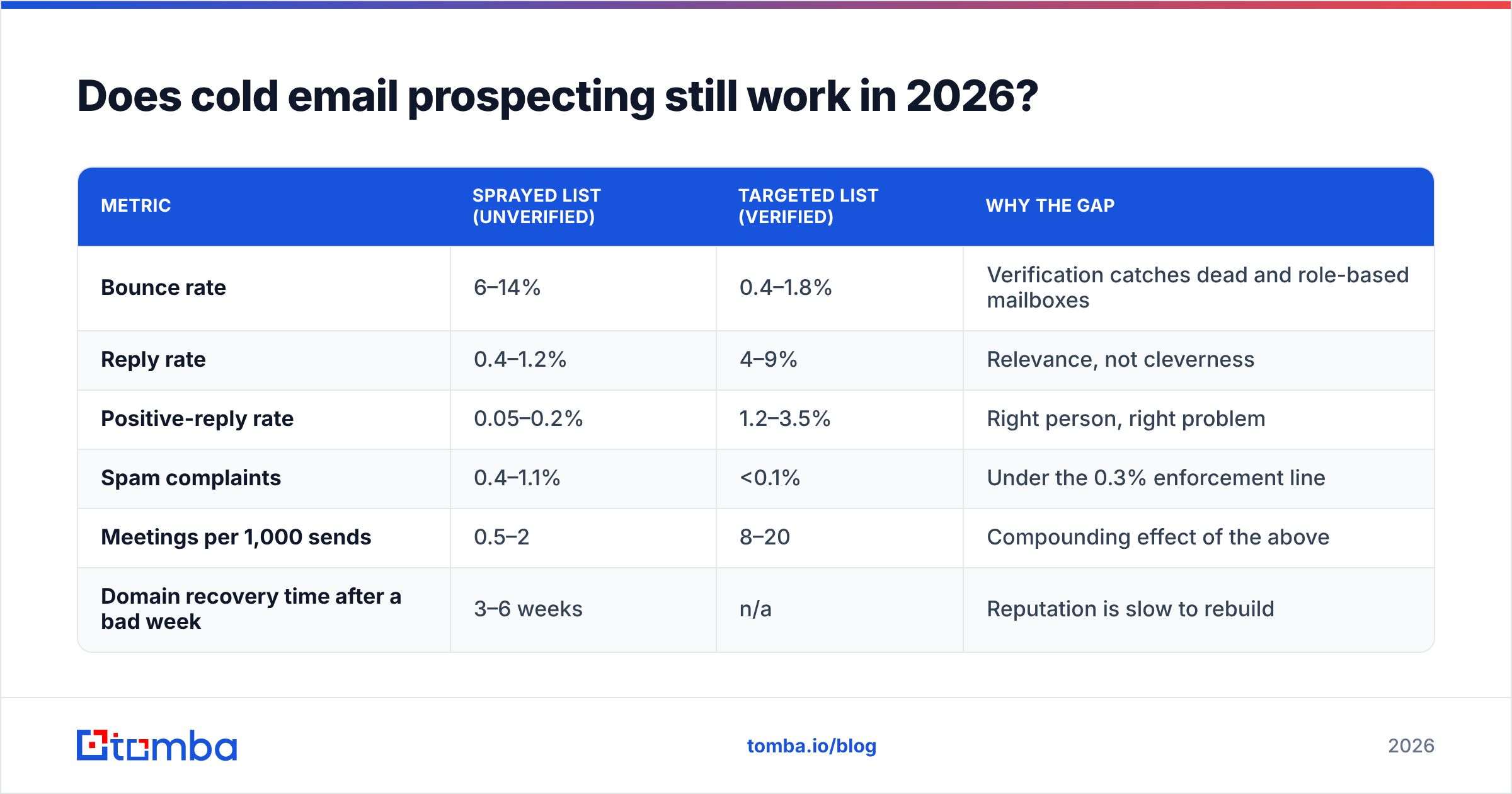
Rough benchmarks we see across B2B SaaS and services teams running verified lists in 2026:
| Metric | Sprayed list (unverified) | Targeted list (verified) | Why the gap |
|---|---|---|---|
| Bounce rate | 6–14% | 0.4–1.8% | Verification catches dead and role-based mailboxes |
| Reply rate | 0.4–1.2% | 4–9% | Relevance, not cleverness |
| Positive-reply rate | 0.05–0.2% | 1.2–3.5% | Right person, right problem |
| Spam complaints | 0.4–1.1% | <0.1% | Under the 0.3% enforcement line |
| Meetings per 1,000 sends | 0.5–2 | 8–20 | Compounding effect of the above |
| Domain recovery time after a bad week | 3–6 weeks | n/a | Reputation is slow to rebuild |
Note the last row. There is no "recover fast" option. Sender reputation is a trailing average, and mailbox providers weight recent behavior heavily but forget slowly. This is the asymmetry that should govern every decision you make about list size.
If you want the mechanics of how providers score you, our email deliverability glossary entry breaks down the signals in order of weight.
What changed between the 2020 playbook and the 2026 playbook?#

Five things flipped. Read this as a checklist against your current process:
- List size stopped being a virtue. In 2020, "we loaded 20k contacts" was a status report. In 2026 it's a confession. The right number for a single sequence is 30–80 contacts you could describe individually.
- Verification moved from optional to load-bearing. A bounce is no longer a wasted credit; it is a negative reputation event that affects the deliverability of every email you send afterward from that domain. Run every list through an email verifier before it touches your sender.
- Open rate died as a metric. Apple Mail Privacy Protection pre-loads tracking pixels, and Gmail's proxying obscures the rest. If your reporting still optimizes subject lines by open rate, you are optimizing against a random number generator.
- Personalization got cheaper than templating. LLMs made per-contact research economically trivial. The competitive edge moved from "can you personalize" to "do you have the data worth personalizing on" — funding events, hiring signals, tech-stack changes.
- Multi-inbox infrastructure became standard, then became suspicious. Twenty secondary domains all sending identical copy is now a detectable pattern. Two to four well-warmed domains sending genuinely different messages outperform it.
How do you build a prospect list that doesn't burn your domain?#
Four steps, in this order. Do not reorder them.
Step 1 — Define the account list before the contact list. Write down the firmographic filter in a single sentence: "Series A–B B2B SaaS, 40–200 employees, US or UK, hiring for RevOps." If you can't say it in one sentence, your targeting is a wish, not a filter. Pull the accounts from a source you can audit — G2 category pages and job boards are underrated for this because the signal is public and timestamped.
Step 2 — Find the person, then the email. Identify the human by role and responsibility, not by title string matching. Then resolve the address. A domain search gives you the company's email pattern and the known mailboxes on it; an email finder resolves a specific first-name/last-name/domain triple. Both are better than guessing first.last@, which is right roughly 60% of the time and catastrophically wrong the other 40%.
Step 3 — Verify, and segment on the result. Verification returns more than valid/invalid. It returns deliverable, risky, catch-all, and invalid. Send to deliverable. Hold catch-all addresses in a separate low-volume sequence — a catch-all verifier narrows the risk, but a catch-all domain will accept mail for asdkjhaksd@ too, so you are never fully certain. Drop invalid. Never, ever send to a list where you don't know the split.
Step 4 — Enrich only what changes the message. Enrichment is not decoration. If a data field doesn't change a sentence in the email, don't pay for it. Headcount growth changes the message. A contact's astrological sign does not.
Step 5 — Cap the batch. Load 50 contacts. Send. Read every reply. Then decide whether the sequence deserves 500 more.
For teams running this at scale, bulk verify handles the step-3 gate on a full CSV before it reaches your sending tool, which is where the reputational damage would otherwise happen.
Which tools do what in a cold email prospecting stack?#
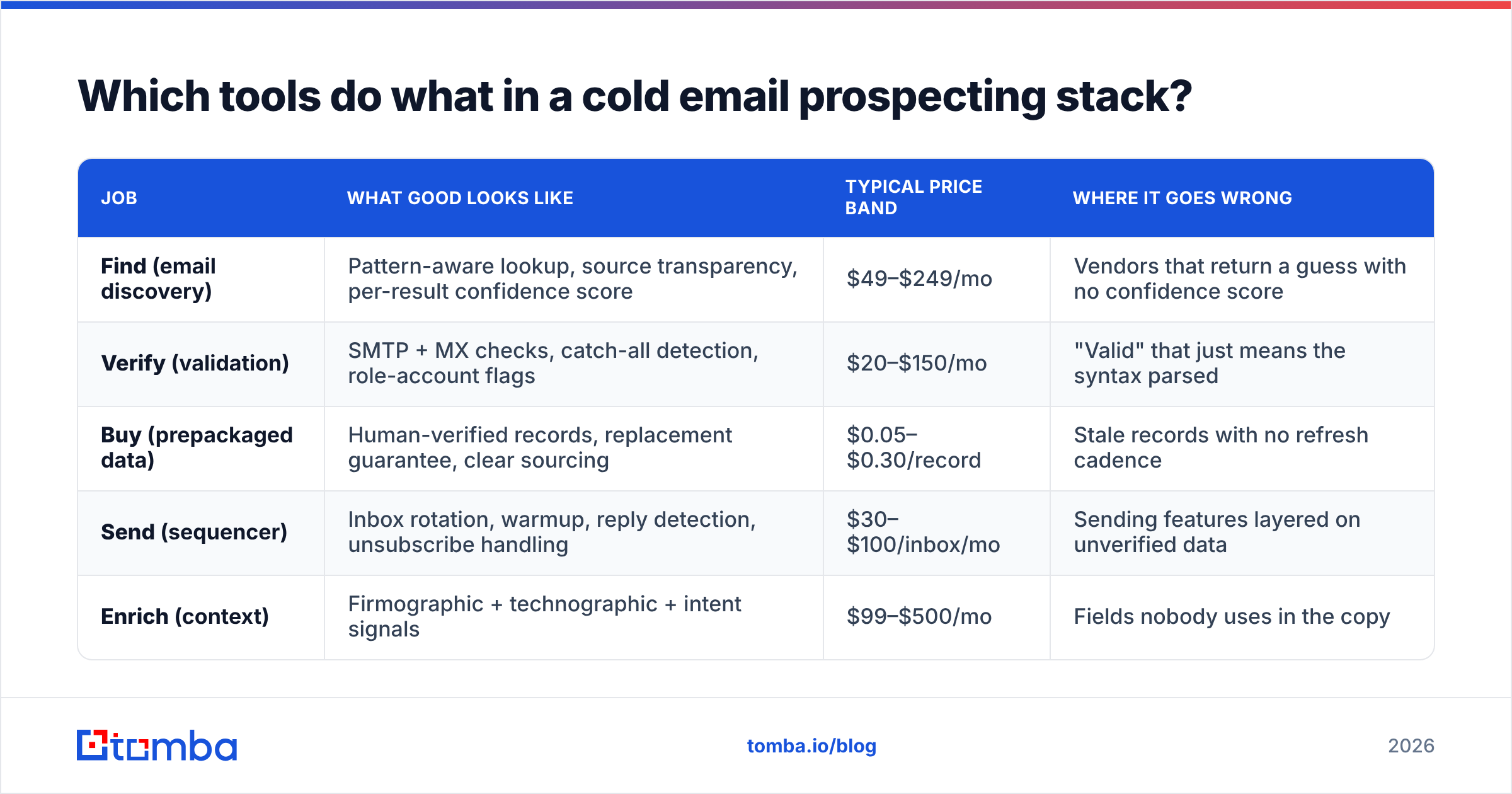
The single biggest budget mistake is buying one platform to do all three jobs — find, verify, send — and discovering that its verification is a wrapper around a cheap third-party API. Here's how the categories actually break down.
| Job | What good looks like | Typical price band | Where it goes wrong |
|---|---|---|---|
| Find (email discovery) | Pattern-aware lookup, source transparency, per-result confidence score | $49–$249/mo | Vendors that return a guess with no confidence score |
| Verify (validation) | SMTP + MX checks, catch-all detection, role-account flags | $20–$150/mo | "Valid" that just means the syntax parsed |
| Buy (prepackaged data) | Human-verified records, replacement guarantee, clear sourcing | $0.05–$0.30/record | Stale records with no refresh cadence |
| Send (sequencer) | Inbox rotation, warmup, reply detection, unsubscribe handling | $30–$100/inbox/mo | Sending features layered on unverified data |
| Enrich (context) | Firmographic + technographic + intent signals | $99–$500/mo | Fields nobody uses in the copy |
A few concrete notes on vendors, since "it depends" is a coward's answer:
- For discovery, Tomba sits in the accuracy-first camp: results carry a confidence score and a source list, so you can decide whether to send or hold. Free tier is 25 searches/month; Starter is $49/mo, Growth $99/mo, Pro $249/mo. Full Tomba pricing is public.
- For prepackaged contact data, BookYourData is a genuinely strong option when you'd rather buy verified records than resolve them yourself. Their pay-as-you-go model and accuracy guarantee suit teams who want a clean list today rather than a search workflow. It solves a different problem than a finder does, and for many teams both belong in the stack.
- For sending, whichever sequencer you pick, the deliverability outcome is dominated by the list you feed it. Instantly, Smartlead, and Saleshandy all send fine. None of them fix a 9% bounce rate.
- For CRM-side hygiene, HubSpot's sales guidance remains the most readable free reference on lifecycle stages and how prospecting data should land in the pipeline.
What does a cold email that gets replies actually look like?#
Four sentences. Under 90 words. One ask.
The structure that survives testing:
- Observation — a specific, verifiable fact about their company. Not "I love what you're doing." A fact.
- Implication — what that fact probably means for them, stated as a hypothesis you might be wrong about.
- Proof — one number from a comparable customer. Not a case study link.
- Ask — a question that costs less than 10 seconds to answer.
Example:
Saw you posted two RevOps roles in six weeks. Usually that means the reporting layer broke before the headcount did. We cut list-hygiene time from 6 hours to 20 minutes for a 40-person SaaS team last quarter. Worth a look, or is data quality already handled?
Notice what's absent: no "hope you're well," no three-paragraph company boilerplate, no calendar link in the first touch. The ask is a question, so replying is easier than ignoring. That's the whole trick.
Follow-ups should add information, not guilt. "Bumping this to the top of your inbox" is a confession that you had nothing to say. Give a new angle, a new number, or a graceful exit on touch four.
How many emails should you send per inbox per day?#

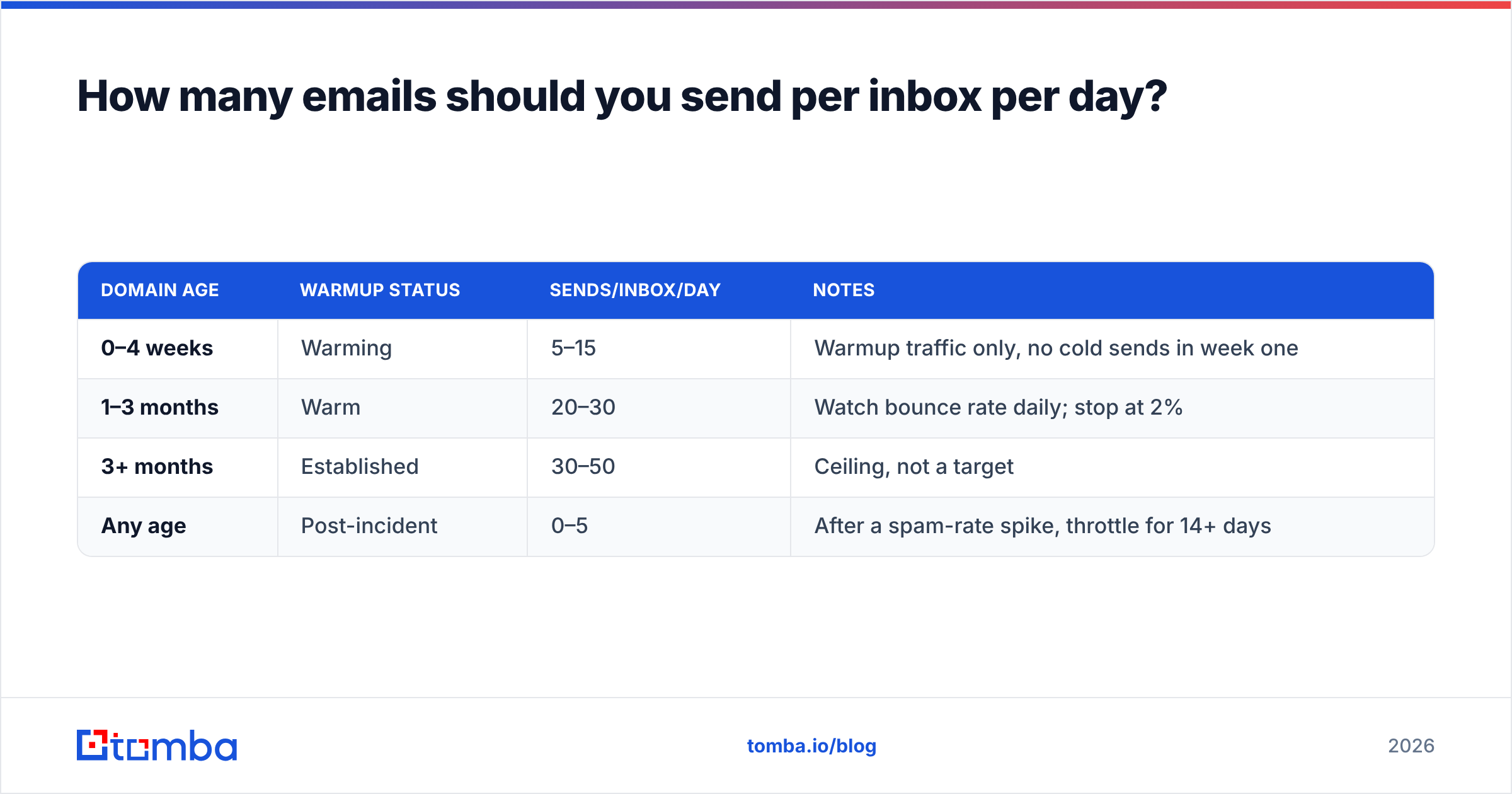
Fewer than you want to. The safe operating envelope in 2026:
| Domain age | Warmup status | Sends/inbox/day | Notes |
|---|---|---|---|
| 0–4 weeks | Warming | 5–15 | Warmup traffic only, no cold sends in week one |
| 1–3 months | Warm | 20–30 | Watch bounce rate daily; stop at 2% |
| 3+ months | Established | 30–50 | Ceiling, not a target |
| Any age | Post-incident | 0–5 | After a spam-rate spike, throttle for 14+ days |
Two inboxes at 30/day beats six inboxes at 60/day, every time, because reputation is per-domain and recovery is slow. If your growth model requires 2,000 cold sends a day, your growth model is the problem, not your infrastructure.
Run an SPF checker and confirm DKIM and DMARC before your first send. Missing authentication records are the single most common reason a technically clean list still lands in spam.
What are the most common cold email prospecting mistakes?#
- Sending to catch-all domains as if they were verified. They accept everything. Acceptance is not delivery.
- Optimizing subject lines on open rate. You are measuring pixel prefetch, not human attention.
- Personalizing the first line and templating the rest. Buyers spot the seam instantly. It reads worse than an honest template.
- Treating a bounce as a wasted credit. It's a reputation debit that costs you future sends.
- Skipping the 50-contact pilot. You learn more from 50 sends you read carefully than 5,000 you skim in aggregate.
- Buying a list and sending to it the same day. Even good vendor data ages. Re-verify at send time.
- No unsubscribe mechanism. Beyond the legal exposure, complaint rate is the metric that ends domains.
How do you measure cold email prospecting properly?#
Track four numbers and ignore the rest:
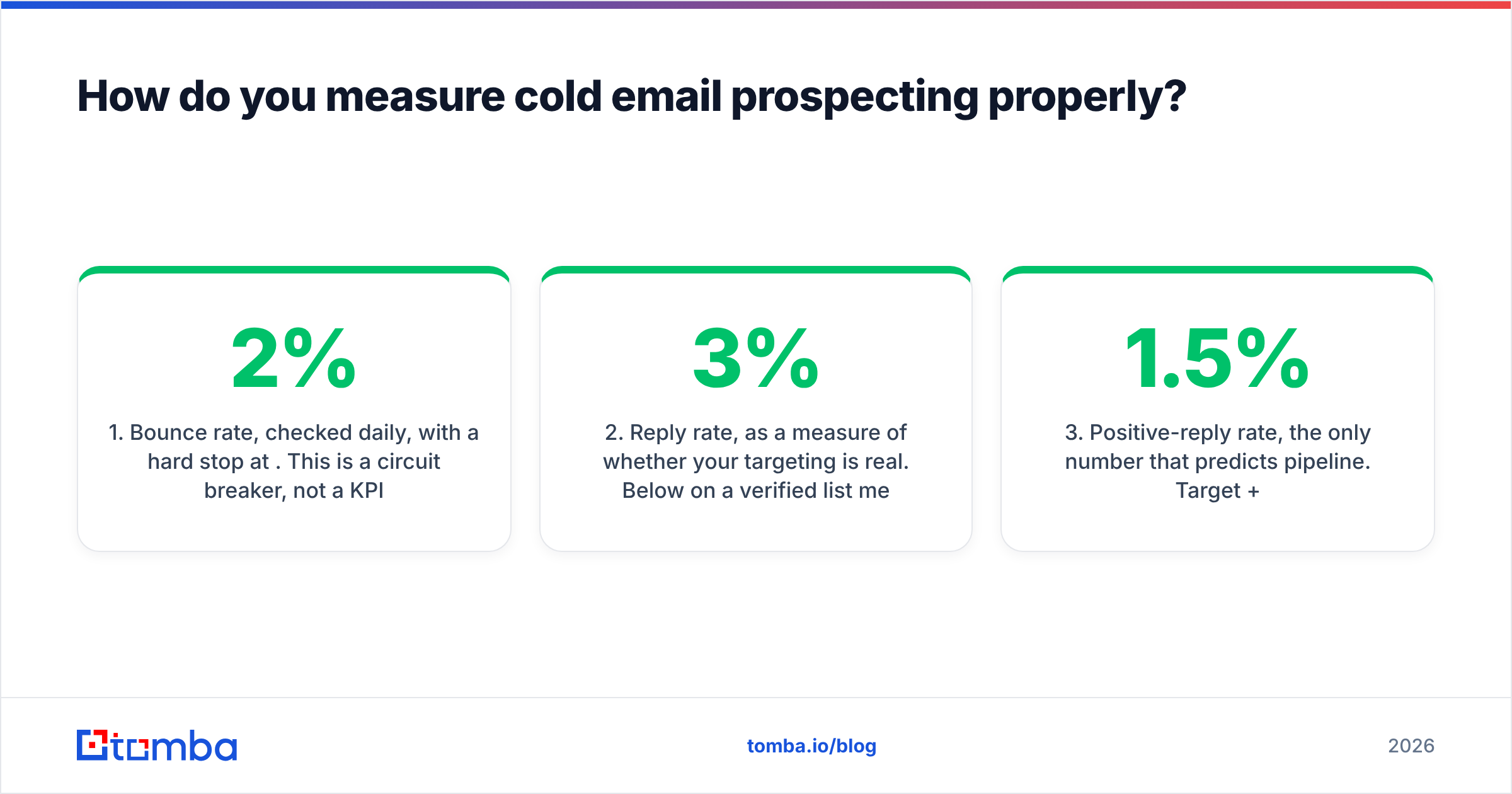
- Bounce rate, checked daily, with a hard stop at 2%. This is a circuit breaker, not a KPI.
- Reply rate, as a measure of whether your targeting is real. Below 3% on a verified list means your ICP is wrong, not your copy.
- Positive-reply rate, the only number that predicts pipeline. Target 1.5%+.
- Meetings per 1,000 verified sends. This is the unit economics of the whole channel. Under 5 and the channel isn't paying for itself.
Everything else — opens, clicks, "engagement score" — is a lagging proxy at best and a fabricated metric at worst. If your sequencer's dashboard leads with open rate, that dashboard was designed in 2019.
Where should you start this week?#
Pick one segment. Fifty accounts. One contact each. Resolve the addresses, verify them, hold the catch-alls, and write fifty emails you'd be comfortable having forwarded to the CEO. Send over five days. Read every reply.
That exercise will teach you more about your ICP than a quarter of volume experiments, and it costs almost nothing to run.
When you're ready to build that first list, the Tomba Email Finder resolves professional email addresses by name and domain, returns a confidence score and the sources behind each result, and lets you verify before a single message leaves your sender. The free tier covers 25 searches a month — enough to run the fifty-contact pilot above across two segments and see whether the channel deserves a budget line before you commit one.
Related guides#
// get started
Find, verify and enrich your first contacts today
Start on the free plan with 25 searches a month, then scale when your team is ready.
Free plan · No credit card required · GDPR & CCPA
// about the author