Cold Email Research: How to Personalize at Scale in 2026
Most reps either skip research entirely or burn 20 minutes on a prospect worth 90 seconds. Here's a tiering system, the signals that actually move reply rates, and the stack that makes it repeatable.
TL;DR
- Cold email research is not "find a fun fact about the prospect." It's finding evidence that a specific problem exists right now at a specific account, and that your reader owns it.
- Research effort should be tiered, not uniform. Tier 1 accounts get 12 minutes. Tier 3 gets 45 seconds of automated enrichment and nothing more.
- The signals that move reply rates are structural (hiring, funding, tech-stack changes, org changes, public complaints), not cosmetic (a marathon photo, a podcast appearance).
- Bad data destroys good research. A perfectly researched email sent to a dead mailbox scores zero — verify before you personalize.
- Measure research by reply-rate lift per minute spent, not by how clever the first line sounds.
What is cold email research, actually?#
Cold email research is the process of collecting enough verified information about a company and a person to make one specific, falsifiable claim about their situation — and then sending an email built around that claim.
That last part is where most definitions stop short. Research isn't the collection. Research is the collection plus the discard. You will find fifteen facts about a prospect. Fourteen of them are irrelevant to whether they'll buy. The job is identifying the one that isn't.
Here's the test: if your opening line could be pasted into an email to a different company without becoming false, it isn't research. It's decoration.
Compare:
- Decoration: "Loved your recent post on LinkedIn about scaling culture."
- Research: "You posted three SDR roles in Berlin last month but your careers page still lists a single AE. That ratio usually breaks pipeline coverage in about a quarter."
The second one is a claim. It can be wrong. That's what makes it worth reading.
Why does most cold email research fail?#
Because it optimizes for feeling personal instead of being relevant, and because it's applied uniformly across a list that doesn't deserve uniform treatment.
Four failure modes come up constantly:
- The compliment opener. "Congrats on the funding round!" arrives in a Series B VP's inbox roughly 400 times in the two weeks after the announcement. It is not personalization. It is proof you read TechCrunch.
- Research without a hypothesis. Reps read a company's About page, learn nothing actionable, and write a generic email anyway. Twelve minutes spent, zero signal extracted. If you don't know what problem you're looking for evidence of, you'll find nothing.
- Uniform effort. Spending equal time on a 12,000-employee enterprise account and a 9-person agency guarantees you underinvest in the first and overinvest in the second.
- Researching before verifying. You spend fifteen minutes on a beautiful email to
sarah.chen@acmecorp.com, an address you guessed from a naming pattern. It bounces. Your sender reputation takes the hit and the fifteen minutes are gone.
That last one is worth sitting with. Research is downstream of data quality, not upstream of it. Verify the contact exists, then invest research time.

How much cold email research is enough?#
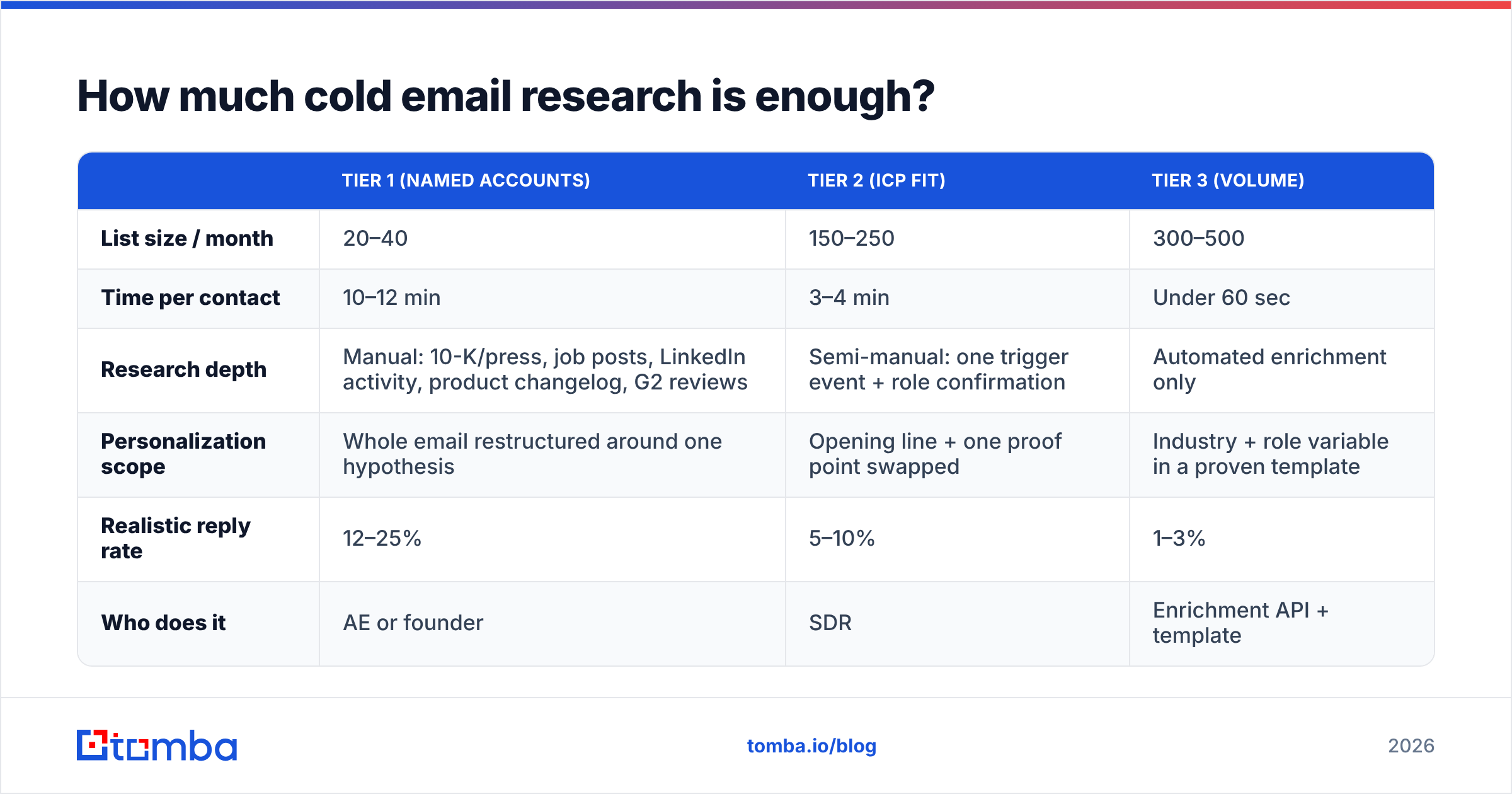
Tier your list first. Here's a working framework you can adapt — the numbers are calibrated for a two-person outbound team running ~600 contacts a month.
| Tier 1 (Named Accounts) | Tier 2 (ICP Fit) | Tier 3 (Volume) | |
|---|---|---|---|
| List size / month | 20–40 | 150–250 | 300–500 |
| Time per contact | 10–12 min | 3–4 min | Under 60 sec |
| Research depth | Manual: 10-K/press, job posts, LinkedIn activity, product changelog, G2 reviews | Semi-manual: one trigger event + role confirmation | Automated enrichment only |
| Personalization scope | Whole email restructured around one hypothesis | Opening line + one proof point swapped | Industry + role variable in a proven template |
| Realistic reply rate | 12–25% | 5–10% | 1–3% |
| Who does it | AE or founder | SDR | Enrichment API + template |
The mistake isn't Tier 3. Tier 3 is fine — it's a cheap lottery ticket with a positive expected value if your data is clean and your copy is decent. The mistake is running your whole list at Tier 2.5: too much time for volume economics, too little depth to earn a Tier 1 reply. That middle zone is where outbound teams quietly lose thousands of hours a year.
Sales research productivity is one of the recurring themes in Gartner's sales research — the pattern is consistent: reps overestimate how much research a mid-tier account justifies and underestimate how much a strategic one does.
Which cold email research signals actually work?#
Signals are only useful if they correlate with a budget-holding problem existing this quarter. Ranked roughly by reply-rate impact in B2B SaaS outbound:
- Hiring signals. Open roles are a company telling you where it hurts, in public, with a budget attached. Three data engineer openings means a data problem. Two RevOps hires means their CRM is a mess. This is the single richest and most under-used source.
- Tech-stack changes. A company that just added a new marketing automation platform has a six-month window where integrations, migrations, and data hygiene are top of mind. Adoption and removal are both signals.
- Org changes. New VPs rebuild their stack in the first 120 days. A new Head of Growth is the highest-intent buyer in B2B, and they announce themselves publicly.
- Funding and expansion. Weak on its own, strong as a multiplier. "You raised" is noise. "You raised, then opened four sales roles in a market you didn't operate in last year" is a hypothesis.
- Public complaints and reviews. G2 reviews, Reddit threads, and support forums tell you exactly what your prospect's current vendor is failing at. If they left a two-star review of your competitor eleven weeks ago, you have your entire email.
- Content and conference activity. Weakest tier. Useful for tone and timing, rarely for the core claim. A prospect speaking about data privacy tells you the topic is safe. It doesn't tell you they have a problem.
Notice that signals 1 through 5 are all observable from the outside without following anyone around the internet. That matters. Research that feels surveillance-adjacent ("saw you were at the gym at 6am!") reads as creepy and kills replies, a point HubSpot's sales team has made repeatedly in their outbound guidance.
Where do you find these signals fast?#
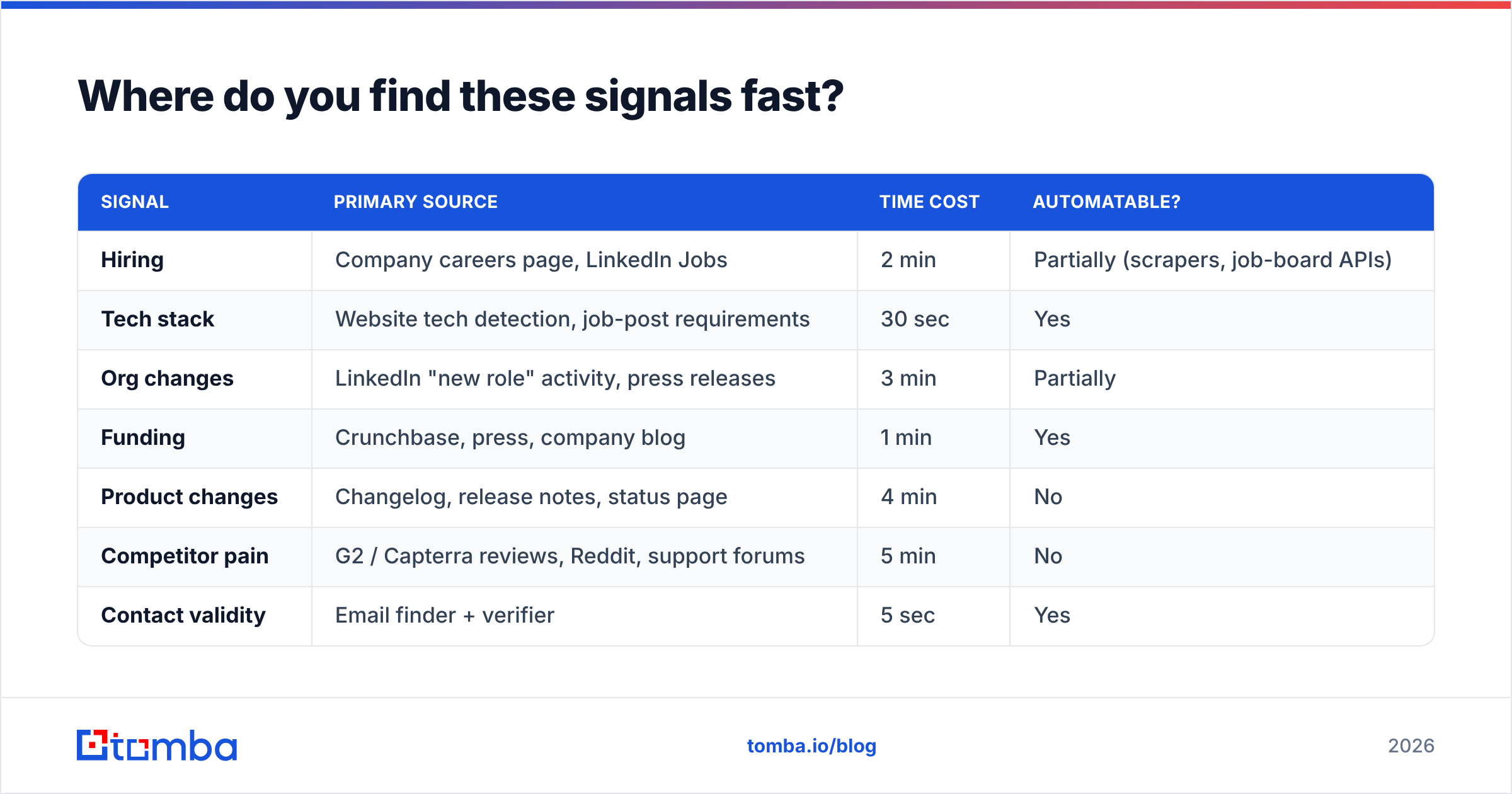
| Signal | Primary source | Time cost | Automatable? |
|---|---|---|---|
| Hiring | Company careers page, LinkedIn Jobs | 2 min | Partially (scrapers, job-board APIs) |
| Tech stack | Website tech detection, job-post requirements | 30 sec | Yes |
| Org changes | LinkedIn "new role" activity, press releases | 3 min | Partially |
| Funding | Crunchbase, press, company blog | 1 min | Yes |
| Product changes | Changelog, release notes, status page | 4 min | No |
| Competitor pain | G2 / Capterra reviews, Reddit, support forums | 5 min | No |
| Contact validity | Email finder + verifier | 5 sec | Yes |
Two practical notes.
First: the stack detection step is worth automating early. Knowing a prospect runs a particular CRM, ESP, or analytics tool narrows your hypothesis before you read a single word about them. A website tech stack checker turns this into a two-second lookup.
Second: everything in that table is worthless if the mailbox is wrong. Run your list through an email verifier before assigning a single minute of manual research. Bounce-first, research-second is the ordering that survives contact with reality.
How do you turn a signal into copy?#
A signal is not a sentence. It's the input to a three-part structure:
Observation → Implication → Ask.
The observation is the verified fact. The implication is your hypothesis about what it costs them. The ask is small and specific.
Weak (observation only):
"Saw you're hiring three SDRs."
Strong (all three):
"You've got three SDR openings and one AE listed. Teams that hire ahead of AE capacity usually end up with SDRs booking meetings nobody has time to run — pipeline looks great, conversion tanks. Is that already showing up in your Q3 numbers, or are you hiring AEs next?"
The second email is 48 words and contains one falsifiable claim, one consequence, and a question the reader can answer in nine words. If your hypothesis is wrong, they'll often correct you — which is still a reply, and still a conversation.
This is why "research" and "copywriting" aren't separate steps. Research that doesn't produce an implication hasn't finished. If you can't complete the sentence "…which probably means…", go back and find a better signal.
Can you do cold email research at scale without a team?#
Yes, if you accept that "at scale" means automating the bottom two tiers and protecting your manual hours for the top one. The workflow that works:
Step 1 — Build the list from a firmographic filter, not a name list. Start from the ICP definition (industry, headcount, geo, stack), not from a spreadsheet someone handed you.
Step 2 — Enrich and verify in bulk. Find the addresses, verify them, drop anything risky or catch-all-unresolvable. A bulk email finder handles a few thousand rows without a manual pass. This step also gives you the role/title data you'll use to segment.
Step 3 — Attach machine-readable signals. Job counts, tech stack, funding date, headcount delta over 90 days. These come from APIs and become template variables. This is Tier 3's entire research budget, and it's enough.
Step 4 — Score and split. Accounts with two or more stacked signals get promoted to Tier 2. Accounts matching your named-account list get Tier 1 regardless of signal count.
Step 5 — Spend your human hours on Tier 1 only. Twelve minutes each, forty accounts, eight hours a month. That's a realistic budget for a founder or a senior AE.
Step 6 — Feed replies back into scoring. After 200 sends you'll know which signal predicts replies in your market. Weight it up. Kill the ones that don't.
The teams that win at outbound aren't researching more. They're researching narrower, on fewer accounts, with cleaner data underneath.
What tools do you need for cold email research?#
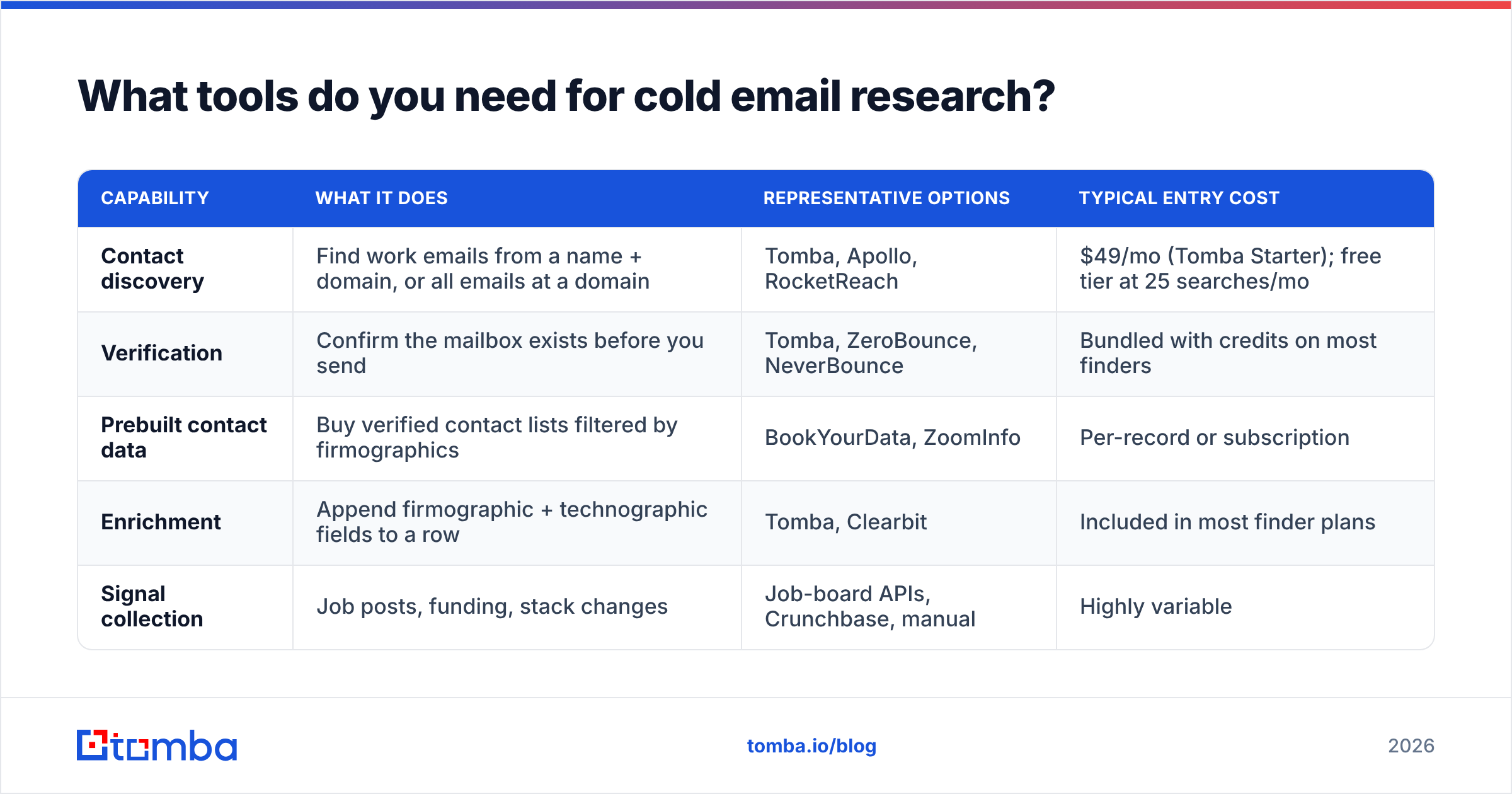
You need four capabilities: contact discovery, verification, enrichment, and signal collection. Some tools cover several. Here's an honest breakdown of the categories.
| Capability | What it does | Representative options | Typical entry cost |
|---|---|---|---|
| Contact discovery | Find work emails from a name + domain, or all emails at a domain | Tomba, Apollo, RocketReach | $49/mo (Tomba Starter); free tier at 25 searches/mo |
| Verification | Confirm the mailbox exists before you send | Tomba, ZeroBounce, NeverBounce | Bundled with credits on most finders |
| Prebuilt contact data | Buy verified contact lists filtered by firmographics | BookYourData, ZoomInfo | Per-record or subscription |
| Enrichment | Append firmographic + technographic fields to a row | Tomba, Clearbit | Included in most finder plans |
| Signal collection | Job posts, funding, stack changes | Job-board APIs, Crunchbase, manual | Highly variable |
A few notes on the tradeoffs, since the categories blur in marketing copy:
- Finders vs. databases. A finder resolves a contact on demand from a name and domain — good when you already know who you want. A database like BookYourData is stronger when you're starting from filters rather than named targets, and it's a genuinely solid option if list-building is your bottleneck. Most teams end up using both: the database for discovery, the finder for verification and one-off lookups.
- All-in-one sequencers. Convenient, but you're locked into their data quality. If bounce rates climb, you can't swap the data layer without swapping the whole tool.
- Verification is non-negotiable. Catch-all domains are the specific place where cheap tools quietly return "valid" for addresses that don't exist. A dedicated catch-all verifier is what separates a 1% bounce rate from a 7% one.
On pricing: Tomba's plans run Free (25 searches/mo), Starter at $49/mo, Growth at $99/mo, and Pro at $249/mo, with the finder, verifier, domain search, and enrichment on the same credit pool. For a solo founder running Tier 1 outbound, the free tier is often genuinely enough for the first month.
How do you know if the research is working?#
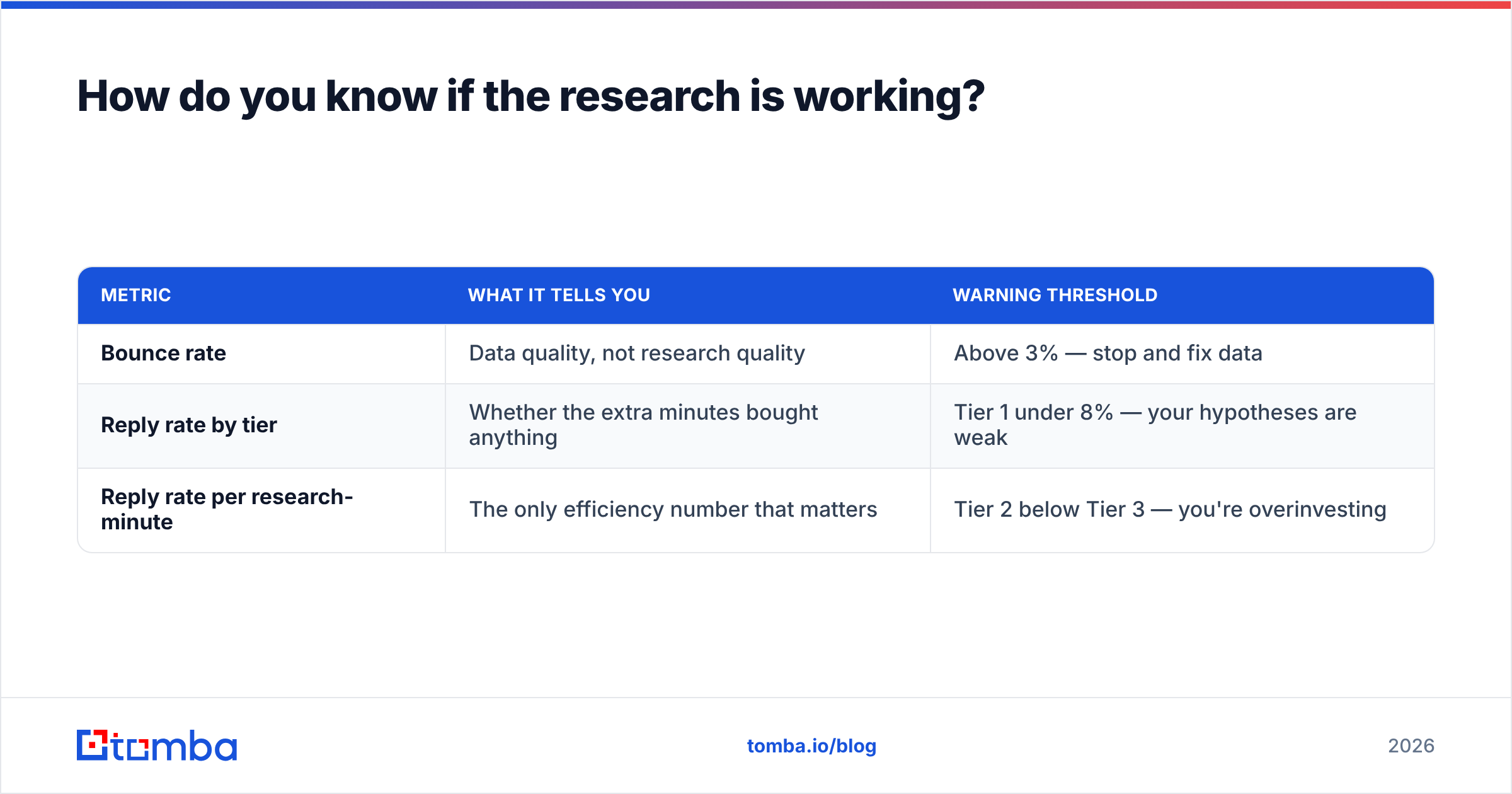
Track three numbers, not one.
| Metric | What it tells you | Warning threshold |
|---|---|---|
| Bounce rate | Data quality, not research quality | Above 3% — stop and fix data |
| Reply rate by tier | Whether the extra minutes bought anything | Tier 1 under 8% — your hypotheses are weak |
| Reply rate per research-minute | The only efficiency number that matters | Tier 2 below Tier 3 — you're overinvesting |
That last row is the one nobody calculates. If your Tier 2 emails take four minutes each and reply at 6%, and your Tier 3 emails take 45 seconds and reply at 2.5%, then Tier 3 is producing roughly 3.3 replies per hour of work and Tier 2 is producing 0.9. Tier 2 is losing. Either the research has to get sharper or the tier has to be collapsed into Tier 3.
Run this calculation monthly. It will surprise you at least once.
What's changed about cold email research in 2026?#
Three things, briefly.
AI made surface-level personalization worthless. Every prospect now receives AI-generated openers referencing their LinkedIn post. The commodity is dead. The premium is on hypotheses a language model can't produce without the underlying signal — which means the advantage shifted from writing to data collection.
Inbox providers tightened bulk-sender rules. Bounce rates and complaint rates now gate delivery in ways they didn't three years ago. Research quality is now indirectly a deliverability input, because a researched, relevant email gets marked as spam less often.
Signal APIs became cheap. Job posts, funding, and tech stack data that required manual work in 2020 is now a single API call. The gap between the teams that use them and the teams that don't is now almost entirely a workflow gap, not a budget one.
Start with the data layer. Every hour of research you do on a contact who doesn't exist is an hour you don't get back, and every bounce nudges your domain closer to the spam folder. Use the Tomba Email Finder to resolve and verify your list first — the free tier covers 25 searches a month, which is enough to work through your first named-account batch before you commit to a plan. Then spend your twelve minutes where they'll actually pay you back.
Related guides#
Ready to find emails that actually work?
Join 150,000+ professionals who stopped guessing and started sending. Free credits on signup — no credit card required.
Get the Tomba newsletter
Practical outbound tactics and product updates — once every two weeks.
About the author