Cold Email Service in 2026: How to Pick One That Actually Lands
Most cold email services sell you sending volume, not replies. Here's what actually separates the platforms that land in the inbox from the ones that quietly burn your domain.
TL;DR
- A cold email service is the sending layer — mailboxes, warmup, sequencing, throttling, reply detection. It is not a lead database, and confusing the two is why most campaigns fail.
- Pricing is quoted per user or per contact, but the real cost driver is inboxes and sending domains, which most vendors bill separately.
- Deliverability is 70% list quality and authentication, 30% platform. The best service in the world cannot rescue a list with a 22% bounce rate.
- Verify before you send. A single campaign to an unverified list can take a warmed domain from 95% inbox placement to spam-foldered in under 48 hours.
- Budget roughly $30–$100/mo for the sending platform, $3–$6 per extra mailbox, and a separate line item for finding and verifying contacts.
What is a cold email service, exactly?#
A cold email service is the software that takes a list of contacts and delivers messages to them one at a time, from real mailboxes, on a schedule that looks human.
Think of it like a delivery fleet. The trucks (mailboxes), the dispatch schedule (throttling), the routes (sequences), and the maintenance crew (warmup) are all part of the fleet. What the fleet does not do is decide what goes in the boxes or who the customers are. That's your list — and it comes from somewhere else entirely.
This distinction matters because vendors blur it constantly. Apollo, Instantly, Smartlead, Lemlist, Saleshandy, and Reply.io all describe themselves as "cold email platforms," but they sit at different points on a spectrum:
- Pure sending infrastructure — Smartlead, Instantly. You bring the list, they handle inboxes, rotation, warmup, and reply routing at volume.
- Sequencer plus light data — Lemlist, Saleshandy, Reply.io. Sending tools with a bundled contact database, usually thinner than a dedicated data vendor's.
- All-in-one GTM suites — Apollo, Outreach, Salesloft. Database, sequencer, dialer, and CRM sync in one bill, with the sending layer often the weakest component.
- Managed / agency services — done-for-you campaigns where a human writes copy and runs the sends. Priced at $2,000–$8,000/mo retainers.
Most teams under 20 reps want category 1 or 2, paired with a dedicated data source. Category 3 looks cheaper on the invoice and is more expensive on the P&L, because you end up paying premium seat prices for database credits you could source for a fraction elsewhere.

How do cold email services actually compare on price?#
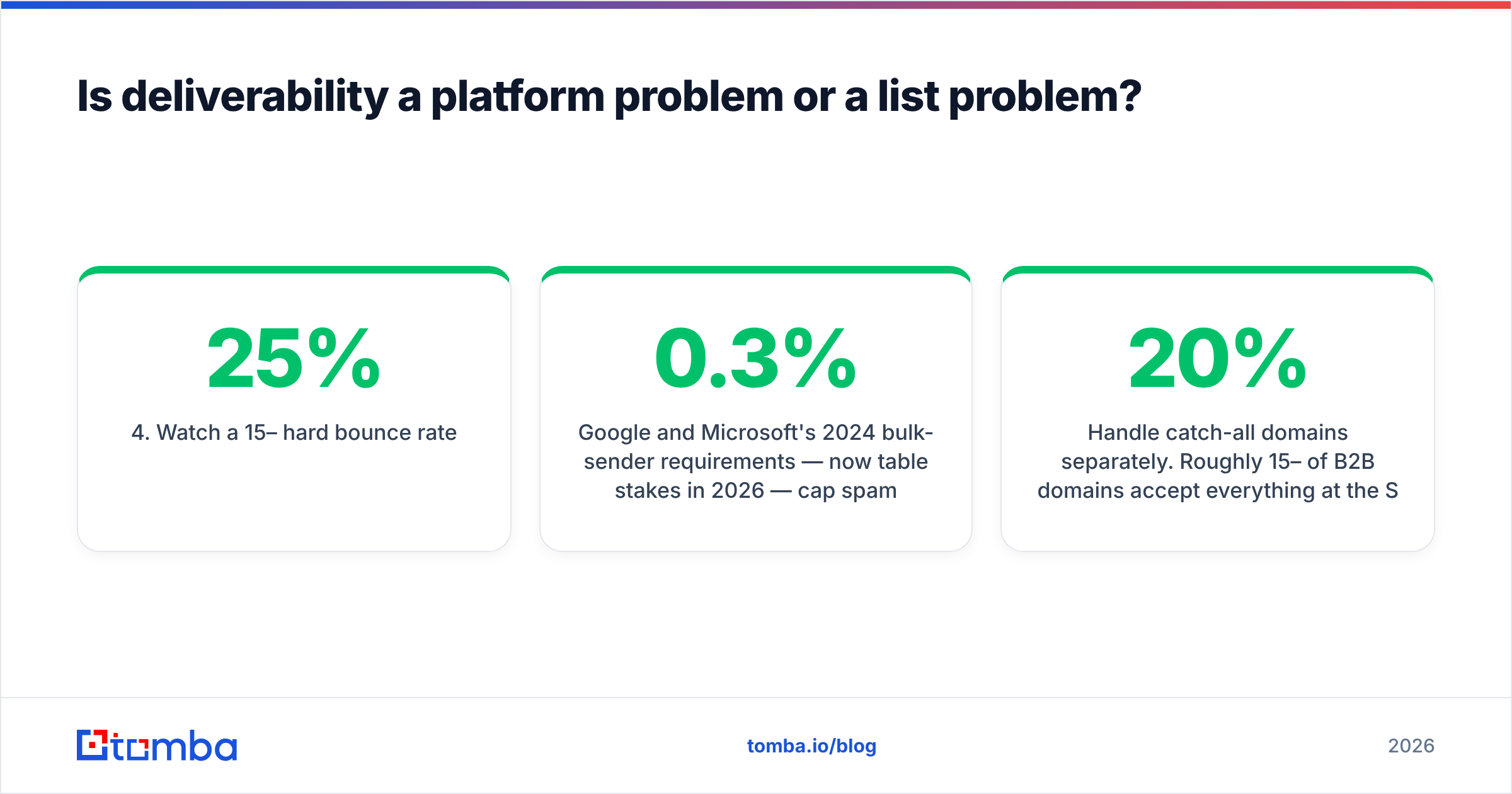
Below is what you'd realistically pay in 2026 for a two-person outbound team sending roughly 3,000 emails a month. Note that "per user" pricing is deceptive — you almost always need multiple mailboxes per user.
| Feature | Instantly | Smartlead | Lemlist | Apollo | Saleshandy |
|---|---|---|---|---|---|
| Entry price | $37/mo | $39/mo | $69/user/mo | $59/user/mo | $36/mo |
| Unlimited mailboxes | Yes | Yes (paid tiers) | No — per seat | No | Yes on higher tiers |
| Built-in warmup | Included | Included | Add-on | Limited | Included |
| Contact database | Add-on credits | No | Bundled, small | Yes, large | Bundled |
| Inbox rotation | Yes | Yes | Yes | Partial | Yes |
| Reply / bounce detection | Yes | Yes | Yes | Yes | Yes |
| API access | Paid tiers | Paid tiers | Paid tiers | Yes | Paid tiers |
| Best for | High-volume agencies | Technical operators | Personalization-heavy | Teams wanting one bill | Budget SMB |
Two things jump out. First, entry prices cluster tightly around $36–$69 — the platform is not where you win or lose money. Second, the column that varies most is contact database, and that's the column where the actual cost lives.
An Apollo seat at $59/mo sounds cheap until you hit the export cap and need to upgrade twice. Meanwhile a pure sender at $39/mo plus a dedicated data source often lands cheaper and gives you better data, because the data vendor's entire business depends on accuracy rather than on locking you into a seat.
For reference, Tomba pricing starts free at 25 searches/mo, then $49/mo (Starter), $99/mo (Growth), and $249/mo (Pro). Pair that with a $39/mo sender and you're running a complete outbound stack for under $90/mo with data you can actually trust.
Peer vendors like BookYourData take a different, credit-purchase approach — you buy verified records outright rather than subscribing — which works well for teams doing a few large, infrequent list pulls rather than continuous prospecting. Both models are legitimate; pick based on whether your list-building is bursty or continuous.
Is deliverability a platform problem or a list problem?#
It's a list problem wearing a platform costume.
Here's the failure sequence almost every team runs, in order:
- Buy or scrape a list of 5,000 contacts.
- Skip verification because the vendor said the data was "verified."
- Load it into a cold email service and send.
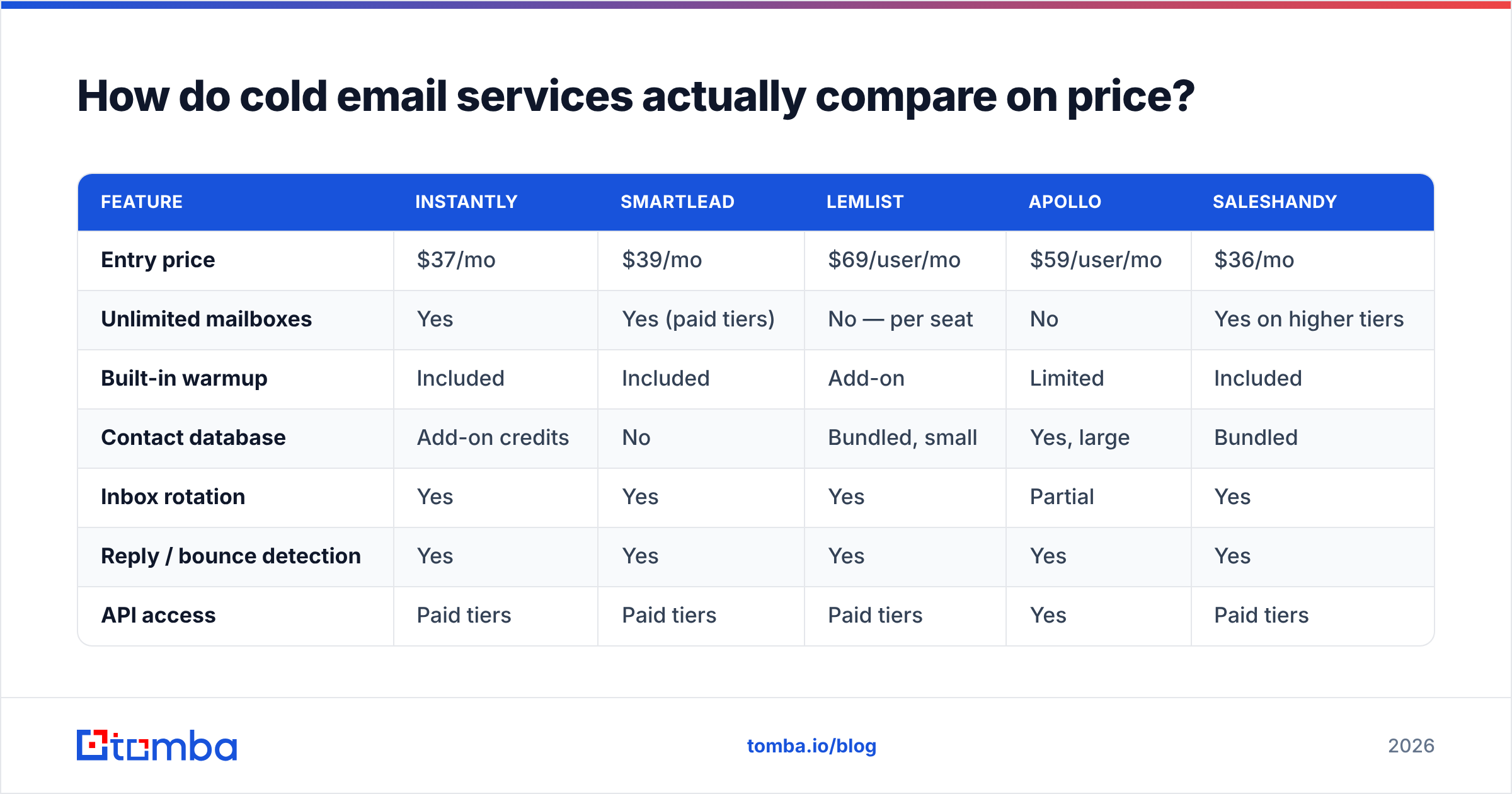
- Watch a 15–25% hard bounce rate.
- Mailbox providers flag the sending domain within two campaigns.
- Blame the platform, churn to a competitor, repeat.
Google and Microsoft's 2024 bulk-sender requirements — now table stakes in 2026 — cap spam complaint rates at 0.3% and require SPF, DKIM, and DMARC on every sending domain. You can monitor exactly where you stand using Google Postmaster Tools, which is free and which almost nobody checks before a campaign. A hard bounce rate above roughly 3% is a reputation event. Above 10%, you're not sending cold email anymore; you're testing how fast a domain can be blacklisted.
No cold email service prevents this. Warmup pools, inbox rotation, and send throttling all reduce the rate at which a bad list damages you — they change the slope, not the direction.
The fix is unglamorous and mechanical:
- Find contacts from a source that publishes its methodology. Understanding where the data comes from tells you more about accuracy than any accuracy percentage on a landing page.
- Verify every address before it enters the sequencer. An email verifier pass costs fractions of a cent per record and removes hard bounces before they exist.
- Handle catch-all domains separately. Roughly 15–20% of B2B domains accept everything at the SMTP layer. A catch-all verifier can distinguish real mailboxes on those domains instead of forcing you to guess.
- Authenticate before you warm. SPF, DKIM, DMARC, and a custom tracking domain. Then warm for 14–21 days.
- Ramp slowly. 10–20 sends per mailbox per day for the first two weeks, scaling to 30–50. More mailboxes, not more volume per mailbox.
If you want a concrete ramp schedule, an email warmup calculator will give you a day-by-day send ceiling rather than a vague "go slow."
What features actually matter in a cold email service?#
Ignore the feature matrix on the pricing page. These are the five things that change outcomes, ranked:
1. Inbox rotation across multiple domains. The single highest-leverage feature. Instead of one domain sending 200 emails/day, you send 40/day from five secondary domains. Reputation risk is distributed. If one domain gets flagged, four keep running and your primary domain — the one your website and contracts live on — was never in the blast radius.
2. Native warmup that runs continuously. Warmup isn't a phase, it's a background process. Services that pause warmup once campaigns start are giving you a reputation cliff the moment volume dips.
3. Automatic bounce and reply detection with sequence halt. If a prospect replies and the sequence keeps firing, you've turned a warm lead into a complaint. Test this in a trial — surprisingly many tools have a 6–24 hour detection lag.
4. Send throttling with randomized intervals. Sending 40 emails at exactly 09:00:00 is a machine signature. Real senders spread across hours with irregular gaps.
5. Clean deliverability reporting per domain, not per campaign. Campaign-level open rates tell you about copy. Domain-level placement tells you whether you still have a business next quarter.
Everything else — AI copy generation, LinkedIn steps, native dialers — is a nice-to-have that will not save a campaign built on the wrong list.

How should you actually build the stack?#
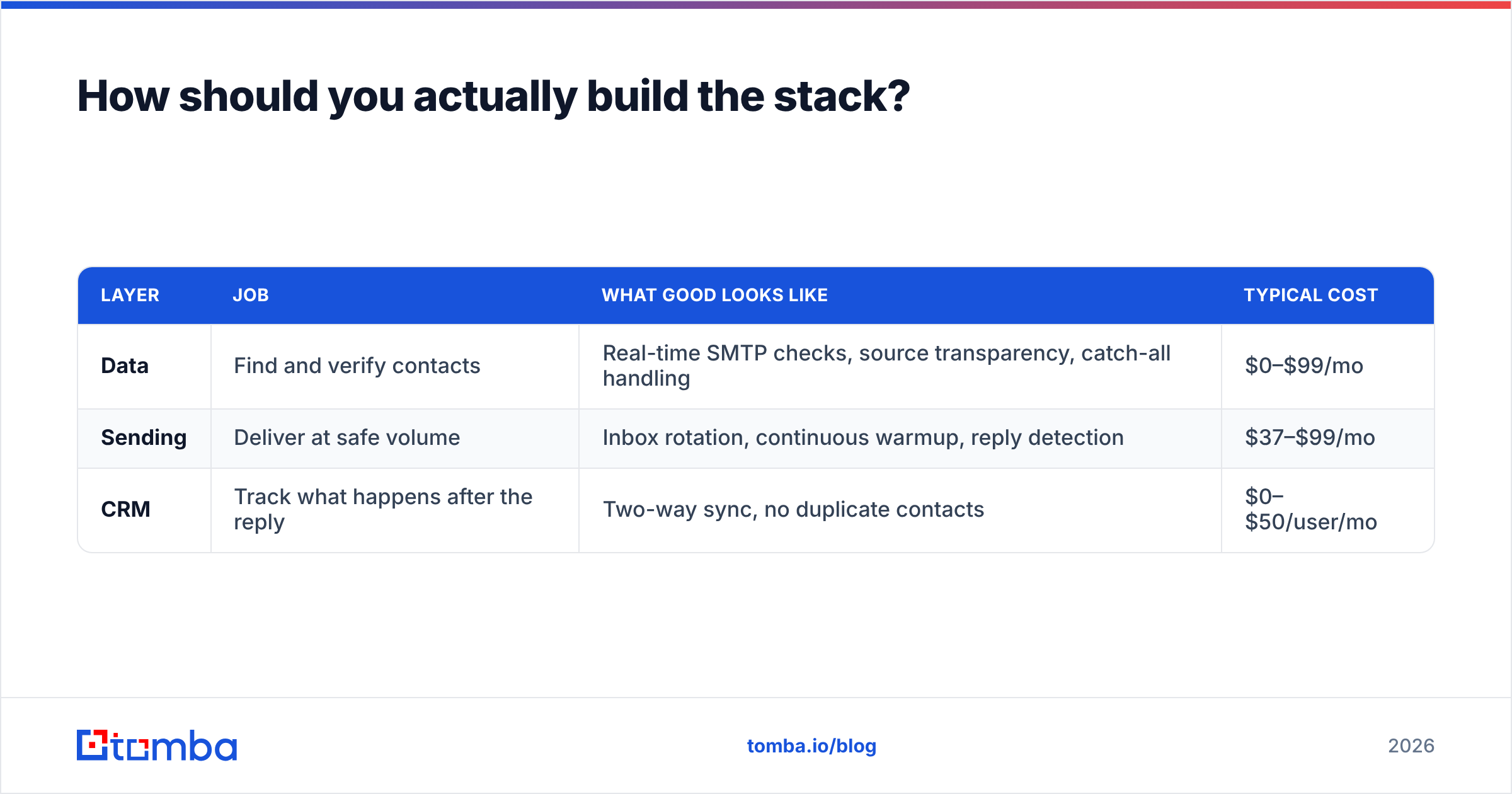
Split it into three layers and buy the best tool for each. Bundling saves invoices, not money.
| Layer | Job | What good looks like | Typical cost |
|---|---|---|---|
| Data | Find and verify contacts | Real-time SMTP checks, source transparency, catch-all handling | $0–$99/mo |
| Sending | Deliver at safe volume | Inbox rotation, continuous warmup, reply detection | $37–$99/mo |
| CRM | Track what happens after the reply | Two-way sync, no duplicate contacts | $0–$50/user/mo |
For the data layer, the practical workflow is: pull target companies, run a domain search to surface every reachable address at each company, use an email finder for named prospects, then verify the whole set in one batch before export. That sequence takes minutes and removes the entire class of bounce-driven reputation damage.
For the sending layer, read actual practitioner reviews rather than vendor copy. The G2 sales engagement category is noisy but the one-star reviews are informative — they cluster around billing surprises and support latency, which is exactly what you can't learn from a demo.
For a sense of how the pure-sender category positions itself, Instantly's own documentation is unusually candid about the fact that inbox placement depends on list hygiene it does not control. That's a good sign in a vendor.
Is a managed cold email agency worth it?#
Sometimes — but the math is specific.
An agency retainer runs $2,000–$8,000/mo. A self-run stack runs roughly $100–$200/mo plus one person's partial attention, call it 8–12 hours a week. If that person's fully-loaded cost is $80/hour, you're at $3,200–$4,800/mo in labor. The agency is genuinely cheaper if your team's time has a higher-value alternative use, and genuinely more expensive if you have a competent SDR with spare cycles.
The failure mode with agencies is that they optimize for meetings booked, not pipeline quality, because meetings are the contractual deliverable. You get volume. You may not get fit. Ask any agency for their reply-to-opportunity conversion rate, not their meeting count, and watch how many change the subject.
Where agencies genuinely win: they already own dozens of warmed sending domains. That inventory takes 60–90 days to build from scratch and is the real asset you're renting.
What does a sane 30-day launch look like?#
- Days 1–3. Buy two or three secondary sending domains that resemble your primary (yourcompany.co, getyourcompany.com). Never send cold from your primary domain. Configure SPF, DKIM, DMARC on each.
- Days 4–7. Create two mailboxes per domain. Start warmup in your cold email service. Do not send anything else.
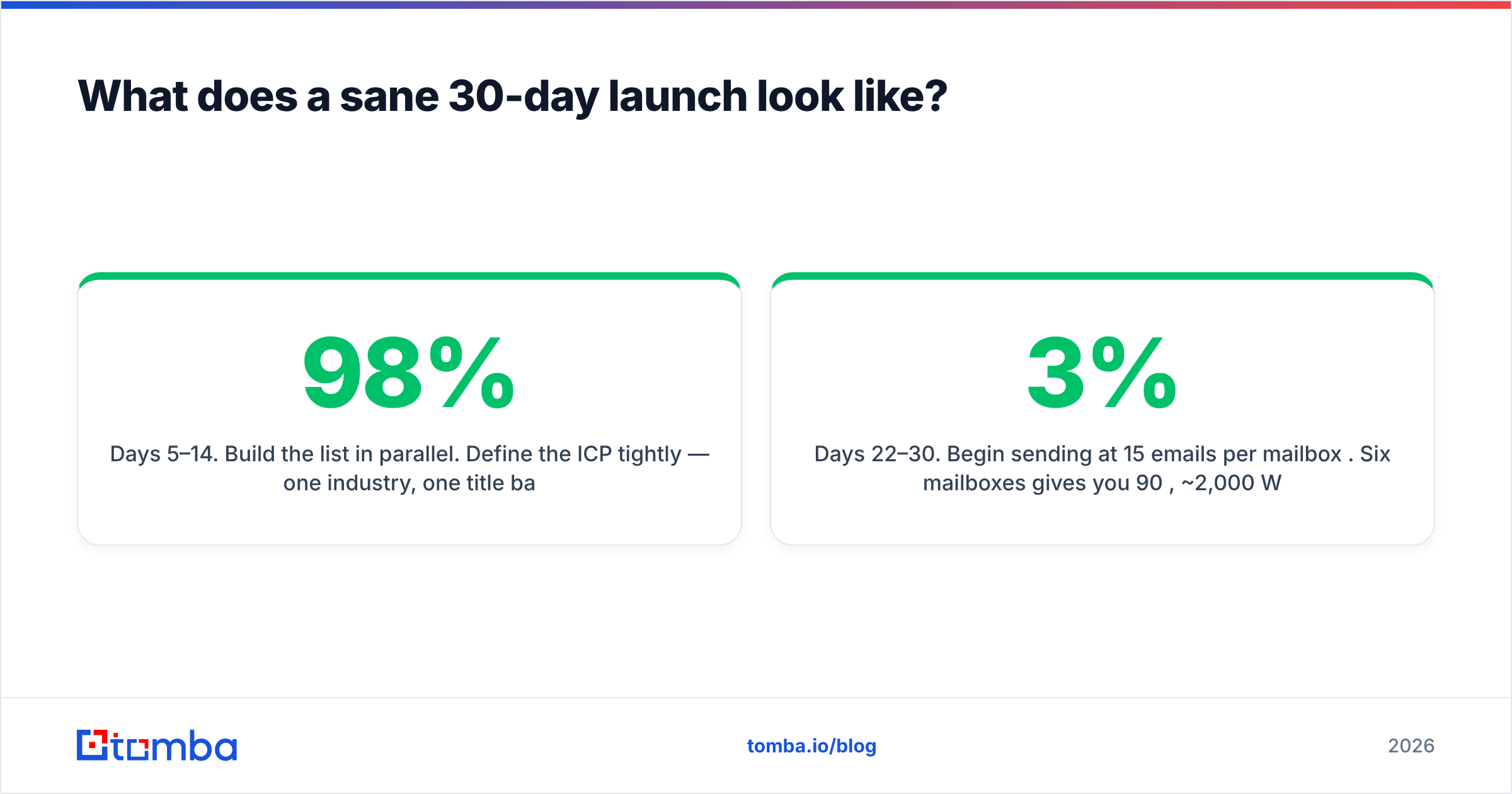
- Days 5–14. Build the list in parallel. Define the ICP tightly — one industry, one title band, one company-size range. Find contacts, verify them, and discard anything the verifier flags as risky or unknown. A 500-contact list that's 98% valid beats a 5,000-contact list that's 80% valid, every single time.
- Days 15–21. Warmup continues. Write three subject-line variants and two body variants. Keep the body under 90 words. One ask, one link, no attachments.
- Days 22–30. Begin sending at 15 emails per mailbox per day. Six mailboxes gives you 90/day, ~2,000/month. Watch bounce rate daily. If it exceeds 3%, stop and re-verify the list. If spam complaints exceed 0.1%, stop and rewrite the copy.
Scale by adding mailboxes, never by raising per-mailbox volume. This is the rule that separates teams sending in year three from teams rebuying domains every quarter.
Which cold email service should you pick?#
If you send under 2,000/month and want the cheapest path that won't hurt you: Saleshandy or Smartlead, paired with an external data source.
If you run an agency or send 20,000+/month across many clients: Instantly or Smartlead, for unlimited mailboxes and rotation depth.
If personalization is your whole differentiator and volume is low: Lemlist.
If leadership demands one vendor and one invoice, and you accept a weaker sending layer as the price: Apollo.
And if you're honest about where campaigns actually break — the list, not the sender — then the order of purchase should be reversed from what most teams do. Get the data right first. The sending platform is the easy, cheap, replaceable part.
Get your list right before you pick a sender#
Every deliverability problem you're about to have starts with an address that shouldn't have been in the sequence. Before you comparison-shop cold email services, build a list you'd bet your domain on.
Tomba Email Finder finds professional email addresses by domain, name, or company, with SMTP-level verification built into the same workflow — so contacts arrive already checked rather than checked after the bounces land. Start free with 25 searches a month, no card required, and see what your actual bounce rate looks like when the list was right from the beginning.
Related guides#
Ready to find emails that actually work?
Join 150,000+ professionals who stopped guessing and started sending. Free credits on signup — no credit card required.
Get the Tomba newsletter
Practical outbound tactics and product updates — once every two weeks.
About the author