Cold Email Setup in 2026: The Complete Technical Guide
Most cold email setup advice stops at "add SPF and DKIM." This guide covers the DNS records, warmup math, inbox economics, and list hygiene that actually decide whether you land in the inbox in 2026.
TL;DR
- A working cold email setup is four things in order: sending domains, authentication records, warmup, and list hygiene. Skip any one and the other three stop mattering.
- Google and Microsoft both enforce a spam-complaint ceiling near 0.3%. That is roughly three complaints per thousand sends — you can breach it with a single bad list.
- Send 20-40 emails per inbox per day, not 200. Buy more inboxes instead of pushing volume through fewer.
- Warmup takes 3-4 weeks minimum on a fresh domain. There is no paid shortcut, only paid simulations of one.
- Verification before sending is the single highest-ROI step. A 4% bounce rate on a new domain will undo six weeks of careful warmup in two days.
What is cold email setup, and why does it break so often?#
Cold email setup is the technical and operational groundwork that lets an unknown sender reach a stranger's primary inbox: separate sending domains, authenticated DNS records, a slow volume ramp, and a verified contact list.
It breaks because most teams treat it as a checklist to clear once, then assume the infrastructure is permanent. It isn't. Inbox placement is a reputation score that decays. Mailbox providers recalculate it continuously from your bounce rate, complaint rate, engagement signals, and authentication consistency. A setup that worked in March fails in June because the list got staler, not because the DNS changed.
Here is the dependency order. Each layer only works if the one above it is solid:
- Domain architecture. Never send cold email from your primary company domain. Buy lookalike domains and treat them as expendable infrastructure.
- Authentication. SPF, DKIM, and DMARC are the identity check. Without all three, Gmail and Outlook increasingly reject bulk mail outright rather than filing it in spam.
- Warmup. Reputation is earned through gradual, engaged volume. A new domain has zero reputation, which mailbox providers treat as suspicious, not neutral.
- List quality. Bounces and complaints are the two metrics that destroy reputation fastest. Both are controlled entirely at the data layer, before a single email is sent.
- Content and cadence. Only after the first four are stable does copy start to matter for deliverability rather than just reply rate.
Most teams invert this list. They obsess over subject lines while sending from an unauthenticated domain to a list scraped eight months ago.
Which domains and inboxes should you actually buy?#
Buy secondary domains. Your primary domain — the one your invoices, contracts, and support tickets flow through — must never carry cold outbound. If a cold campaign burns a domain's reputation, you want that domain to be getacme.com, not acme.com.
Practical architecture for a team sending 3,000 cold emails per month:
- 3 secondary domains (
tryacme.com,acme-hq.com,getacme.io) - 3 inboxes per domain = 9 inboxes
- 30 emails per inbox per day = 270/day = ~5,900/month capacity at 50% utilization
That gives you headroom. Running any inbox near its ceiling leaves no room for follow-up sequences, which are where most of your reply volume comes from anyway.
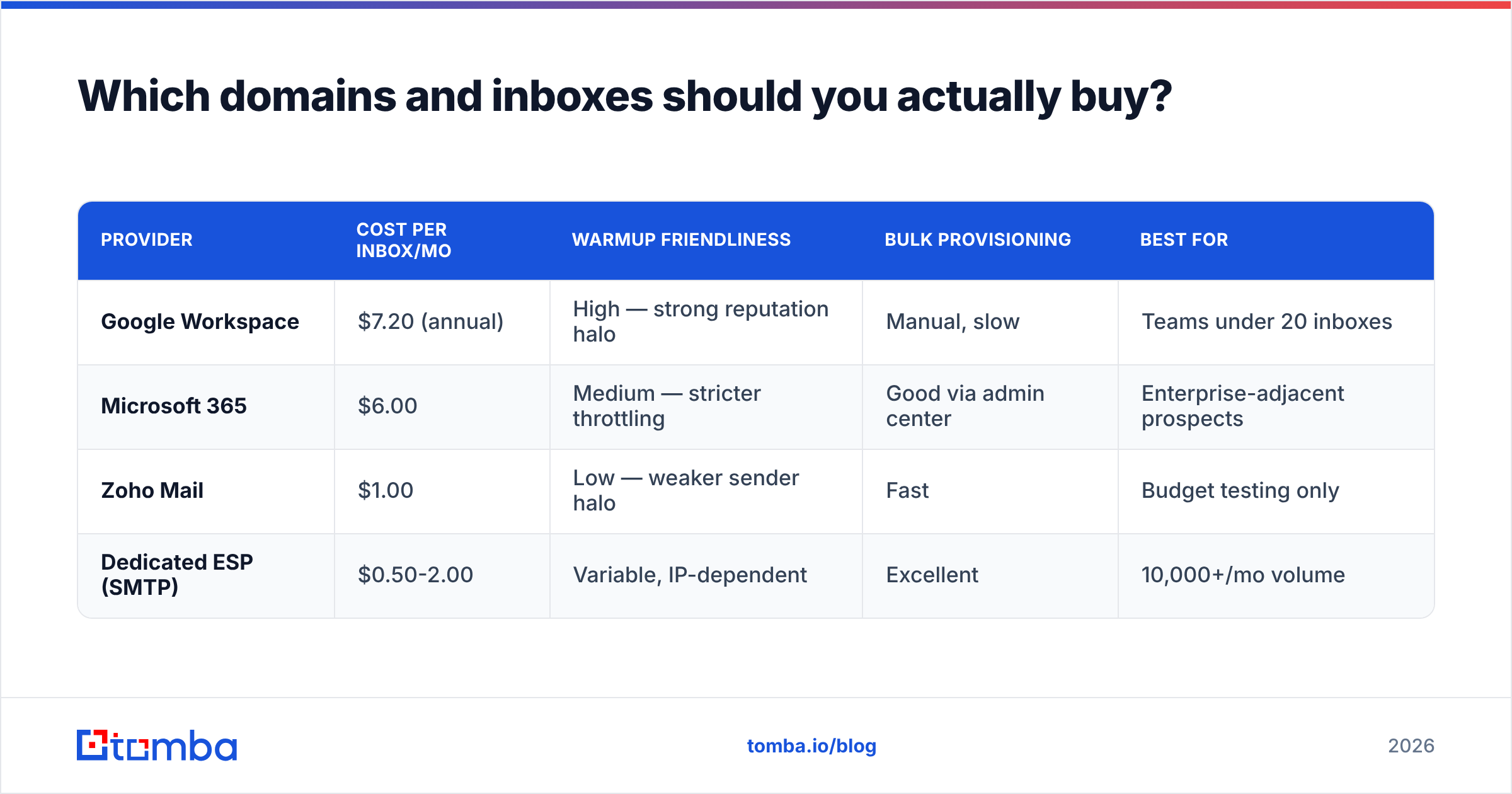
| Provider | Cost per inbox/mo | Warmup friendliness | Bulk provisioning | Best for |
|---|---|---|---|---|
| Google Workspace | $7.20 (annual) | High — strong reputation halo | Manual, slow | Teams under 20 inboxes |
| Microsoft 365 | $6.00 | Medium — stricter throttling | Good via admin center | Enterprise-adjacent prospects |
| Zoho Mail | $1.00 | Low — weaker sender halo | Fast | Budget testing only |
| Dedicated ESP (SMTP) | $0.50-2.00 | Variable, IP-dependent | Excellent | 10,000+/mo volume |
Google Workspace costs the most per seat and is still usually the right answer under 20 inboxes. Gmail-to-Gmail delivery carries an implicit trust advantage, and most B2B recipients are on Google Workspace. The $1/mo alternatives look attractive on a spreadsheet and cost you 15 percentage points of inbox rate.
How do you configure SPF, DKIM, and DMARC correctly?#
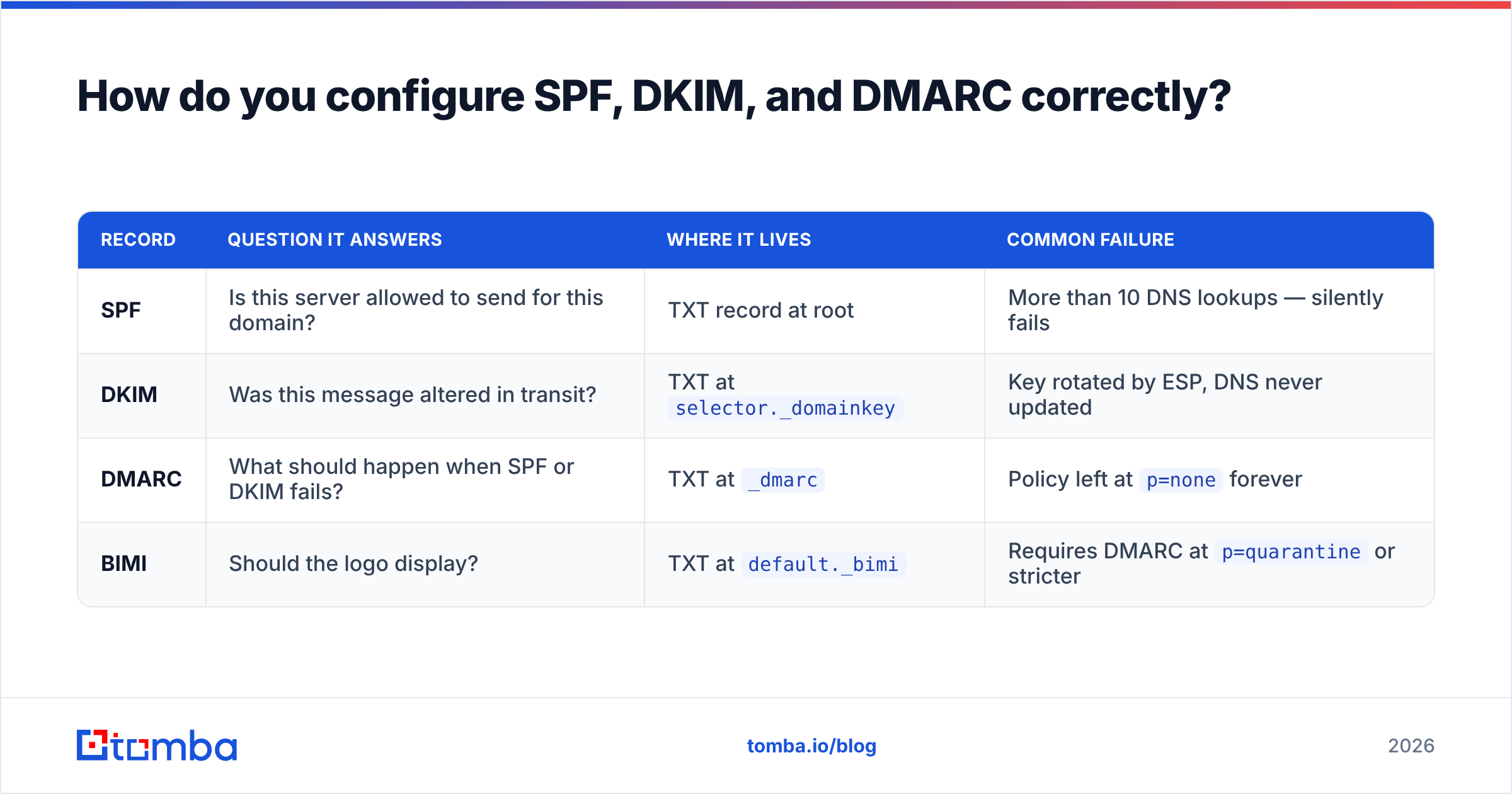
These three records answer three different questions. Configuring one and skipping the others is the most common failure in any cold email setup.
| Record | Question it answers | Where it lives | Common failure |
|---|---|---|---|
| SPF | Is this server allowed to send for this domain? | TXT record at root | More than 10 DNS lookups — silently fails |
| DKIM | Was this message altered in transit? | TXT at selector._domainkey |
Key rotated by ESP, DNS never updated |
| DMARC | What should happen when SPF or DKIM fails? | TXT at _dmarc |
Policy left at p=none forever |
| BIMI | Should the logo display? | TXT at default._bimi |
Requires DMARC at p=quarantine or stricter |
Start DMARC at p=none with a reporting address so you can see what's failing, then move to p=quarantine after two weeks of clean reports, then p=reject. Google's email sender guidelines now require DMARC for anyone sending over 5,000 messages a day to Gmail addresses, and the practical enforcement threshold keeps dropping. Treat p=reject as the destination, not an optional hardening step.
The SPF ten-lookup limit deserves special attention because it fails quietly. Every include: in your SPF record triggers a DNS lookup, and nested includes count too. Chain Google Workspace, a sending platform, and a CRM together and you are at eight lookups before you notice. Past ten, SPF returns permerror and mailbox providers treat the result as no SPF at all. Run your record through an SPF checker after every infrastructure change, not once at setup.
DKIM key length matters too. A 1024-bit key still passes, but 2048-bit is the current expectation and costs nothing extra. The DKIM specification allows both; mailbox providers increasingly weight the stronger key.

How long does domain warmup really take?#
Three to four weeks on a fresh domain, minimum. Anyone selling you a five-day warmup is selling you a simulation of reputation, not reputation.
Warmup works because mailbox providers watch the ratio of positive engagement (opens, replies, moves-out-of-spam) to negative signals (bounces, complaints, deletes-without-open) over time. A brand-new domain sending 200 emails on day one has no engagement history to offset any negative signal. One complaint out of 200 is a 0.5% rate — above Google's threshold — and the domain is flagged before it ever had a chance.
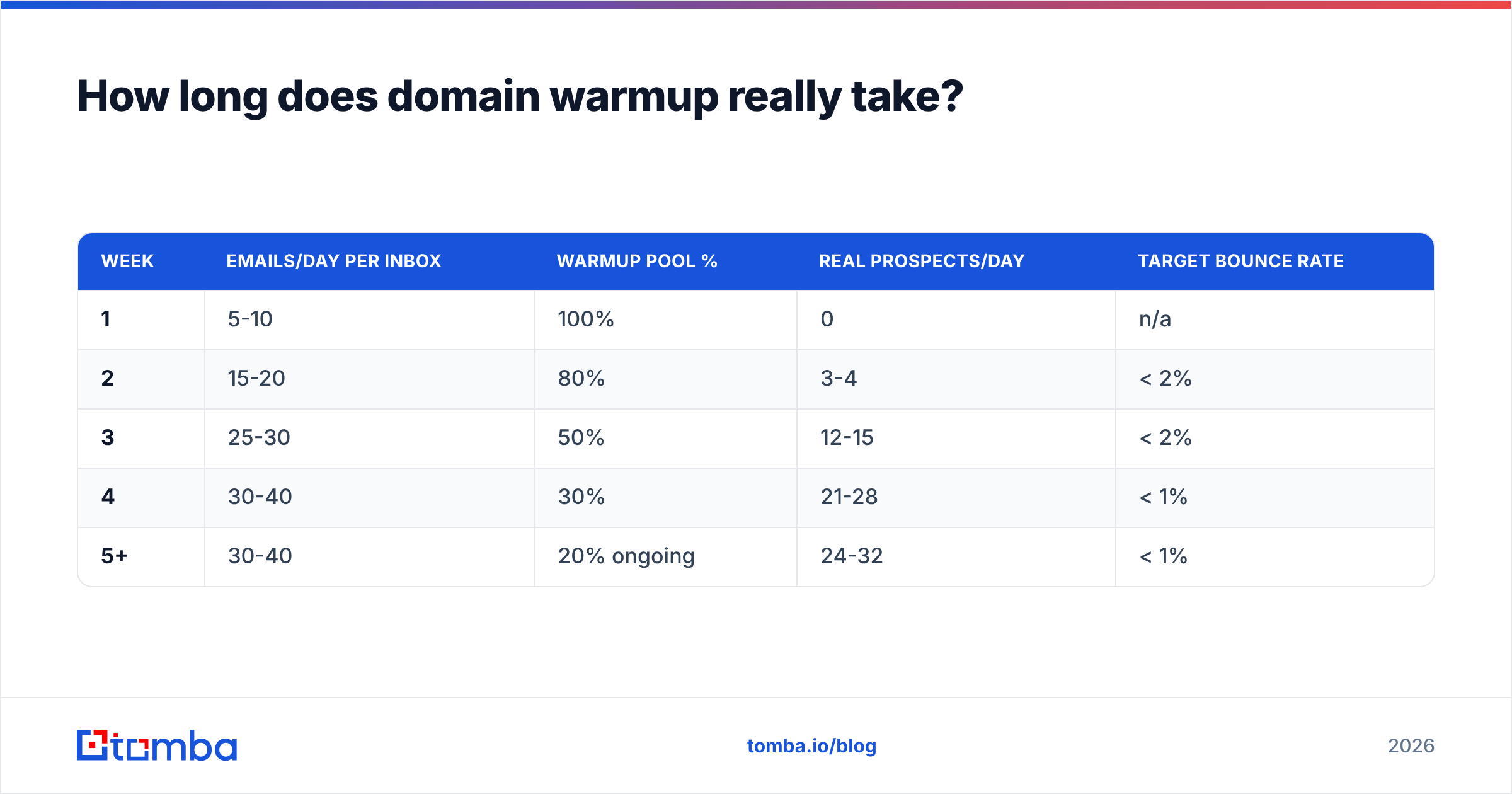
A conservative ramp for one inbox:
| Week | Emails/day per inbox | Warmup pool % | Real prospects/day | Target bounce rate |
|---|---|---|---|---|
| 1 | 5-10 | 100% | 0 | n/a |
| 2 | 15-20 | 80% | 3-4 | < 2% |
| 3 | 25-30 | 50% | 12-15 | < 2% |
| 4 | 30-40 | 30% | 21-28 | < 1% |
| 5+ | 30-40 | 20% ongoing | 24-32 | < 1% |
Two things people get wrong here. First, they stop the warmup pool once real sending begins. Keep 20% of volume in the warmup network permanently — it's a cheap engagement floor that absorbs the occasional bad week. Second, they ramp aggressively on the assumption that warmup tools generate real reputation. Warmup networks generate positive engagement signals. They do not generate the thing mailbox providers care most about, which is whether real strangers reply to you.
If you want to model a ramp against a target monthly volume rather than eyeballing it, run the numbers through a warmup calculator before you buy inboxes. Most teams discover they need twice as many mailboxes as they budgeted for.
Monitor the result, don't assume it. Google Postmaster Tools gives you domain reputation, spam rate, and authentication pass rates for Gmail traffic, free. If your spam rate line is climbing while volume is flat, the list is the problem, not the infrastructure.
Does list quality matter more than DNS?#
Yes, and it isn't close.
Perfect SPF, DKIM, and DMARC on a domain sending to a 12% invalid list will end up in spam. Mediocre authentication on a domain sending to a 99% valid, well-targeted list will mostly land. Mailbox providers weight behavioral outcomes far above configuration.
The numbers that matter:
- Bounce rate. Keep it under 2%. Above 5%, providers begin throttling. Above 8%, some ESPs suspend the account outright.
- Complaint rate. Google and Microsoft both target below 0.3%. That is 3 per 1,000. Sustained breaches trigger domain-level filtering.
- Catch-all exposure. Catch-all domains accept everything, which means they neither bounce nor confirm. They inflate your apparent deliverability while suppressing reply rate. Segment them separately.
- Data age. B2B contact data decays at roughly 22-30% per year as people change jobs. A list built 12 months ago is a different list today.
This is why verification is not a nice-to-have step at the end. Run every list through an email verifier before it touches a warm domain, and re-verify anything older than 90 days. For domains that accept all addresses, a dedicated catch-all verifier will tell you which mailboxes actually exist rather than leaving you to guess.

The other half of list quality is sourcing. Scraped CSVs, marketplace lists, and exports from a colleague's old CRM all share the same defect: you have no idea when the data was collected or whether the address was ever validated. Sourcing addresses directly against live company domains — via domain search or a pattern-based email finder — gives you a timestamp and a confidence score you can act on. That distinction shows up in your bounce rate within one campaign.
What does a full cold email setup actually cost?#
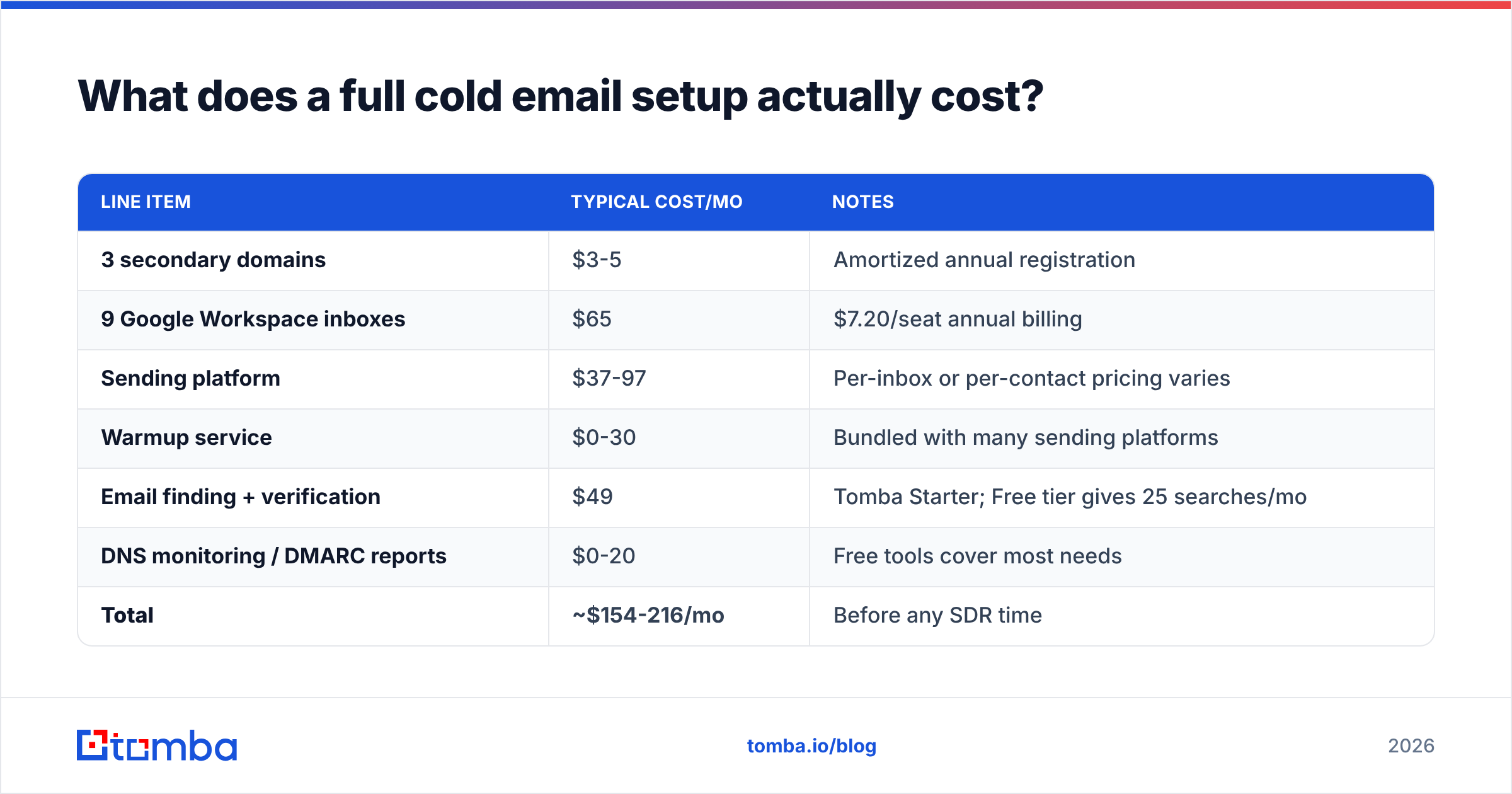
Budget for the infrastructure, not just the software. Here's a realistic monthly cost for a team sending ~3,000 cold emails per month across 9 inboxes.
| Line item | Typical cost/mo | Notes |
|---|---|---|
| 3 secondary domains | $3-5 | Amortized annual registration |
| 9 Google Workspace inboxes | $65 | $7.20/seat annual billing |
| Sending platform | $37-97 | Per-inbox or per-contact pricing varies |
| Warmup service | $0-30 | Bundled with many sending platforms |
| Email finding + verification | $49 | Tomba Starter; Free tier gives 25 searches/mo |
| DNS monitoring / DMARC reports | $0-20 | Free tools cover most needs |
| Total | ~$154-216/mo | Before any SDR time |
Two observations. The data layer — finding and verifying addresses — is usually the smallest line item and the one with the largest effect on outcome. And the sending platform, which most teams shop for first, is largely interchangeable above a basic feature bar. Reviews on G2 will tell you the same thing if you read past the star ratings: teams switch sending platforms constantly and rarely see deliverability change, because the sending platform was never the bottleneck.
What are the mistakes that kill a new setup?#
- Sending from the primary domain. One bad campaign and your invoices land in spam. There is no recovery path that doesn't involve months.
- Adding tracking pixels and link tracking on day one. Open tracking injects a remote image; link tracking rewrites URLs through a shared redirect domain that thousands of other senders also use. Both are spam signals. Turn open tracking off entirely and use a custom tracking domain if you track clicks at all.
- Identical copy across every inbox. Mailbox providers fingerprint message bodies. Nine inboxes sending byte-identical text is a bulk-mail signature. Vary the first line and the sign-off at minimum.
- No unsubscribe mechanism. A one-line opt-out ("reply STOP and I'll close the loop") converts would-be complaints into harmless replies. Complaints cost you reputation; replies earn it.
- Treating a plateau as a ceiling. If reply rate drops after week six, the usual cause is list decay, not domain burn. Re-verify before you rebuild infrastructure.
- Ignoring the reporting loop. DMARC aggregate reports and Postmaster Tools tell you exactly which layer is failing. Reading them takes fifteen minutes a week.
For a deeper primer on how mailbox providers score senders, the email deliverability entry in the glossary covers the underlying reputation model.
What's the minimum viable checklist?#
If you do nothing else, do these in order:
- Register two secondary domains and forward them to your main site.
- Set up 2-3 Google Workspace inboxes per domain.
- Publish SPF (under 10 lookups), 2048-bit DKIM, and DMARC at
p=nonewith a reporting address. - Enroll every inbox in a warmup network and leave it there permanently.
- Verify your entire list before the first real send, and re-verify quarterly.
- Start at 5 emails per inbox per day. Reach 30 by week four. Stop there.
- Move DMARC to
p=quarantine, thenp=reject, once reports come back clean. - Check Postmaster Tools weekly. Spam rate above 0.2% means pause and re-verify.
Steps 1-4 take an afternoon. Step 5 is the one teams skip, and it's the one that determines whether steps 1-4 mattered.
Where to start#
The infrastructure side of a cold email setup is a solved problem — buy the domains, publish the records, ramp slowly. What separates campaigns that work from campaigns that quietly die in spam is the contact data feeding them.
Start there. Tomba's Email Finder sources verified professional addresses by domain, name, or company, with a confidence score attached to each result so you know what you're sending to before you send it. The free tier gives you 25 searches a month to test against a real list; Starter is $49/mo when you're ready to run at volume. Verify first, warm up second, and let the DNS do its quiet job in the background.
Related guides#
// get started
Find, verify and enrich your first contacts today
Start on the free plan with 25 searches a month, then scale when your team is ready.
Free plan · No credit card required · GDPR & CCPA
// about the author