Cold Email Software Free: 9 Best Free Tools in 2026
Most "free" cold email software is a 14-day trial with a countdown clock. Here's which tools have a genuinely free plan, what each one caps, and where free stops being cheap.
TL;DR
- Almost nothing marketed as "cold email software free" is actually free. Roughly 80% of the tools ranking for that phrase offer a 7–14 day trial, not a free plan.
- The tools with real free tiers fall into two camps: Gmail-based senders (Mailmeteor, GMass, YAMM) that cap you at ~50 sends/day, and freemium sequencers that cap contacts or seats instead.
- The sending tool is rarely what breaks. Bad data and an unwarmed domain are. Budget your free time for verification and warmup, not for a fancier sequencer.
- A workable $0 stack in 2026: Google Workspace inbox you already pay for + Mailmeteor free + Tomba's free tier (25 searches/mo) for finding and verifying addresses.
- Free stops being sensible somewhere around 500 sends/month or two mailboxes. Past that, the manual overhead costs more than a $49/mo plan.
What does "cold email software free" actually mean?#
Three completely different things, and vendors deliberately blur them.
Free trial. Full product, 7–14 days, credit card sometimes required. Instantly, Smartlead, Lemlist, Woodpecker, and Mailshake all live here. You get everything, then a paywall. Useful for evaluating, useless for a sustained campaign.
Free plan (freemium). A permanently free tier with a hard cap on sends, contacts, or seats. Mailmeteor, GMass, Saleshandy, and Brevo sit here. This is what most people actually mean when they search for free cold email software.
Free tool. A single-purpose utility with no account or a trivial one — an email verifier, a subject line tester, an SPF checker. Not a sending platform, but often the part of the stack that decides whether your campaign lands.
If you skip that distinction you'll build a workflow on a 14-day timer and discover it on day 15, mid-sequence, with 300 contacts half-sent.
Which free cold email tools are real in 2026?#
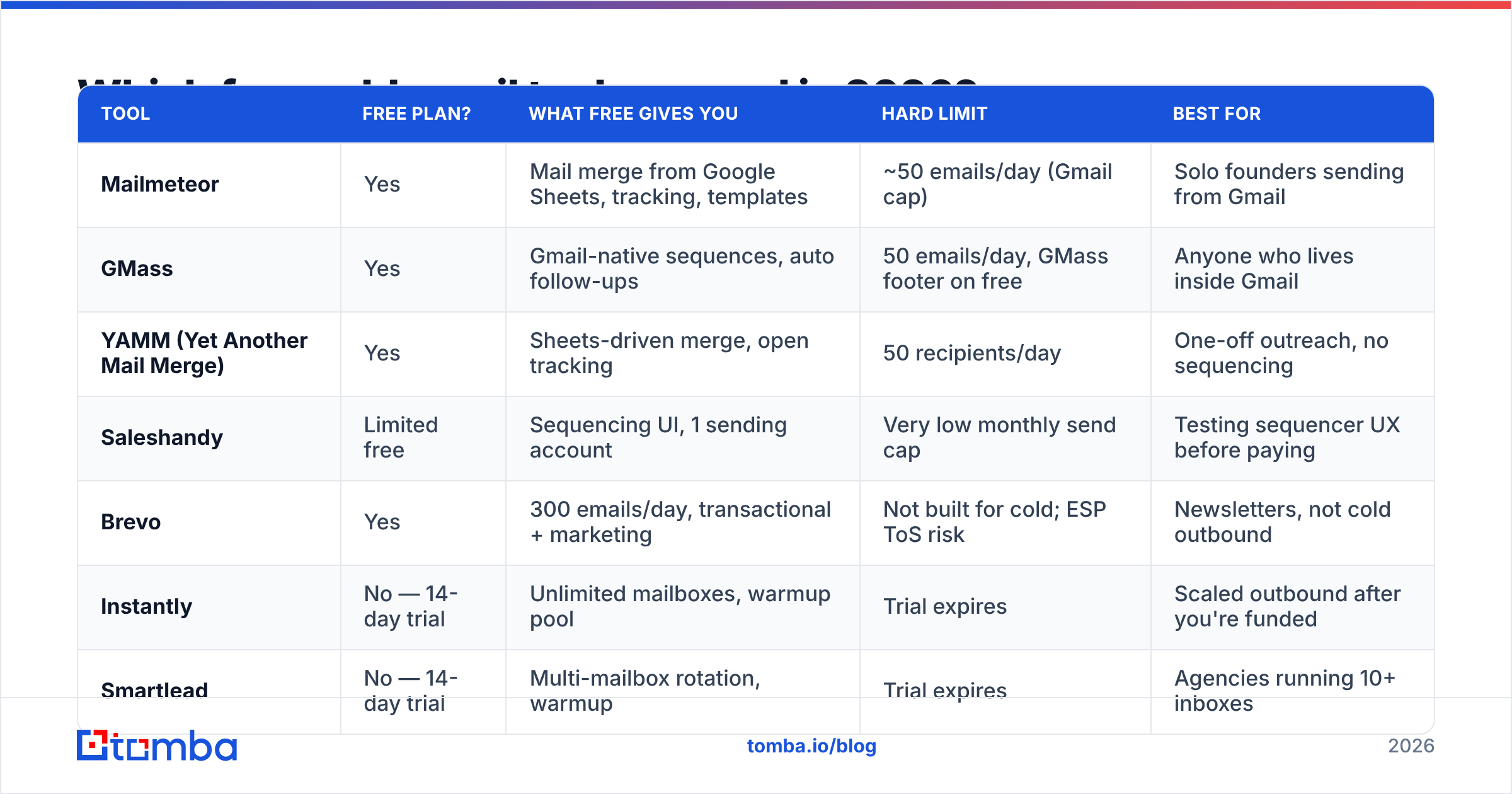
Here is the honest state of the market. Every "free" column below refers to a permanent free plan, not a trial. Vendors change limits constantly — verify on the pricing page before you commit a campaign to one.
| Tool | Free plan? | What free gives you | Hard limit | Best for |
|---|---|---|---|---|
| Mailmeteor | Yes | Mail merge from Google Sheets, tracking, templates | ~50 emails/day (Gmail cap) | Solo founders sending from Gmail |
| GMass | Yes | Gmail-native sequences, auto follow-ups | 50 emails/day, GMass footer on free | Anyone who lives inside Gmail |
| YAMM (Yet Another Mail Merge) | Yes | Sheets-driven merge, open tracking | 50 recipients/day | One-off outreach, no sequencing |
| Saleshandy | Limited free | Sequencing UI, 1 sending account | Very low monthly send cap | Testing sequencer UX before paying |
| Brevo | Yes | 300 emails/day, transactional + marketing | Not built for cold; ESP ToS risk | Newsletters, not cold outbound |
| Instantly | No — 14-day trial | Unlimited mailboxes, warmup pool | Trial expires | Scaled outbound after you're funded |
| Smartlead | No — 14-day trial | Multi-mailbox rotation, warmup | Trial expires | Agencies running 10+ inboxes |
| Lemlist | No — trial only | Personalized images, LinkedIn steps | Trial expires | Multichannel sequences |
| Tomba | Yes | 25 searches/mo, finder + verifier + domain search | 25 credits, then paid plans from $49/mo | Sourcing and verifying the list itself |
Two things jump out. First, no serious sequencer — Instantly, Smartlead, Lemlist, Outreach, Salesloft — offers a free plan. The trial is the free plan. Second, every genuinely free sender is Gmail-based, which means you inherit Google's sending limits whether the software mentions them or not.
Why does free cold email software cap you at 50 sends a day?#
Because the cap isn't theirs. It's Google's.
Tools like Mailmeteor and GMass send through your own Gmail account via the Gmail API. A free Gmail account is limited to roughly 500 recipients per day; Google Workspace accounts get 2,000. The free tiers of these apps then apply their own lower cap — usually 50/day — as the paywall.
That constraint is more feature than bug. Google's bulk sender guidelines require authenticated mail (SPF, DKIM, DMARC), one-click unsubscribe for bulk senders, and a spam complaint rate under 0.3%. A brand-new domain blasting 500 cold emails on day one trips all three signals at once. Fifty a day is roughly what a warmed-up mailbox can sustain for cold outreach without the reputation damage.
The corollary: if a free tool promises "unlimited sends," it's either sending through a shared IP pool (your reputation is now the average of every other free user's) or it's a trial in disguise.
What actually breaks a free cold email campaign?#
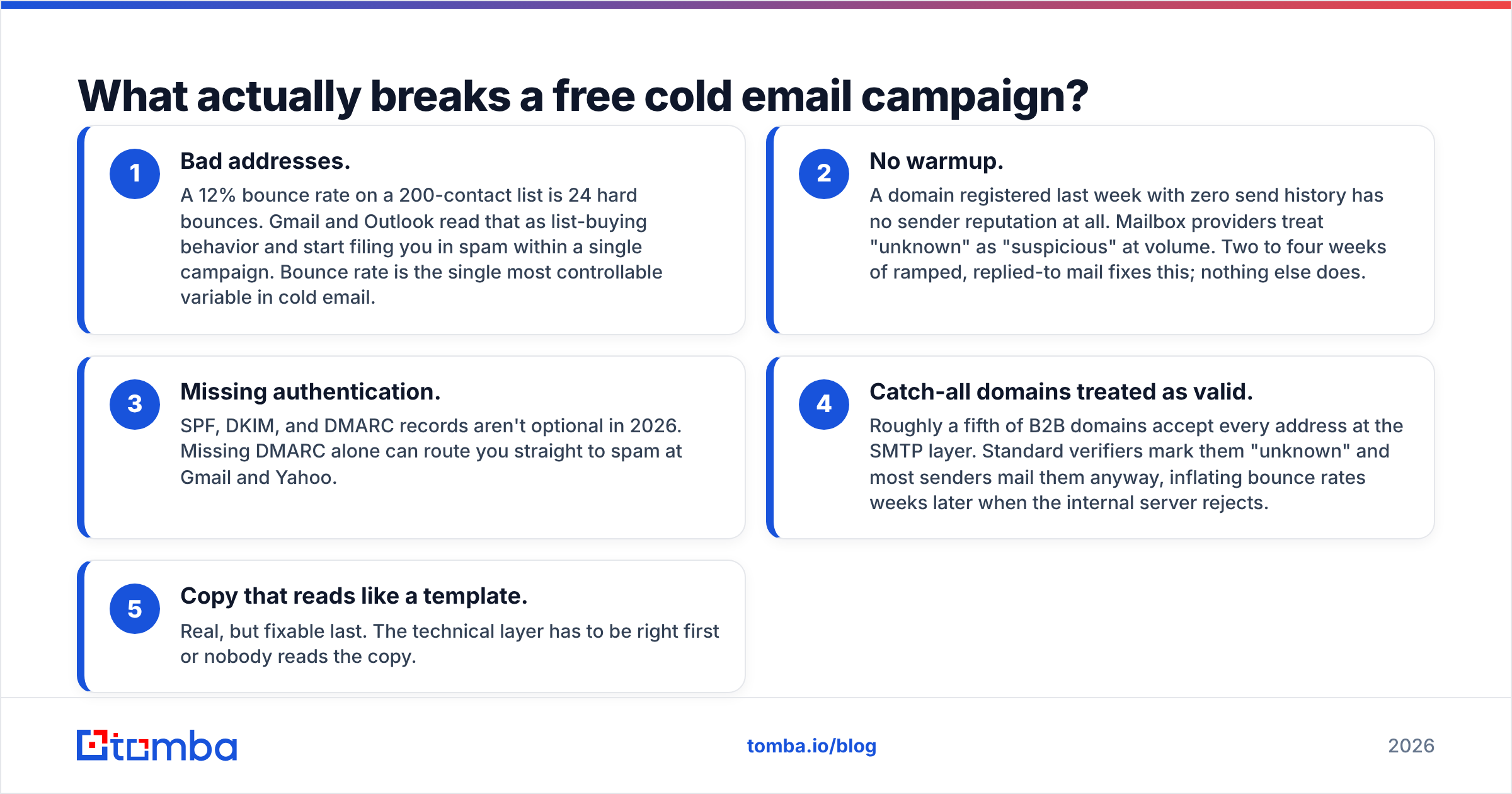
Not the sequencer. In order of how often it kills campaigns:
- Bad addresses. A 12% bounce rate on a 200-contact list is 24 hard bounces. Gmail and Outlook read that as list-buying behavior and start filing you in spam within a single campaign. Bounce rate is the single most controllable variable in cold email.
- No warmup. A domain registered last week with zero send history has no sender reputation at all. Mailbox providers treat "unknown" as "suspicious" at volume. Two to four weeks of ramped, replied-to mail fixes this; nothing else does.
- Missing authentication. SPF, DKIM, and DMARC records aren't optional in 2026. Missing DMARC alone can route you straight to spam at Gmail and Yahoo.
- Catch-all domains treated as valid. Roughly a fifth of B2B domains accept every address at the SMTP layer. Standard verifiers mark them "unknown" and most senders mail them anyway, inflating bounce rates weeks later when the internal server rejects.
- Copy that reads like a template. Real, but fixable last. The technical layer has to be right first or nobody reads the copy.
Notice that none of the top four are solved by paying for a better sequencer. They're solved by data hygiene and DNS records — both of which have free tools.
What does a genuinely free cold email stack look like?#
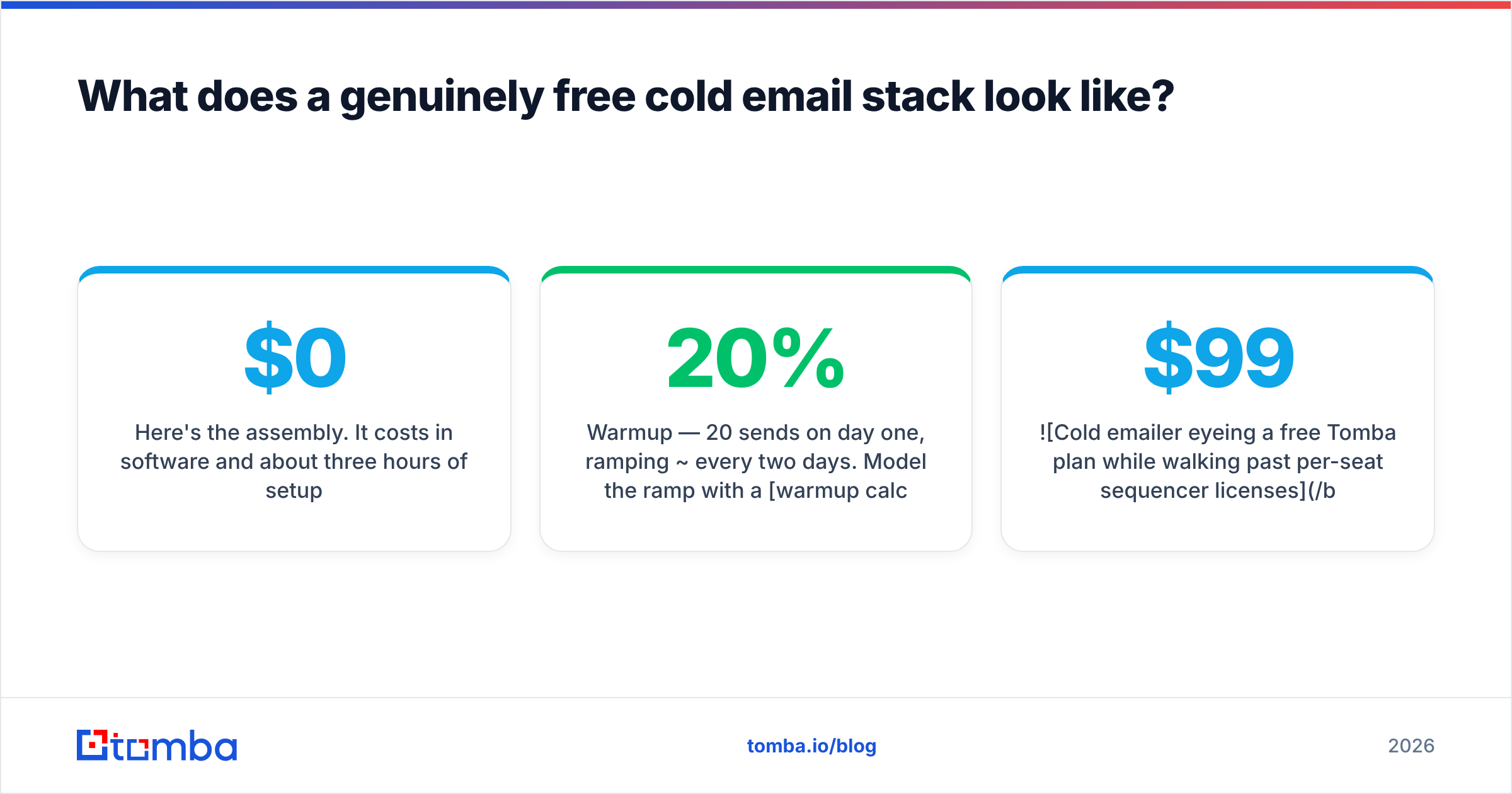
Here's the assembly. It costs $0 in software and about three hours of setup.
- Sending inbox — a Google Workspace mailbox you probably already pay for, or a free Gmail on a dedicated domain. Never send cold mail from your primary business domain; use a lookalike (
getacme.cominstead ofacme.com) so a reputation hit doesn't take your invoices down with it. - Authentication — set SPF, DKIM, DMARC before your first send. Check the record with a free SPF checker and confirm alignment. Ten minutes, and it's the highest-ROI ten minutes in outbound.
- Warmup — 20 sends on day one, ramping ~20% every two days. Model the ramp with a warmup calculator so you don't guess. Free warmup networks exist but they're increasingly detectable; conversational replies from real humans beat any pool.
- List building — Tomba's free tier gives you 25 searches per month across the email finder, domain search, and verifier. Twenty-five verified decision-makers at companies you actually researched beats 2,000 scraped rows every time at this stage.
- Verification — verify before you send, not after you bounce. Run addresses through an email verifier and drop anything that isn't a clean SMTP-valid result. Catch-alls need separate handling.
- Sending — Mailmeteor or GMass on their free plan. Both do follow-ups. Both cap around 50/day, which conveniently matches what a warming domain can absorb.
That stack sends roughly 1,000 emails a month, which is more than most seed-stage founders can follow up on properly anyway.
Is free cold email software worth it, or are you paying elsewhere?#
You're paying elsewhere. The question is whether the currency is a good trade.
What free costs you in time. Free plans strip automation at the edges: no CRM sync, no bulk enrichment, no API. A 100-contact list built by hand — find company, find person, guess email, verify, paste into a Sheet — runs about 90 seconds per contact. That's 2.5 hours. The same list through bulk lead generation and a CRM push is five minutes. At any hourly rate above minimum wage, the paid plan wins before you've sent an email.
What free costs you in deliverability. Free sequencers rarely offer inbox rotation. One mailbox means one reputation, and one bad campaign torches it. Paid tools spread 500 sends across ten mailboxes at 50 each — the same volume, a tenth of the per-inbox risk.
What free costs you in data. This is the real one. Free-tier data is thinner: fewer sources, older refresh cycles, no phone numbers, no contact enrichment. Paid B2B data providers — Tomba, and peers like BookYourData for verified purchased lists — differ mainly in freshness and coverage depth, and those two variables drive your bounce rate more than anything in your sending tool.
The switching threshold. Move off free when any of these is true:
- You're sending more than ~500 emails/month
- You need more than one sending mailbox
- Someone other than you touches the campaign
- You're re-typing data between two tools more than once a week
Below those lines, free is genuinely correct and paying is theater. Above them, the free plan is a tax on your calendar.
How do you pick between the free options?#
Match the tool to where you actually live.
You live in Gmail and send under 50/day. GMass. It's a Chrome extension, sequences run from the Gmail compose window, and follow-ups auto-stop on reply. Free tier adds a footer. Reviews on G2 consistently flag the footer as the only real free-plan complaint.
You live in Google Sheets. Mailmeteor. Merge fields come straight from columns, it's a Workspace add-on, and the free plan is generous enough for a genuine campaign.
You want to test a real sequencer's UX. Take Instantly's or Smartlead's 14-day trial and run one full campaign end to end — warmup, send, reply handling. Treat it as evaluation, not as a free plan. Build your list first so you don't burn trial days on data collection.
You need contacts more than you need a sender. Start with the data layer. A domain search on 25 target companies will teach you more about who to email than any sequencer feature. The sending tool is commoditized; the list is not.
You're sending to catch-all domains. Use a dedicated catch-all verifier instead of accepting your sequencer's "unknown" verdict. The difference between "unknown" and "verified" on a catch-all is the difference between an 8% and a 2% bounce rate.
What free cold email software will not do for you#
It won't warm your domain in a weekend. It won't make a scraped list clean. It won't tell you that the VP of Engineering you're emailing left in March. And it won't rotate mailboxes, which means the ceiling on free is structural, not commercial.
What it will do — and this is worth stating plainly — is let you validate that anyone replies to your offer before you spend $99/mo finding out they don't. Fifty emails a day for two weeks is 700 sends. If 700 well-researched, verified, personalized emails to your ICP produce zero replies, the problem was never the software tier.
That's the actual argument for starting free. Not that it's cheap. That it forces you to fix the message and the list first, because those are the only variables the free tier lets you change.
Where should you start this week?#
Build the list before you pick the sender. Ninety percent of the outcome sits in who you email and whether that address is real.
Open the Tomba Email Finder, pull verified addresses for 25 people at companies you genuinely want as customers, and send them one honest email each from a warmed inbox. The free tier covers exactly that experiment — 25 searches, no card. If the replies come back, you'll know precisely what to upgrade and why. If they don't, you saved $99 and learned something more valuable than a sequencer feature comparison ever teaches.
Related guides#
// get started
Find, verify and enrich your first contacts today
Start on the free plan with 25 searches a month, then scale when your team is ready.
Free plan · No credit card required · GDPR & CCPA
// about the author