Cold Email Template: 7 Frameworks That Get Replies in 2026
Most cold email template packs are recycled 2018 fluff. Here are seven frameworks that still book meetings in 2026, the four-line structure underneath them, and the data hygiene that decides whether any of it lands.
TL;DR
- A cold email template is a reusable skeleton, not a script. The parts you keep constant are structure and constraints; the parts you swap are the observation, the claim, and the ask.
- Seven frameworks cover roughly every B2B cold email worth sending: Trigger, Before-After-Bridge, Problem-Agitate-Solve, Peer Proof, Question-Only, Referral Redirect, and the Two-Line Break-Up.
- Length beats cleverness. Under 90 words with a single ask consistently outperforms 200-word "value bombs."
- A great template on a bad list still fails. Bounce rate above 3% suppresses everything you send afterward, template quality included.
- Personalization that matters is relevance to their current situation, not "I saw you went to Michigan State."
What is a cold email template, actually?#
A cold email template is a fixed structure with variable slots. Think of it like a recipe card: the method (sear, deglaze, reduce) is stable, the ingredients change with what's in the fridge.
Most people get this backwards. They treat the template as a paragraph to find-and-replace {{first_name}} into, hit send on 4,000 contacts, and wonder why 2% opened and nobody replied. What you're actually templating is a sequence of jobs:
- Establish why you're in their inbox — one line, specific to them, no throat-clearing.
- Make a falsifiable claim — something that could be wrong, which is what makes it credible.
- Show the claim held for someone like them — a name, a number, a timeframe.
- Ask for something small — a reply, an opinion, fifteen minutes. Never a demo, not yet.
- Get out — no P.S. stack, no calendar link farm.
Everything below is a variation on those five jobs. If a template you're using skips job 1 or 4, it isn't a template. It's a brochure.

Why do most cold email templates stop working?#
Three reasons, in order of how much damage they do.
Saturation. The "I noticed you're hiring SDRs" opener was novel in 2019. By 2023 every sequencer shipped it as a default snippet. Prospects now pattern-match the shape of an email before reading a word of it. A template's half-life is roughly the time it takes for one popular LinkedIn post to distribute it.
Filtering changed. Google and Yahoo's bulk-sender requirements pushed authentication and complaint-rate thresholds from best practice to enforcement. A template that triggers spam complaints doesn't just underperform — it degrades your sender reputation and drags down the sequences running beside it. Run your copy through a spam checker before it touches a live list, and confirm your SPF record is actually valid rather than assumed valid.
Data rot. B2B contact data decays at roughly 22-30% per year. Templates get blamed for problems that are really list problems. If 12% of your sends bounce, your reply rate is measuring a broken pipe, not bad copy.
The 7 cold email template frameworks worth keeping#
Each of these has a job it does better than the others. Pick by situation, not by preference.
1. The Trigger template#
Best when something observable just changed at the account — funding, a new exec, a product launch, a job posting.
Subject: your new VP of Revenue

Hi {{first_name}},

Saw {{company}} brought on {{new_exec}} last month — usually means
the next two quarters are about pipeline coverage, not headcount.

We helped {{peer_company}} cut their SDR list-building time from
6 hrs/week to under 1. Same stage, same motion.

Worth a reply if that's on your plate?

{{signature}}
Why it works: the trigger proves you looked. The inference ("usually means...") proves you understand the pattern. Both are falsifiable.
2. Before-After-Bridge (BAB)#
Best for problems the prospect already knows they have.
Before: "Your reps spend Monday building lists." After: "They spend Monday calling." Bridge: "That's what we did for X." Three sentences. It's a story with the middle removed.
3. Problem-Agitate-Solve (PAS)#
Best when the pain is real but under-prioritized. Agitation is not scaremongering — it's quantification. "3 hours per rep per week" agitates. "You're leaving money on the table" does not.
4. Peer Proof#
Best for crowded categories where you're the fifth vendor of the week.
Subject: {{competitor_customer}} switched — here's why

{{first_name}} — {{peer_1}}, {{peer_2}}, and {{peer_3}} all moved
off {{incumbent}} in the last year. Same reason each time:
per-credit pricing on data they never used.

Not a pitch. If you're re-evaluating in {{quarter}}, I'll send
the three-line summary of what changed for them.

Reply "send it"?
The ask is content, not a meeting. Reply rates on this pattern hold up because the cost of saying yes is two words.
5. Question-Only#
Best for senior titles who delete anything with a paragraph.
"Hi Dana — is list-building still eating your team's Mondays, or did you solve that?"
That's the whole email. The "or did you solve that?" clause is doing real work: it gives them a dignified exit, which paradoxically increases replies. It also surfaces the competitor they chose, which is intel you didn't have.
6. Referral Redirect#
Best when you're not sure you have the right person.
"Hi Marcus — if data coverage for outbound isn't yours, could you point me at whoever owns it? Happy to stop bothering you either way."
Low cost, high routing value. The "stop bothering you" line is the concession that earns the redirect.
7. The Two-Line Break-Up#
Best as the final touch in a sequence. Not passive-aggressive, not guilt-tripping.
"Closing the loop on this one, Dana. If timing changes in Q3, I'm here. — Sam"
No "since I haven't heard back." No "should I assume you're not interested." Those read as accusations. Break-ups that respect the silence get a surprising number of "actually, ping me in June" replies.
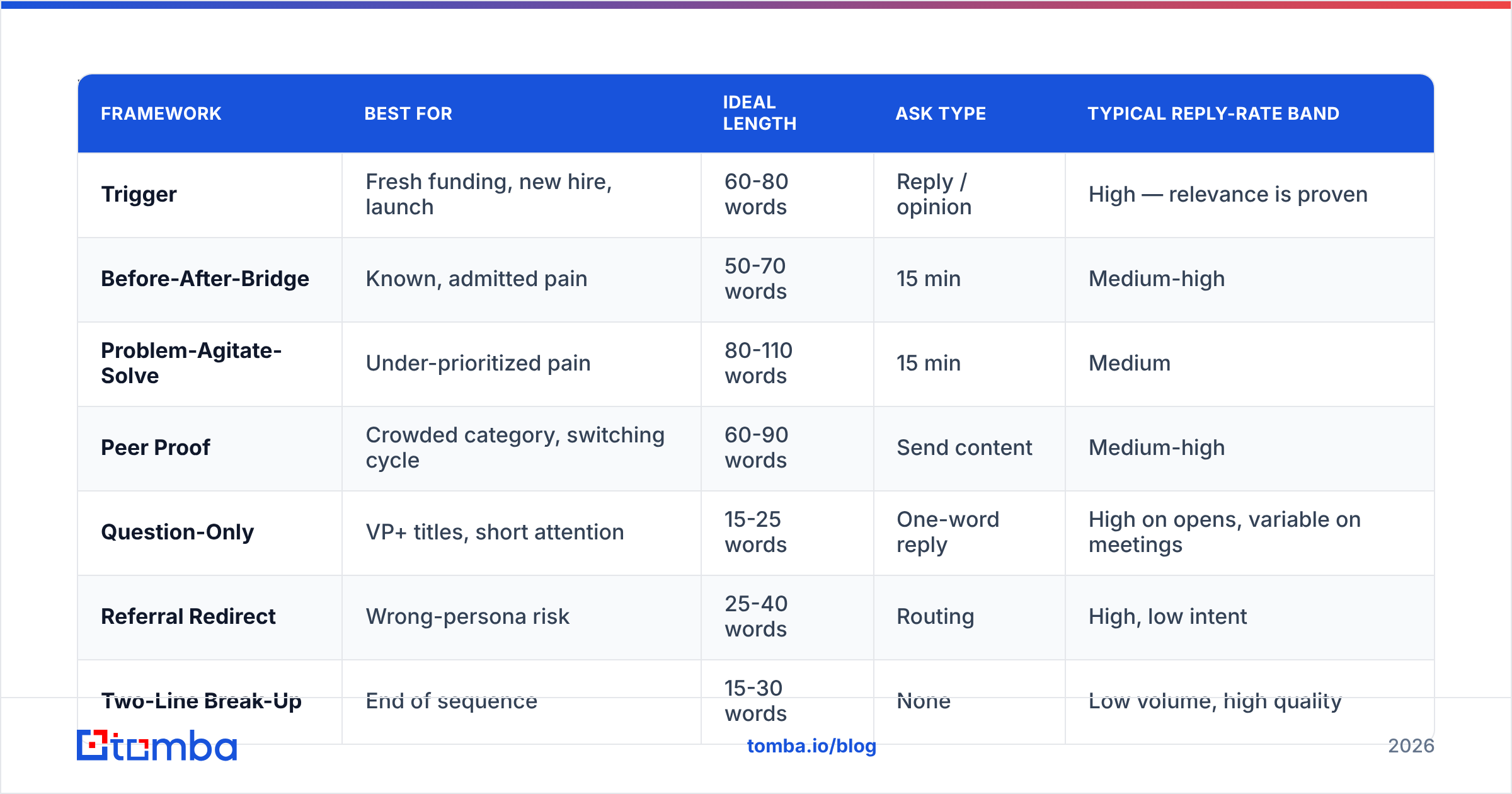
Which cold email template should you use when?#
| Framework | Best for | Ideal length | Ask type | Typical reply-rate band |
|---|---|---|---|---|
| Trigger | Fresh funding, new hire, launch | 60-80 words | Reply / opinion | High — relevance is proven |
| Before-After-Bridge | Known, admitted pain | 50-70 words | 15 min | Medium-high |
| Problem-Agitate-Solve | Under-prioritized pain | 80-110 words | 15 min | Medium |
| Peer Proof | Crowded category, switching cycle | 60-90 words | Send content | Medium-high |
| Question-Only | VP+ titles, short attention | 15-25 words | One-word reply | High on opens, variable on meetings |
| Referral Redirect | Wrong-persona risk | 25-40 words | Routing | High, low intent |
| Two-Line Break-Up | End of sequence | 15-30 words | None | Low volume, high quality |
Reply-rate bands are directional, not promises. The same template swings 4x depending on list quality and ICP fit. Anyone quoting you an exact percentage for a template is quoting their list, not your copy.
What are the rules that apply to every cold email template?#
These hold across all seven frameworks.
- One ask. Two asks is zero asks. If you want a reply and a calendar booking and a resource download, you've built a decision tree for someone who owes you nothing.
- Under 100 words. HubSpot's analysis of sales email data and years of sequencer telemetry converge on short. Mobile preview panes show roughly 90 words. Write to the pane.
- No merge-tag confetti.
{{first_name}}in the greeting is fine.{{company}}three times reads like a mail merge that ate itself. - Subject lines are lowercase and specific. "quick question" is a tell. "your new VP of Revenue" is not. Test yours with a subject line tester before committing a whole sequence to it.
- No images, no tracking pixels on the first touch. Both correlate with spam placement, and open-rate data has been unreliable since Apple's Mail Privacy Protection anyway. Optimize for replies. Replies are real.
- Plain-text signature. Four lines maximum: name, title, company, one link. Build one with a email signature generator if yours has grown a logo, a banner, and a legal disclaimer.
Does personalization still move the needle?#
Yes, but not the kind that gets sold as personalization.
There are three tiers, and only two of them work:
- Tier 1 — Cosmetic. First name, company name, city. Zero lift in 2026. Everyone does it; nobody notices it.
- Tier 2 — Situational. Something true about their current business state: a hire, a launch, a market shift, a tech-stack change. This is where the lift lives. It signals you spent thirty seconds on them specifically.
- Tier 3 — Relational. A shared connection, a comment on their podcast, a genuine reaction to something they wrote. Highest reply rate, doesn't scale past ~20 emails a day.
Most teams should run Tier 2 at volume and Tier 3 on a hand-picked list of forty accounts. Tier 1 is table stakes that earns nothing.
The practical constraint is that Tier 2 requires a reason to write today, and reasons to write today come from data. Job-change signals, funding events, hiring pages, tech-stack detection. If your CRM has a name and an email and nothing else, you're structurally locked into Tier 1 and your templates will underperform no matter how well written they are. That's what data enrichment is for — turning a name into a situation.
Why does list quality decide template performance?#
Because the funnel multiplies.
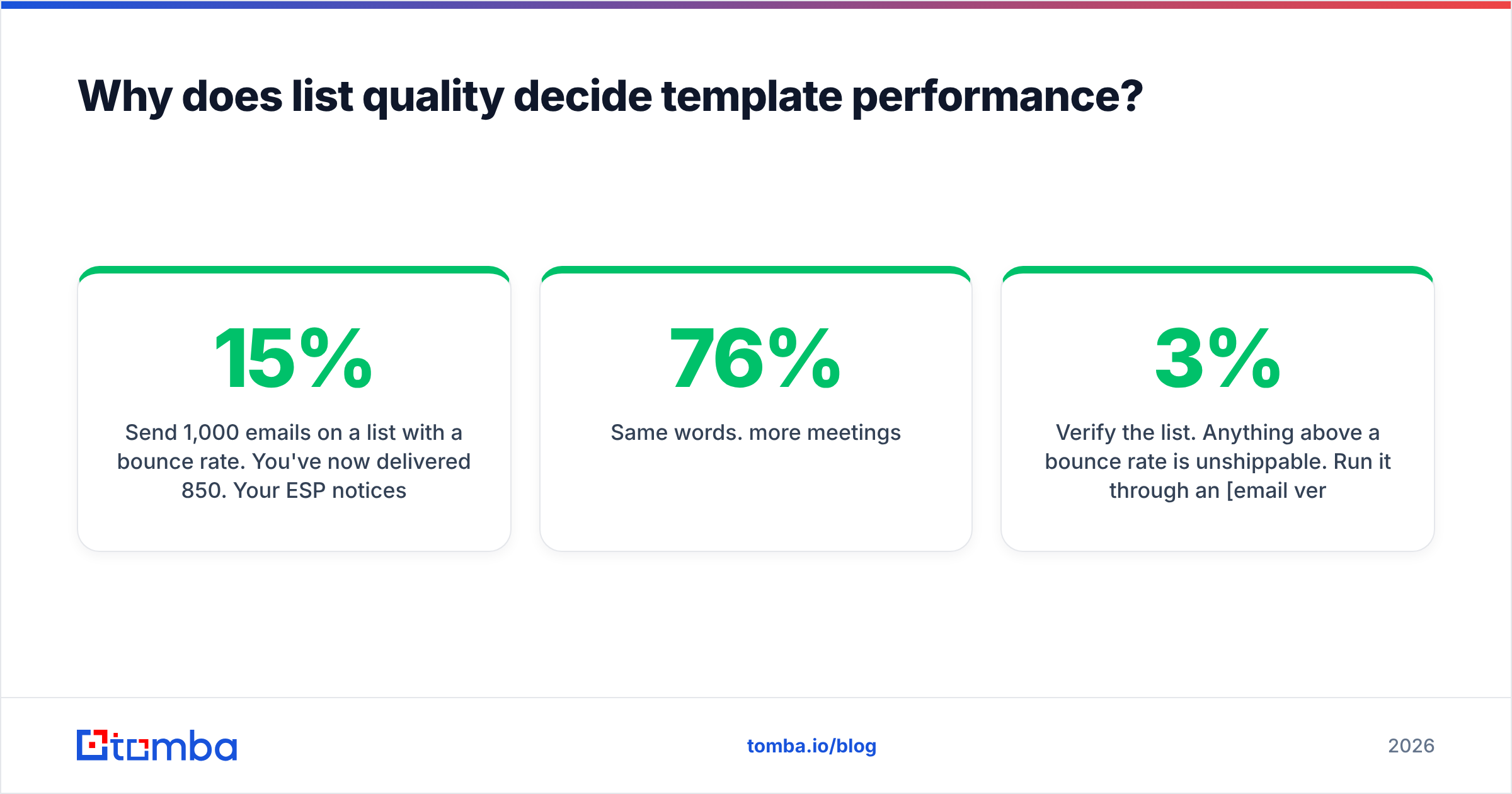
Send 1,000 emails on a list with a 15% bounce rate. You've now delivered 850. Your ESP notices. Placement drops. Say 60% of the survivors land in the primary inbox instead of 90%. You're at 510 real impressions. A 5% reply rate on 510 is 25 conversations. The same template on a verified list — 1% bounce, 90% placement — reaches 891 real impressions and produces 44 conversations.
Same words. 76% more meetings.
That's before the compounding damage: a domain that bounces hard repeatedly gets throttled, and the recovery takes weeks. Email deliverability is not a separate discipline from copywriting. It's the denominator under it.
So before you A/B test a subject line:
- Verify the list. Anything above a 3% bounce rate is unshippable. Run it through an email verifier and drop the unknowns.
- Handle catch-all domains deliberately. They accept everything and tell you nothing. A catch-all verifier at least separates "probably real" from "coin flip."
- Deduplicate. Two emails from two reps to one person in one week is a complaint, not a touchpoint.
- Warm the domain. Sending 500/day from a two-week-old domain is a self-inflicted wound.

How do you test a cold email template properly?#
Most template "testing" is superstition. Here's the version that produces knowledge.
Test one variable. Subject line or opener or CTA. Not a rewritten email. If you change three things and reply rate doubles, you've learned nothing you can transfer.
Use enough volume. Reply rates are low-frequency events. Distinguishing a 3% from a 5% reply rate at any confidence needs several hundred sends per arm. Below that you're reading noise and promoting it to strategy.
Measure replies, then positive replies, then meetings. A template can lift replies and tank meetings — usually by being cute enough to earn a "what is this?" A template that lifts positive-reply rate is the only one worth rolling out.
Kill on schedule. Every template has a decay curve. Log the date you started it and check reply rate monthly. When a template drops 30% from its own baseline, retire it. Don't tune it. The market moved.
Watch the response rate by segment. A template that works for Series A founders and dies with enterprise VPs isn't a bad template. It's a mis-segmented one.
Outside your own data, G2's category reviews are useful for spotting which sequencing tools actually report positive-reply attribution versus which just count opens. Vendors differ more than you'd expect on what "reply" means.
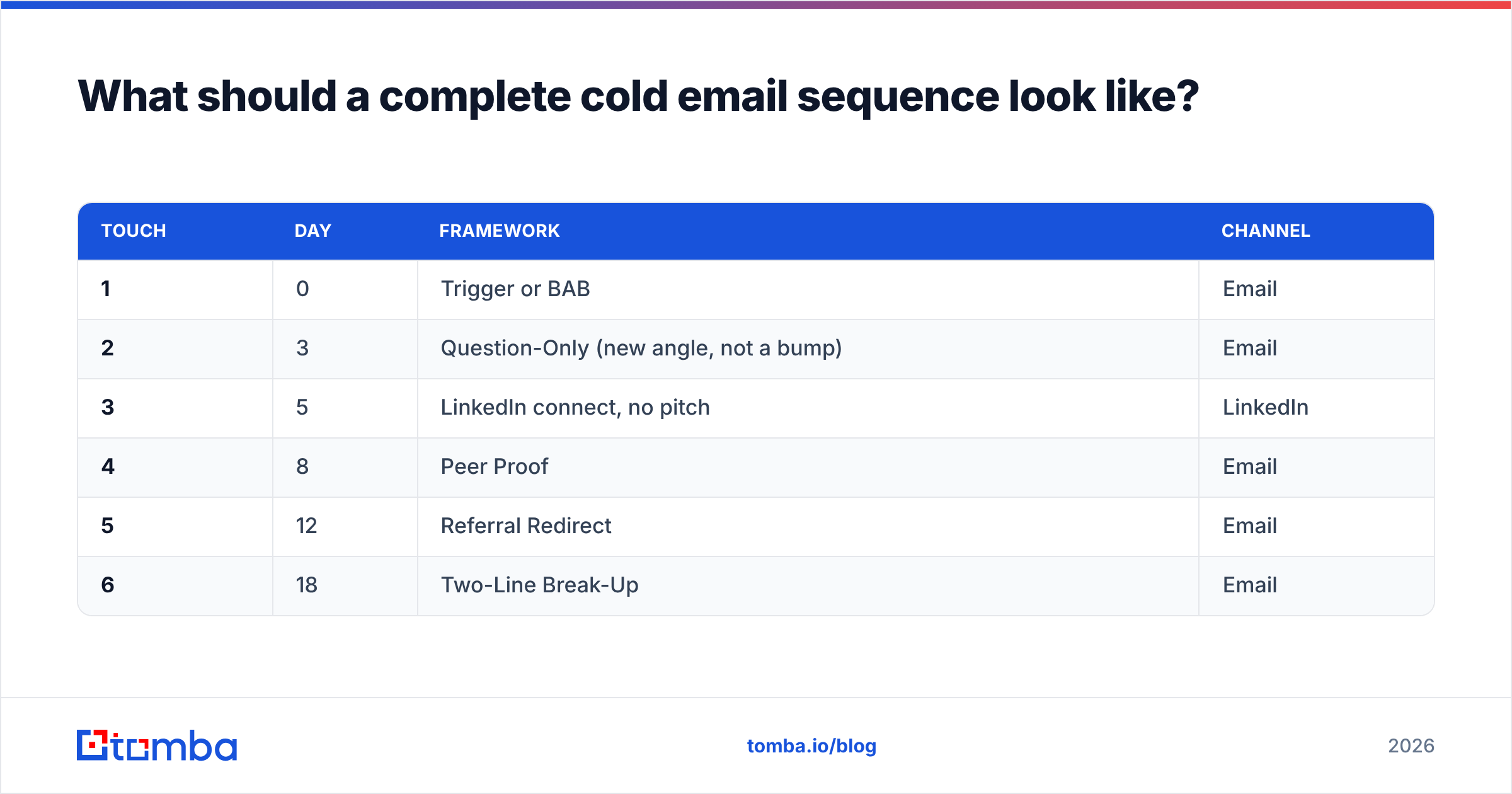
What should a complete cold email sequence look like?#
Templates don't ship alone. A working sequence in 2026 looks roughly like:
| Touch | Day | Framework | Channel |
|---|---|---|---|
| 1 | 0 | Trigger or BAB | |
| 2 | 3 | Question-Only (new angle, not a bump) | |
| 3 | 5 | LinkedIn connect, no pitch | |
| 4 | 8 | Peer Proof | |
| 5 | 12 | Referral Redirect | |
| 6 | 18 | Two-Line Break-Up |
Two rules people break constantly. First: never reply "just bumping this to the top of your inbox." It communicates that your last email wasn't worth reading and this one isn't either. Every touch carries a new angle. Second: don't stack all six on one channel. Multi-channel sequences that pair email with LinkedIn outreach consistently outperform email-only at the same touch count, because the second channel resets attention rather than compounding fatigue.
If you want a starting library rather than writing from scratch, our cold email templates collection maps directly onto the seven frameworks above, and Gong's public research on outbound language is worth an hour if you want to see which phrases correlate with closed deals versus polite deflection.
What's the honest verdict on cold email templates?#
Templates are a floor, not a ceiling.
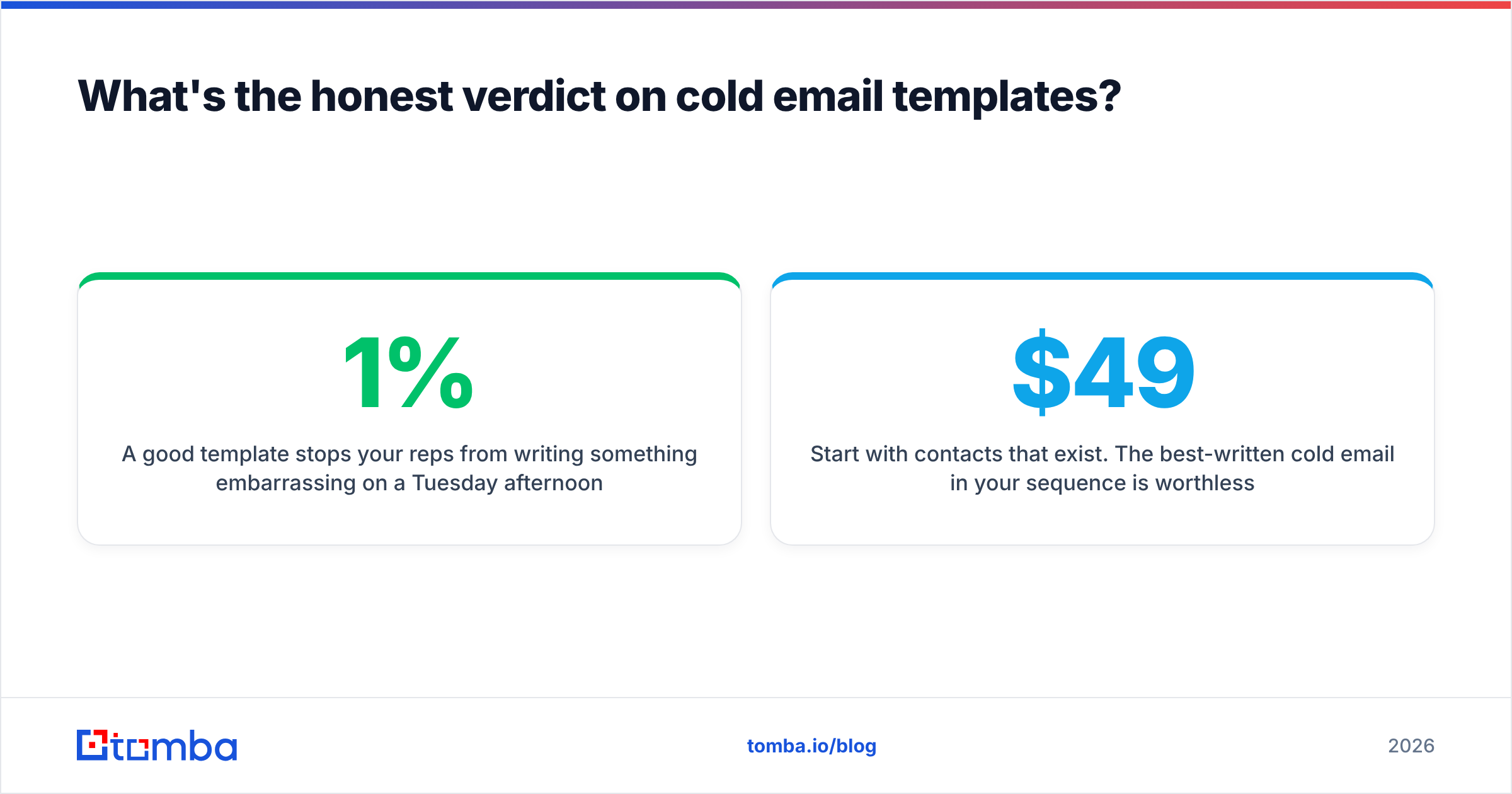
A good template stops your reps from writing something embarrassing on a Tuesday afternoon. It enforces brevity, one ask, and a real reason for writing. That's worth a lot — it's most of the gap between a 1% and a 4% reply rate.
What a template cannot do is manufacture relevance. It can't tell you that the VP you're emailing left in March, or that the address in your CRM has been bouncing since Q4, or that this account bought a competitor last month. Those are data problems, and no amount of copywriting fixes a data problem. The teams that quietly outperform aren't running secret templates. They're running the same seven frameworks everyone else has, against lists that are actually accurate, with triggers that are actually current.
Fix the list first. Then the templates start working the way the case studies promised.
Start with contacts that exist. The best-written cold email in your sequence is worthless if it lands on an address that stopped resolving eight months ago. Tomba Email Finder pulls verified professional emails by domain, name, or company, with confidence scores so you know what you're sending to before you send it. The free tier gives you 25 searches a month to check your current list against reality; paid plans start at $49/mo on Tomba pricing when you're ready to run the whole book. Verify first, then send the template.
Related guides#
Ready to find emails that actually work?
Join 150,000+ professionals who stopped guessing and started sending. Free credits on signup — no credit card required.
Get the Tomba newsletter
Practical outbound tactics and product updates — once every two weeks.
About the author