Cold Email Template for IT Services: 7 Scripts That Book Meetings
Most IT services cold emails die because they pitch capabilities instead of consequences. Here are seven tested templates, the structure behind them, and the follow-up cadence that turns replies into scoped calls.
TL;DR
- A cold email template for IT services only works when it names a specific operational consequence — downtime, audit exposure, license waste — not a capability list.
- IT buyers (CTOs, IT directors, ops managers) receive 20-40 vendor emails a week. Your differentiator is proof of context, not adjectives.
- The seven templates below are organized by trigger: tech-stack signal, hiring signal, compliance deadline, incident, competitor churn, renewal window, and referral.
- Reply rates collapse when list quality is bad. Verified, role-matched contacts beat clever copy every time.
- The follow-up sequence matters more than the first email. Roughly half of positive replies land on touches 2-4.
Why do most cold emails for IT services fail?#
Because they describe the seller, not the buyer's Tuesday.
Open almost any managed IT provider's outbound and you find the same skeleton: "We're a full-service MSP offering 24/7 monitoring, cloud migration, cybersecurity, and helpdesk support." That sentence is true of roughly 40,000 companies in North America. It carries zero information for the recipient.
The buyer of IT services is not shopping for a capability list. They are managing a specific, currently-annoying problem: a Windows Server 2016 box that nobody wants to touch, a SOC 2 audit in ninety days with no evidence collection process, a helpdesk queue that spikes every Monday because the VPN drops over the weekend, an M365 license count that grew 30% while headcount grew 8%.
Your cold email has one job: prove you understand which of those problems they have, before you ask for anything.
That's the difference between "We provide managed IT services" and "Your careers page has three open Azure roles and your job posts still reference on-prem AD — most teams in that spot are running a hybrid identity setup nobody fully owns."
The second one earns a reply because it demonstrates you did work. HubSpot's sales research has consistently found that personalization depth — not volume — is the strongest lever on reply rate, and IT buyers are among the most personalization-sensitive segments precisely because they are technical enough to spot a mail merge.

What structure does a high-performing IT services cold email use?#
Every template below follows the same five-beat structure. Learn the beats and you can generate infinite variations.
- Observed trigger (1 sentence). Something verifiable and recent: a job posting, a tech-stack change, an acquisition, a compliance deadline, a headcount jump. This is the proof-of-work line.
- Implied consequence (1-2 sentences). What that trigger usually means operationally. You are not accusing them of failure — you are describing what typically happens to companies in that position.
- Specific relevance (1 sentence). One concrete thing you did for a comparable company. Name the industry and size, not the logo (unless you have permission).
- Low-friction ask (1 sentence). Not "hop on a 30-minute discovery call." Ask a question they can answer in one line, or offer something asynchronous.
- Sign-off with no pitch. No signature block with six certifications. No "P.S. we're a Microsoft Gold Partner."
Total: 70-110 words. Anything over 130 words gets skimmed and archived.
The most common failure is spending three sentences on beat 3 and one on beat 1. Invert that. Proof-of-work is the currency; your credentials are the receipt you show later.
Which cold email template for IT services fits my trigger?#
Here's the mapping. Each template is written for a real trigger, because sending the wrong template to the right person is the same as sending the right template to the wrong person.
1. Tech-stack signal#
Trigger: Their site or job posts reveal a stack you specialize in.
Subject: your Azure + on-prem AD setup
Hi {{First}},
Your three open infrastructure roles all mention Azure, but the job descriptions still reference on-prem AD and Group Policy. That usually means hybrid identity — and hybrid identity is where 70% of the {{industry}} teams we talk to are quietly carrying conditional-access gaps.
We rebuilt exactly that for a 240-person logistics firm last quarter; the fix was four weeks, not a migration project.
Worth a look at your conditional access policies, or is that already someone's job?
— {{Name}}
Why it works: the trigger is verifiable, the consequence is technical enough to be credible, and the ask ("or is that already someone's job?") gives them a graceful no.
2. Hiring signal#
Trigger: They just posted an IT role, or three, or their IT manager left.
Subject: covering the gap until you hire
Hi {{First}},
Saw you're hiring an IT manager. Median time-to-fill for that role is around 60 days, and the handover gap is usually where patching cadence and offboarding slip.
We run interim coverage for companies in that window — no long contract, just keeping the lights on until your hire ramps.
Would a two-page coverage plan be useful, or are you covered internally?
— {{Name}}
3. Compliance deadline#
Trigger: Their industry has a known deadline (SOC 2 renewal, HIPAA, PCI-DSS 4.0, CMMC, DORA).
Subject: SOC 2 evidence collection
Hi {{First}},
If you're renewing SOC 2 this year, the piece that eats calendar time isn't the controls — it's evidence collection across endpoints, access logs, and vendor reviews.
We built the evidence pipeline for two {{industry}} companies your size; both cut audit prep from ~6 weeks to under 2.
Are you handling evidence in-house, or through your auditor?
— {{Name}}
4. Incident or outage#
Trigger: A public incident, a status-page event, a breach disclosure in their sector.
Handle this one carefully. Never gloat, never reference their outage directly if it was embarrassing. Reference the sector event instead.
Subject: the {{Vendor}} outage last week
Hi {{First}},
Half our {{industry}} clients discovered during last week's {{Vendor}} outage that their failover was documented but never tested.
We run a two-hour tabletop that surfaces exactly which dependency breaks first. Free, no pitch, we just use it to scope.
Want the checklist we use, or is failover already tested quarterly on your side?
— {{Name}}
5. Competitor churn#
Trigger: Their current MSP was acquired, downsized, or is publicly struggling.
Subject: {{MSP}} acquisition
Hi {{First}},
When {{MSP}} got acquired, most of their mid-market accounts got reassigned to a shared pod. If your account manager changed twice this year, that's why.
We took on four of their former clients; the transition took 3 weeks and we ran both stacks in parallel for two.
Is service quality holding, or has response time drifted?
— {{Name}}
6. Renewal window#
Trigger: You know their contract anniversary (often visible in procurement records or press releases).
Subject: before your renewal
Hi {{First}},
Most IT contracts auto-renew 60 days out, which means the decision happens now, quietly.
Not asking you to switch. I'm asking whether you've benchmarked your per-seat cost against what {{industry}} companies at {{headcount}} are paying — because the spread is wide.
I can send the benchmark. Useful?
— {{Name}}
7. Referral or mutual connection#
Trigger: A shared client, investor, or colleague.
Subject: {{Mutual}} suggested I reach out
Hi {{First}},
{{Mutual}} mentioned you're consolidating vendors after the {{Company}} acquisition. That's usually where two ticketing systems and three MDM policies collide.
We ran the same consolidation for {{Mutual}}'s team — 6 weeks, no ticket loss.
Happy to walk through what broke and how we fixed it. Worth 15 minutes?
— {{Name}}
How do these templates compare on effort and reply rate?#
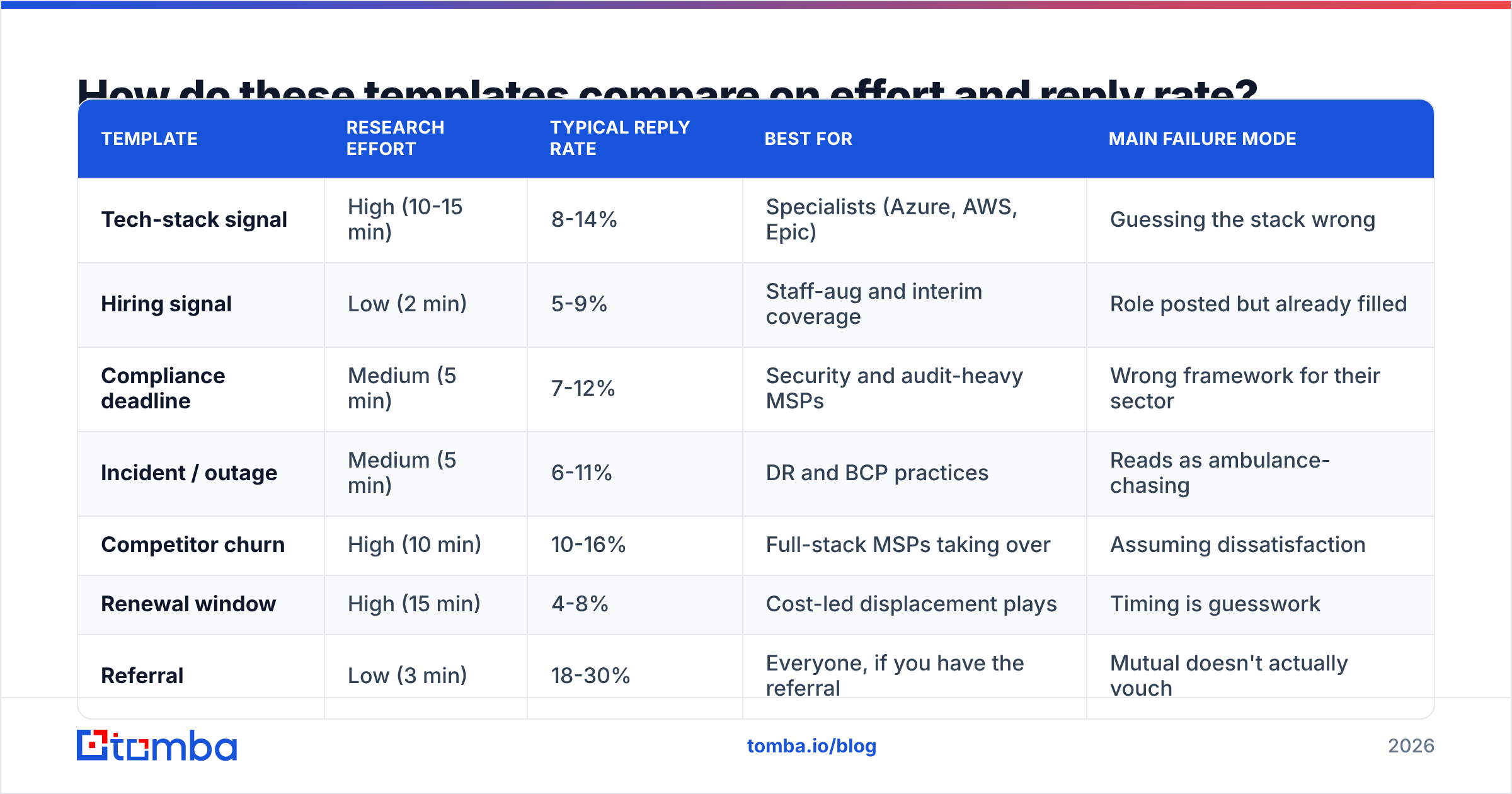
Not every template deserves the same investment. Here's an honest breakdown based on what IT-services outbound teams typically see. Treat the reply-rate column as directional, not gospel — it moves ±40% with list quality.
| Template | Research effort | Typical reply rate | Best for | Main failure mode |
|---|---|---|---|---|
| Tech-stack signal | High (10-15 min) | 8-14% | Specialists (Azure, AWS, Epic) | Guessing the stack wrong |
| Hiring signal | Low (2 min) | 5-9% | Staff-aug and interim coverage | Role posted but already filled |
| Compliance deadline | Medium (5 min) | 7-12% | Security and audit-heavy MSPs | Wrong framework for their sector |
| Incident / outage | Medium (5 min) | 6-11% | DR and BCP practices | Reads as ambulance-chasing |
| Competitor churn | High (10 min) | 10-16% | Full-stack MSPs taking over | Assuming dissatisfaction |
| Renewal window | High (15 min) | 4-8% | Cost-led displacement plays | Timing is guesswork |
| Referral | Low (3 min) | 18-30% | Everyone, if you have the referral | Mutual doesn't actually vouch |
Two things jump out. First, the referral template dominates everything — which is why your outbound program should systematically mine for warm paths before it mines for cold ones. Second, the high-effort templates (tech-stack, competitor churn) earn their effort. The low-effort ones are volume plays and should be treated as such.
Why does list quality beat copy quality?#
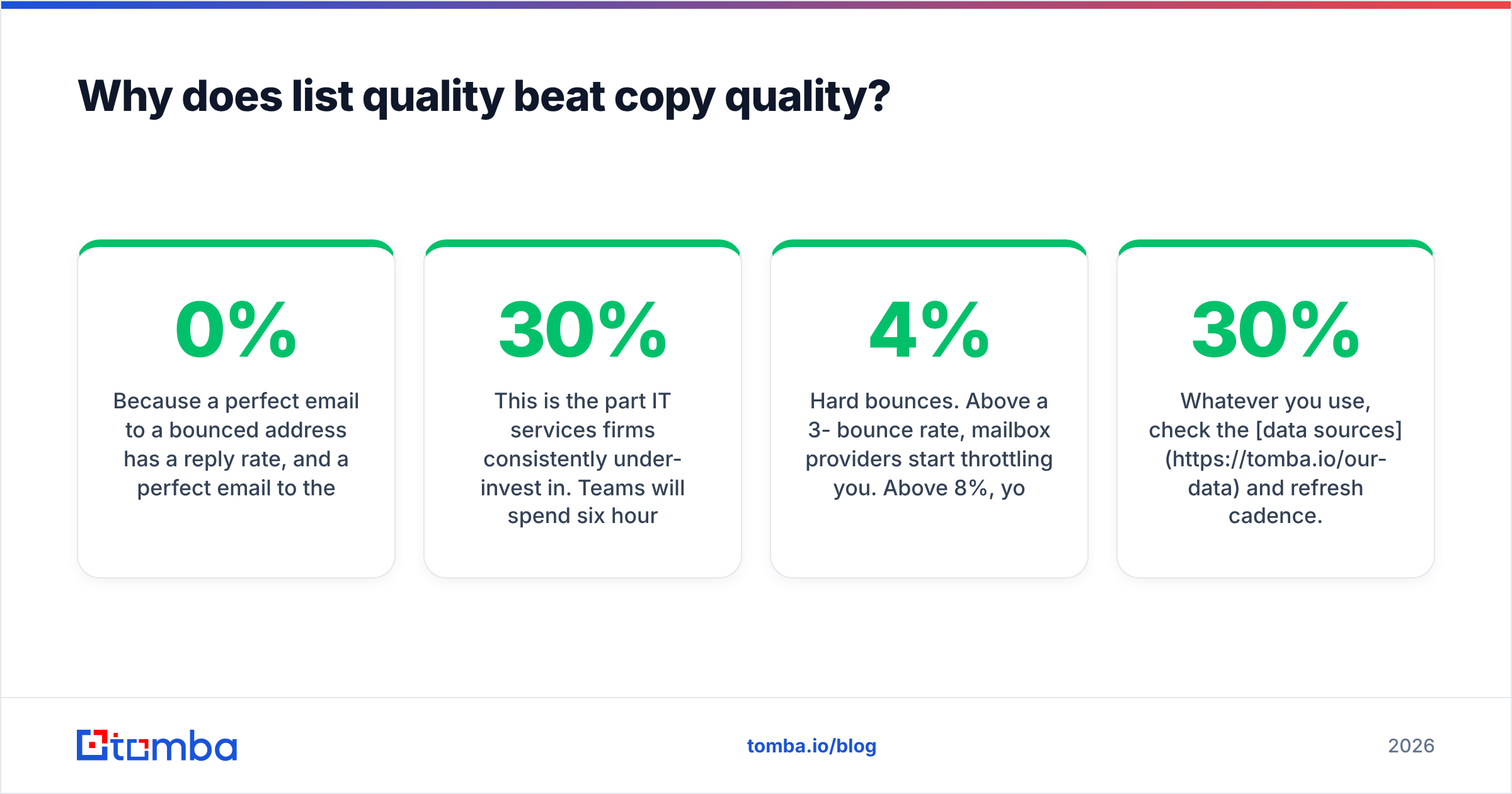
Because a perfect email to a bounced address has a 0% reply rate, and a perfect email to the wrong role has roughly the same.
This is the part IT services firms consistently under-invest in. Teams will spend six hours workshopping subject lines and then blast the result at a scraped list where 30% of the addresses are stale, 15% are role accounts (info@, support@), and 20% belong to people who left the company eighteen months ago.
Three failure modes, in order of damage:
- Hard bounces. Above a 3-4% bounce rate, mailbox providers start throttling you. Above 8%, your domain reputation takes real damage and even your legitimate mail lands in spam. Run every list through an email verifier before send — this is non-negotiable, not an optimization.
- Catch-all domains. A huge share of mid-market IT departments sit behind catch-all MX configurations, which accept every address and then silently drop the invalid ones. Standard verification returns "unknown." A dedicated catch-all verifier is the only way to separate real mailboxes from black holes.
- Role mismatch. Sending an infrastructure pitch to a VP of Engineering at a product company gets you ignored; sending it to the IT Director gets you read. Use domain search to pull the full contact map for a target company, then pick by title rather than by whoever's email you happened to find first.

There's a real market of data providers here and they are not interchangeable. Some optimize for coverage breadth, some for verification depth. Providers like BookYourData have built a solid reputation for pre-verified, filterable B2B lists when you want to buy rather than build. Tools like Tomba's email finder sit on the other side of the workflow — you already know the company and the person, and you need the address, verified, at scale. Most mature outbound teams use both: purchased lists for top-of-funnel breadth, real-time finding and verification for the accounts they actually care about.
Whatever you use, check the data sources and refresh cadence. B2B contact data decays at roughly 25-30% per year, and IT departments churn faster than most.
What should the follow-up sequence look like?#
Roughly half of positive replies to cold outbound arrive after the first email. If your sequence is "email, wait, give up," you're leaving most of your pipeline on the table.
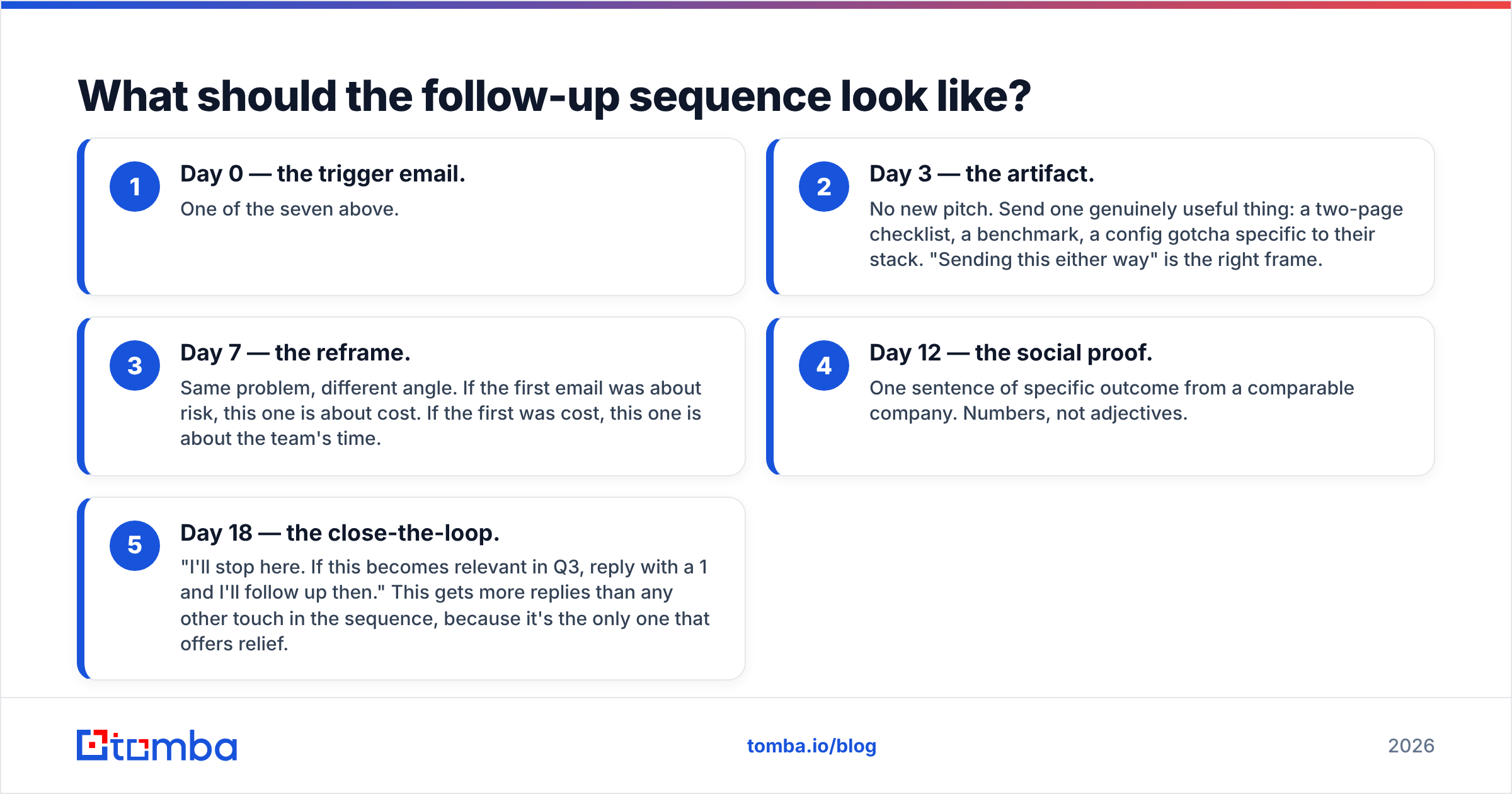
A workable cadence for IT services, spread across 18-21 days:
- Day 0 — the trigger email. One of the seven above.
- Day 3 — the artifact. No new pitch. Send one genuinely useful thing: a two-page checklist, a benchmark, a config gotcha specific to their stack. "Sending this either way" is the right frame.
- Day 7 — the reframe. Same problem, different angle. If the first email was about risk, this one is about cost. If the first was cost, this one is about the team's time.
- Day 12 — the social proof. One sentence of specific outcome from a comparable company. Numbers, not adjectives.
- Day 18 — the close-the-loop. "I'll stop here. If this becomes relevant in Q3, reply with a 1 and I'll follow up then." This gets more replies than any other touch in the sequence, because it's the only one that offers relief.
Two rules. Never send all five from the same thread if the first three got no opens — that's a deliverability signal, not a persistence problem. And never send more than one email per week to the same person once they've gone silent twice.
If your reply volume is climbing but meetings aren't, the sequence isn't the problem. The offer is. Test the ask, not the copy.
How do you know whether your cold email program is working?#
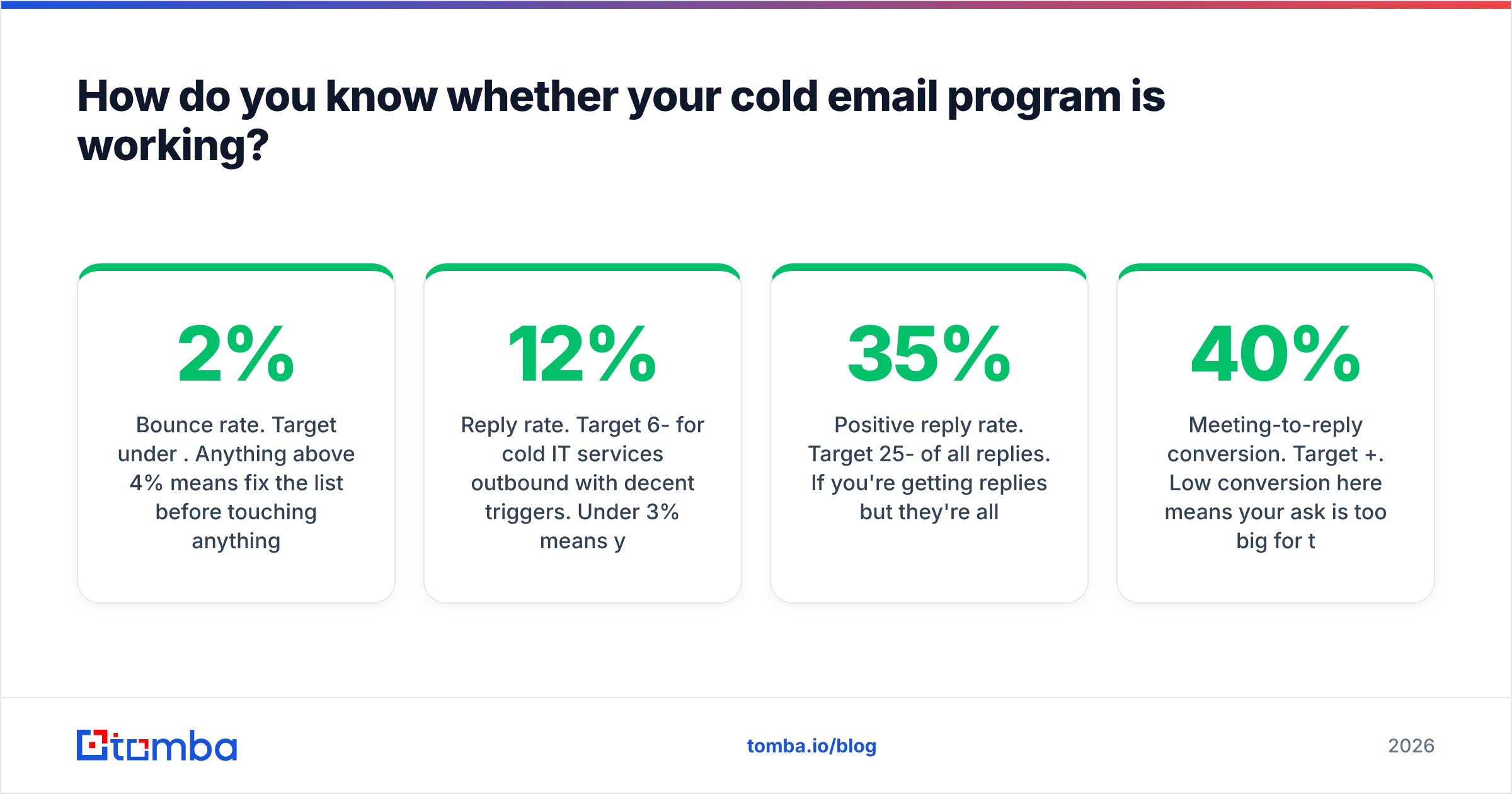
Track four numbers, in this order:
- Bounce rate. Target under 2%. Anything above 4% means fix the list before touching anything else. Check your sender reputation monthly.
- Reply rate. Target 6-12% for cold IT services outbound with decent triggers. Under 3% means your trigger isn't real or your list is off-role.
- Positive reply rate. Target 25-35% of all replies. If you're getting replies but they're all "please remove," your targeting is wrong, not your copy.
- Meeting-to-reply conversion. Target 40%+. Low conversion here means your ask is too big for the stage.
Notice that copy improvements move exactly one of those four. This is why teams that obsess over subject lines plateau, and teams that obsess over targeting compound.
For broader context on how IT buying committees actually evaluate vendors — usually 6-10 stakeholders, mostly before they ever contact you — Gartner's IT research hub is a reasonable starting point. And if you're selling into the managed-services category specifically, understanding how managed services are defined and priced will keep you from pitching a model your prospect already rejected.
Where should you start?#
Pick one trigger. Build a list of 50 companies that genuinely have it. Verify every address. Send the matching template with a real observation in the first line, not a merge field pretending to be one.
Fifty verified, well-targeted emails will out-book two thousand generic ones — and they won't torch your domain doing it.
The bottleneck for most IT services teams isn't the template. It's getting from "I know which 50 companies have this trigger" to "I have the IT Director's verified email address at all 50." That's a data problem, and it's the one worth solving first.
Tomba Email Finder handles exactly that step: give it a company domain and a name, or just a domain, and get back verified professional email addresses with confidence scores — plus catch-all detection so you know which mailboxes are real before you hit send. The free tier covers 25 searches a month if you want to test it against a list you already have; paid plans start at $49/mo. See Tomba pricing for the full breakdown, or start finding addresses at tomba.io/email-finder.
Related guides#
Ready to find emails that actually work?
Join 150,000+ professionals who stopped guessing and started sending. Free credits on signup — no credit card required.
Get the Tomba newsletter
Practical outbound tactics and product updates — once every two weeks.
About the author