Cold Email Templates for Executives: 7 That Get Replies
Executives delete 90% of cold email in under four seconds. Here are seven templates that survive the skim test, plus the structure, triggers, and follow-up cadence behind them.
TL;DR
- Executives read email on a phone, between meetings, in under four seconds. Anything over 120 words is skimmed, not read.
- The templates that work share one shape: a specific trigger, one claim with a number attached, one question that costs nothing to answer.
- Seniority changes the currency. A CFO wants cost and risk. A CRO wants pipeline. A CTO wants engineering hours. Same template skeleton, different denominator.
- Personalization at the executive level means referencing a decision they made, not a LinkedIn post they liked.
- None of it matters if the address bounces. Verify before you send — a 5% bounce rate on a 200-person C-suite list is enough to hurt your sending domain.
Why do most cold emails to executives fail?#
Because they were written for a persona, not a person with 340 unread messages.
The average VP-and-above inbox gets between 100 and 200 external emails a week. Most get triaged from a notification preview: sender name, subject line, first eight words of the body. That is the entire surface area you're competing on. If your opening line is "I hope this email finds you well" or "I wanted to reach out because," you have spent the whole preview saying nothing.
The second failure is scope. Reps write to executives as if the executive is the buyer. Usually they are the authorizer. They don't want a demo — they want to know whether this is worth delegating. That reframes the ask entirely. "Are you free for 30 minutes Thursday?" is a bad ask for a CFO. "Is this Priya's call or yours?" is a good one, because it takes four seconds to answer and it moves the deal either way.
The third failure is measurable and unglamorous: the email never arrives. Between guessed addresses, catch-all domains that silently swallow mail, and role accounts that route to a shared queue nobody reads, a meaningful chunk of "no reply" is actually "no delivery." Research consolidated by review platforms like G2 consistently shows B2B contact databases decaying at roughly 2–3% per month as people change jobs. Over a year, that's a third of your list.
Wait — that image should read: 
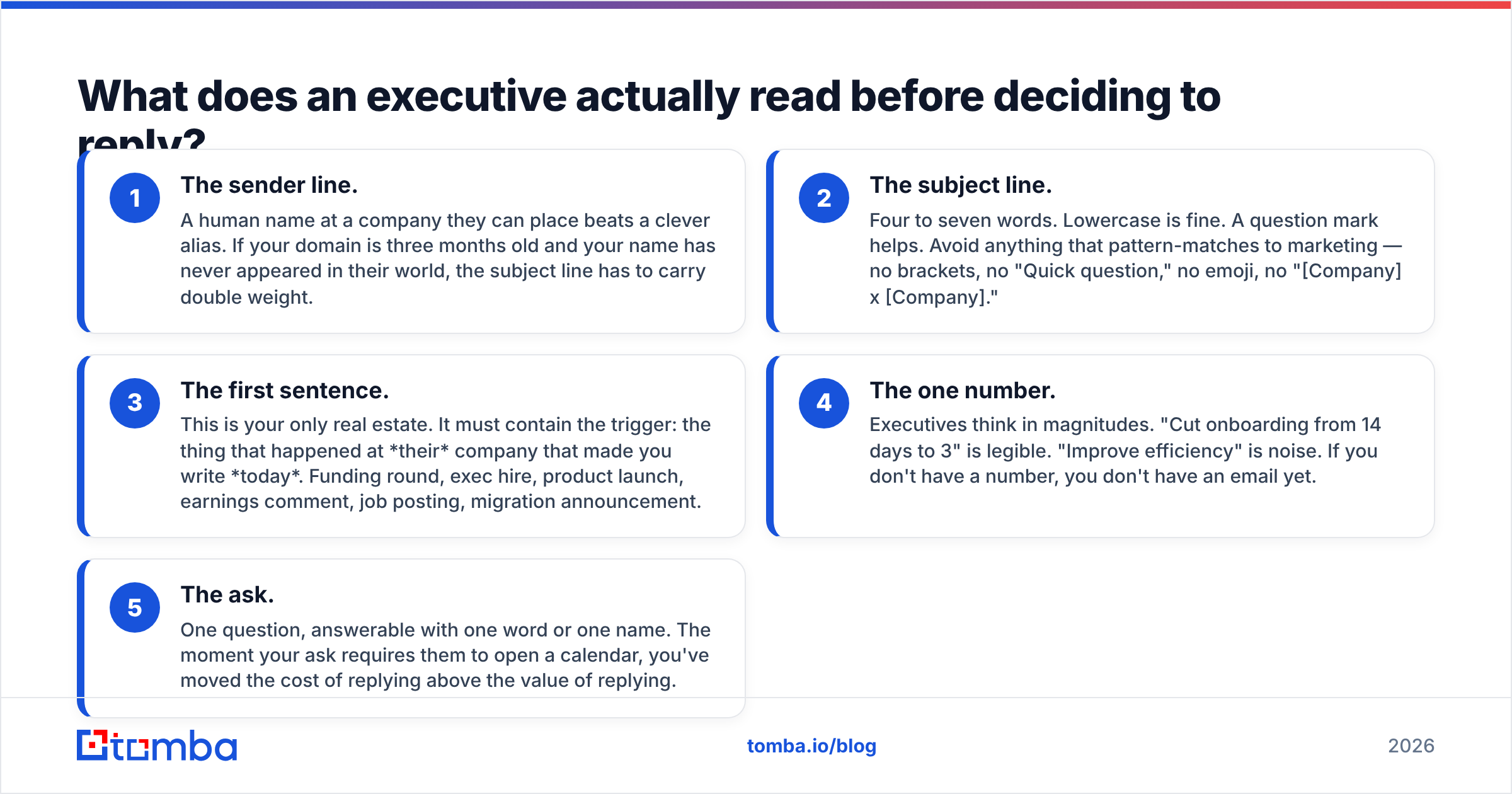
What does an executive actually read before deciding to reply?#
Five things, in this order. Everything in the templates below is engineered around them.
- The sender line. A human name at a company they can place beats a clever alias. If your domain is three months old and your name has never appeared in their world, the subject line has to carry double weight.
- The subject line. Four to seven words. Lowercase is fine. A question mark helps. Avoid anything that pattern-matches to marketing — no brackets, no "Quick question," no emoji, no "[Company] x [Company]."
- The first sentence. This is your only real estate. It must contain the trigger: the thing that happened at their company that made you write today. Funding round, exec hire, product launch, earnings comment, job posting, migration announcement.
- The one number. Executives think in magnitudes. "Cut onboarding from 14 days to 3" is legible. "Improve efficiency" is noise. If you don't have a number, you don't have an email yet.
- The ask. One question, answerable with one word or one name. The moment your ask requires them to open a calendar, you've moved the cost of replying above the value of replying.
Word count for the whole thing: 50 to 120. Under 90 is better. Anything longer signals you don't know what you're asking for.
What are the 7 cold email templates for executives?#
Each template below is annotated with when it works and when it backfires. Replace every bracket. If you can't fill a bracket with something specific, the template is not for that prospect.
1. The trigger-event template (funding, hire, launch)#
Subject: after the series B
[Name] — saw the $[X]M round closed last month, with [investor] leading.
Most teams that raise at your stage hit the same wall: headcount grows 3x faster than the systems underneath it. We rebuilt [similar company]'s [process] so their [metric] went from [X] to [Y] without adding [N] hires.
Worth 15 minutes with whoever owns [function] — is that you or [likely name]?
[Your name]
Works when: the event is under 60 days old and genuinely creates the problem you solve. Backfires when: you congratulate them. Never congratulate. Every other vendor congratulated.
2. The peer-proof template#
Subject: how [competitor] handled [problem]
[Name] — [Competitor] moved their [process] off [old approach] last year. Their [role] told us it cut [metric] by [X]%.
You're roughly the same size and shape. Not assuming you have the same problem, but if [symptom] is on your list for [quarter], I can send the two-page breakdown of what they changed.
Want it?
[Your name]
Works when: the named peer is a real, verifiable customer and a credible rival. Backfires when: you name-drop a company they consider beneath them, or one you can't legally reference.
3. The one-metric template (best for CFOs)#
Subject: [X]% of your [spend line]
[Name] — companies at [revenue band] typically spend [X]% of [budget line] on [category]. Based on [public signal: job postings, tech stack, headcount], you're likely near the top of that range.
We took [customer] from [X]% to [Y]% in two quarters. No rip-and-replace.
If the number's wrong, tell me and I'll stop. If it's close, who runs that budget?
[Your name]
Works when: you've done real arithmetic and are willing to be corrected. Backfires when: the estimate is obviously scraped. CFOs can smell a template variable.
4. The delegation template#
Subject: wrong person?
[Name] — I've been trying to figure out who owns [specific process] at [Company]. Best guess is your org, but it may sit under [other function].
Context: we cut [metric] by [X] for [customer], and [Company] shows [public signal] that suggests the same setup.
One name is all I need. Happy to leave you out of it entirely.
[Your name]
Works when: you genuinely don't know the owner, and you say so. Backfires when: it's a fake-humility trick and the executive knows you know.
5. The teardown template#
Subject: three things on [Company]'s [page/flow]
[Name] — I went through [specific page or flow] as a buyer would. Three things cost you conversions: [1], [2], [3]. The second one is worth about [$X]/month at your traffic.
Wrote it up with screenshots. Send it over, or is [name] the right person?
[Your name]
Works when: the teardown is real, specific, and free. Attach nothing — offer it. Backfires when: the critique is generic or the executive built the thing personally.
6. The contrarian template#
Subject: disagree with the [Podcast/Panel] take
[Name] — heard your point on [podcast] that [their claim]. Half agree. The part I'd push on: [specific counterpoint with evidence].
We see the opposite in [N] deployments — [data point].
Curious whether you've seen it break the way I have. No pitch.
[Your name]
Works when: you actually listened, and you're actually right. Backfires when: the disagreement is manufactured. This is the highest-risk, highest-reply template in the set.
7. The breakup template#
Subject: closing the loop
[Name] — three notes, no reply, which is a clear answer. Closing the file.
If [problem] moves up the list in [Q3], the one-page version is [link]. Otherwise, good luck with [specific initiative].
[Your name]
Works when: it's genuinely the last email. Send it and mean it. Backfires when: you send a fourth email after the breakup email. Everyone does this. Everyone gets marked as spam.
How should the template change by executive role?#
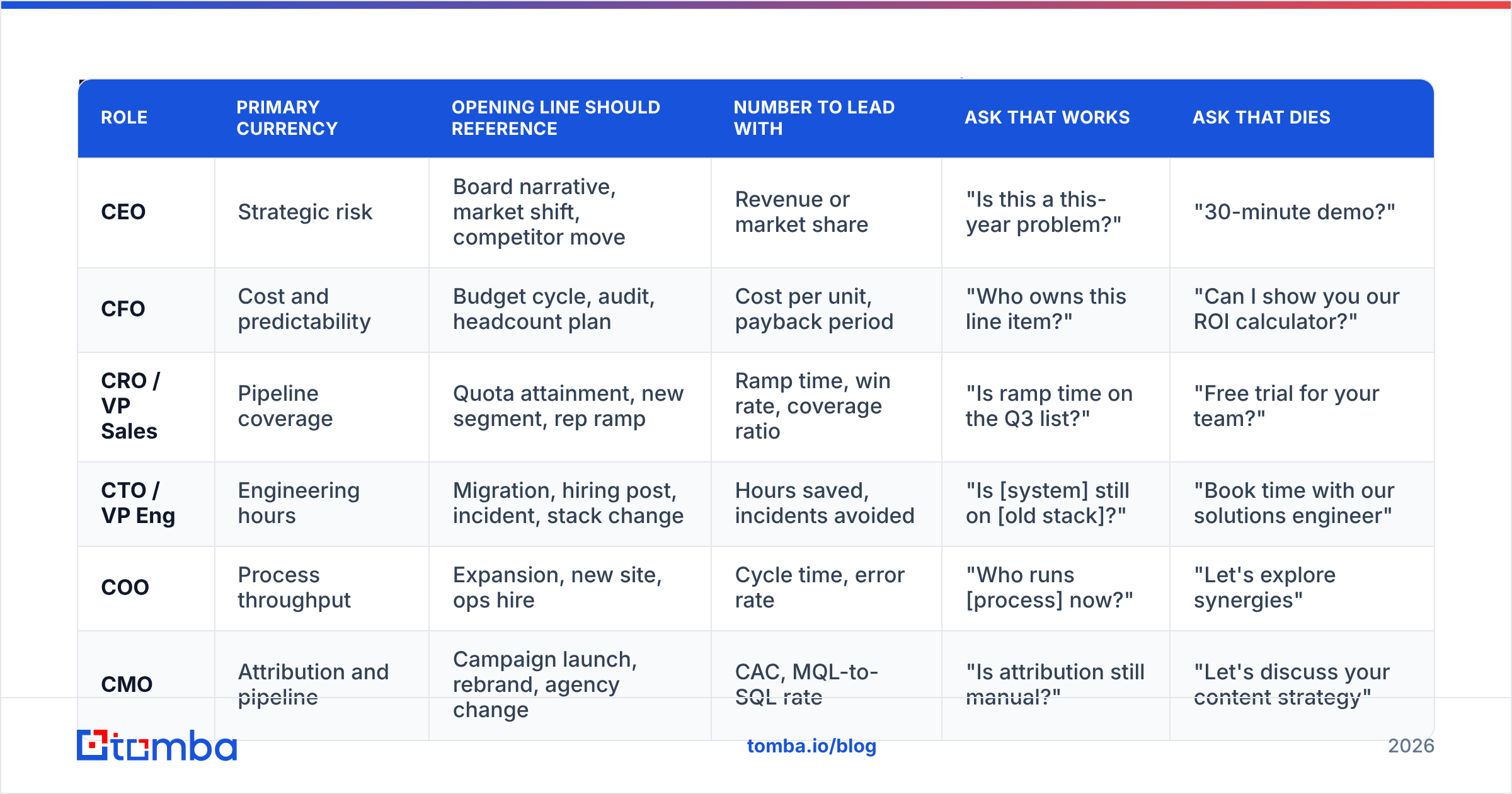
The skeleton stays. The denominator changes. This is the single highest-leverage edit most reps skip.
| Role | Primary currency | Opening line should reference | Number to lead with | Ask that works | Ask that dies |
|---|---|---|---|---|---|
| CEO | Strategic risk | Board narrative, market shift, competitor move | Revenue or market share | "Is this a this-year problem?" | "30-minute demo?" |
| CFO | Cost and predictability | Budget cycle, audit, headcount plan | Cost per unit, payback period | "Who owns this line item?" | "Can I show you our ROI calculator?" |
| CRO / VP Sales | Pipeline coverage | Quota attainment, new segment, rep ramp | Ramp time, win rate, coverage ratio | "Is ramp time on the Q3 list?" | "Free trial for your team?" |
| CTO / VP Eng | Engineering hours | Migration, hiring post, incident, stack change | Hours saved, incidents avoided | "Is [system] still on [old stack]?" | "Book time with our solutions engineer" |
| COO | Process throughput | Expansion, new site, ops hire | Cycle time, error rate | "Who runs [process] now?" | "Let's explore synergies" |
| CMO | Attribution and pipeline | Campaign launch, rebrand, agency change | CAC, MQL-to-SQL rate | "Is attribution still manual?" | "Let's discuss your content strategy" |
A CFO reading a CRO email knows instantly. It reads like a form letter with the wrong mail-merge field, because that's what it is.
Which trigger should you attach to which template?#
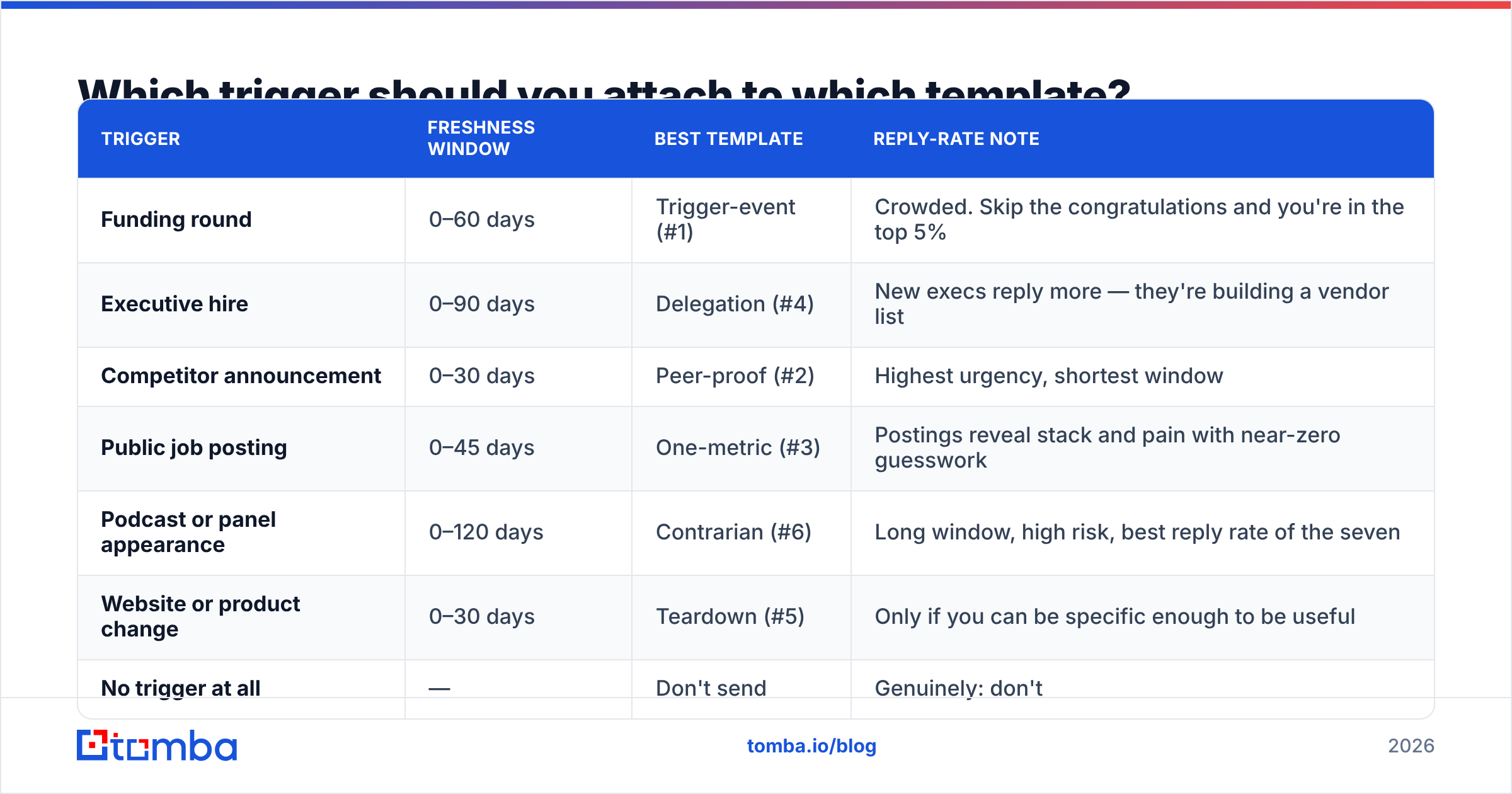
Triggers are not decoration. They are the reason the email is not spam. Match them deliberately.
| Trigger | Freshness window | Best template | Reply-rate note |
|---|---|---|---|
| Funding round | 0–60 days | Trigger-event (#1) | Crowded. Skip the congratulations and you're in the top 5% |
| Executive hire | 0–90 days | Delegation (#4) | New execs reply more — they're building a vendor list |
| Competitor announcement | 0–30 days | Peer-proof (#2) | Highest urgency, shortest window |
| Public job posting | 0–45 days | One-metric (#3) | Postings reveal stack and pain with near-zero guesswork |
| Podcast or panel appearance | 0–120 days | Contrarian (#6) | Long window, high risk, best reply rate of the seven |
| Website or product change | 0–30 days | Teardown (#5) | Only if you can be specific enough to be useful |
| No trigger at all | — | Don't send | Genuinely: don't |
That last row is the one nobody wants. If there is no trigger, you are writing a newsletter to a stranger.

How do you make sure the email actually lands?#
You can write the best cold email of your career and still get a zero because the address was a guess.
Executive addresses are the hardest tier of B2B data. They're the most likely to be aliased, the most likely to be firewalled behind an EA, and the most likely to be stale — senior people change jobs and the old mailbox often stays open, silently accepting mail that nobody reads. That last case is worse than a bounce, because it looks like delivery.
Three checks before any executive campaign goes out:
- Find the address from the domain, not from a pattern guess. Pattern generators produce
first.last@and hope. A proper email finder resolves against known-good sources for that specific domain and returns a confidence score you can filter on. - Verify every address, including the ones you're confident about. Email verification catches the mailbox that was deprovisioned last quarter. Keep hard bounces under 2%. Above 5% on a list this small, your domain reputation takes a hit that outlasts the campaign.
- Handle catch-all domains explicitly. Large enterprises frequently accept all mail at the MX level, which means a standard verifier returns "unknown," not "valid." A catch-all verifier narrows that down instead of leaving you to guess. Segment catch-all addresses into their own send so a bad batch doesn't poison the good one.
Then the boring infrastructure: SPF, DKIM, and DMARC aligned; a warmed sending domain; volume under 50 executive sends per mailbox per day. Google and Microsoft both tightened bulk-sender requirements in the last two years, and enforcement is now automatic. HubSpot's sales resources and Gartner's sales research both put deliverability hygiene ahead of copy quality in terms of measurable impact — which is a polite way of saying your templates don't matter if you're in the spam folder. If you want the fundamentals, start with email deliverability.
What subject lines work on executives?#
Short, lowercase, and slightly unfinished. The subject's only job is to survive the notification preview.
after the series B— pairs with template 1wrong person?— pairs with template 4three things on your checkout— pairs with template 5disagree with your take on PLG— pairs with template 6[X]% of your infra spend— pairs with template 3closing the loop— pairs with template 7
What dies on arrival: "Quick question," "Touching base," anything with brackets, anything with a first name in the subject, anything that reads like it was A/B tested. Executives have seen the A/B test. If you want to sanity-check variants before you send, run them through a subject line tester rather than burning list segments to learn the same thing.
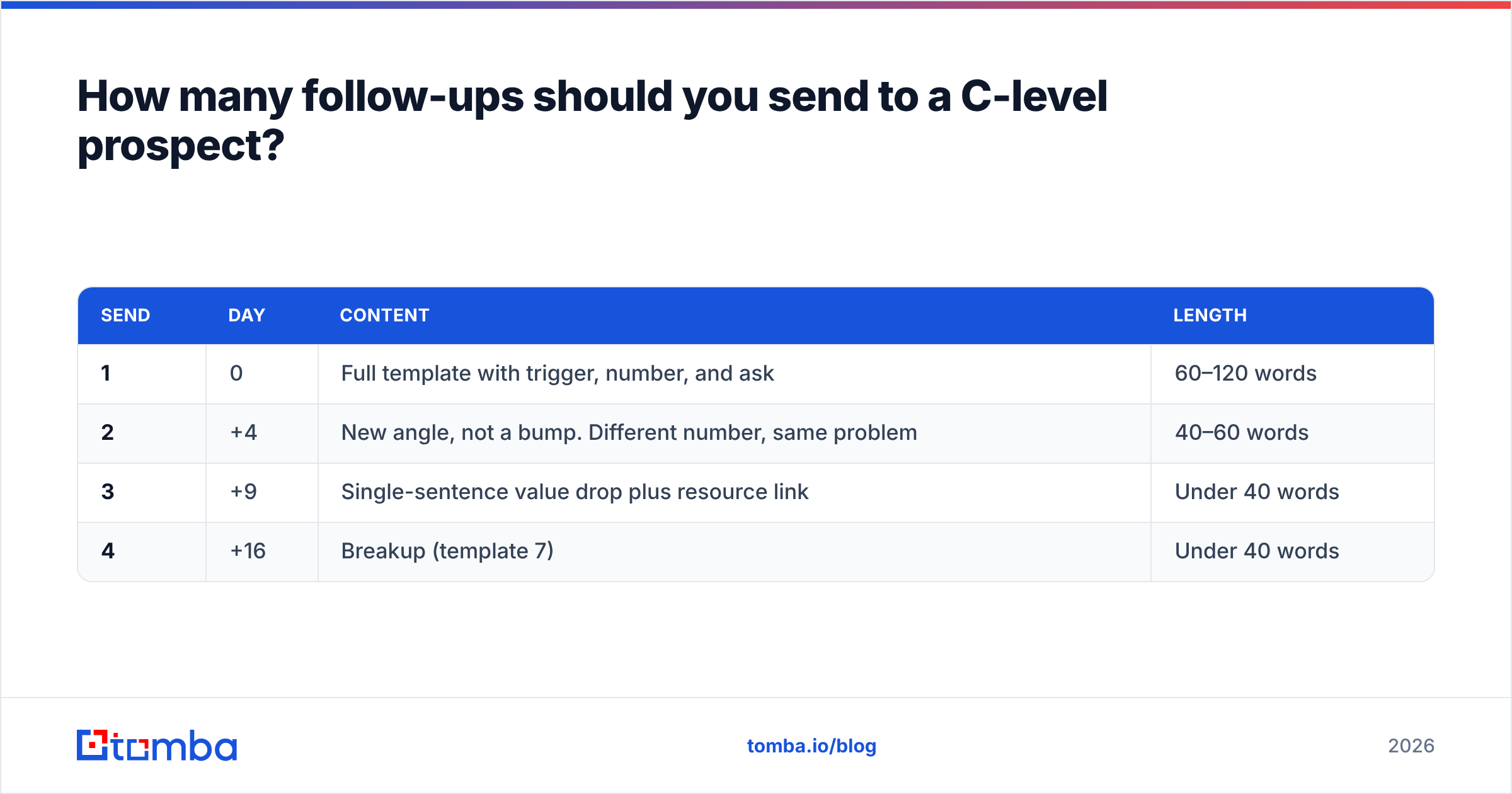
How many follow-ups should you send to a C-level prospect?#
Three, then stop.
| Send | Day | Content | Length |
|---|---|---|---|
| 1 | 0 | Full template with trigger, number, and ask | 60–120 words |
| 2 | +4 | New angle, not a bump. Different number, same problem | 40–60 words |
| 3 | +9 | Single-sentence value drop plus resource link | Under 40 words |
| 4 | +16 | Breakup (template 7) | Under 40 words |
Never reply to your own thread with "just bumping this to the top of your inbox." It's the clearest possible signal that you have nothing new to say and expect them to do the work of remembering who you are. Each follow-up must be able to stand alone if it's the only one they read.
Reply rates on executive lists are structurally lower than on manager-level lists. A well-targeted 200-person C-suite campaign returning 4–7% replies is performing well. If you're seeing 12%, check whether your list is really executives or whether you've caught a lot of directors with inflated titles.
Start with addresses that exist#
Templates are the cheap part. Any competent rep can rewrite these seven in an afternoon. The expensive part is a clean list of executive addresses that actually resolve, sorted by a trigger that's less than 60 days old.
Build that first. Use Tomba Email Finder to resolve executive addresses by domain, name, or company, push them through the verifier, and hold anything below your confidence threshold out of the send. The free tier gives you 25 searches a month to test the workflow on a target account list; Tomba pricing starts at $49/mo on Starter when you're ready to run it at volume.
Then write the 90-word email. Then send it once, follow up three times, and move on.
Related guides#
Ready to find emails that actually work?
Join 150,000+ professionals who stopped guessing and started sending. Free credits on signup — no credit card required.
Get the Tomba newsletter
Practical outbound tactics and product updates — once every two weeks.
About the author