Cold Email Templates for Gmail: 9 Proven Formats for 2026
Nine cold email templates built for Gmail's send limits, threading quirks, and spam filters — plus the setup steps that decide whether any of them ever get seen.
TL;DR
- Templates don't fail because the copy is bad. They fail because Gmail throttled you, your domain had no SPF/DKIM/DMARC, or 30% of your list bounced.
- Free Gmail caps you at ~500 recipients/day; Google Workspace at ~2,000/day. Cold outreach lives at the bottom of those numbers, not the top.
- The nine templates below are grouped by trigger — job change, funding, content, mutual connection, competitor switch, and so on. Pick by trigger, not by vibe.
- One variable per template is the personalization. Everything else stays fixed. That's what makes a template a template instead of a mail merge with extra steps.
- Verify before you send. A 3% bounce rate is survivable. An 8% bounce rate on a new domain is a reputation problem you'll spend six weeks digging out of.
What makes a cold email template "for Gmail" specifically?#
Most template roundups hand you copy that would work in any inbox. That's the problem. Gmail has opinions, and it enforces them.
Think of Gmail like a nightclub with a bouncer who remembers faces. The copy is what you say at the door. But if you showed up 400 times last Tuesday, or your ID is missing a signature, you don't get to talk at all. Deliverability is the bouncer. Copy is the conversation.
Three Gmail-specific constraints shape every template on this page:
- Send limits are per-day, rolling. Google's published sending limits put free Gmail at 500 external recipients per day and Workspace at 2,000. Hit them and you're locked out for 24 hours — mid-sequence, mid-campaign.
- Threading changes what a follow-up can say. Gmail collapses replies into a conversation. Your follow-up is visible next to the original. "Just circling back" reads as filler when the reader can see the original two inches above it.
- The Promotions tab is triggered by structure, not just words. Image-heavy signatures, multiple links, tracking pixels, and HTML tables push you sideways. Plain-text-looking mail stays in Primary.
Everything below assumes a clean domain, authenticated DNS, and a verified list. If you're missing those, the templates are decoration.
What has to be true before you send a single template?#
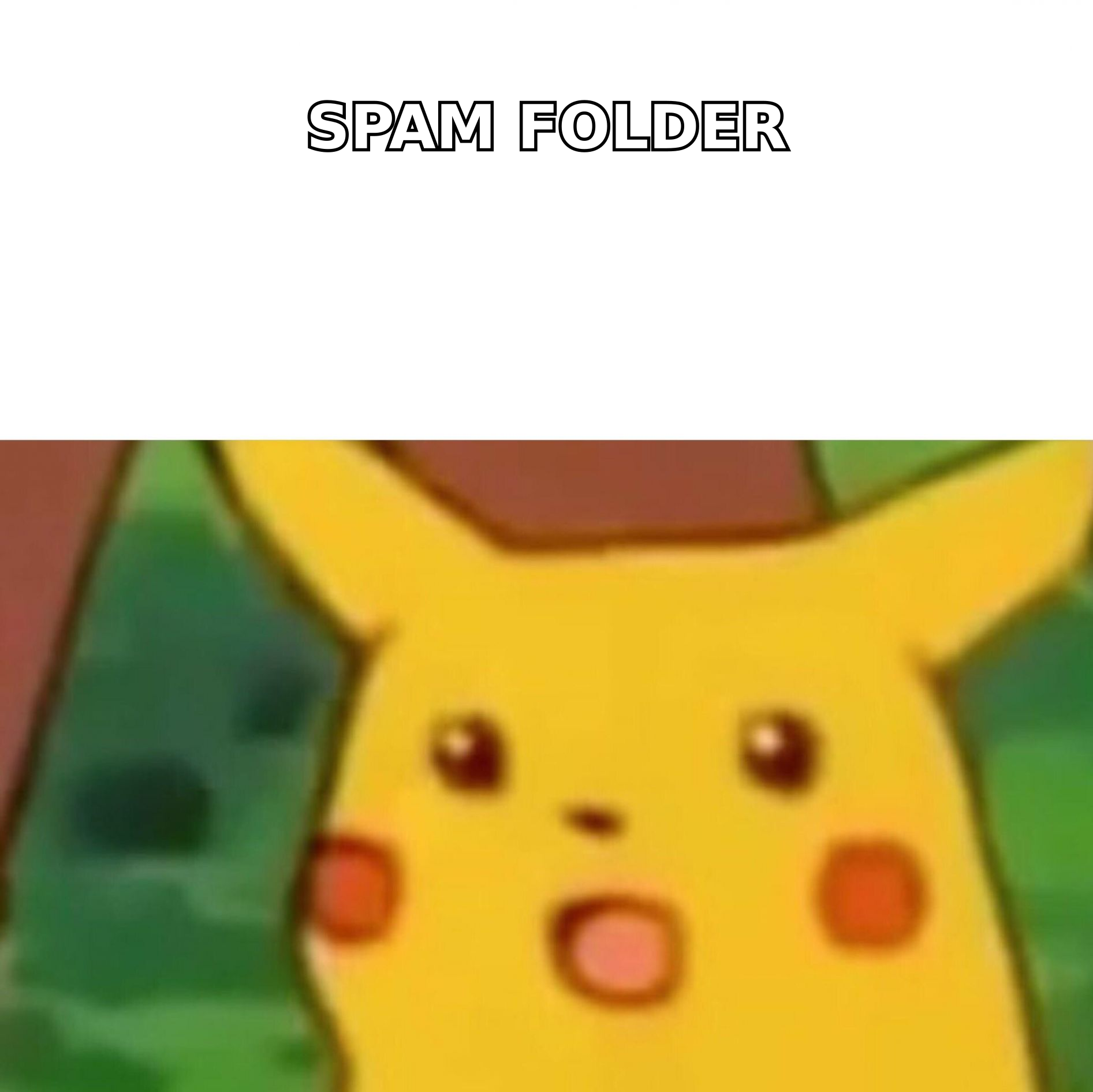
Here's the boring checklist that decides 80% of your outcome:
- Use a secondary domain. Send from
getacme.com, notacme.com. If reputation tanks, your billing and support email survives. - Authenticate all three records. SPF, DKIM, DMARC. Check your SPF record before you assume it's fine — misconfigured SPF is the single most common cause of a "why is everything in spam" ticket.
- Warm up for 3–4 weeks. Start at 5–10 sends/day and ramp. An email warmup calculator gives you the ramp schedule; the point is that Gmail wants to see human-looking volume growth, not a cold start at 200.
- Verify every address. Catch-all domains, role accounts (
info@,sales@), and stale contacts are what turn a 2% bounce into a 9% bounce. Run the list through an email verifier first. - Cap at 30–50 cold sends/day per inbox. Yes, Gmail permits 500. Gmail also permits you to ruin your domain. Spread volume across 3–5 inboxes instead of maxing one.
- Strip the signature. One line of plain text. No logo, no banner, no "book a meeting" button in the first email.
That last point surprises people. A rep sends 200 beautifully written emails, gets zero replies, and assumes the copy failed. The copy never got read.
Which cold email template should you use for which trigger?#
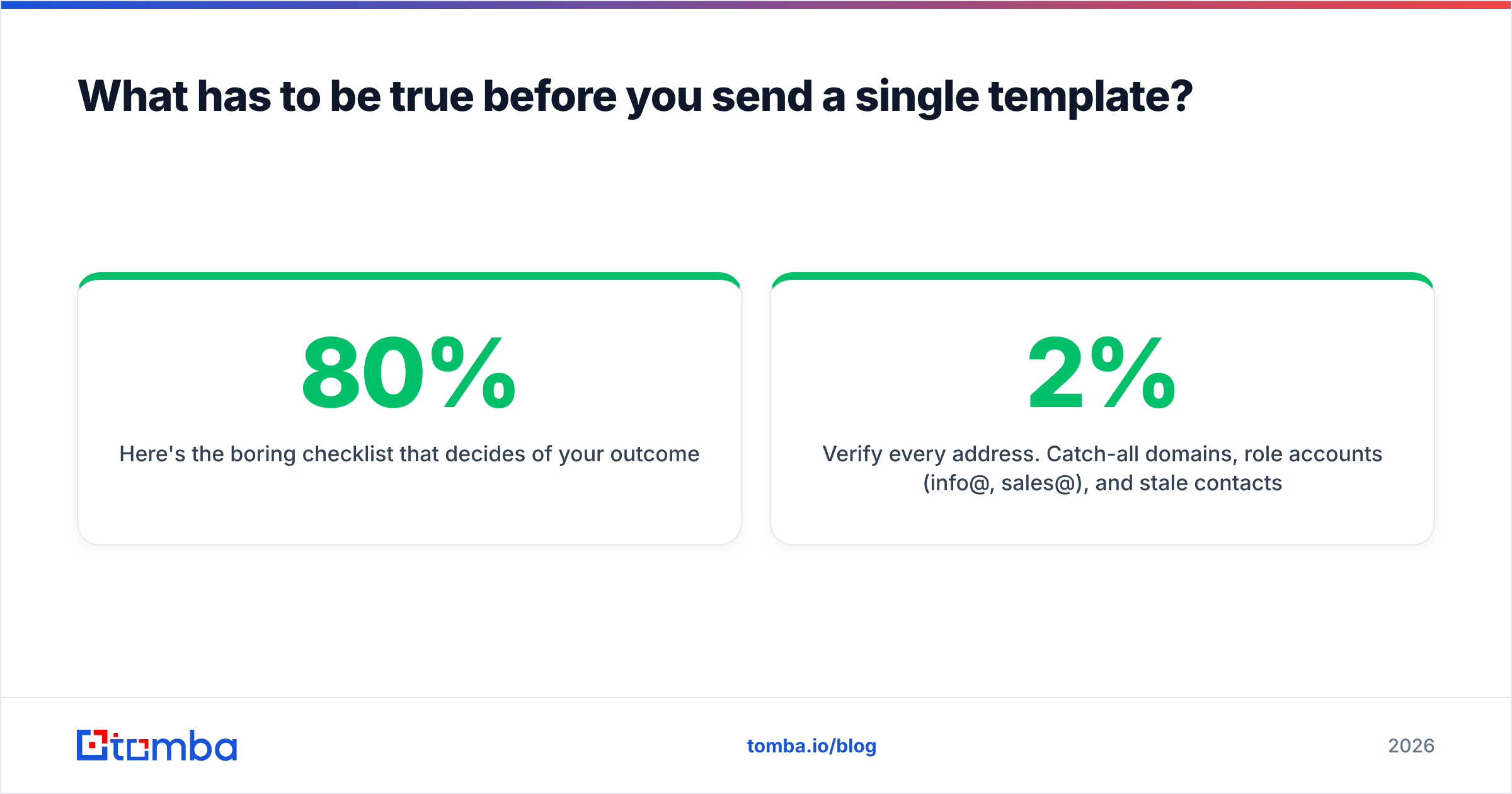
Templates work when they're attached to a reason you're emailing right now. Without a trigger, every template degrades into "I noticed your company does things." Here's the mapping.
| Template | Trigger | Best for | Typical reply rate | Follow-ups needed |
|---|---|---|---|---|
| New role congratulations | Prospect changed jobs in last 90 days | AE / SDR outbound | 8–14% | 1–2 |
| Funding round | Series A–C announced | Tools with headcount-linked value | 6–11% | 2 |
| Content compliment | They published/spoke recently | Partnerships, agencies | 5–9% | 1 |
| Mutual connection | Shared contact or alumni tie | Enterprise, long cycles | 12–20% | 1 |
| Competitor switch | They use a rival tool (tech-stack signal) | Direct replacement sales | 4–8% | 2–3 |
| Hiring signal | Open role implies a gap | Recruiting, staffing, tooling | 6–10% | 2 |
| Free audit / teardown | None (value-first) | Agencies, consultants | 3–7% | 2–3 |
| Referral upward | Wrong person, right company | Anyone stuck below the buyer | 15–25% (as forwards) | 1 |
| Breakup email | End of a sequence | Everyone | 4–9% | 0 |
Reply rates are directional — they come from aggregated benchmarks across B2B outbound, and they move enormously with list quality. The ranking is what matters: warm signals beat cold ones every time.
What do the nine cold email templates for Gmail actually look like?#
Each one is under 120 words. Each has exactly one variable that requires research. Subject lines are lowercase and short, because that's what a real person's email looks like in a Gmail preview pane.
1. New role congratulations#
Subject: congrats on the {{new_title}} role
{{first_name}} — saw you moved into the {{new_title}} seat at {{company}} last month. Congrats.
First 90 days in that role usually means inheriting someone else's {{system}}. When {{similar_company}}'s new {{title}} came in, the first thing they fixed was {{specific_problem}} — took about two weeks and cut {{metric}} by {{number}}.
Worth 12 minutes to walk you through what they did?
{{your_name}}
Variable to research: the previous title and start date. LinkedIn shows both.
2. Funding round#
Subject: the Series {{round}}
{{first_name}} — congrats on the {{amount}} round.
Most teams at your stage double sales headcount within nine months. The part nobody budgets for is that {{problem}} scales linearly with reps, not with revenue.
{{customer_example}} hit that wall at 14 reps. Here's what they did instead: {{one_sentence}}.
Want the two-page version?
3. Content compliment (that isn't flattery)#
Subject: your point about {{specific_claim}}
{{first_name}} — read your piece on {{topic}}. The line about {{specific_claim}} is the part most people get wrong.
We see the opposite pattern in {{industry}}: {{contrarian_data_point}}. Curious whether you've run into that.
Either way, good piece.
Note there's no ask. That's deliberate — this one earns a reply, and the reply is where you pitch. Pair it with an author finder if you're reaching out to people who publish under a byline but hide their contact page.
4. Mutual connection#
Subject: {{mutual_name}} suggested I reach out
{{first_name}} — {{mutual_name}} mentioned you're rebuilding {{function}} at {{company}} and thought this might be relevant.
Short version: we handle {{outcome}} for teams in your position. {{mutual_name}} used it at {{their_company}}.
Happy to send a two-minute Loom instead of a meeting if that's easier.
Only send this if the mutual connection knows you're sending it. The downside of getting caught is total.
5. Competitor switch#
Subject: {{competitor}} → us
{{first_name}} — you're running {{competitor}}, which means you've already solved {{problem_a}}. Most teams on it eventually hit {{problem_b}}.
Three of your peers moved in the last quarter. The migration took under a week and they kept {{thing_they_liked}}.
Not asking you to switch. Asking whether {{problem_b}} is real for you yet.
6. Hiring signal#
Subject: the {{role}} req
{{first_name}} — saw the {{role}} opening. That's usually a signal the team is drowning in {{task}}.
{{customer}} was about to hire the same role and instead automated {{percentage}} of it. They filled the req anyway, just for a higher-leverage job.
Want to see how?
7. Free teardown#
Subject: 4 things on {{company}}'s {{asset}}
{{first_name}} — spent 20 minutes on your {{asset}} and found four things worth fixing. Two are five-minute changes.
Recorded a 3-minute video: {{link}}
No pitch in it. If it's useful, tell me and I'll do the same for {{other_asset}}.
Actually record the video. The moment you fake this, it stops working — permanently, because people talk.
8. Referral upward#
Subject: wrong person?
{{first_name}} — I think I've got the wrong contact.
Who owns {{function}} at {{company}}? We help teams cut {{metric}} and I'd rather bother the right person once than you three times.
Thanks either way.
The highest reply rate on this list, and it doesn't sell anything. Use a domain search first so you're not guessing at who owns what.
9. Breakup#
Subject: closing the loop
{{first_name}} — I've sent a few notes about {{topic}} and haven't heard back, which usually means it's not a priority. Totally fair.
Closing your file. If {{trigger_event}} ever changes, I'm here.
{{your_name}}
Do not write "I'll assume you're not interested" with a passive-aggressive edge. It reads exactly as it's meant to.
Should you send cold email templates from Gmail, Workspace, or a dedicated tool?#
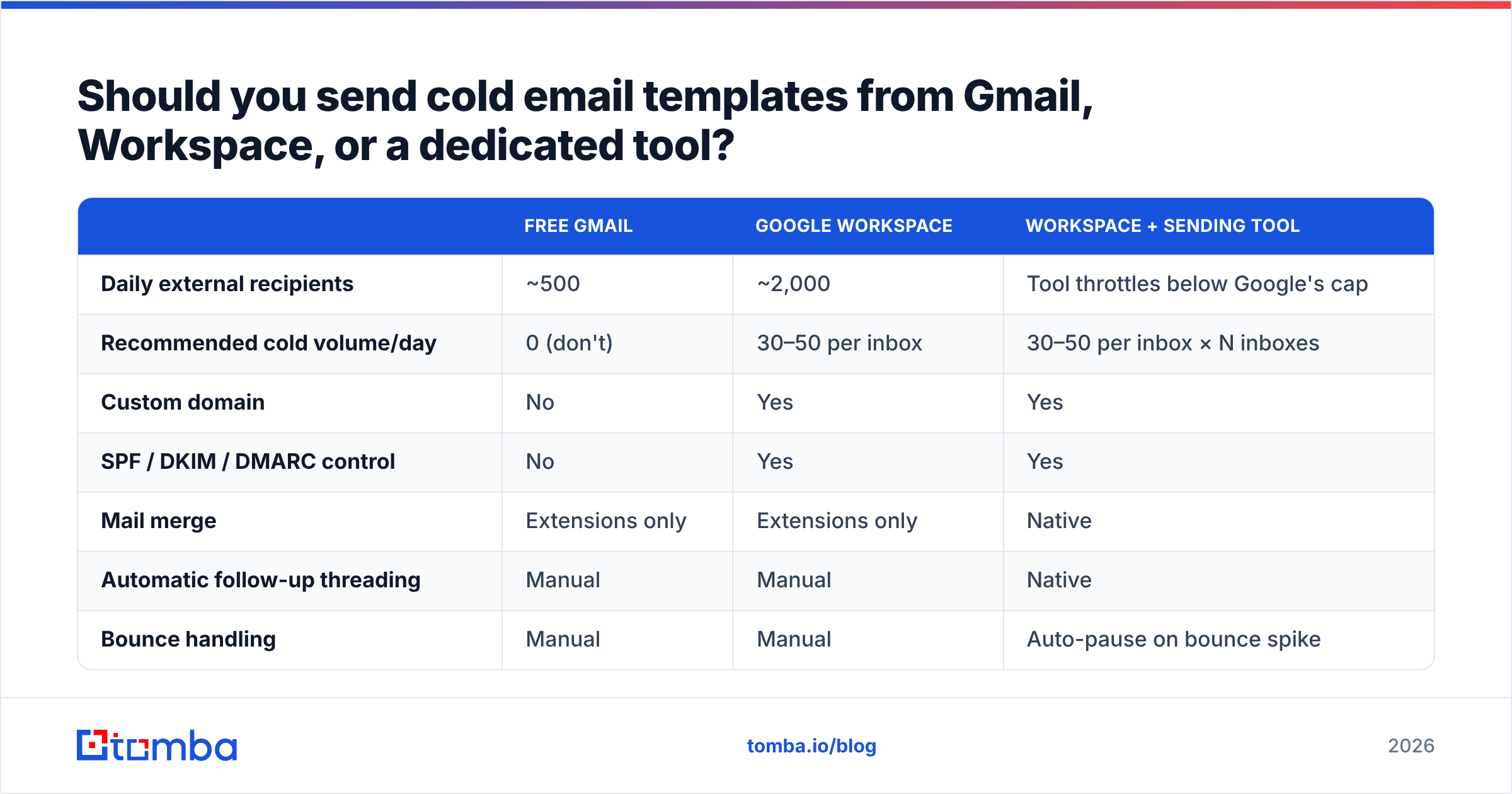
This is where most people pick wrong. The honest comparison:
| Free Gmail | Google Workspace | Workspace + sending tool | |
|---|---|---|---|
| Daily external recipients | ~500 | ~2,000 | Tool throttles below Google's cap |
| Recommended cold volume/day | 0 (don't) | 30–50 per inbox | 30–50 per inbox × N inboxes |
| Custom domain | No | Yes | Yes |
| SPF / DKIM / DMARC control | No | Yes | Yes |
| Mail merge | Extensions only | Extensions only | Native |
| Automatic follow-up threading | Manual | Manual | Native |
| Bounce handling | Manual | Manual | Auto-pause on bounce spike |
| Reply detection | Manual | Manual | Native |
| Realistic starting cost | $0 | ~$7/user/mo | ~$7/user/mo + $30–80/mo tool |
Free Gmail is disqualified for cold outreach — no custom domain means no DKIM alignment, which means DMARC can't pass, which means Gmail and Microsoft treat you as an unauthenticated stranger. Google's own guidance for bulk senders is unambiguous on this.
Workspace alone works if you're sending fewer than about 20 emails a day and you're fine tracking replies by hand. Past that, you want a sending layer that throttles, threads, and pauses automatically. Check current player pricing on G2 rather than trusting a comparison post from eighteen months ago — this category re-prices constantly.
How do you personalize a template without spending 20 minutes per email?#
The rule: one researched variable, one company-level variable, everything else fixed.
- The researched variable is the trigger. A job change, a funding round, a specific sentence in something they wrote. It goes in the first line and nowhere else.
- The company-level variable is reusable across everyone at that account. A tech-stack signal, headcount, a recent product launch.
- Everything else is your standard proof point and CTA.
That's 90 seconds of research per prospect, not 20 minutes. And it beats "hyper-personalized" AI-generated fluff, because the fluff pattern-matches to a template anyway — readers can smell an LLM riffing on their LinkedIn headline.
Before you scale it, run a draft through a spam checker. The words that trip filters change; the structural triggers (excessive links, image-to-text ratio, misaligned From/Reply-To) barely move.
What breaks cold email templates in Gmail — and how do you fix each one?#
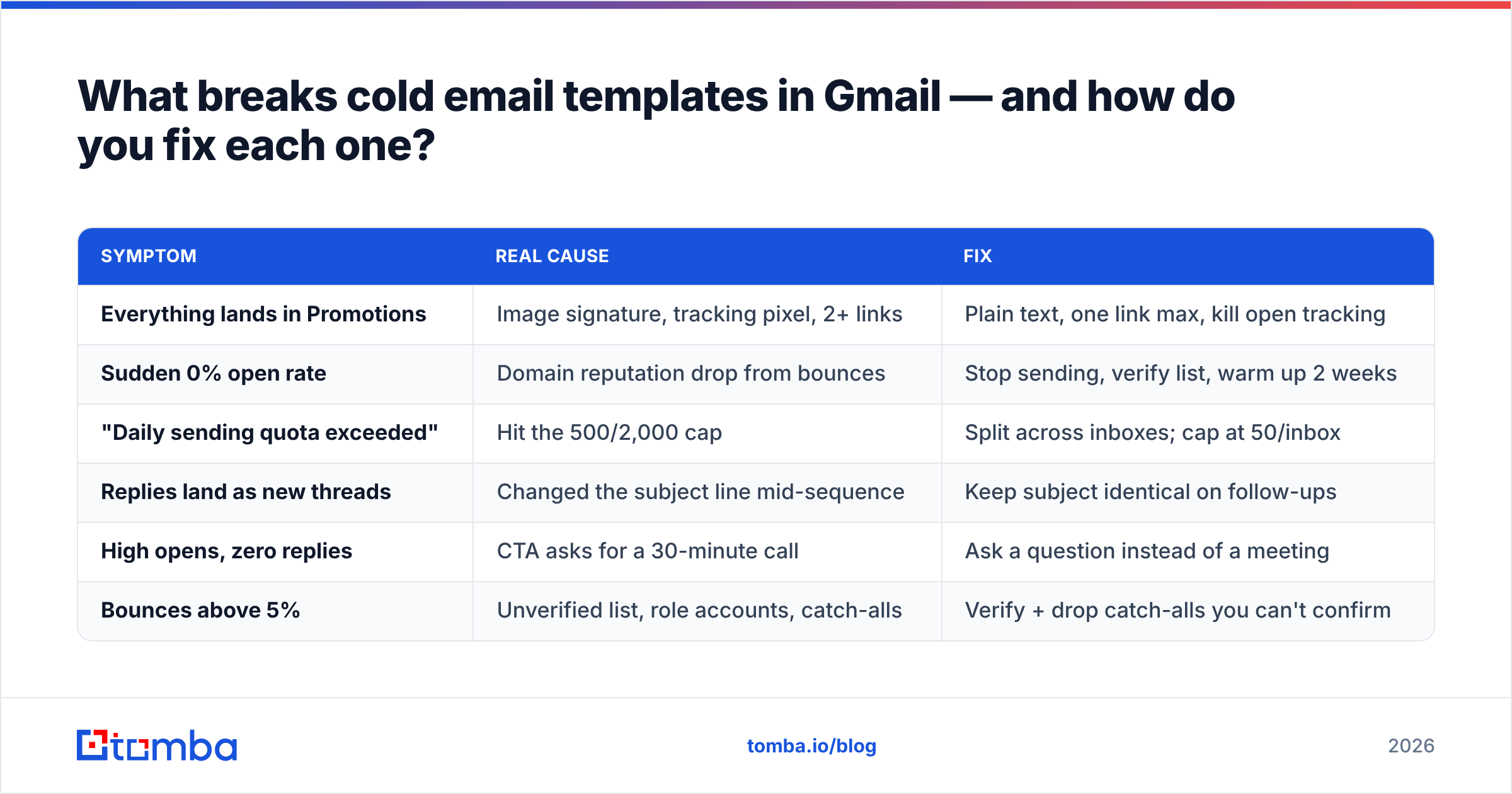
| Symptom | Real cause | Fix |
|---|---|---|
| Everything lands in Promotions | Image signature, tracking pixel, 2+ links | Plain text, one link max, kill open tracking |
| Sudden 0% open rate | Domain reputation drop from bounces | Stop sending, verify list, warm up 2 weeks |
| "Daily sending quota exceeded" | Hit the 500/2,000 cap | Split across inboxes; cap at 50/inbox |
| Replies land as new threads | Changed the subject line mid-sequence | Keep subject identical on follow-ups |
| High opens, zero replies | CTA asks for a 30-minute call | Ask a question instead of a meeting |
| Bounces above 5% | Unverified list, role accounts, catch-alls | Verify + drop catch-alls you can't confirm |
The bounce line deserves emphasis. Gmail and Microsoft both read hard bounces as a signal you bought a list. Sustained bounce rates above 5% will suppress your inbox placement across every recipient domain, not just the ones that bounced. HubSpot's email deliverability research documents the same relationship from the ESP side.
How many follow-ups should each template get?#
Between one and three, depending on trigger strength.
- Warm triggers (mutual connection, referral upward): one follow-up. If a real signal doesn't convert on the second touch, more touches just burn the relationship.
- Medium triggers (job change, funding, hiring): two follow-ups, spaced 3 and 7 days.
- Cold triggers (competitor switch, cold teardown): three, spaced 3, 7, and 12 days, ending with the breakup.
Each follow-up must add something. In a Gmail thread the reader sees the original email directly below yours. "Bumping this" next to your original ask looks like exactly what it is. Add a customer example, a stat, a shorter ask — or don't send.
If you're building follow-ups at volume, a library of cold email templates beats writing each sequence from scratch, as long as you're editing the trigger line rather than shipping the default.
Start with the list, not the copy#
The uncomfortable truth about cold email templates for Gmail: the ninth-best template sent to a verified, well-targeted list of 200 people beats the best template on this page sent to 2,000 addresses scraped from a directory. Copy is a multiplier on a number. If the number is zero, the multiplier doesn't matter.
Get the number right first. Tomba's Email Finder pulls verified professional addresses by domain, name, or company, with confidence scoring on every result — so the list you plug into these templates is the list you actually meant to build. The free tier gives you 25 searches a month to test it; paid plans start at $49/mo, and you can see the full breakdown on the Tomba pricing page. Verify first, template second, and Gmail will finally let your copy do its job.
Related guides#
Ready to find emails that actually work?
Join 150,000+ professionals who stopped guessing and started sending. Free credits on signup — no credit card required.
Get the Tomba newsletter
Practical outbound tactics and product updates — once every two weeks.
About the author