Cold Email Templates for Sales That Actually Get Replies
Nine cold email templates for sales teams, broken down by the psychology that makes each one work — plus the deliverability and data checklist that decides whether anyone ever reads them.
TL;DR#
- Templates are 20% of the outcome. List quality and deliverability decide whether your cold email templates for sales ever get seen; copy decides what happens after.
- Short beats clever. Emails under 120 words consistently outperform long ones. Every template below fits on a phone screen without scrolling.
- One ask per email. The "interest ask" ("worth a look?") beats the "calendar ask" ("Tuesday at 2pm?") on first touch by a wide margin.
- Personalization has a floor and a ceiling. One specific, verifiable detail per email is enough. Three is theater.
- Sequence structure matters more than any single template. A 4–6 touch sequence over 14–18 days catches most of the replies a single send misses.
Why do most cold email templates for sales fail before anyone reads them?#
Because the template was never the problem.
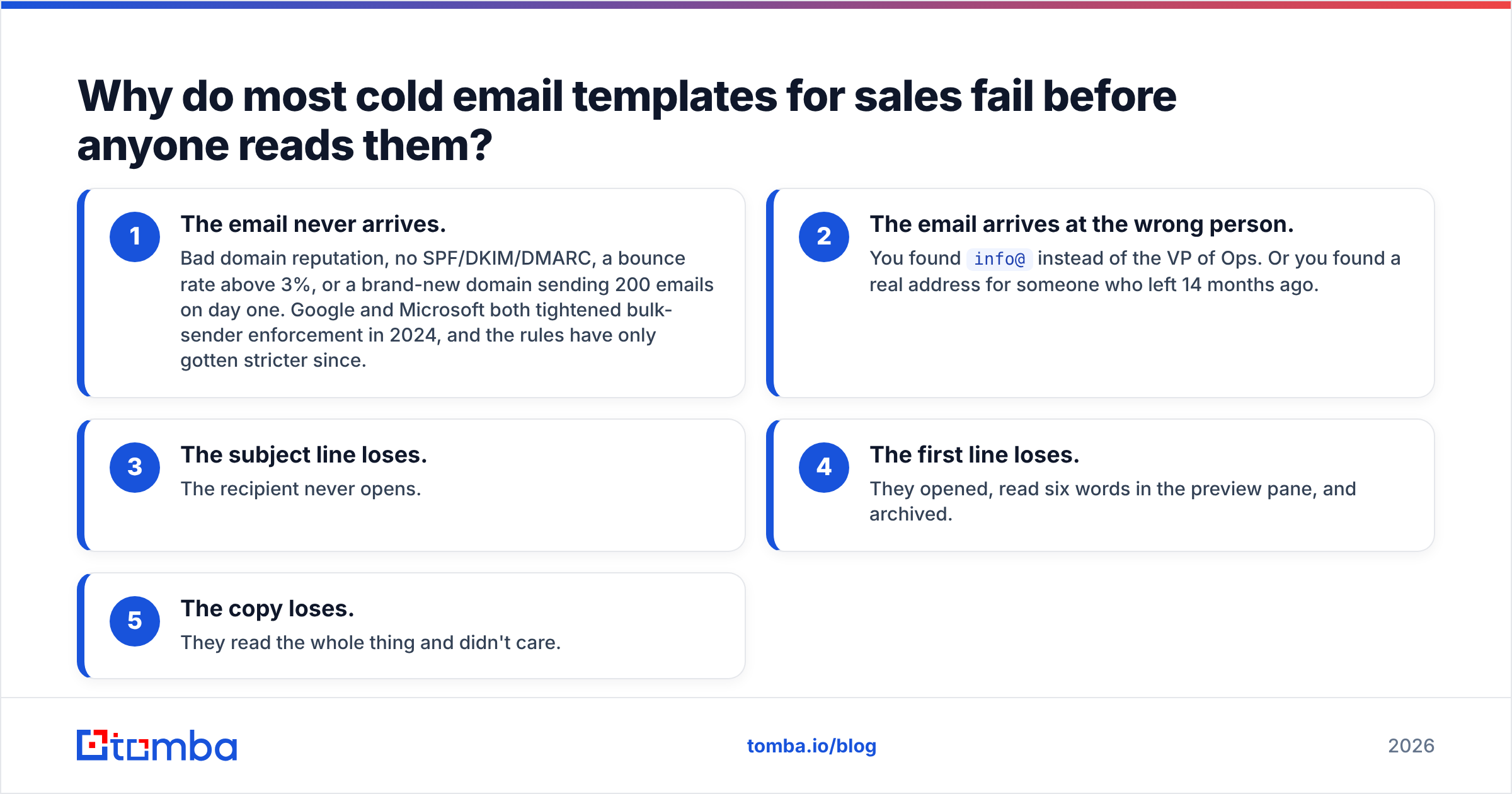
Here's the failure chain, in order of how often it kills a campaign:
- The email never arrives. Bad domain reputation, no SPF/DKIM/DMARC, a bounce rate above 3%, or a brand-new domain sending 200 emails on day one. Google and Microsoft both tightened bulk-sender enforcement in 2024, and the rules have only gotten stricter since.
- The email arrives at the wrong person. You found
info@instead of the VP of Ops. Or you found a real address for someone who left 14 months ago. - The subject line loses. The recipient never opens.
- The first line loses. They opened, read six words in the preview pane, and archived.
- The copy loses. They read the whole thing and didn't care.
Notice that four of those five failure modes happen before your carefully-crafted value prop gets read. If you're rewriting templates while your bounce rate sits at 8%, you're rearranging furniture in a house that's on fire.
Start with the data. A verified, correctly-targeted list turns a mediocre template into a working one. A bad list turns a great template into a spam complaint. Run your prospects through an email verifier before a single send, and build the list itself with domain search so you're pulling live addresses from the company's actual mail infrastructure rather than scraping stale directories.
What makes a cold email template actually convert?#
Strip away the frameworks and there are five components. Every high-performing cold email has all five, and almost every failing one is missing two or more.
- A subject line that reads like internal mail — lowercase, 2–5 words, no punctuation gymnastics. "quick question re: onboarding" outperforms "Transform Your Onboarding With AI 🚀" by an order of magnitude.
- An opening line about them, not you — the first sentence must contain a fact the recipient recognizes as true about their world. Never "I hope this email finds you well." Never "My name is."
- A problem statement with a number in it — vague pain ("scaling challenges") gets ignored; specific pain ("your 4 SDRs are each spending ~6 hours a week on manual list building") gets read twice.
- Social proof that matches their size and segment — a logo from a 5,000-person enterprise means nothing to a 30-person startup, and vice versa.
- A single low-friction ask — one question, answerable with one word.
That's it. Word count under 120. No attachments. No images. One link at most, and ideally zero on the first touch.
Which cold email templates for sales work in 2026?#
Nine templates, grouped by the psychological lever each one pulls. Replace the bracketed variables with real, verified data — never with a guess.
1. The trigger-event email#
Best for: funding rounds, new exec hires, product launches, office expansions.
Subject: congrats on the series b
Hi [First name],
Saw the $[amount]M round last week — the plan to double the [department] team by [quarter] stood out.
When [similar company] went through the same hiring push, their [specific process] broke at around [number] reps. We fixed it in three weeks.
Worth a 10-minute look at how?
[Your name]
Why it works: the trigger gives you a non-creepy reason to be in their inbox, and it dates your email — it's obviously not a mass blast from six months ago.
2. The specific-observation email#
Best for: when there's no trigger event and you need to earn attention with homework.
Subject: your [page name] page
Hi [First name],
Your pricing page routes demo requests through a form that asks for company size before it asks for an email. That's a real conversion tax — usually 15–25% of fills.
We rebuilt that flow for [customer] and their demo volume went up [X]% in a quarter.
Want the two-line diagnosis? Happy to send it whether or not we ever talk.
[Your name]
Why it works: you gave value before asking for anything, and the ask itself is "want free advice?" rather than "want to buy?"
3. The competitor-switch email#
Best for: prospects visibly using a tool you replace.
Subject: re: [competitor tool]
Hi [First name],
Noticed [company] is running [competitor] for [use case]. Most teams we talk to like it until [specific limitation] starts costing them [specific consequence].
If that hasn't bitten you yet, ignore this. If it has, [customer] switched last [month] and cut [metric] by [X]%.
Worth comparing notes?
[Your name]
Handle this one carefully. Never trash the incumbent — you don't know if the recipient chose it. Name a limitation, not a flaw.
4. The one-line email#
Best for: senior executives, and as a follow-up after two ignored longer emails.
Subject: [company] + [your company]
[First name] — are you the right person to talk to about [specific problem]?
[Your name]
Why it works: it costs three seconds to read and one word to answer. Reply rates on this format are frequently the highest in a sequence, and even a "no, talk to Sarah" is a win.
5. The mutual-connection email#
Best for: warm-adjacent outbound.
Subject: [mutual connection] suggested I reach out
Hi [First name],
[Mutual connection] mentioned you're rethinking [initiative] this year.
We handle [narrow thing] for [2–3 comparable companies]. [Mutual connection] thought there might be an overlap.
Open to a short call, or should I send over the one-pager first?
[Your name]
Only use this if the connection is real and has agreed to be named. One bad name-drop burns two relationships.
6. The "wrong person" email#
Best for: when you're not sure who owns the problem.
Subject: wrong person?
Hi [First name],
I'm probably in the wrong inbox — who owns [specific function] at [company] these days?
Context: we cut [metric] by [X]% for [similar company], and the person who cared was usually the [title].
Thanks either way.
[Your name]
Why it works: it's a genuine question with a socially easy answer. Referrals from this template land in the right inbox with implied endorsement.
7. The data-point email#
Best for: analytical buyers — engineering, finance, RevOps.
Subject: [number] on [their metric]
Hi [First name],
We benchmarked [N] companies in [their vertical]. Median [metric] was [X]. Top quartile hit [Y].
Curious where [company] lands — most teams your size are surprised by the gap.
Want the full benchmark? No form, I'll just paste it.
[Your name]
Why it works: it appeals to comparison anxiety, and the ask is a document, not a meeting.
8. The break-up email#
Best for: touch 5 or 6, after silence.
Subject: closing the loop
Hi [First name],
I've sent a few notes about [problem] and haven't heard back — which usually means one of three things:
- It's not a priority this year
- It is, and you're handling it internally
- Bad timing
Reply with 1, 2, or 3 and I'll act accordingly.
[Your name]
The numbered-reply mechanic is the whole trick. It converts a decision into a keystroke.
9. The re-engagement email#
Best for: closed-lost deals and dormant contacts 6+ months old.
Subject: [thing that changed]
Hi [First name],
When we spoke in [month], [objection] was the blocker. That shipped in [month].
Not asking for a meeting — just wanted you to have the update in case the calculus changed.
[Your name]
How do these templates compare on effort, reply rate, and best use?#
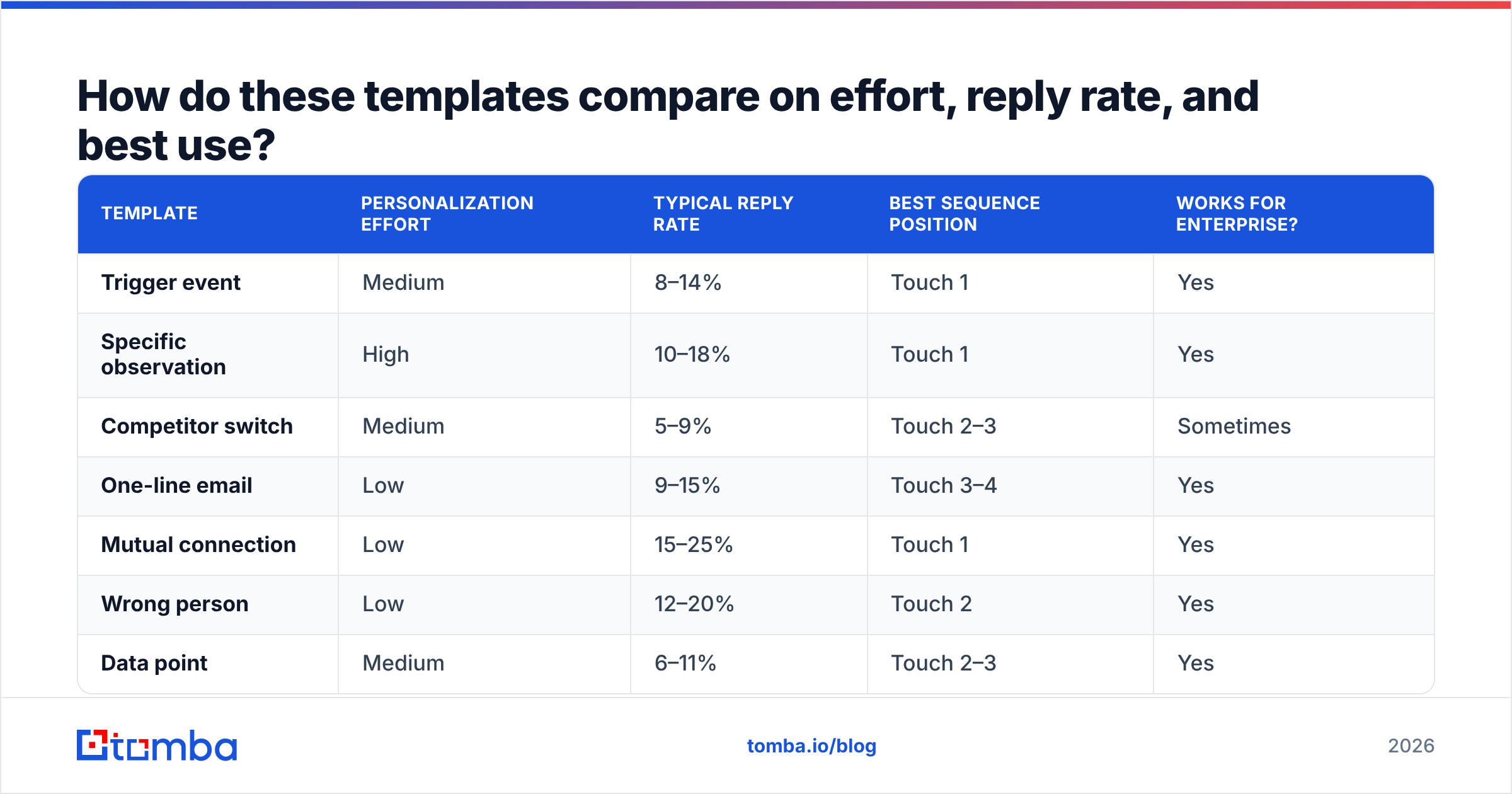
The numbers below are directional ranges observed across mid-market B2B outbound programs. Your mileage varies with list quality, offer, and segment — treat them as relative rankings, not guarantees.
| Template | Personalization effort | Typical reply rate | Best sequence position | Works for enterprise? |
|---|---|---|---|---|
| Trigger event | Medium | 8–14% | Touch 1 | Yes |
| Specific observation | High | 10–18% | Touch 1 | Yes |
| Competitor switch | Medium | 5–9% | Touch 2–3 | Sometimes |
| One-line email | Low | 9–15% | Touch 3–4 | Yes |
| Mutual connection | Low | 15–25% | Touch 1 | Yes |
| Wrong person | Low | 12–20% | Touch 2 | Yes |
| Data point | Medium | 6–11% | Touch 2–3 | Yes |
| Break-up | Low | 7–12% | Touch 5–6 | Yes |
| Re-engagement | Low | 10–16% | Standalone | Yes |
The pattern is clear: the low-effort, low-ask templates (one-line, wrong person, mutual connection) beat the high-effort pitch emails on raw reply rate. The high-effort ones convert better into pipeline, because the replies they generate are qualified. Run both — cheap templates to find who's alive, expensive templates to move them.
How should you structure the sequence around these templates?#
A single cold email is a coin flip. A sequence is a process.
Days 1–18, five touches:
- Day 1 — Trigger event or specific observation. The strongest email you have.
- Day 4 — Reply in the same thread. Add one new piece of value, three sentences max. No "just bumping this."
- Day 8 — New thread, new angle. Data-point or competitor-switch template.
- Day 12 — The one-line email. Different subject, different framing.
- Day 18 — Break-up email.
Three rules that matter more than the schedule:
- Never send two emails from the same angle. If touch 1 was about hiring, touch 3 should not be about hiring.
- Vary the subject line style. Question, then statement, then internal-mail lowercase.
- Cap the sequence. Six touches, then out. Seven-plus touches generate complaints, not meetings, and spam complaints are the single fastest way to torch a sending domain.
What has to be true before you press send?#
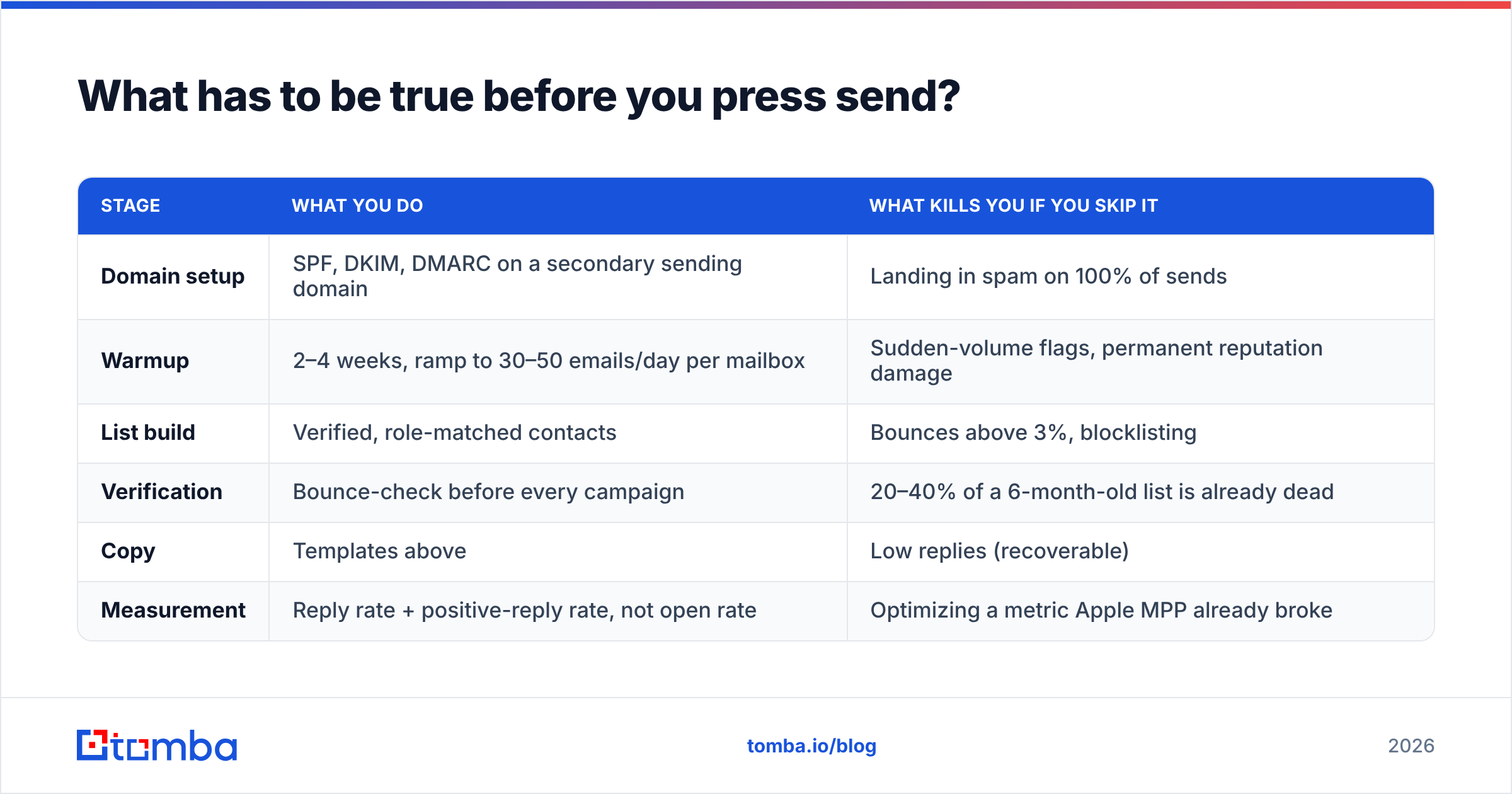
Templates sit at the end of the checklist, not the beginning. Here's the full order of operations.
| Stage | What you do | What kills you if you skip it |
|---|---|---|
| Domain setup | SPF, DKIM, DMARC on a secondary sending domain | Landing in spam on 100% of sends |
| Warmup | 2–4 weeks, ramp to 30–50 emails/day per mailbox | Sudden-volume flags, permanent reputation damage |
| List build | Verified, role-matched contacts | Bounces above 3%, blocklisting |
| Verification | Bounce-check before every campaign | 20–40% of a 6-month-old list is already dead |
| Copy | Templates above | Low replies (recoverable) |
| Measurement | Reply rate + positive-reply rate, not open rate | Optimizing a metric Apple MPP already broke |
Two of those rows deserve extra attention.
Verification is not optional. B2B contact data decays at roughly 25–30% a year through job changes alone. A list you built in January is meaningfully wrong by summer. Re-verify before every campaign — bulk verify turns this into a ten-minute job instead of a research project. If a domain accepts everything, run it through a catch-all verifier rather than guessing.
Open rate is dead as a KPI. Since Apple's Mail Privacy Protection began pre-fetching images, open rates are inflated and directionally useless for iOS-heavy audiences. Measure reply rate and positive-reply rate. If you want the deliverability fundamentals in plain language, Google's own bulk sender guidelines are the primary source, and HubSpot's research on email engagement is a reasonable public benchmark for the rest. For third-party views on the tooling layer, G2's sales-engagement category is where practitioner reviews concentrate.
What personalization is worth the time?#
There's a productive middle. Below it, you're sending mail merge. Above it, you're spending 20 minutes per prospect to gain a percentage point.
Worth it:
- A trigger event from the last 60 days
- A specific artifact on their site you actually looked at
- The name of a tool they visibly run
- A number from their public reporting or job postings
Not worth it:
- Their college
- The city they live in
- Their most recent LinkedIn post, if it's a reshare
- Anything that reads as "I ran a scraper on you"
The tell is simple: if the personalization could be generated automatically from a database, the recipient can tell, and it costs you credibility. One real observation beats four automated tokens.
Pulling that observation still requires knowing who you're writing to. Build your target list first with a reliable email finder so the name, title, and address all belong to the same living human — then spend your research time on the one detail that makes the email land.
Get the data right, then the templates work#
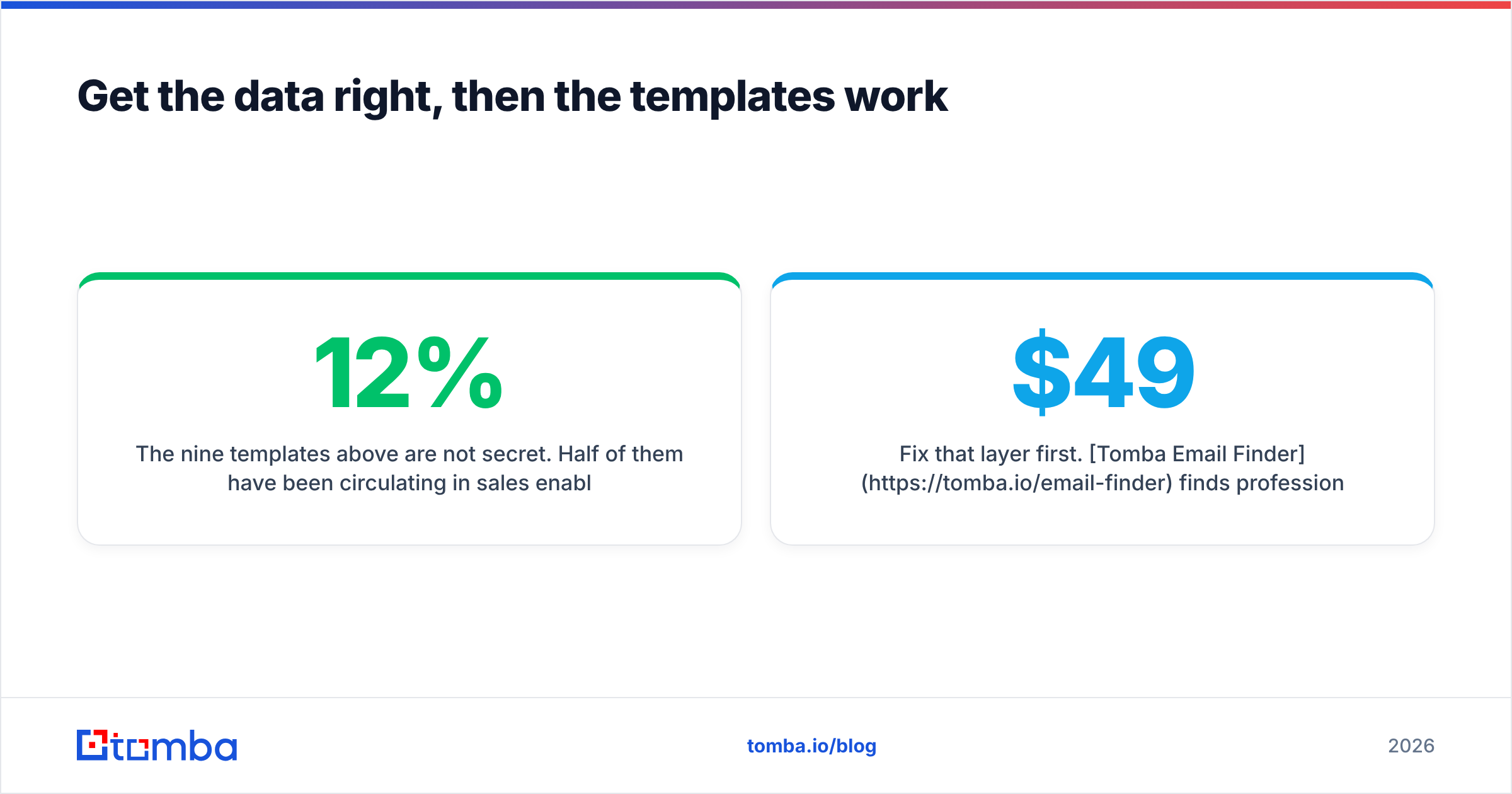
The nine templates above are not secret. Half of them have been circulating in sales enablement decks for a decade. What separates the teams that get 12% reply rates from the teams that get 1.2% is not the words — it's whether the email reached a real, current, correctly-targeted inbox with a clean sending reputation behind it.
Fix that layer first. Tomba Email Finder finds professional email addresses by domain, name, or company, with verification built into the same workflow — so the list you send to on Monday is the list that actually exists on Monday. The free tier gives you 25 searches a month to test it against your current data; Tomba pricing starts at $49/mo on Starter if you need volume.
Verify the list. Warm the domain. Then send template one.
Related guides#
Ready to find emails that actually work?
Join 150,000+ professionals who stopped guessing and started sending. Free credits on signup — no credit card required.
Get the Tomba newsletter
Practical outbound tactics and product updates — once every two weeks.
About the author