Best Cold Email Tools in 2026: A No-Fluff Buyer's Guide
Most cold email tools sell you a sequencer and call it a stack. Here's what each layer actually does, what it costs, and where the money quietly leaks.
TL;DR
- "Cold email tools" is not one category. It's four: data, verification, sending infrastructure, and sequencing. Buying one and expecting all four is how teams end up in spam.
- Sequencer pricing is the loudest number and rarely the biggest line item. Inboxes, domains, warmup, and per-lead enrichment credits usually cost more than the platform.
- Verification is the highest-ROI dollar in the stack. A 3% bounce rate is a working domain; a 12% bounce rate is a burned one, and no sequencer saves you from that.
- All-in-one suites (Apollo, Instantly, Smartlead) trade data quality for convenience. Best-of-breed stacks trade convenience for control. Pick based on volume, not on feature-list length.
- Under ~5,000 sends/month, a lean stack — a good email finder, a verifier, one sequencer, three warmed inboxes — beats every enterprise platform on cost per booked meeting.
What are cold email tools, exactly?#
A cold email tool is any software that moves a stranger from "I don't know this person exists" to "this person replied." That's a chain, not a product. Most buyers evaluate one link and assume the rest.
Think of it like a restaurant. The sequencer is the waiter — visible, chatty, the thing you rate on Yelp. But the meal fails in the kitchen: bad ingredients (wrong data), no quality check (no verification), a broken stove (cold domains, no SPF/DKIM). Nobody blames the stove. They blame the waiter.
Here's the actual stack, in the order failures cascade:
- Data layer — finds who to email and what their address is. Email finders, B2B databases, LinkedIn extractors, enrichment APIs. Garbage here poisons everything downstream.
- Verification layer — confirms the address accepts mail before you send. Syntax, MX, SMTP handshake, catch-all handling.
- Infrastructure layer — domains, inboxes, DNS records (SPF record, DKIM, DMARC), warmup, and rotation. This is what determines whether you land in Primary or Promotions.
- Sequencing layer — schedules, personalizes, follows up, tracks replies, and syncs to your CRM.
Every serious cold email problem I've seen traced back to layer 1 or 2 while the team was busy A/B testing layer 4 subject lines.

Which layer should you buy first?#
Buy in reverse order of blame. The layer everyone blames last is the one you should fix first.
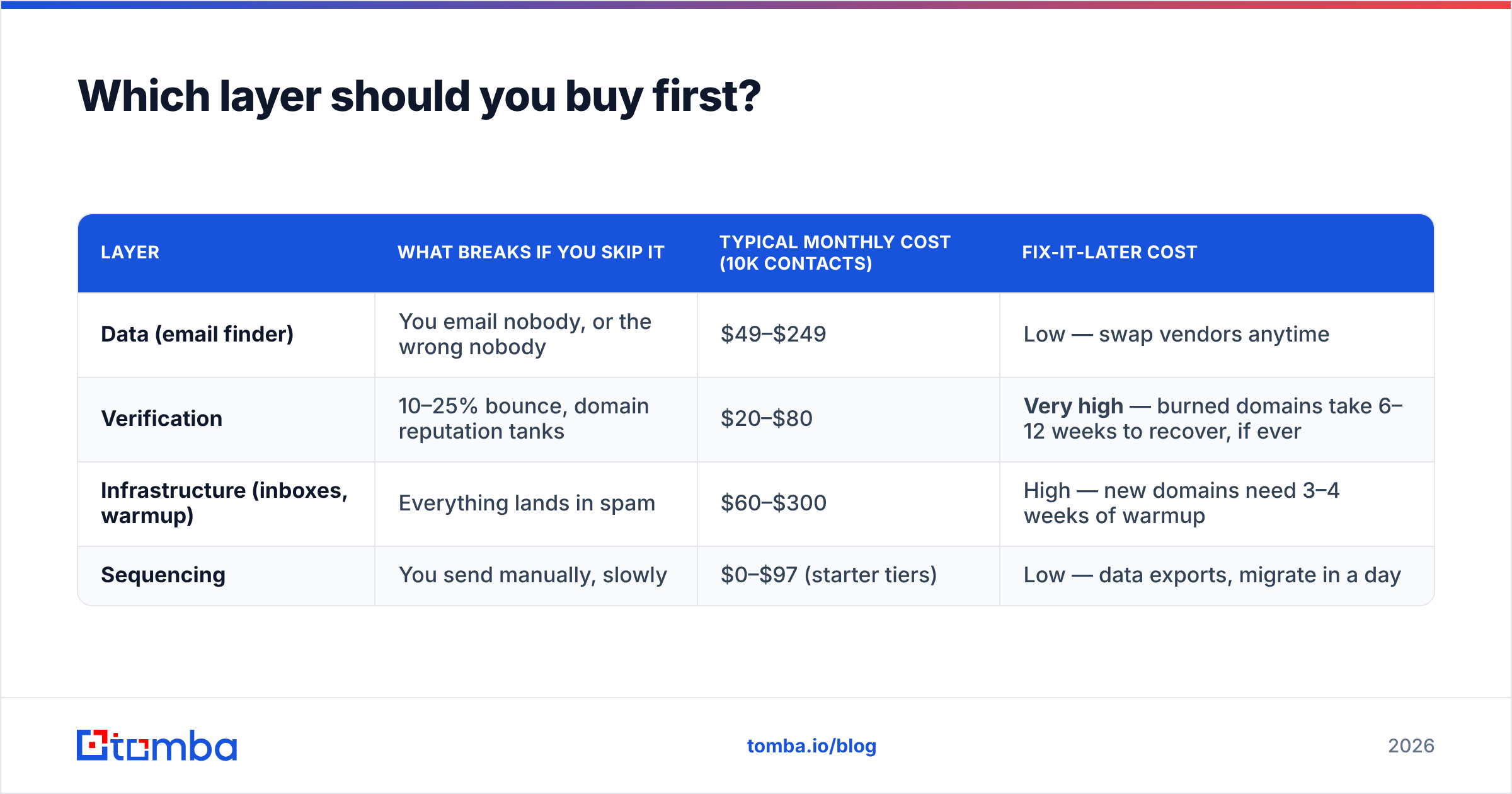
| Layer | What breaks if you skip it | Typical monthly cost (10k contacts) | Fix-it-later cost |
|---|---|---|---|
| Data (email finder) | You email nobody, or the wrong nobody | $49–$249 | Low — swap vendors anytime |
| Verification | 10–25% bounce, domain reputation tanks | $20–$80 | Very high — burned domains take 6–12 weeks to recover, if ever |
| Infrastructure (inboxes, warmup) | Everything lands in spam | $60–$300 | High — new domains need 3–4 weeks of warmup |
| Sequencing | You send manually, slowly | $0–$97 (starter tiers) | Low — data exports, migrate in a day |
The pattern is obvious once you see it: the two layers nobody demos are the two with the worst recovery cost. Sequencers are commodity software. You can migrate from Smartlead to Instantly on a Tuesday afternoon. You cannot migrate off a blacklisted domain.
How do the major cold email tools compare in 2026?#
Below is the honest version — not the feature matrix each vendor puts on its own pricing page. Prices are entry paid tiers as of mid-2026; all of these vendors change tiers frequently, so treat them as order-of-magnitude, not gospel.
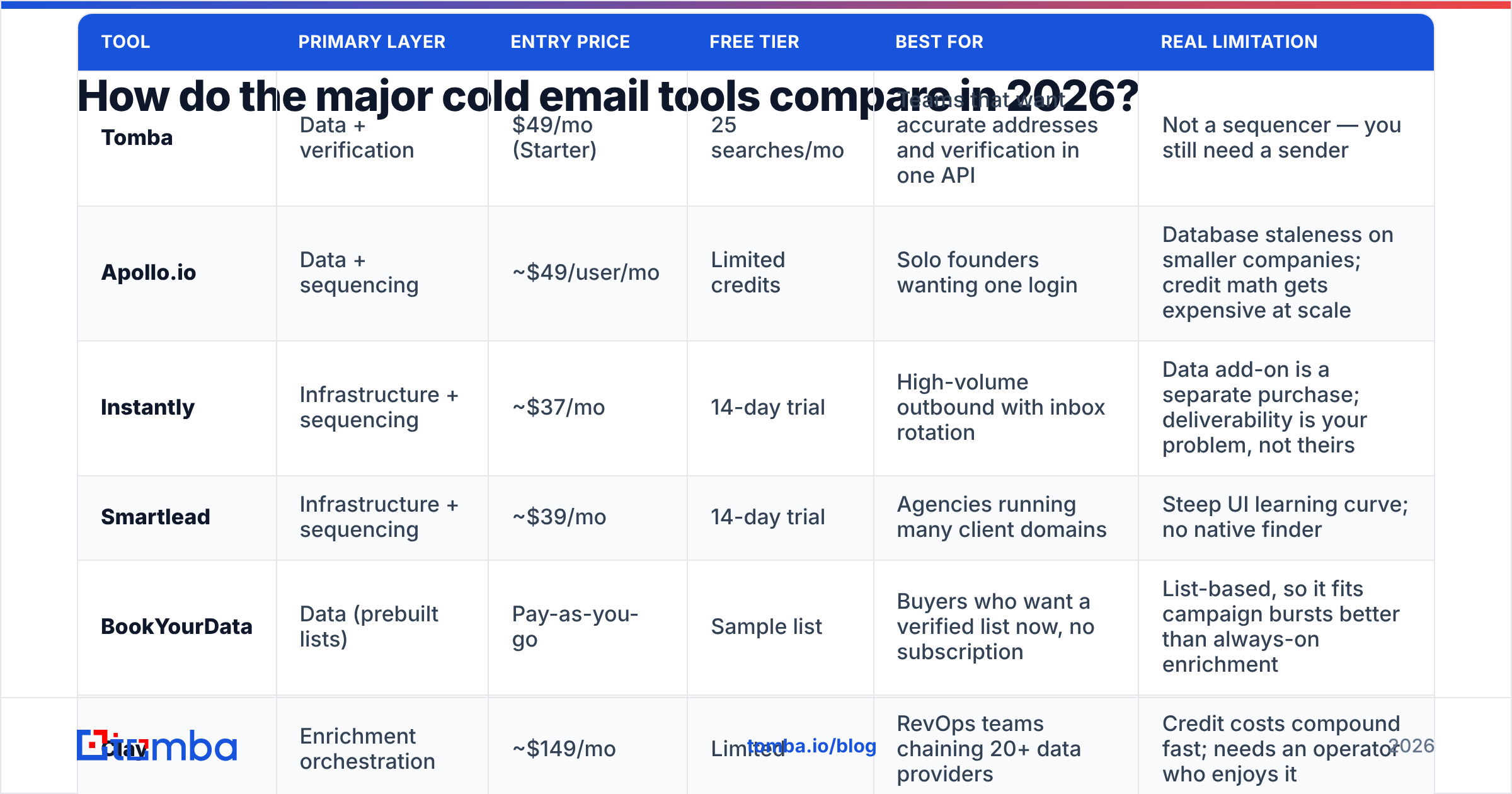
| Tool | Primary layer | Entry price | Free tier | Best for | Real limitation |
|---|---|---|---|---|---|
| Tomba | Data + verification | $49/mo (Starter) | 25 searches/mo | Teams that want accurate addresses and verification in one API | Not a sequencer — you still need a sender |
| Apollo.io | Data + sequencing | ~$49/user/mo | Limited credits | Solo founders wanting one login | Database staleness on smaller companies; credit math gets expensive at scale |
| Instantly | Infrastructure + sequencing | ~$37/mo | 14-day trial | High-volume outbound with inbox rotation | Data add-on is a separate purchase; deliverability is your problem, not theirs |
| Smartlead | Infrastructure + sequencing | ~$39/mo | 14-day trial | Agencies running many client domains | Steep UI learning curve; no native finder |
| BookYourData | Data (prebuilt lists) | Pay-as-you-go | Sample list | Buyers who want a verified list now, no subscription | List-based, so it fits campaign bursts better than always-on enrichment |
| Clay | Enrichment orchestration | ~$149/mo | Limited | RevOps teams chaining 20+ data providers | Credit costs compound fast; needs an operator who enjoys it |
Two things that table hides.
First, the all-in-ones are not equally all-in-one. Apollo bundles data with sequencing but leaves infrastructure to you. Instantly and Smartlead bundle infrastructure with sequencing but leave data to you. Nobody credibly bundles all four, which is why the "one tool to rule them all" pitch keeps failing at the seams.
Second, credit pricing is not price. A $49/mo plan with 500 credits and a 60% hit rate costs you $0.16 per usable contact. A $99/mo plan with 5,000 credits and a 92% hit rate costs $0.02. The cheaper sticker is 8x the real cost. Always divide by verified, deliverable contacts — the only unit that converts.
Is verification really worth a separate tool?#
Yes, and it's not close. This is the single most defensible line item in your stack.
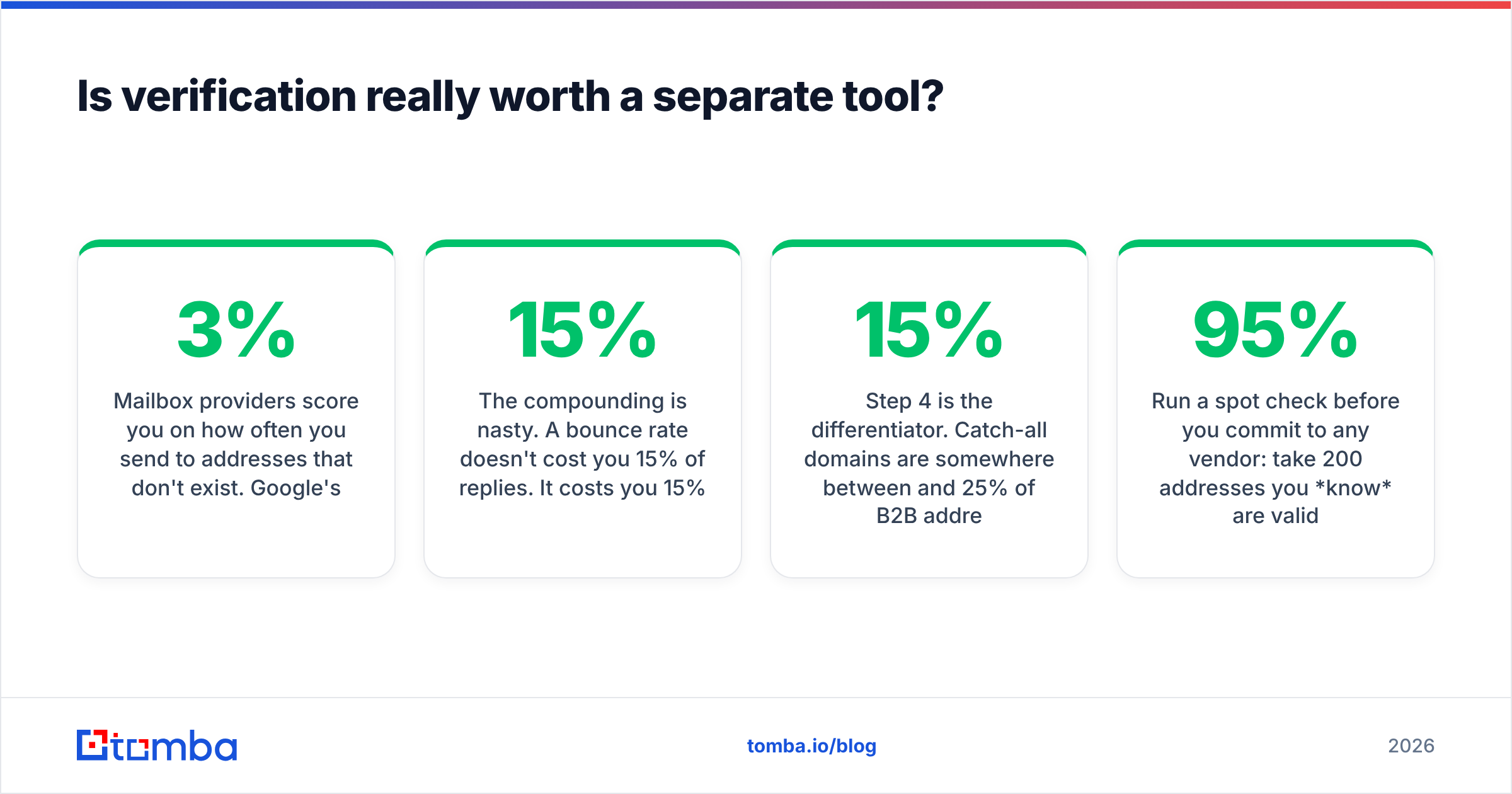
Mailbox providers score you on how often you send to addresses that don't exist. Google's own sender guidelines put the practical bounce ceiling around 2–3%. Cross it consistently and your sender reputation degrades. Degraded reputation means your good emails — to real prospects, with real offers — stop reaching Primary.
The compounding is nasty. A 15% bounce rate doesn't cost you 15% of replies. It costs you 15% of sends plus a reputation penalty that suppresses the other 85%. I've watched teams take a 40% drop in reply rate from a bounce problem that arithmetic said should cost them 15%.
What good verification actually checks, in order:
- Syntax and domain existence — free, fast, catches typos and dead companies.
- MX record lookup — does the domain accept mail at all?
- SMTP handshake — does the specific mailbox exist? This is where cheap tools stop returning honest answers.
- Catch-all detection — the domain says yes to everything. This is where most verifiers give up and mark the address "risky," dumping the decision on you.
- Role and disposable filtering —
info@,sales@,noreply@, plus throwaway domains.
Step 4 is the differentiator. Catch-all domains are somewhere between 15% and 25% of B2B addresses depending on your ICP, and they skew toward larger companies — exactly the accounts you want. A verifier that marks every catch-all "unknown" has just told you nothing about a quarter of your list. Tools with a dedicated catch-all verifier resolve a meaningful share of those instead of punting.
Run a spot check before you commit to any vendor: take 200 addresses you know are valid (your own customers, your team), and 50 you know are dead. A verifier that can't get 95%+ on both halves is a false-confidence machine.
What does a lean cold email stack cost in 2026?#
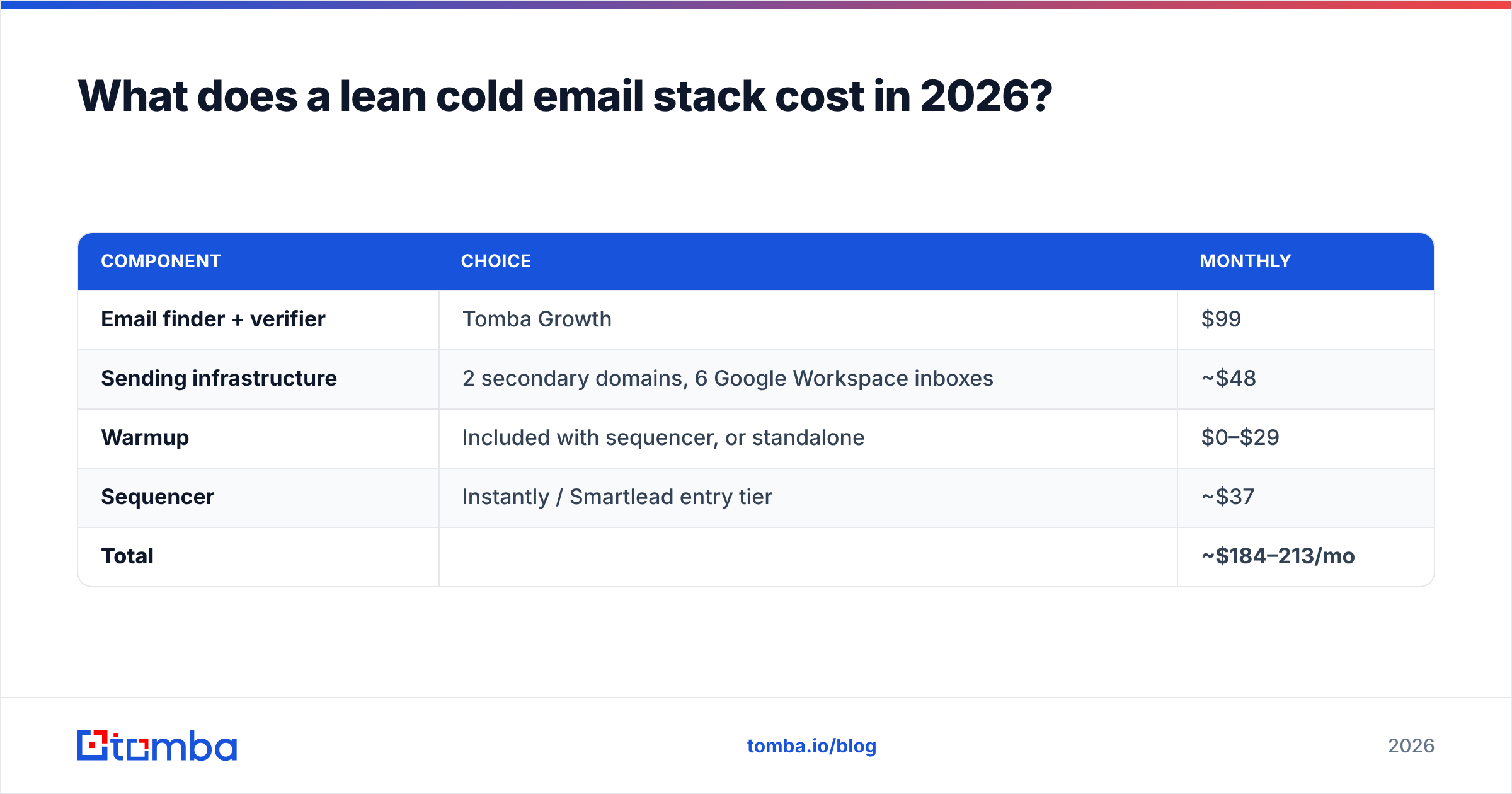
Let's price a real scenario: a two-person sales team, 3,000 emails per month, 750 net-new verified contacts per month.
| Component | Choice | Monthly |
|---|---|---|
| Email finder + verifier | Tomba Growth | $99 |
| Sending infrastructure | 2 secondary domains, 6 Google Workspace inboxes | ~$48 |
| Warmup | Included with sequencer, or standalone | $0–$29 |
| Sequencer | Instantly / Smartlead entry tier | ~$37 |
| Total | ~$184–213/mo |
Compare that to a single seat of an enterprise sales engagement platform, which starts north of $100/user/month before data credits and typically requires an annual contract with a minimum seat count. The lean stack is not the compromise. It's the control group that every enterprise proposal has to beat, and most don't at this volume.
Where the enterprise suite genuinely wins: 15+ reps, complex territory rules, conversation intelligence, deal-stage attribution, and a RevOps person whose job is keeping it clean. Below that headcount, you're paying for governance you don't have anyone to govern.
Check current Tomba pricing against whatever the sequencer quotes you — the two rarely scale on the same axis, and that mismatch is where budgets break.
How do you evaluate a cold email tool without wasting a month?#
Vendors optimize demos. You should optimize evidence. Here's a five-day evaluation that costs almost nothing.
- Build a 100-row truth set. Real people at real companies, addresses you can confirm independently. Mix company sizes, include at least 20 catch-all domains, include 10 people who left their company in the last year.
- Run the trial against the truth set, not against fresh prospecting. Measure hit rate (found an address), precision (address is correct), and false-confidence rate (marked "valid," actually bounces). The third number is the one vendors never publish.
- Send 50 real emails from a warmed inbox. Watch the bounce rate. Anything above 3% means the verifier lied to you.
- Check inbox placement, not just delivery. "Delivered" includes Spam. Use a seed-list test across Gmail, Outlook, and one corporate Microsoft 365 tenant. Corporate M365 is the hard one and the one that matters for B2B.
- Read the API docs before you sign. If you'll ever automate this — and you will — a clean email finder API with predictable rate limits saves more engineering time than any UI feature saves rep time.
Two anti-patterns worth naming. Don't evaluate on database size; total contact counts are marketing numbers and correlate poorly with coverage of your ICP. And don't evaluate on integration count; you need three integrations to work perfectly, not ninety to exist. Peer reviews on G2 are useful for support responsiveness and billing surprises, and roughly useless for accuracy claims, since almost nobody runs a truth set.

Do you still need a sequencer if you're sending 500 emails a month?#
Probably not, and this is the most expensive question nobody asks.
Below roughly 500 sends per month, a sequencer's core value — scheduling, throttling, rotation — is solving a problem you don't have. What you actually need at that volume is a clean list, a follow-up reminder, and the discipline to send four touches instead of one. Most reply-rate gains at low volume come from research depth, not automation. A sequencer makes it faster to send bad emails to more people.
The threshold moves when one of three things is true:
- You're rotating more than two inboxes. Manual rotation is where humans reliably fail.
- You need reply detection to stop sequences. Emailing someone a fourth time after they replied is the fastest way to burn a warm lead.
- You need sequence-level attribution feeding revenue operations reporting.
Until then, spend the sequencer budget on better data. The response rate difference between a well-researched list and a well-automated blast is not subtle.
What's actually changing in 2026?#
Three shifts are worth adjusting for.
Bulk authentication enforcement is now table stakes. The sender requirements Google and Yahoo rolled out for bulk senders have hardened. DMARC with a policy (not p=none), one-click unsubscribe on anything list-like, and spam complaint rates under 0.3% are enforced, not suggested. Any sequencer that doesn't surface your DMARC status in its onboarding is behind.
AI personalization has hit diminishing returns. When every tool can generate a first line about a prospect's recent LinkedIn post, that first line stops signaling effort. The signal moved to things AI can't cheaply fake: a specific number from their earnings call, a reference to a job posting, a genuinely relevant introduction. Tools that help you find those signals beat tools that help you phrase them. HubSpot's sales research has been tracking this collapse in generic-personalization lift for a couple of years now.
Data providers are consolidating, and coverage is getting lumpier. The practical consequence: single-vendor coverage assumptions are riskier than they were. Teams running any real volume now check a primary source and fall back to a second. A clean bulk email finder with an honest confidence score makes that fallback logic trivial instead of a Clay-shaped side project.
Where should you actually start?#
If you're building from zero, in order: get the addresses right, verify them, warm the infrastructure, then automate. Skip a step and you'll spend the next quarter debugging a symptom three layers downstream from the cause.
Start with the data layer, because it's the one with the lowest switching cost and the highest downstream leverage. The Tomba Email Finder resolves professional addresses by name, domain, or company, with verification and catch-all handling built into the same request — so the address you get back is one you can send to, not one you have to check somewhere else. The free tier gives you 25 searches a month, which is enough to run the 100-row truth set above and see the numbers for yourself before you pay anybody, including us.
Build the truth set first. Let it pick the tools.
Related guides#
Ready to find emails that actually work?
Join 150,000+ professionals who stopped guessing and started sending. Free credits on signup — no credit card required.
Get the Tomba newsletter
Practical outbound tactics and product updates — once every two weeks.
About the author