Cold Email Triggers: 12 Buying Signals That Get Replies
Most cold email triggers are already stale by the time you hit send. Here are the 12 signals that still move reply rates in 2026, how long each one stays warm, and the three everyone overuses.
TL;DR
- A cold email trigger is a timestamped event that changes a prospect's priorities — funding, a new hire, a tech swap, a layoff, a competitor's outage. It's not a firmographic attribute like "50-200 employees."
- Triggers decay. A Series B announcement is worth reaching out on for roughly 30 days. A job posting for a role you replace is worth about 14. A LinkedIn post is worth 48 hours.
- The three most-used triggers (funding, job change, new hire) are also the most crowded — every SDR in the category hits the same list on the same day.
- The trigger doesn't write the email. It earns you the first sentence. The rest still has to say something the prospect didn't already know.
- Detection is cheap now. The bottleneck is turning "Acme raised $40M" into a verified inbox for the right VP within 72 hours.
What is a cold email trigger?#
A cold email trigger is an observable event that shifts a company's spending priorities in a direction you can help with.
Think of it like knocking on a door. Firmographics tell you which houses exist. A trigger tells you which ones just had a pipe burst. Same door, wildly different reception.
The distinction matters because most teams confuse the two. "VP of Engineering at a 200-person fintech" is a filter — it describes a static state that was true last quarter and will be true next quarter. "VP of Engineering at a 200-person fintech who posted three backend roles last Tuesday" is a trigger. The first tells you who to email eventually. The second tells you who to email Thursday.
The mechanism is simple. Buying happens when the cost of the status quo suddenly exceeds the cost of change. Trigger events are the moments that cost jumps: a budget lands, a person leaves, a system breaks, a competitor ships. Your email arrives while the pain is still on the whiteboard, not six weeks after it got triaged into "next year."
Gartner's research on B2B buying consistently finds that most of the buying journey happens before a vendor is ever contacted. Triggers are how you shorten the gap between "we have a problem" and "we're talking to someone."
Why do trigger-based cold emails outperform static lists?#
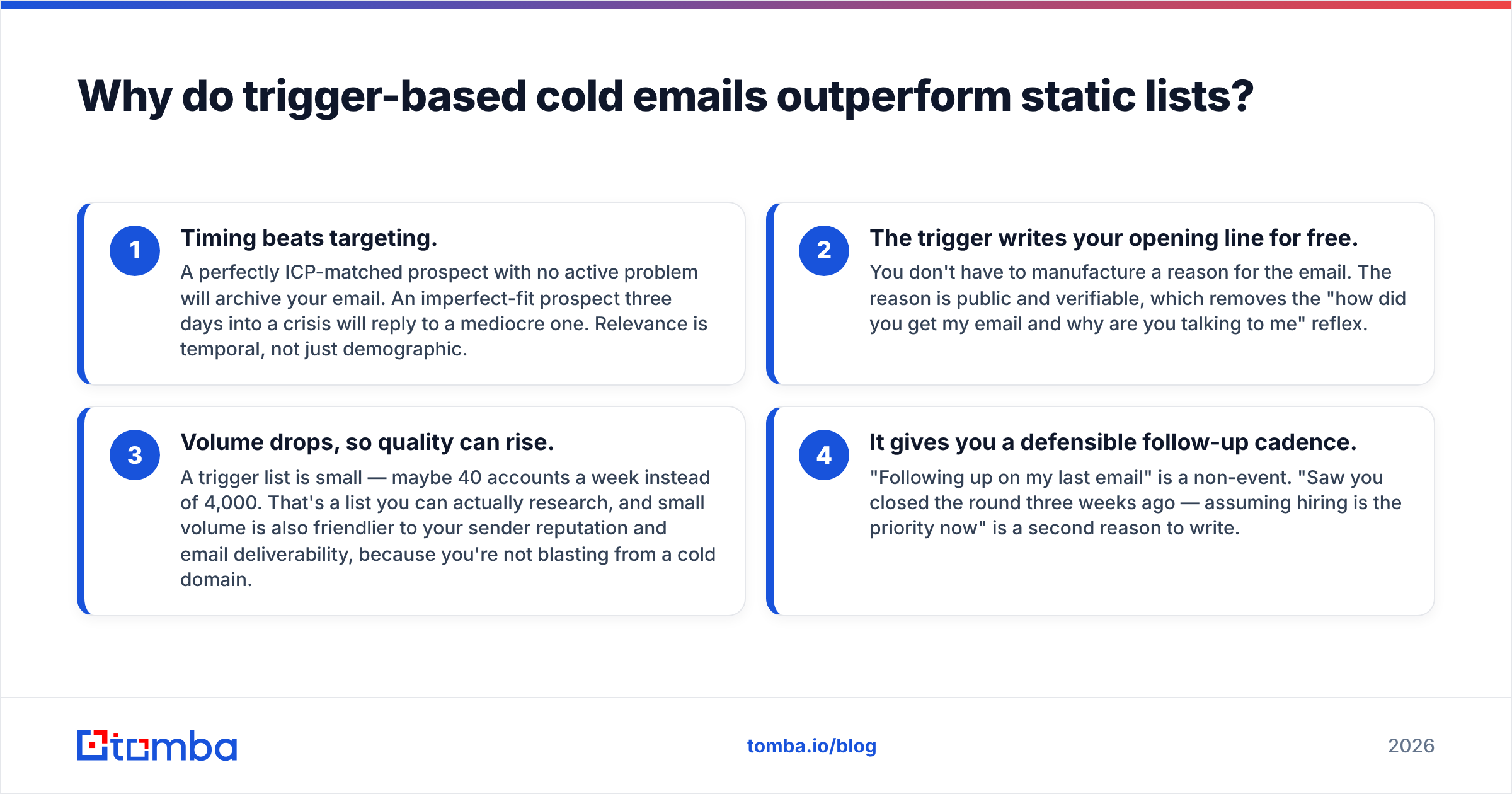
Three reasons, in descending order of importance.
- Timing beats targeting. A perfectly ICP-matched prospect with no active problem will archive your email. An imperfect-fit prospect three days into a crisis will reply to a mediocre one. Relevance is temporal, not just demographic.
- The trigger writes your opening line for free. You don't have to manufacture a reason for the email. The reason is public and verifiable, which removes the "how did you get my email and why are you talking to me" reflex.
- Volume drops, so quality can rise. A trigger list is small — maybe 40 accounts a week instead of 4,000. That's a list you can actually research, and small volume is also friendlier to your sender reputation and email deliverability, because you're not blasting from a cold domain.
- It gives you a defensible follow-up cadence. "Following up on my last email" is a non-event. "Saw you closed the round three weeks ago — assuming hiring is the priority now" is a second reason to write.
The tradeoff is honest: trigger-based outbound produces fewer sends. If your comp plan rewards activity volume, this will look worse before it looks better. HubSpot's sales research has documented the same tension for years — teams that reduce send volume and increase per-email relevance tend to see response rate improve while raw meeting count stays flat for the first six to eight weeks.
Which cold email triggers actually work in 2026?#
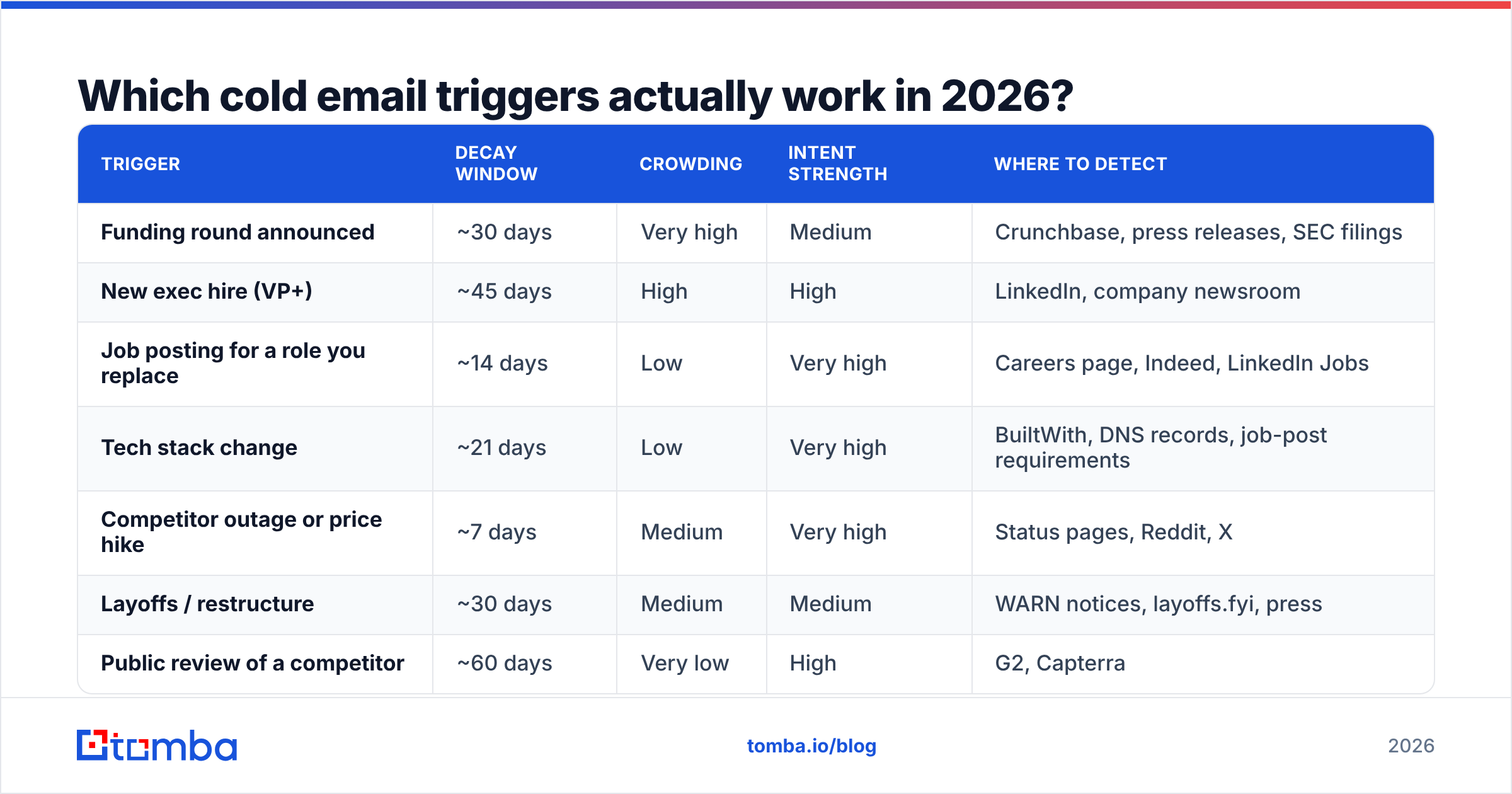
Not all triggers are equal. They differ in three ways that matter operationally: how long the signal stays warm (decay window), how many competitors see the same signal (crowding), and how directly it maps to a purchase (intent strength).
Here's the honest ranking.
| Trigger | Decay window | Crowding | Intent strength | Where to detect |
|---|---|---|---|---|
| Funding round announced | ~30 days | Very high | Medium | Crunchbase, press releases, SEC filings |
| New exec hire (VP+) | ~45 days | High | High | LinkedIn, company newsroom |
| Job posting for a role you replace | ~14 days | Low | Very high | Careers page, Indeed, LinkedIn Jobs |
| Tech stack change | ~21 days | Low | Very high | BuiltWith, DNS records, job-post requirements |
| Competitor outage or price hike | ~7 days | Medium | Very high | Status pages, Reddit, X |
| Layoffs / restructure | ~30 days | Medium | Medium | WARN notices, layoffs.fyi, press |
| Public review of a competitor | ~60 days | Very low | High | G2, Capterra |
| M&A / acquisition | ~90 days | High | Medium | Press, regulatory filings |
| Website visit to pricing page | ~72 hours | None | Very high | First-party analytics, visitor identification |
| Compliance deadline in their sector | ~120 days | Low | Medium | Regulator publications |
| Podcast or conference appearance | ~10 days | Low | Low | Event agendas, podcast feeds |
| Contract renewal window | ~60 days | Low | Very high | Inferred from case studies, G2 dates, LinkedIn tenure |
Read that table for the pattern, not the individual rows. The triggers with the highest intent strength are the ones with the lowest crowding. Funding rounds have inverted this — everyone watches them, so the signal is loud and worth almost nothing. Nobody watches for a company quietly removing a competitor's script from their footer.
Sorry — that's the meme slot:
Actually, embed it plainly:
What separates a strong trigger from a weak one?#
Score any candidate trigger against four questions. If it fails two, drop it.
- Is it timestamped? "They use Salesforce" is not a trigger. "They started using Salesforce on March 3" is. Without a timestamp you cannot build a cadence.
- Does it change a budget line? A new VP of Revenue Operations changes budget. A new junior designer usually doesn't. Follow the money, not the headcount.
- Can you tie it to your product in one sentence? If explaining the connection takes a paragraph, the prospect won't make the leap either.
- Is it findable at scale? A trigger you can only spot by manually reading a founder's blog is a great trigger and a terrible pipeline. You need at least one repeatable source.
- Would a competitor plausibly miss it? Crowding kills conversion faster than bad copy. If eight vendors email on day one, being ninth is worse than being silent.
The best triggers in most categories are compound: two weak signals stacked into one strong one. "Raised a Series A" is crowded. "Raised a Series A and posted a Head of Sales role and has no CRM in their tech stack" is a list of maybe four companies — and every one of them will read your email.
How do you detect triggers at scale without a data team?#
You need three layers, and only the third one costs real money.
Layer 1 — Free public sources. Careers pages, status pages, LinkedIn company updates, regulatory filings, review sites. Scrape or monitor these with any workflow tool. Cost: near zero. Coverage: 60% of triggers.
Layer 2 — Structured signal feeds. Funding databases, tech-stack lookups, layoff trackers. Most have APIs or export options. Cost: moderate. Coverage: brings you to ~85%.
Layer 3 — First-party intent. Who visited your pricing page, who opened your last three emails, who your customers churned to. This is the only layer competitors literally cannot copy. Website visitor reveal sits here.
The detection layer is now the easy part. The genuinely hard part comes next.
How do you turn a trigger into a deliverable email?#
A trigger is worthless until it becomes a verified inbox belonging to the right human, inside the decay window.
Here's where most trigger-based programs quietly fail. The team spots that Acme raised $40M on Tuesday. By the time someone finds the VP of Engineering, guesses the email format, and pushes it into a sequence, it's the following Thursday. The decay window is half gone and the message reads like everyone else's.
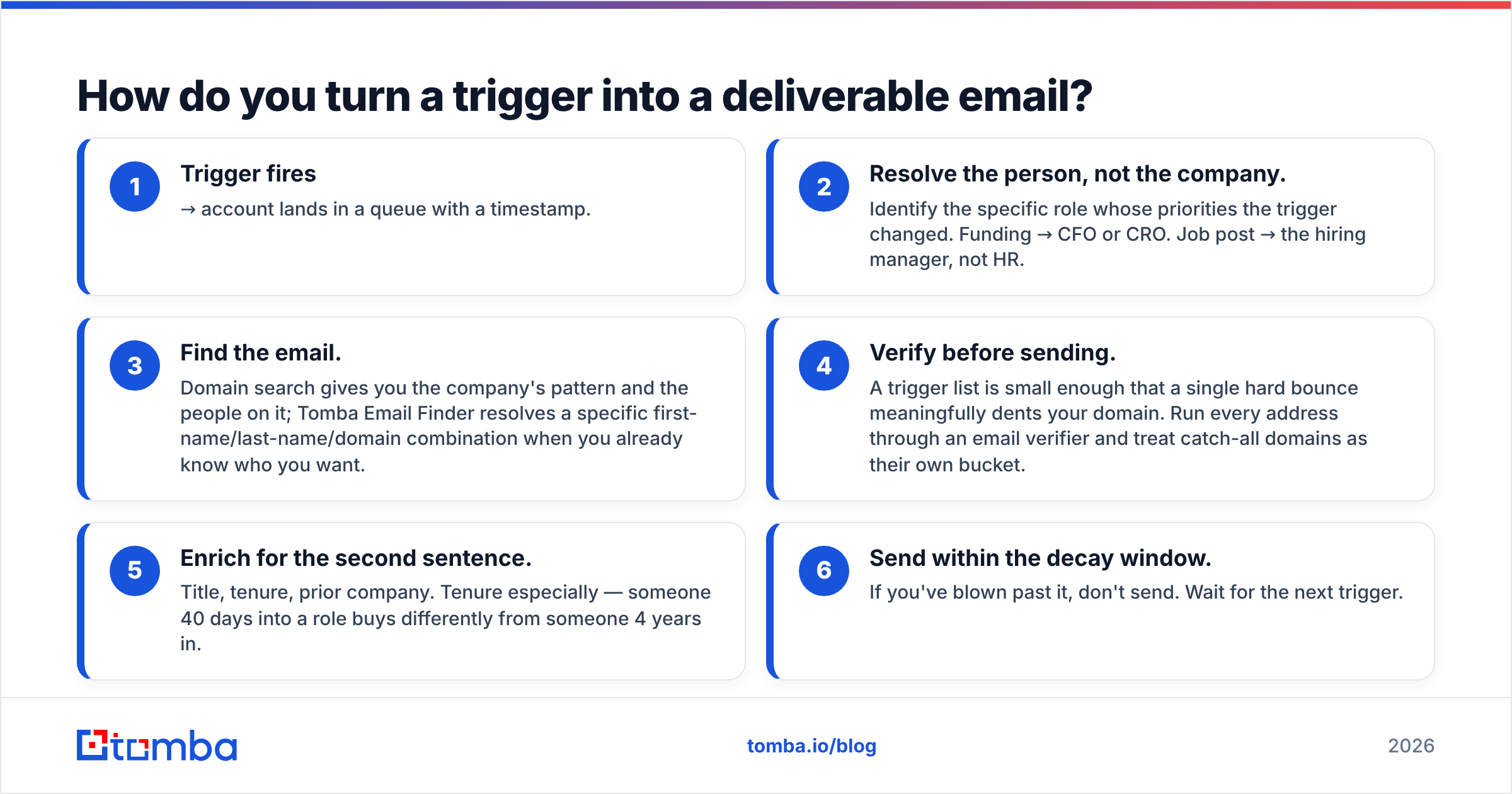
The workflow that actually holds up:
- Trigger fires → account lands in a queue with a timestamp.
- Resolve the person, not the company. Identify the specific role whose priorities the trigger changed. Funding → CFO or CRO. Job post → the hiring manager, not HR.
- Find the email. Domain search gives you the company's pattern and the people on it; Tomba Email Finder resolves a specific first-name/last-name/domain combination when you already know who you want.
- Verify before sending. A trigger list is small enough that a single hard bounce meaningfully dents your domain. Run every address through an email verifier and treat catch-all domains as their own bucket.
- Enrich for the second sentence. Title, tenure, prior company. Tenure especially — someone 40 days into a role buys differently from someone 4 years in.
- Send within the decay window. If you've blown past it, don't send. Wait for the next trigger.
Step 3 through 5 should take minutes, not days. If it takes days, your triggers are decorative.

Which cold email triggers are overrated?#
Three, and they're the three most teams start with.
Funding announcements. Ubiquitous, easy to detect, and therefore worthless as a differentiator. Every company that raises a round receives 200+ cold emails in the first fortnight, almost all opening with "congrats on the raise." If you must use it, use it as a filter, not an opener — never mention the round in the first line.
Job changes. A person starting a new role is genuinely receptive, but the window is contested. Recruiters, vendors, and their own new colleagues are all competing for attention in week one. Wait until day 30–45, when they've formed opinions about what's broken.
Company milestones and anniversaries. "Happy 10th birthday, Acme!" changes no budgets. It reads as a pretext because it is one.
What's underrated, in the same order: contract renewal timing, negative competitor reviews, and quiet tech-stack removals. All three require more work to detect. That's precisely why they still convert. This is also where a good B2B database or contact enrichment layer earns its keep — it turns a hard-won signal into a contactable person before the window shuts.
A quick note on tooling: this is a category with genuinely different philosophies. Signal-first platforms, list-first providers like BookYourData, and finder-first tools like Tomba each solve a different slice. Signal platforms tell you when. List providers give you breadth to filter against. Finders resolve the specific person once the trigger has narrowed the field. Most functional stacks use two of the three, and pretending one replaces the others leads to a lot of unopened email.
How should you write the email once you have the trigger?#
Three sentences. Not four.
- The observation. State the trigger in plain language, specifically enough that it could only be about them. Never "I saw you're growing." Always "You posted two SRE roles last week."
- The inference. Say what you think that means, and be willing to be wrong. "Usually that means the on-call rotation is underwater before the hires land." This is where you demonstrate you've thought about their world instead of your product.
- The ask. Small, specific, low-commitment. Not "do you have 15 minutes." Try "worth a look at how [similar company] handled the same gap?"
Notice what's absent: your company name, your funding, your feature list, a calendar link, and the word "quick." The trigger bought you attention for about eight seconds. Spend all eight on them.
If you want a starting scaffold, our cold email templates library has trigger-shaped variants you can gut and rewrite — which is what you should do with any template. And before the send, run the copy through a spam checker; trigger emails often carry links to news articles, and link-heavy first-touch mail gets filtered.
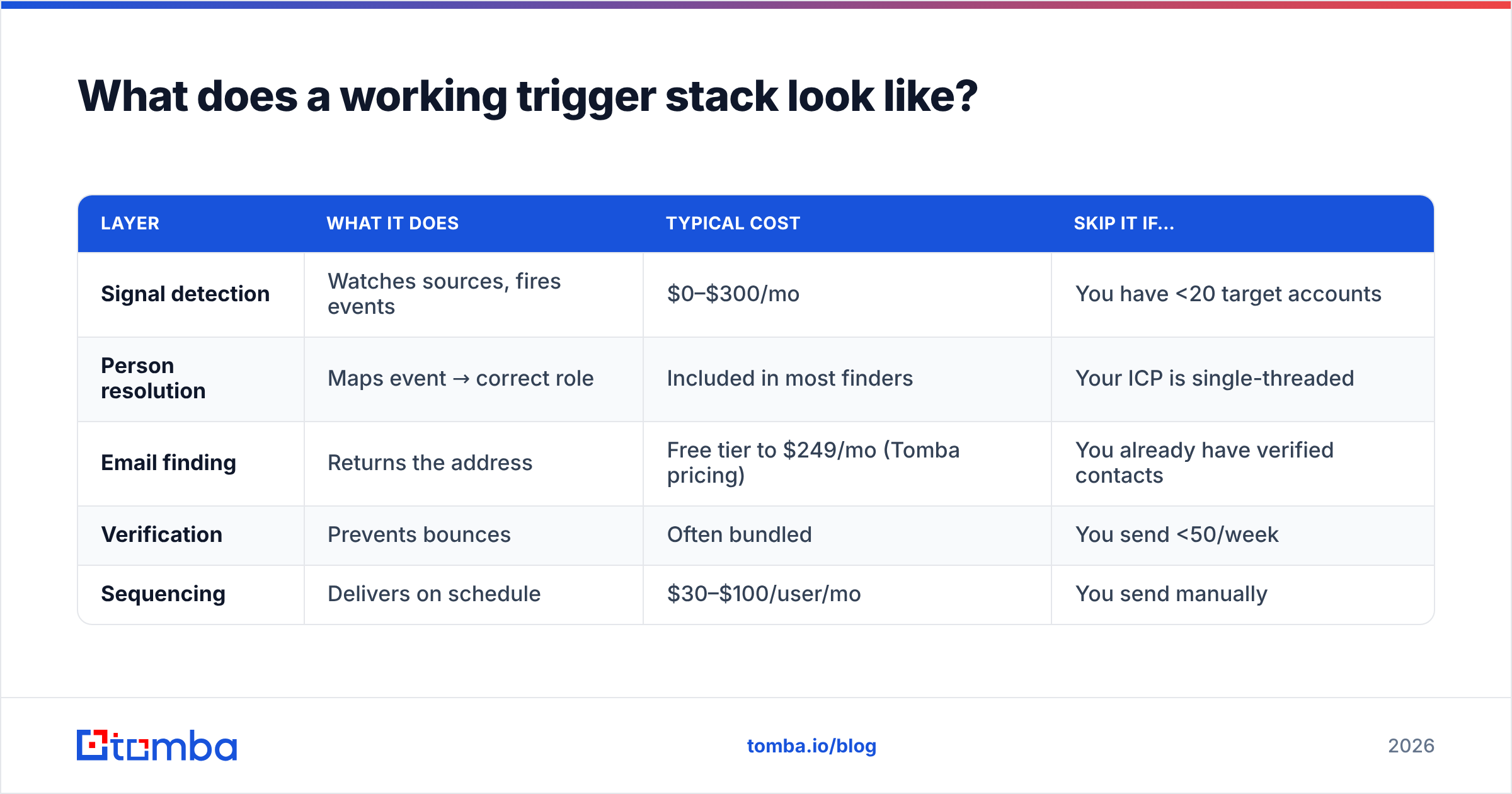
What does a working trigger stack look like?#
| Layer | What it does | Typical cost | Skip it if… |
|---|---|---|---|
| Signal detection | Watches sources, fires events | $0–$300/mo | You have <20 target accounts |
| Person resolution | Maps event → correct role | Included in most finders | Your ICP is single-threaded |
| Email finding | Returns the address | Free tier to $249/mo (Tomba pricing) | You already have verified contacts |
| Verification | Prevents bounces | Often bundled | You send <50/week |
| Sequencing | Delivers on schedule | $30–$100/user/mo | You send manually |
Notice that detection is the cheapest layer and the one everyone obsesses over. Resolution and verification are where trigger programs actually break — the signal fired, and nobody could reach the human before it went cold.
Where should you start this week?#
Pick one trigger with low crowding and high intent from the table above. Job postings are the easiest place to begin: they're public, timestamped, legally scrapeable, and they tell you exactly what a company has decided to spend money on. Build a list of 25 accounts that posted a relevant role in the last 10 days. Find the hiring manager, not the recruiter. Send 25 emails, one at a time, each with a real observation in the first line.
Twenty-five emails. Track replies, not opens — open tracking has been unreliable since Apple's Mail Privacy Protection changed the game, as HubSpot's own sales team has written about at length. If you get three or more conversations from 25, you've found a repeatable trigger. Scale that one before adding a second.
Then do the boring part: measure decay. Send half your list on day 2 and half on day 12, and see which half replies. That single experiment will tell you more about your market than any of the numbers in this article.
Ready to reach the people your triggers surface?#
A trigger is only as good as the inbox it lands in. Once you know which company and which role, Tomba Email Finder resolves the verified professional email in seconds — by name and domain, in bulk, or straight from the API into whatever fires your signals. The free tier gives you 25 searches a month, which is enough to run the 25-account experiment above end to end before you commit a dollar. Start with one trigger, one list, and one week.
Related guides#
Ready to find emails that actually work?
Join 150,000+ professionals who stopped guessing and started sending. Free credits on signup — no credit card required.
Get the Tomba newsletter
Practical outbound tactics and product updates — once every two weeks.
About the author