Cold Mailing in 2026: The Complete Guide That Actually Converts
Cold mailing still works in 2026 — if you skip the spray-and-pray playbook. Here's how to build lists, warm domains, write copy that gets replies, and stay out of spam.
Cold mailing is not dead — but the version that worked in 2019 is. Blasting a purchased list of 10,000 unverified contacts today gets your domain blacklisted before lunch. The version that works in 2026 looks more like precision outreach: small, verified lists, warmed-up sending infrastructure, and copy that reads like a human wrote it to one specific person.
This guide walks you through the whole system, from finding valid addresses to writing the follow-up that actually gets the reply.
TL;DR#
- Cold mailing is sending unsolicited but relevant email to prospects who fit your ideal customer profile — legal when done right, spam when done lazily.
- Deliverability beats volume. A verified 200-contact list outperforms an unverified 5,000-contact blast every time.
- Warm your domain, authenticate it (SPF, DKIM, DMARC), and keep bounce rates under 2% or your sender reputation tanks.
- Personalized, short, one-ask emails get 3–5x the reply rate of generic templates.
- Tools matter: an accurate email finder plus a verifier keeps your bounce rate low and your domain safe.
What is cold mailing?#
Cold mailing is the practice of emailing someone you have no prior relationship with, because they match a profile of a person likely to need what you sell. Think of it like knocking on the right doors in the right neighborhood — you're not wandering randomly, you've researched who lives where and why they'd want to hear from you.
It's the digital cousin of cold calling, minus the interruption. Done badly, it's spam: irrelevant, mass-blasted, and instantly deleted. Done well, it's a scalable channel that fills pipeline for a fraction of the cost of paid ads.
The difference between the two is almost entirely about relevance and infrastructure, not send volume. A cold email that lands in the inbox, names a real problem, and asks for one small thing is welcome. A cold email that lands in spam because your domain isn't authenticated never gets the chance.
Is cold mailing legal in 2026?#
Yes, in most jurisdictions, with conditions. Cold mailing is regulated, not banned.
- CAN-SPAM (US): You can email business prospects without prior consent, but you must include a valid physical address, an honest subject line, and a working unsubscribe link — and honor opt-outs within 10 business days.
- GDPR (EU): B2B cold email is permitted under "legitimate interest," but you must be able to justify why you contacted that person, offer easy opt-out, and only process relevant data.
- CASL (Canada): Stricter — generally requires consent, with narrow exceptions for existing business relationships.
The practical takeaway: email business roles about business problems, keep records of why each contact is relevant, and make unsubscribing effortless. Consumer inboxes (personal Gmail addresses about consumer products) are where you get into trouble.
How is cold mailing different from spam?#
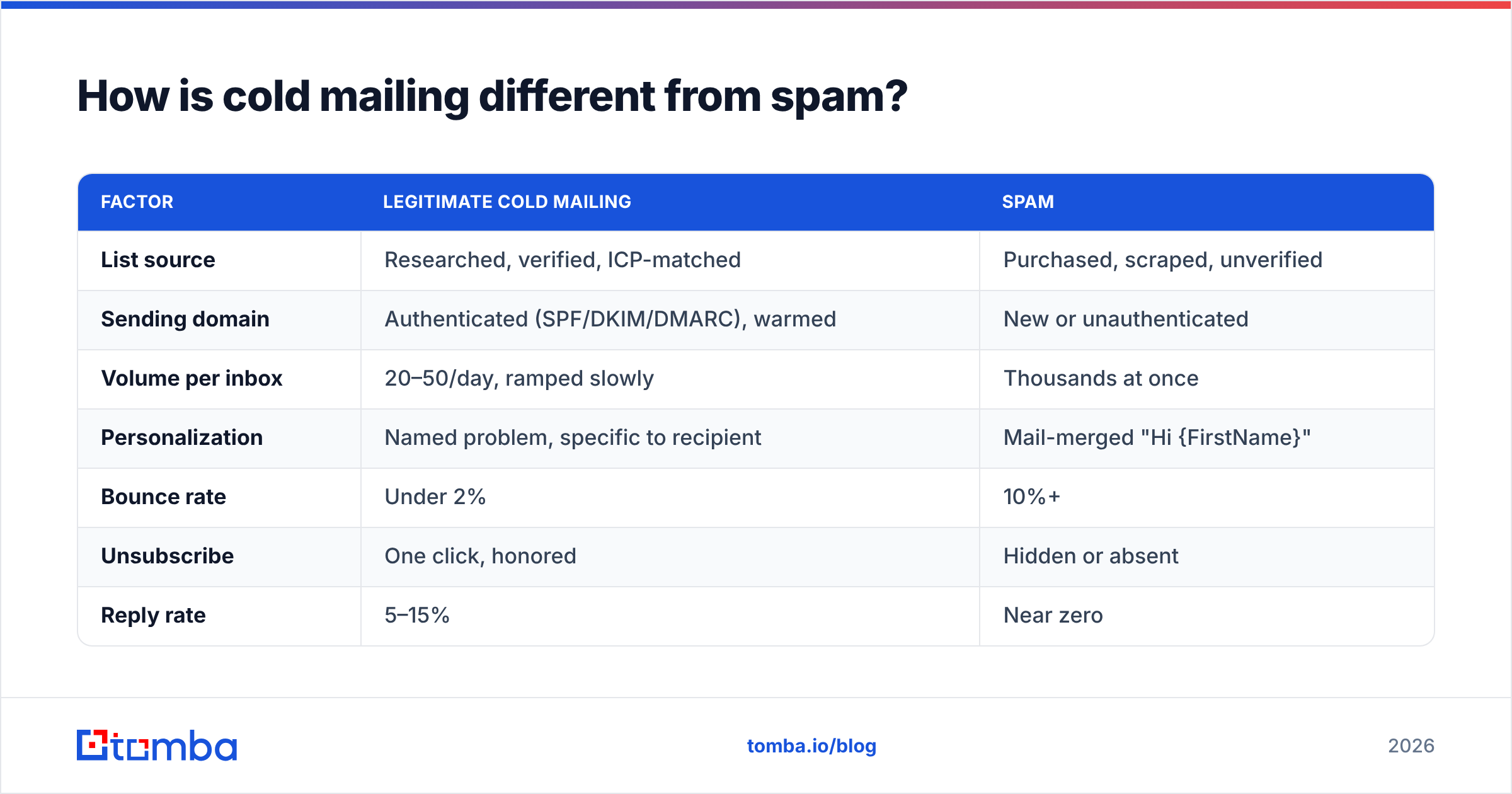
The inbox providers — Google, Microsoft — decide this for you, and they're strict as of 2024's bulk-sender rules. Here's how legitimate cold mailing stacks up against spam in the eyes of a filter.
| Factor | Legitimate cold mailing | Spam |
|---|---|---|
| List source | Researched, verified, ICP-matched | Purchased, scraped, unverified |
| Sending domain | Authenticated (SPF/DKIM/DMARC), warmed | New or unauthenticated |
| Volume per inbox | 20–50/day, ramped slowly | Thousands at once |
| Personalization | Named problem, specific to recipient | Mail-merged "Hi {FirstName}" |
| Bounce rate | Under 2% | 10%+ |
| Unsubscribe | One click, honored | Hidden or absent |
| Reply rate | 5–15% | Near zero |
The single biggest lever is your bounce rate. Send to a list full of dead addresses and mailbox providers read it as a signal you bought a junk list — reputation drops, and even your valid recipients stop seeing your mail. That's why verification is step zero, not an afterthought.
How do you build a cold mailing list that converts?#
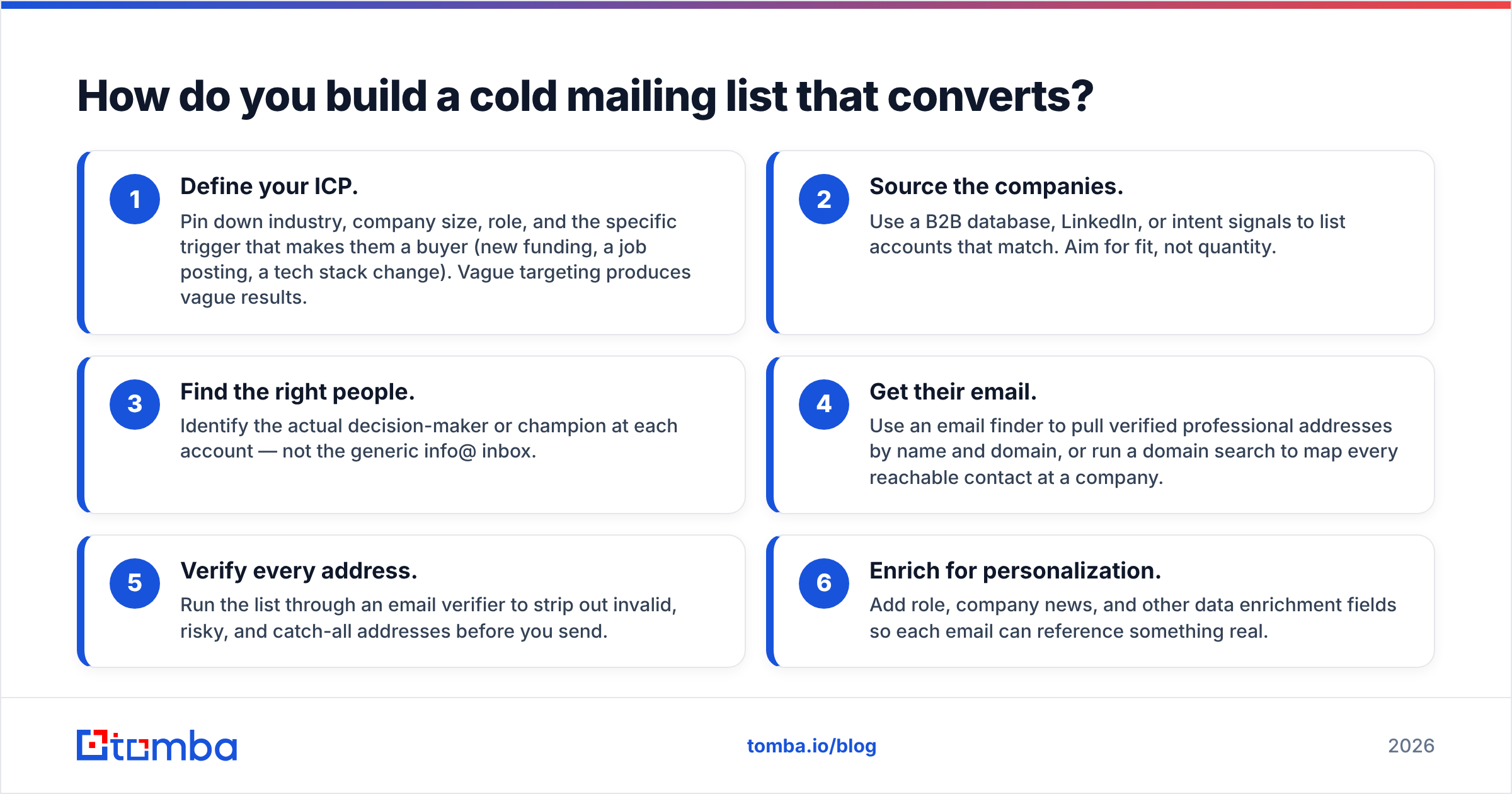
Start narrow. A tightly-defined list of 200 people who genuinely fit beats 5,000 names you scraped from a conference PDF. Here's the build sequence.
- Define your ICP. Pin down industry, company size, role, and the specific trigger that makes them a buyer (new funding, a job posting, a tech stack change). Vague targeting produces vague results.
- Source the companies. Use a B2B database, LinkedIn, or intent signals to list accounts that match. Aim for fit, not quantity.
- Find the right people. Identify the actual decision-maker or champion at each account — not the generic info@ inbox.
- Get their email. Use an email finder to pull verified professional addresses by name and domain, or run a domain search to map every reachable contact at a company.
- Verify every address. Run the list through an email verifier to strip out invalid, risky, and catch-all addresses before you send.
- Enrich for personalization. Add role, company news, and other data enrichment fields so each email can reference something real.
The reason step 4 and 5 are separate matters: finding an address and confirming it's deliverable are different jobs. Accuracy at the finder stage keeps your verifier bill down and your bounce rate low from the start.
What makes cold mailing infrastructure work?#
Your list can be perfect and your copy brilliant, but if your sending setup is broken, everything lands in spam. Infrastructure is the unglamorous foundation that decides whether you even get read.
- Authenticate your domain. Set up SPF, DKIM, and DMARC records. These prove to mailbox providers that you are who you claim to be. Without them, Gmail and Outlook now bulk-filter or reject you outright.
- Use a separate sending domain. Never cold-mail from your primary domain. Buy a lookalike (e.g.,
get-yourbrand.com) so a reputation problem never touches your main email. - Warm up the domain. Ramp sending slowly over 3–6 weeks, starting at a handful of emails a day and building volume as engagement accumulates. New domains that blast on day one get flagged instantly.
- Cap daily volume. Keep it to roughly 20–50 emails per inbox per day. Need more? Add more inboxes, don't crank one harder.
- Monitor reputation. Watch Google Postmaster Tools and your sender reputation so you catch a dip before it becomes a blacklist.
Good email deliverability is a system, not a switch. The teams that win at cold mailing treat their sending domain like a credit score — slow to build, easy to wreck, and worth protecting.
How do you write a cold email that gets replies?#
Write to one person about one problem, and ask for one thing. Every extra ask, every extra paragraph, lowers your reply rate.
Here's the anatomy of a cold email that works in 2026:
- Subject line: 2–5 words, lowercase, curiosity or specificity. "quick question about {company}'s onboarding" beats "REVOLUTIONARY SOLUTION FOR YOU."
- Opening line: Reference something specific about them — a recent hire, a product launch, a LinkedIn post. This proves it's not mass mail. Never open with "I hope this email finds you well."
- The problem: One sentence naming a pain your ICP feels. Make them think "how do they know that?"
- The proof: One line of credibility — a comparable customer, a specific result. No paragraph of features.
- The ask: A single, low-friction call to action. "Worth a 15-minute call next week?" or better, "Want me to send a 2-minute video showing how?"
Keep the whole thing under 120 words. If it doesn't fit on a phone screen without scrolling, it's too long. If you're stuck, a cold email AI writer or a bank of cold email templates gives you a starting frame to personalize — just don't send the template as-is.
One more rule: measure by response rate, not open rate. Open tracking is increasingly unreliable (Apple Mail pre-loads images), and a reply is the only signal that actually predicts revenue.
How many follow-ups should you send?#
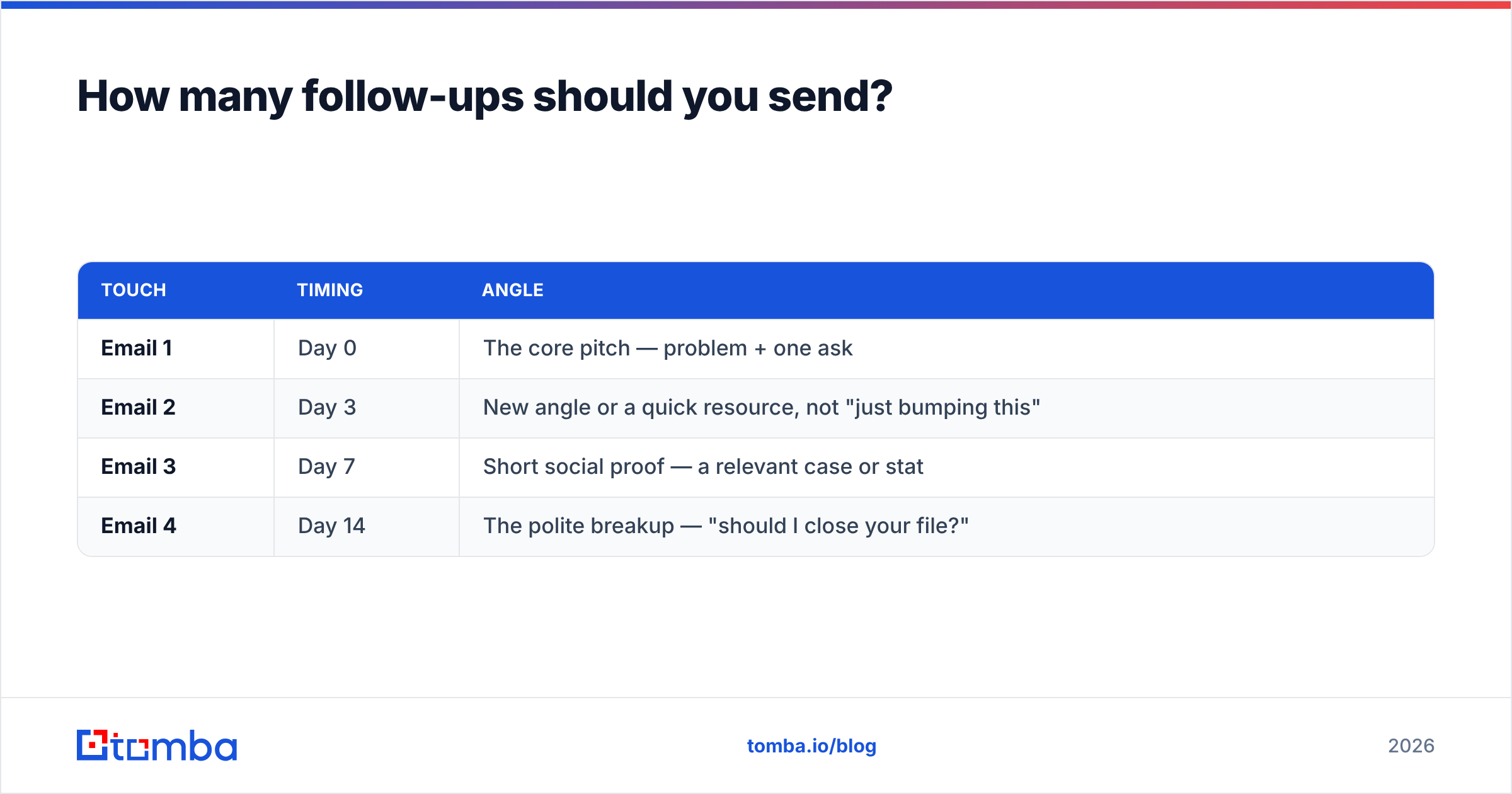
Two to four, spaced across two weeks, then stop. Most replies come from the follow-ups, not the first email — but there's a hard line between persistent and annoying.
| Touch | Timing | Angle |
|---|---|---|
| Email 1 | Day 0 | The core pitch — problem + one ask |
| Email 2 | Day 3 | New angle or a quick resource, not "just bumping this" |
| Email 3 | Day 7 | Short social proof — a relevant case or stat |
| Email 4 | Day 14 | The polite breakup — "should I close your file?" |
Each follow-up should add something, not just guilt-trip the recipient for not replying. The "breakup" email is often the highest-converting of the sequence — the fear of missing out does the work. After four touches with no response, move on. Continuing past that only trains recipients to mark you as spam, which hurts everyone else on your domain.
What tools do you need for cold mailing?#
You need three capabilities: find accurate contacts, verify them, and send at controlled volume. Some platforms bundle these; most teams stitch together a best-of-breed stack.
- Prospecting data & finder: where you get verified email addresses. Accuracy here determines your bounce rate. Tools like Tomba, along with respected peers such as BookYourData, focus on delivering clean, verified B2B contact data.
- Verification: a dedicated email verifier or free email checker to catch the addresses that slip through.
- Sending & sequencing: a cold-email platform that handles inbox rotation, warm-up, and follow-up automation.
- CRM sync: push replies into your CRM so nothing falls through the cracks. Tomba connects via HubSpot, Salesforce, and Zapier.
If you want to compare full sending platforms, third-party review sites like G2 and Capterra publish verified user ratings that cut through vendor marketing. For deliverability best practices, Google's own sender guidelines are the source of truth — the mailbox providers wrote the rules, so read them from the source.
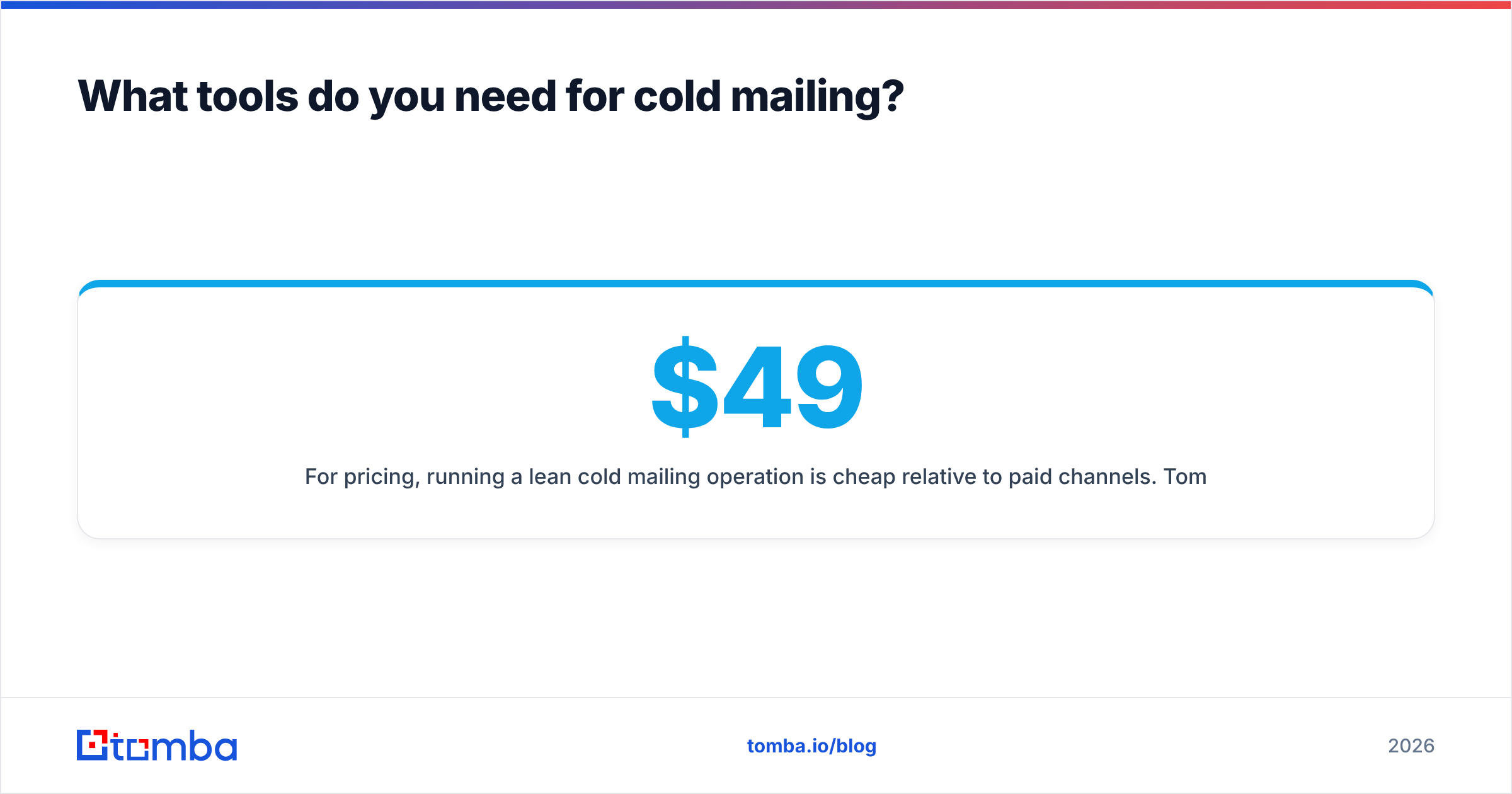
For pricing, running a lean cold mailing operation is cheap relative to paid channels. Tomba's pricing starts with a free tier of 25 searches a month, then $49/mo for Starter, $99/mo for Growth, and $249/mo for Pro — enough finder and verifier volume to keep a real outbound motion supplied without blowing the budget.
Common cold mailing mistakes to avoid#
Most failed campaigns die from the same handful of errors. Skip these and you're ahead of 80% of senders.
- Sending to unverified lists — the fastest way to a blacklist. Verify first, always.
- No domain warm-up — new domains blasting on day one get filtered before anyone reads a word.
- Writing for yourself, not the reader — leading with your product instead of their problem.
- Too many asks — a link, a call, a demo, and a whitepaper in one email means zero conversions.
- Giving up after one email — the money is in touches 2 through 4.
- Ignoring the data — if a segment bounces or never replies, cut it. Cold mailing rewards ruthless iteration.
The bottom line#
Cold mailing in 2026 works when you treat it as a precision channel, not a volume game. Verified lists, an authenticated and warmed domain, short human copy, and a disciplined follow-up sequence — that's the whole formula. Everything else is noise.
The step that quietly determines whether the rest even matters is contact accuracy. If your addresses bounce, your domain reputation collapses and your best-written email never arrives. Start there: use the Tomba Email Finder to pull verified professional emails by name, domain, or company, run them through the verifier, and send to a list you can actually trust. Get the data right, and cold mailing turns back into what it's supposed to be — a reliable, low-cost line straight into your next customer's inbox.
Related guides#
Ready to find emails that actually work?
Join 150,000+ professionals who stopped guessing and started sending. Free credits on signup — no credit card required.
Get the Tomba newsletter
Practical outbound tactics and product updates — once every two weeks.
About the author