The Cold Sales Email Template Playbook: 7 Examples for 2026
Most cold emails get ignored because they read like a pitch, not a conversation. Here are 7 cold sales email templates that actually book meetings in 2026 — plus the structure, personalization, and deliverability rules behind them.
Cold email is not dead — bad cold email is. The difference between a reply and a delete usually comes down to a few structural choices you can systemize with a good template. This guide gives you 7 cold sales email templates you can copy today, plus the framework, personalization tactics, and deliverability guardrails that decide whether they ever get read.
TL;DR#
- A cold sales email template is a reusable skeleton — hook, relevance, value, one ask — not a copy-paste script you blast to 5,000 people unchanged.
- The 7 templates below cover the situations that actually happen: trigger-event, pain-point, competitor-switch, referral, case-study, re-engagement, and the ultra-short "break-up" close.
- Short wins. Emails between 50 and 125 words consistently out-reply long ones.
- Personalization only works if the email lands. Verify addresses and warm your domain first, or the best copy in the world hits spam.
- Templates get you 80% of the way; the first line and the single call-to-action are where you earn the reply.
What is a cold sales email template?#
A cold sales email template is a reusable structure for reaching a prospect who has never heard from you, built so the relevant parts stay fixed and the personal parts get swapped per recipient. Think of it like a house frame: the studs and beams (opening hook, relevance line, value proposition, call-to-action, sign-off) are standardized, while the drywall and paint (the prospect's name, company, trigger event, and specific pain) change every time.
The mistake most reps make is treating a template as a script — identical words to everyone. That produces the "spray and pray" email everyone ignores. A template used well is closer to a checklist that guarantees every message answers four questions the reader is silently asking: Who are you? Why me? Why now? What's the one small thing you want?
Here is the anatomy every template in this post follows:
- Subject line — 3 to 5 words, lowercase-friendly, curiosity or specificity. No "RE:" tricks.
- Opening line — about them, never "I hope this email finds you well." This is the make-or-break sentence.
- Relevance / trigger — the reason you're emailing this person right now (a funding round, a job change, a tech-stack signal, a LinkedIn post).
- Value proposition — one concrete outcome, ideally with a number, framed around their world not your feature list.
- Single call-to-action — one low-friction ask (a question, not a 30-minute demo booking).
- Signature — short, human, with a real name and a way to verify you're real.
Why do most cold sales emails fail?#
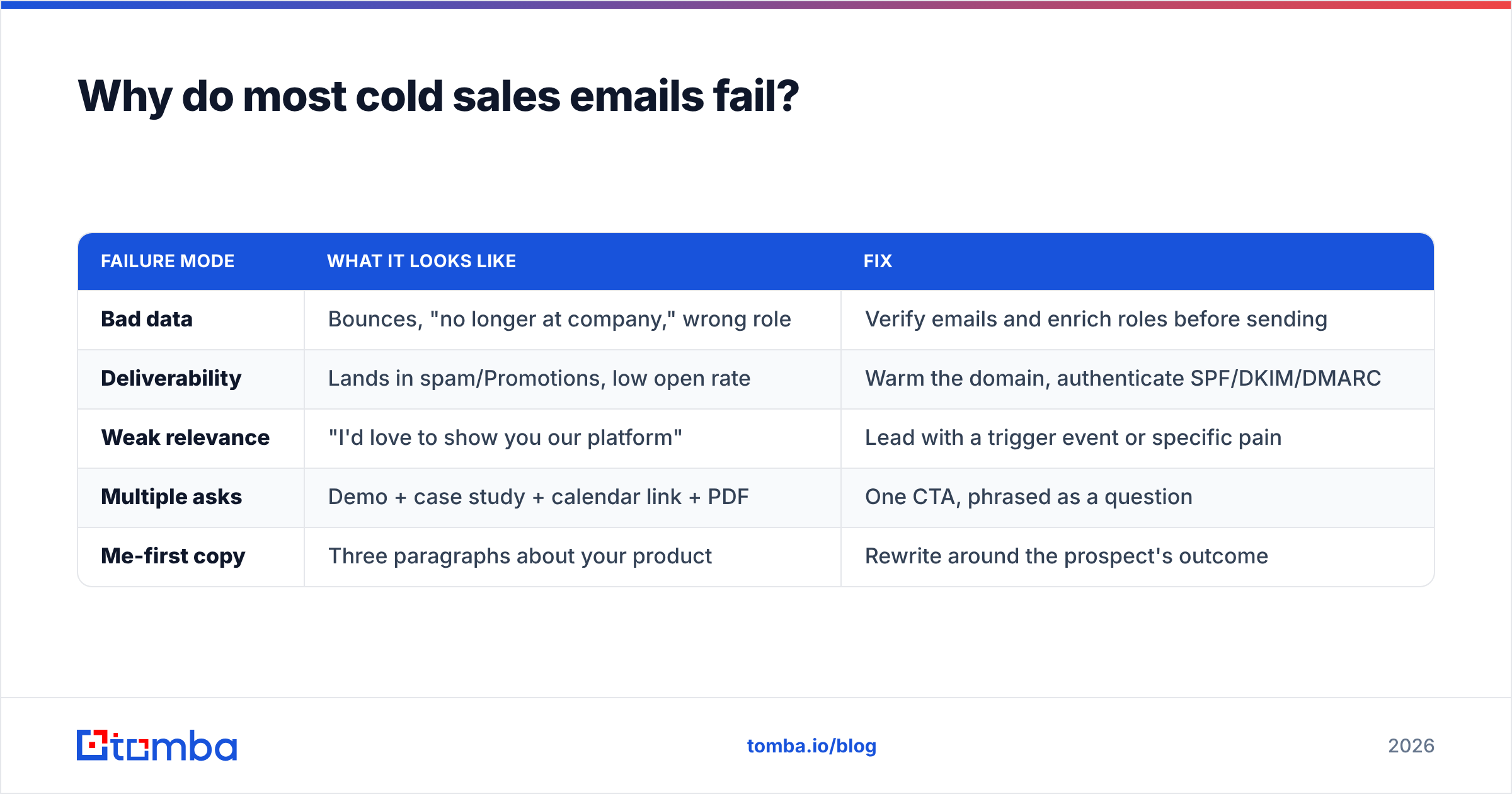
Most cold emails fail before the copy even matters — they never reach the inbox, or they reach the wrong person. Three failure modes dominate.
| Failure mode | What it looks like | Fix |
|---|---|---|
| Bad data | Bounces, "no longer at company," wrong role | Verify emails and enrich roles before sending |
| Deliverability | Lands in spam/Promotions, low open rate | Warm the domain, authenticate SPF/DKIM/DMARC |
| Weak relevance | "I'd love to show you our platform" | Lead with a trigger event or specific pain |
| Multiple asks | Demo + case study + calendar link + PDF | One CTA, phrased as a question |
| Me-first copy | Three paragraphs about your product | Rewrite around the prospect's outcome |
The uncomfortable truth: a mediocre template sent to a verified, well-researched list beats a brilliant template sent to a scraped, unverified one. That's why the workflow starts with data. Pull accurate contacts with an email finder, confirm they're deliverable with an email verifier, and only then worry about wording. Skipping verification is how good reps torch their sender reputation and land every future email in spam.
For a deeper primer on inbox placement, HubSpot's guide to email deliverability is a solid, vendor-neutral reference worth bookmarking.
The 7 cold sales email templates#
Copy these, then replace every [bracket] with real research. Each includes the situation it's built for and a subject line.
1. The trigger-event template#
Use when: the prospect just did something newsworthy — funding, hire, product launch, expansion.
Subject: congrats on the [Series B]
Hi [First name],
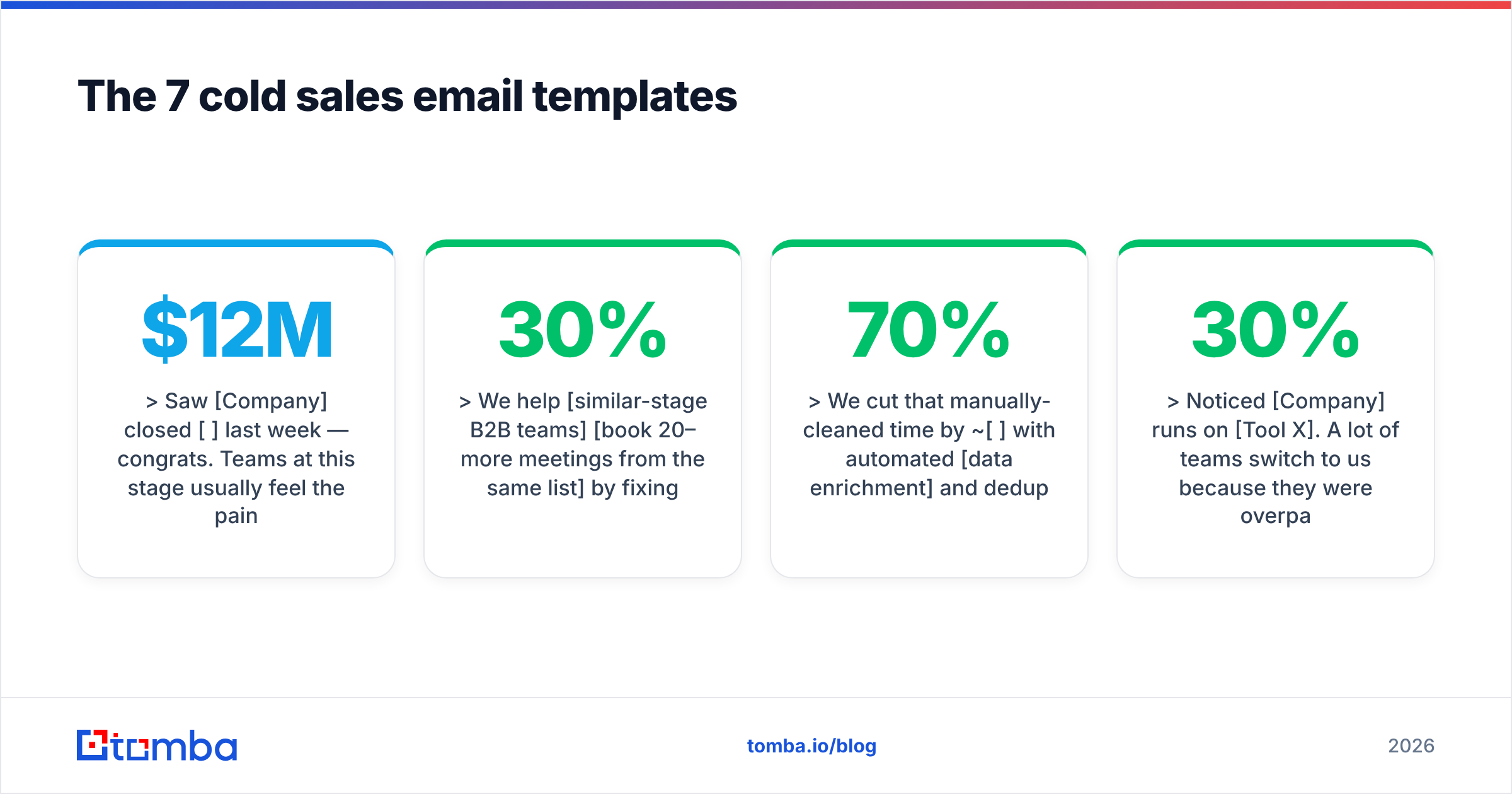
Saw [Company] closed [$12M] last week — congrats. Teams at this stage usually feel the pain of [scaling outbound without blowing up deliverability] pretty fast.
We help [similar-stage B2B teams] [book 20–30% more meetings from the same list] by fixing that before it becomes a fire.
Worth a quick 10-minute look, or is outbound not a priority this quarter?
[Your name]
Why it works: the trigger makes the timing feel intentional, and the CTA gives an easy out, which paradoxically lifts reply rates.
2. The pain-point template#
Use when: you know a specific, common problem for the role.
Subject: [duplicate leads] in [HubSpot]?
Hi [First name],
Most [RevOps leads] I talk to lose hours a week to [duplicate and stale records] clogging the CRM.
We cut that manually-cleaned time by ~[70%] with automated [data enrichment] and dedup.
Is that a headache worth 15 minutes, or are you already sorted?
[Your name]
3. The competitor-switch template#
Use when: the prospect uses a rival tool you can beat on price or accuracy.
Subject: [Apollo] → cheaper + more accurate
Hi [First name],
Noticed [Company] runs on [Tool X]. A lot of teams switch to us because they were overpaying for credits and still getting [30%] bounce rates.
We're roughly [half the price] with verified emails baked in. Happy to send a side-by-side accuracy test on your own domain — no call needed.
Want the test?
[Your name]
4. The referral template#
Use when: someone in their network or company pointed you to them.
Subject: [Sarah] suggested I reach out
Hi [First name],
[Sarah on your growth team] mentioned you own [outbound lead gen] and might feel the [list-building bottleneck] she does.
We solved exactly that for her workflow last month. Mind if I share the 2-line version of how?
[Your name]
5. The case-study / social-proof template#
Use when: you have a comparable customer result.
Subject: how [Acme] added [40] meetings/mo
Hi [First name],
[Acme] — same space as [Company] — went from [12 to 40] booked meetings a month after fixing their [contact data accuracy].
I wrote up the exact 3-step play. Want me to send it over?
[Your name]
6. The re-engagement template#
Use when: a prior thread went quiet.
Subject: bad timing?
Hi [First name],
Circling back once — totally fine if [better data for outbound] isn't a now-thing.
Should I close the loop, or is it worth revisiting in [Q3]?
[Your name]
7. The break-up template#
Use when: it's your last touch in a sequence.
Subject: closing your file
Hi [First name],
I don't want to keep cluttering your inbox, so this is my last note.
If [cutting bounce rates and finding verified contacts] ever moves up the list, just reply "later" and I'll reach back out at a better time.
[Your name]
The break-up email is famously one of the highest-reply messages in any sequence — loss aversion does the work.
How do you personalize a template at scale?#
You personalize at scale by separating the research layer from the writing layer, so you spend human effort only where it moves reply rates. The 80/20 is: the first line and the relevance/trigger line are worth manual research; everything else can stay templated.
A practical scale workflow:
- Build the list — segment by role, industry, and a shared trigger so one template fits the whole batch.
- Enrich each contact — pull title, company, and LinkedIn context. Tomba's data enrichment fills gaps so your merge fields aren't empty.
- Find and verify addresses — run the domain through domain search to find the right people, then verify to protect deliverability. For big batches, a bulk email finder does thousands at once.
- Write one personal line per prospect — reference the trigger from step 1. This is the only manual step and it takes ~30 seconds each.
- Warm and throttle — ramp send volume gradually; don't blast 500 cold emails from a fresh domain on day one.
The point of this split: templates make the 90% reusable so you can afford to hand-craft the 10% that earns the reply. Reps who try to personalize everything burn out at 20 emails a day; reps who personalize nothing get 1% reply rates. The template-plus-one-line model is the middle path that actually scales.
Cold email length and timing: what the data says#
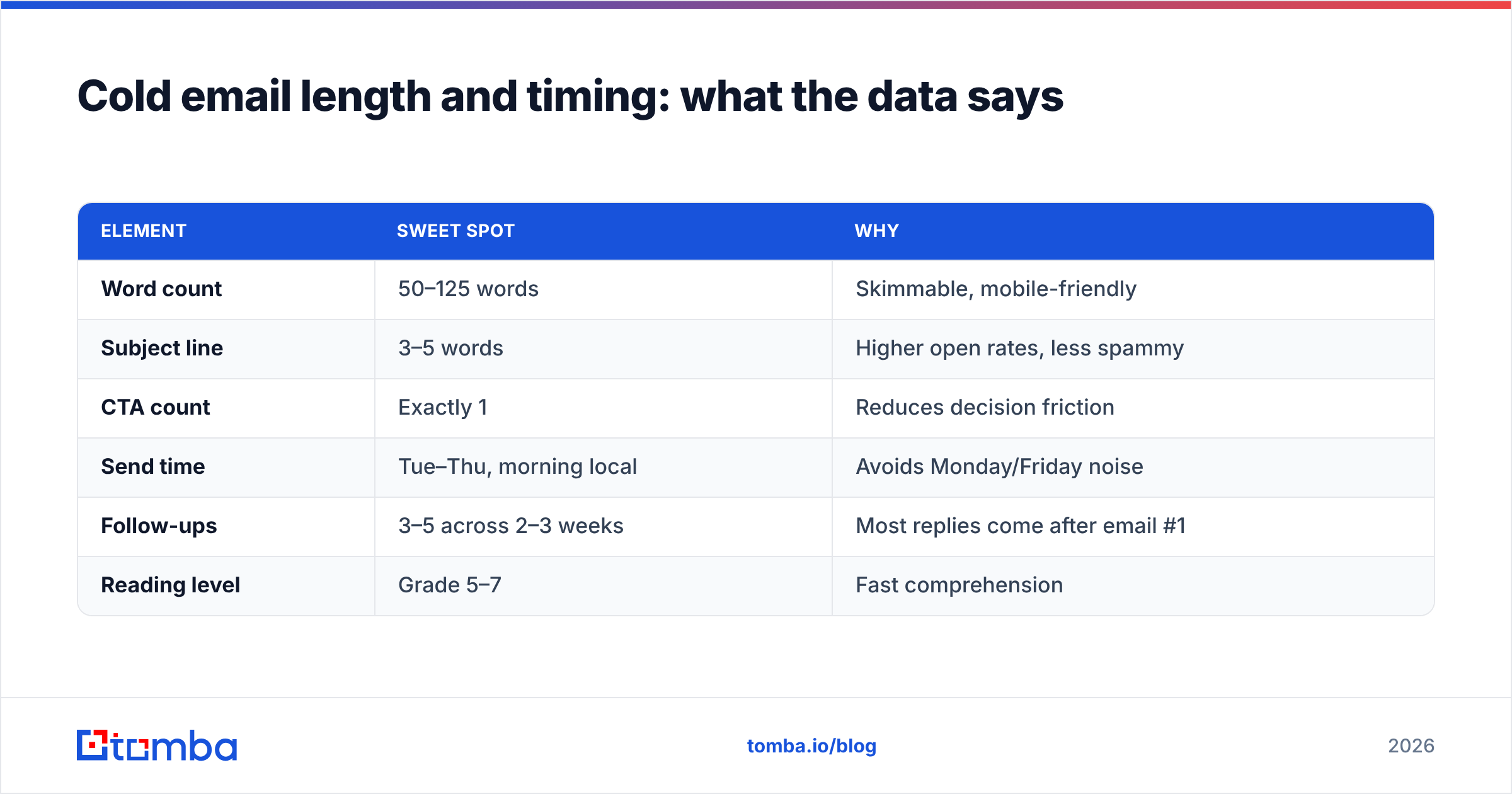
Shorter and simpler wins almost every time. Cold emails in the 50–125 word range tend to out-perform longer ones, and subject lines of 3–5 words typically beat clever long ones. Reading level matters too — write at roughly a 5th-to-7th-grade level, because busy executives skim on phones.
| Element | Sweet spot | Why |
|---|---|---|
| Word count | 50–125 words | Skimmable, mobile-friendly |
| Subject line | 3–5 words | Higher open rates, less spammy |
| CTA count | Exactly 1 | Reduces decision friction |
| Send time | Tue–Thu, morning local | Avoids Monday/Friday noise |
| Follow-ups | 3–5 across 2–3 weeks | Most replies come after email #1 |
| Reading level | Grade 5–7 | Fast comprehension |
A note on follow-ups: the majority of positive replies land on the second through fourth touch, not the first. Build your sequence so each follow-up adds a new angle (new case study, new pain, the break-up) instead of "just bumping this to the top of your inbox." For benchmarks on what "good" reply rates look like across industries, G2's sales engagement category reviews are a useful sanity check.
Deliverability: the part templates can't fix#
You can write the perfect cold sales email template and still get 0% replies if your domain isn't set up to land in the primary inbox. Templates control what you say; deliverability controls whether it's seen.
The non-negotiables before you send at volume:
- Authenticate your domain — set up SPF, DKIM, and DMARC. Check your SPF record is valid before you scale.
- Warm the domain — new domains and inboxes need weeks of gradual ramp-up, not a cold-start blast.
- Verify every address — invalid emails cause bounces, and high bounce rates are the fastest way to get flagged.
- Watch your reputation — monitor blacklists and engagement; one bad campaign can poison your domain for months.
- Keep volume human — 20–50 truly personalized cold emails per inbox per day beats 500 spray-and-pray sends.
This is why the data step isn't optional. A clean, verified list keeps bounce rates low, which keeps email deliverability high, which is what lets your templates actually get read. The order is always: verify → warm → send. Reverse it and even the best copy dies in spam.
How do you write the subject line and first line?#
The subject line's only job is to earn the open, and the first line's only job is to earn the second line — nothing more. Don't try to sell in either.
For subject lines, three patterns punch above their weight:
- Specific + short: "duplicate leads in HubSpot?"
- Trigger reference: "congrats on the Series B"
- Curiosity gap: "bad timing?"
Avoid ALL CAPS, exclamation points, "free," "guarantee," and anything that reads like a marketing blast — spam filters and humans both flag them. If you want to pressure-test before sending, run drafts through a free spam checker to catch trigger words.
For the first line, the rule is brutal: it must be about the reader, and it must not be "I hope this finds you well." Reference their trigger, their post, their role's known pain, or the referral. If your first line could be sent to anyone, it will be read by no one.
Cold email templates vs. fully custom emails#
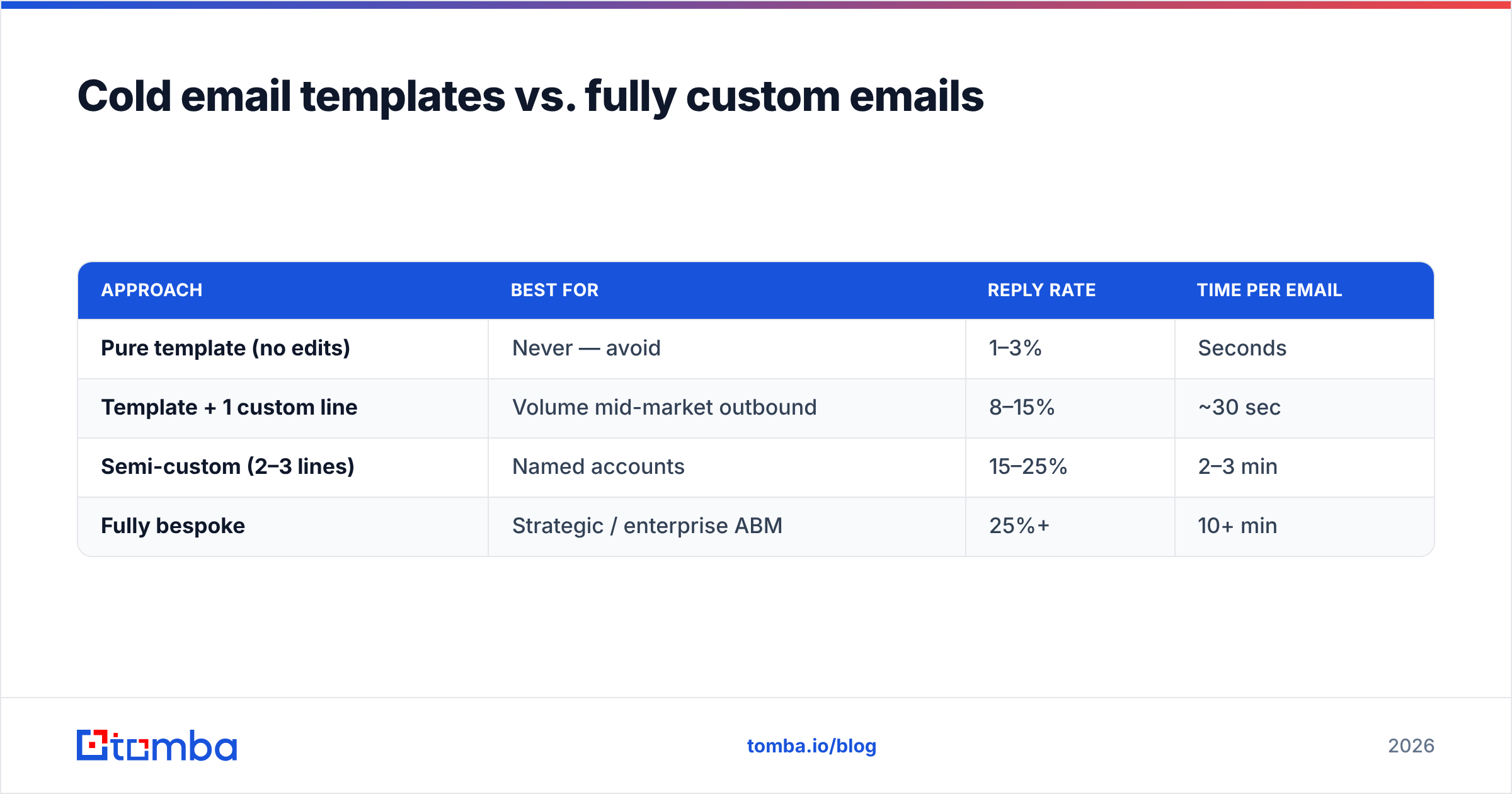
You don't have to choose between templates and personalization — the best-performing reps use both, tiered by account value.
| Approach | Best for | Reply rate | Time per email |
|---|---|---|---|
| Pure template (no edits) | Never — avoid | 1–3% | Seconds |
| Template + 1 custom line | Volume mid-market outbound | 8–15% | ~30 sec |
| Semi-custom (2–3 lines) | Named accounts | 15–25% | 2–3 min |
| Fully bespoke | Strategic / enterprise ABM | 25%+ | 10+ min |
Match effort to deal size. A $500/year deal doesn't justify a 10-minute email; a $150K enterprise logo justifies a fully bespoke one. The templates in this post are built for the second row — the highest-ROI tier for most B2B teams.
Frequently asked questions#
How many cold emails should I send per day? Start at 20–50 per inbox on a warmed domain, and scale slowly. Volume without warm-up and verification tanks deliverability faster than it books meetings.
Do cold email templates still work in 2026? Yes — as structures, not scripts. The template gives you a proven skeleton; the personalized first line and single CTA are what get the reply.
How many follow-ups should a cold sequence have? Three to five over two to three weeks. Most positive replies come after the first email, so stopping at one leaves the majority of your pipeline on the table.
What's the single biggest reply-rate lever? Data quality. Verified contacts and a relevant trigger beat clever copy every time, because relevance and deliverability are prerequisites for the copy to even matter.
Put your templates to work#
Great templates only pay off when they reach real, verified people. Before you send a single one of these, build your list on accurate data: use the Tomba Email Finder to find professional email addresses by name, company, or domain, verify them to keep bounce rates near zero, and enrich each contact so your merge fields are never empty. Start free with 25 searches a month, and if you're scaling outbound, the Growth plan at $99/mo covers most mid-market teams. Get the data right, plug it into the 7 templates above, and let the replies do the talking.
Related guides#
Ready to find emails that actually work?
Join 150,000+ professionals who stopped guessing and started sending. Free credits on signup — no credit card required.
Get the Tomba newsletter
Practical outbound tactics and product updates — once every two weeks.
About the author