Coldlytics vs FinalScout: Which B2B Tool Wins in 2026?
Coldlytics does the list-building for you; FinalScout finds emails from LinkedIn on autopilot. Here's an honest, side-by-side breakdown of pricing, accuracy, and which one fits your outbound motion in 2026.
Picking between Coldlytics and FinalScout usually means picking between two very different ways of buying B2B contact data. One sends humans to research your list. The other scrapes LinkedIn and guesses the email. Both work — but they solve different problems, and paying for the wrong one is an expensive way to learn that.
This breakdown is written for outbound teams who want a straight answer, not a feature dump. We'll cover what each tool actually is, how they price, where the data comes from, and who should pick which.
TL;DR — Coldlytics vs FinalScout at a glance#
- Coldlytics is a done-for-you prospecting service. You submit a request, human researchers build a custom list, and you get verified contacts back. Great for niche targeting, slow by design, priced per-lead.
- FinalScout is a self-serve email finder built on top of LinkedIn, with an AI email writer bolted on. Fast, cheap per contact, but accuracy swings with how good the LinkedIn match is.
- Coldlytics wins when your ICP is weird, hyper-specific, or can't be filtered from a database. FinalScout wins when you live in LinkedIn Sales Navigator and want volume now.
- Neither is the cheapest way to get accurate emails at scale. A pure email finder with a public API and a real email verifier usually beats both on cost-per-valid-contact.
- If you only remember one thing: match the tool to how you source leads, not to the flashiest feature.
What is Coldlytics?#
Coldlytics is a research-as-a-service platform. Instead of giving you a database and a search bar, it gives you a request form. You describe the exact people you want — job titles, company signals, geography, whatever qualifies your best-fit accounts — and a team of human researchers assembles the list manually, then verifies the contact details before handing it over.
Think of it like hiring a freelance researcher, except productized. You're not paying for software access; you're paying for finished output. That's the whole pitch: you skip the tooling, the filtering, and the "is this email real" anxiety because a person already did it.
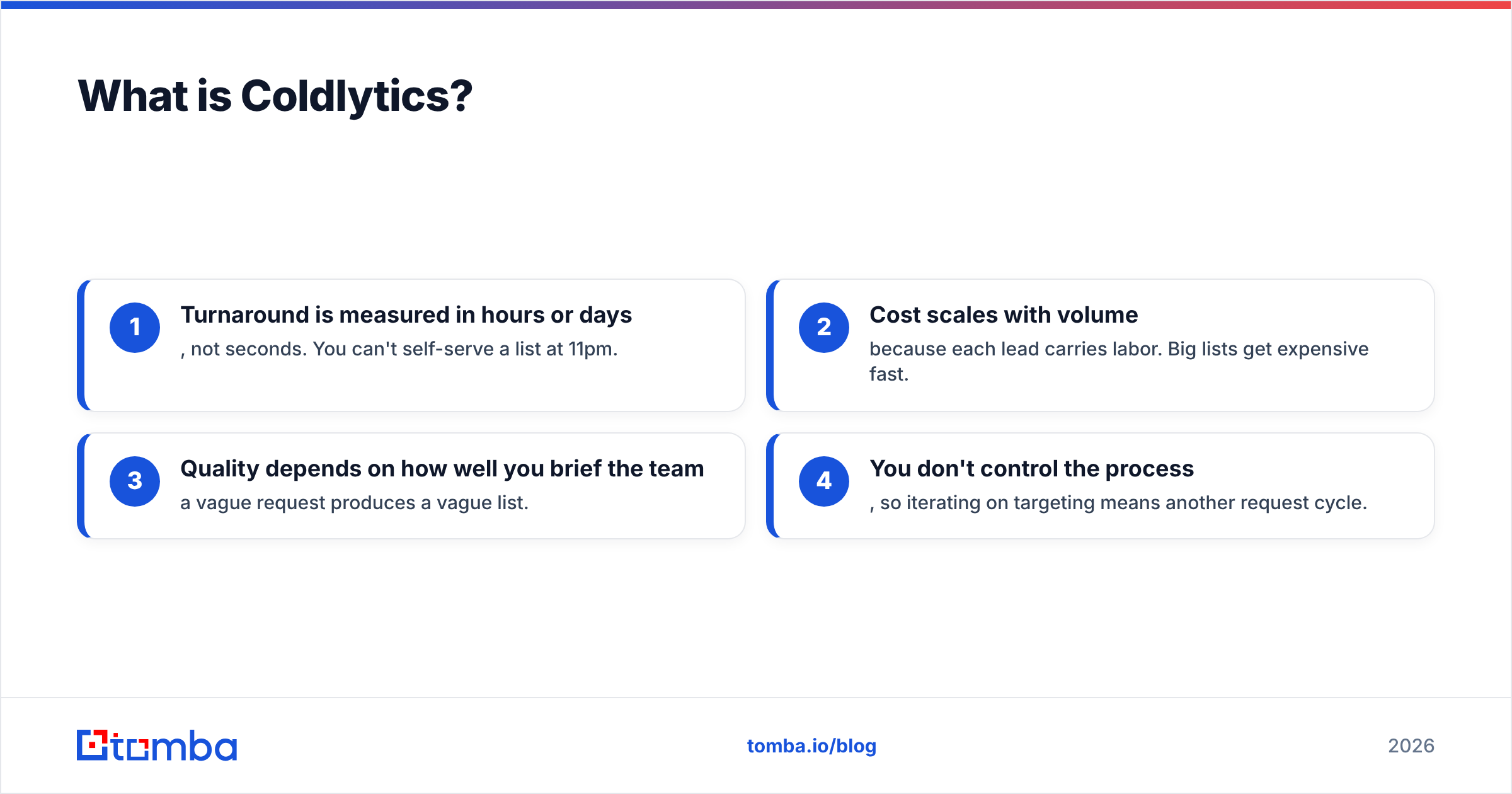
The trade-offs are the obvious ones for any human-in-the-loop service:
- Turnaround is measured in hours or days, not seconds. You can't self-serve a list at 11pm.
- Cost scales with volume because each lead carries labor. Big lists get expensive fast.
- Quality depends on how well you brief the team — a vague request produces a vague list.
- You don't control the process, so iterating on targeting means another request cycle.
Where Coldlytics genuinely shines is the messy stuff a database can't filter: "companies that just posted a specific job opening," "agencies using a particular tech stack," "founders who spoke at these three events." Humans can chase signals that no dropdown menu captures.
What is FinalScout?#
FinalScout is a self-serve tool that finds professional email addresses from LinkedIn profiles and Sales Navigator searches, then lets you draft outreach with an AI writer. You install the extension, browse LinkedIn like normal, and export contacts with emails attached — often in bulk from a search result.
Its core loop is LinkedIn-native. If your prospecting already happens inside Sales Navigator, FinalScout feels natural: you filter, you scrape, you email. The AI writing layer (built to reference each prospect's profile) is a nice add-on for reps who hate staring at a blank first line.
The catch is the same one every LinkedIn-based finder faces: the email isn't on LinkedIn. The tool infers or matches it from other sources, so accuracy depends on the match quality and how fresh the underlying data is. For common corporate domains it's usually fine. For smaller companies, catch-all domains, or people who changed jobs recently, hit rates drop — and you won't always know until your bounces come back.
That's why pairing any LinkedIn finder with a dedicated catch-all verifier matters more than the finder's marketing admits.
Coldlytics vs FinalScout: the core differences#
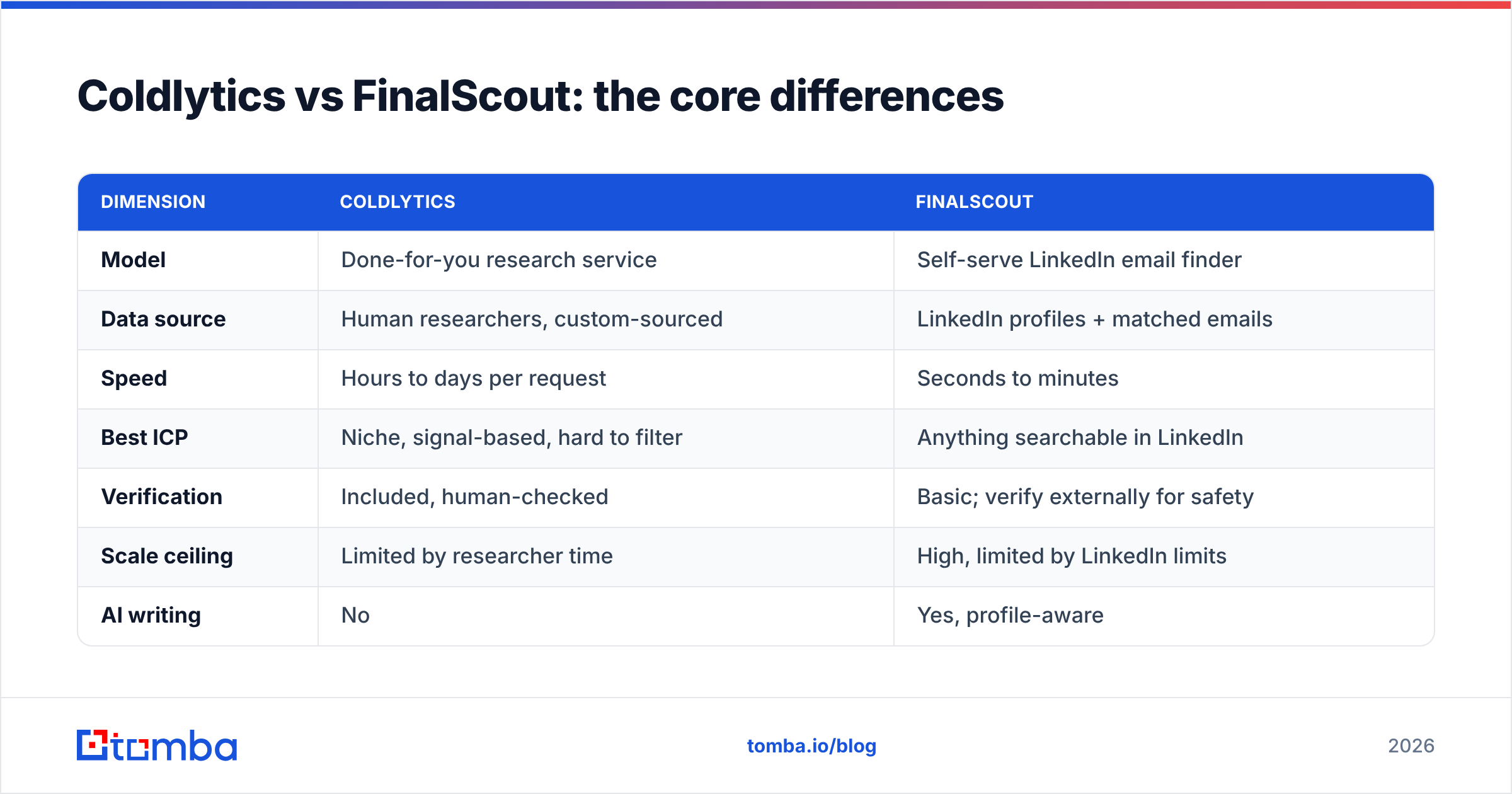
The fastest way to understand these two is that they sit on opposite ends of the "who does the work" spectrum. Coldlytics does it for you. FinalScout hands you the controls.
| Dimension | Coldlytics | FinalScout |
|---|---|---|
| Model | Done-for-you research service | Self-serve LinkedIn email finder |
| Data source | Human researchers, custom-sourced | LinkedIn profiles + matched emails |
| Speed | Hours to days per request | Seconds to minutes |
| Best ICP | Niche, signal-based, hard to filter | Anything searchable in LinkedIn |
| Verification | Included, human-checked | Basic; verify externally for safety |
| Scale ceiling | Limited by researcher time | High, limited by LinkedIn limits |
| AI writing | No | Yes, profile-aware |
| Pricing shape | Per-lead / credit packs | Per-contact subscription tiers |
| Learning curve | None (you just brief) | Moderate (extension + workflow) |
Read that table twice, because it's the actual decision. If your bottleneck is finding the right people, Coldlytics removes it. If your bottleneck is getting emails fast for people you can already see, FinalScout removes that one.
How they price#
Coldlytics uses a credit/per-lead structure — you're buying finished, verified contacts, so the price per record is higher but there's no software subscription to babysit. FinalScout uses tiered monthly subscriptions priced on how many contacts you export, which rewards heavy users and punishes occasional ones.
The important nuance: compare cost-per-valid-contact, not sticker price. A cheap finder that returns 70% deliverable emails can cost more per usable lead than a "pricier" source that returns 95%. Always divide by the bounce-adjusted yield.
Is Coldlytics better than FinalScout?#
It depends entirely on your sourcing problem — there's no universal winner.
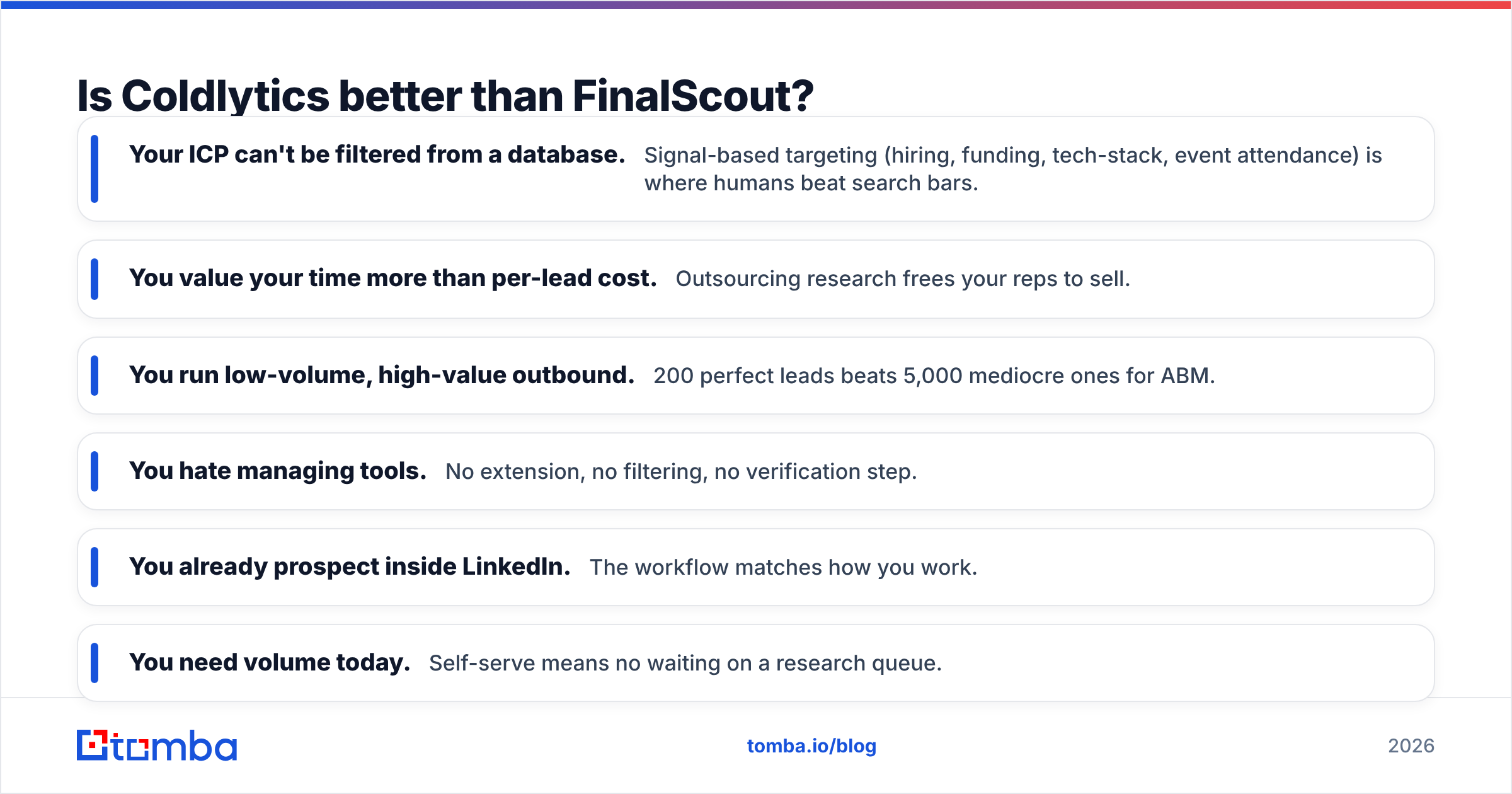
Choose Coldlytics if:
- Your ICP can't be filtered from a database. Signal-based targeting (hiring, funding, tech-stack, event attendance) is where humans beat search bars.
- You value your time more than per-lead cost. Outsourcing research frees your reps to sell.
- You run low-volume, high-value outbound. 200 perfect leads beats 5,000 mediocre ones for ABM.
- You hate managing tools. No extension, no filtering, no verification step.
Choose FinalScout if:
- You already prospect inside LinkedIn. The workflow matches how you work.
- You need volume today. Self-serve means no waiting on a research queue.
- Budget is tight and you'll do your own verification. Cheaper per contact if you accept variable accuracy.
- You want AI-assisted first drafts tied to each prospect's profile.
The honest verdict: Coldlytics is a service and FinalScout is a tool. Comparing them head-to-head is a little like comparing a catering company to a kitchen. Both feed you; only one asks you to cook.

Where both tools leave money on the table#
Here's the thing neither vendor loves to say out loud: most outbound teams don't need done-for-you research or a LinkedIn-locked finder. They need a fast, accurate, programmable way to turn a domain or a name into a verified email — and to do it in bulk, on their own schedule, at a predictable cost.
That's a different category: a data-first email finder with a real API and native verification. It fills the gap between "pay a human for every lead" and "scrape LinkedIn and hope."
Consider the practical workflow most teams actually run:
- Start from a company list. Use domain search to pull every reachable contact at a target account, mapped to roles.
- Find specific people by name. When you know who you want, resolve the email directly instead of hunting a profile.
- Verify before you send. Run every address through verification — including catch-all logic — so your bounce rate stays under control.
- Automate it. A public email finder API means your CRM or sequencer requests emails on demand, no manual export dance.
This is where a platform like Tomba fits between the two extremes: cheaper and faster than a done-for-you service, more accurate and more programmable than a LinkedIn scraper. You keep control of the process without paying per-lead labor rates.
Coldlytics vs FinalScout vs a data-first finder#
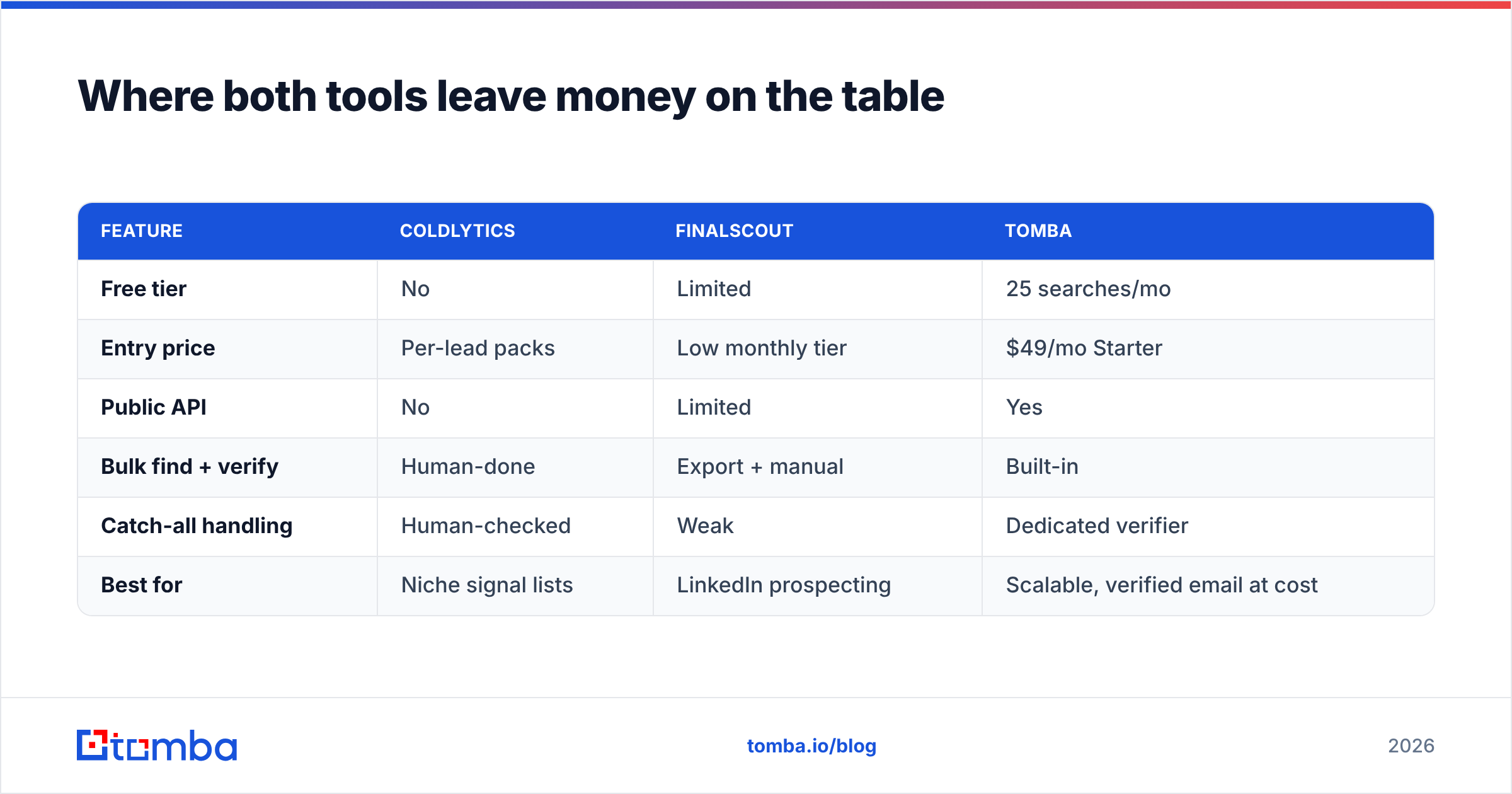
| Feature | Coldlytics | FinalScout | Tomba |
|---|---|---|---|
| Free tier | No | Limited | 25 searches/mo |
| Entry price | Per-lead packs | Low monthly tier | $49/mo Starter |
| Public API | No | Limited | Yes |
| Bulk find + verify | Human-done | Export + manual | Built-in |
| Catch-all handling | Human-checked | Weak | Dedicated verifier |
| Best for | Niche signal lists | LinkedIn prospecting | Scalable, verified email at cost |
You can see the full Tomba pricing tiers — Free (25 searches), Starter at $49/mo, Growth at $99/mo, and Pro at $249/mo — which stay flat and predictable whether you pull 50 emails or 5,000. Compare that to per-lead research costs or per-contact export caps and the math usually favors the programmable option once you cross a few hundred contacts a month. (You can also cross-check real user sentiment on G2 before committing to any of the three.)
Which should you actually pick?#
Map it to your bottleneck and the choice makes itself:
- Bottleneck is targeting (you can't build the right list yourself) → Coldlytics. Pay humans to do what databases can't.
- Bottleneck is LinkedIn workflow (you live in Sales Nav and want emails inline) → FinalScout. It meets you where you already prospect.
- Bottleneck is cost, speed, and scale (you know your accounts and just need verified emails, programmatically) → a data-first finder. This is the majority case, and it's the one both tools overcharge for.
Most teams overestimate how "un-findable" their leads are. If your ICP is "VPs of Marketing at 50–500 person SaaS companies," you don't need a human researcher — you need find email addresses by domain and a verifier that catches the bounces before they happen. Save the done-for-you service for the genuinely weird lists.
The bottom line#
Coldlytics and FinalScout are both good at what they do; they're just not the same thing. Coldlytics sells you finished research and charges service rates for it. FinalScout sells you a fast LinkedIn workflow and asks you to accept variable accuracy in return. Pick based on whether your problem is sourcing or speed — and be honest about which one it actually is.
But if what you really need is verified professional emails, in bulk, on demand, at a price that doesn't balloon with volume, you're describing a data-first email finder — not a research agency and not a scraper.
Start free with Tomba's Email Finder. Turn any domain or name into a verified, deliverable email — 25 searches a month at no cost, a public API when you're ready to automate, and built-in verification so your bounce rate stays low. It's the middle path Coldlytics and FinalScout leave open: control without the per-lead bill, accuracy without the guesswork. Test it against your hardest list and let the yield decide.
Related guides#
Ready to find emails that actually work?
Join 150,000+ professionals who stopped guessing and started sending. Free credits on signup — no credit card required.
Get the Tomba newsletter
Practical outbound tactics and product updates — once every two weeks.
About the author