Coldlytics vs Findymail (2026): Which Lead Tool Wins?
Coldlytics builds lists with human researchers; Findymail finds and verifies emails on autopilot. Here is an honest, side-by-side breakdown of which one fits your outbound motion in 2026 — and where a cheaper API beats both.
You are choosing between two very different bets. Coldlytics puts human researchers behind your list-building so you get hand-checked prospects. Findymail leans on automation to find and verify emails at speed. Both promise clean data that lands in the inbox — but they solve the problem from opposite ends.
This comparison cuts through the marketing. You will see how each tool actually works, what they cost, where accuracy holds up, and which outbound motions each one fits. And because neither is the only option, you will see where a pure email-finder API undercuts both on price.
TL;DR — Coldlytics vs Findymail#
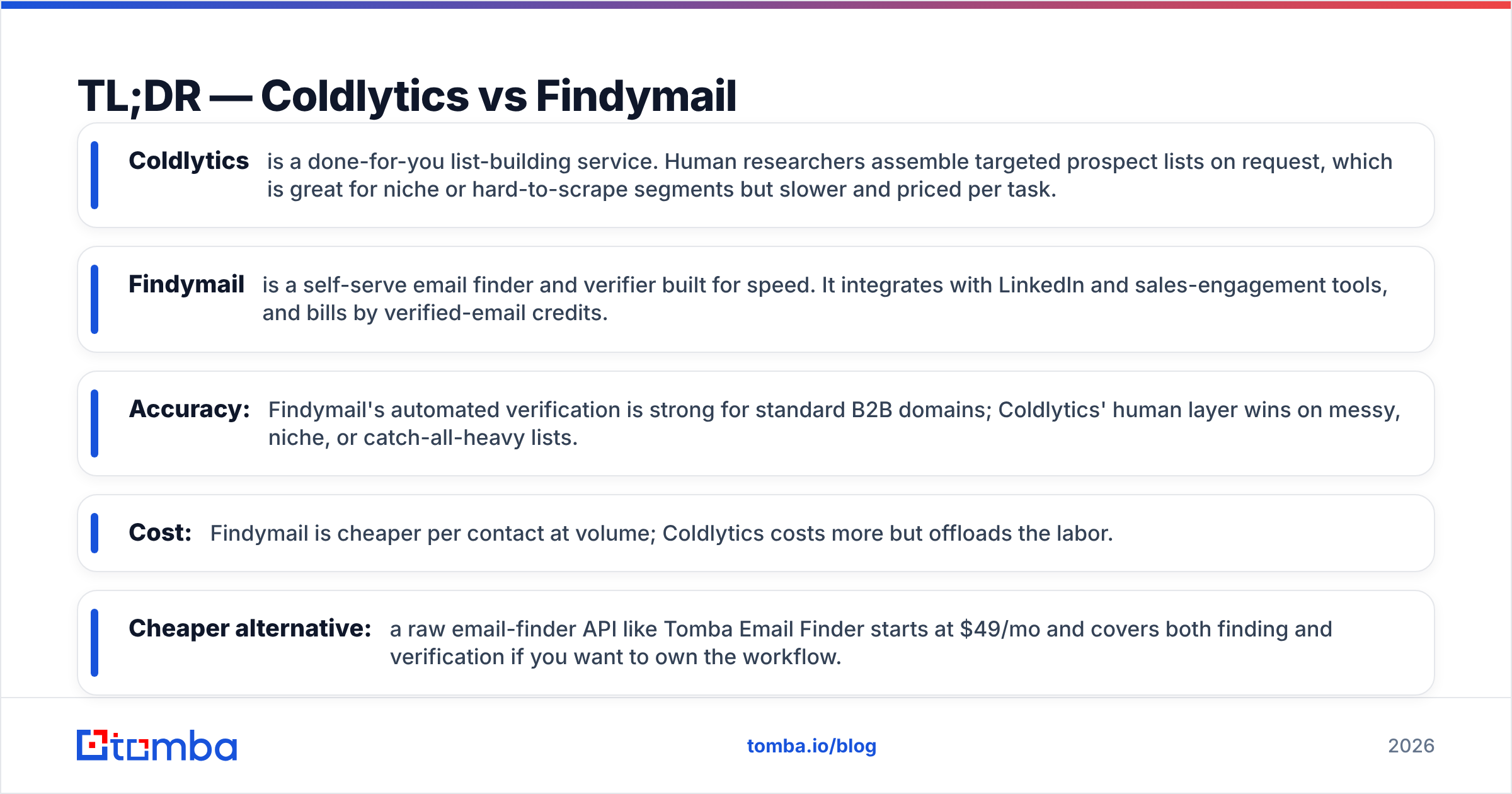
- Coldlytics is a done-for-you list-building service. Human researchers assemble targeted prospect lists on request, which is great for niche or hard-to-scrape segments but slower and priced per task.
- Findymail is a self-serve email finder and verifier built for speed. It integrates with LinkedIn and sales-engagement tools, and bills by verified-email credits.
- Accuracy: Findymail's automated verification is strong for standard B2B domains; Coldlytics' human layer wins on messy, niche, or catch-all-heavy lists.
- Cost: Findymail is cheaper per contact at volume; Coldlytics costs more but offloads the labor.
- Cheaper alternative: a raw email-finder API like Tomba Email Finder starts at $49/mo and covers both finding and verification if you want to own the workflow.
What is Coldlytics?#
Coldlytics is a prospect research and list-building service, not a self-serve database. You submit a request describing your ideal customer — titles, industries, company size, geography — and a team of human researchers builds the list, sourcing contact details and running them through verification before handoff.
Think of it like hiring a research desk on demand instead of buying a self-checkout tool. The upside is obvious for hard targets: local businesses without clean web footprints, non-English markets, or verticals where scraping tools return garbage. A human can read a company page, confirm a role change, and skip the obviously wrong record.
The trade-off is throughput and cost structure. Because a person is doing the work, turnaround is measured in hours or days rather than seconds, and you pay per list or per task rather than per credit. If your ICP is well-covered by databases, you may be paying a premium for a problem you do not have.
Coldlytics also offers a manual verification layer, which is where its human-in-the-loop model earns its keep — messy catch-all email domains that automated tools flag as "unknown" can often be resolved by a researcher.
What is Findymail?#
Findymail is an automated email finder and verifier aimed at sales teams running high-volume outbound. You feed it names, companies, or LinkedIn profiles, and it returns verified professional emails, billing you by the verified credit. Its selling point is a verification engine tuned to keep bounce rates low, which protects sender reputation on cold campaigns.
Findymail leans into the LinkedIn and Sales Navigator workflow, letting you extract lists from searches and push them into sequencing tools. It is self-serve, fast, and priced for scale — the opposite philosophy from Coldlytics. You trade the human judgment for speed and a much lower cost per contact.
Where Findymail can struggle is the same place every automated tool does: catch-all domains, tiny companies with no discoverable pattern, and regions with thin data coverage. Its verification is conservative, so it would rather return nothing than a risky guess — good for deliverability, less good for coverage on hard lists. Findymail is popular enough that it has a dedicated Findymail alternative crowd shopping for more coverage or a better price.
Coldlytics vs Findymail: side-by-side comparison#
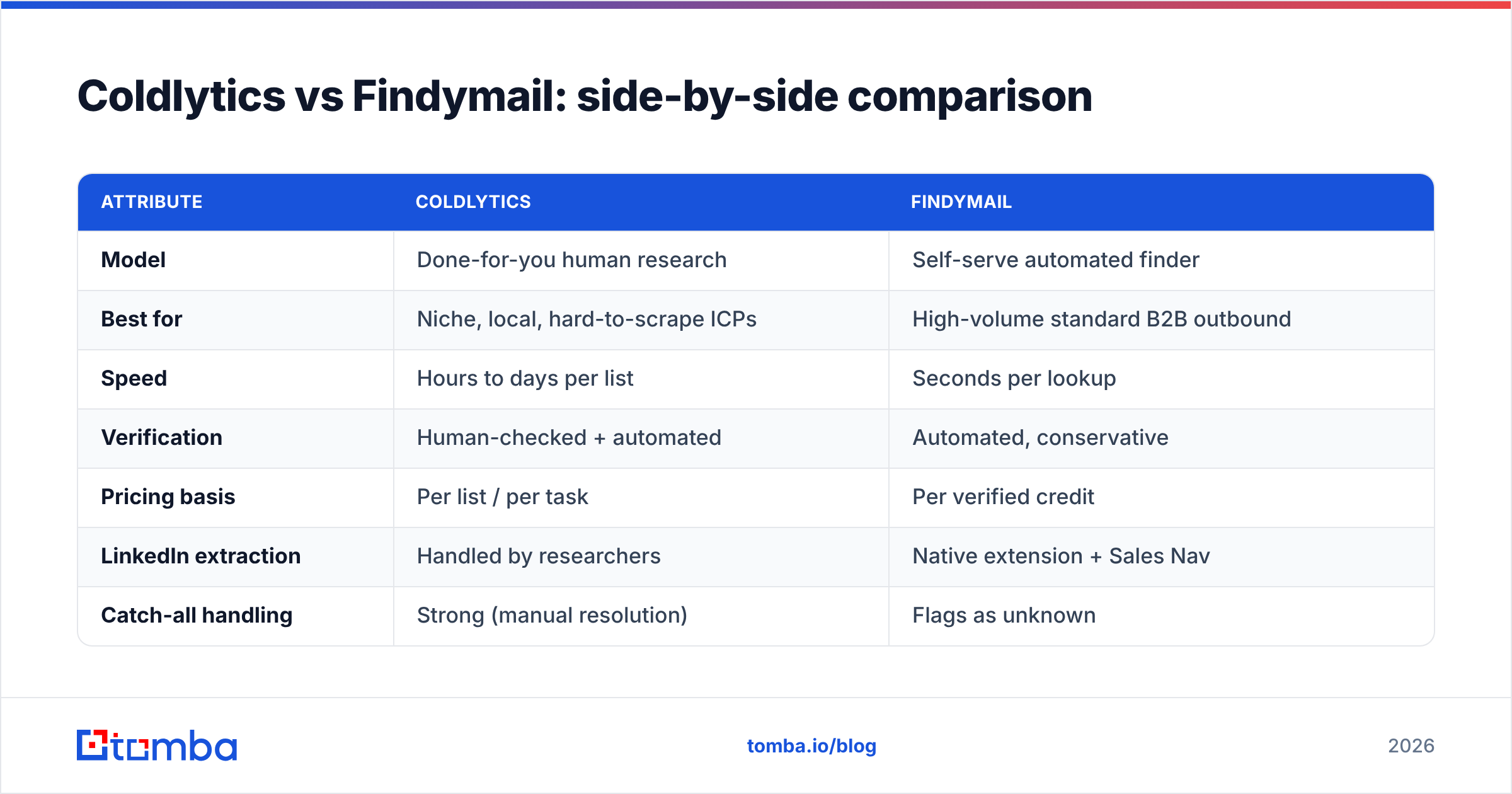
Here is the core breakdown. Prices move, so treat the figures as directional and confirm on each vendor's pricing page before you buy.
| Attribute | Coldlytics | Findymail |
|---|---|---|
| Model | Done-for-you human research | Self-serve automated finder |
| Best for | Niche, local, hard-to-scrape ICPs | High-volume standard B2B outbound |
| Speed | Hours to days per list | Seconds per lookup |
| Verification | Human-checked + automated | Automated, conservative |
| Pricing basis | Per list / per task | Per verified credit |
| LinkedIn extraction | Handled by researchers | Native extension + Sales Nav |
| Catch-all handling | Strong (manual resolution) | Flags as unknown |
| API access | Limited | Yes |
| Learning curve | Minimal (you brief, they build) | Low |
The pattern is clear: Coldlytics sells your time back to you, and Findymail sells scale. Neither is objectively "better" — the right pick depends on whether your bottleneck is labor or budget.

Which is more accurate?#
Accuracy depends entirely on your list. On standard corporate domains — companies with public teams, consistent email patterns, and active LinkedIn presence — Findymail's automated verification is excellent and its low-bounce promise holds. For the bulk of SaaS, agency, and mid-market outbound, that covers most of your list.
On the hard 20% — micro-businesses, non-English markets, catch-all domains, recently-changed roles — Coldlytics' human layer pulls ahead. A researcher can cross-reference sources and confirm a contact that an algorithm would drop or guess. That is the whole reason the service exists.
A useful way to think about it:
- Clean, mainstream ICP: Findymail (or any good automated finder) wins on cost and speed with no meaningful accuracy loss.
- Messy or niche ICP: Coldlytics' manual verification recovers contacts automation misses.
- Mixed list: run automation first, then send only the "unknown" remainder to a human layer — the cheapest path to full coverage.
That third approach is why many teams do not treat this as either/or. They automate the easy 80% and reserve human research for the expensive tail. If you want to run your own verification pass before any of this, an email verifier with catch-all detection handles the automated step cheaply.
Which is cheaper?#
Findymail is cheaper per contact, full stop — automation always beats paying a person per record. If your monthly need is thousands of standard B2B emails, credit-based pricing wins on raw math.
But "cheaper per contact" is not the same as "cheaper overall." Coldlytics bundles the labor you would otherwise pay an SDR or VA to do. If building lists is currently eating 10 hours of someone's week, offloading that can be a net saving even at a higher sticker price. Price the total workflow, not just the data.
There is also a third lane: own the finding and verification yourself with an API and pay wholesale rates. That is where a tool like Tomba changes the equation.
Where does Tomba fit in this comparison?#
Tomba is the build-it-yourself lane. Instead of a research desk (Coldlytics) or a packaged finder (Findymail), you get an email-finder and verification engine you can drive through the app, a Chrome extension, spreadsheets, or the Tomba API. You own the workflow and pay platform pricing instead of per-task or premium credit rates.
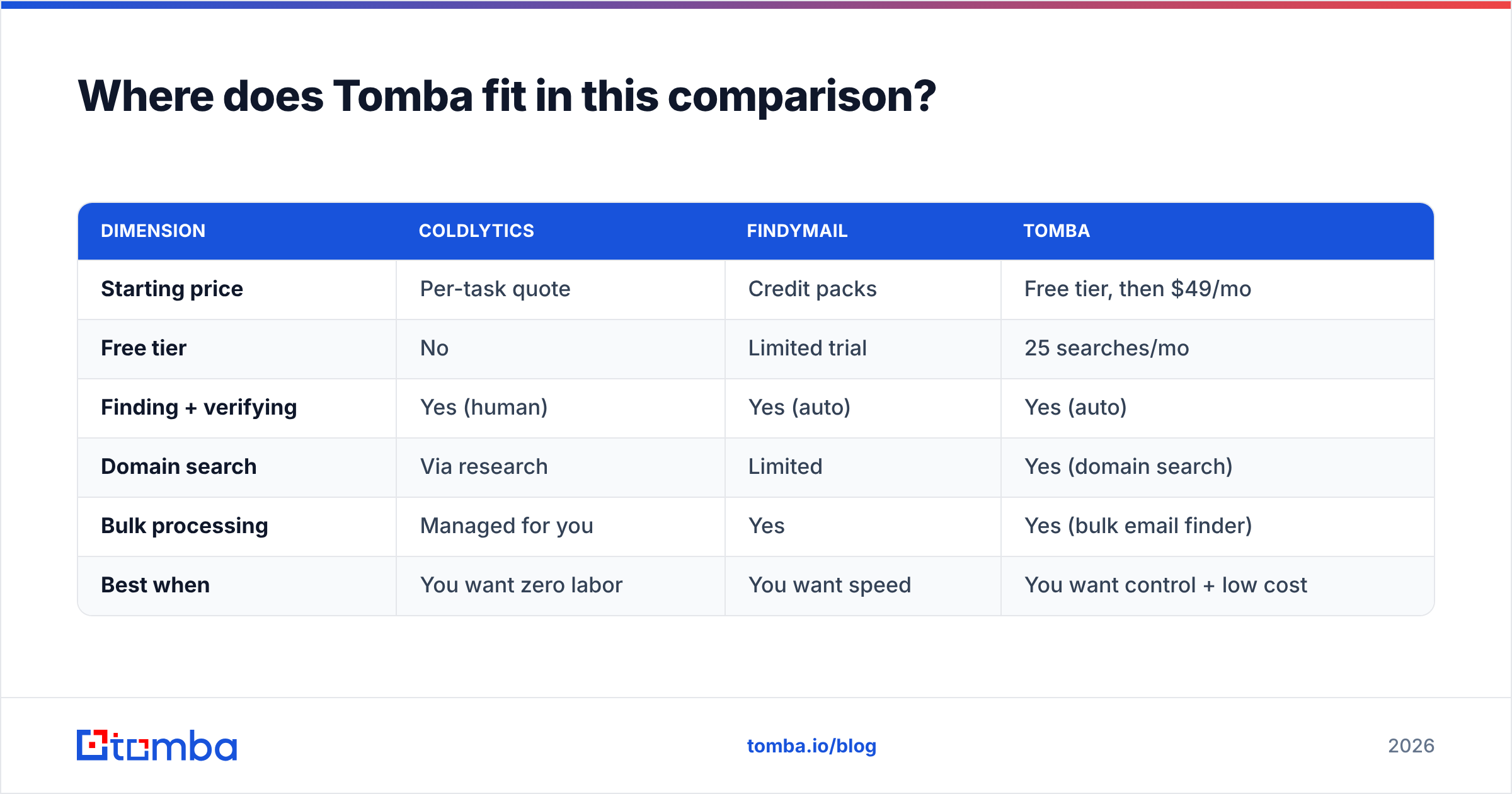
Here is how the three approaches stack up on the dimensions that decide most purchases:
| Dimension | Coldlytics | Findymail | Tomba |
|---|---|---|---|
| Starting price | Per-task quote | Credit packs | Free tier, then $49/mo |
| Free tier | No | Limited trial | 25 searches/mo |
| Finding + verifying | Yes (human) | Yes (auto) | Yes (auto) |
| Domain search | Via research | Limited | Yes (domain search) |
| Bulk processing | Managed for you | Yes | Yes (bulk email finder) |
| Best when | You want zero labor | You want speed | You want control + low cost |
Tomba's pricing runs Free (25 searches/mo), Starter $49/mo, Growth $99/mo, Pro $249/mo, and Enterprise custom. For teams that already have an SDR or ops person who can run lists, that flat cost is usually the lowest total-cost option of the three — you are not paying a per-record premium or a research markup.
Tomba is not a human-research service, so it will not out-resolve Coldlytics on the genuinely messy tail. And it is a broader platform than Findymail's focused finder. The point is that "Coldlytics vs Findymail" is a false binary if your real question is "what is the most cost-effective way to get verified B2B contacts."
Which should you choose?#
Match the tool to your actual bottleneck.
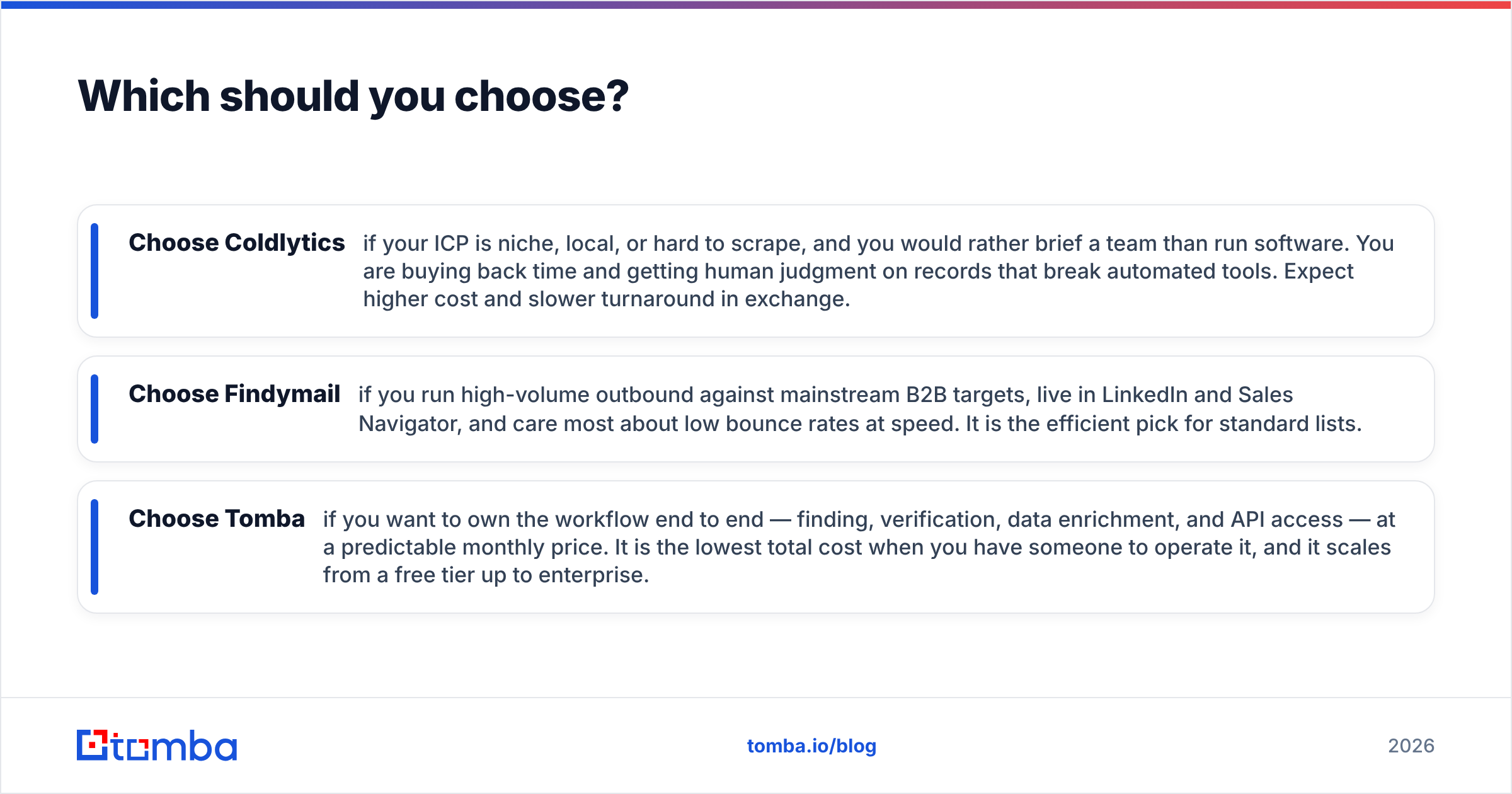
- Choose Coldlytics if your ICP is niche, local, or hard to scrape, and you would rather brief a team than run software. You are buying back time and getting human judgment on records that break automated tools. Expect higher cost and slower turnaround in exchange.
- Choose Findymail if you run high-volume outbound against mainstream B2B targets, live in LinkedIn and Sales Navigator, and care most about low bounce rates at speed. It is the efficient pick for standard lists.
- Choose Tomba if you want to own the workflow end to end — finding, verification, data enrichment, and API access — at a predictable monthly price. It is the lowest total cost when you have someone to operate it, and it scales from a free tier up to enterprise.
For most modern outbound teams, the smartest structure is a hybrid: automate the bulk of your finding and verification with a platform or focused finder, and reserve a human-research service for the expensive tail where automation genuinely fails. That gives you full coverage without paying premium rates on the easy 80% of your list.
For a broader market view, compare user reviews on G2 and Capterra before committing — sentiment on speed, support, and data freshness varies more than the pricing pages suggest.
Frequently asked questions#
Is Findymail better than Coldlytics? Neither is universally better. Findymail wins on speed and cost per contact for standard B2B lists; Coldlytics wins on accuracy for niche, local, or catch-all-heavy targets that automation struggles with.
Can I use both together? Yes, and many teams do. Run an automated finder over your full list first, then send only the unresolved "unknown" contacts to a human-research service. It is the cheapest route to complete coverage.
Is there a cheaper alternative to both? A self-serve email-finder platform like Tomba starts at $49/mo (with a free tier of 25 searches) and handles finding, verification, and enrichment, which lowers total cost if you have someone to run the lists.
The bottom line#
Coldlytics and Findymail sit at opposite ends of the same problem: one buys back your labor with human researchers, the other buys scale with automation. Pick Coldlytics for hard, niche lists where judgment matters; pick Findymail for fast, high-volume outbound against mainstream domains.
If your real goal is verified B2B contacts at the lowest total cost — with finding, verification, and enrichment under one roof — try the Tomba Email Finder. Start on the free tier, run your own lists, and see whether owning the workflow beats paying per task or per premium credit for your ICP. For most teams with an operator on staff, it does.
Related guides#
Ready to find emails that actually work?
Join 150,000+ professionals who stopped guessing and started sending. Free credits on signup — no credit card required.
Get the Tomba newsletter
Practical outbound tactics and product updates — once every two weeks.
About the author