Coldlytics vs GetProspect (2026): Which Prospecting Tool Wins?
Coldlytics sells done-for-you lists built by human researchers; GetProspect is a self-serve email finder with a 100M+ database. Here's how they compare on price, accuracy, and speed — and when a third option beats both.
Choosing between Coldlytics vs GetProspect comes down to one question: do you want a team of researchers to hand-build your prospect list, or do you want a self-serve tool that lets you pull emails on demand? They solve the same problem — getting verified B2B contacts into your outbound — but they sit at opposite ends of the "done-for-you vs do-it-yourself" spectrum.
This guide breaks down pricing, data accuracy, turnaround time, and the use cases each one actually fits. If you run outbound at any real volume, the distinction matters more than the marketing pages suggest.
TL;DR: Coldlytics vs GetProspect at a glance#
- Coldlytics is a done-for-you prospecting service. You submit a request, human researchers build a custom list, and you get verified contacts back — usually within a day or two. Best when you value hands-off precision over speed.
- GetProspect is a self-serve email finder and LinkedIn extractor backed by a large B2B database. You search, filter, and export on your own. Best when you want volume and control at software prices.
- Pricing splits them cleanly: Coldlytics charges per list/credit for research labor; GetProspect runs a monthly SaaS subscription with a free tier.
- Accuracy is strong on both, but they get there differently: Coldlytics relies on manual verification, GetProspect on automated database matching plus real-time verification.
- If you want database scale and API-grade accuracy without the SaaS ceiling, a self-serve finder like Tomba Email Finder is the third option most teams should price out before committing.
What is Coldlytics?#
Coldlytics is a managed, human-powered prospecting service. Instead of giving you a tool, it gives you an outcome: you describe your ideal customer profile, targeting rules, and the data points you need, and a research team compiles a bespoke list of verified prospects.
The pitch is precision. Because a person (not just an algorithm) is building the list, Coldlytics can handle niche criteria that filters alone struggle with — "operations managers at logistics firms that recently opened a second warehouse," for example. That kind of nuance is where automated databases tend to return noise.
The trade-off is that you're buying labor. You submit a task, wait for the turnaround, and pay per list or per credit rather than a flat monthly fee. It's closer to hiring a research VA than logging into software. You can see their model on the official Coldlytics site.

What is GetProspect?#
GetProspect is a self-serve email finder built around a large B2B contact database (100M+ contacts, by its own numbers) plus a LinkedIn email extraction workflow. You search by company, role, industry, or location, apply filters, and export verified emails directly — no waiting on a research team.
It leans into the do-it-yourself model. A Chrome extension pulls emails while you browse LinkedIn, bulk search lets you process lists, and the built-in verifier checks deliverability before you export. For teams that already know their targeting and want to move fast, that self-serve loop is the appeal. You can review its feature set on getprospect.com or read verified reviews on G2.
The trade-off is the mirror image of Coldlytics: you own the workflow, so you own the quality control. If your filters are sloppy or your ICP is fuzzy, the tool will happily export a fuzzy list.
Coldlytics vs GetProspect: the core comparison#
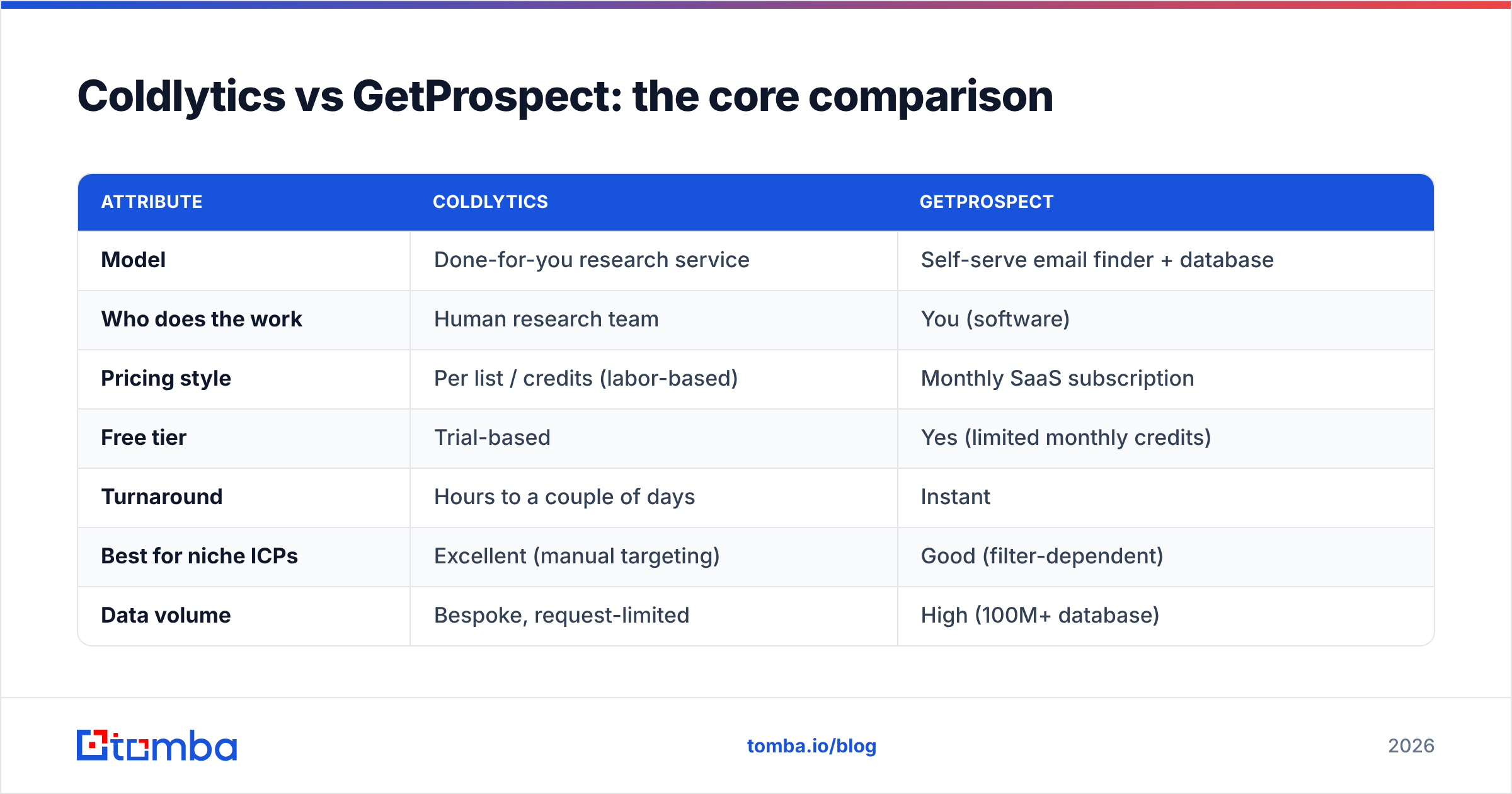
Here's the head-to-head on the attributes that actually change your decision.
| Attribute | Coldlytics | GetProspect |
|---|---|---|
| Model | Done-for-you research service | Self-serve email finder + database |
| Who does the work | Human research team | You (software) |
| Pricing style | Per list / credits (labor-based) | Monthly SaaS subscription |
| Free tier | Trial-based | Yes (limited monthly credits) |
| Turnaround | Hours to a couple of days | Instant |
| Best for niche ICPs | Excellent (manual targeting) | Good (filter-dependent) |
| Data volume | Bespoke, request-limited | High (100M+ database) |
| LinkedIn extraction | Handled by researchers | Chrome extension, self-serve |
| Built-in verification | Manual + automated | Automated verifier |
| API access | Limited | Available on paid plans |
The pattern is clear: Coldlytics optimizes for precision and offloading effort, GetProspect optimizes for speed, volume, and cost control. Neither is strictly "better" — they're built for different buyers.
Is Coldlytics or GetProspect more accurate?#
Both land in the same accuracy neighborhood, but they arrive by different roads — and the road matters for edge cases.

Coldlytics wins on messy, judgment-heavy targeting. A human can read a company's site, cross-check a role on LinkedIn, and confirm the person still works there. That manual step catches things automation misses — recent job changes, ambiguous titles, holding-company vs operating-company confusion. For low-volume, high-value accounts (ABM, enterprise), that hands-on verification is genuinely worth paying for.
GetProspect wins on consistency at volume. Its automated verifier runs the same deliverability checks on every contact, so you get predictable quality across thousands of rows. The risk is stale data on long-tail roles — if the database record is old, no filter will tell you the person left six months ago.
A practical rule: if your list is 50 must-win accounts, manual research pays off. If your list is 5,000 mid-market prospects, a self-serve finder plus a strong email verifier step is faster and cheaper per validated contact. The bottleneck isn't finding emails — it's verifying them before you send.
How does pricing compare?#
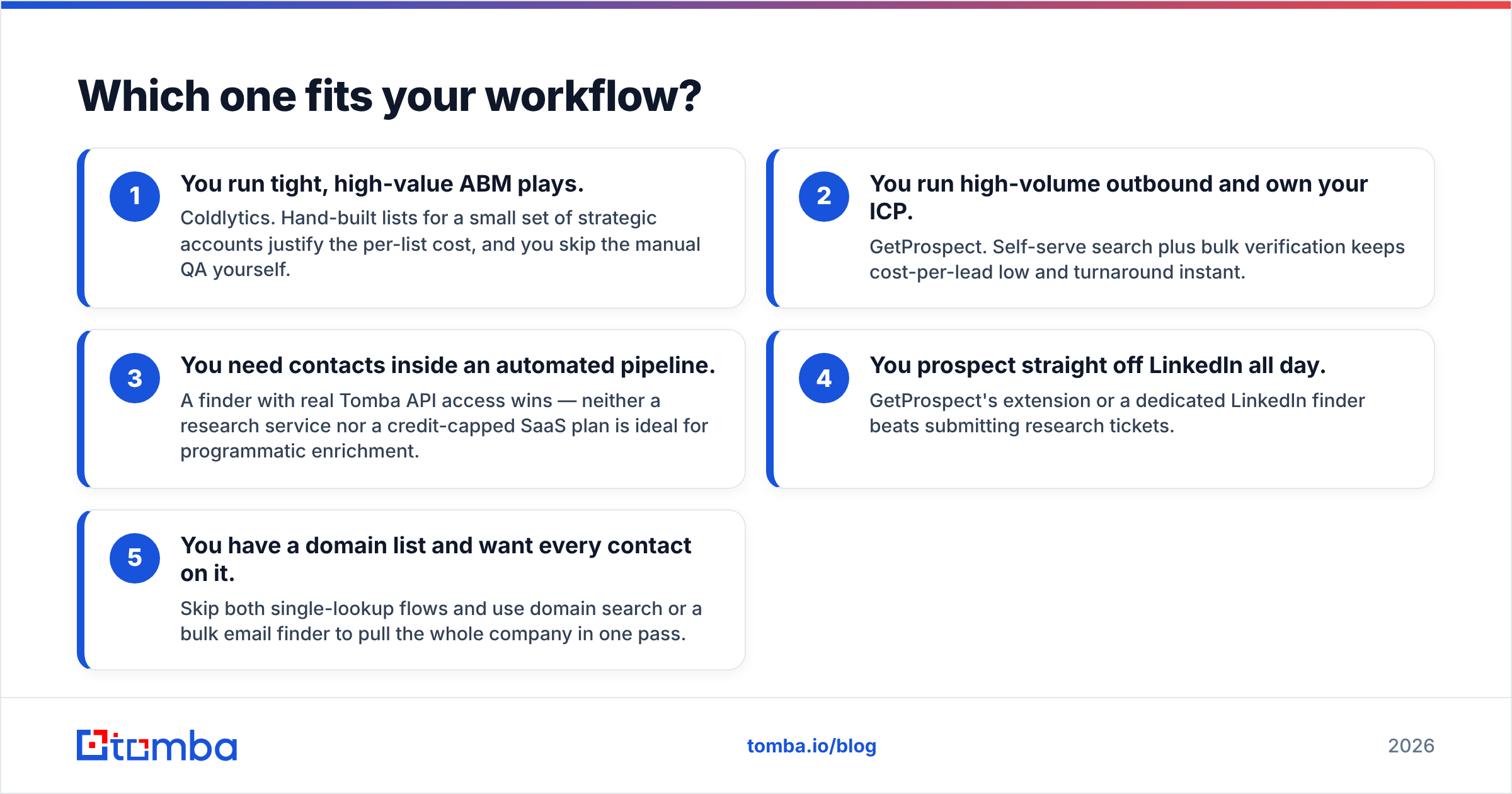
This is where the two models feel most different, and where budget owners should look hardest.
| Plan dimension | Coldlytics | GetProspect | Tomba (reference) |
|---|---|---|---|
| Entry point | Credit/list packages | Free tier (limited credits) | Free tier (25 searches/mo) |
| Paid starting tier | Per-research pricing | Monthly subscription | $49/mo (Starter) |
| Scales by | Number of lists / credits | Contacts + verifications | Searches + verifications |
| Cost driver | Human labor | Database access | Database + API access |
| Best value when | Volume is low, targeting is complex | Volume is steady and self-managed | You want API + volume together |
Coldlytics pricing is labor-priced, so cost-per-contact rises with complexity and volume — great for a curated 200-lead campaign, expensive for a 10,000-lead quarter. GetProspect's subscription flattens that curve for high volume but caps your monthly credits, and overages add up. For a full breakdown of a self-serve pricing model built for scale, compare against Tomba pricing before you sign an annual contract with anyone.

Which one fits your workflow?#
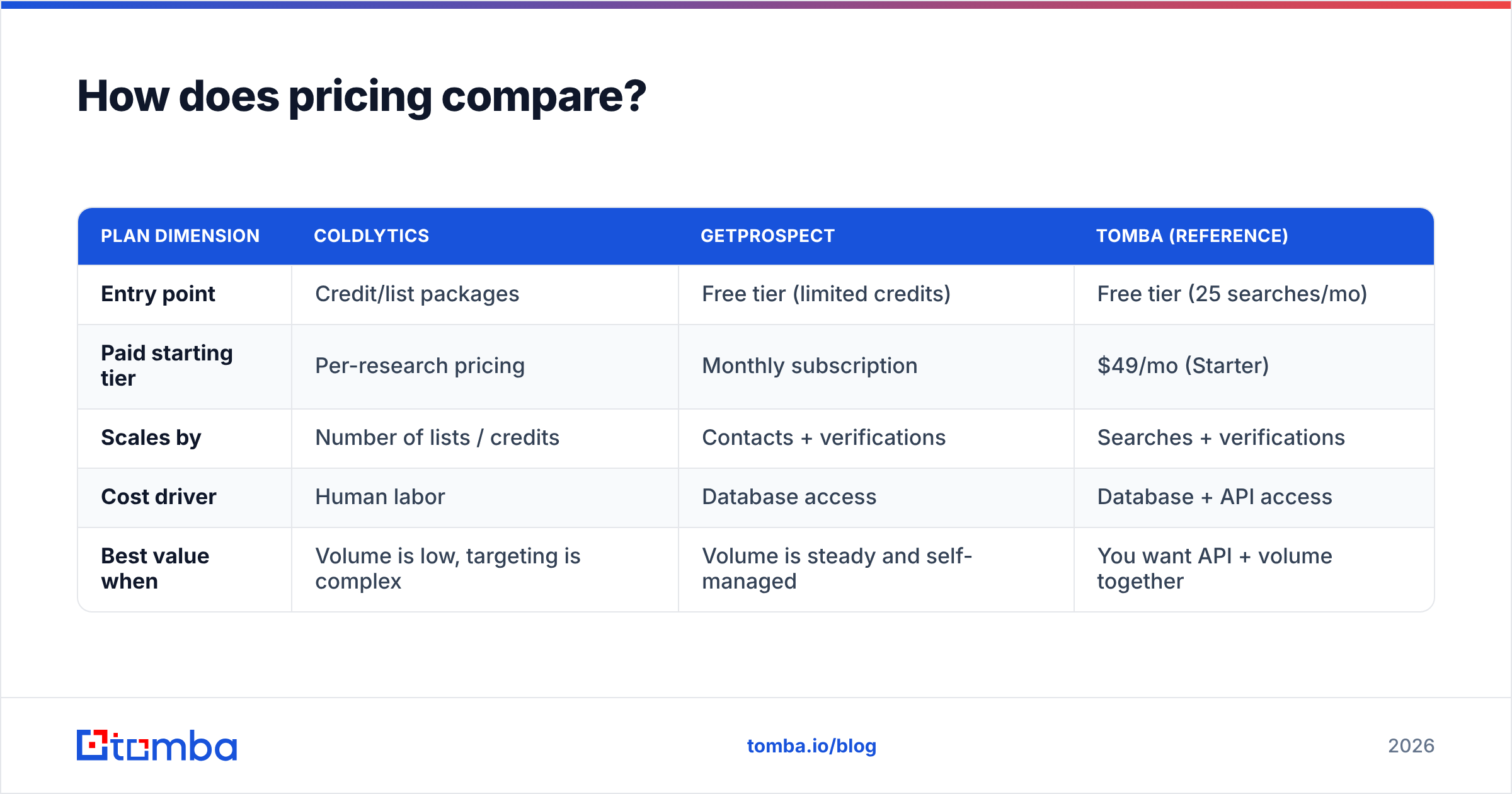
Match the tool to how your team actually operates, not to the feature list.
- You run tight, high-value ABM plays. Coldlytics. Hand-built lists for a small set of strategic accounts justify the per-list cost, and you skip the manual QA yourself.
- You run high-volume outbound and own your ICP. GetProspect. Self-serve search plus bulk verification keeps cost-per-lead low and turnaround instant.
- You need contacts inside an automated pipeline. A finder with real Tomba API access wins — neither a research service nor a credit-capped SaaS plan is ideal for programmatic enrichment.
- You prospect straight off LinkedIn all day. GetProspect's extension or a dedicated LinkedIn finder beats submitting research tickets.
- You have a domain list and want every contact on it. Skip both single-lookup flows and use domain search or a bulk email finder to pull the whole company in one pass.
Most teams don't fit cleanly into one box. A common setup: use a self-serve finder for the bulk of the pipeline, and reserve a done-for-you service for the handful of accounts where a wrong contact costs you a six-figure deal.
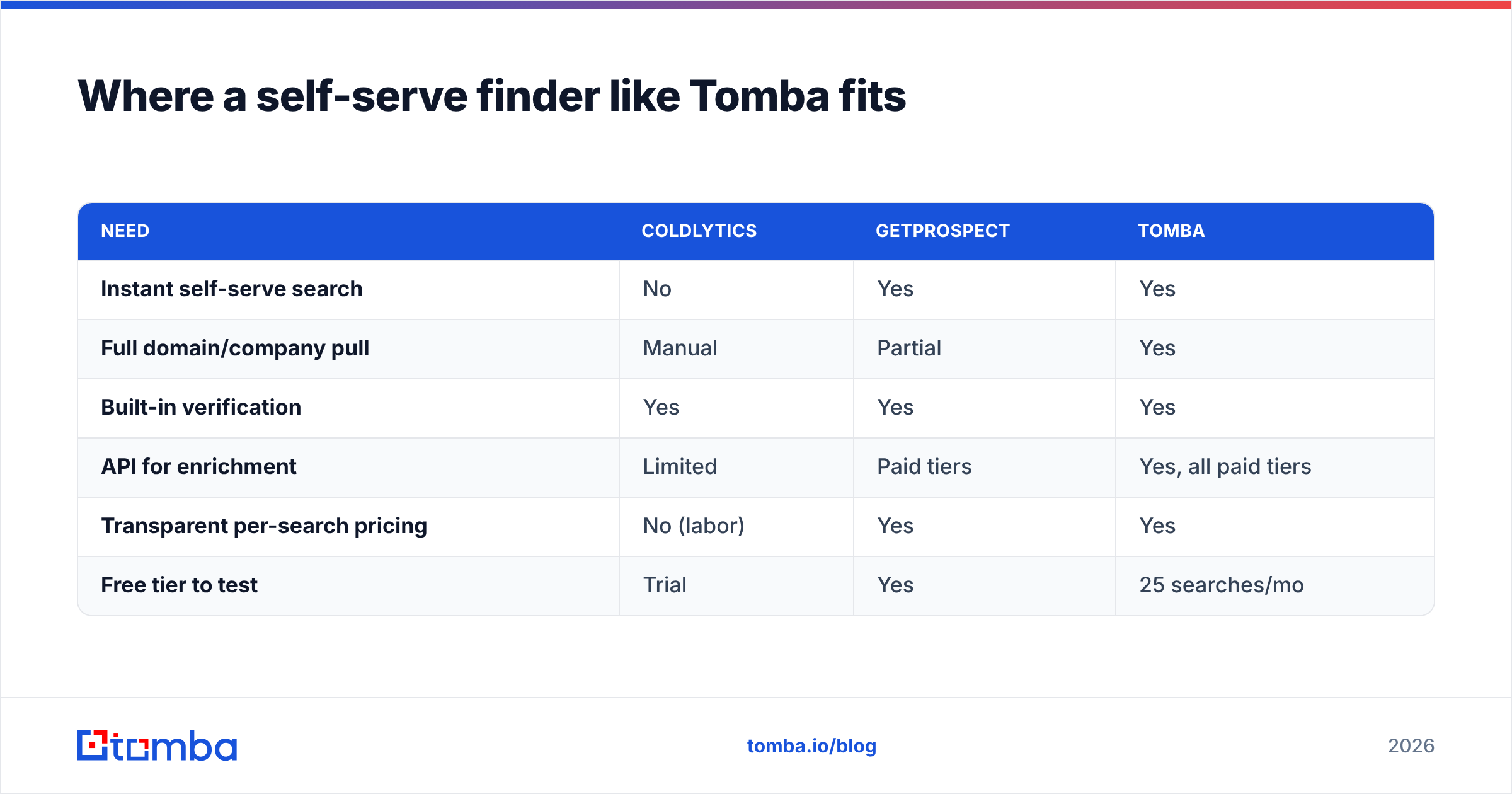
Where a self-serve finder like Tomba fits#
If the Coldlytics vs GetProspect decision feels like a compromise, that's usually a sign you're missing a third option. The gap Coldlytics fills (precision) and the gap GetProspect fills (volume + control) aren't mutually exclusive — the right self-serve finder covers both without the SaaS credit ceiling or the per-list labor bill.

Here's the honest positioning:
| Need | Coldlytics | GetProspect | Tomba |
|---|---|---|---|
| Instant self-serve search | No | Yes | Yes |
| Full domain/company pull | Manual | Partial | Yes |
| Built-in verification | Yes | Yes | Yes |
| API for enrichment | Limited | Paid tiers | Yes, all paid tiers |
| Transparent per-search pricing | No (labor) | Yes | Yes |
| Free tier to test | Trial | Yes | 25 searches/mo |
Tomba's finder is designed for teams that want database scale and verification and an API in one place — with public Tomba plans starting at $49/mo rather than opaque research quotes. You still verify before you send (always verify), but you're not choosing between "fast but shallow" and "precise but slow."
Common questions#
Is Coldlytics better than GetProspect for cold email? For deliverability, the tool matters less than your verification and sending hygiene. Coldlytics gives you cleaner lists out of the box; GetProspect gives you more lists faster. Either works for cold email if you verify aggressively and warm your domain first.
Can I use both? Yes, and plenty of teams do — GetProspect (or another self-serve finder) for pipeline volume, Coldlytics for strategic accounts that need a human touch. The two models complement each other more than they compete.
What about data freshness? This is the real risk with any database tool. Records go stale as people change jobs. Manual services re-check at build time; self-serve tools depend on database refresh cadence. Whichever you pick, run a verification pass on every export — a job change you didn't catch is a bounce you didn't need.
The verdict#
Pick Coldlytics if your outbound is precision-first, your account list is short, and you'd rather pay for research than run it yourself. Pick GetProspect if you want instant, self-serve volume at predictable SaaS pricing and you're confident in your own targeting.
But before you commit to either, price out a self-serve finder that gives you database scale, built-in verification, and full API access on a transparent plan. Tomba Email Finder covers the middle ground both tools leave open — search by domain, name, or company, verify in the same workflow, and export or push straight into your stack via API. Start on the free tier, run your real ICP through it, and let the results — not the sales page — make the call.
Related guides#
Ready to find emails that actually work?
Join 150,000+ professionals who stopped guessing and started sending. Free credits on signup — no credit card required.
Get the Tomba newsletter
Practical outbound tactics and product updates — once every two weeks.
About the author