Coldlytics vs LimeLeads: Which B2B Lead Tool Wins in 2026?
Coldlytics does manual lead research on demand; LimeLeads sells a self-serve B2B database. We compare pricing, data freshness, and accuracy to help you pick — and show where a dedicated email finder beats both.
Choosing between Coldlytics and LimeLeads comes down to one question: do you want someone to build a lead list for you, or do you want to pull one yourself? They solve the same problem — filling your pipeline with contactable B2B prospects — but from opposite ends of the workflow. This guide breaks down how each one works, what it costs, how fresh and accurate the data is, and when a dedicated email-finding tool beats both.
TL;DR#
- Coldlytics is a done-for-you lead research service. You describe your ideal customer, a human-plus-automation team builds a custom list, and you get verified contacts on a turnaround. Best when your targeting is niche and you value hands-off precision.
- LimeLeads is a self-serve B2B contact database. You filter by industry, title, location, and company size, then export records instantly. Best when you want speed and volume at a predictable seat price.
- Pricing models differ sharply: Coldlytics charges per research task/credits; LimeLeads sells monthly export tiers. Cost-per-lead can swing wildly depending on volume.
- Data freshness is the real differentiator. On-demand research (Coldlytics) is built the day you order it; a static database (LimeLeads) is only as fresh as its last refresh.
- Neither is a true email finder. If your bottleneck is verifying or appending emails at scale via API, a purpose-built tool like Tomba Email Finder fills that gap more cheaply.
What is Coldlytics?#
Coldlytics is a managed lead-generation service — think of it as hiring a research assistant who never sleeps. Instead of giving you access to a database, you submit a brief describing your target audience (for example, "operations directors at US logistics companies with 50–200 employees"), and their team assembles a bespoke list using a mix of human researchers and automated enrichment. Every contact is checked before it lands in your inbox.
The mental model is a restaurant with no menu: you tell the chef exactly what you want, and they cook it fresh. That's powerful when your ideal customer profile is unusual or when off-the-shelf databases return junk for your niche. The trade-off is turnaround time — you wait for the list to be built rather than downloading it instantly.
Coldlytics leans heavily on custom targeting, so it shines for agencies and outbound teams running highly specific campaigns where a generic export would waste half the credits on bad-fit prospects.
What is LimeLeads?#
LimeLeads is a self-serve B2B contact database. You log in, apply filters (industry, job title, seniority, location, revenue, headcount, technology), preview matching records, and export the ones you want to CSV or straight into your CRM. It's the vending-machine model: the inventory already exists, and you grab what you need on the spot.
LimeLeads emphasizes transparency — you see a live count of matching records before you spend an export, and pricing scales by how many records you pull per month. For teams that already know their filters and want to move fast, that immediacy is the whole appeal. There's no waiting on a research team; the list is a few clicks away.
The catch with any static database is coverage and decay. Job titles change, people leave companies, and domains get retired. A database is a snapshot, and snapshots age.
Coldlytics vs LimeLeads: side-by-side comparison#
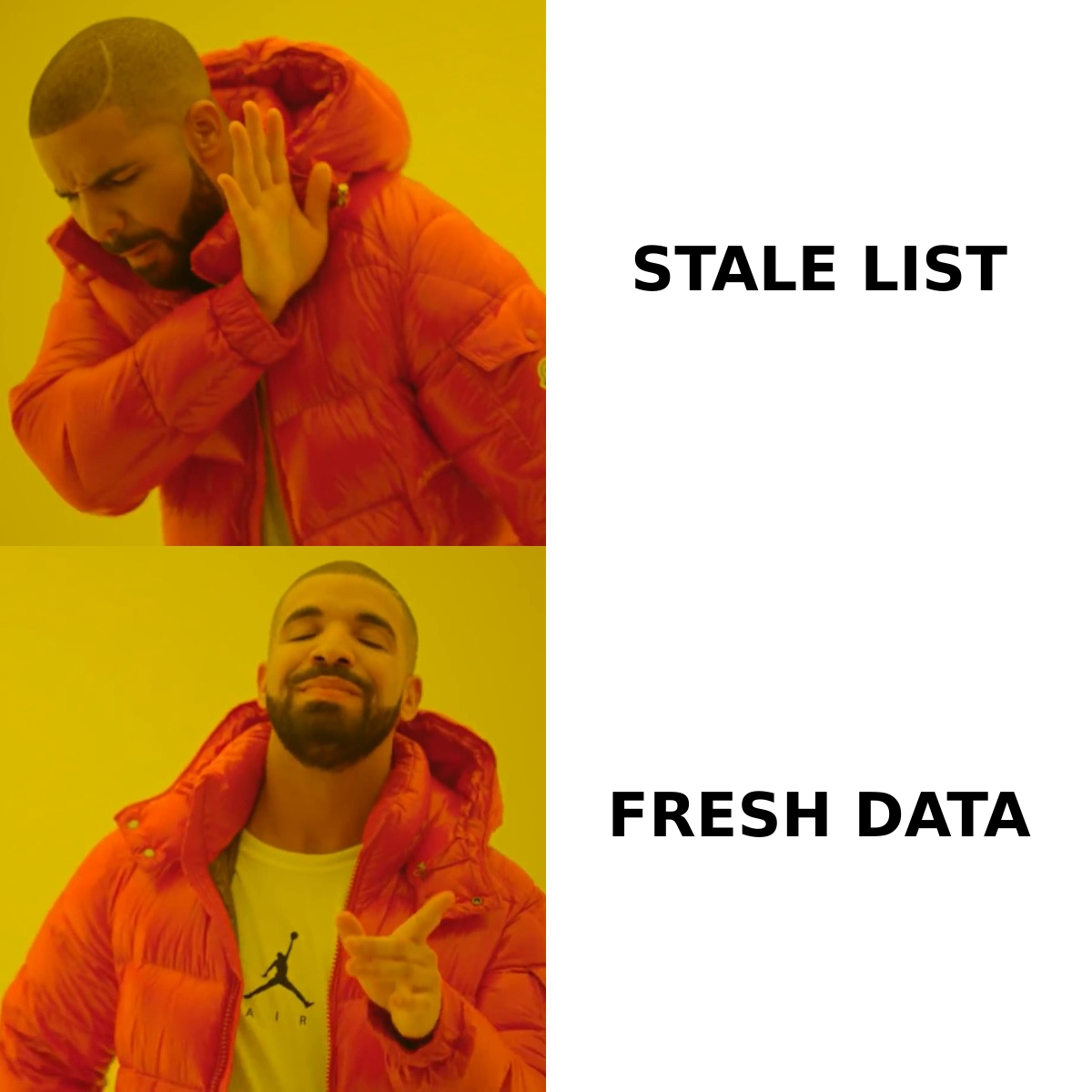
Here's how the two stack up across the attributes that actually affect your cost-per-meeting.
| Attribute | Coldlytics | LimeLeads |
|---|---|---|
| Model | Done-for-you research | Self-serve database |
| Data freshness | Built on-demand per order | Snapshot, refreshed periodically |
| Turnaround | Hours to days | Instant export |
| Targeting | Fully custom brief | Filter-based |
| Verification | Human + automated per list | Database-level, not per-order |
| Pricing basis | Per task / credits | Monthly export tiers |
| Best for | Niche, high-intent lists | Volume + speed |
| API / bulk | Limited | Export-focused |
The pattern is clear: Coldlytics trades speed for precision and freshness, while LimeLeads trades bespoke targeting for instant volume. Neither is "better" in the abstract — it depends on whether your constraint is time or fit.
Which has more accurate data?#
Coldlytics generally wins on accuracy for niche lists, because the data is built and verified the moment you order it. Freshness is the single biggest driver of accuracy in B2B data — a contact verified today is far more likely to be reachable than one that's been sitting in a database for six months. When a human researcher confirms each record against a live source, bounce rates drop.
LimeLeads isn't inaccurate, but it inherits the fundamental limitation of every static database: decay. Studies across the industry consistently show B2B contact data degrades at roughly 22–30% per year as people change jobs. A record that was perfect at the last refresh may be stale by the time you export it. LimeLeads mitigates this with its preview counts and periodic refreshes, but you're still pulling from a stored snapshot.
If accuracy is mission-critical and you're sending high-value outbound, the smart move regardless of source is to run every list through an email verifier before you hit send. Verification catches the invalid and risky addresses that erode your sender reputation and drag down email deliverability. Treat any purchased or researched list as a starting point, not gospel.
How does pricing compare?#
Pricing is where the two diverge most, and where a naive comparison misleads you.
Coldlytics charges around a research task/credit model — you're paying for the labor of building and verifying a custom list. That makes cost-per-lead higher on paper, but every lead is targeted and fresh, so your effective cost-per-qualified-lead can be lower for niche campaigns where a generic export would be mostly waste.
LimeLeads charges monthly tiers based on export volume. If you pull thousands of records a month across broad filters, the per-record cost is low. But if half those records are stale or off-target, your real cost-per-meeting climbs.
Here's a simplified way to think about it:
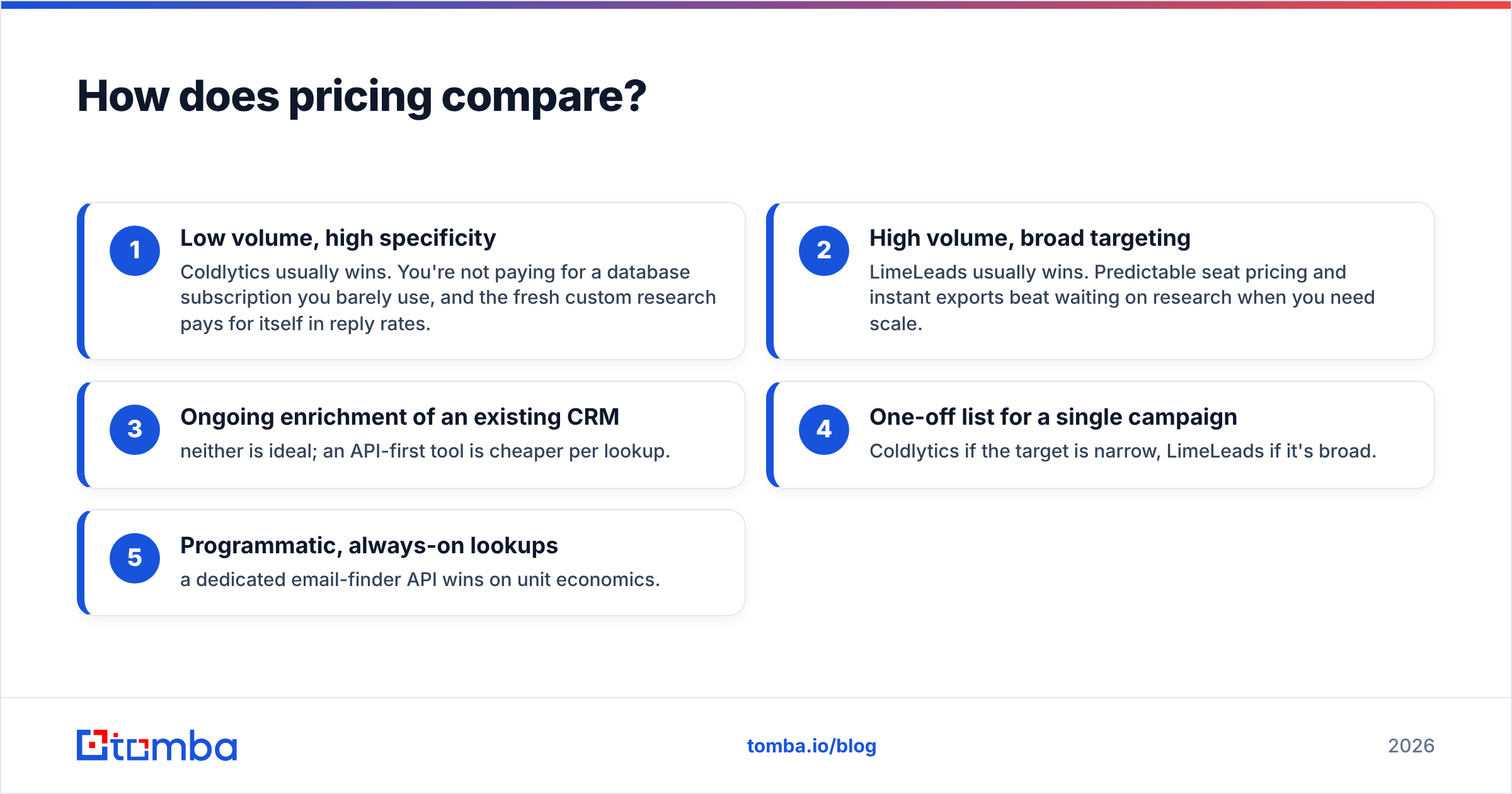
- Low volume, high specificity — Coldlytics usually wins. You're not paying for a database subscription you barely use, and the fresh custom research pays for itself in reply rates.
- High volume, broad targeting — LimeLeads usually wins. Predictable seat pricing and instant exports beat waiting on research when you need scale.
- Ongoing enrichment of an existing CRM — neither is ideal; an API-first tool is cheaper per lookup.
- One-off list for a single campaign — Coldlytics if the target is narrow, LimeLeads if it's broad.
- Programmatic, always-on lookups — a dedicated email-finder API wins on unit economics.
Always model cost-per-qualified-lead, not cost-per-record. A cheap record you can't reach costs more than an expensive one you can.
Where do both tools fall short?#
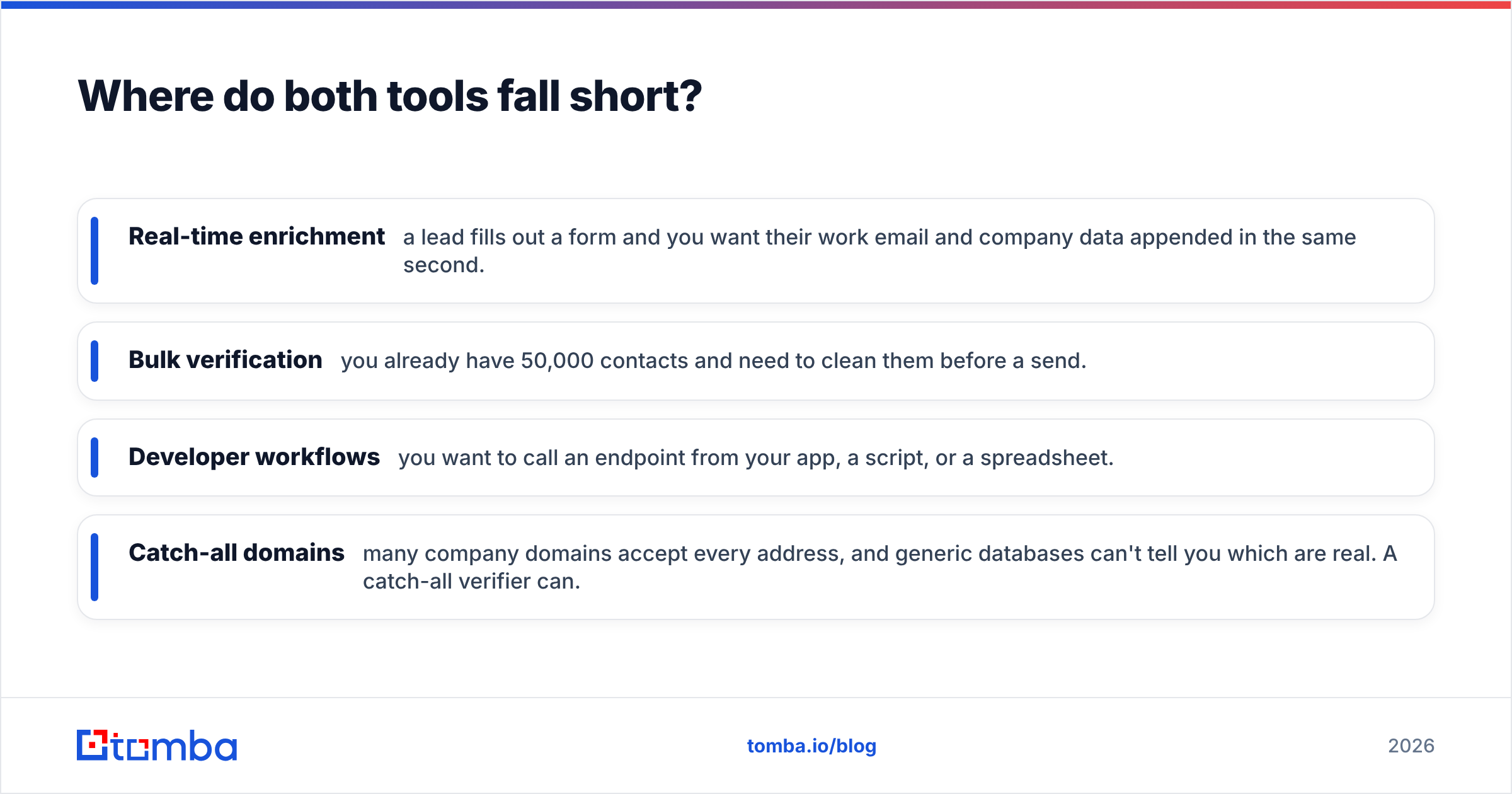
Both Coldlytics and LimeLeads are built to hand you a list. Neither is designed to sit inside your product or workflow and resolve emails on demand. If your bottleneck is any of the following, you've outgrown the list-buying model:
- Real-time enrichment — a lead fills out a form and you want their work email and company data appended in the same second.
- Bulk verification — you already have 50,000 contacts and need to clean them before a send.
- Developer workflows — you want to call an endpoint from your app, a script, or a spreadsheet.
- Catch-all domains — many company domains accept every address, and generic databases can't tell you which are real. A catch-all verifier can.
This is exactly the gap purpose-built email tools fill. With a domain search, you pull every known address at a target company instantly; with an email finder API, you wire the same capability into your own stack. You're no longer buying static lists — you're generating fresh, verified contacts programmatically whenever you need them.

How does Tomba compare to Coldlytics and LimeLeads?#
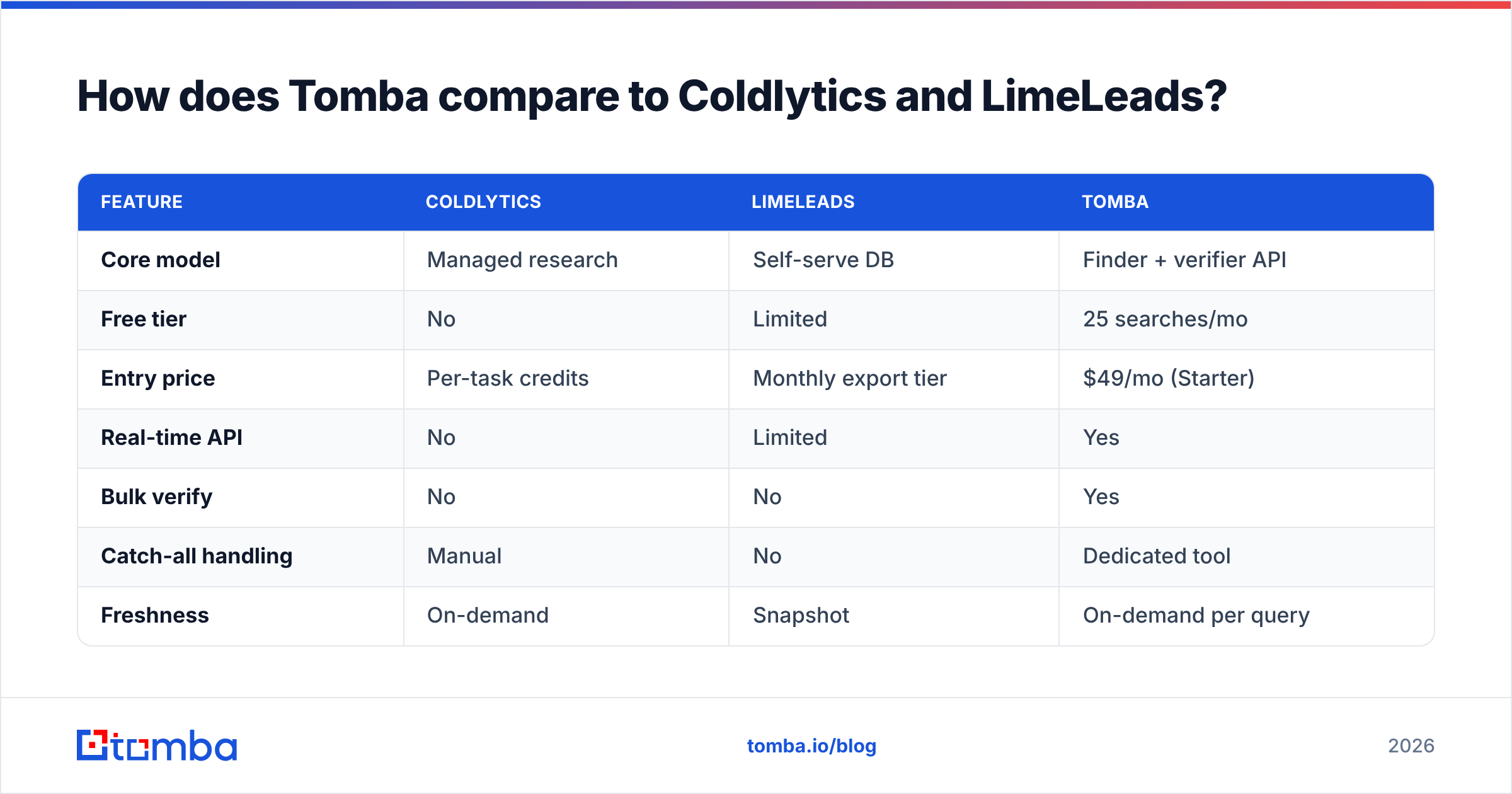
Tomba isn't a like-for-like replacement for either — it's the layer underneath both. Where Coldlytics sells you research labor and LimeLeads sells you database access, Tomba gives you the finding-and-verifying engine directly, priced per lookup rather than per list or per seat.
| Feature | Coldlytics | LimeLeads | Tomba |
|---|---|---|---|
| Core model | Managed research | Self-serve DB | Finder + verifier API |
| Free tier | No | Limited | 25 searches/mo |
| Entry price | Per-task credits | Monthly export tier | $49/mo (Starter) |
| Real-time API | No | Limited | Yes |
| Bulk verify | No | No | Yes |
| Catch-all handling | Manual | No | Dedicated tool |
| Freshness | On-demand | Snapshot | On-demand per query |
Tomba's pricing runs a free tier at 25 searches/month, Starter at $49/mo, Growth at $99/mo, and Pro at $249/mo, with Enterprise custom. Because you pay per lookup, the cost scales with actual usage instead of a flat database fee — which is why teams doing programmatic enrichment or ongoing verification tend to land here rather than on a list subscription.
That said, Tomba doesn't do the human research briefs Coldlytics does. If you genuinely want a person to interpret a fuzzy targeting brief and hand-build a niche list, Coldlytics is the better fit for that specific job. And if you want to browse-and-export from a ready-made database with no setup, LimeLeads does that well. The right answer depends on whether your problem is research, browsing, or resolving contacts at scale.
Which one should you choose?#
Match the tool to your actual constraint:
- Choose Coldlytics if your targeting is niche, your list volume is modest, and you'd rather pay for freshness and precision than manage the research yourself. Agencies and specialist outbound teams get the most value here.
- Choose LimeLeads if you want instant, self-serve access to a broad B2B database and predictable monthly pricing, and your filters are standard (common industries, titles, geographies).
- Choose an email-finder tool like Tomba if your bottleneck is verifying, appending, or finding emails programmatically — via API, bulk lead generation, a Chrome extension, or Google Sheets — rather than buying a finished list. Many teams pair one of the two list tools with Tomba: source with one, verify and enrich with the other.
There's no shame in using more than one. A common, effective stack is to pull a broad list from a database, then run it through a verifier so you're only paying to email people who actually exist.
Frequently asked questions#
Is Coldlytics better than LimeLeads? For niche, high-intent lists where freshness matters, Coldlytics tends to win because each list is built and verified on demand. For broad, high-volume self-serve exports at a predictable price, LimeLeads wins. It's a workflow choice, not a quality ranking.
Are LimeLeads emails accurate? They're reasonable at the point of a database refresh, but any static B2B database decays over time as people change jobs. Always verify before sending — running exports through an email verifier catches stale and invalid addresses.
Do Coldlytics or LimeLeads offer an API? Both are export/list oriented rather than API-first. If you need real-time programmatic lookups or enrichment inside your own app, a dedicated email finder API is a better architectural fit.
What's the cheapest way to generate verified B2B emails? For always-on, per-lookup usage, an API-priced tool is usually cheapest because you only pay for what you resolve. Tomba's free tier (25 searches/month) lets you test coverage before committing.
The bottom line#
Coldlytics vs LimeLeads isn't a fight over who has "better data" — it's a choice between a done-for-you research model and a self-serve database. Pick Coldlytics for niche, freshly-built lists; pick LimeLeads for fast, broad exports. But if your real problem is finding and verifying professional emails at scale — inside your CRM, your app, or a spreadsheet — a list vendor is the wrong tool entirely.
That's where Tomba Email Finder fits: find email addresses by domain, name, or company, verify them in bulk, and wire it all into your workflow via API — starting free with 25 searches a month, no static list to let go stale. Source your leads however you like, then let Tomba make sure they're real before you ever hit send.
Related guides#
Ready to find emails that actually work?
Join 150,000+ professionals who stopped guessing and started sending. Free credits on signup — no credit card required.
Get the Tomba newsletter
Practical outbound tactics and product updates — once every two weeks.
About the author