How to Find Company Contact Information: A 2026 Guide
Company contact information is easy to collect and hard to trust. Here are the real sources, the tools that beat manual research, and the verification steps that keep your outreach out of spam in 2026.
Company contact information sounds like the easiest thing in the world to get. It is on the website, in a footer, on a LinkedIn page, in a press release. And yet most sales and marketing teams still waste hours chasing the wrong email, dialing a disconnected number, or emailing a general inbox that no human reads. The problem is not scarcity. It is accuracy, freshness, and matching the right person to the right channel.
This guide breaks down where company contact information actually lives, how to collect it at scale without drowning in bad records, and how to verify it before it torches your sender reputation.
TL;DR#
- Company contact information is more than an email address — it spans role-based emails, direct personal emails, phone numbers, headquarters and branch addresses, and social profiles.
- Free public sources get you started but decay fast — websites, WHOIS, and LinkedIn are useful, but job changes make roughly 30% of B2B contact data go stale every year.
- Automated finders beat manual research once you need more than a handful of contacts — a good tool searches by domain, name, or company and returns a confidence score.
- Verification is non-negotiable. Sending to unverified addresses drives bounces, spam complaints, and blacklisting.
- A repeatable stack — find, enrich, verify, sync to CRM — turns scattered data into a pipeline you can trust.
What counts as company contact information?#
Company contact information is the full set of data points you need to reach an organization and the specific people inside it. Treating it as "just an email" is why so many outreach campaigns underperform.
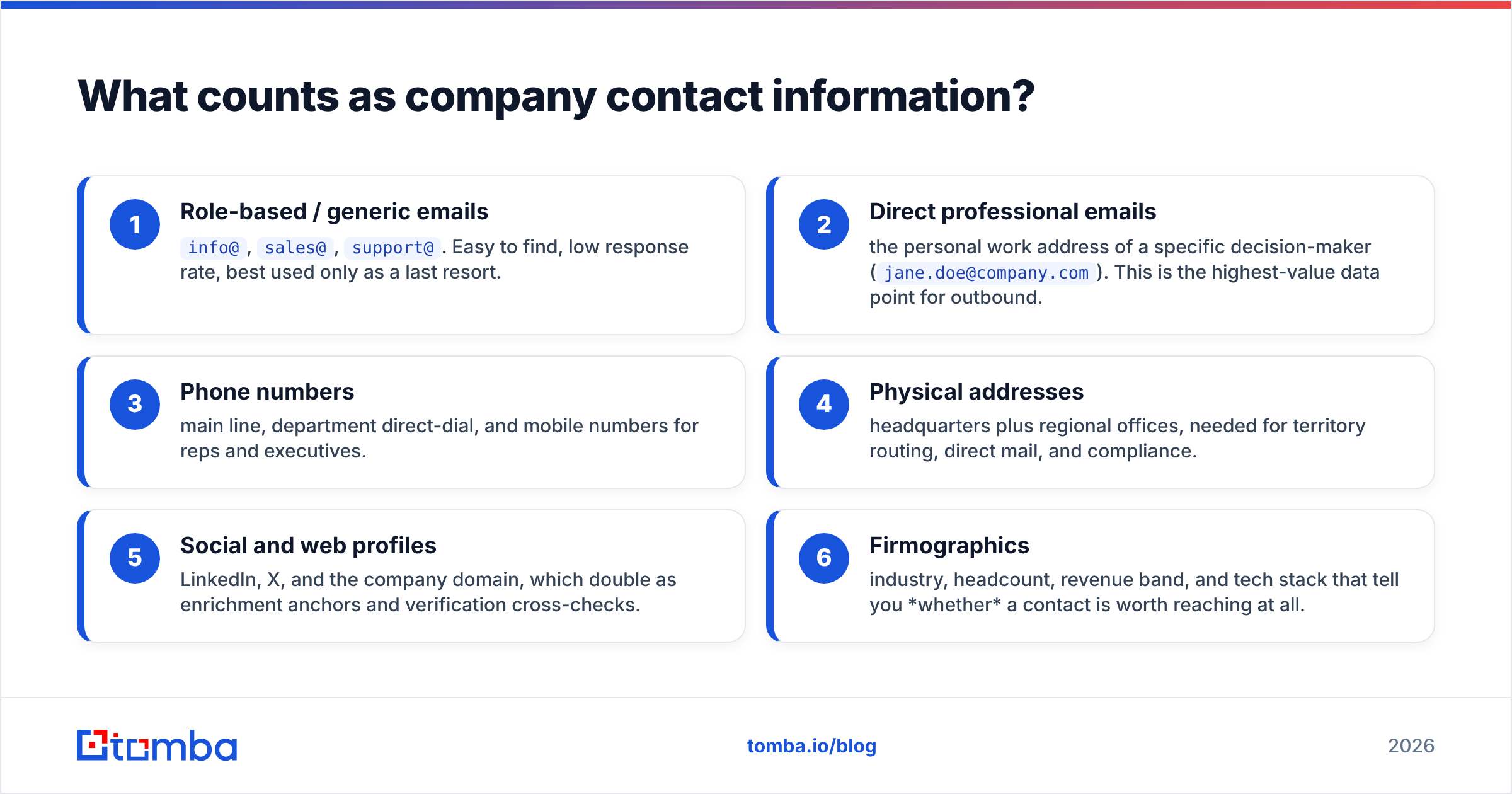
Here is the practical breakdown of what you should be collecting for any target account:
- Role-based / generic emails —
info@,sales@,support@. Easy to find, low response rate, best used only as a last resort. - Direct professional emails — the personal work address of a specific decision-maker (
jane.doe@company.com). This is the highest-value data point for outbound. - Phone numbers — main line, department direct-dial, and mobile numbers for reps and executives.
- Physical addresses — headquarters plus regional offices, needed for territory routing, direct mail, and compliance.
- Social and web profiles — LinkedIn, X, and the company domain, which double as enrichment anchors and verification cross-checks.
- Firmographics — industry, headcount, revenue band, and tech stack that tell you whether a contact is worth reaching at all.
The reason this matters: a phone number without a name is noise, and a name without a verified email is a bounce waiting to happen. Good contact data links a real person to a reachable channel with evidence that the channel still works.

Where does company contact information actually come from?#
Contact data originates in a handful of source types, each with different accuracy and coverage. Understanding the source tells you how much to trust the record.
Public web pages. Contact and "About" pages, team bios, and blog author boxes often list emails and direct lines. Reliable when present, but many companies hide personal emails behind forms.
Domain and DNS records. A domain search crawls a company domain and returns the email addresses and patterns associated with it — for example, discovering that a firm uses first.last@domain.com. Public WHOIS data (see the WHOIS overview on Wikipedia) can also surface registrant contacts, though privacy proxies now mask most of it.
Professional networks. LinkedIn, industry directories, and association member lists are the richest source of who works where, but they rarely expose the email directly — you have to derive or find it.
Data providers and finders. Tools aggregate the above, cross-reference multiple signals, and score confidence. This is where scale comes from.
First-party signals. Website visitors, event attendees, and inbound form fills are your highest-intent contacts and the cleanest data you will ever own.
The key insight: no single source is complete. HubSpot's research on data decay, summarized in its guide to database quality, shows why layering sources and re-verifying on a schedule beats trusting any one origin.
Manual research vs. an automated finder: which should you use?#
Short answer: do a few contacts by hand to learn the patterns, then automate everything else. Manual research does not scale past a couple dozen accounts, and it introduces human transcription errors that are expensive to clean later.
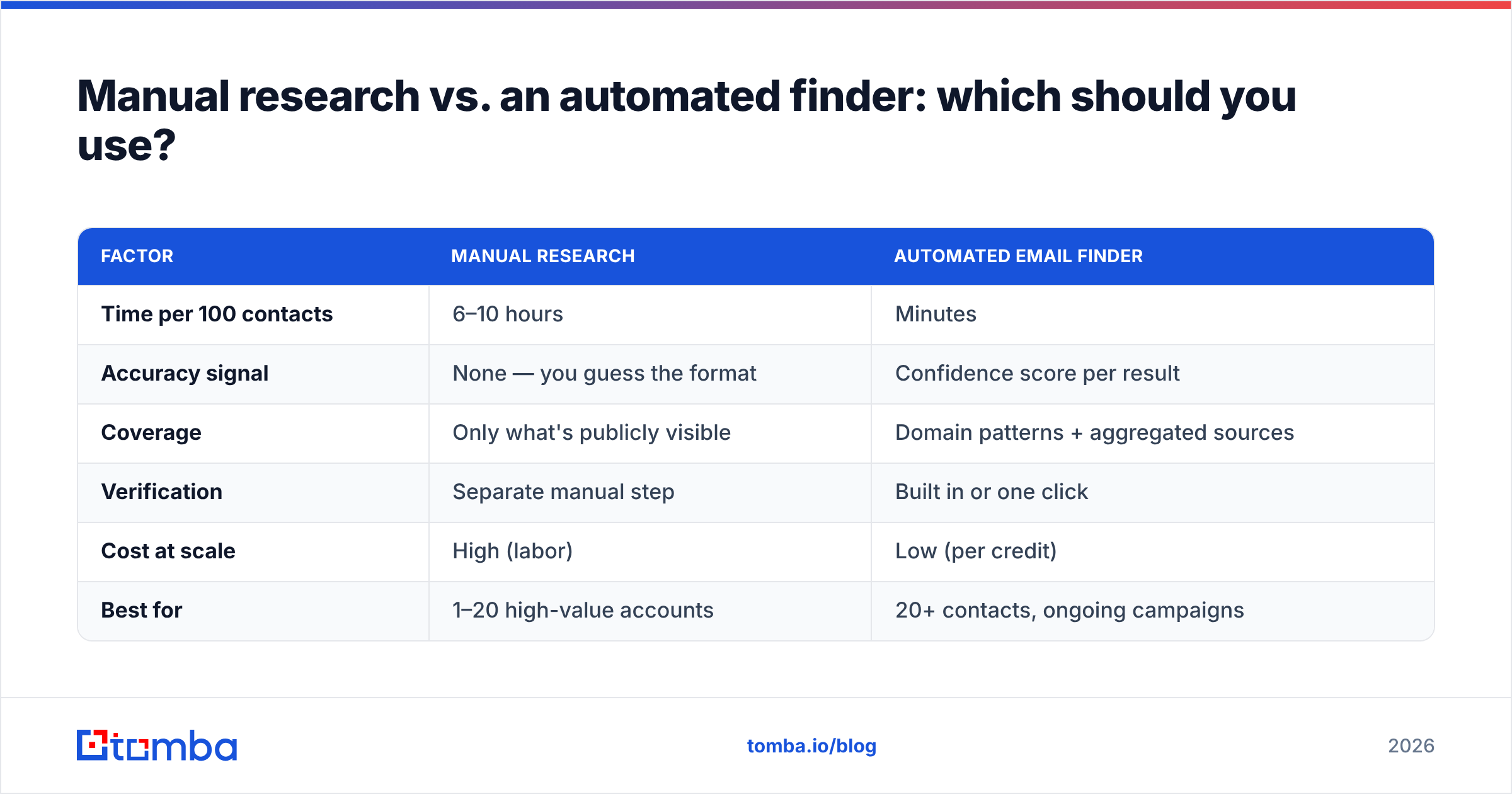
Here is how the two approaches compare on the factors that actually affect pipeline:
| Factor | Manual research | Automated email finder |
|---|---|---|
| Time per 100 contacts | 6–10 hours | Minutes |
| Accuracy signal | None — you guess the format | Confidence score per result |
| Coverage | Only what's publicly visible | Domain patterns + aggregated sources |
| Verification | Separate manual step | Built in or one click |
| Cost at scale | High (labor) | Low (per credit) |
| Best for | 1–20 high-value accounts | 20+ contacts, ongoing campaigns |
Manual work still has a place: named strategic accounts, executive outreach where you want a human-verified email, and gut-checking a tool's output when you first adopt it. Everything else belongs in an automated flow.
How do you find company contact information at scale?#
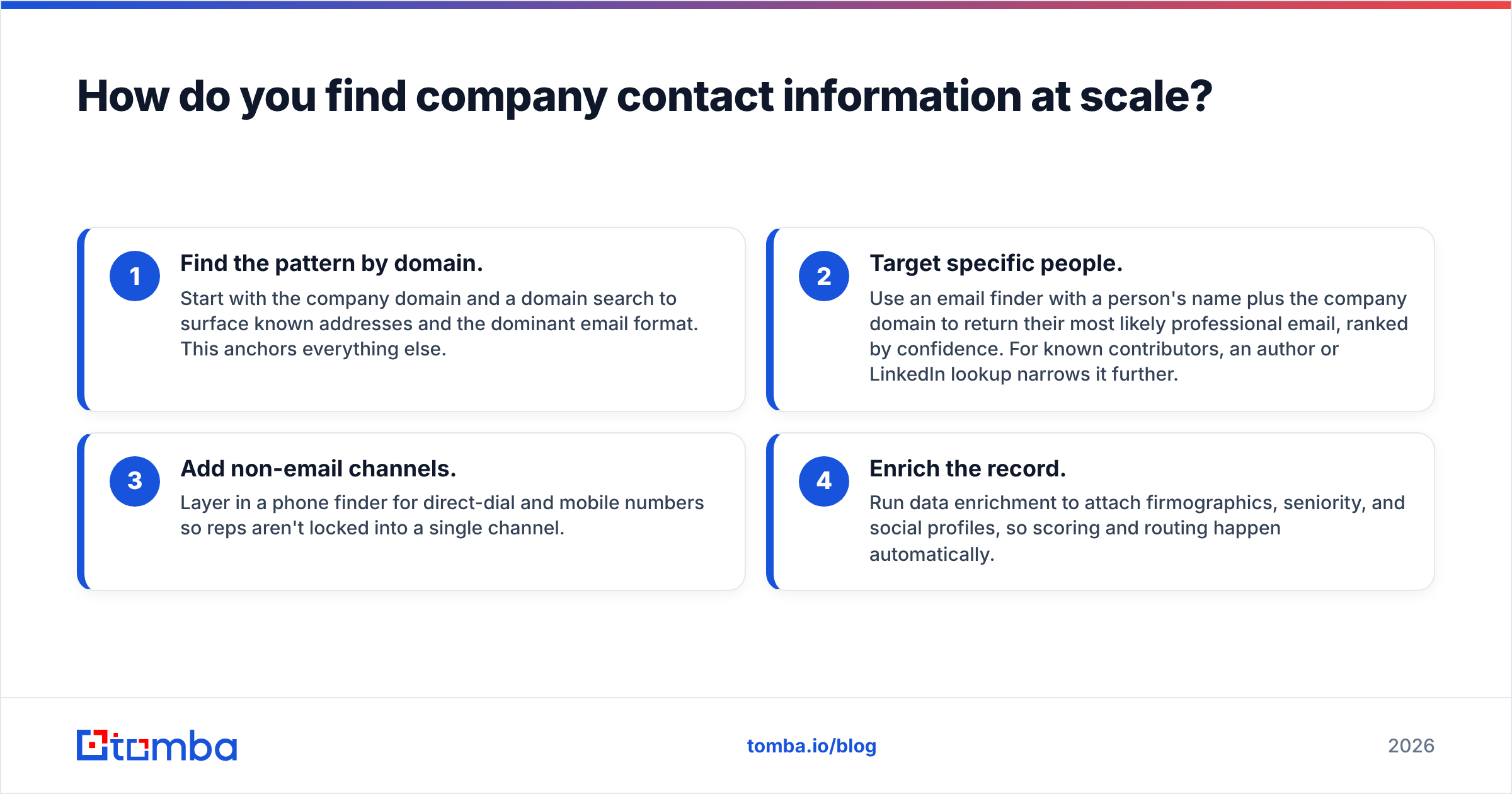
Scaling comes down to a repeatable four-step loop. Run every batch of accounts through the same pipeline and the quality stays consistent.
- Find the pattern by domain. Start with the company domain and a domain search to surface known addresses and the dominant email format. This anchors everything else.
- Target specific people. Use an email finder with a person's name plus the company domain to return their most likely professional email, ranked by confidence. For known contributors, an author or LinkedIn lookup narrows it further.
- Add non-email channels. Layer in a phone finder for direct-dial and mobile numbers so reps aren't locked into a single channel.
- Enrich the record. Run data enrichment to attach firmographics, seniority, and social profiles, so scoring and routing happen automatically.
The goal is not to collect more data. It is to collect complete, scored records so your reps spend time selling instead of researching. A record that says "jane.doe@company.com, 95% confidence, VP Marketing, verified, direct line attached" is worth fifty half-filled rows.
Why does verification matter more than finding?#
Because one bad send can cost you the whole channel. Email service providers judge you on bounce rate and complaint rate. A list with 15–20% invalid addresses will tank your deliverability, and once your domain lands on a blacklist, even your good emails stop arriving.

Verification checks that a mailbox actually exists and can receive mail, without sending anything. A quality email verifier runs several layers:
- Syntax and format — is it a valid address structure?
- Domain and MX records — does the domain accept mail at all?
- Mailbox check — does this specific inbox exist?
- Catch-all detection — is the domain accepting everything (which needs special handling)?
- Disposable / role flagging — is it a throwaway or a generic inbox?
Treat verification as a standing process, not a one-time cleanup. Re-verify your active lists quarterly, because the same job changes that made finding hard also silently break addresses you already own. If you want the terminology behind these checks, Tomba's B2B glossary defines deliverability, sender reputation, and catch-all in plain language.
What does a full company-contact stack look like?#
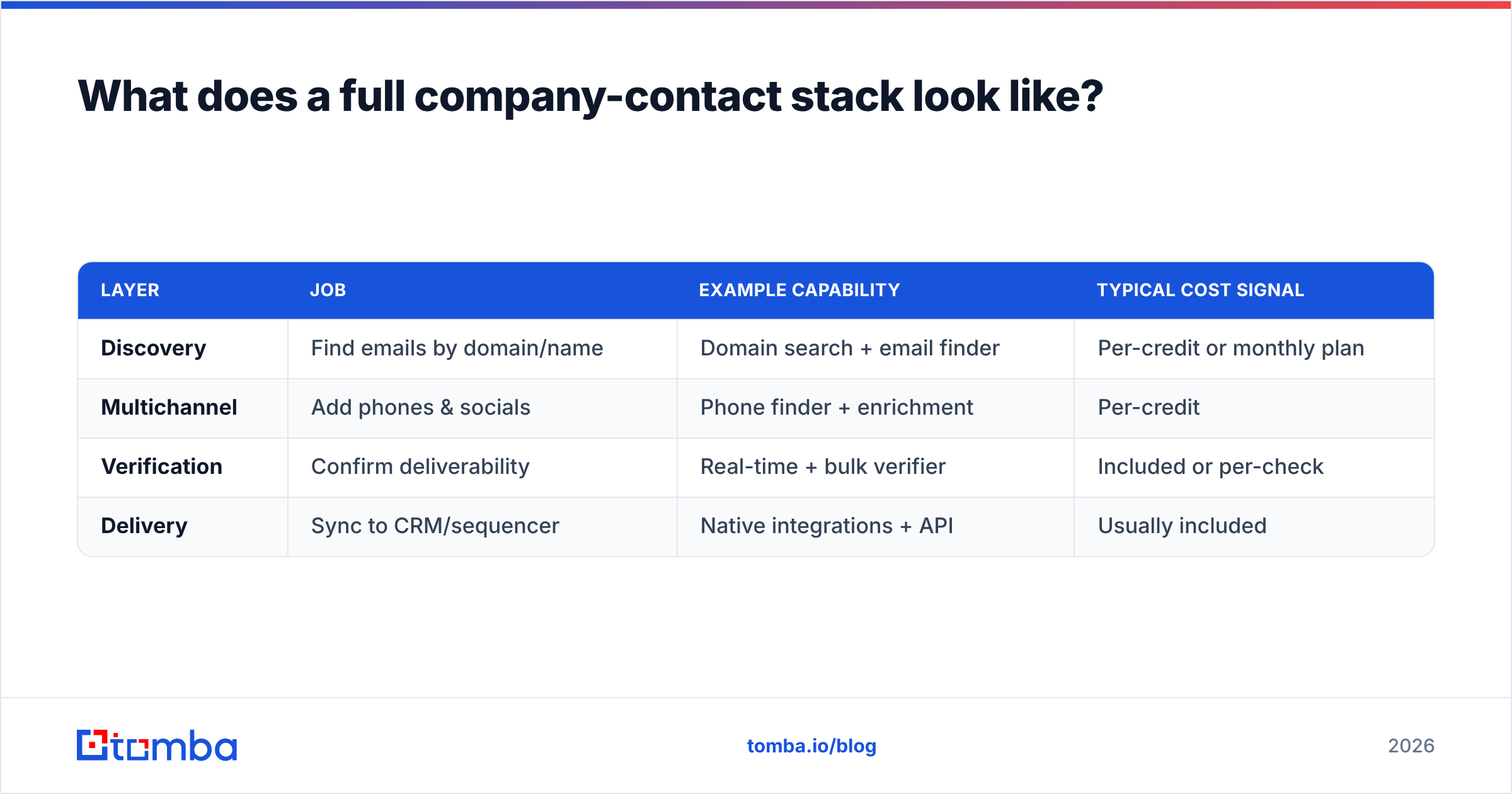
You do not need ten tools. You need coverage across four jobs, ideally from one source of truth so records don't fragment. Here is a reference stack mapped to what each layer does and roughly what it costs.
| Layer | Job | Example capability | Typical cost signal |
|---|---|---|---|
| Discovery | Find emails by domain/name | Domain search + email finder | Per-credit or monthly plan |
| Multichannel | Add phones & socials | Phone finder + enrichment | Per-credit |
| Verification | Confirm deliverability | Real-time + bulk verifier | Included or per-check |
| Delivery | Sync to CRM/sequencer | Native integrations + API | Usually included |
On pricing, be realistic about volume before you commit. Tomba's pricing illustrates the common tiering: a Free tier (25 searches/month) to test accuracy, Starter at $49/month, Growth at $99/month, and Pro at $249/month for teams running steady outbound. The lesson isn't the exact number — it's that you should price against your monthly contact volume, not the sticker on the landing page. Cross-check any vendor's real-world reliability on independent review sites like G2 before you scale spend.
How do you keep company contact data clean over time?#
Data quality is a maintenance problem, not a purchase. Even a perfect list degrades as people switch jobs, companies rebrand, and domains change hands. Build these habits into your operation:
- Deduplicate on ingestion. Merge records by domain plus normalized name so you don't email the same person from three rows.
- Score and expire. Attach a "last verified" date and treat anything older than 90 days as suspect.
- Verify before every major send. Run the list through a verifier the day you launch, not the day you built it.
- Enrich on a trigger. When a contact changes title or company, re-run enrichment to keep firmographics current.
- Close the loop from bounces. Feed hard bounces back into your system to purge and re-find.
Teams that do this consistently see their bounce rates stay under 2% and their reply rates climb, because reps are reaching real people at working addresses. Teams that skip it spend Q2 wondering why the same playbook that worked last year suddenly lands in spam.
Common mistakes that waste company contact data#
- Relying on generic inboxes.
info@addresses convert poorly and often route to no one. Use them only when a direct email genuinely isn't available. - Skipping verification to save credits. The savings are illusory — bounces cost far more in deliverability than verification costs in credits.
- Buying static lists. A purchased CSV is out of date the moment it's sold. Prefer live lookups you can re-run.
- Ignoring catch-all domains. Marking every catch-all address as "valid" inflates your bounce risk. Handle them with a dedicated catch-all check.
- Never re-checking. Contact data is perishable. A quarterly re-verify cadence is the cheapest insurance you can buy.
The bottom line#
Company contact information is only valuable when it is complete, current, and verified. Anyone can scrape an email off a website; the teams that win are the ones who find the right person, attach the right channels, confirm the address is live, and keep the whole thing fresh. Build that as a pipeline — find, enrich, verify, sync — and your outreach stops fighting bad data and starts compounding.
If you want a fast, accurate starting point, the Tomba Email Finder lets you find professional email addresses by domain, name, or company, with a confidence score on every result and built-in verification so you send with confidence. Start on the free tier, test the accuracy against contacts you already know, and scale up only once you trust the data. That is how you turn scattered company contact information into a channel you can rely on.
Related guides#
Ready to find emails that actually work?
Join 150,000+ professionals who stopped guessing and started sending. Free credits on signup — no credit card required.
Get the Tomba newsletter
Practical outbound tactics and product updates — once every two weeks.
About the author