Company Data Enrichment: The 2026 Guide to Better B2B Data
Your CRM rots at roughly 30% a year. Company data enrichment is how you fight back — filling missing firmographics, job titles, and verified emails automatically.
Half of what's sitting in your CRM right now is wrong, stale, or missing. Titles change, companies get acquired, people switch jobs, and the clean list you bought last year quietly rots. Company data enrichment is the process that fixes this at scale — automatically topping up thin records with accurate firmographic, technographic, and contact data so your reps stop wasting cycles on dead leads.
This guide breaks down what enrichment actually does, the fields worth enriching, how the plumbing works, what it costs in 2026, and how to pick a tool without overpaying.
TL;DR#
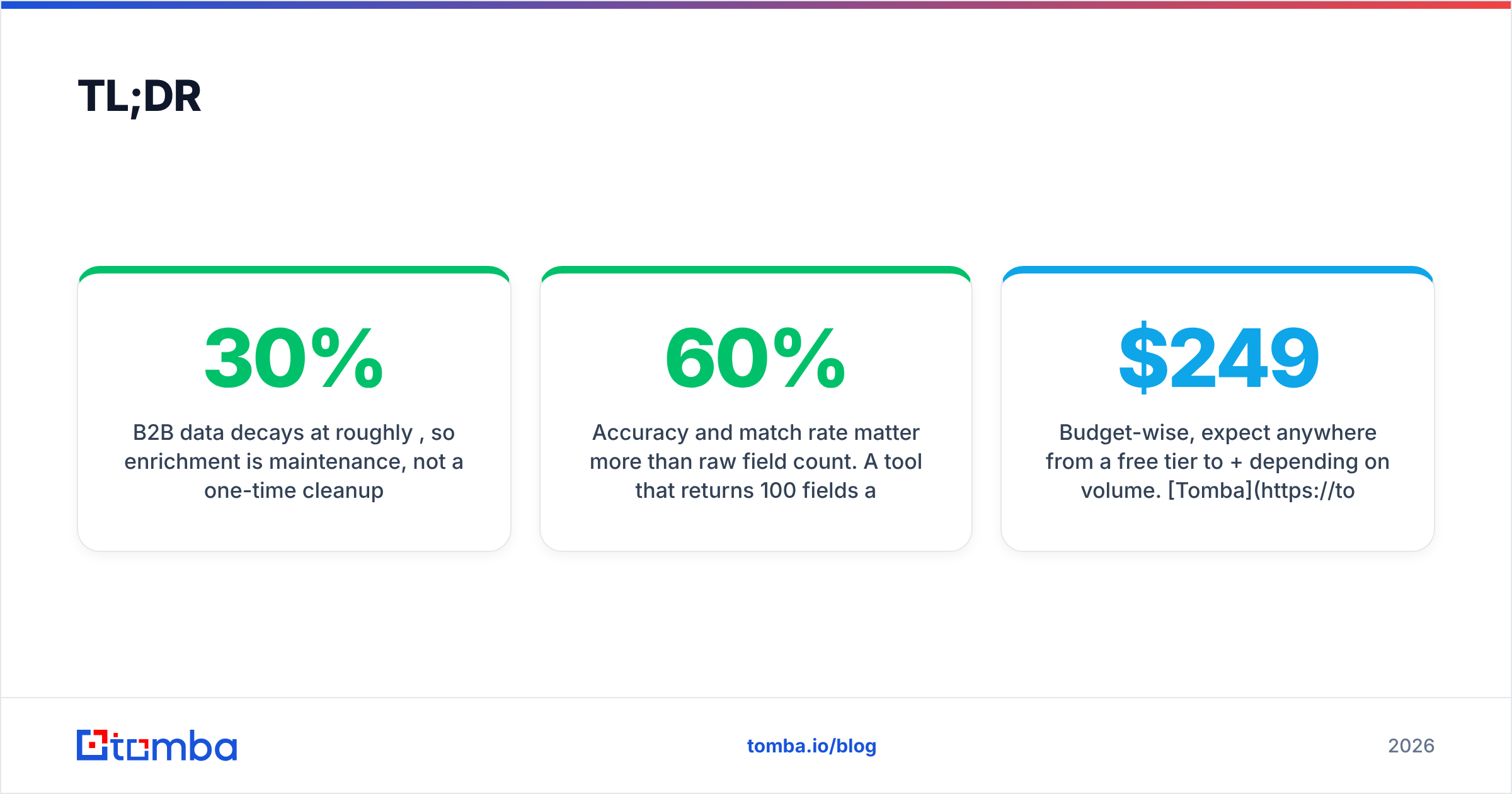
- Company data enrichment adds missing or fresh attributes (industry, size, revenue, tech stack, verified emails, phone numbers) to records you already have — a company name, a domain, or an email.
- B2B data decays at roughly 30% per year, so enrichment is maintenance, not a one-time cleanup.
- The two flavors that matter: firmographic enrichment (about the company) and contact enrichment (about the person).
- Accuracy and match rate matter more than raw field count. A tool that returns 100 fields at 60% accuracy is worse than one returning 12 fields at 95%.
- Budget-wise, expect anywhere from a free tier to $249+/mo depending on volume. Tomba starts free (25 searches/mo) and scales to Pro at $249/mo.
What is company data enrichment?#
Company data enrichment is the practice of taking a sparse record and filling in the blanks from external data sources — think of it like a title company running a background check on a house before you buy. You show up with an address; they come back with the square footage, the tax history, the zoning, and the last three owners. You started with one line and left with a full profile.
In B2B terms, you hand the system a small "seed" — often just a work email or a company domain — and it returns a structured profile: industry, employee count, annual revenue, headquarters location, funding stage, the technologies the company runs, and the decision-makers inside it. Some platforms enrich on the way in (a form submission triggers a real-time lookup), others enrich in bulk (you upload a spreadsheet of 10,000 accounts overnight).
The goal is not to hoard data. It's to make each record actionable — complete enough that a rep can route it, score it, personalize it, and reach the right person on the first try.
Why does company data enrichment matter?#
Bad data is expensive in ways that don't show up on one line item. Gartner has estimated that poor data quality costs organizations an average of $12.9 million per year, spread across wasted effort, missed opportunities, and bad decisions. Here's where enrichment pays for itself:
- Lead routing — You can't send an "enterprise" lead to the enterprise team if the record has no employee count. Enrichment fills the field that routing rules depend on.
- Lead scoring — A scoring model that keys off industry, revenue, and tech stack is only as good as those inputs. Empty fields score as zeros and good accounts fall through.
- Personalization — "I saw you're hiring three SDRs and running HubSpot" beats "Dear valued prospect." That line requires enriched signals.
- Deliverability — Enriching (and then verifying) contact emails cuts your bounce rate, which protects your sender reputation and keeps you out of spam folders.
- Shorter forms — If you enrich behind the scenes, you can ask for an email and derive the other 15 fields, lifting conversion on every gated asset.
The through-line: enrichment turns a name into a decision. Every downstream system — CRM, scoring, sequencing, ABM — inherits the quality of the data you feed it.
What data fields can you enrich?#
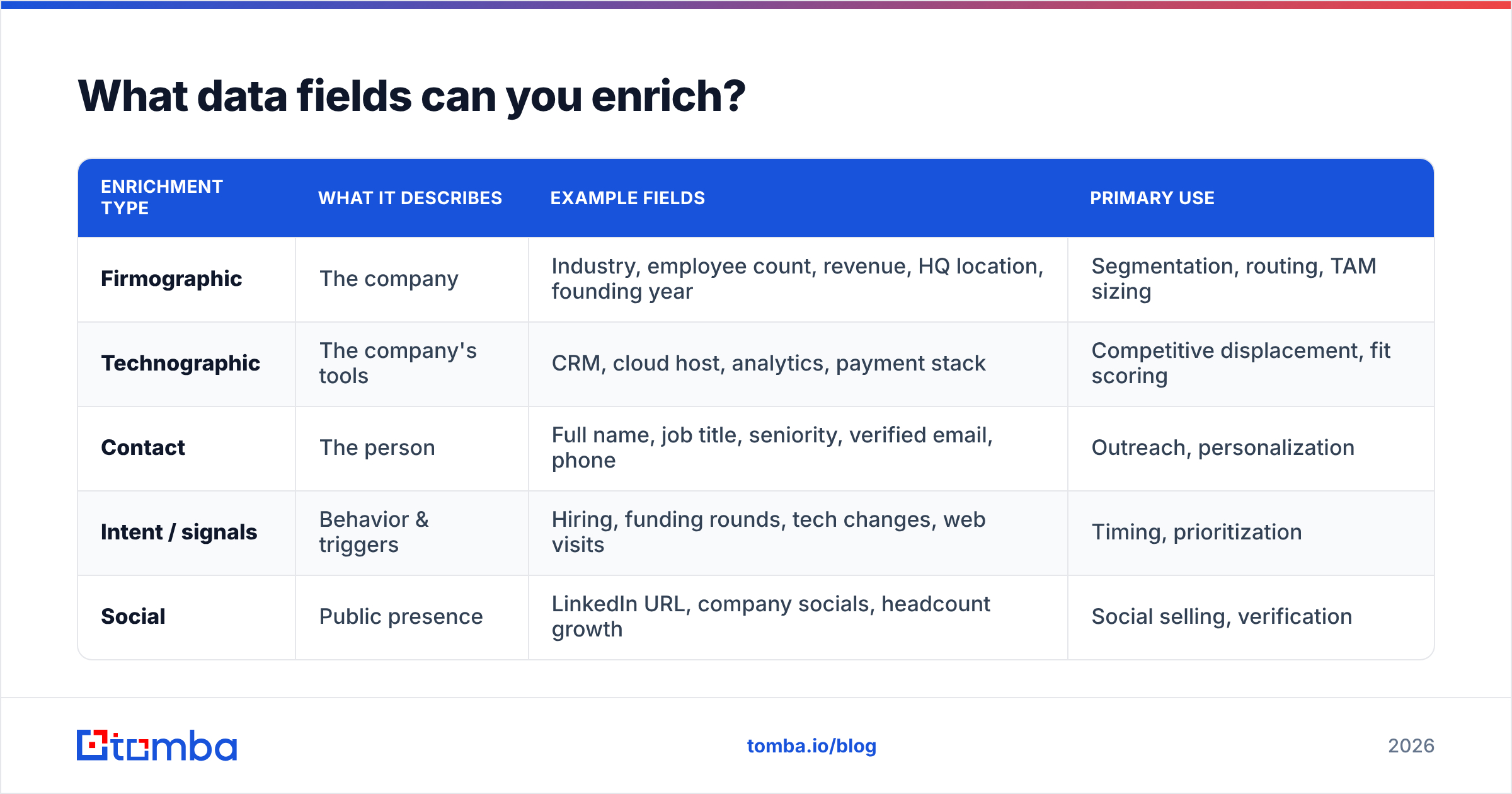
Enrichment splits cleanly into two buckets. Knowing which one you need keeps you from paying for fields you'll never use.
| Enrichment type | What it describes | Example fields | Primary use |
|---|---|---|---|
| Firmographic | The company | Industry, employee count, revenue, HQ location, founding year | Segmentation, routing, TAM sizing |
| Technographic | The company's tools | CRM, cloud host, analytics, payment stack | Competitive displacement, fit scoring |
| Contact | The person | Full name, job title, seniority, verified email, phone | Outreach, personalization |
| Intent / signals | Behavior & triggers | Hiring, funding rounds, tech changes, web visits | Timing, prioritization |
| Social | Public presence | LinkedIn URL, company socials, headcount growth | Social selling, verification |
Most teams start with firmographic + contact data because those two unlock routing and outreach immediately. Technographic and intent layers are where you level up once the basics are clean. If you only remember one rule: enrich the fields your workflows actually branch on, and ignore the rest.
How does company data enrichment work?#
Under the hood, every enrichment tool runs the same four-step loop, whether it's enriching one record on a form submit or a million rows in a batch job.
- Match — The tool takes your seed (email, domain, or company name) and finds the corresponding entity in its database. Match rate — the percentage of your records it can identify — is the first quality metric to check.
- Gather — It pulls attributes from its data sources: public web pages, business registries, SEC filings, job boards, and SMTP-verified contact data.
- Verify — Good platforms don't just copy data; they validate it. A verified email is SMTP-checked; a catch-all domain gets flagged. This is where an email verifier earns its keep before a single message goes out.
- Append — The clean, structured fields are written back to your record via API, CSV, or a native CRM integration.
The difference between a mediocre tool and a great one lives in steps 1 and 3. Anyone can scrape a job title off a public page. Fewer can tell you that the person left that job in March, and that the email you're about to hit is now a catch-all that will silently swallow your message.

That surprised-Pikachu moment — a 40% bounce rate two weeks into a campaign — is almost always a data problem, not a copy problem. Enrich and verify first, then send.
What are the best company data enrichment tools in 2026?#
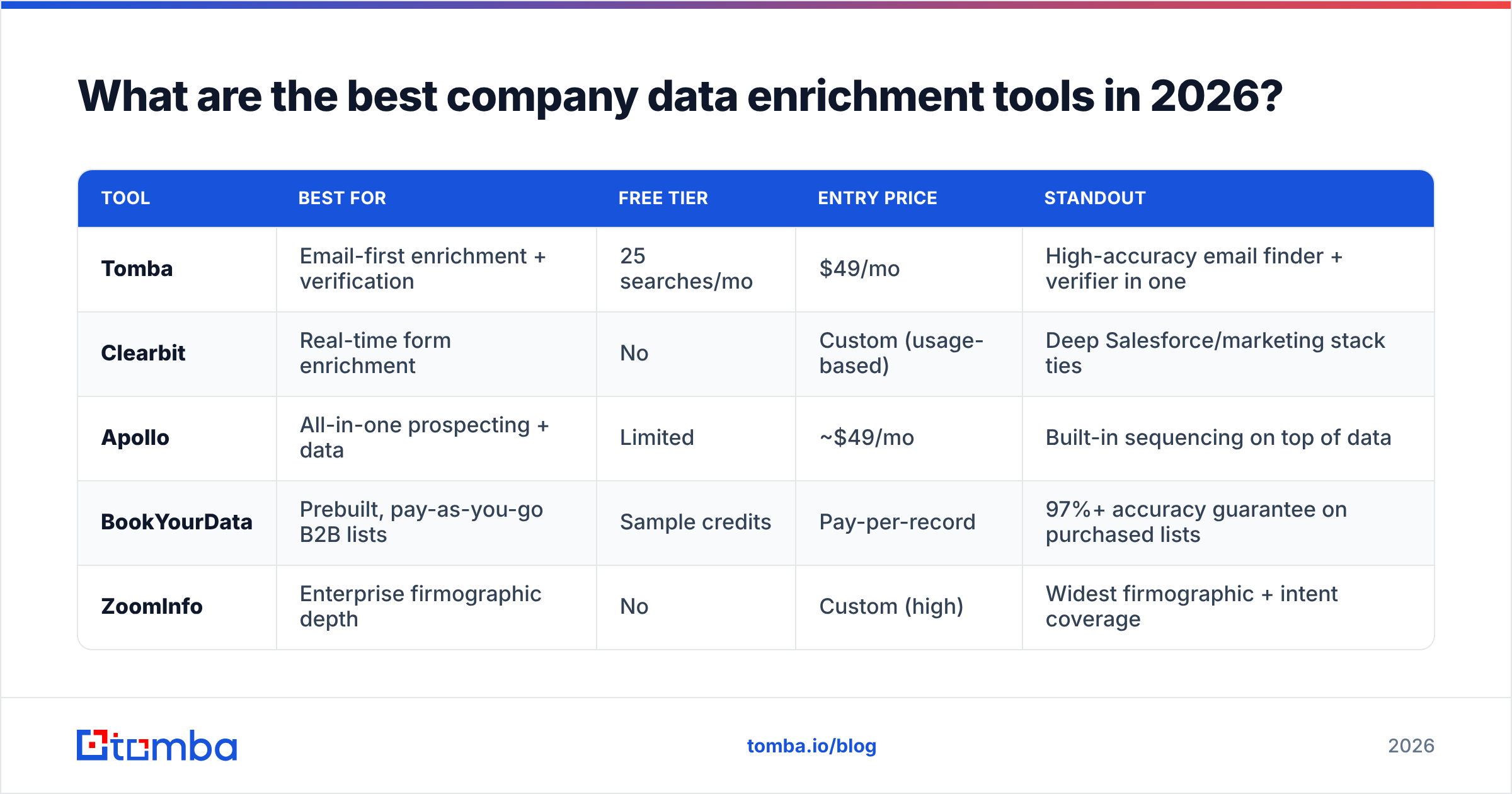
There's no single "best" — the right pick depends on whether you enrich in real time or in batch, how much you care about email accuracy, and your budget. Here's an honest side-by-side of common categories of tool.
| Tool | Best for | Free tier | Entry price | Standout |
|---|---|---|---|---|
| Tomba | Email-first enrichment + verification | 25 searches/mo | $49/mo | High-accuracy email finder + verifier in one |
| Clearbit | Real-time form enrichment | No | Custom (usage-based) | Deep Salesforce/marketing stack ties |
| Apollo | All-in-one prospecting + data | Limited | ~$49/mo | Built-in sequencing on top of data |
| BookYourData | Prebuilt, pay-as-you-go B2B lists | Sample credits | Pay-per-record | 97%+ accuracy guarantee on purchased lists |
| ZoomInfo | Enterprise firmographic depth | No | Custom (high) | Widest firmographic + intent coverage |
A few honest notes. If your enrichment need is fundamentally "I have a name and a company, get me a reachable, verified email," an email-first tool like Tomba or a curated provider like BookYourData will out-perform a broad platform you're paying enterprise rates for. If you need real-time enrichment on inbound web forms with tight marketing-automation hooks, Clearbit is purpose-built for that. And if you want firmographic breadth plus intent data across a huge account universe — and have the budget — ZoomInfo is hard to beat, though you'll pay for it. Cross-check current reviews on G2 before you commit; category leaders shift year to year.
For teams that want to test accuracy themselves, most vendors (Tomba included) let you enrich a small sample on a free tier before you buy — always do that. Match rate and email validity vary wildly by region and industry, and your list is the only benchmark that matters.
How much does company data enrichment cost?#
Pricing models fall into three shapes, and mixing them up is how teams overspend.
- Per-credit / per-record — You pay for each successful enrichment. Great for occasional batch jobs, predictable for one-off list builds. This is how BookYourData and most bulk providers work.
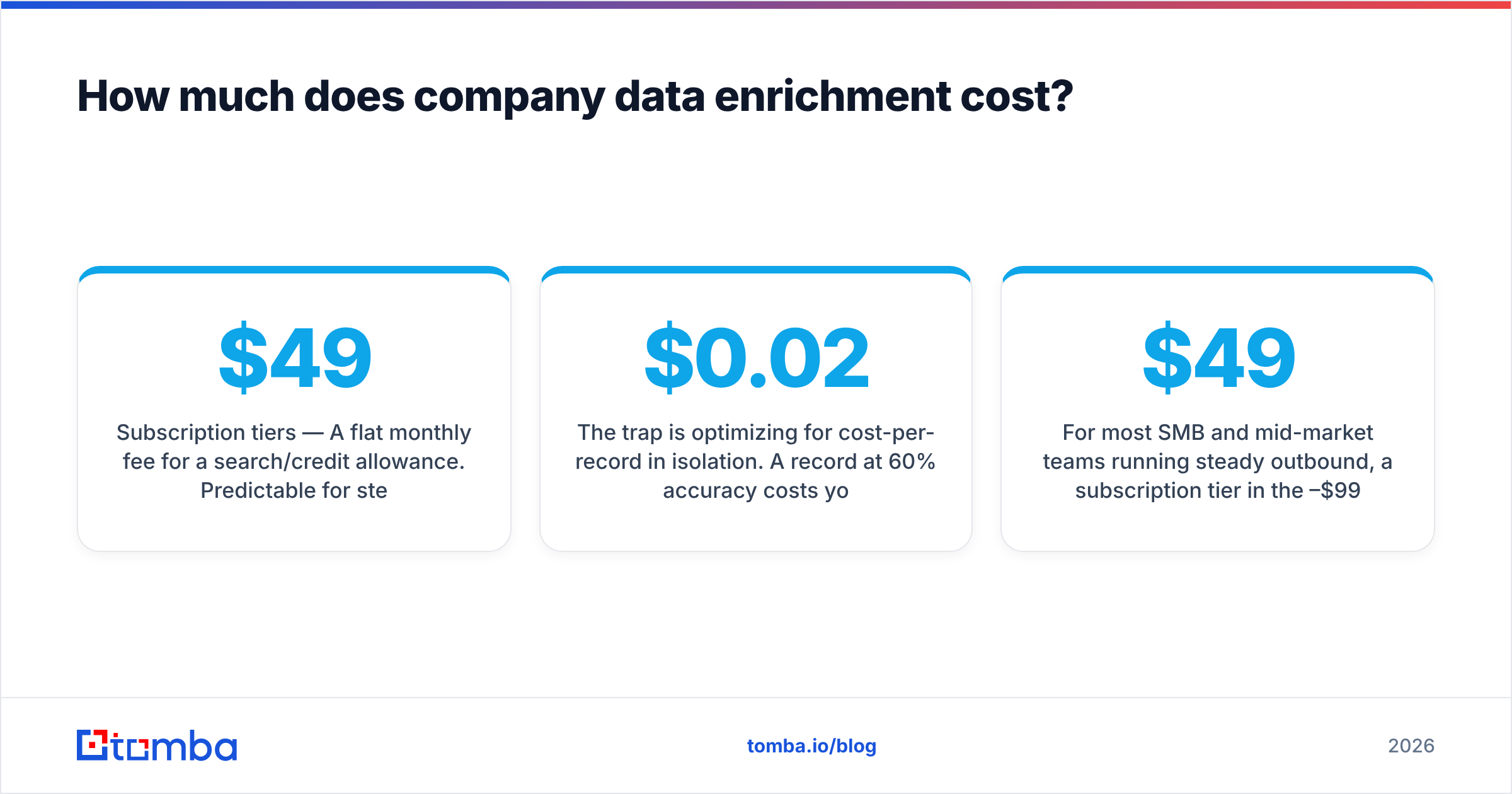
- Subscription tiers — A flat monthly fee for a search/credit allowance. Predictable for steady-state outbound. Tomba's pricing runs Free (25/mo), Starter $49/mo, Growth $99/mo, and Pro $249/mo, with Enterprise custom.
- Usage-based / custom — Common at the enterprise end (Clearbit, ZoomInfo). Powerful, but quotes scale fast and often lock you into annual commitments.
The trap is optimizing for cost-per-record in isolation. A $0.02 record at 60% accuracy costs you more than a $0.10 record at 95% once you factor in the wasted sends, the damaged domain reputation, and the rep hours spent chasing ghosts. Price the outcome, not the row.
For most SMB and mid-market teams running steady outbound, a subscription tier in the $49–$99 range covers the volume without the enterprise contract. Reserve pay-as-you-go for spiky, project-based enrichment and custom pricing for genuine enterprise scale.
How do you implement company data enrichment?#
You don't need a six-month data project. Here's the pragmatic rollout:
- Audit what's broken — Export your CRM and count fill rates per field. If "employee count" is blank on 40% of accounts, that's your first target.
- Pick your trigger — Real-time (enrich on form submit / new record) or batch (nightly/weekly). Most teams start batch, then add real-time for inbound.
- Choose seed + fields — Decide what you'll enrich from (domain and email are the most reliable seeds) and to (only the fields your workflows use).
- Verify before you write — Route enriched emails through verification so you never write an invalid address back to the CRM. Use a bulk email finder plus verification for the initial backfill.
- Wire the integration — Connect via native app, Tomba API, or a no-code tool like Zapier so enrichment runs without manual exports.
- Set a refresh cadence — Data decays. Re-enrich stale records quarterly; nightly for high-value accounts.
That's it. Start with a one-time backfill to prove the ROI, then automate the ongoing top-ups so your CRM never rots back to where it started.
Frequently asked questions#
Is company data enrichment GDPR-compliant? It can be, but compliance is on you and your vendor. Legitimate providers source from public and permission-based data and honor opt-out requests. Confirm your provider's data sourcing and processing terms, and only enrich data you have a lawful basis to hold — read up on major CRM vendors' guidance, such as HubSpot's data privacy resources, before rolling out.
Enrichment vs. buying a list — what's the difference? Buying a list gives you net-new records. Enrichment improves records you already have — though many providers (BookYourData, Tomba) do both. If your CRM is full but thin, enrich. If it's empty, source, then enrich and verify.
How often should I re-enrich? Quarterly for the general database, monthly or on-trigger for active pipeline and target accounts. Because B2B data decays around 30% a year, "set and forget" isn't an option.
What's the single most important field to enrich? A verified, reachable email. Everything else — segmentation, scoring, personalization — assumes you can actually reach the person. Nail contact accuracy first, then layer on firmographics.
Fix your data before your next campaign#
Your outreach can only be as good as the records behind it. If reps are bouncing on bad emails, guessing at company size, or personalizing off stale titles, no amount of clever copy will save the numbers — the fix is upstream, in the data.
Start with the fields that move the needle: accurate, verified contact data. The Tomba Email Finder turns a name and a domain into a verified professional email, and pairs with Tomba's domain search, catch-all verifier, and data enrichment so you can clean and complete your whole list — starting free at 25 searches a month, no card required. Enrich once, verify always, and watch your bounce rate and reply rate move in the right directions.
Related guides#
Ready to find emails that actually work?
Join 150,000+ professionals who stopped guessing and started sending. Free credits on signup — no credit card required.
Get the Tomba newsletter
Practical outbound tactics and product updates — once every two weeks.
About the author