What Is a Company Database? The 2026 Guide to B2B Data
A company database is only as useful as it is fresh. Here's how modern B2B databases are built, what makes one accurate, and how to keep yours from rotting.
Most teams don't have a data problem. They have a stale data problem. You can buy a list of two million companies today, and roughly a third of it will be wrong within twelve months — people change jobs, companies rebrand, domains lapse, phone lines get disconnected. A company database is not a file you buy once. It's a living system you maintain.
This guide breaks down what a company database actually is in 2026, how the good ones are built, how to judge accuracy, and how to keep yours from quietly rotting in the background.
TL;DR#
- A company database is a structured, continuously updated store of firmographic, contact, and technographic data about businesses — not a static CSV.
- The value lives in freshness and match rate, not raw record count. A smaller, verified database beats a bloated, decayed one every time.
- B2B data decays at roughly 2–3% per month, so any database without a refresh loop is losing accuracy the day you buy it.
- The best modern approach is API-first: enrich on demand against a source that re-verifies in real time instead of storing snapshots.
- Build vs. buy is usually a false choice — most teams buy the base layer and enrich it live with a provider like Tomba.
What is a company database?#
A company database is a structured repository of information about organizations and the people inside them. Think of it as a contacts app for the entire B2B economy: instead of your personal friends, it holds companies, their domains, headcount, industry, tech stack, and the professionals you'd actually want to reach.
A useful company database blends three data types:
- Firmographic data — the company's identity: legal name, domain, industry, employee count, revenue band, headquarters, and funding stage.
- Contact data — the people: names, roles, professional email addresses, and B2B phone numbers.
- Technographic data — what the company runs: CRM, cloud provider, analytics, e-commerce platform, and other tools that signal buying intent.
The moment you combine those three, a flat list becomes a targeting engine. You can slice for "Series B SaaS companies in North America using HubSpot with 50–200 employees" and get a workable account list. That's the difference between a spreadsheet and a database.
Why does a company database decay so fast?#
Because the underlying reality changes constantly. Gartner and other analysts have long estimated that B2B data degrades at around 2 to 3 percent per month — call it 25 to 30 percent a year. The causes are mundane but relentless:
- People switch jobs (a single role change breaks name, email, and often phone at once).
- Companies get acquired, rebrand, or migrate domains.
- Offices close or relocate.
- Direct-dial numbers get reassigned.
This is why the "record count" on a vendor's pricing page is close to meaningless on its own. A database advertising 200 million contacts might have 60 million that are wrong before you send your first email. What matters is the verified, deliverable slice — and how quickly the provider re-checks it.
The practical takeaway: treat your company database like fresh produce, not canned goods. It has a shelf life, and refrigeration (a verification and refresh loop) is not optional.
What makes a company database accurate?#
Accuracy is a stack of behaviors, not a single number. When you evaluate a source, look for these signals:
- Verification recency — When was each record last checked? "Verified within 30 days" is a real claim; "verified" with no date is marketing.
- Match rate — Of the companies or contacts you actually query, what percentage returns a usable result? A 95% database of the wrong industry is useless to you.
- Deliverability of emails — Does the provider validate against SMTP and flag catch-all domains, or does it hand you addresses that bounce?
- Source transparency — Reputable providers publish where their data comes from and how it's assembled. If you can't see where the data comes from, assume the worst.
- Coverage vs. your ICP — Global coverage is nice, but depth in your segment (region, company size, function) beats broad-but-shallow.
A quick sanity test: pull 25 records you already know to be true, run them through the provider, and score the results yourself. Fifteen minutes of manual checking tells you more than any published accuracy figure.
Build vs. buy: how should you source company data?#
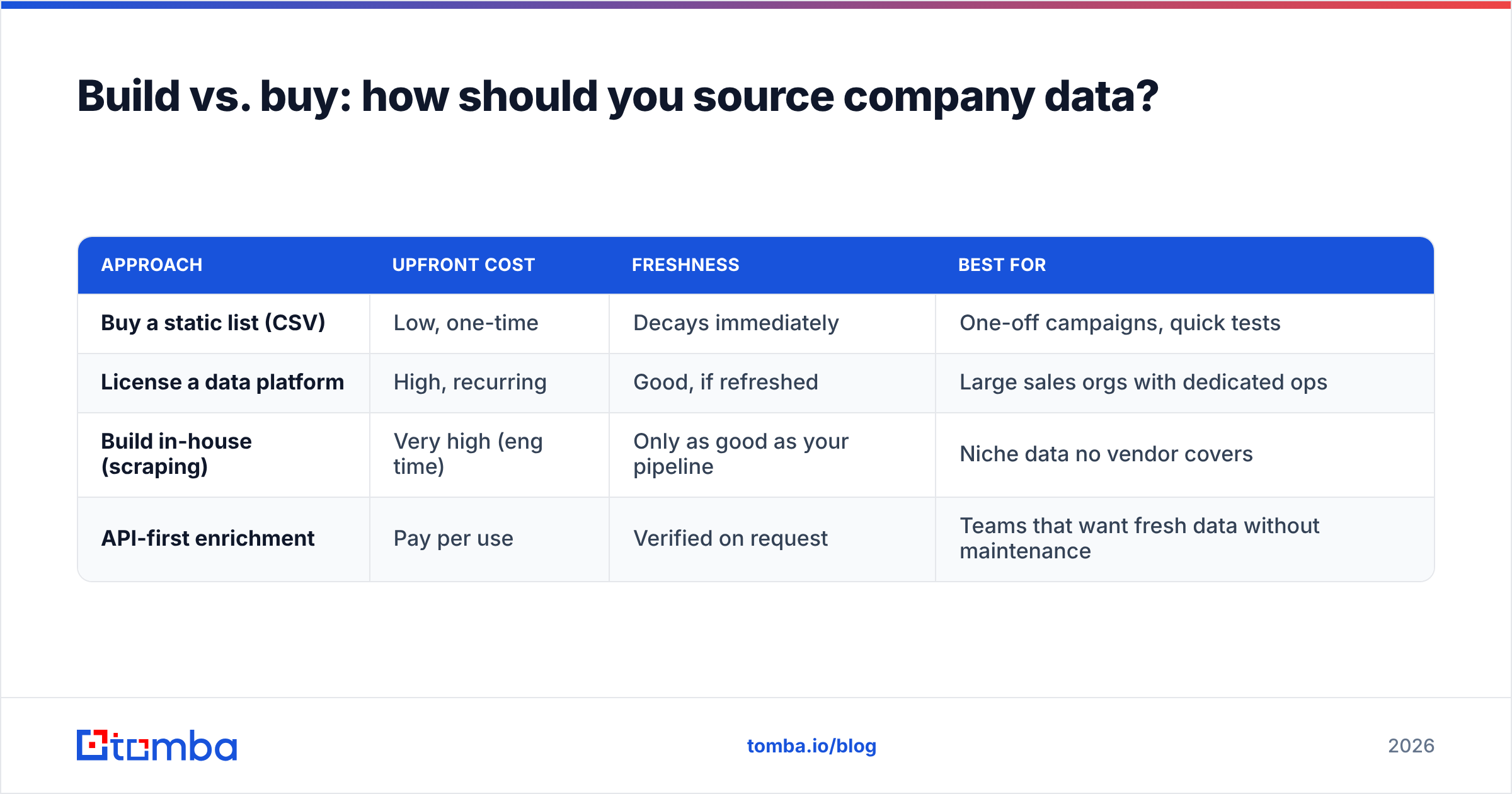
Most teams frame this as build-or-buy, then agonize over it. The honest answer is that you almost always do both — you buy or subscribe to a base layer, then enrich and verify it against a live source. Here's how the pure approaches actually compare:
| Approach | Upfront cost | Freshness | Best for |
|---|---|---|---|
| Buy a static list (CSV) | Low, one-time | Decays immediately | One-off campaigns, quick tests |
| License a data platform | High, recurring | Good, if refreshed | Large sales orgs with dedicated ops |
| Build in-house (scraping) | Very high (eng time) | Only as good as your pipeline | Niche data no vendor covers |
| API-first enrichment | Pay per use | Verified on request | Teams that want fresh data without maintenance |
The static CSV is the trap. It looks cheapest and works for a week. The in-house build looks powerful until you price the engineering hours to keep it alive. For most B2B teams, the sweet spot is API-first enrichment: keep a lean B2B database of accounts you care about and enrich records the moment you touch them, so you're never storing a stale snapshot.
This is also where a competitor-and-partner like BookYourData fits — a solid choice when you want pay-as-you-go, pre-built B2B lists with verification baked in. The point isn't that one tool wins; it's that your architecture should assume data goes stale and design the refresh in from day one.
How do modern company databases stay fresh?#
The good ones stop treating data as inventory and start treating it as a query. Instead of shipping you a frozen block of records, they re-derive and re-verify each record close to the moment you request it. Three mechanisms make that work:
- On-demand verification — When you look up a company or contact, the provider checks the email in real time (SMTP probe, syntax, and catch-all detection) rather than trusting a months-old flag.
- Domain-centric discovery — Instead of storing every person forever, the system finds current contacts by domain when you ask, using domain search to surface who's actually there now.
- Continuous enrichment — Records flowing through your CRM get topped up automatically via data enrichment, so the database improves as you use it instead of decaying.
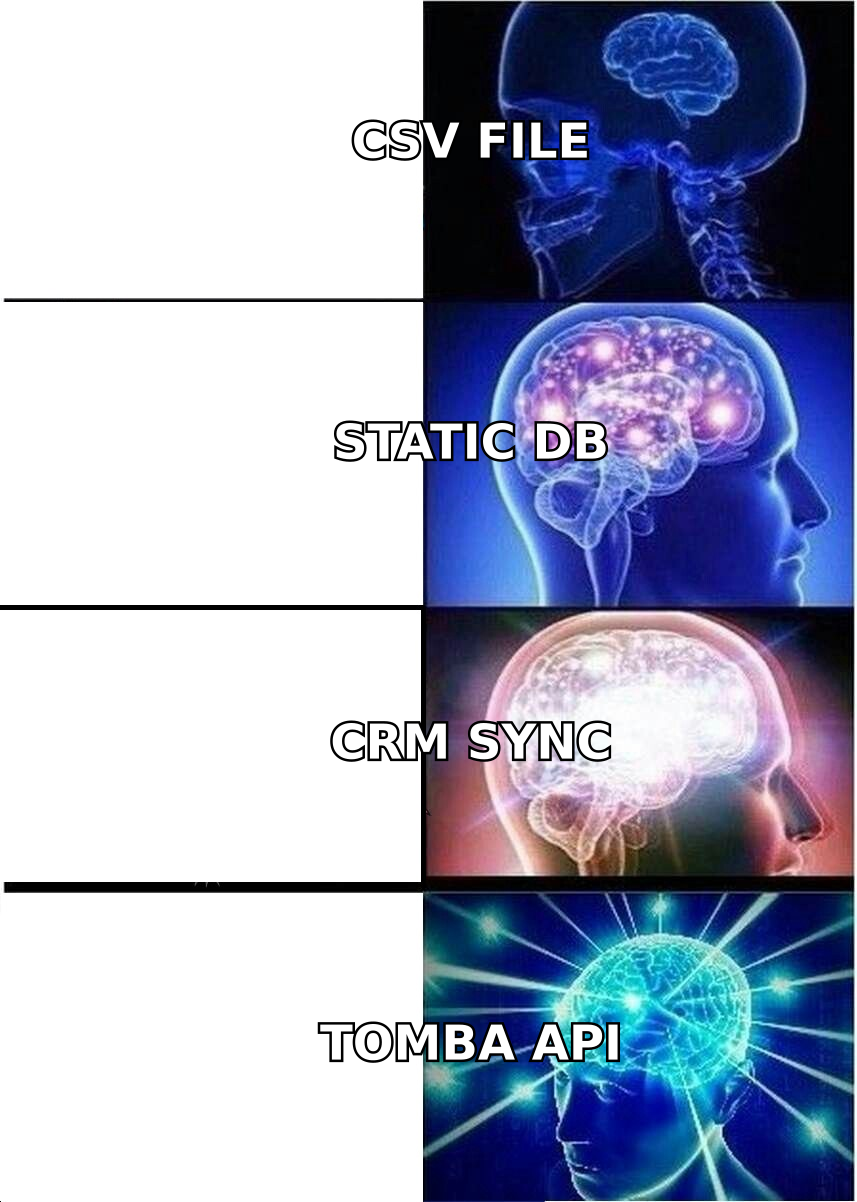
This is the architectural shift behind the meme above: a raw CSV is a photograph, a static database is a photo album, a CRM sync is a security camera — but an API is a live feed. The Tomba API is built around that live-feed model, which is why "how often is it updated?" becomes a slightly wrong question. It's verified when you ask.
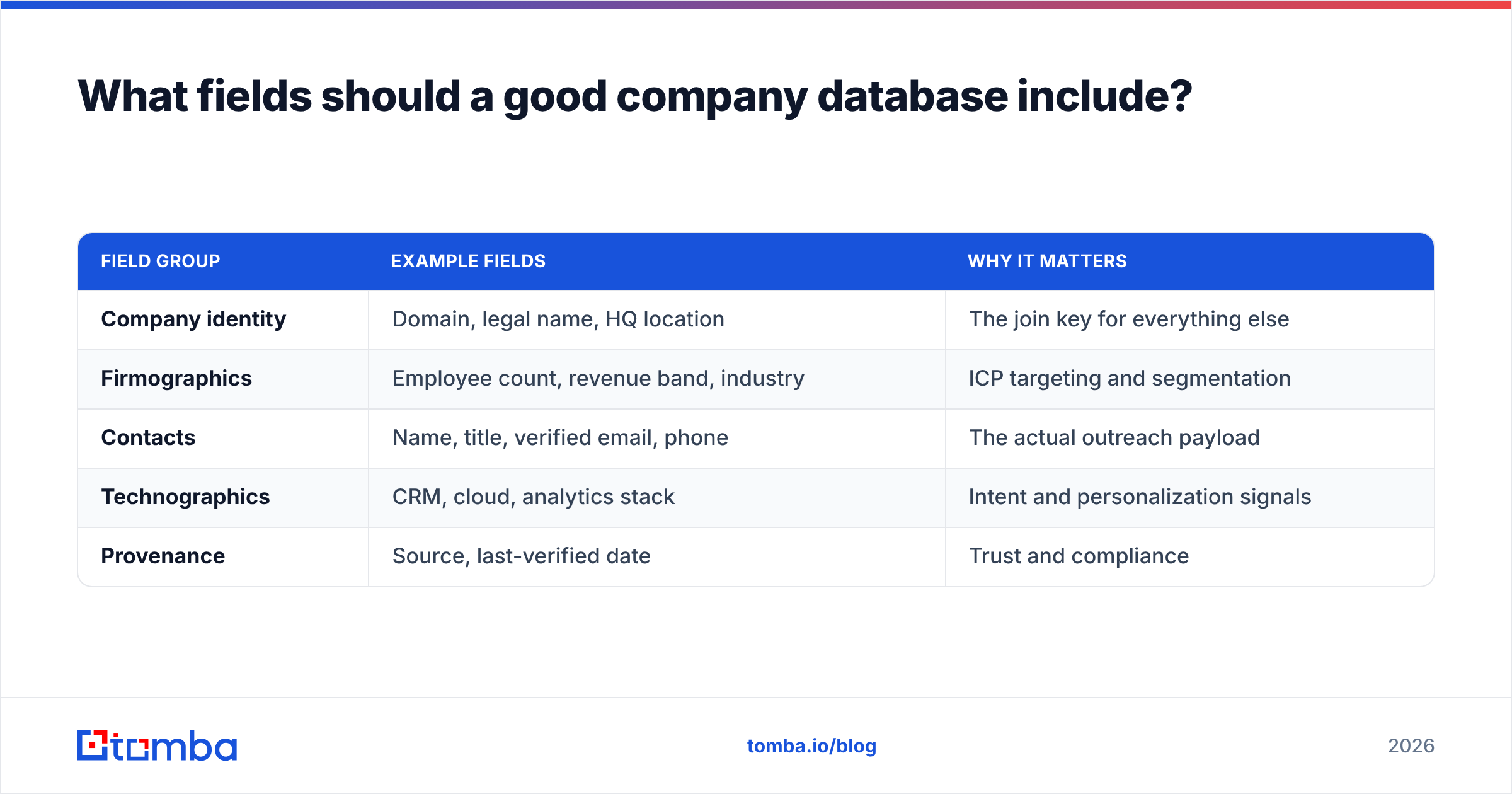
What fields should a good company database include?#
If you're specifying or auditing a database, this is a reasonable minimum schema. Anything less and you'll be doing manual research later; much more and you're paying to store fields you never filter on.
| Field group | Example fields | Why it matters |
|---|---|---|
| Company identity | Domain, legal name, HQ location | The join key for everything else |
| Firmographics | Employee count, revenue band, industry | ICP targeting and segmentation |
| Contacts | Name, title, verified email, phone | The actual outreach payload |
| Technographics | CRM, cloud, analytics stack | Intent and personalization signals |
| Provenance | Source, last-verified date | Trust and compliance |
Notice the last row. Provenance — where a record came from and when it was last confirmed — is the field teams skip and later regret. In a world of tightening privacy rules, being able to show the source of a contact isn't just good hygiene; it's increasingly a compliance requirement. You can read more about how vendors are evaluated on G2's data intelligence category if you want third-party framing.
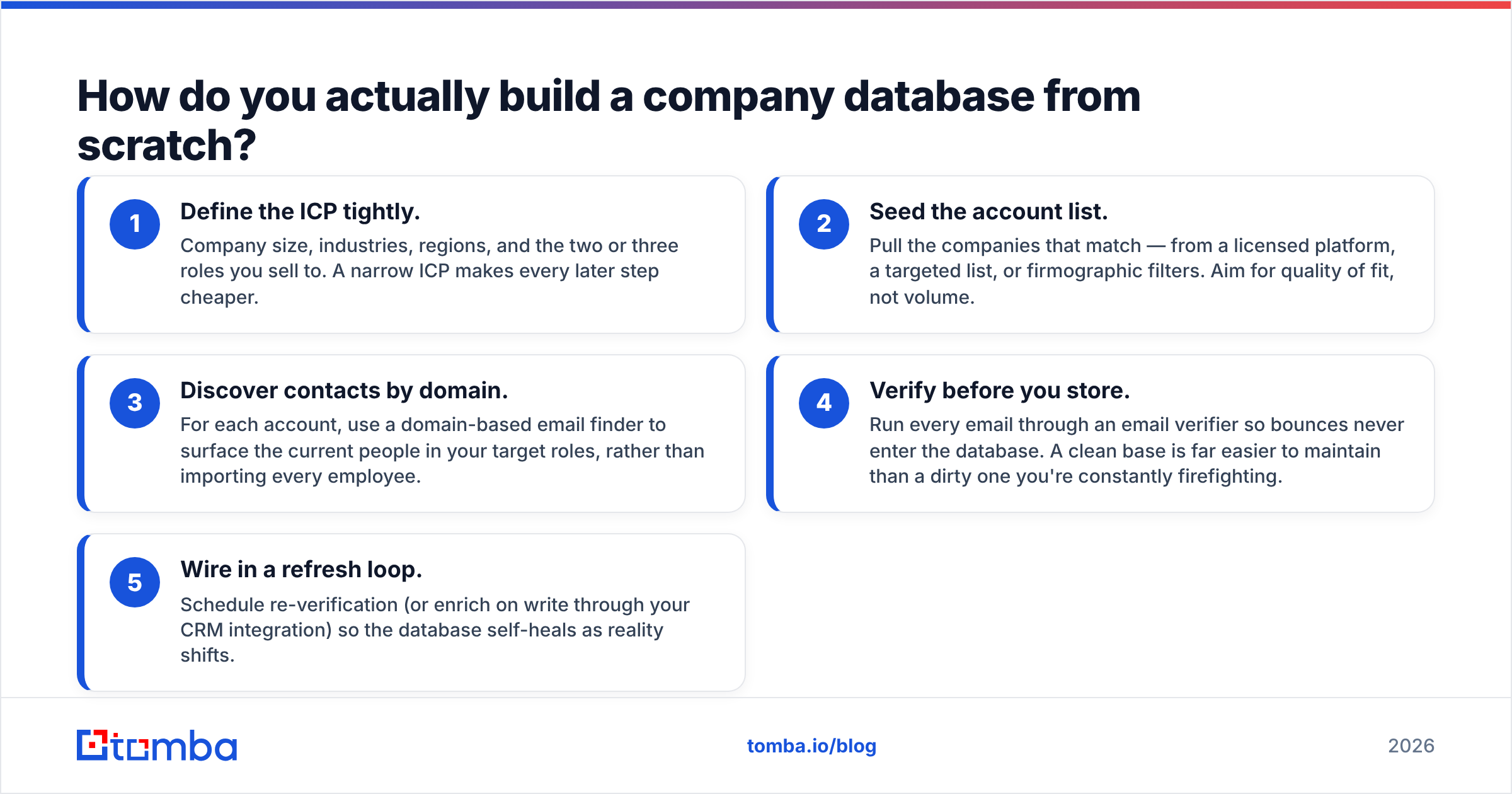
How do you actually build a company database from scratch?#
Say you're starting with nothing but an ICP definition. Here's a lean, five-step path that avoids the two classic failure modes (buying too much dead data, or over-engineering a scraper):
- Define the ICP tightly. Company size, industries, regions, and the two or three roles you sell to. A narrow ICP makes every later step cheaper.
- Seed the account list. Pull the companies that match — from a licensed platform, a targeted list, or firmographic filters. Aim for quality of fit, not volume.
- Discover contacts by domain. For each account, use a domain-based email finder to surface the current people in your target roles, rather than importing every employee.
- Verify before you store. Run every email through an email verifier so bounces never enter the database. A clean base is far easier to maintain than a dirty one you're constantly firefighting.
- Wire in a refresh loop. Schedule re-verification (or enrich on write through your CRM integration) so the database self-heals as reality shifts.
Skip step five and you've just built a slightly nicer CSV that will decay like all the others. The loop is the product.
What about compliance and data ethics?#
A company database that ignores privacy law is a liability dressed as an asset. The core rules to internalize:
- Business contact data is regulated too. Frameworks like GDPR and CCPA cover professional data; "it's just work emails" is not a defense. The Wikipedia overview of GDPR is a decent starting orientation.
- Provenance enables consent handling. If someone requests deletion or opt-out, you need to know where their record came from and remove it everywhere.
- Legitimate interest has limits. B2B outreach can qualify, but only with relevance, an easy opt-out, and honest sender identity. Salesforce and other CRM vendors publish practical B2B compliance guidance worth reading.
Build compliance into the schema (that provenance field again) and it becomes a background feature rather than a scramble during your first data-subject request.
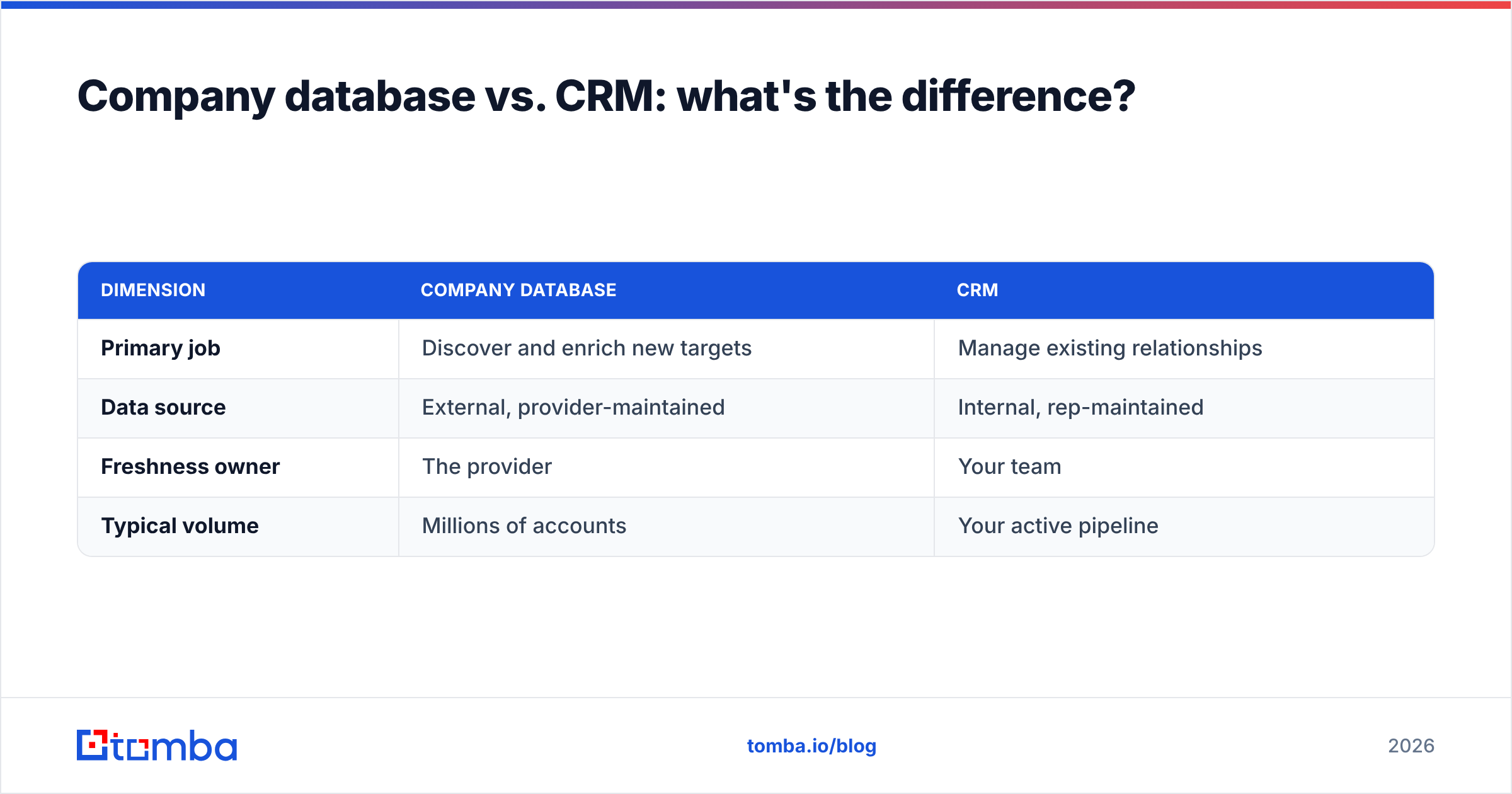
Company database vs. CRM: what's the difference?#
They're often confused, so let's be precise. Your CRM is where you manage relationships you already have — deals, activities, notes, pipeline stages. A company database is the external universe of accounts and contacts, most of which you haven't engaged yet. See the CRM definition for the fuller picture.
| Dimension | Company database | CRM |
|---|---|---|
| Primary job | Discover and enrich new targets | Manage existing relationships |
| Data source | External, provider-maintained | Internal, rep-maintained |
| Freshness owner | The provider | Your team |
| Typical volume | Millions of accounts | Your active pipeline |
The healthiest setup connects the two: the company database feeds fresh, verified records into the CRM, and the CRM's activity data flags which accounts deserve re-enrichment. Neither replaces the other.
The bottom line#
A company database is a maintenance commitment, not a purchase. The teams that win with B2B data aren't the ones with the biggest record count — they're the ones whose data is verified when they use it. That means picking accuracy over volume, building a refresh loop instead of a snapshot, and treating provenance as a first-class field.
If you want the fresh-when-you-ask model without standing up your own pipeline, start with the Tomba Email Finder. It finds current contacts by company domain, verifies them in real time, and plugs into your CRM so your database improves every time you use it instead of decaying. Try it on the free tier (25 searches/mo), then scale on the Starter plan at $49/mo when you're ready — full Tomba pricing is transparent and usage-based. Build the loop once, and your company database stops rotting.
Related guides#
Ready to find emails that actually work?
Join 150,000+ professionals who stopped guessing and started sending. Free credits on signup — no credit card required.
Get the Tomba newsletter
Practical outbound tactics and product updates — once every two weeks.
About the author