Company Email Address Lookup: How to Find Any Work Email in 2026
A practical, no-fluff guide to company email address lookup in 2026 — the methods that actually work, what accuracy really means, and how to verify before you send.
Finding one work email is easy. Finding 500 that actually deliver — without torching your sender reputation — is where most teams fall apart. This guide breaks down company email address lookup the way a practitioner would: what each method costs you in time and accuracy, when guessing is fine, and when you need a real tool behind you.
TL;DR#
- Company email address lookup means locating a person's work email using their name, their employer's domain, or a company's website — then confirming it's real before you send.
- Manual tricks (Google dorks, LinkedIn, pattern guessing) work for one-off lookups but collapse at volume and can't tell you if an inbox actually exists.
- A dedicated email finder + verifier is the only approach that scales past a handful of contacts with accuracy you can trust.
- Accuracy claims are cheap. What matters is the verified deliverable rate — how many addresses land, not how many a tool "returns."
- Always verify before you send. An unverified list is the fastest way to a spam-folder reputation.
What is company email address lookup?#
Company email address lookup is the process of finding a specific person's professional email — like jane.doe@acme.com — using signals you already have: their name, their employer, or the company's web domain. Think of it like finding someone's desk in a large office. You know the building (the domain) and the person (the name); lookup is figuring out which desk is theirs without knocking on all 400 doors.
There are two directions this usually runs:
- Person-first: You know who you want (a VP of Marketing at Acme) and need their address.
- Company-first: You have a target account and want every relevant contact at that company email search — a whole domain's worth of people.
Both rely on the same underlying reality: most companies use a predictable email pattern. Once you know Acme uses first.last@acme.com, you can reason about any employee. The hard part is confirming the guess and handling the companies that don't follow the obvious pattern.

Why is finding company emails harder than it looks?#
Because a plausible-looking address is not the same as a working one. You can generate jane.doe@acme.com in two seconds — but if Jane is actually jdoe@acme.com, or she left in March, or Acme runs a catch-all server that accepts everything and delivers nothing, your "lookup" just produced a bounce waiting to happen.
Three things make this genuinely difficult:
- Pattern drift. Big companies acquire smaller ones and inherit their formats. One domain can carry three patterns at once.
- Catch-all domains. Some servers accept every address at the domain, so a standard SMTP check returns "valid" for garbage. You need a dedicated catch-all verifier to reason about these.
- Staleness. People change jobs constantly. An address that was perfect last quarter is dead weight today.
This is why "I found the email" and "the email is deliverable" are two separate claims. Serious outreach depends on the second one.
What are the main company email lookup methods?#
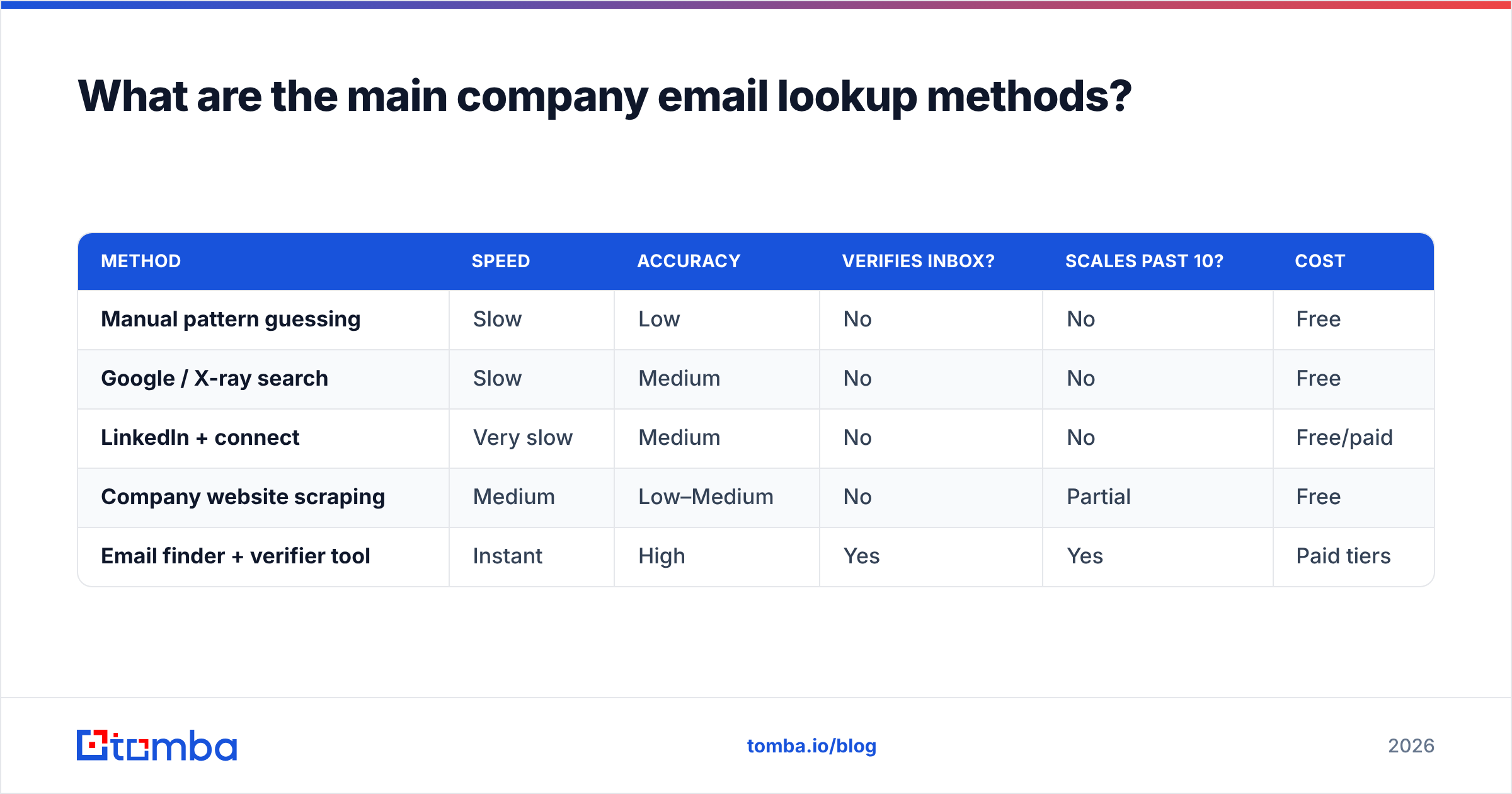
You have five realistic options in 2026, ranging from free-and-slow to paid-and-instant. Here's how they stack up on the things that actually matter.
| Method | Speed | Accuracy | Verifies inbox? | Scales past 10? | Cost |
|---|---|---|---|---|---|
| Manual pattern guessing | Slow | Low | No | No | Free |
| Google / X-ray search | Slow | Medium | No | No | Free |
| LinkedIn + connect | Very slow | Medium | No | No | Free/paid |
| Company website scraping | Medium | Low–Medium | No | Partial | Free |
| Email finder + verifier tool | Instant | High | Yes | Yes | Paid tiers |
The pattern is hard to miss: the free methods share the same two fatal flaws — they don't verify the inbox, and they don't scale. They're fine when you need one CEO's address before a meeting. They fall apart the moment you need a repeatable pipeline.
1. Manual pattern guessing#
Find one known email at the company (often on their site or a press release), infer the pattern, and apply it to your target. Tools like an email permutator generate every plausible combination. It's clever and free — but you still have to verify each guess by hand, and catch-all domains will lie to you.
2. Search-engine X-ray#
Queries like "@acme.com" "marketing" or site:acme.com contact surface published addresses. Great for finding the pattern, weak for finding a specific quiet employee who never published their address anywhere.
3. LinkedIn and social#
You can confirm a person's current employer and role, then combine that with a known domain pattern. Useful context, but LinkedIn rarely exposes the email itself, and manual connection requests don't scale.
4. Website and directory scraping#
Team pages, /about, and press kits sometimes list emails outright. Hit-or-miss, and rarely covers the individual contributors you actually want to reach.
5. A dedicated email finder#
This is the only method built for volume. You give it a name and a domain (or just a domain), and it returns the address plus a verification status in one step. The good ones show you why they believe an address is valid — the source, the pattern, the confidence.
How accurate is company email lookup, really?#
Accuracy is the whole game, and it's also the most abused number in this category. A tool that "returns an email 95% of the time" tells you nothing if half of those bounce. The metric that matters is the verified deliverable rate: of the addresses a tool returns, how many actually accept mail.

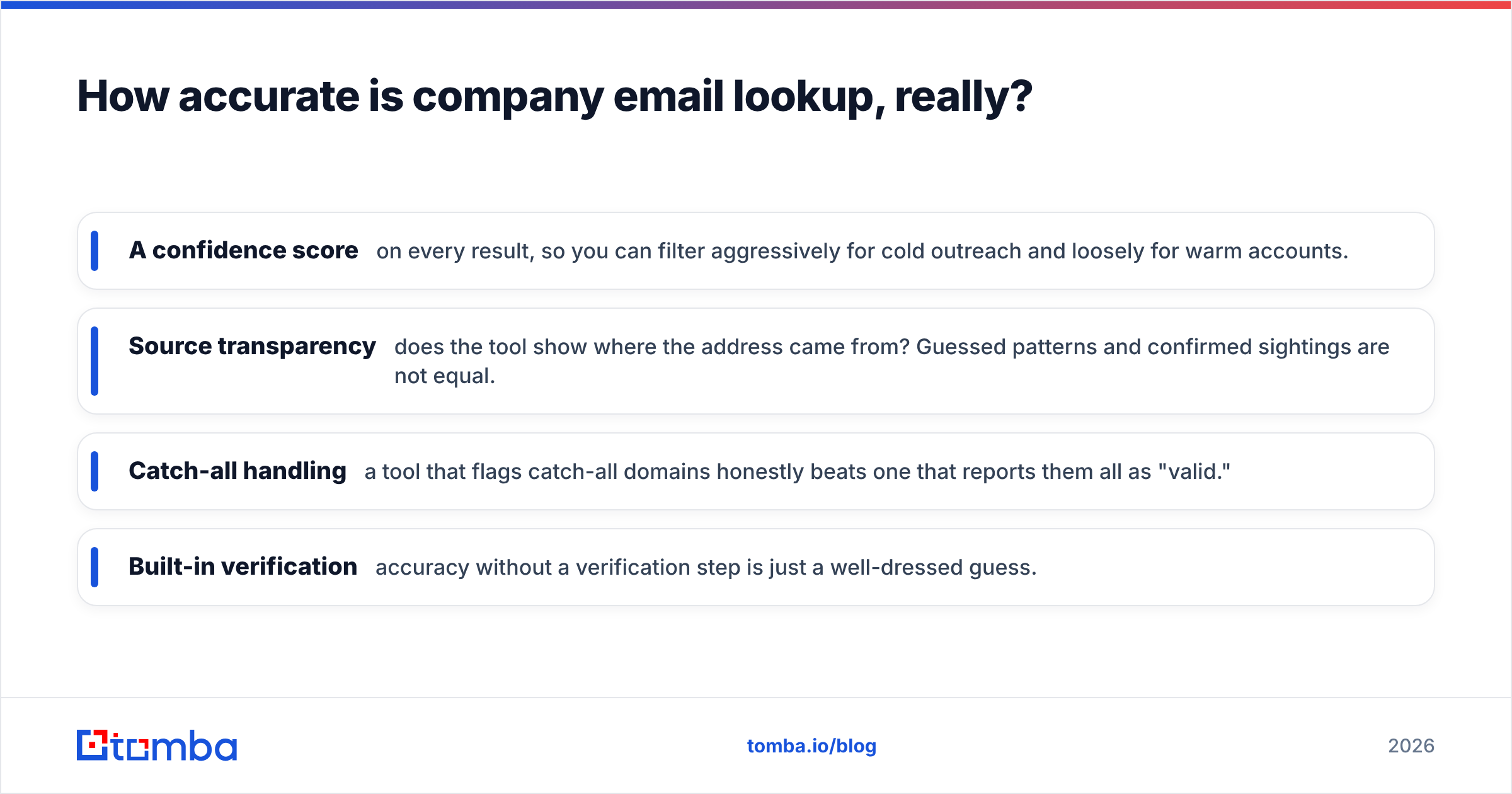
When you evaluate accuracy, look for these signals instead of a single headline percentage:
- A confidence score on every result, so you can filter aggressively for cold outreach and loosely for warm accounts.
- Source transparency — does the tool show where the address came from? Guessed patterns and confirmed sightings are not equal.
- Catch-all handling — a tool that flags catch-all domains honestly beats one that reports them all as "valid."
- Built-in verification — accuracy without a verification step is just a well-dressed guess.
Independent buyer reviews on sites like G2 are a better sanity check than any vendor's own landing page. Read the one- and two-star reviews specifically; that's where bounce complaints live.
What does a good email finder tool actually do?#
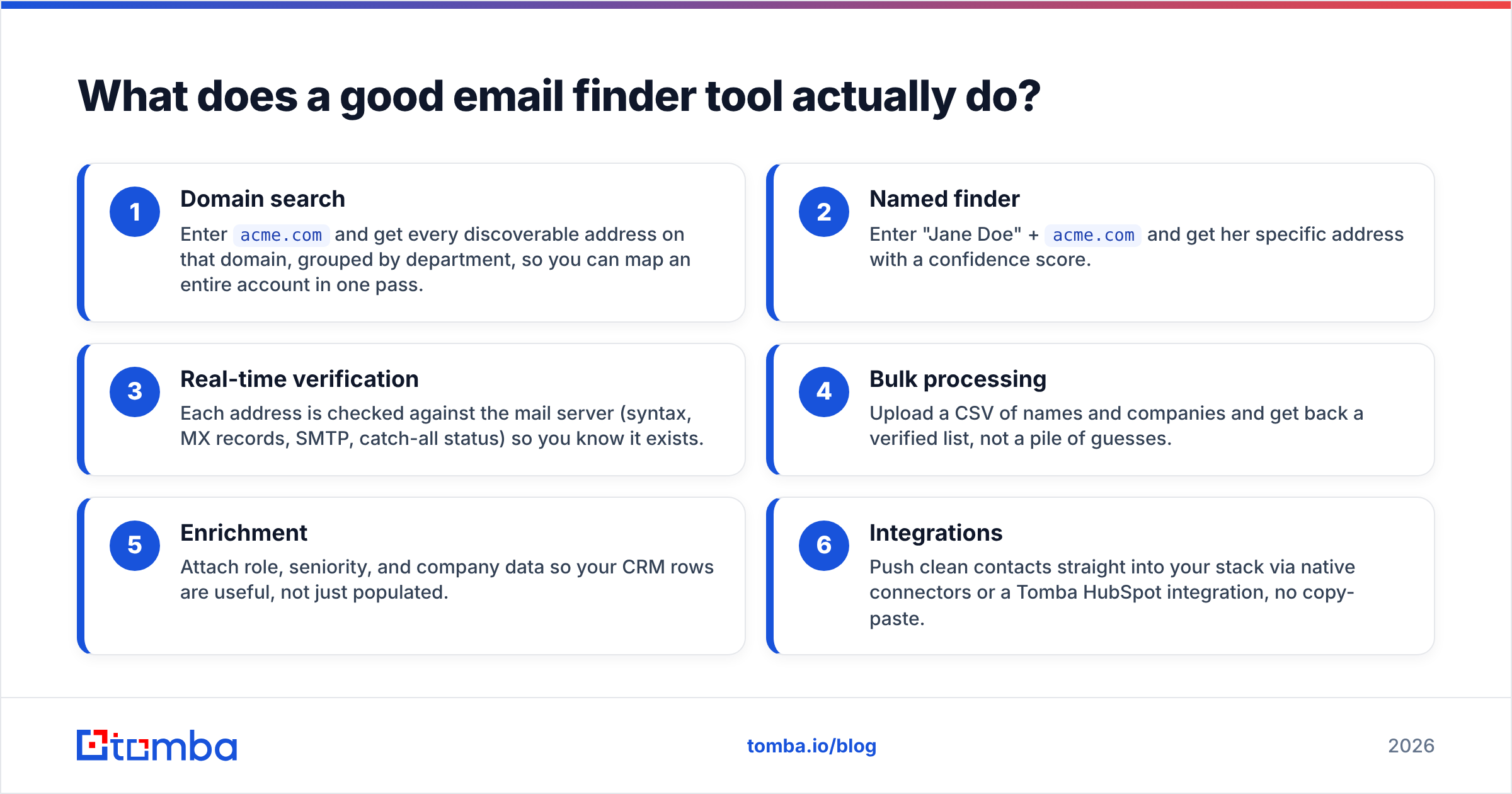
A finder is only half the job. The other half is a verifier that confirms deliverability before anything leaves your outbox. Here's what a complete workflow looks like when the tooling is doing its job.
- Domain search — Enter
acme.comand get every discoverable address on that domain, grouped by department, so you can map an entire account in one pass. - Named finder — Enter "Jane Doe" +
acme.comand get her specific address with a confidence score. - Real-time verification — Each address is checked against the mail server (syntax, MX records, SMTP, catch-all status) so you know it exists.
- Bulk processing — Upload a CSV of names and companies and get back a verified list, not a pile of guesses.
- Enrichment — Attach role, seniority, and company data so your CRM rows are useful, not just populated.
- Integrations — Push clean contacts straight into your stack via native connectors or a Tomba HubSpot integration, no copy-paste.
This is where Tomba fits. Its core email finder covers steps one and two, an email verifier handles step three, and the bulk email finder turns a spreadsheet of prospects into a send-ready list. You're not stitching five tools together; the lookup and the verification are the same motion.

How much does company email lookup cost in 2026?#
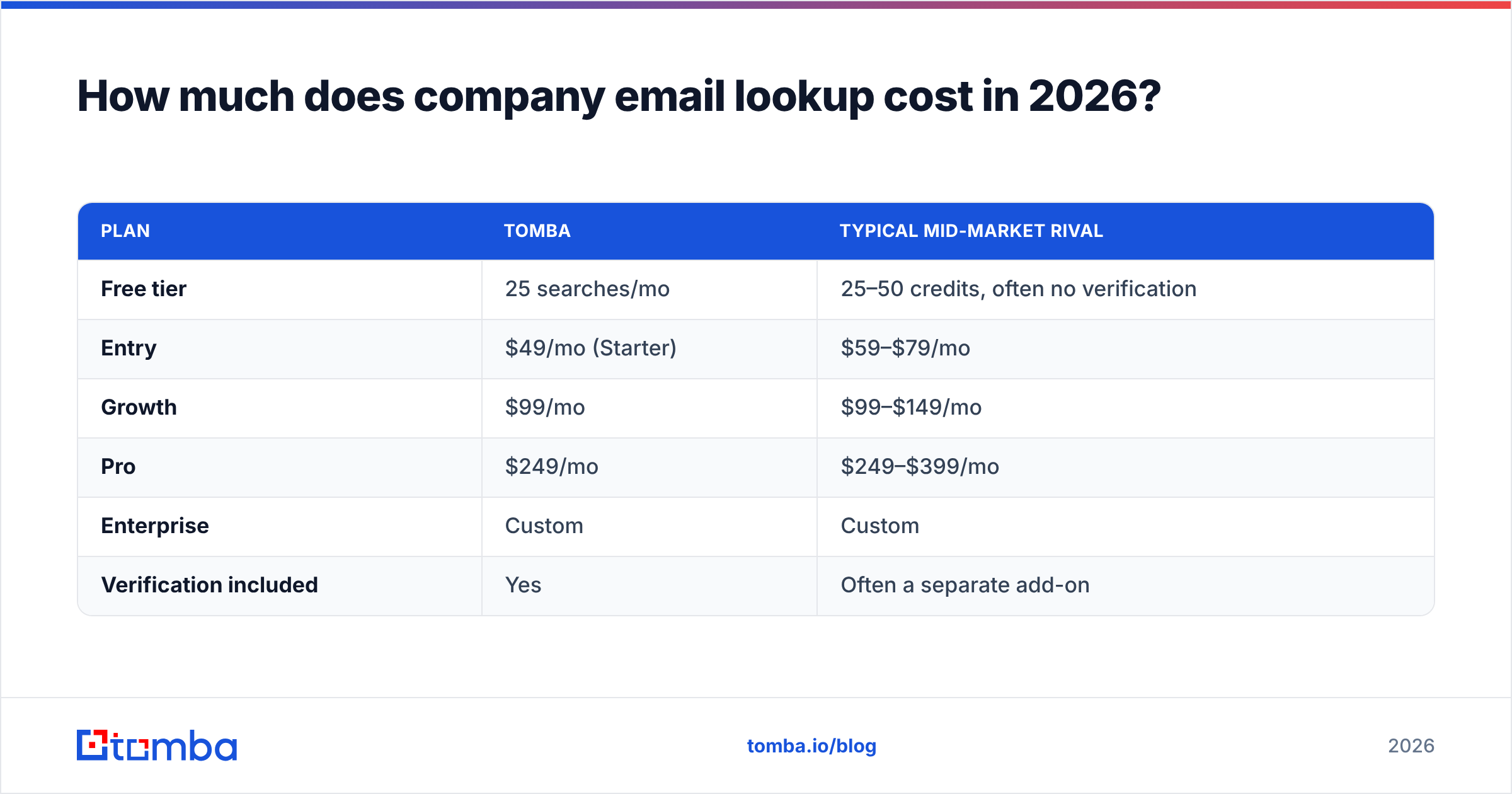
Free methods cost you time; paid tools cost you money but return hours and deliverability. Here's how the pricing shakes out across common options so you can match a plan to your actual volume.
| Plan | Tomba | Typical mid-market rival |
|---|---|---|
| Free tier | 25 searches/mo | 25–50 credits, often no verification |
| Entry | $49/mo (Starter) | $59–$79/mo |
| Growth | $99/mo | $99–$149/mo |
| Pro | $249/mo | $249–$399/mo |
| Enterprise | Custom | Custom |
| Verification included | Yes | Often a separate add-on |
The line that trips people up is verification. Plenty of competitors sell finding and verifying as two products, so the sticker price understates the real cost. When you compare, normalize on verified addresses per dollar, not raw credits. Full Tomba pricing is public if you want the exact tier breakdown.
For most teams the math is simple: if you're doing more than roughly 20 lookups a week, a paid finder pays for itself in recovered time before you even count the deliverability gains.
When should you still do it manually?#
Manual lookup earns its keep in three narrow cases:
- One critical contact. You need a single decision-maker's address before a meeting and have five minutes to spare. Guess the pattern, verify it once with a free email checker, and move on.
- Ultra-sensitive targets. For a tiny list of high-stakes prospects, a human eyeballing every source can add judgment a tool won't.
- Pattern discovery. Sometimes you just want to learn a company's format, which a company email pattern tool surfaces instantly and for free.
Outside those cases, manual work is a false economy. The time you spend guessing and cross-checking is time you're not spending on the conversation that actually closes.
How do you keep your lookups from hurting deliverability?#
Finding the address is step one; protecting your sender reputation is what keeps you in the inbox. Even a perfectly-found list will burn you if you send carelessly.
- Verify before every send, not once a quarter. Lists decay 2–3% per month as people change jobs.
- Segment by confidence. Send to high-confidence, verified addresses first; treat catch-all and low-confidence ones as a separate, gentler track.
- Warm up new domains. A clean list on a cold domain still lands in spam. Reputation is earned over time.
- Respect the data. Comply with GDPR and CAN-SPAM — legitimate B2B outreach is fine, but honor opt-outs immediately.
Reputable finders source data responsibly; you can read where Tomba's data sources come from rather than taking accuracy on faith. Pairing a clean source with disciplined verification is what separates a durable outreach program from a one-quarter flameout.
Which method should you choose?#
Match the tool to the job:
- One-off, low stakes → Google X-ray or a free permutator, verified once by hand.
- A named person you must reach → a finder with a confidence score, verified before sending.
- A whole target account → domain search, so you map every relevant contact at once.
- Hundreds or thousands of prospects → a bulk finder with built-in verification, full stop.
The through-line is verification. Whichever method surfaces the address, confirming it exists before you send is non-negotiable in 2026 — mailbox providers are less forgiving of bounces than they've ever been.
Start looking up company emails the reliable way#
If your company email address lookup involves more than the occasional single contact, stop guessing and let a purpose-built tool do the finding and the verifying in one pass. Tomba's Email Finder turns a name and a domain — or just a domain — into a verified, confidence-scored address, with domain search, bulk processing, and a built-in verifier behind it. Start on the free tier (25 searches a month, no card), and upgrade to Starter at $49/mo when your pipeline outgrows it. Find the right people, confirm they're reachable, and spend your time on the conversation instead of the guesswork.
Related guides#
Ready to find emails that actually work?
Join 150,000+ professionals who stopped guessing and started sending. Free credits on signup — no credit card required.
Get the Tomba newsletter
Practical outbound tactics and product updates — once every two weeks.
About the author