Company Email Domain Finder: Find Any Company's Emails in 2026
A company email domain finder turns a website into a list of verified work emails. Here's how domain-based lookup works, what accuracy to expect, and how the top tools compare in 2026.
TL;DR
- A company email domain finder takes a company's website (like
stripe.com) and returns the work email addresses tied to that domain — no guessing formats by hand. - The good ones do three jobs at once: detect the company's email pattern, list real people behind it, and verify each address before you send.
- Accuracy is the whole game. A finder that hands you 500 addresses at 55% deliverability is worse than one that hands you 300 at 96%.
- Free browser tools are fine for a one-off lookup; API and bulk workflows are where paid tools earn their keep.
- Tomba runs a free tier (25 searches/month) and paid plans from $49/mo, with domain search, verification, and catch-all handling in one place.
What is a company email domain finder?#
A company email domain finder is a tool that maps a domain to the email addresses that live on it. You give it acme.com; it gives you jane.doe@acme.com, m.patel@acme.com, and so on — along with names, job titles, and a confidence score for each.
Think of it like a phone book for a single office building. Instead of knocking on every door to learn who works there, you look up the address once and get the whole directory. The tool figures out the building's naming convention (first.last, flast, first) and then fills in the residents it already knows about.
Under the hood, three things are happening:
- Pattern detection — the tool identifies the dominant email format for the domain (e.g.
{first}.{last}@domain). - Person matching — it cross-references known employees at that company from public sources, its own crawled index, and enrichment data.
- Verification — it pings each candidate address (SMTP checks, MX records, catch-all detection) so you're not sending into a black hole.
Skip step three and you've built a bounce machine. That's the part cheap tools quietly cut.

How does domain-based email lookup actually work?#
Domain lookup is not magic and it's not scraping your inbox. It's pattern inference plus a large, continuously refreshed index of business contacts.
Here's the flow most quality tools follow when you run a domain search:
- Input the domain. You paste
company.comor a company name that resolves to it. - Resolve the mail infrastructure. The tool reads MX records to confirm where mail is delivered (Google Workspace, Microsoft 365, self-hosted).
- Infer the pattern. From known addresses on that domain, it locks the dominant format and its confidence.
- Enumerate people. It returns employees it can associate with the domain, ranked by how sure it is.
- Verify each address. SMTP handshakes and catch-all logic separate the safe sends from the risky ones.
The catch-all problem deserves its own callout. Some domains accept mail for any address — anything@company.com looks valid even when the person doesn't exist. A serious finder flags these instead of pretending they're confirmed, which is why a dedicated catch-all verifier matters more than a raw count of "found" emails.
What makes one company email domain finder better than another?#
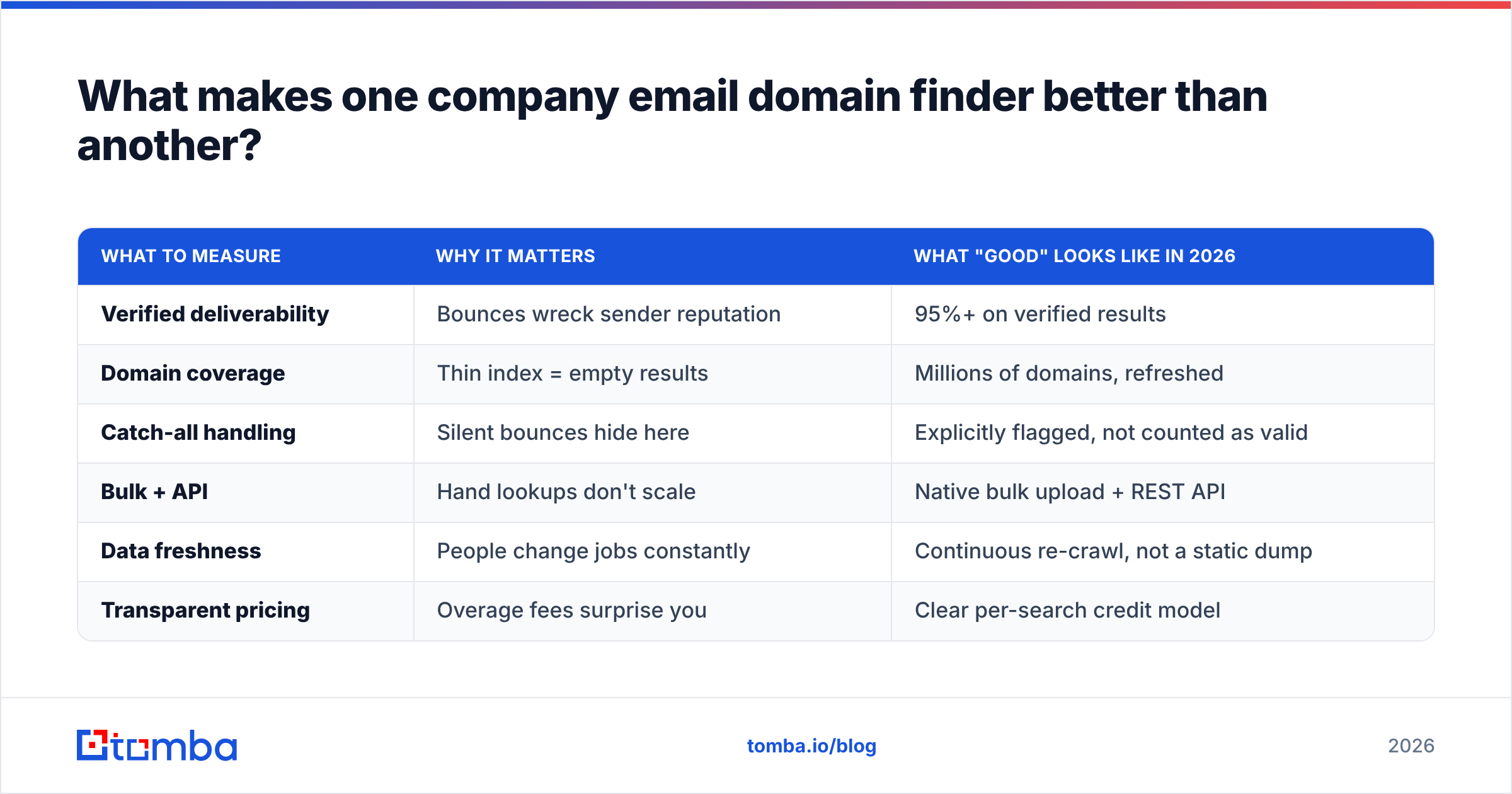
Coverage gets the headline; accuracy pays the bills. Below is the honest scorecard to judge any tool against.
| What to measure | Why it matters | What "good" looks like in 2026 |
|---|---|---|
| Verified deliverability | Bounces wreck sender reputation | 95%+ on verified results |
| Domain coverage | Thin index = empty results | Millions of domains, refreshed |
| Catch-all handling | Silent bounces hide here | Explicitly flagged, not counted as valid |
| Bulk + API | Hand lookups don't scale | Native bulk upload + REST API |
| Data freshness | People change jobs constantly | Continuous re-crawl, not a static dump |
| Transparent pricing | Overage fees surprise you | Clear per-search credit model |

Notice what's not on that list: total addresses returned. A vendor bragging about volume without a verified-deliverability number is selling you a bounce rate. When you evaluate data accuracy, ask where the data comes from and how often it's checked — a fresh, verified 300 beats a stale, unverified 3,000 every time.
Which tools lead the company email domain finder market in 2026?#
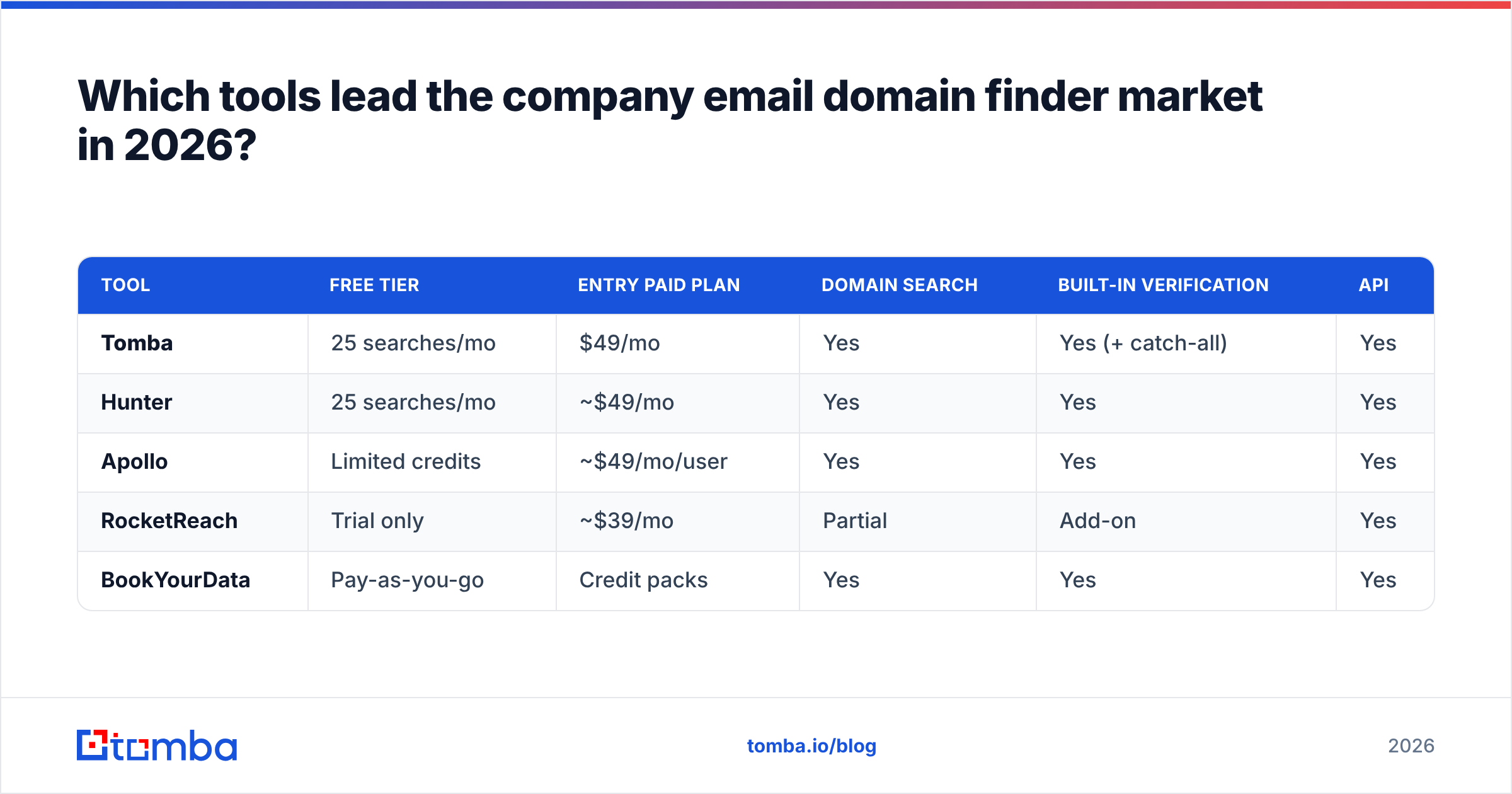
Here's a neutral side-by-side of the categories you'll actually shortlist. Prices are entry paid tiers as published on each vendor's site; verify current numbers before you buy.
| Tool | Free tier | Entry paid plan | Domain search | Built-in verification | API |
|---|---|---|---|---|---|
| Tomba | 25 searches/mo | $49/mo | Yes | Yes (+ catch-all) | Yes |
| Hunter | 25 searches/mo | ~$49/mo | Yes | Yes | Yes |
| Apollo | Limited credits | ~$49/mo/user | Yes | Yes | Yes |
| RocketReach | Trial only | ~$39/mo | Partial | Add-on | Yes |
| BookYourData | Pay-as-you-go | Credit packs | Yes | Yes | Yes |
A few honest notes so you pick by fit, not by ad copy:
- Tomba bundles domain search, email verification, catch-all detection, and enrichment under one credit system — good when you want one bill and one API. See full Tomba pricing for the Growth ($99/mo) and Pro ($249/mo) tiers.
- Hunter is the incumbent generalist — clean UI, well-known, comparable entry price.
- Apollo couples finding with a full sales-engagement suite; you're buying more than a finder, and pricing is per seat.
- RocketReach leans on breadth and personal contact data; domain-first workflows are less central.
- BookYourData is a respected pay-as-you-go option when you'd rather buy credits than subscribe.

For deeper head-to-heads, third-party review sites like G2 and Capterra keep current user ratings that cut through vendor claims.
Is a free company email domain finder good enough?#
For a handful of lookups a month, yes. For a real outbound program, no — and here's where people get burned.
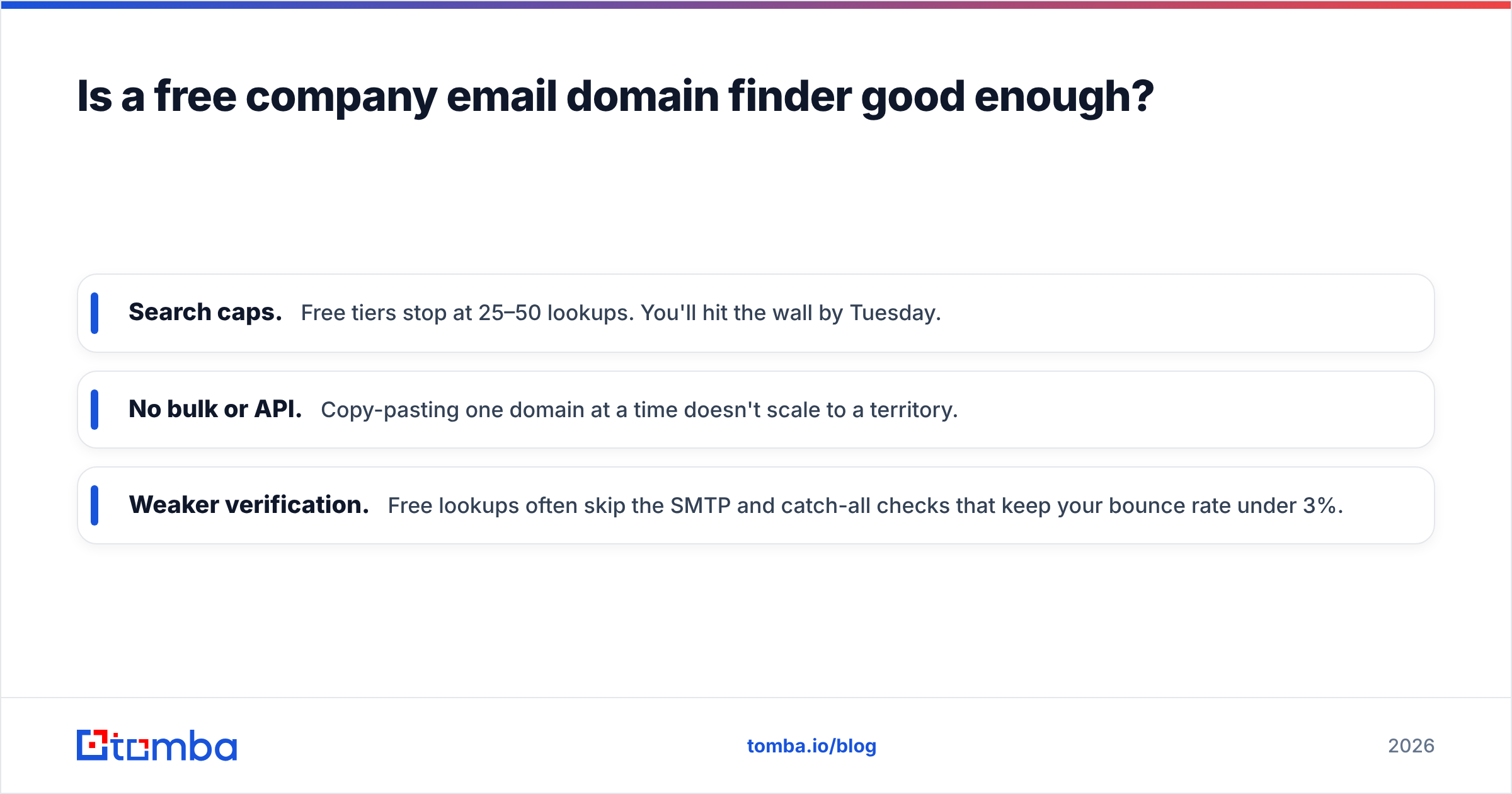
Free tools and free tiers are perfect when you need to find one decision-maker's email before a call, or confirm a company's format. The moment you're pulling hundreds of contacts a week, three limits bite:
- Search caps. Free tiers stop at 25–50 lookups. You'll hit the wall by Tuesday.
- No bulk or API. Copy-pasting one domain at a time doesn't scale to a territory.
- Weaker verification. Free lookups often skip the SMTP and catch-all checks that keep your bounce rate under 3%.
That last point is the expensive one. Send to unverified addresses and mailbox providers start routing you to spam — your good emails suffer for the bad ones.

If bounce rate is the risk, verification is the insurance. Run any list — bought, scraped, or found — through a bulk verifier before the first send. It's the cheapest deliverability win you'll ever buy. (More on why in email deliverability fundamentals.)
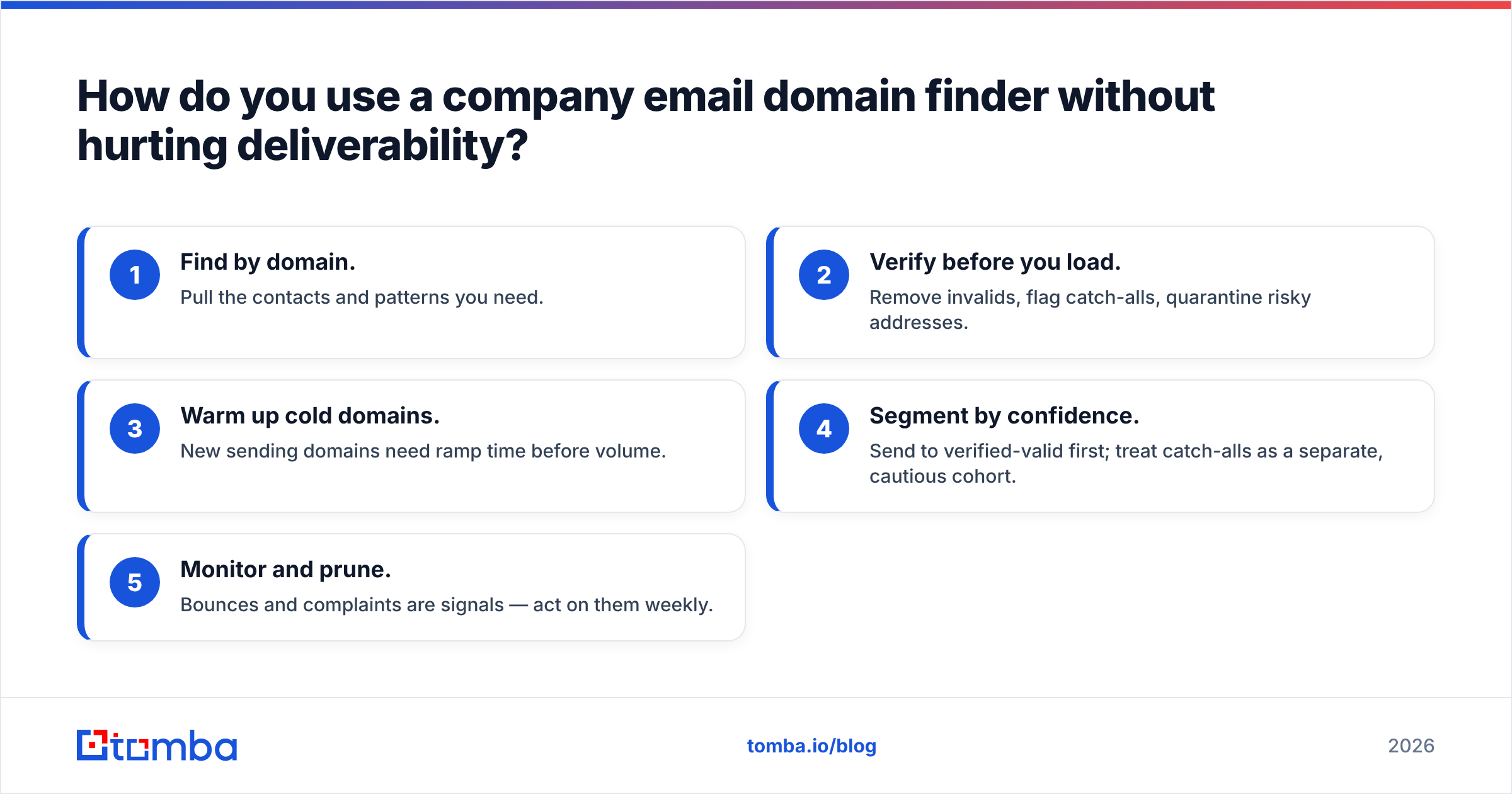
How do you use a company email domain finder without hurting deliverability?#
Finding emails is step one. Protecting your ability to reach them is the part that separates pros from list-burners.
Follow this sequence and your domain stays healthy:
- Find by domain. Pull the contacts and patterns you need.
- Verify before you load. Remove invalids, flag catch-alls, quarantine risky addresses.
- Warm up cold domains. New sending domains need ramp time before volume.
- Segment by confidence. Send to verified-valid first; treat catch-alls as a separate, cautious cohort.
- Monitor and prune. Bounces and complaints are signals — act on them weekly.
Two authoritative references worth bookmarking: Google's own Postmaster and sender guidelines spell out the bounce and complaint thresholds that trigger spam folder placement, and most CRMs (see HubSpot's deliverability docs) echo the same rules. None of this is optional in 2026 — mailbox providers enforce it automatically.
What's the fastest way to get started?#
Start with a single domain and see the output quality for yourself. Paste a company you know well into a domain finder, then eyeball whether the names, titles, and formats match reality. Quality is obvious within one search.
If you want a tool that handles the whole chain — find by domain, verify, flag catch-alls, and enrich — in one credit system with a real API, try the Tomba Email Finder. The free tier gives you 25 searches a month to test accuracy on your own target accounts before spending a dollar, and paid plans start at $49/mo when you're ready to scale. Feed it a domain, get back verified work emails, and keep your sender reputation intact while you do it.
Find the right people. Verify before you send. Then reach out.
Related guides#
Ready to find emails that actually work?
Join 150,000+ professionals who stopped guessing and started sending. Free credits on signup — no credit card required.
Get the Tomba newsletter
Practical outbound tactics and product updates — once every two weeks.
About the author