Company Sizes Explained: B2B Segments and How to Sell Each
SMB, mid-market, enterprise — the labels sound simple until a deal stalls because you pitched the wrong tier. Here's how B2B company sizes actually break down and how to sell each one.
Company size is one of those filters everyone applies and almost nobody defines the same way. One rep calls a 300-person company "mid-market," another calls it "enterprise," and a third lumps it in with SMB because the deal size looked small. That inconsistency quietly wrecks segmentation, forecasting, and every cold email you send.
This guide fixes that. You'll get a clear, numbers-based breakdown of B2B company sizes, why each tier behaves differently, and how to change your outreach, pricing, and sales motion depending on who you're targeting.
TL;DR#
- Company sizes in B2B are usually bucketed by headcount into micro (1–10), small (11–50), mid-market (51–1,000), and enterprise (1,000+) — but revenue and deal complexity matter just as much.
- Each tier buys differently. SMBs decide fast with one or two people; enterprise deals drag through procurement, security review, and committees of 6–10 stakeholders.
- Segment before you prospect, not after. Filtering your list by company size up front doubles the relevance of every message.
- One message never fits all sizes. A pitch that lands with a 5-person startup will bounce off a 5,000-person org, and vice versa.
- Accurate firmographic data is the whole game. You can't segment by a company size field you don't actually have — enrichment fills that gap.
What are company sizes in B2B?#
Company size is a way of grouping businesses into tiers so you can treat similar buyers similarly. Think of it like clothing sizes: a store doesn't stitch a unique shirt for every customer, but it also doesn't sell one universal garment. It offers a handful of sizes that cover most bodies well enough. B2B segmentation works the same way — a few well-chosen tiers let you tailor your approach without building a custom motion for every account.
The most common yardstick is employee headcount, because it's public, stable, and easy to pull from data providers. But headcount alone can mislead you. A 40-person software company can generate more revenue than a 400-person logistics firm, and a lean 200-person fintech can have a longer, more complex buying process than a 2,000-person retailer. Serious segmentation blends three signals:
- Headcount — the default proxy; easy to source and compare.
- Annual revenue — reflects budget and deal-size potential better than headcount.
- Buying complexity — number of stakeholders, procurement rigor, and security requirements, which tend to scale with size but not perfectly.

For the official definitions that regulators use, the U.S. Small Business Administration sets size standards by industry (often up to 500 or even 1,500 employees for "small"), and the concept of small and medium-sized enterprises varies across the EU and other regions. Sales teams usually run tighter internal buckets than these legal thresholds.
How are company sizes broken down by headcount and revenue?#
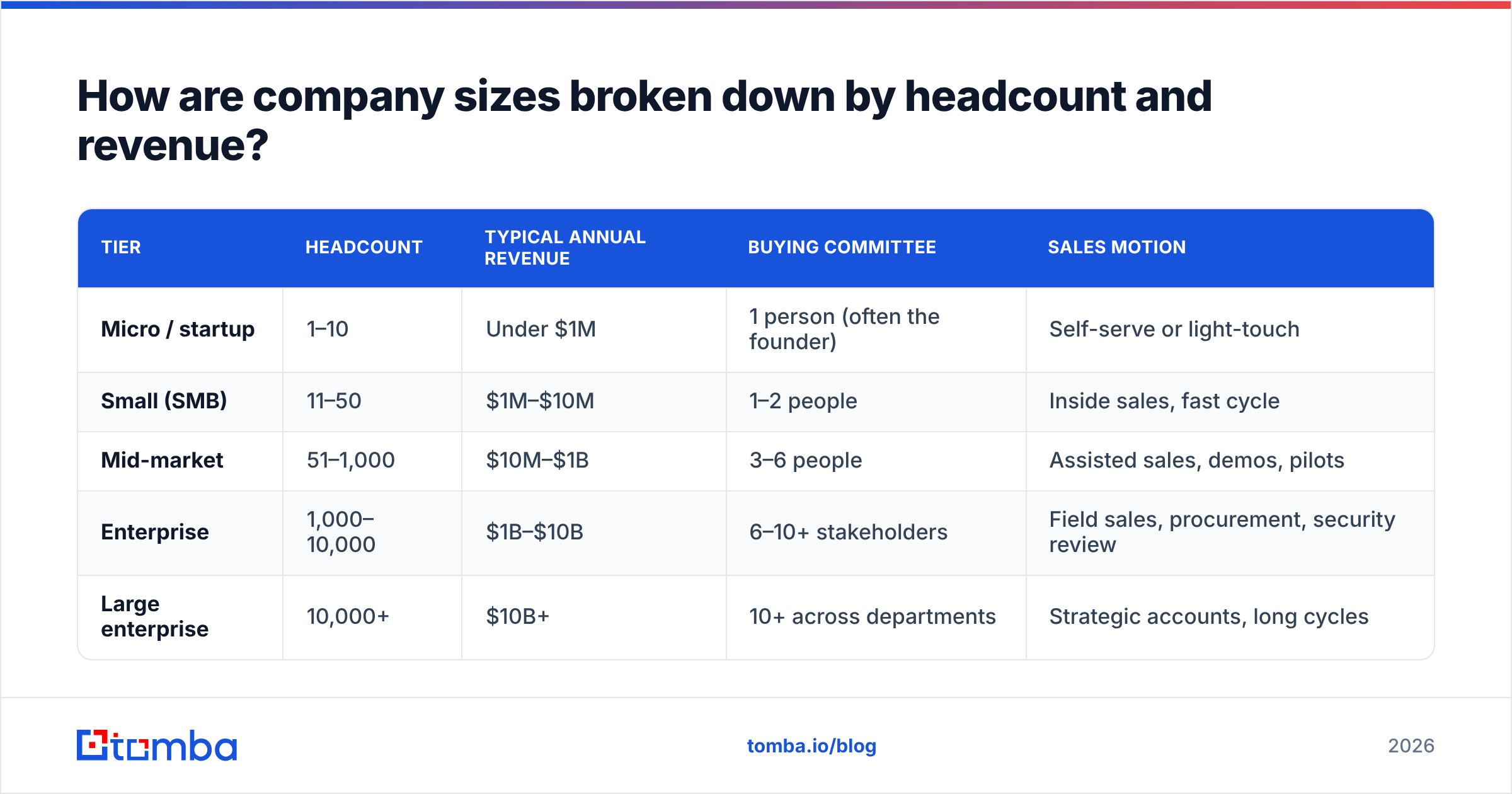
Here's a practical breakdown that maps to how most B2B sales and marketing teams actually segment. Use it as a starting template and adjust the boundaries to your market.
| Tier | Headcount | Typical annual revenue | Buying committee | Sales motion |
|---|---|---|---|---|
| Micro / startup | 1–10 | Under $1M | 1 person (often the founder) | Self-serve or light-touch |
| Small (SMB) | 11–50 | $1M–$10M | 1–2 people | Inside sales, fast cycle |
| Mid-market | 51–1,000 | $10M–$1B | 3–6 people | Assisted sales, demos, pilots |
| Enterprise | 1,000–10,000 | $1B–$10B | 6–10+ stakeholders | Field sales, procurement, security review |
| Large enterprise | 10,000+ | $10B+ | 10+ across departments | Strategic accounts, long cycles |
Two things to notice. First, the ranges overlap in the real world — a fast-growing 900-person company often behaves like enterprise even though headcount says mid-market. Second, revenue and headcount can diverge sharply by industry, which is exactly why you should carry both fields in your CRM rather than trusting one alone. Analysts like Gartner consistently find that buying-group size grows with company size, and that's the variable that actually reshapes your sales process.
Why does company size change how you sell?#
Because the buyer's reality changes at each tier. The same product gets bought for different reasons, by different people, on different timelines.
- Micro and small businesses buy to solve an immediate, concrete pain. The founder or a single manager decides, often in one or two conversations, and cares about price, speed, and whether it works today. Long RFPs and "let me loop in legal" rarely happen. Your job is to reduce friction and prove value fast.
- Mid-market companies are the sweet spot for many B2B vendors. There's real budget, a defined problem owner, and a small committee — but not the procurement gauntlet of enterprise. Deals close in weeks to a couple of months with a demo, a pilot, and a champion who can rally two or three colleagues.
- Enterprise organizations buy through process. Expect security questionnaires, procurement negotiations, multi-threaded stakeholders, and a cycle measured in quarters. The upside is contract size and stickiness; the cost is patience and coordination. You're not selling a product so much as de-risking a decision for a group of people who each have something to lose.
If you send the enterprise playbook to a 10-person startup, you'll bore them with process they don't need. Send the SMB playbook to a 5,000-person org, and you'll look like you don't understand how they operate. Matching motion to size is the difference between a reply and a delete.
How do you segment your prospect list by company size?#
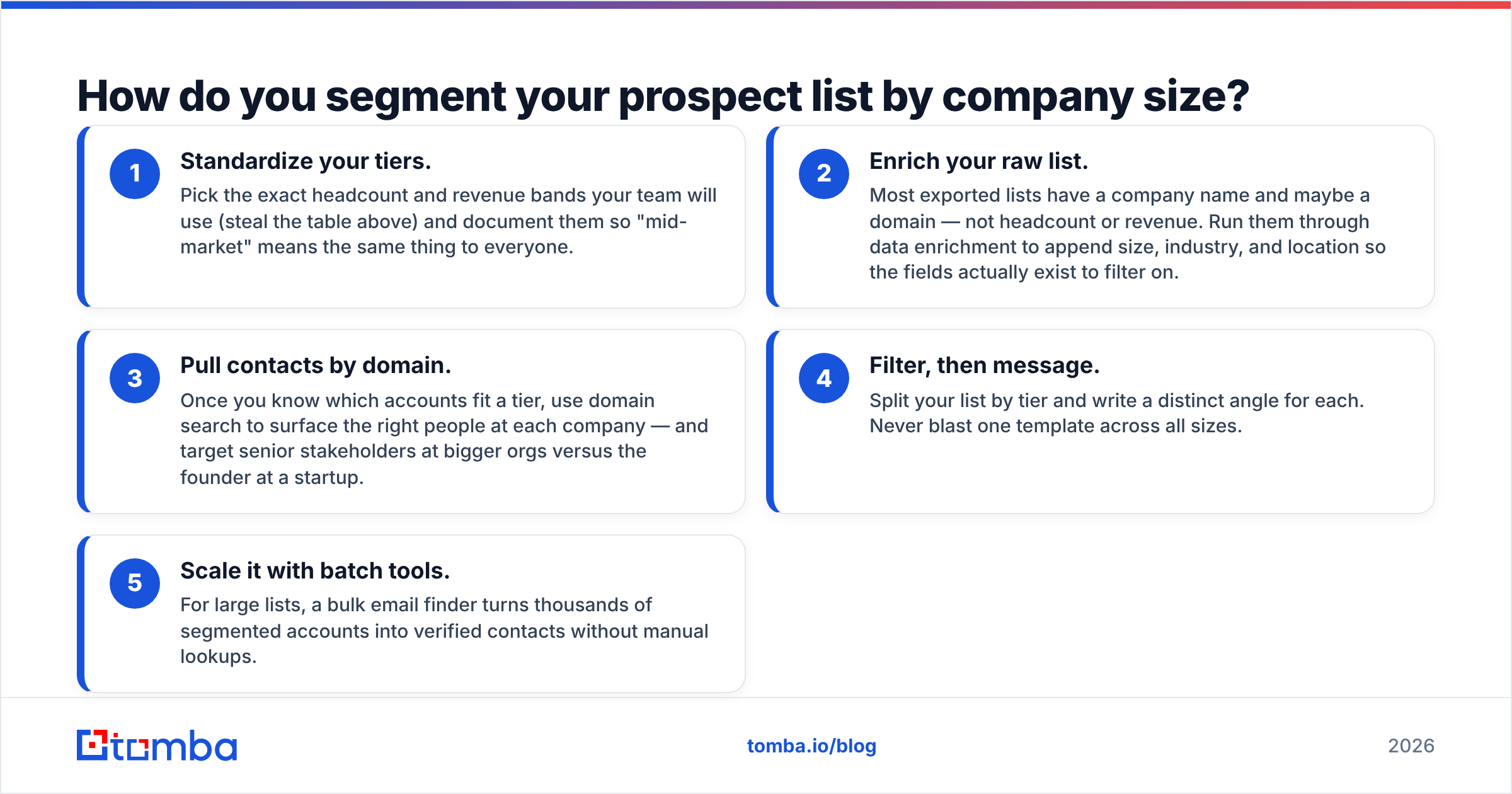
Segmenting well comes down to having the right firmographic fields attached to every account, then filtering before you write a single line of outreach. Here's the workflow that scales.
- Standardize your tiers. Pick the exact headcount and revenue bands your team will use (steal the table above) and document them so "mid-market" means the same thing to everyone.
- Enrich your raw list. Most exported lists have a company name and maybe a domain — not headcount or revenue. Run them through data enrichment to append size, industry, and location so the fields actually exist to filter on.
- Pull contacts by domain. Once you know which accounts fit a tier, use domain search to surface the right people at each company — and target senior stakeholders at bigger orgs versus the founder at a startup.
- Filter, then message. Split your list by tier and write a distinct angle for each. Never blast one template across all sizes.
- Scale it with batch tools. For large lists, a bulk email finder turns thousands of segmented accounts into verified contacts without manual lookups.
The order matters. Segment first, enrich second, personalize third. Teams that skip enrichment end up "segmenting" on a field that's 40% blank, which means nearly half their list gets the wrong message by default.
What message works for each company size?#
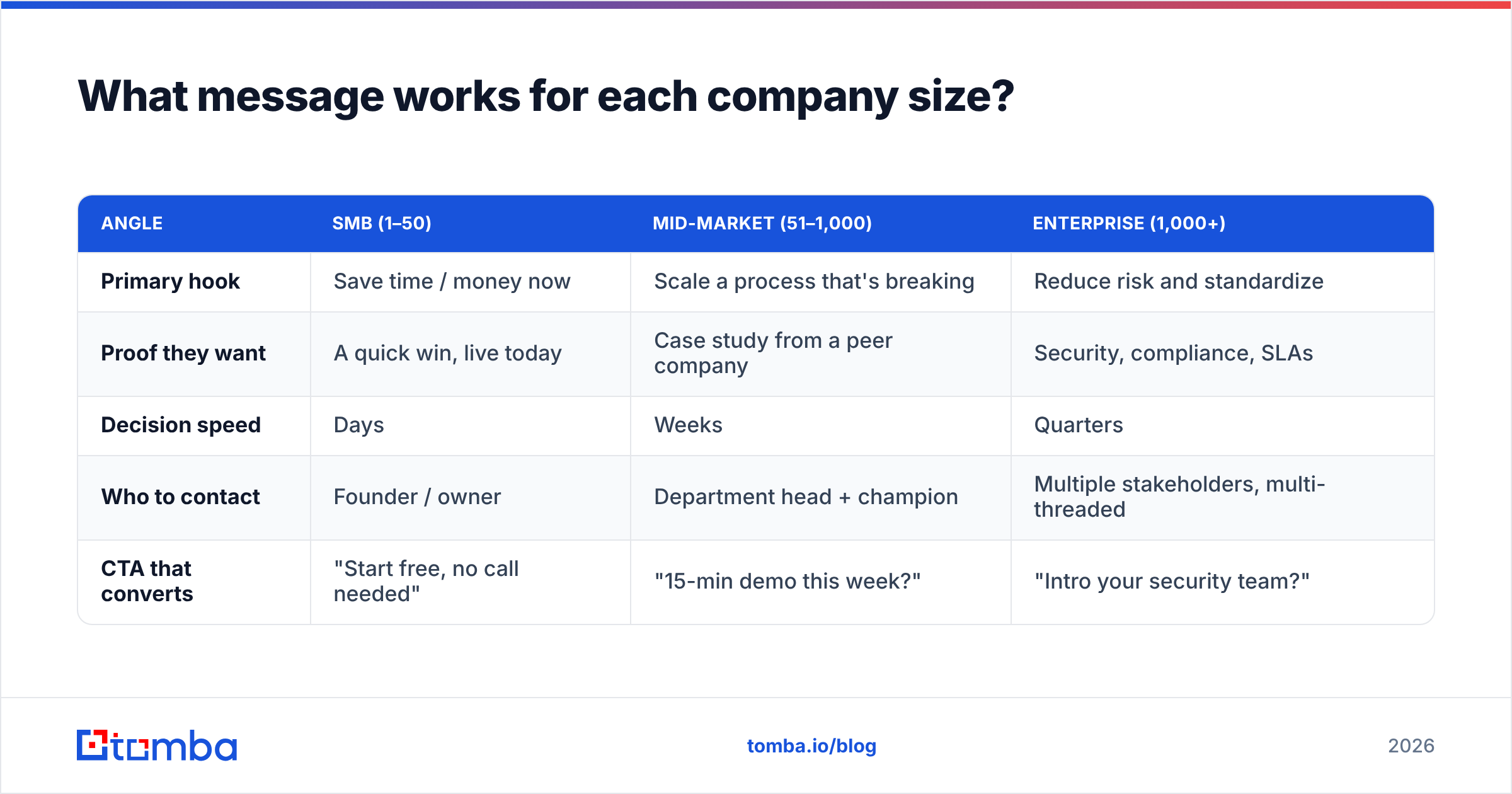
Same product, different framing. Below is how the core value proposition shifts as you move up the size ladder.
| Angle | SMB (1–50) | Mid-market (51–1,000) | Enterprise (1,000+) |
|---|---|---|---|
| Primary hook | Save time / money now | Scale a process that's breaking | Reduce risk and standardize |
| Proof they want | A quick win, live today | Case study from a peer company | Security, compliance, SLAs |
| Decision speed | Days | Weeks | Quarters |
| Who to contact | Founder / owner | Department head + champion | Multiple stakeholders, multi-threaded |
| CTA that converts | "Start free, no call needed" | "15-min demo this week?" | "Intro your security team?" |
The tactical takeaway: your subject line, your proof point, and your call to action should all flex by tier. A "start free in two minutes" CTA converts a solo founder and insults a VP of Operations who needs to bring nine people along. A "let's schedule a security review" line reassures enterprise and terrifies a startup that just wants to try the thing.
What are common mistakes when targeting by company size?#
- Trusting headcount as the only signal. A staffing agency and a SaaS company with identical headcounts have wildly different budgets. Carry revenue too.
- Using stale data. Headcount changes constantly with hiring, layoffs, and acquisitions. A size field from two years ago routinely misclassifies accounts. Refresh it.
- Over-segmenting. Five tiers is plenty. Ten micro-segments create work without lift; you'll spend more time sorting than selling.
- Ignoring the "growth" signal. A 300-person company hiring aggressively often buys like a bigger one. Pair size with momentum indicators.
- Letting fields go blank. The most common failure isn't wrong data — it's missing data. If half your accounts have no size field, your segmentation is a coin flip. This is where clean B2B data earns its keep.
How do you keep company size data accurate over time?#
Company size is a moving target, so treat it as a maintained field, not a one-time import. Three habits keep it trustworthy:
- Re-enrich on a schedule. Run your active accounts through enrichment quarterly so headcount and revenue reflect reality, not last year's snapshot.
- Verify contacts at the same time. People change roles as companies grow. Re-checking with an email verifier keeps your outreach from bouncing when a champion moves on.
- Watch for tier jumps. When an account crosses a boundary — say, a startup that just raised and doubled headcount — it may deserve a different motion and a different rep entirely. Flag those transitions.
Accurate size data compounds. It sharpens forecasting, routes leads to the right team, and makes every downstream metric — win rate, deal size, cycle length — actually comparable across your pipeline.
Which company size should you target first?#
Start where your product creates value fastest and your sales motion already fits. If you're small and need cash flow, SMB and mid-market close quickly and forgive imperfect process. If you have the resources to run long cycles and want big, sticky contracts, invest in enterprise — but only if you can support security reviews and multi-threaded deals. Many teams win by anchoring in mid-market first, then expanding down to SMB with self-serve and up to enterprise once they have reference logos.
Whatever tier you choose, the prerequisite is the same: a clean, segmented, enriched list of the right companies and the right people inside them. You can't sell to a company size you haven't correctly identified.
That's where Tomba's Email Finder comes in. Once you've segmented your accounts by size, Tomba turns those target companies into verified, ready-to-contact email addresses — by domain, by name, or in bulk. Start on the free tier with 25 searches a month, then scale up as your list grows (see Tomba pricing: Starter at $49/mo, Growth at $99/mo, Pro at $249/mo). Segment smart, enrich once, and reach the right people at every company size without the manual grind.
Related guides#
// get started
Find, verify and enrich your first contacts today
Start on the free plan with 25 searches a month, then scale when your team is ready.
Free plan · No credit card required · GDPR & CCPA
// about the author