CompanyData.com, BoldData vs FinalScout: 2026 Verdict
CompanyData.com, BoldData, and FinalScout solve three different lead-data problems. Here's an honest, side-by-side breakdown of pricing, accuracy, and which one actually fits your pipeline in 2026.
Choosing between CompanyData.com, BoldData vs FinalScout comes down to three ideas about lead data. One sells bulk company files. One builds targeted lists by hand. One scrapes contacts off LinkedIn. Pick the wrong one and you burn a quarter of your prospecting budget on records you can't email.
This CompanyData.com, BoldData vs FinalScout breakdown skips the marketing pages. It tells you what each tool is good at, where it falls short, and which workflow it fits.
TL;DR — Which Tool Should You Pick?#
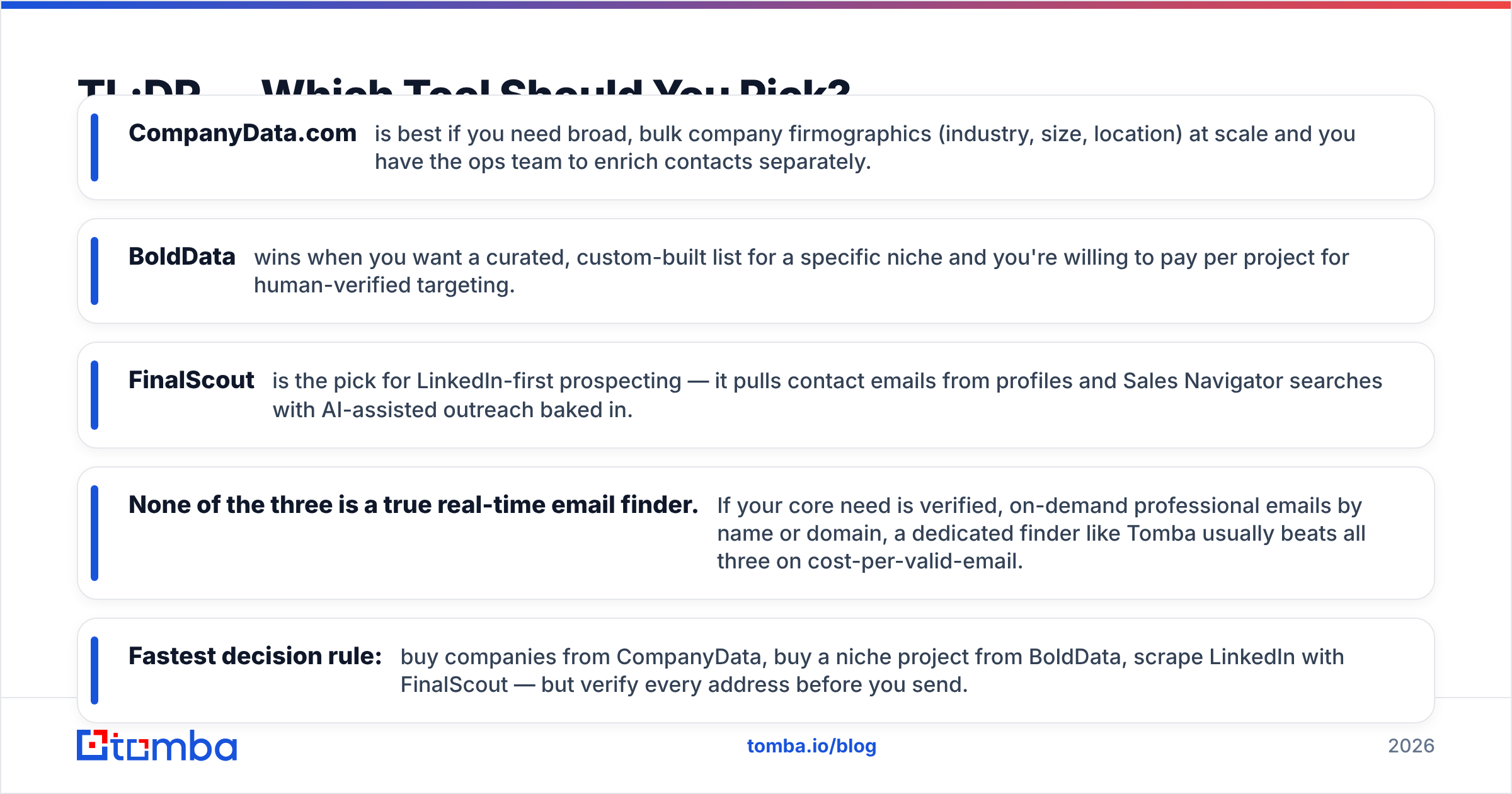
- CompanyData.com is best for broad, bulk company firmographics (industry, size, location). You get scale, but you need an ops team to add contacts.
- BoldData wins when you want a custom-built list for one niche. You pay per project for human-verified targeting.
- FinalScout is the pick for LinkedIn-first prospecting. It pulls emails from profiles and Sales Navigator, with AI outreach built in.
- None of the three is a true real-time email finder. If you need verified emails by name or domain, a dedicated finder like Tomba usually wins on cost per valid email.
- Fastest rule: buy companies from CompanyData, buy a niche project from BoldData, scrape LinkedIn with FinalScout — and verify every address before you send.
What Does Each Tool Actually Do?#
These three products get lumped together in "B2B data" searches. But they don't compete head-to-head as often as the SERP suggests.
CompanyData.com is a company database. Think firmographic records: legal name, registration data, industry codes, headcount, revenue bands, and location. You get them as downloadable files or via API. It is built for account selection and market sizing, not for handing you a buyer's inbox.
BoldData (bolddata.nl) is a Netherlands-based custom-list provider. You describe your target — say, "manufacturers in Germany with 50–200 staff." Their team then builds and delivers a tailored dataset, often with contact details. It works more like a data broker than a self-serve SaaS.
FinalScout (finalscout.com) is a LinkedIn email tool with an AI writer attached. You browse LinkedIn or Sales Navigator, and the extension finds business emails for the profiles you view. Then it helps you draft outreach.
So the real question isn't "which is best." It's "which problem are you solving": account targeting (CompanyData), a done-for-you niche list (BoldData), or LinkedIn contacts (FinalScout)?
How Do CompanyData.com, BoldData, and FinalScout Compare?#
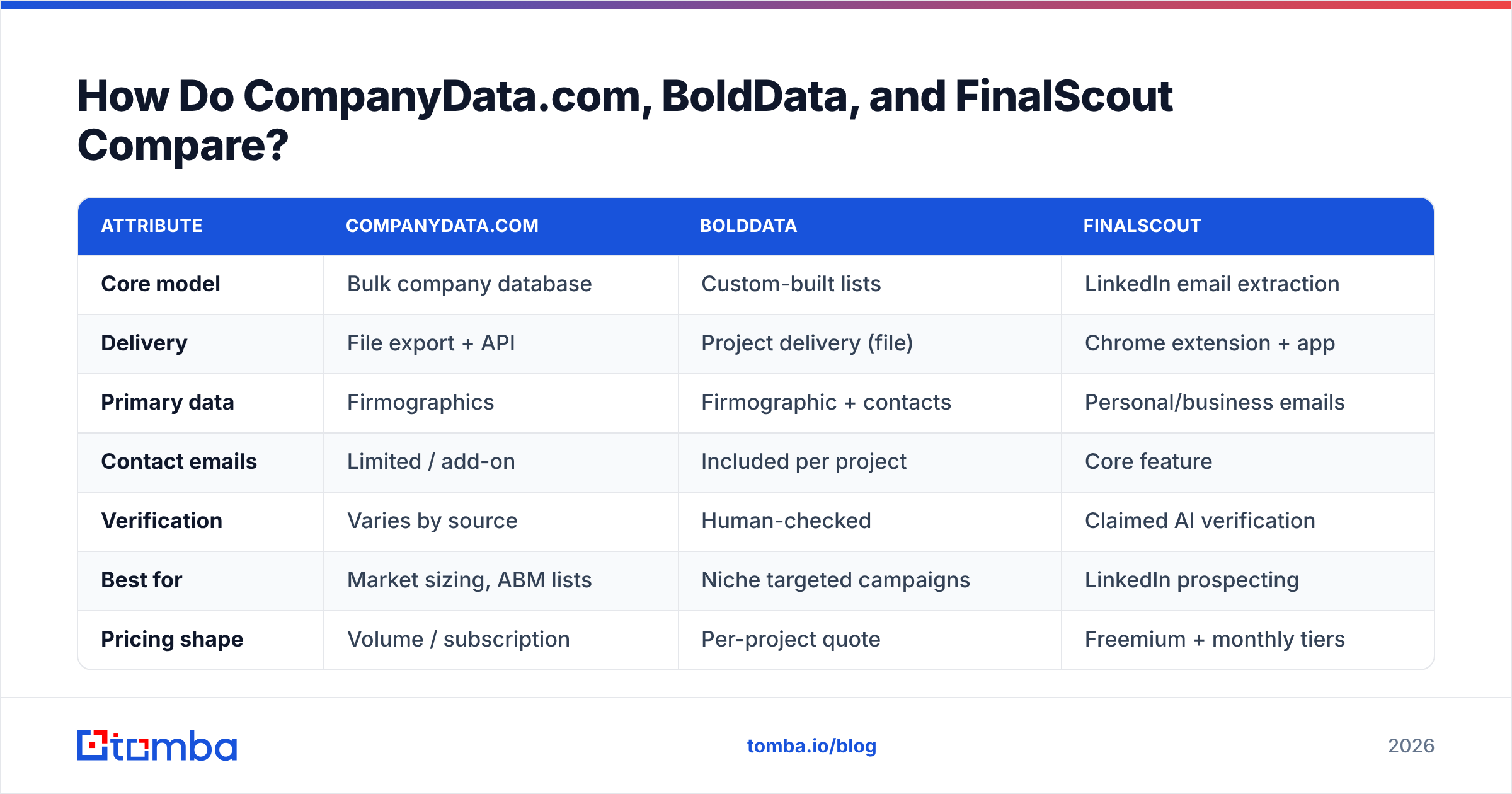
Here's the side-by-side on the things that actually change your decision.
| Attribute | CompanyData.com | BoldData | FinalScout |
|---|---|---|---|
| Core model | Bulk company database | Custom-built lists | LinkedIn email extraction |
| Delivery | File export + API | Project delivery (file) | Chrome extension + app |
| Primary data | Firmographics | Firmographic + contacts | Personal/business emails |
| Contact emails | Limited / add-on | Included per project | Core feature |
| Verification | Varies by source | Human-checked | Claimed AI verification |
| Best for | Market sizing, ABM lists | Niche targeted campaigns | LinkedIn prospecting |
| Pricing shape | Volume / subscription | Per-project quote | Freemium + monthly tiers |
| Free option | No true free tier | No (quote-based) | Free plan (limited credits) |
| Real-time lookup | No | No | Session-based |
The pattern is clear. CompanyData and BoldData are list businesses — you buy a batch and work it. FinalScout is a session tool — it finds contacts as you browse. That gap matters more than any single feature. It decides how fresh your data is when you hit send.
Which Has the Most Accurate Data?#
Accuracy claims get slippery here. So split two things: firmographic accuracy and email deliverability.
For firmographics (company name, size, industry), CompanyData.com and BoldData both use registry and business-directory sources. That data ages slowly. A company's headcount band doesn't change each week. Both are solid. BoldData's human curation shows its edge in tight niches, where automated databases mislabel industries.
For email accuracy, the story flips. Bulk files decay fast. B2B email lists lose about 22–30% of their accuracy per year as people change jobs. That's why any static list needs re-verification before use. FinalScout pulls emails at browse-time, so its data is fresher. But LinkedIn emails are often gmail or outlook addresses. Those hurt your deliverability and reply rates in a B2B sequence.

The honest takeaway: don't trust any of the three blind. Whatever you buy or scrape, run it through an email verifier before your first send. One bounce spike can tank your domain reputation for weeks — see how it ties to email deliverability for the mechanics. Verification is the cheapest insurance in outbound.
How Does the Pricing Compare?#
Pricing tracks the product model. This is where budgets blow up if you pick wrong.
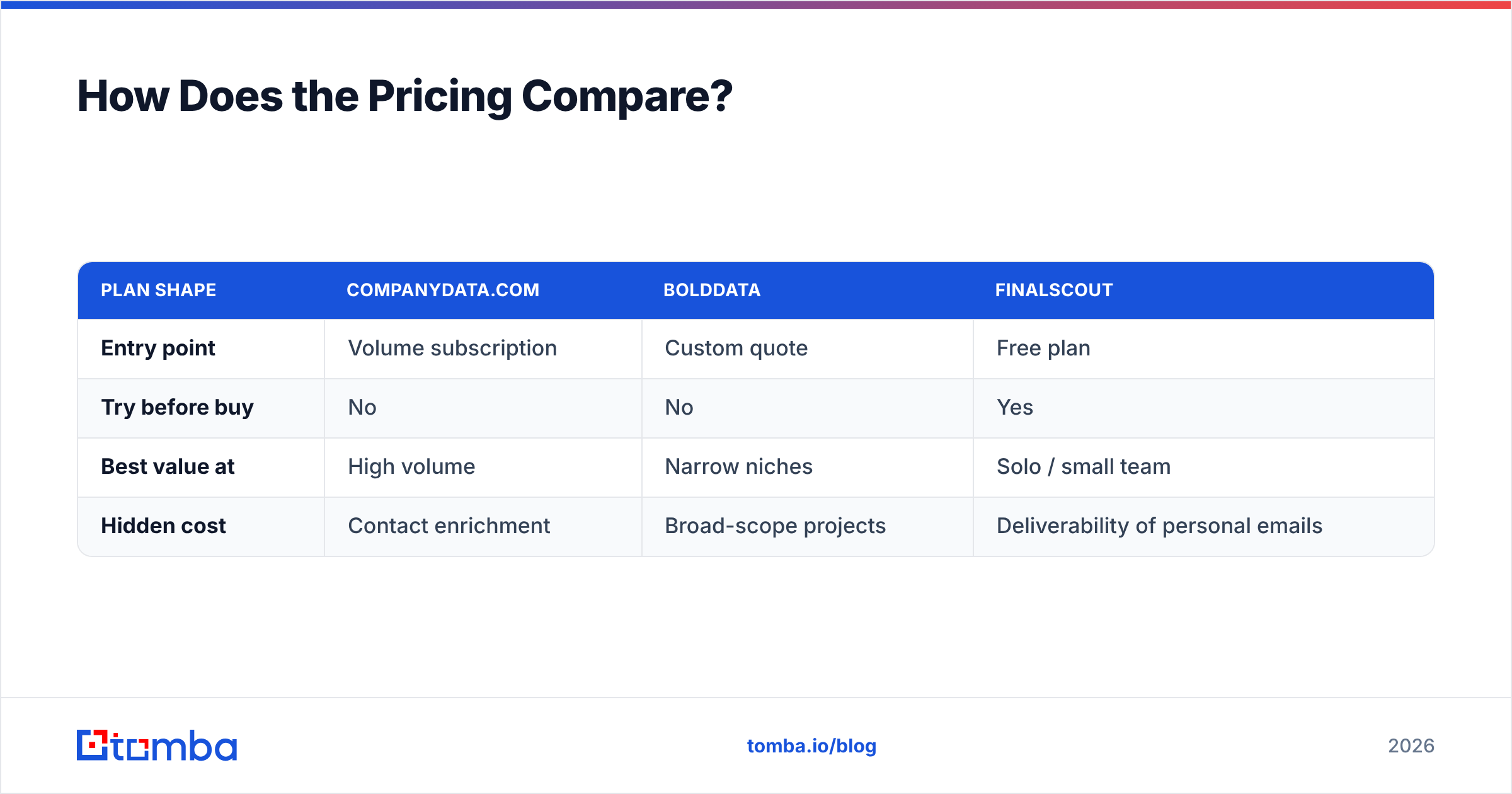
- CompanyData.com prices on volume and access tier. You pay for scale: large record counts and API throughput. Cost per record drops as you buy more. That rewards broad coverage but punishes small, targeted campaigns.
- BoldData is quote-based. Each project is scoped and priced on its own. A tight niche list can be great value. A broad ask gets expensive fast. There is no free tier — you talk to sales.
- FinalScout uses freemium SaaS pricing. You get a free plan with limited credits, then paid tiers that scale by credits and AI features. It's the easiest to start under $100/month. It's also the only one you can try without a sales call.
| Plan shape | CompanyData.com | BoldData | FinalScout |
|---|---|---|---|
| Entry point | Volume subscription | Custom quote | Free plan |
| Try before buy | No | No | Yes |
| Best value at | High volume | Narrow niches | Solo / small team |
| Hidden cost | Contact enrichment | Broad-scope projects | Deliverability of personal emails |
Comparing these on a spreadsheet? Add a fourth column for a pay-as-you-go finder. A dedicated tool's per-search cost, checked against Tomba pricing, often beats a bulk file you'll only half use. You pay only for the accounts you're working.
Where Does a Dedicated Email Finder Fit In?#
Here's what the three vendors won't put on their landing pages. For many outbound teams, the real job is simple: "I have a name and a company. I need a verified work email now." That's not a bulk-list job. It's not a LinkedIn-scrape job. It's an email-finder job.

This is where a purpose-built tool changes the workflow:
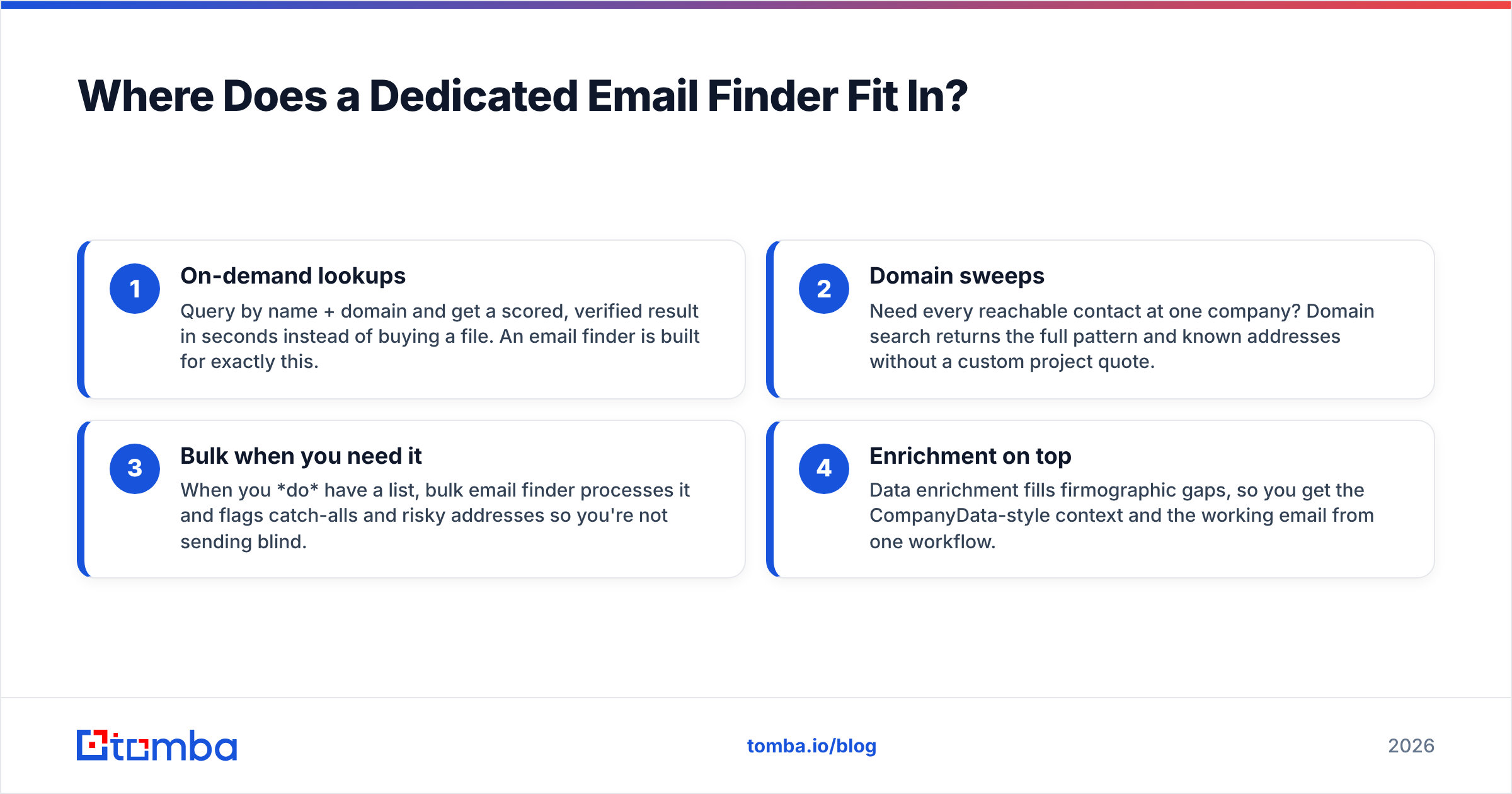
- On-demand lookups — Query by name and domain. Get a scored, verified result in seconds instead of buying a file. An email finder is built for this.
- Domain sweeps — Need every contact at one company? Domain search returns the full pattern and known addresses, with no custom quote.
- Bulk when you need it — When you do have a list, bulk email finder processes it. It flags catch-alls and risky addresses so you're not sending blind.
- Enrichment on top — Data enrichment fills firmographic gaps. You get CompanyData-style context and the working email in one workflow.
The point isn't that a finder replaces all three. It's that most teams reach for a bulk-list or scrape tool when they needed a verified lookup. So they overpay for freshness they then throw away.
When Should You Choose Each One?#
Match the tool to the motion, not the marketing.
Choose CompanyData.com when: you run account-based targeting or TAM sizing. You need thousands of records with consistent fields. And you have a RevOps team to enrich contacts and verify emails downstream. It's infrastructure, not a shortcut.
Choose BoldData when: your campaign is niche and geo-specific — one industry in one country. Volume is modest. You value human-curated targeting over self-serve speed. The per-project model shines when "close enough" databases keep mislabeling your segment.
Choose FinalScout when: LinkedIn is your main channel. You prospect person by person or off Sales Navigator. You want AI drafting in the same tool. Just budget time to filter out personal-domain emails before they hit a cold sequence.
Choose a dedicated finder when: your bottleneck is turning known names and domains into verified, sendable work emails. That's the most common outbound need. It's also the one all three tools above handle only partly. G2's lead intelligence category is a good neutral place to check any of these against peer reviews first.
What Are the Trade-offs Nobody Mentions?#
Three caveats worth knowing before you sign anything:
- Static lists decay silently. A file that's 95% accurate at purchase is much worse three months later. Neither CompanyData nor BoldData refunds decay. Build re-verification into your process.
- LinkedIn emails carry deliverability risk. Personal gmail or outlook addresses skew your B2B metrics and can read as spam. FinalScout's freshness is real. But "fresh" isn't the same as "safe to send from a corporate domain."
- Compliance is on you. GDPR and similar rules cover how you source and store this data. Custom-list and scraping models both put the burden of lawful basis on the buyer.
The Verdict: CompanyData.com, BoldData vs FinalScout#
There's no single winner, because they aren't really one product. For broad account data at scale, CompanyData.com is the strongest infrastructure play. For hand-built niche lists, BoldData's curation earns its quote. For LinkedIn-first prospecting with AI drafting, FinalScout is the most convenient.
But strip the CompanyData.com, BoldData vs FinalScout question down to the job most teams do every day — get me a verified work email for this person, right now, with no bulk file or sales call — and none of the three is built for it. That gap is why a dedicated finder belongs in almost every stack, next to whichever of these three you pick.
Get Verified Emails Without the Bulk-List Waste#
If your real bottleneck is turning names and domains into verified work emails, start with the Tomba Email Finder. You get on-demand lookups, domain search, bulk processing, and built-in verification. There's a free tier (25 searches/month) and a Starter plan at $49/month, so you can test the workflow before you commit budget to any bulk provider. Pair it with whichever list or LinkedIn tool fits your motion, verify everything before you send, and stop paying for freshness you throw away.
Related guides#
Ready to find emails that actually work?
Join 150,000+ professionals who stopped guessing and started sending. Free credits on signup — no credit card required.
Get the Tomba newsletter
Practical outbound tactics and product updates — once every two weeks.
About the author